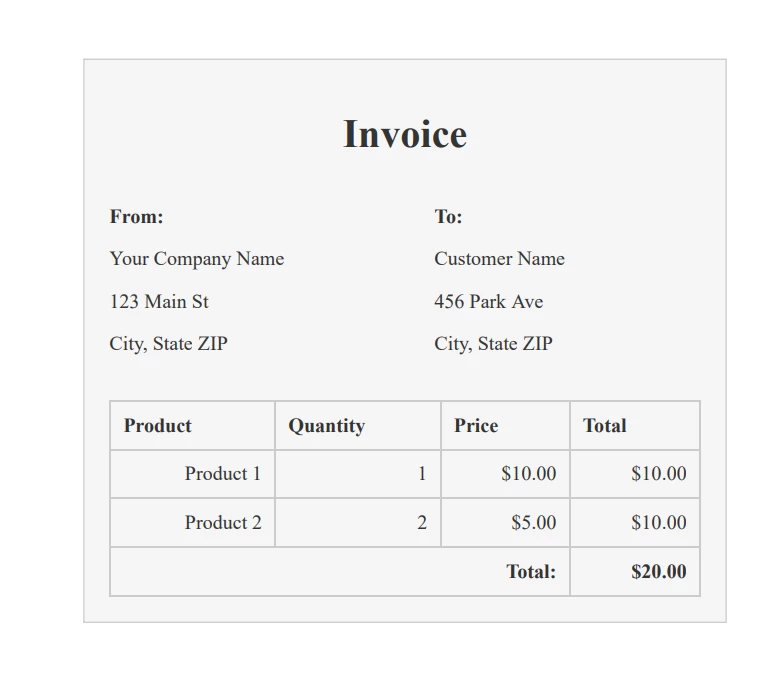
JAVA용 IRONPDF 사용 Java PDF 변환기(코드 예제 튜토리얼) 커티스 차우 업데이트됨:8월 31, 2025 다운로드 IronPDF 메이븐 다운로드 JAR 다운로드 무료 체험 시작하기 LLM용 사본 LLM용 사본 LLM용 마크다운 형식으로 페이지를 복사하세요 ChatGPT에서 열기 ChatGPT에 이 페이지에 대해 문의하세요 제미니에서 열기 제미니에게 이 페이지에 대해 문의하세요 Grok에서 열기 Grok에게 이 페이지에 대해 문의하세요 혼란 속에서 열기 Perplexity에게 이 페이지에 대해 문의하세요 공유하다 페이스북에 공유하기 트위터에 공유하기 LinkedIn에 공유하기 URL 복사 이메일로 기사 보내기 This article will discuss PDF conversion and how to convert files to PDF using Java and will also introduce IronPDF, a Java PDF Library. IronPDF: Java PDF Library IronPDF is a Java PDF library by Iron Software that enables developers to create, edit, and manipulate PDF documents easily. It provides an easy-to-use API for converting HTML content into PDF documents, CSS, and JavaScript, as well as a wide range of tools for customizing and modifying existing PDF files. IronPDF offers excellent support for modern web technologies like CSS3 and JavaScript, making it possible to create PDF documents and pages that include advanced features such as interactive forms with IronPDF examples and extracting embedded media. Developers can use IronPDF's simple API to generate PDFs from scratch or convert existing HTML documents to PDFs. The library also offers a range of customization options, allowing developers to add custom headers and footers to PDFs, watermarks for security purposes, images, and other features to their PDF documents. The library is designed to be fast and efficient, which means it can handle large PDF files and complex documents with ease. IronPDF also supports multi-threading, allowing developers to generate PDF documents in parallel and improve overall performance. Getting Started with IronPDF Installing IronPDF Java Library in Your Maven Project is a straightforward process. Follow the steps below to install the library using the provided dependency: Open your Maven project in an IDE such as Eclipse, IntelliJ IDEA, or NetBeans. Open the pom.xml file for your project. Scroll down to the dependencies section and add the following code: <dependency> <groupId>com.ironsoftware</groupId> <artifactId>ironpdf</artifactId> <version>YOUR_VERSION</version> </dependency> <dependency> <groupId>org.slf4j</groupId> <artifactId>slf4j-simple</artifactId> <version>1.7.30</version> </dependency> <dependency> <groupId>com.ironsoftware</groupId> <artifactId>ironpdf</artifactId> <version>YOUR_VERSION</version> </dependency> <dependency> <groupId>org.slf4j</groupId> <artifactId>slf4j-simple</artifactId> <version>1.7.30</version> </dependency> XML This code adds the IronPDF Java library and the slf4j-simple logging library as dependencies for your project. Save the pom.xml file. Build your project to download and install the IronPDF Java library and its dependencies. You can now use the IronPDF Java library in your project. To do so, add the following import statement to your Java class: import com.ironsoftware.ironpdf.*; import com.ironsoftware.ironpdf.*; JAVA You can now use the IronPDF for Java API to create, edit, and manipulate PDF documents. You have successfully installed the IronPDF Java library in your Maven project using the provided dependency. You can now use the library to convert HTML documents to PDF, create PDF documents from scratch, and modify existing PDF documents. Convert HTML to PDF file To convert HTML content to a PDF file using IronPDF for Java, you can use the following Java code: import com.ironsoftware.ironpdf.*; import java.io.IOException; import java.nio.file.Paths; public class HtmlToPdfConverter { public static void main(String[] args) { // Apply your license key License.setLicenseKey("YOUR-LICENSE-KEY"); // Set a log path Settings.setLogPath(Paths.get("C:/tmp/IronPdfEngine.log")); // Render the HTML as a PDF PdfDocument myPdf = PdfDocument.renderHtmlAsPdf("<h1>Hello World</h1> Made with IronPDF!"); // Save the PdfDocument to a file myPdf.saveAs(Paths.get("html_saved.pdf")); } } import com.ironsoftware.ironpdf.*; import java.io.IOException; import java.nio.file.Paths; public class HtmlToPdfConverter { public static void main(String[] args) { // Apply your license key License.setLicenseKey("YOUR-LICENSE-KEY"); // Set a log path Settings.setLogPath(Paths.get("C:/tmp/IronPdfEngine.log")); // Render the HTML as a PDF PdfDocument myPdf = PdfDocument.renderHtmlAsPdf("<h1>Hello World</h1> Made with IronPDF!"); // Save the PdfDocument to a file myPdf.saveAs(Paths.get("html_saved.pdf")); } } JAVA The above program sets the license key using the License.setLicenseKey method. It then sets the log path using the Settings.setLogPath method to specify the output folder where the log file should be saved. Next, it uses the PdfDocument.renderHtmlAsPdf method to render the HTML as a PDF document. The HTML content is passed as a string argument to this method. In this example, the HTML content is a simple "Hello World" message. After the PDF document is created, the program saves it to a file using the saveAs method, specifying the file path as an argument. In this example, the file is saved as "html_saved.pdf" in the current directory. Convert HTML Files to PDF File Format Using the HTML file to generate PDF files is a complex task. But IronPDF makes it very easy and with the help of IronPDF, we can do this task with a few lines of code. import com.ironsoftware.ironpdf.*; import java.io.IOException; import java.nio.file.Paths; public class HtmlFileToPdfConverter { public static void main(String[] args) { // Apply your license key License.setLicenseKey("YOUR-LICENSE-KEY"); // Set a log path Settings.setLogPath(Paths.get("C:/tmp/IronPdfEngine.log")); // Render the HTML file as a PDF PdfDocument myPdf = PdfDocument.renderHtmlFileAsPdf("invoice.html"); // Save the PdfDocument to a file myPdf.saveAs(Paths.get("html_file_saved.pdf")); } } import com.ironsoftware.ironpdf.*; import java.io.IOException; import java.nio.file.Paths; public class HtmlFileToPdfConverter { public static void main(String[] args) { // Apply your license key License.setLicenseKey("YOUR-LICENSE-KEY"); // Set a log path Settings.setLogPath(Paths.get("C:/tmp/IronPdfEngine.log")); // Render the HTML file as a PDF PdfDocument myPdf = PdfDocument.renderHtmlFileAsPdf("invoice.html"); // Save the PdfDocument to a file myPdf.saveAs(Paths.get("html_file_saved.pdf")); } } JAVA First, the IronPDF library is imported along with the required Java IO classes. A license key is set to enable the use of the IronPDF library. The log path is set to the specified directory for logging purposes. Next, the HTML file is rendered as a PDF document using the IronPDF renderHtmlFileAsPdf method. The resulting PDF document is stored in a variable named myPdf. Finally, the PDF document is saved to a file using the saveAs method, with the output file path specified. Output of PDF File Convert URL to PDF File The provided code can be used to convert any URL to a PDF document swiftly and save it to a file using the IronPDF library. import com.ironsoftware.ironpdf.*; import java.io.IOException; import java.nio.file.Paths; public class UrlToPdfConverter { public static void main(String[] args) { // Apply your license key License.setLicenseKey("YOUR-LICENSE-KEY"); // Set a log path Settings.setLogPath(Paths.get("C:/tmp/IronPdfEngine.log")); // Render the URL as a PDF PdfDocument myPdf = PdfDocument.renderUrlAsPdf("https://ironpdf.com"); // Save the PdfDocument to a file myPdf.saveAs(Paths.get("url.pdf")); } } import com.ironsoftware.ironpdf.*; import java.io.IOException; import java.nio.file.Paths; public class UrlToPdfConverter { public static void main(String[] args) { // Apply your license key License.setLicenseKey("YOUR-LICENSE-KEY"); // Set a log path Settings.setLogPath(Paths.get("C:/tmp/IronPdfEngine.log")); // Render the URL as a PDF PdfDocument myPdf = PdfDocument.renderUrlAsPdf("https://ironpdf.com"); // Save the PdfDocument to a file myPdf.saveAs(Paths.get("url.pdf")); } } JAVA Here are the steps involved in converting a URL to PDF: Import the necessary classes from the IronPDF library and from the standard Java libraries. Set your IronPDF license key using the License.setLicenseKey method. You can obtain a license key from the IronPDF website. Set the path for the IronPDF log file using the Settings.setLogPath method. This step is optional but recommended for debugging purposes. Use the PdfDocument.renderUrlAsPdf method to render the URL as a PDF. This method returns a PdfDocument object that represents the generated PDF. Use the PdfDocument.saveAs method to save the PDF to a file. This method takes a Path object representing the file path where the PDF should be saved. Output of PDF File Summary The article highlights the significance of using PDF format in today's digital age and introduces IronPDF as a Java PDF library that helps developers with creating, editing, and manipulating PDF documents. IronPDF is compatible with contemporary web technologies, such as CSS3 and JavaScript, and features a straightforward API that enables developers to generate PDF files from scratch or convert existing HTML documents to PDFs. Moreover, the article provides practical examples to demonstrate how IronPDF can be used to convert HTML files, HTML content, and URLs into PDF documents. The pricing model for IronPDF's licensing options starts at $799 and includes a free trial opportunity for developers to test the product before purchase. 자주 묻는 질문 Java를 사용하여 HTML 콘텐츠를 PDF로 변환하려면 어떻게 해야 하나요? IronPDF의 PdfDocument.renderHtmlAsPdf 메서드를 사용하여 HTML 콘텐츠를 PDF로 직접 변환할 수 있습니다. 이 메서드는 HTML 콘텐츠를 문자열로 받아들이고 PDF 문서를 원활하게 생성합니다. Java에서 HTML 파일을 PDF로 변환하는 과정은 어떻게 되나요? IronPDF를 사용하면 renderHtmlFileAsPdf 메서드를 사용하여 HTML 파일을 PDF로 변환할 수 있습니다. 이 메서드는 HTML 파일의 경로가 필요하며 PDF 문서를 출력합니다. Java에서 URL을 PDF로 변환하려면 어떻게 해야 하나요? IronPDF를 사용하면 PdfDocument.renderUrlAsPdf 메서드를 사용하여 URL을 PDF로 변환할 수 있습니다. 이 메서드는 URL을 문자열로 받아 웹페이지에서 PDF 문서를 생성합니다. Maven 프로젝트에서 PDF 라이브러리를 통합하기 위한 설치 단계는 무엇인가요? IronPDF를 Maven 프로젝트에 통합하려면 IronPDF 종속성과 slf4j-simple 로깅 라이브러리를 pom.xml 파일에 추가한 다음 프로젝트를 빌드하여 라이브러리를 다운로드 및 설치해야 합니다. IronPDF는 고급 웹 기술을 지원하나요? 예, IronPDF는 CSS3 및 JavaScript와 같은 고급 웹 기술을 지원하므로 복잡한 레이아웃과 대화형 요소가 포함된 PDF를 만들 수 있습니다. Java에서 PDF 문서를 사용자 정의하기 위해 IronPDF는 어떤 기능을 제공하나요? IronPDF는 PDF 문서에 사용자 정의 머리글, 바닥글, 워터마크 및 이미지를 추가하는 기능을 포함하여 다양한 사용자 정의 옵션을 제공합니다. 개발자는 Java를 사용하여 대용량 PDF 파일을 어떻게 처리할 수 있나요? IronPDF는 성능에 최적화되어 있으며 대용량 PDF 파일을 효율적으로 관리할 수 있습니다. 멀티 스레딩을 지원하므로 개발자가 복잡한 문서를 신속하게 처리할 수 있습니다. 개발자가 구매하기 전에 Java PDF 라이브러리를 사용해 볼 수 있나요? 예, IronPDF는 개발자가 구매하기 전에 기능과 성능을 평가할 수 있는 무료 평가판을 제공합니다. Java를 사용하여 URL을 PDF로 변환하려면 어떤 단계가 필요하나요? IronPDF로 URL을 PDF로 변환하려면 관련 클래스를 가져오고, 라이선스 키를 설정하고, 로그 경로를 정의하고, renderUrlAsPdf 메서드를 사용하여 URL을 처리한 다음 saveAs로 파일을 저장하세요. IronPDF는 Java에서 처음부터 PDF를 만드는 데 적합합니까? 예, IronPDF는 다양한 요소 추가와 사용자 정의 옵션을 지원하는 사용자 친화적인 API를 제공하여 처음부터 PDF를 쉽게 만들 수 있도록 설계되었습니다. 커티스 차우 지금 바로 엔지니어링 팀과 채팅하세요 기술 문서 작성자 커티스 차우는 칼턴 대학교에서 컴퓨터 과학 학사 학위를 취득했으며, Node.js, TypeScript, JavaScript, React를 전문으로 하는 프론트엔드 개발자입니다. 직관적이고 미적으로 뛰어난 사용자 인터페이스를 만드는 데 열정을 가진 그는 최신 프레임워크를 활용하고, 잘 구성되고 시각적으로 매력적인 매뉴얼을 제작하는 것을 즐깁니다. 커티스는 개발 분야 외에도 사물 인터넷(IoT)에 깊은 관심을 가지고 있으며, 하드웨어와 소프트웨어를 통합하는 혁신적인 방법을 연구합니다. 여가 시간에는 게임을 즐기거나 디스코드 봇을 만들면서 기술에 대한 애정과 창의성을 결합합니다. 관련 기사 업데이트됨 6월 22, 2025 Java에서 TIFF를 PDF로 변환하는 방법 이 포괄적인 가이드는 IronPDF를 사용하여 Java에서 TIFF 이미지를 PDF로 원활하게 변환하는 방법에 대한 단계를 안내합니다. 더 읽어보기 업데이트됨 7월 28, 2025 Java에서 PDF를 PDFA로 변환하는 방법 이 문서에서는 IronPDF를 사용하여 Java에서 PDF 파일을 PDF/A 형식으로 변환하는 방법을 살펴봅니다. 더 읽어보기 업데이트됨 7월 28, 2025 Java로 PDF 문서를 만드는 방법 이 문서에서는 주요 개념, 최고의 라이브러리 및 예제를 다루는 Java에서 PDF 작업에 대한 포괄적인 가이드를 제공합니다. 더 읽어보기 Java 애플리케이션에서 PDF 파일을 동적으로 생성하는 방법Java로 PDF에 디지털 서명을 ...

업데이트됨 6월 22, 2025 Java에서 TIFF를 PDF로 변환하는 방법 이 포괄적인 가이드는 IronPDF를 사용하여 Java에서 TIFF 이미지를 PDF로 원활하게 변환하는 방법에 대한 단계를 안내합니다. 더 읽어보기
업데이트됨 7월 28, 2025 Java에서 PDF를 PDFA로 변환하는 방법 이 문서에서는 IronPDF를 사용하여 Java에서 PDF 파일을 PDF/A 형식으로 변환하는 방법을 살펴봅니다. 더 읽어보기
업데이트됨 7월 28, 2025 Java로 PDF 문서를 만드는 방법 이 문서에서는 주요 개념, 최고의 라이브러리 및 예제를 다루는 Java에서 PDF 작업에 대한 포괄적인 가이드를 제공합니다. 더 읽어보기