


C# 运算符(开发人员如何使用)

在 C# 中,运算符在对变量和值执行各种操作中起着至关重要的作用。 无论您是初学者还是有经验的开发人员,深入了解C# 运算符对于编写高效且富有表现力的代码都是至关重要的。 在这本全面指南中,我们将探讨 C# 中不同类型的运算符以及它们如何在您的程序中使用。 我们还将看到如何将这些 C# 运算符与IronPDF一起使用。
1. Types of Operators in C#
1.1. 算术运算符
C# 算术运算符用于基本数学运算。 这些运算包括加法(+)、减法(-)、乘法(*)、除法(/)和取模(%)。 对于算术运算符,运算符优先级类似于众所周知的 BEDMAS 或 PEDMAS 数学运算符优先级。
让我们深入了解一个示例以理解这些运算符如何工作:
// Arithmetic Operators
int a = 10;
int b = 3;
int sum = a + b; // Adds the values of a and b
int difference = a - b; // Subtracts b from a
int product = a * b; // Multiplies a by b
int quotient = a / b; // Divides a by b (integer division)
int remainder = a % b; // Modulus operation; gives the remainder of a divided by b

Console.WriteLine("Arithmetic Operators:");
Console.WriteLine($"Sum: {sum}, Difference: {difference}, Product: {product}, Quotient: {quotient}, Remainder: {remainder}");
Console.WriteLine();
// Arithmetic Operators
int a = 10;
int b = 3;
int sum = a + b; // Adds the values of a and b
int difference = a - b; // Subtracts b from a
int product = a * b; // Multiplies a by b
int quotient = a / b; // Divides a by b (integer division)
int remainder = a % b; // Modulus operation; gives the remainder of a divided by b
Console.WriteLine("Arithmetic Operators:");
Console.WriteLine($"Sum: {sum}, Difference: {difference}, Product: {product}, Quotient: {quotient}, Remainder: {remainder}");
Console.WriteLine();' Arithmetic Operators
Dim a As Integer = 10
Dim b As Integer = 3
Dim sum As Integer = a + b ' Adds the values of a and b
Dim difference As Integer = a - b ' Subtracts b from a
Dim product As Integer = a * b ' Multiplies a by b
Dim quotient As Integer = a \ b ' Divides a by b (integer division)
Dim remainder As Integer = a Mod b ' Modulus operation; gives the remainder of a divided by b
Console.WriteLine("Arithmetic Operators:")
Console.WriteLine($"Sum: {sum}, Difference: {difference}, Product: {product}, Quotient: {quotient}, Remainder: {remainder}")
Console.WriteLine()1.2. 关系运算符
关系运算符用于比较值并确定它们之间的关系。 C# 中常用的关系运算符包括大于 (>)、小于 (<)、等于 (==)、不等于 (!=)、大于或等于 (>=) 和小于或等于 (<=)。
// Relational Operators
bool isEqual = (a == b); // Checks if a is equal to b
bool notEqual = (a != b); // Checks if a is not equal to b
bool greaterThan = (a > b); // Checks if a is greater than b
bool lessThan = (a < b); // Checks if a is less than b
bool greaterOrEqual = (a >= b); // Checks if a is greater than or equal to b
bool lessOrEqual = (a <= b); // Checks if a is less than or equal to b

Console.WriteLine("Relational Operators:");
Console.WriteLine($"Equal: {isEqual}, Not Equal: {notEqual}, Greater Than: {greaterThan}, Less Than: {lessThan}, Greater or Equal: {greaterOrEqual}, Less or Equal: {lessOrEqual}");
Console.WriteLine();
// Relational Operators
bool isEqual = (a == b); // Checks if a is equal to b
bool notEqual = (a != b); // Checks if a is not equal to b
bool greaterThan = (a > b); // Checks if a is greater than b
bool lessThan = (a < b); // Checks if a is less than b
bool greaterOrEqual = (a >= b); // Checks if a is greater than or equal to b
bool lessOrEqual = (a <= b); // Checks if a is less than or equal to b
Console.WriteLine("Relational Operators:");
Console.WriteLine($"Equal: {isEqual}, Not Equal: {notEqual}, Greater Than: {greaterThan}, Less Than: {lessThan}, Greater or Equal: {greaterOrEqual}, Less or Equal: {lessOrEqual}");
Console.WriteLine();' Relational Operators
Dim isEqual As Boolean = (a = b) ' Checks if a is equal to b
Dim notEqual As Boolean = (a <> b) ' Checks if a is not equal to b
Dim greaterThan As Boolean = (a > b) ' Checks if a is greater than b
Dim lessThan As Boolean = (a < b) ' Checks if a is less than b
Dim greaterOrEqual As Boolean = (a >= b) ' Checks if a is greater than or equal to b
Dim lessOrEqual As Boolean = (a <= b) ' Checks if a is less than or equal to b
Console.WriteLine("Relational Operators:")
Console.WriteLine($"Equal: {isEqual}, Not Equal: {notEqual}, Greater Than: {greaterThan}, Less Than: {lessThan}, Greater or Equal: {greaterOrEqual}, Less or Equal: {lessOrEqual}")
Console.WriteLine()1.3. 逻辑运算符
逻辑运算符用于对布尔值执行逻辑运算。 C# 中常见的逻辑运算有 AND (&&)、OR (||) 和 NOT (!)。
// Logical Operators
bool condition1 = true;
bool condition2 = false;
bool resultAnd = condition1 && condition2; // true if both conditions are true
bool resultOr = condition1 || condition2; // true if either condition is true
bool resultNot = !condition1; // inverts the Boolean value of condition1

Console.WriteLine("Logical Operators:");
Console.WriteLine($"AND: {resultAnd}, OR: {resultOr}, NOT: {resultNot}");
Console.WriteLine();
// Logical Operators
bool condition1 = true;
bool condition2 = false;
bool resultAnd = condition1 && condition2; // true if both conditions are true
bool resultOr = condition1 || condition2; // true if either condition is true
bool resultNot = !condition1; // inverts the Boolean value of condition1
Console.WriteLine("Logical Operators:");
Console.WriteLine($"AND: {resultAnd}, OR: {resultOr}, NOT: {resultNot}");
Console.WriteLine();' Logical Operators
Dim condition1 As Boolean = True
Dim condition2 As Boolean = False
Dim resultAnd As Boolean = condition1 AndAlso condition2 ' true if both conditions are true
Dim resultOr As Boolean = condition1 OrElse condition2 ' true if either condition is true
Dim resultNot As Boolean = Not condition1 ' inverts the Boolean value of condition1
Console.WriteLine("Logical Operators:")
Console.WriteLine($"AND: {resultAnd}, OR: {resultOr}, NOT: {resultNot}")
Console.WriteLine()1.4. 赋值运算符
赋值运算符用于将值分配给变量。 简单赋值运算符是 =。 但是,C# 还提供了复合赋值运算符,例如 +=、-=、*=、/= 和 %=。
// Assignment Operators
int x = 5; // Assigns 5 to x
int y = 2; // Assigns 2 to y
x += y; // Increases x by the value of y
y *= 3; // Multiplies y by 3

Console.WriteLine("Assignment Operators:");
Console.WriteLine($"x after +=: {x}, y after *=: {y}");
Console.WriteLine();
// Assignment Operators
int x = 5; // Assigns 5 to x
int y = 2; // Assigns 2 to y
x += y; // Increases x by the value of y
y *= 3; // Multiplies y by 3
Console.WriteLine("Assignment Operators:");
Console.WriteLine($"x after +=: {x}, y after *=: {y}");
Console.WriteLine();' Assignment Operators
Dim x As Integer = 5 ' Assigns 5 to x
Dim y As Integer = 2 ' Assigns 2 to y
x += y ' Increases x by the value of y
y *= 3 ' Multiplies y by 3
Console.WriteLine("Assignment Operators:")
Console.WriteLine($"x after +=: {x}, y after *=: {y}")
Console.WriteLine()1.5. 位运算符
位运算符在位级别执行操作。 常用的位运算符包括按位与 (&)、按位或 (|)、按位异或 (^)、按位取反 (~)、左移 (<<) 和右移 (>>)。
// Bitwise Operators
int p = 5; // Binary: 0101
int q = 3; // Binary: 0011
int bitwiseAnd = p & q; // Binary AND operation
int bitwiseOr = p | q; // Binary OR operation
int bitwiseXor = p ^ q; // Binary XOR operation
int bitwiseNotP = ~p; // Binary NOT operation (complement)
int leftShift = p << 1; // Shift bits of p left by 1
int rightShift = p >> 1; // Shift bits of p right by 1

Console.WriteLine("Bitwise Operators:");
Console.WriteLine($"AND: {bitwiseAnd}, OR: {bitwiseOr}, XOR: {bitwiseXor}, NOT: {bitwiseNotP}, Left Shift: {leftShift}, Right Shift: {rightShift}");
Console.WriteLine();
// Bitwise Operators
int p = 5; // Binary: 0101
int q = 3; // Binary: 0011
int bitwiseAnd = p & q; // Binary AND operation
int bitwiseOr = p | q; // Binary OR operation
int bitwiseXor = p ^ q; // Binary XOR operation
int bitwiseNotP = ~p; // Binary NOT operation (complement)
int leftShift = p << 1; // Shift bits of p left by 1
int rightShift = p >> 1; // Shift bits of p right by 1
Console.WriteLine("Bitwise Operators:");
Console.WriteLine($"AND: {bitwiseAnd}, OR: {bitwiseOr}, XOR: {bitwiseXor}, NOT: {bitwiseNotP}, Left Shift: {leftShift}, Right Shift: {rightShift}");
Console.WriteLine();' Bitwise Operators
Dim p As Integer = 5 ' Binary: 0101
Dim q As Integer = 3 ' Binary: 0011
Dim bitwiseAnd As Integer = p And q ' Binary AND operation
Dim bitwiseOr As Integer = p Or q ' Binary OR operation
Dim bitwiseXor As Integer = p Xor q ' Binary XOR operation
Dim bitwiseNotP As Integer = Not p ' Binary NOT operation (complement)
Dim leftShift As Integer = p << 1 ' Shift bits of p left by 1
Dim rightShift As Integer = p >> 1 ' Shift bits of p right by 1
Console.WriteLine("Bitwise Operators:")
Console.WriteLine($"AND: {bitwiseAnd}, OR: {bitwiseOr}, XOR: {bitwiseXor}, NOT: {bitwiseNotP}, Left Shift: {leftShift}, Right Shift: {rightShift}")
Console.WriteLine()1.6. 条件运算符(三元运算符)
条件运算符 (?:) 是在一行中表达 if-else 语句的简写方式。
// Conditional (Ternary) Operator
int age = 20;
string result = (age >= 18) ? "Adult" : "Minor"; // Checks if age is 18 or more

Console.WriteLine("Conditional Operator:");
Console.WriteLine($"Result: {result}");
Console.WriteLine();
// Conditional (Ternary) Operator
int age = 20;
string result = (age >= 18) ? "Adult" : "Minor"; // Checks if age is 18 or more
Console.WriteLine("Conditional Operator:");
Console.WriteLine($"Result: {result}");
Console.WriteLine();' Conditional (Ternary) Operator
Dim age As Integer = 20
Dim result As String = If(age >= 18, "Adult", "Minor") ' Checks if age is 18 or more
Console.WriteLine("Conditional Operator:")
Console.WriteLine($"Result: {result}")
Console.WriteLine()在这个例子中,如果 age 大于或等于 18,则 result 的值将为"成人",否则为"未成年人"。
1.7. 空值合并运算符
空值合并运算符(??)用于为可空类型提供默认值。
// Null-Coalescing Operator
int? nullableValue = null;
int resultCoalesce = nullableValue ?? 10; // Uses value 10 if nullableValue is null

Console.WriteLine("Null-Coalescing Operator:");
Console.WriteLine($"Result: {resultCoalesce}");
// Null-Coalescing Operator
int? nullableValue = null;
int resultCoalesce = nullableValue ?? 10; // Uses value 10 if nullableValue is null
Console.WriteLine("Null-Coalescing Operator:");
Console.WriteLine($"Result: {resultCoalesce}");' Null-Coalescing Operator
Dim nullableValue? As Integer = Nothing
Dim resultCoalesce As Integer = If(nullableValue, 10) ' Uses value 10 if nullableValue is null
Console.WriteLine("Null-Coalescing Operator:")
Console.WriteLine($"Result: {resultCoalesce}")2. 介绍 IronPDF
IronPDF for C# 是一个多功能库,使开发人员能够将 PDF 相关功能无缝集成到他们的 .NET 应用程序中。 IronPDF 简化了复杂的任务,使其成为使用 C# 和 .NET 技术的开发人员的宝贵资源。 请始终参考官方文档以获取准确的使用说明和更新。
2.1. 开始使用 IronPDF
要在 C# 项目中开始使用 IronPDF,您首先需要安装 IronPDF NuGet 包。 或者,您可以使用 NuGet 包管理器搜索 "IronPDF" 并从那里安装该包。
Install-Package IronPdf
安装包后,您可以开始无缝使用 IronPDF 来处理 PDF 文件。
2.2. 代码示例:在 IronPDF 中使用 C# 操作符
using IronPdf;
using System;
class Program
{
    static void Main()
    {
        // Create an instance of ChromePdfRenderer
        var renderer = new ChromePdfRenderer();

        // Add HTML content with mathematical operations
        string content = $@"<!DOCTYPE html>
                            <html>
                            <body>
                                <h1>Mathematical Operations in IronPDF</h1>
                                <p>Sum: 5 + 7 = {5 + 7}</p>
                                <p>Product: 3 * 4 = {3 * 4}</p>
                                <p>Division: 10 / 2 = {10 / 2}</p>
                                <p>Modulus: 15 % 4 = {15 % 4}</p>
                            </body>
                            </html>";

        // Render HTML content to PDF
        var pdf = renderer.RenderHtmlAsPdf(content);

        // Save the PDF to a file
        pdf.SaveAs("MathOperations.pdf");
        Console.WriteLine("PDF with mathematical operations created successfully!");
    }
}
using IronPdf;
using System;
class Program
{
static void Main()
{
// Create an instance of ChromePdfRenderer
var renderer = new ChromePdfRenderer();
// Add HTML content with mathematical operations
string content = $@"<!DOCTYPE html>
<html>
<body>
<h1>Mathematical Operations in IronPDF</h1>
<p>Sum: 5 + 7 = {5 + 7}</p>
<p>Product: 3 * 4 = {3 * 4}</p>
<p>Division: 10 / 2 = {10 / 2}</p>
<p>Modulus: 15 % 4 = {15 % 4}</p>
</body>
</html>";
// Render HTML content to PDF
var pdf = renderer.RenderHtmlAsPdf(content);
// Save the PDF to a file
pdf.SaveAs("MathOperations.pdf");
Console.WriteLine("PDF with mathematical operations created successfully!");
}
}Imports IronPdf
Imports System
Friend Class Program
Shared Sub Main()
' Create an instance of ChromePdfRenderer
Dim renderer = New ChromePdfRenderer()
' Add HTML content with mathematical operations
Dim content As String = $"<!DOCTYPE html>
<html>
<body>
<h1>Mathematical Operations in IronPDF</h1>
<p>Sum: 5 + 7 = {5 + 7}</p>
<p>Product: 3 * 4 = {3 * 4}</p>
<p>Division: 10 / 2 = {10 \ 2}</p>
<p>Modulus: 15 % 4 = {15 Mod 4}</p>
</body>
</html>"
' Render HTML content to PDF
Dim pdf = renderer.RenderHtmlAsPdf(content)
' Save the PDF to a file
pdf.SaveAs("MathOperations.pdf")
Console.WriteLine("PDF with mathematical operations created successfully!")
End Sub
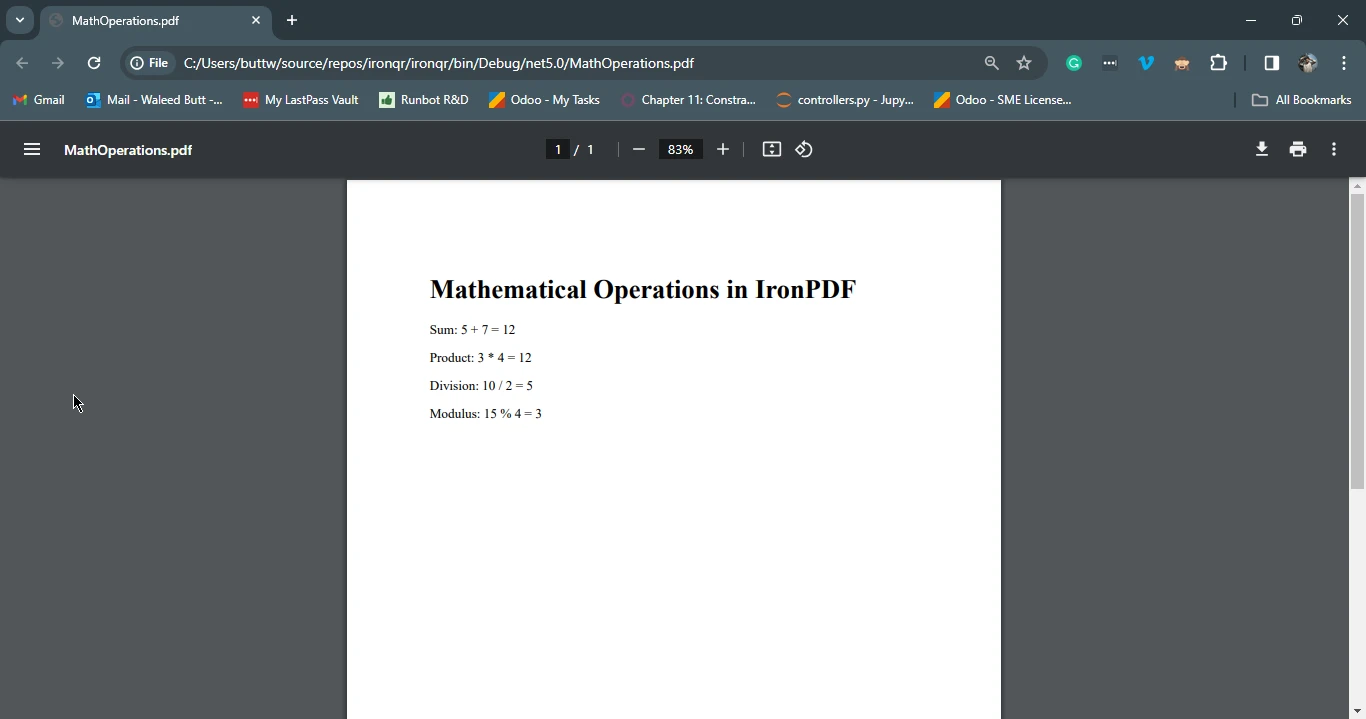
End Class这段 C# 代码利用 IronPDF 库创建一个 PDF 文档,其中包含我们展示的多个操作符。 它使用 ChromePdfRenderer 类来渲染 HTML 内容,其中包括使用 C# 运算符计算的数学表达式。
HTML 内容包含显示和求和、乘积、除法和模的标题和段落,通过字符串格式化进行插值。 渲染后的 HTML 接着使用 IronPDF 转换为 PDF,生成的 PDF 被保存为 "MathOperations.pdf"。
3. 结论
掌握 C# 操作符对开发者来说至关重要,使得通过算术、关系、逻辑、赋值、位运算、条件和空合并操作提高编码效率。 这本全面的指南探讨了各种操作符类型,并提供了实用的代码示例。 此外,IronPDF 的介绍强调了其在 C# 中处理 PDF 相关任务的实用性。
通过与 IronPDF 无缝集成 C# 操作符,开发者可以轻松在 PDF 文件中执行算术运算,展示了这个库的多功能性。 总的来说,深入理解 C# 操作符使开发者能够为广泛的编程任务创建更强大和更具表现力的代码。
您可以访问此链接获得 IronPDF 的免费试用许可证。 要了解有关 IronPDF 的更多信息,请访问 此处,要了解代码示例,请访问 此处。
常见问题解答
C# 中有哪些不同类型的运算符?
C# 中的运算符被分类为多种类型,包括算术、关系、逻辑、赋值、位运算、条件和空合并运算符。每种类型在编程中都有特定的功能,并且可以结合 IronPDF 使用,以增强 PDF 的生成和修改过程。
如何在 PDF 生成中使用算术运算符?
C# 中的算术运算符可用于 IronPDF 中执行计算,以在 PDF 文档中动态生成内容。例如,您可以使用它们来计算总数、平均值或需要在 PDF 中显示的任何其他数字数据。
逻辑运算符能否帮助进行 PDF 内容决策?
是的,逻辑运算符如 AND、OR 和 NOT 可以在 C# 中用于决定在使用 IronPDF 时应在 PDF 中包含哪些内容。它们评估可确定数据流和内容呈现的条件。
赋值运算符在 PDF 创建的背景下是如何工作的?
C# 中的赋值运算符用于分配和修改变量值。在使用 IronPDF 创建 PDF 时,它们可以用来设置影响 PDF 格式和内容的值,例如将计算得出的值分配给然后渲染到文档中的变量。
位运算符在 C# 编程中扮演什么角色?
C# 中的位运算符对二进制数据执行低级操作,包括 AND、OR、XOR 和 NOT 运算。尽管不直接用于 PDF 生成,但这些运算符可以成为在将数据渲染到使用 IronPDF 创建的 PDF 前的数据预处理任务的一部分。
条件运算符如何在 PDF 生成中应用?
条件运算符 (?:) 允许您根据条件执行不同的代码路径。在使用 IronPDF 生成 PDF 时,可以根据特定标准或条件来决定应包含或排除哪些内容。
空合并运算符如何增强 PDF 生成?
C# 中的空合并运算符 (??) 为可能为 null 的变量提供默认值。这确保在使用 IronPDF 生成 PDF 时不会发生空引用异常,从而实现流畅且无错误的渲染过程。
使用 IronPDF 为 .NET 应用程序有什么优势?
IronPDF 是一个强大的库,将 PDF 功能集成到 .NET 应用程序中,允许开发人员轻松创建、修改和提取 PDF 内容。它支持 C# 运算符,使在 PDF 中能够结合动态内容和数据驱动的见解。
如何使用 C# 将 HTML 内容渲染为 PDF?
使用 IronPDF,您可以通过 RenderHtmlAsPdf 方法将 HTML 内容转换为 PDF。这样可以将基于 Web 的内容无缝集成到静态 PDF 文档中,确保动态和交互式的 HTML 元素被准确表示。
如果我的 PDF 生成失败,我可以采取哪些故障排除步骤?
如果 PDF 生成失败,请确保您的 C# 代码没有语法错误,并且所有呈现的数据都格式正确。检查空值,使用逻辑和条件运算符处理异常,并验证您的项目中是否正确安装和引用了 IronPDF。



















 免费开始
免费开始 免费开始
免费开始 预定免费现场演示





 无需信用卡或创建账户










