Das UUID (universell eindeutiger Bezeichner) Paket ist eine beliebte NPM (Node Package Manager) Bibliothek, die verwendet wird, um universell eindeutige Bezeichner (UUIDs) in JavaScript-Anwendungen zu generieren. UUIDs sind nützlich, um eindeutige Schlüssel in Datenbanken, Sitzungskennungen und mehr zu erstellen. Später in diesem Artikel werden wir uns auch mit IronPDF befassen, einem PDF-Generierungs-Paket for Node.js von Iron Software. Beide Bibliotheken können verwendet werden, um eindeutige IDs für Datenbanken zu generieren, und generierte UUIDs können im PDF-Format zu Archivierungszwecken gespeichert werden.
Hauptmerkmale
-
RFC4122-Konformität: Das UUID-Paket unterstützt die Erstellung von UUIDs, die RFC4122 entsprechen und somit universell eindeutig und standardisiert sind.
-
Mehrere UUID-Versionen: Es unterstützt verschiedene UUID-Versionen, darunter:
- v1: Zeitstempelbasierte UUIDs.
- v3: Namespace-basierte UUIDs unter Verwendung von MD5-Hashing.
- v4: Zufällig generierte UUIDs.
- v5: Namespace-basierte UUIDs unter Verwendung von SHA-1-Hashing.
- v6: Zeitstempelbasierte UUIDs mit neu angeordneten Feldern für eine verbesserte Sortierung 1 .
-
Plattformübergreifende Unterstützung: Das Paket funktioniert in verschiedenen Umgebungen, darunter Node.js, React Native und moderne Webbrowser.
-
Keine Abhängigkeiten: Es hat einen geringen Speicherbedarf und keine Abhängigkeiten, wodurch es leichtgewichtig und einfach in Projekte zu integrieren ist.
-
Kryptografisch sicher: Die generierten UUIDs sind kryptografisch sicher und gewährleisten somit eine hohe Sicherheit.
Installation
Um das uuid-Paket zu installieren, verwenden Sie einen der folgenden Befehle:
npm install uuid
npm install uuid
SHELL
or
yarn add uuid
yarn add uuid
SHELL
Grundlegende Nutzung
So generieren Sie UUID-Strings mit dem uuid-Paket:
// Import syntax for uuid library
import { v4 as uuidv4 } from 'uuid';
// Generate a random UUID v4
const myUUID = uuidv4();
console.log(myUUID); // Example valid uuid: '9b1deb4d-3b7d-4bad-9bdd-2b0d7b3dcb6d'
// Import syntax for uuid library
import { v4 as uuidv4 } from 'uuid';
// Generate a random UUID v4
const myUUID = uuidv4();
console.log(myUUID); // Example valid uuid: '9b1deb4d-3b7d-4bad-9bdd-2b0d7b3dcb6d'
JavaScript
Alternativ unter Verwendung der CommonJS-Syntax:
// Import using CommonJS syntax
const { v4: uuidv4 } = require('uuid');
// Generate a random UUID (version 4)
const myUUID = uuidv4();
console.log(myUUID); // Example uuid string output: '1b9d6bcd-bbfd-4b2d-9b5d-ab8dfbbd4bed'
// Import using CommonJS syntax
const { v4: uuidv4 } = require('uuid');
// Generate a random UUID (version 4)
const myUUID = uuidv4();
console.log(myUUID); // Example uuid string output: '1b9d6bcd-bbfd-4b2d-9b5d-ab8dfbbd4bed'
JavaScript
Erweiterte Funktionen
- Namespace-basierte UUIDs: Mit Version 3 oder Version 5 können Sie UUIDs basierend auf einem Namespace und einem Namen erstellen:
import { v5 as uuidv5 } from 'uuid';

// Define a namespace UUID
const MY_NAMESPACE = '6ba7b810-9dad-11d1-80b4-00c04fd430c8';

// Generate UUID based on the namespace and a name
const myUUID = uuidv5('my-unique-name', MY_NAMESPACE);
console.log(myUUID); // Example output: 'e4eaaaf2-d142-11e1-b3e4-080027620cdd'
import { v5 as uuidv5 } from 'uuid';

// Define a namespace UUID
const MY_NAMESPACE = '6ba7b810-9dad-11d1-80b4-00c04fd430c8';

// Generate UUID based on the namespace and a name
const myUUID = uuidv5('my-unique-name', MY_NAMESPACE);
console.log(myUUID); // Example output: 'e4eaaaf2-d142-11e1-b3e4-080027620cdd'
JavaScript
- Validierung und Parsing: Das UUID-Paket bietet auch Funktionen zum Validieren und Parsen von UUIDs:
import { validate as uuidValidate, parse as uuidParse } from 'uuid';

// Validate a UUID
const isValid = uuidValidate('9b1deb4d-3b7d-4bad-9bdd-2b0d7b3dcb6d');
console.log(isValid); // true

// Convert UUID string to an array of bytes
const bytes = uuidParse('9b1deb4d-3b7d-4bad-9bdd-2b0d7b3dcb6d');
console.log(bytes); // Uint8Array(16) [ 155, 29, 235, 77, 59, 125, 75, 173, 155, 221, 43, 13, 123, 61, 203, 109 ]
import { validate as uuidValidate, parse as uuidParse } from 'uuid';

// Validate a UUID
const isValid = uuidValidate('9b1deb4d-3b7d-4bad-9bdd-2b0d7b3dcb6d');
console.log(isValid); // true

// Convert UUID string to an array of bytes
const bytes = uuidParse('9b1deb4d-3b7d-4bad-9bdd-2b0d7b3dcb6d');
console.log(bytes); // Uint8Array(16) [ 155, 29, 235, 77, 59, 125, 75, 173, 155, 221, 43, 13, 123, 61, 203, 109 ]
JavaScript
Einführung in IronPDF
IronPDF ist eine beliebte PDF-Generierungsbibliothek, die zum Generieren, Bearbeiten und Konvertieren von PDF-Dokumenten verwendet wird. Das IronPDF NPM-Paket ist speziell für Node.js-Anwendungen ausgelegt. Hier sind einige Schlüsselmerkmale und Details über das IronPDF NPM-Paket:
Hauptmerkmale
HTML-zu-PDF-Konvertierung
Konvertieren Sie HTML-Inhalte mühelos in PDF-Dokumente. Dieses Feature ist besonders nützlich zur Erzeugung dynamischer PDFs aus Webinhalten.
URL zu PDF-Konvertierung
Erzeugen Sie PDFs direkt von URLs, sodass Sie die Inhalte von Webseiten erfassen und als PDF-Dateien programmatisch speichern können.
PDF-Manipulation
Verschmelzen, teilen und manipulieren Sie vorhandene PDF-Dokumente mit Leichtigkeit. IronPDF bietet Funktionen wie das Anhängen von Seiten, das Splitten von Dokumenten und mehr.
PDF-Sicherheit
Sichern Sie Ihre PDF-Dokumente, indem Sie sie mit Passwörtern verschlüsseln oder digitale Signaturen anwenden. IronPDF bietet Optionen zum Schutz Ihrer sensiblen Dokumente vor unberechtigtem Zugriff.
Hohe Ausgabequalität
Erzeugen Sie hochwertige PDF-Dokumente mit präziser Wiedergabe von Text, Bildern und Formatierungen. IronPDF stellt sicher, dass Ihre generierten PDFs die Originalinhalte getreu wiedergeben.
IronPDF ist mit verschiedenen Plattformen kompatibel, einschließlich Windows, Linux und macOS, was es für eine Vielzahl von Entwicklungsumgebungen geeignet macht.
Einfache Integration
Integrieren Sie IronPDF mühelos in Ihre Node.js-Anwendungen mithilfe seines npm-Pakets. Die API ist gut dokumentiert, was es einfach macht, PDF-Erzeugungsfunktionen in Ihre Projekte einzubauen.
Installation
Um das IronPDF NPM-Paket zu installieren, verwenden Sie den folgenden Befehl:
yarn add @ironsoftware/ironpdf @ironsoftware/ironpdf-engine-windows-x64
yarn add @ironsoftware/ironpdf @ironsoftware/ironpdf-engine-windows-x64
SHELL
PDF-Dokument mit IronPDF erstellen und das UUID NPM-Paket verwenden
UUIDs können an vielen Stellen in einer Anwendung verwendet werden. Es ist ein sehr grundlegender Teil einer Anwendung. UUIDs können als Geheimnisse für verschlüsselte Daten verwendet werden, und diese Geheimnisse können in PDF-Dokumenten für Archivierungszwecke gespeichert werden. Unten sehen wir ein Beispiel, in dem wir verschiedene Versionen von UUID generieren und in einem PDF-Dokument mit IronPDF dokumentieren.
Abhängigkeiten installieren: Erstellen Sie zunächst ein neues Next.js-Projekt (falls Sie dies noch nicht getan haben) mit dem folgenden Befehl. Verweisen Sie hier.
npx create-next-app@latest uuid-pdf --use-npm --example "https://github.com/vercel/next-learn/tree/main/basics/learn-starter"
npx create-next-app@latest uuid-pdf --use-npm --example "https://github.com/vercel/next-learn/tree/main/basics/learn-starter"
SHELL
Navigieren Sie als Nächstes in Ihr Projektverzeichnis:
Installieren Sie die erforderlichen Pakete:
yarn add @ironsoftware/ironpdf @ironsoftware/ironpdf-engine-windows-x64
yarn add uuid
yarn add @ironsoftware/ironpdf @ironsoftware/ironpdf-engine-windows-x64
yarn add uuid
SHELL
Erstellen eines PDFs
Nun erstellen wir ein einfaches Beispiel für die Erstellung eines PDFs mit IronPDF.
PDF-Generierungs-API: Der erste Schritt besteht darin, eine Backend-API zur Generierung des PDF-Dokuments zu erstellen. Da IronPDF nur serverseitig läuft, müssen wir eine API erstellen, die aufgerufen wird, wenn ein Benutzer ein PDF generieren möchte. Erstellen Sie eine Datei unter dem Pfad pages/api/pdf.js und fügen Sie den unten stehenden Inhalt hinzu.
IronPDF benötigt einen Lizenzschlüssel, den Sie von der Lizenzseite erhalten und im unten stehenden Code platzieren können.
// pages/api/pdf.js
import { IronPdfGlobalConfig, PdfDocument } from "@ironsoftware/ironpdf";
import { validate as uuidValidate } from 'uuid';

// Apply your IronPDF license key
IronPdfGlobalConfig.getConfig().licenseKey = "Your license key";

export default async function handler(req, res) {
  try {
    // Extract query parameters from request
    const v4t = req.query.v4;
    const v5t = req.query.v5;
    const c = req.query.c;

    // Prepare HTML content for PDF
    let content = "<h1>Demo UUID and Generate PDF Using IronPDF</h1>";
    content += "<p>V4 UUID: " + v4t + "</p>";
    content += "<p>V5 UUID: " + v5t + "</p>";
    content += "<p>Is UUID: " + c + ", Valid: " + uuidValidate(c).toString() + "</p>";

    // Generate PDF document
    const pdf = await PdfDocument.fromHtml(content);
    const data = await pdf.saveAsBuffer();
    console.log("PDF generated successfully.");

    // Set the response headers and send the PDF as a response
    res.setHeader("Content-Type", "application/pdf");
    res.setHeader("Content-Disposition", "attachment; filename=awesomeIron.pdf");
    res.send(data);
  } catch (error) {
    console.error("Error generating PDF:", error);
    res.status(500).end();
  }
}
// pages/api/pdf.js
import { IronPdfGlobalConfig, PdfDocument } from "@ironsoftware/ironpdf";
import { validate as uuidValidate } from 'uuid';

// Apply your IronPDF license key
IronPdfGlobalConfig.getConfig().licenseKey = "Your license key";

export default async function handler(req, res) {
  try {
    // Extract query parameters from request
    const v4t = req.query.v4;
    const v5t = req.query.v5;
    const c = req.query.c;

    // Prepare HTML content for PDF
    let content = "<h1>Demo UUID and Generate PDF Using IronPDF</h1>";
    content += "<p>V4 UUID: " + v4t + "</p>";
    content += "<p>V5 UUID: " + v5t + "</p>";
    content += "<p>Is UUID: " + c + ", Valid: " + uuidValidate(c).toString() + "</p>";

    // Generate PDF document
    const pdf = await PdfDocument.fromHtml(content);
    const data = await pdf.saveAsBuffer();
    console.log("PDF generated successfully.");

    // Set the response headers and send the PDF as a response
    res.setHeader("Content-Type", "application/pdf");
    res.setHeader("Content-Disposition", "attachment; filename=awesomeIron.pdf");
    res.send(data);
  } catch (error) {
    console.error("Error generating PDF:", error);
    res.status(500).end();
  }
}
JavaScript
Ändern Sie jetzt den index.js Code wie unten, um die UUID und IronPDF zu verwenden.
import Head from "next/head";
import styles from "../styles/Home.module.css";
import React, { useState } from "react";
import { v4 as uuidv4, v5 as uuidv5, validate as uuidValidate } from 'uuid';

export default function Home() {
  const [text, setText] = useState("");

  // Generate UUIDs for demonstration
  const myUUID = uuidv4();
  const MY_NAMESPACE = '6ba7b810-9dad-11d1-80b4-00c04fd430c8';
  const myV5UUID = uuidv5('IronPDF', MY_NAMESPACE);

  // Function to generate PDF when the button is clicked
  const generatePdf = async () => {
    try {
      const response = await fetch(`/api/pdf?v4=${myUUID}&v5=${myV5UUID}&c=${text}`);
      const blob = await response.blob();
      const url = window.URL.createObjectURL(new Blob([blob]));
      const link = document.createElement("a");
      link.href = url;
      link.setAttribute("download", "awesomeIron.pdf");

      // Append, click and remove the link to download the PDF
      document.body.appendChild(link);
      link.click();
      link.parentNode.removeChild(link);
    } catch (error) {
      console.error("Error generating PDF:", error);
    }
  };

  // Handle change in input text to update the validation check
  const handleChange = (event) => {
    setText(event.target.value);
  };

  // Render the component
  return (
    <div className={styles.container}>
      <Head>
        <title>Generate PDF Using IronPDF</title>
        <link rel="icon" href="/favicon.ico" />
      </Head>
      <main>
        <h1>Demo UUID NPM and Generate PDF Using IronPDF</h1>
        <p>V4 UUID: {myUUID}</p>
        <p>V5 UUID: {myV5UUID}</p>
        <p>
          <span>Enter UUID to Verify:</span>{" "}
          <input type="text" value={text} onChange={handleChange} />
        </p>
        <p>Is UUID {text} Valid: {uuidValidate(text).toString()}</p>
        <button style={{margin: 20, padding: 5}} onClick={generatePdf}>
          Generate PDF
        </button>
      </main>
      <style jsx>{`
        main {
          padding: 5rem 0;
          flex: 1;
          display: flex;
          flex-direction: column;
          justify-content: center;
          align-items: center;
        }
      `}</style>
      <style jsx global>{`
        html,
        body {
          padding: 0;
          margin: 0;
          font-family: -apple-system, BlinkMacSystemFont, Segoe UI, Roboto,
            Oxygen, Ubuntu, Cantarell, Fira Sans, Droid Sans, Helvetica Neue,
            sans-serif;
        }
        * {
          box-sizing: border-box;
        }
      `}</style>
    </div>
  );
}
import Head from "next/head";
import styles from "../styles/Home.module.css";
import React, { useState } from "react";
import { v4 as uuidv4, v5 as uuidv5, validate as uuidValidate } from 'uuid';

export default function Home() {
  const [text, setText] = useState("");

  // Generate UUIDs for demonstration
  const myUUID = uuidv4();
  const MY_NAMESPACE = '6ba7b810-9dad-11d1-80b4-00c04fd430c8';
  const myV5UUID = uuidv5('IronPDF', MY_NAMESPACE);

  // Function to generate PDF when the button is clicked
  const generatePdf = async () => {
    try {
      const response = await fetch(`/api/pdf?v4=${myUUID}&v5=${myV5UUID}&c=${text}`);
      const blob = await response.blob();
      const url = window.URL.createObjectURL(new Blob([blob]));
      const link = document.createElement("a");
      link.href = url;
      link.setAttribute("download", "awesomeIron.pdf");

      // Append, click and remove the link to download the PDF
      document.body.appendChild(link);
      link.click();
      link.parentNode.removeChild(link);
    } catch (error) {
      console.error("Error generating PDF:", error);
    }
  };

  // Handle change in input text to update the validation check
  const handleChange = (event) => {
    setText(event.target.value);
  };

  // Render the component
  return (
    <div className={styles.container}>
      <Head>
        <title>Generate PDF Using IronPDF</title>
        <link rel="icon" href="/favicon.ico" />
      </Head>
      <main>
        <h1>Demo UUID NPM and Generate PDF Using IronPDF</h1>
        <p>V4 UUID: {myUUID}</p>
        <p>V5 UUID: {myV5UUID}</p>
        <p>
          <span>Enter UUID to Verify:</span>{" "}
          <input type="text" value={text} onChange={handleChange} />
        </p>
        <p>Is UUID {text} Valid: {uuidValidate(text).toString()}</p>
        <button style={{margin: 20, padding: 5}} onClick={generatePdf}>
          Generate PDF
        </button>
      </main>
      <style jsx>{`
        main {
          padding: 5rem 0;
          flex: 1;
          display: flex;
          flex-direction: column;
          justify-content: center;
          align-items: center;
        }
      `}</style>
      <style jsx global>{`
        html,
        body {
          padding: 0;
          margin: 0;
          font-family: -apple-system, BlinkMacSystemFont, Segoe UI, Roboto,
            Oxygen, Ubuntu, Cantarell, Fira Sans, Droid Sans, Helvetica Neue,
            sans-serif;
        }
        * {
          box-sizing: border-box;
        }
      `}</style>
    </div>
  );
}
JavaScript
Code Erklärung
-
Imports und Initial Setup:
Head von next/head: Wird verwendet, um das <head> des HTML-Dokuments zu ändern, um den Titel und das Favicon festzulegen.styles von ../styles/Home.module.css: Importiert lokale CSS-Stile für die Komponente.React, useState: React-Hooks für das Zustandsmanagement.uuidv4, uuidv5, uuidValidate: Funktionen, die aus dem UUID-Paket zum Erzeugen, Validieren und Parsen von UUIDs importiert wurden.
-
Komponentenfunktionalität:
-
Render Methode:
- Gibt JSX für die UI-Struktur der Komponente zurück:
- Beinhaltet einen Titel (
Head), einen Hauptbereich (<main>) und verschiedene Absätze, die UUIDs und ein Eingabefeld für die Benutzerinteraktion anzeigen.
- Die
generatePdf Funktion ist an einen Button-Klick gebunden, um die PDF-Generierung auszulösen.
- CSS-Stile werden lokal (
<style jsx>) und global (<style jsx global>) mit Next.js's styled-jsx definiert.
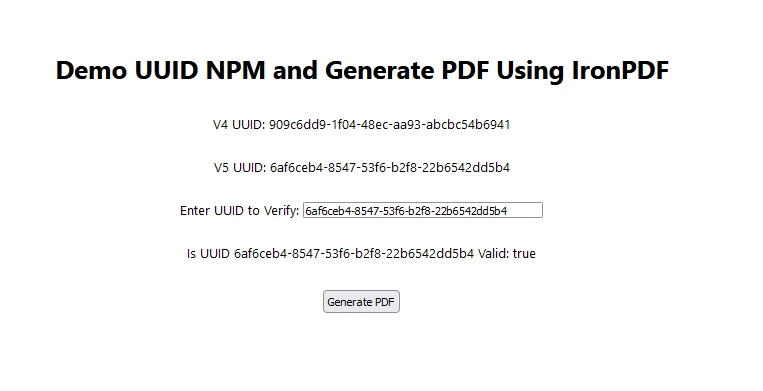
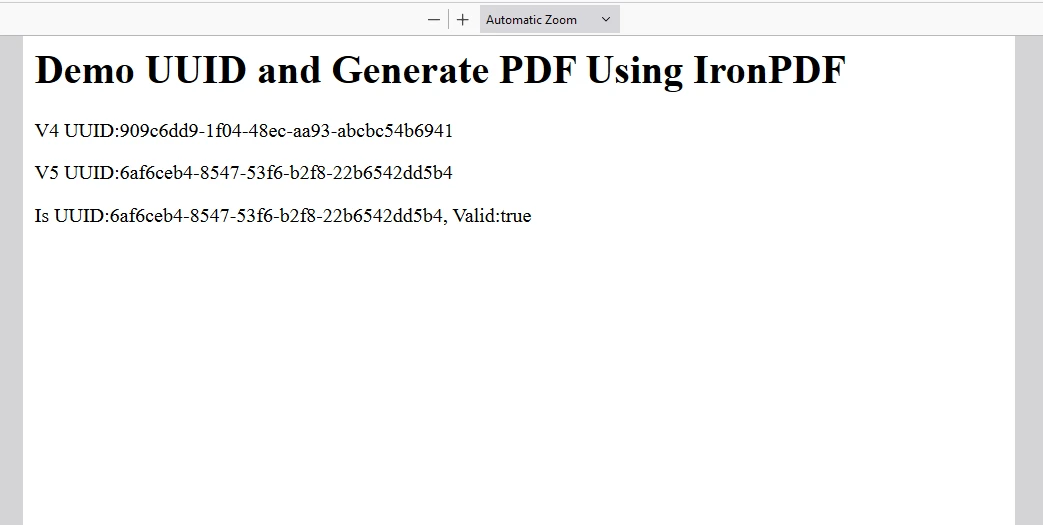
Ausgabe
PDF
IronPDF-Lizenz
IronPDF läuft mit dem Lizenzschlüssel. IronPDF NPM bietet einen kostenlosen Test Lizenzschlüssel, um Benutzern zu ermöglichen, seine umfangreichen Funktionen vor dem Kauf auszuprobieren.
Platzieren Sie hier den Lizenzschlüssel:
import { IronPdfGlobalConfig, PdfDocument } from "@ironsoftware/ironpdf";
// Apply your IronPDF license key
IronPdfGlobalConfig.getConfig().licenseKey = "Add Your key here";
import { IronPdfGlobalConfig, PdfDocument } from "@ironsoftware/ironpdf";
// Apply your IronPDF license key
IronPdfGlobalConfig.getConfig().licenseKey = "Add Your key here";
JavaScript
Abschluss
Das UUID NPM-Paket ist ein robustes und vielseitiges Werkzeug zur Generierung von eindeutigen Bezeichnern in JavaScript-Anwendungen. Seine Unterstützung für mehrere UUID-Versionen, plattformübergreifende Kompatibilität und kryptografische Stärke machen es zu einer unverzichtbaren Bibliothek für Entwickler, die eindeutige Bezeichner benötigen.
IronPDF befähigt Node.js-Entwickler, die PDF-Handhabungsfähigkeiten innerhalb ihrer Anwendungen zu erweitern und bietet unvergleichliche Funktionalität, Zuverlässigkeit und Leistung. Durch die Nutzung der fortschrittlichen Funktionen von IronPDF zur PDF-Erstellung, -Konvertierung und -Manipulation können Entwickler Dokumenten-Workflows optimieren, Benutzererfahrungen verbessern und vielfältige geschäftliche Anforderungen mit Zuversicht erfüllen.
Nutzen Sie IronPDF, um das volle Potenzial des PDF-Handlings in Ihren Node.js-Projekten auszuschöpfen und professionelle Dokumentlösungen mühelos bereitzustellen. Auf der anderen Seite kann das UUID NPM-Paket verwendet werden, um bei Bedarf eindeutige IDs zur Verschlüsselung von Daten zu generieren. Diese geheimen Schlüssel können mit IronPDF in PDFs für Archivierungszwecke gespeichert werden.