from ironpdf import *

# Instantiate Renderer
renderer = ChromePdfRenderer()

# Create a PDF from a HTML string using Python
pdf = renderer.RenderHtmlAsPdf("<h1>Hello World</h1>")

# Export to a file or Stream
pdf.SaveAs("output.pdf")

# Advanced Example with HTML Assets
# Load external html assets: Images, CSS and JavaScript.
# An optional BasePath 'C:\site\assets\' is set as the file location to load assets from
myAdvancedPdf = renderer.RenderHtmlAsPdf("<img src='icons/iron.png'>", r"C:\site\assets")
myAdvancedPdf.SaveAs("html-with-assets.pdf")
from ironpdf import *# Instantiate Rendererrenderer = ChromePdfRenderer()# Create a PDF from a HTML string using Pythonpdf = renderer.RenderHtmlAsPdf("<h1>Hello World</h1>")# Export to a file or Streampdf.SaveAs("output.pdf")# Advanced Example with HTML Assets# Load external html assets: Images, CSS and JavaScript.# An optional BasePath 'C:\site\assets\' is set as the file location to load assets frommyAdvancedPdf = renderer.RenderHtmlAsPdf("<img src='icons/iron.png'>", r"C:\site\assets")myAdvancedPdf.SaveAs("html-with-assets.pdf")
COMPARACIONES DE PRODUCTOS
FastAPI Python (Cómo Funciona Para Desarrolladores)
[FastAPI](https://pypi.org/project/fastapi/) es un marco web moderno y de alto rendimiento para construir APIs con Python. Está diseñado para ser fácil de usar y aprender, proporcionando potentes características como validación automática, serialización y documentación interactiva automática de API. Además, funciona con cualquier motor de plantillas y te permite utilizar cualquier configuración de plantilla predeterminada necesaria para tu proyecto.
Profundicemos en los detalles de [FastAPI](https://pypi.org/project/fastapi/), sus características y cómo usarlo eficazmente. Más adelante en este artículo, también analizaremos [IronPDF](/python/), un paquete de generación de PDF en Python de [Iron Software](https://ironsoftware.com).
## Características principales de FastAPI
1. **Alto rendimiento:** FastAPI es uno de los frameworks Python más rápidos disponibles, comparable a Node.js y Go, gracias al uso de Starlette para las partes web y Pydantic para las partes de datos.
2. **Facilidad de uso:** Está diseñado para ser intuitivo y reducir el tiempo dedicado a leer la documentación. El marco utiliza sugerencias de tipo estándar de Python para la validación y serialización de datos.
3. **Documentación interactiva automática:** FastAPI genera automáticamente documentación API interactiva utilizando OpenAPI y esquema JSON, accesible a través de /docs (Swagger UI) y /redoc (ReDoc). Cualquier actualización en la API se refleja automáticamente en la documentación.
4. **Soporte del editor:** Excelente soporte para completar código y verificar tipos en editores como VS Code, lo que hace que el desarrollo sea más rápido y reduce errores.
5. **Basado en estándares:** se basa en (y es totalmente compatible con) los estándares abiertos para API: OpenAPI y JSON Schema.
## Instalación
Puedes instalar FastAPI y [Uvicorn](https://www.uvicorn.org) (un servidor ASGI) usando pip:
```shell
pip install fastapi
pip install "uvicorn[standard]"
```
## Crear su primera aplicación FastAPI
Aquí tienes un ejemplo sencillo para que comiences con FastAPI y expongas datos de Python a través de una interfaz de usuario:
```python
from fastapi import FastAPI

# Create a FastAPI 'app' instance
app = FastAPI()

# Root path operation
@app.get("/")
def read_root():
    return {"Hello": "World"}

# Path operation for items including query parameter 'q'
@app.get("/items/{item_id}")
def read_item(item_id: int, q: str = None):
    return {"item_id": item_id, "q": q}
```
Para ejecutar la aplicación, utiliza Uvicorn:
```shell
uvicorn main:app --reload
```
Este comando iniciará un servidor de desarrollo y recargará automáticamente los cambios en el código. Puede acceder a la documentación interactiva de la API en `http://127.0.0.1:8000/docs`.
## Características avanzadas
FastAPI admite un amplio rango de características avanzadas, haciéndolo adecuado para aplicaciones complejas:
1. **Inyección de dependencias:** FastAPI proporciona un potente sistema de inyección de dependencias que le permite administrar las dependencias de forma limpia y eficiente.
2. **Tareas en segundo plano:** puede definir tareas en segundo plano para que se ejecuten después de devolver una respuesta, lo cual es útil para tareas como enviar correos electrónicos o procesar datos.
3. **WebSockets:** FastAPI admite WebSockets, lo que permite la comunicación en tiempo real entre el cliente y el servidor.
4. **Seguridad:** FastAPI incluye herramientas para gestionar la seguridad, incluidos OAuth2, tokens JWT y más.
5. **Integración de bases de datos:** FastAPI se puede integrar fácilmente con bases de datos utilizando bibliotecas como SQLAlchemy o Tortoise-ORM.
### Ejemplo: Construcción de una API CRUD
Construyamos una simple API CRUD (Crear, Leer, Actualizar, Eliminar) para gestionar elementos.
1. **Definir el modelo de datos:**
```python
from pydantic import BaseModel

# Define a Pydantic model for the item with default description and tax
class Item(BaseModel):
    name: str
    description: str = None
    price: float
    tax: float = None
```
2. **Cree la aplicación FastAPI:**
```python
from fastapi import FastAPI, HTTPException
# Initialize 'app' instance and an empty 'items' dictionary
app = FastAPI()
items = {}
# Create operation: Add a new item
@app.post("/items/")
def create_item(item: Item):
item_id = len(items) + 1
items[item_id] = item
return item
# Read operation: Retrieve an item by 'item_id'
@app.get("/items/{item_id}")
def read_item(item_id: int):
if item_id not in items:
raise HTTPException(status_code=404, detail="Item not found")
return items[item_id]
# Update operation: Replace an existing item
@app.put("/items/{item_id}")
def update_item(item_id: int, item: Item):
if item_id not in items:
raise HTTPException(status_code=404, detail="Item not found")
items[item_id] = item
return item
# Delete operation: Remove an item by 'item_id'
@app.delete("/items/{item_id}")
def delete_item(item_id: int):
if item_id not in items:
raise HTTPException(status_code=404, detail="Item not found")
del items[item_id]
return {"message": "Item deleted"}
```
## Presentando IronPDF
[IronPDF](/python/) es una poderosa biblioteca de Python diseñada para crear, editar y firmar PDFs desde HTML, CSS, imágenes, y JavaScript. Ofrece un rendimiento de calidad comercial con un bajo uso de memoria. Las características clave son:
#### Conversión de HTML a PDF
Convierte archivos HTML, cadenas HTML y URLs a PDFs. Por ejemplo, renderiza una página web como PDF utilizando el renderizador PDF de Chrome.
#### Soporte multiplataforma
Compatible con varias plataformas .NET, incluyendo .NET Core, .NET Standard y .NET Framework. Es compatible con Windows, Linux y macOS.
#### Edición y firma
Establece propiedades, añade seguridad con contraseñas y permisos, y aplica firmas digitales a tus PDFs.
#### Plantillas de página y configuración
Personaliza PDFs con encabezados, pies de página, números de página y márgenes ajustables. Soporta diseños responsivos y tamaños de papel personalizados.
#### Cumplimiento de normas
Adhiere a normas PDF como PDF/A y PDF/UA. Soporta codificación de caracteres UTF-8 y maneja activos como imágenes, CSS y fuentes.
## Generar documentos PDF con IronPDF y FastAPI
```shell
:InstallCmd pip install fastapi ironpdf
```
```python
from fastapi import FastAPI
from fastapi.responses import FileResponse
from ironpdf import *
# Apply your IronPDF license key
License.LicenseKey = "key"
# Initialize 'app' instance
app = FastAPI()
# Route for simple greeting
@app.get("/")
def read_root():
return {"Hello": "IronPDF"}
# Route that reads items with path and query parameters
@app.get("/items/{item_id}")
def read_item(item_id: int, q: str = None):
return {"item_id": item_id, "q": q}
# Route for generating a PDF document
@app.get("/pdf")
async def get_pdf(greet1: str = None, greet2: str = None):
# Use ChromePdfRenderer to create PDF from HTML
renderer = ChromePdfRenderer()
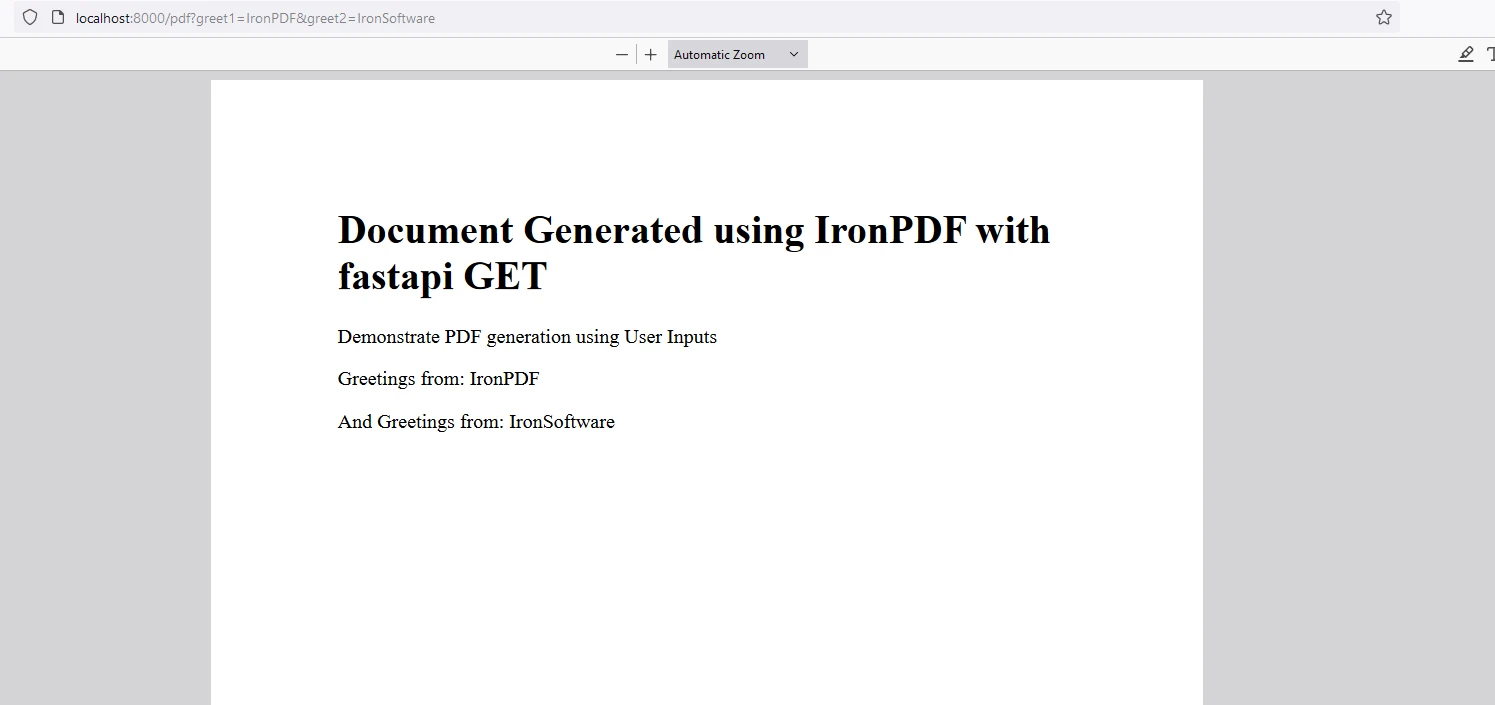
content = "<h1>Document Generated using IronPDF with FastAPI GET</h1>"
content += "<p> Demonstrate PDF generation using User Inputs</p>"
content += f"<p>Greetings from: {greet1}</p>"
content += f"<p>And Greetings from: {greet2}</p>"
pdf = renderer.RenderHtmlAsPdf(content)
# Save the PDF to a file
pdf.SaveAs("fastapi.pdf")
# Create a response with the generated PDF
headers = {
"Content-Disposition": "inline; filename=sample.pdf"
}
return FileResponse("fastapi.pdf", media_type="application/pdf", headers=headers)
```
### Explicación del código
Este fragmento de código demuestra la integración de IronPDF con FastAPI para generar dinámicamente documentos PDF basados en entradas de usuario y servirlos como respuesta descargable.
1. **Configuración de la clave de licencia:** Aplica la clave de licencia de IronPDF para habilitar sus características.
2. **Inicialización de FastAPI:** Inicializa una instancia de FastAPI (`app`) para manejar solicitudes HTTP.
3. **Manejadores de rutas básicas:**
- `read_root()`: Responde con un mensaje JSON sencillo que indica "Hola IronPDF" al acceder a la URL raíz (`/`).
- `read_item()`: Acepta un parámetro de ruta `item_id` y un parámetro de consulta opcional `q`. Devuelve una respuesta JSON con estos parámetros.
4. **Ruta de generación de PDF (`/pdf`):**
- `get_pdf()`: Esta función asíncrona maneja solicitudes GET al endpoint `/pdf` con parámetros de consulta opcionales llamados `greet1` y `greet2`.
- Construye una cadena HTML (`content`) que incluye:
- Un encabezado que indica el origen y propósito del documento.
- Un párrafo que demuestra la generación de PDF usando entradas de usuario (`greet1` y `greet2`).
- Usa `ChromePdfRenderer()` de IronPDF para renderizar el contenido HTML en un PDF (`pdf = renderer.RenderHtmlAsPdf(content)`).
- Guarda el PDF generado como "fastapi.pdf" (`pdf.SaveAs("fastapi.pdf")`).
5. **Suministro del PDF:**
- Configura las cabeceras de respuesta para especificar que el PDF debe ser visto en línea en el navegador (`"Content-Disposition": "inline; filename=sample.pdf"`).
- Crea un objeto `FileResponse` apuntando al archivo PDF generado con el tipo de medio apropiado (`"application/pdf"`).
- Retorna el objeto `FileResponse`, que desencadena la descarga del documento PDF cuando se accede al endpoint `/pdf`.
Este fragmento de código ilustra cómo IronPDF puede integrarse perfectamente con FastAPI para generar y servir documentos PDF dinámicamente basados en las entradas del usuario. Muestra la capacidad de convertir contenido HTML en PDFs, haciéndolo adecuado para aplicaciones que requieren generación de documentos sobre la marcha y entrega a través de HTTP.
### Resultado
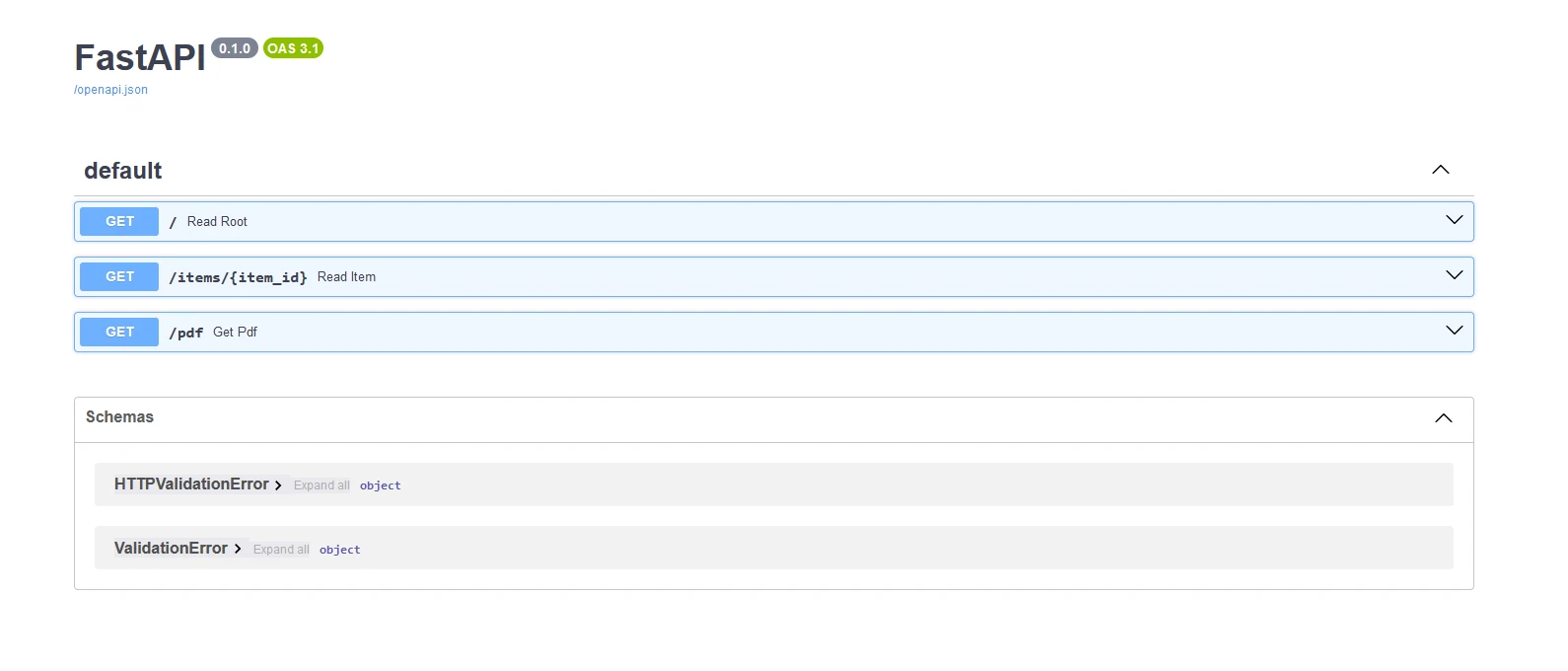
Abajo se muestra la salida swagger generada a partir de las APIs
### PDF
## Licencia de IronPDF
**IronPDF** se ejecuta con la clave de licencia para Python. IronPDF for Python ofrece una [licencia de prueba gratuita](trial-license) para permitir a los usuarios probar las características antes de la compra.
Coloca la clave de licencia al inicio del script antes de usar el paquete IronPDF:
```python
from ironpdf import *
# Apply your license key
License.LicenseKey = "key"
```
## Conclusión
[FastAPI](https://fastapi.tiangolo.com) es un marco potente y fácil de usar para construir APIs en Python. FastAPI tiene alto rendimiento, documentación automática y características avanzadas que lo hacen una excelente opción tanto para principiantes como para desarrolladores experimentados. Ya sea que estés construyendo una API simple o una aplicación web compleja, FastAPI proporciona las herramientas que necesitas para tener éxito.
[IronPDF](/python/) es una robusta biblioteca de Python para crear, manipular y renderizar documentos PDF desde contenido HTML. Ofrece características como conversión de HTML a PDF, creación de formularios interactivos, manipulación de PDFs (fusión, división) y extracción de texto. Ideal para generar PDFs dinámicos con facilidad e integrar en varias aplicaciones Python.
FastAPI es un marco web moderno y de alto rendimiento para construir APIs con Python. Está diseñado para ser fácil de usar y aprender, proporcionando potentes características como validación automática, serialización y documentación interactiva automática de API. Además, funciona con cualquier motor de plantillas y te permite utilizar cualquier configuración de plantilla predeterminada necesaria para tu proyecto.
Profundicemos en los detalles de FastAPI, sus características y cómo usarlo eficazmente. Más adelante en este artículo, también analizaremos IronPDF, un paquete de generación de PDF en Python de Iron Software.
Características principales de FastAPI
Alto rendimiento: FastAPI es uno de los frameworks Python más rápidos disponibles, comparable a Node.js y Go, gracias al uso de Starlette para las partes web y Pydantic para las partes de datos.
Facilidad de uso: Está diseñado para ser intuitivo y reducir el tiempo dedicado a leer la documentación. El marco utiliza sugerencias de tipo estándar de Python para la validación y serialización de datos.
Documentación interactiva automática: FastAPI genera automáticamente documentación API interactiva utilizando OpenAPI y esquema JSON, accesible a través de /docs (Swagger UI) y /redoc (ReDoc). Cualquier actualización en la API se refleja automáticamente en la documentación.
Soporte del editor: Excelente soporte para completar código y verificar tipos en editores como VS Code, lo que hace que el desarrollo sea más rápido y reduce errores.
Basado en estándares: se basa en (y es totalmente compatible con) los estándares abiertos para API: OpenAPI y JSON Schema.
Instalación
Puedes instalar FastAPI y Uvicorn (un servidor ASGI) usando pip:
Este comando iniciará un servidor de desarrollo y recargará automáticamente los cambios en el código. Puede acceder a la documentación interactiva de la API en http://127.0.0.1:8000/docs.
Características avanzadas
FastAPI admite un amplio rango de características avanzadas, haciéndolo adecuado para aplicaciones complejas:
Inyección de dependencias: FastAPI proporciona un potente sistema de inyección de dependencias que le permite administrar las dependencias de forma limpia y eficiente.
Tareas en segundo plano: puede definir tareas en segundo plano para que se ejecuten después de devolver una respuesta, lo cual es útil para tareas como enviar correos electrónicos o procesar datos.
WebSockets: FastAPI admite WebSockets, lo que permite la comunicación en tiempo real entre el cliente y el servidor.
Seguridad: FastAPI incluye herramientas para gestionar la seguridad, incluidos OAuth2, tokens JWT y más.
Integración de bases de datos: FastAPI se puede integrar fácilmente con bases de datos utilizando bibliotecas como SQLAlchemy o Tortoise-ORM.
Ejemplo: Construcción de una API CRUD
Construyamos una simple API CRUD (Crear, Leer, Actualizar, Eliminar) para gestionar elementos.
Definir el modelo de datos:
from pydantic importBaseModel# Define a Pydantic model for the item with default description and taxclass Item(BaseModel): name: str description: str = None price: float tax: float = None
from pydantic import BaseModel

# Define a Pydantic model for the item with default description and tax
class Item(BaseModel):
    name: str
    description: str = None
    price: float
    tax: float = None
Python
Cree la aplicación FastAPI:
from fastapi importFastAPI, HTTPException# Initialize 'app' instance and an empty 'items' dictionaryapp = FastAPI()items = {}# Create operation: Add a new item@app.post("/items/")def create_item(item: Item): item_id = len(items) + 1 items[item_id] = item return item# Read operation: Retrieve an item by 'item_id'@app.get("/items/{item_id}")def read_item(item_id: int): if item_id not in items: raiseHTTPException(status_code=404, detail="Item not found") return items[item_id]# Update operation: Replace an existing item@app.put("/items/{item_id}")def update_item(item_id: int, item: Item): if item_id not in items: raiseHTTPException(status_code=404, detail="Item not found") items[item_id] = item return item# Delete operation: Remove an item by 'item_id'@app.delete("/items/{item_id}")def delete_item(item_id: int): if item_id not in items: raiseHTTPException(status_code=404, detail="Item not found") del items[item_id] return {"message": "Item deleted"}
from fastapi import FastAPI, HTTPException

# Initialize 'app' instance and an empty 'items' dictionary
app = FastAPI()
items = {}

# Create operation: Add a new item
@app.post("/items/")
def create_item(item: Item):
    item_id = len(items) + 1
    items[item_id] = item
    return item

# Read operation: Retrieve an item by 'item_id'
@app.get("/items/{item_id}")
def read_item(item_id: int):
    if item_id not in items:
        raise HTTPException(status_code=404, detail="Item not found")
    return items[item_id]

# Update operation: Replace an existing item
@app.put("/items/{item_id}")
def update_item(item_id: int, item: Item):
    if item_id not in items:
        raise HTTPException(status_code=404, detail="Item not found")
    items[item_id] = item
    return item

# Delete operation: Remove an item by 'item_id'
@app.delete("/items/{item_id}")
def delete_item(item_id: int):
    if item_id not in items:
        raise HTTPException(status_code=404, detail="Item not found")
    del items[item_id]
    return {"message": "Item deleted"}
Python
Presentando IronPDF
IronPDF es una poderosa biblioteca de Python diseñada para crear, editar y firmar PDFs desde HTML, CSS, imágenes, y JavaScript. Ofrece un rendimiento de calidad comercial con un bajo uso de memoria. Las características clave son:
Conversión de HTML a PDF
Convierte archivos HTML, cadenas HTML y URLs a PDFs. Por ejemplo, renderiza una página web como PDF utilizando el renderizador PDF de Chrome.
Soporte multiplataforma
Compatible con varias plataformas .NET, incluyendo .NET Core, .NET Standard y .NET Framework. Es compatible con Windows, Linux y macOS.
Edición y firma
Establece propiedades, añade seguridad con contraseñas y permisos, y aplica firmas digitales a tus PDFs.
Plantillas de página y configuración
Personaliza PDFs con encabezados, pies de página, números de página y márgenes ajustables. Soporta diseños responsivos y tamaños de papel personalizados.
Cumplimiento de normas
Adhiere a normas PDF como PDF/A y PDF/UA. Soporta codificación de caracteres UTF-8 y maneja activos como imágenes, CSS y fuentes.
Generar documentos PDF con IronPDF y FastAPI
> pip install fastapi ironpdf
pip install fastapi ironpdf
from fastapi importFastAPIfrom fastapi.responses importFileResponsefrom ironpdf import *# Apply your IronPDF license keyLicense.LicenseKey = "key"# Initialize 'app' instanceapp = FastAPI()# Route for simple greeting@app.get("/")def read_root(): return {"Hello": "IronPDF"}# Route that reads items with path and query parameters@app.get("/items/{item_id}")def read_item(item_id: int, q: str = None): return {"item_id": item_id, "q": q}# Route for generating a PDF document@app.get("/pdf")async def get_pdf(greet1: str = None, greet2: str = None): # Use ChromePdfRenderer to create PDF from HTML renderer = ChromePdfRenderer() content = "<h1>Document Generated using IronPDF with FastAPI GET</h1>" content += "<p> Demonstrate PDF generation using User Inputs</p>" content += f"<p>Greetings from: {greet1}</p>" content += f"<p>And Greetings from: {greet2}</p>" pdf = renderer.RenderHtmlAsPdf(content) # Save the PDF to a file pdf.SaveAs("fastapi.pdf") # Create a response with the generated PDF headers = { "Content-Disposition": "inline; filename=sample.pdf" } returnFileResponse("fastapi.pdf", media_type="application/pdf", headers=headers)
from fastapi import FastAPI
from fastapi.responses import FileResponse
from ironpdf import *

# Apply your IronPDF license key
License.LicenseKey = "key"

# Initialize 'app' instance
app = FastAPI()

# Route for simple greeting
@app.get("/")
def read_root():
    return {"Hello": "IronPDF"}

# Route that reads items with path and query parameters
@app.get("/items/{item_id}")
def read_item(item_id: int, q: str = None):
    return {"item_id": item_id, "q": q}

# Route for generating a PDF document
@app.get("/pdf")
async def get_pdf(greet1: str = None, greet2: str = None):
    # Use ChromePdfRenderer to create PDF from HTML
    renderer = ChromePdfRenderer()
    content = "<h1>Document Generated using IronPDF with FastAPI GET</h1>"
    content += "<p> Demonstrate PDF generation using User Inputs</p>"
    content += f"<p>Greetings from: {greet1}</p>"
    content += f"<p>And Greetings from: {greet2}</p>"
    pdf = renderer.RenderHtmlAsPdf(content)

    # Save the PDF to a file
    pdf.SaveAs("fastapi.pdf")

    # Create a response with the generated PDF
    headers = {
        "Content-Disposition": "inline; filename=sample.pdf"
    }
    return FileResponse("fastapi.pdf", media_type="application/pdf", headers=headers)
Python
Explicación del código
Este fragmento de código demuestra la integración de IronPDF con FastAPI para generar dinámicamente documentos PDF basados en entradas de usuario y servirlos como respuesta descargable.
Configuración de la clave de licencia: Aplica la clave de licencia de IronPDF para habilitar sus características.
Inicialización de FastAPI: Inicializa una instancia de FastAPI (app) para manejar solicitudes HTTP.
Manejadores de rutas básicas:
read_root(): Responde con un mensaje JSON sencillo que indica "Hola IronPDF" al acceder a la URL raíz (/).
read_item(): Acepta un parámetro de ruta item_id y un parámetro de consulta opcional q. Devuelve una respuesta JSON con estos parámetros.
Ruta de generación de PDF (/pdf):
get_pdf(): Esta función asíncrona maneja solicitudes GET al endpoint /pdf con parámetros de consulta opcionales llamados greet1 y greet2.
Construye una cadena HTML (content) que incluye:
Un encabezado que indica el origen y propósito del documento.
Un párrafo que demuestra la generación de PDF usando entradas de usuario (greet1 y greet2).
Usa ChromePdfRenderer() de IronPDF para renderizar el contenido HTML en un PDF (pdf = renderer.RenderHtmlAsPdf(content)).
Guarda el PDF generado como "fastapi.pdf" (pdf.SaveAs("fastapi.pdf")).
Suministro del PDF:
Configura las cabeceras de respuesta para especificar que el PDF debe ser visto en línea en el navegador ("Content-Disposition": "inline; filename=sample.pdf").
Crea un objeto FileResponse apuntando al archivo PDF generado con el tipo de medio apropiado ("application/pdf").
Retorna el objeto FileResponse, que desencadena la descarga del documento PDF cuando se accede al endpoint /pdf.
Este fragmento de código ilustra cómo IronPDF puede integrarse perfectamente con FastAPI para generar y servir documentos PDF dinámicamente basados en las entradas del usuario. Muestra la capacidad de convertir contenido HTML en PDFs, haciéndolo adecuado para aplicaciones que requieren generación de documentos sobre la marcha y entrega a través de HTTP.
Resultado
Abajo se muestra la salida swagger generada a partir de las APIs
PDF
Licencia de IronPDF
IronPDF se ejecuta con la clave de licencia para Python. IronPDF for Python ofrece una licencia de prueba gratuita para permitir a los usuarios probar las características antes de la compra.
Coloca la clave de licencia al inicio del script antes de usar el paquete IronPDF:
from ironpdf import *# Apply your license keyLicense.LicenseKey = "key"
from ironpdf import *
# Apply your license key
License.LicenseKey = "key"
Python
Conclusión
FastAPI es un marco potente y fácil de usar para construir APIs en Python. FastAPI tiene alto rendimiento, documentación automática y características avanzadas que lo hacen una excelente opción tanto para principiantes como para desarrolladores experimentados. Ya sea que estés construyendo una API simple o una aplicación web compleja, FastAPI proporciona las herramientas que necesitas para tener éxito.
IronPDF es una robusta biblioteca de Python para crear, manipular y renderizar documentos PDF desde contenido HTML. Ofrece características como conversión de HTML a PDF, creación de formularios interactivos, manipulación de PDFs (fusión, división) y extracción de texto. Ideal para generar PDFs dinámicos con facilidad e integrar en varias aplicaciones Python.
Curtis Chau tiene una licenciatura en Ciencias de la Computación (Carleton University) y se especializa en el desarrollo front-end con experiencia en Node.js, TypeScript, JavaScript y React. Apasionado por crear interfaces de usuario intuitivas y estéticamente agradables, disfruta trabajando con frameworks modernos y creando manuales bien estructurados y visualmente atractivos.