



Mis à jour 21 avril 2026
linkify-react (Comment ça marche : Un guide pour les développeurs)
Linkify React est un package npm léger et facile à utiliser qui automatise la conversion de texte brut contenant des URLs
Lire la suite

Le UUID (identifiant unique universel) est un package NPM (Node Package Manager) populaire utilisé pour générer des identifiants uniques universels (UUID) dans les applications JavaScript. Les UUID sont utiles pour créer des clés uniques dans les bases de données, des identifiants de session, et plus encore. Plus tard dans cet article, nous allons également nous pencher sur IronPDF, un package de génération de PDF for Node.js de Iron Software. Ces deux bibliothèques peuvent être utilisées pour générer des identifiants uniques pour les bases de données, et les UUID générés peuvent être stockés au format PDF pour des fins d'archivage.
Conformité à la RFC4122 : Le package UUID prend en charge la création d'UUID conformes à la RFC4122, garantissant ainsi leur unicité universelle et leur normalisation.
Plusieurs versions d'UUID : Il prend en charge différentes versions d'UUID, notamment :
Compatibilité multiplateforme : le package fonctionne dans différents environnements, notamment Node.js, React Native et les navigateurs web modernes.
Zéro dépendance : Il a une empreinte réduite et aucune dépendance, ce qui le rend léger et facile à intégrer dans les projets.
Cryptographiquement robuste : Les UUID générés sont cryptographiquement robustes, garantissant une sécurité élevée.
Pour installer le package uuid, utilisez l'une des commandes suivantes :
npm install uuidor
yarn add uuidVoici comment générer des chaînes UUID en utilisant le package uuid :
// Import syntax for uuid library
import { v4 as uuidv4 } from 'uuid';
// Generate a random UUID v4
const myUUID = uuidv4();
console.log(myUUID); // Example valid uuid: '9b1deb4d-3b7d-4bad-9bdd-2b0d7b3dcb6d'Alternativement, en utilisant la syntaxe CommonJS :
// Import using CommonJS syntax
const { v4: uuidv4 } = require('uuid');
// Generate a random UUID (version 4)
const myUUID = uuidv4();
console.log(myUUID); // Example uuid string output: '1b9d6bcd-bbfd-4b2d-9b5d-ab8dfbbd4bed'import { v5 as uuidv5 } from 'uuid';
// Define a namespace UUID
const MY_NAMESPACE = '6ba7b810-9dad-11d1-80b4-00c04fd430c8';
// Generate UUID based on the namespace and a name
const myUUID = uuidv5('my-unique-name', MY_NAMESPACE);
console.log(myUUID); // Example output: 'e4eaaaf2-d142-11e1-b3e4-080027620cdd'import { validate as uuidValidate, parse as uuidParse } from 'uuid';
// Validate a UUID
const isValid = uuidValidate('9b1deb4d-3b7d-4bad-9bdd-2b0d7b3dcb6d');
console.log(isValid); // true
// Convert UUID string to an array of bytes
const bytes = uuidParse('9b1deb4d-3b7d-4bad-9bdd-2b0d7b3dcb6d');
console.log(bytes); // Uint8Array(16) [ 155, 29, 235, 77, 59, 125, 75, 173, 155, 221, 43, 13, 123, 61, 203, 109 ]
IronPDF est une bibliothèque de génération de PDF populaire utilisée pour générer, éditer, et convertir des documents PDF. Le package NPM IronPDF est spécifiquement conçu pour les applications Node.js. Voici quelques caractéristiques clés et détails sur le package NPM IronPDF :
Convertissez le contenu HTML en documents PDF en toute simplicité. Cette fonctionnalité est particulièrement utile pour générer des PDF dynamiques à partir de contenu web.
Générez des PDF directement à partir d'URL, vous permettant de capturer le contenu des pages web et de les enregistrer sous forme de fichiers PDF de manière programmatique.
Fusionnez, divisez et manipulez facilement des documents PDF existants. IronPDF propose des fonctionnalités telles que l'ajout de pages, la division de documents, et plus.
Sécurisez vos documents PDF en les chiffrant avec des mots de passe ou en appliquant des signatures numériques. IronPDF propose des options pour protéger vos documents sensibles contre l'accès non autorisé.
Produisez des documents PDF de haute qualité avec un rendu précis du texte, des images et du formatage. IronPDF garantit que vos PDF générés maintiennent la fidélité au contenu original.
IronPDF est compatible avec diverses plateformes, y compris Windows, Linux et macOS, ce qui le rend adapté à une large gamme d'environnements de développement.
Intégrez facilement IronPDF dans vos applications Node.js en utilisant son paquet npm. L'API est bien documentée, ce qui facilite l'incorporation des capacités de génération de PDF dans vos projets.
Pour installer le package NPM IronPDF, utilisez la commande suivante :
yarn add @ironsoftware/ironpdf @ironsoftware/ironpdf-engine-windows-x64Les UUID peuvent être utilisés à de nombreux endroits dans une application. C'est une partie très atomique d'une application. Les UUID peuvent être utilisés comme secrets pour les données chiffrées, et ces secrets peuvent être stockés dans des documents PDF à des fins d'archivage. Ci-dessous, nous verrons un exemple où nous générons différentes versions d'UUID et les documentons dans un document PDF avec IronPDF.
Installation des dépendances : Commencez par créer un nouveau projet Next.js (si vous ne l'avez pas déjà fait) à l'aide de la commande suivante. Consultez ici.
npx create-next-app@latest uuid-pdf --use-npm --example "https://github.com/vercel/next-learn/tree/main/basics/learn-starter"Ensuite, naviguez vers votre répertoire de projet :
cd uuid-pdfInstallez les paquets requis :
yarn add @ironsoftware/ironpdf @ironsoftware/ironpdf-engine-windows-x64
yarn add uuidMaintenant, créons un exemple simple de génération de PDF avec IronPDF.
API de génération de PDF : La première étape consiste à créer une API backend pour générer le document PDF. Étant donné qu'IronPDF s'exécute uniquement côté serveur, nous devons créer une API à appeler lorsqu'un utilisateur souhaite générer un PDF. Créez un fichier à l'emplacement pages/api/pdf.js et ajoutez-y le contenu ci-dessous.
IronPDF nécessite une clé de licence, vous pouvez l'obtenir à partir de la page de licence et la placer dans le code ci-dessous.
// pages/api/pdf.js
import { IronPdfGlobalConfig, PdfDocument } from "@ironsoftware/ironpdf";
import { validate as uuidValidate } from 'uuid';

// Apply your IronPDF license key
IronPdfGlobalConfig.getConfig().licenseKey = "Your license key";

export default async function handler(req, res) {
  try {
    // Extract query parameters from request
    const v4t = req.query.v4;
    const v5t = req.query.v5;
    const c = req.query.c;

    // Prepare HTML content for PDF
    let content = "<h1>Demo UUID and Generate PDF Using IronPDF</h1>";
    content += "<p>V4 UUID: " + v4t + "</p>";
    content += "<p>V5 UUID: " + v5t + "</p>";
    content += "<p>Is UUID: " + c + ", Valid: " + uuidValidate(c).toString() + "</p>";

    // Generate PDF document
    const pdf = await PdfDocument.fromHtml(content);
    const data = await pdf.saveAsBuffer();
    console.log("PDF generated successfully.");

    // Set the response headers and send the PDF as a response
    res.setHeader("Content-Type", "application/pdf");
    res.setHeader("Content-Disposition", "attachment; filename=awesomeIron.pdf");
    res.send(data);
  } catch (error) {
    console.error("Error generating PDF:", error);
    res.status(500).end();
  }
}Modifiez maintenant le code index.js comme ci-dessous pour utiliser l'UUID et IronPDF.
import Head from "next/head";
import styles from "../styles/Home.module.css";
import React, { useState } from "react";
import { v4 as uuidv4, v5 as uuidv5, validate as uuidValidate } from 'uuid';

export default function Home() {
  const [text, setText] = useState("");

  // Generate UUIDs for demonstration
  const myUUID = uuidv4();
  const MY_NAMESPACE = '6ba7b810-9dad-11d1-80b4-00c04fd430c8';
  const myV5UUID = uuidv5('IronPDF', MY_NAMESPACE);

  // Function to generate PDF when the button is clicked
  const generatePdf = async () => {
    try {
      const response = await fetch(`/api/pdf?v4=${myUUID}&v5=${myV5UUID}&c=${text}`);
      const blob = await response.blob();
      const url = window.URL.createObjectURL(new Blob([blob]));
      const link = document.createElement("a");
      link.href = url;
      link.setAttribute("download", "awesomeIron.pdf");

      // Append, click and remove the link to download the PDF
      document.body.appendChild(link);
      link.click();
      link.parentNode.removeChild(link);
    } catch (error) {
      console.error("Error generating PDF:", error);
    }
  };

  // Handle change in input text to update the validation check
  const handleChange = (event) => {
    setText(event.target.value);
  };

  // Render the component
  return (
    <div className={styles.container}>
      <Head>
        <title>Generate PDF Using IronPDF</title>
        <link rel="icon" href="/favicon.ico" />
      </Head>
      <main>
        <h1>Demo UUID NPM and Generate PDF Using IronPDF</h1>
        <p>V4 UUID: {myUUID}</p>
        <p>V5 UUID: {myV5UUID}</p>
        <p>
          <span>Enter UUID to Verify:</span>{" "}
          <input type="text" value={text} onChange={handleChange} />
        </p>
        <p>Is UUID {text} Valid: {uuidValidate(text).toString()}</p>
        <button style={{margin: 20, padding: 5}} onClick={generatePdf}>
          Generate PDF
        </button>
      </main>
      <style jsx>{`
        main {
          padding: 5rem 0;
          flex: 1;
          display: flex;
          flex-direction: column;
          justify-content: center;
          align-items: center;
        }
      `}</style>
      <style jsx global>{`
        html,
        body {
          padding: 0;
          margin: 0;
          font-family: -apple-system, BlinkMacSystemFont, Segoe UI, Roboto,
            Oxygen, Ubuntu, Cantarell, Fira Sans, Droid Sans, Helvetica Neue,
            sans-serif;
        }
        * {
          box-sizing: border-box;
        }
      `}</style>
    </div>
  );
}Importations et configuration initiale :
Head depuis next/head : Utilisé pour modifier <head> du document HTML pour définir le titre et le favicon.styles depuis ../styles/Home.module.css : Importe les styles CSS locaux pour le composant.React, useState : Hooks React pour la gestion d'état.uuidv4, uuidv5, uuidValidate : Fonctions importées du package UUID pour la génération, la validation et l'analyse des UUID.Fonctionnalité du composant :
Gestion de l'état :
useState : Gère l'état du champ de saisie de texte où l'utilisateur entre un UUID.text : Variable d'état contenant la valeur actuelle du champ de saisie.Génération d'UUID :
uuidv4() : Génère un UUID aléatoire version 4.MY_NAMESPACE et uuidv5('IronPDF', MY_NAMESPACE) : Génèrent un UUID version 5 basé sur un espace de noms donné.Génération de PDF (fonction generatePdf):
fetch pour appeler un endpoint d'API (/api/pdf-uuid) avec des paramètres de requête (v4, v5, c).<a>).Gestion des événements (fonction handleChange):
text lorsque l'utilisateur tape dans le champ de saisie.Méthode de rendu :
Head), une section principale (<main>) et divers paragraphes affichant des UUIDs et un champ de saisie pour l'interaction utilisateur.generatePdf est liée à un clic de bouton pour déclencher la génération de PDF.<style jsx>) et globalement (<style jsx global>) en utilisant le styled-jsx de Next.js.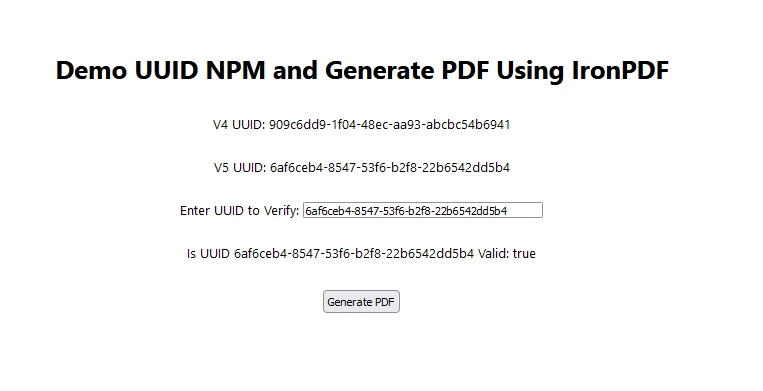
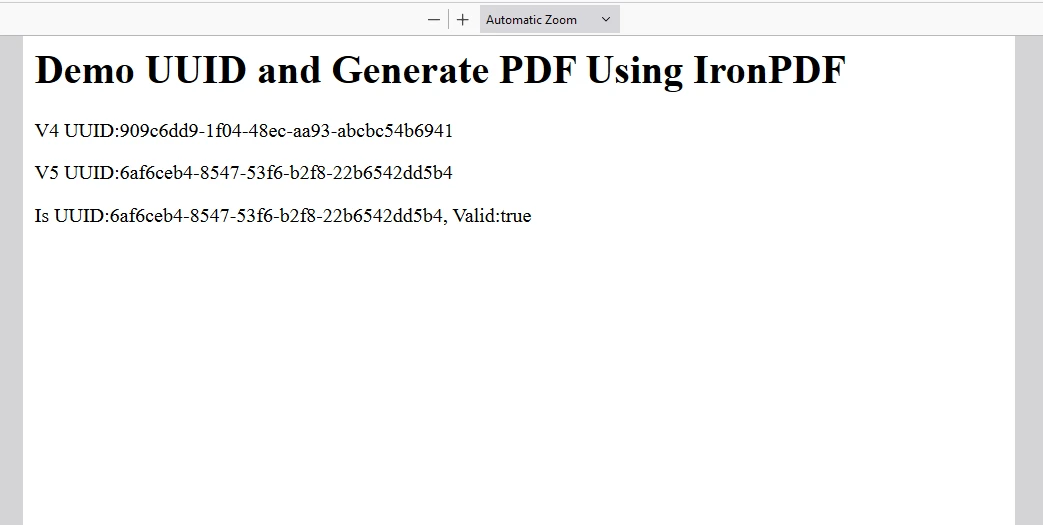
IronPDF fonctionne avec la clé de licence. IronPDF NPM propose une clé de licence d'essai gratuit pour permettre aux utilisateurs de découvrir ses fonctionnalités étendues avant l'achat.
Placez la clé de licence ici :
import { IronPdfGlobalConfig, PdfDocument } from "@ironsoftware/ironpdf";
// Apply your IronPDF license key
IronPdfGlobalConfig.getConfig().licenseKey = "Add Your key here";Le package UUID NPM est un outil robuste et polyvalent pour générer des identifiants uniques dans les applications JavaScript. Son support pour plusieurs versions d'UUID, sa compatibilité multiplateforme, et sa force cryptographique en font une bibliothèque essentielle pour les développeurs ayant besoin d'identifiants uniques.
IronPDF permet aux développeurs Node.js d'améliorer les capacités de gestion de PDF au sein de leurs applications, offrant une fonctionnalité, une fiabilité, et une performance inégalées. En tirant parti des fonctionnalités avancées d'IronPDF pour la génération, la conversion et la manipulation de PDF, les développeurs peuvent rationaliser les flux de travail des documents, améliorer les expériences utilisateur et répondre aux diverses exigences commerciales avec confiance.
Adoptez IronPDF pour débloquer tout le potentiel de la gestion des PDF dans vos projets Node.js et offrir des solutions de documents de qualité professionnelle sans effort. D'autre part, le package UUID NPM peut être utilisé pour générer des identifiants uniques chaque fois qu'ils sont nécessaires pour chiffrer les données. Ces clés secrètes peuvent être stockées dans des fichiers PDF avec IronPDF à des fins d'archivage.

Curtis Chau détient un baccalauréat en informatique (Université de Carleton) et se spécialise dans le développement front-end avec expertise en Node.js, TypeScript, JavaScript et React. Passionné par la création d'interfaces utilisateur intuitives et esthétiquement plaisantes, Curtis aime travailler avec des frameworks modernes et créer des manuels bien structurés et visuellement attrayants.


IronPDF fait partie de IRONSUITE
10 API .NET pour vos documents











Lorsque vous avez besoin que votre PDF ressemble à HTML, rapidement.

