



更新日 2026年4月23日
deepstream io(開発者向けのしくみ)
この記事では、オープンリアルタイムサーバdeepstreamとIronPDFを使用してPDFを生成する方法を学びます。
詳しく読む

Peeweeは、Pythonでデータベースとの操作を簡単にする小さな表現力豊かなORMです。 軽量で使いやすく、複雑なクエリやデータベーススキーマをサポートする自信があります。 Peeweeは、直感的な構文でSQLite、MySQL、PostgreSQLをサポートしており、学びやすく、その結果、学生やプロの間で非常に人気があります。
IronPDFは、PDFドキュメントの作成、読み取り、編集、管理を可能にするPythonライブラリです。 Python .NETを使用すると、PythonアプリケーションでIronPDFを使用することができ、非常に強力なPDF生成機能を得ることができます。 この組み合わせは、データベースから取得したデータに基づいてPDFレポートを生成するのに非常に役立ちます。
この統合により、PeeweeとIronPDFを組み合わせて、動的なPDFドキュメントを生成できます。 この組み合わせは、データ取得からレポート生成までの完全なワークフローを備え、プロフェッショナルかつ自動化されたドキュメントを作成するための非常に強力なツールセットを提供します。 請求書などの簡単なビジネスレポートから複雑なレポートまで、PeeweeとIronPDFはPDF生成の必須ソリューションです。
Peeweeは、Pythonでデータベースとの操作を簡単にする小さな表現力豊かなORMです。 モデルを簡単に作成し、データベースでの検索、追加、更新、削除の複数レコードに簡単に対応できます。 Peeweeは、さまざまなユースケースで使用できるのは、異なるバックエンド(SQLite、MySQL、PostgreSQL)をサポートしているためです。
Peeweeの素晴らしさは、そのシンプルさと使いやすさです。 開発者は、Pythonでクラスとしてモデルを作成しやすく、すべてのデータベースに対するクエリは、単純なAPIのおかげでPythonコードとして作成されます。 このシンプルさにもかかわらず、Peeweeは非常に強力で、複雑な質問、結合、複雑なリレーションシップをサポートし、接続プーリングもサポートしています。
柔軟でミニマルなデザインが、Peeweeを小規模プロジェクトや使いやすさと迅速な開発が重要となる大規模アプリケーションに非常に便利なものにしています。 複雑なデータベースとの操作を非常に少ないボイラープレートコードで行うことで、PeeweeはどんなPython開発者にとっても魅力的なORMとなっています。
Peeweeは、Pythonでデータベースとの操作を簡単にする軽量な表現力豊かなORMライブラリです。 その重要な機能のいくつかを以下に列挙します。
簡単かつシンプル: Peeweeは非常に使いやすく直感的なAPIを持っています。 開発者は普通の属性を持つモデルを問題なく定義し、それを使用してPythonコードでデータベースと簡単にやり取りできます。
複数のデータベース: SQLite、MySQL、PostgreSQL、CockroachDBをサポートしています。
表現力豊かなクエリ構文: Peeweeにはクリーンで表現力豊かなクエリ構文があります; 同じクエリ操作を使用して、Select、Create、Update、および削除クエリを行うことができ、開発者がPython的な構造を使用して難しいクエリを書くことができます。
モデル定義: Peeweeでは、Pythonクラスとしてデータベースモデルを定義します。 クラスのフィールドはデータベースの列に一致します。 この定義により、データベーススキーマに何らかの変更を加える場合は、Pythonコードに同等の変更が行われ、その逆もまた然りです。
リレーションシップ: 外部キー、1対1、多対多を含むすべてのリレーションシップをサポートしており、複雑なデータをモデル化するのに必要です。
接続プーリング: データベース接続を再利用することでパフォーマンスを向上させるために、Peeweeには接続プーリングが組み込まれています。
トランザクション: アトミックトランザクションにより、一連のデータベース操作が実行されますが、そのうちのいずれかが失敗した場合はすべてロールバックされ、データの有効性が維持されます。
シグナルとフック: Peeweeは、レコードの保存や削除などのイベントの前後にカスタム動作を実装するためのシグナルとフックを提供します。
マイグレーション: さらにこれは、主たるPeewee-migrateを使用して、サードパーティのライブラリと統合してデータベーススキーママイグレーションを管理します。 これにより、データベースのバージョン間のスムーズな移行を助けます。
拡張性: Peeweeは、カスタムフィールド、クエリ、または具体的なアプリケーションのニーズに応じたいくつかの機能により簡単に拡張できます。
Playhouseエクステンション: このモジュールは、PlayhouseにSQLiteのフルテキスト検索、いくつかのPostgreSQL固有の機能、接続管理のためのいくつかのツールを含むさまざまな拡張機能を提供します。
非同期サポート: aiopeeweeは、高パフォーマンスアプリケーションに適した非同期操作をサポートするために、Peeweeを拡張します。
以下のステップは、Peewee ORMを使用してシンプルなアプリケーションを立ち上げるための任意 for Pythonプロジェクトでの開始をサポートします。
まず、pipを使用してPeeweeをインストールします。
pip install peewee必ずapp.pyというPythonファイルでデータベースモデルを定義してください。 ここでは、SQLiteを使用して簡単にします。
from peewee import SqliteDatabase, Model, CharField, IntegerField, ForeignKeyField

# Define the database connection
db = SqliteDatabase('my_database.db')

# Define a base model class
class BaseModel(Model):
    class Meta:
        database = db

# Define a User model
class User(BaseModel):
    username = CharField(unique=True)
    age = IntegerField()

# Define a Tweet model, which is related to the User model
class Tweet(BaseModel):
    user = ForeignKeyField(User, backref='tweets')
    content = CharField()

# Create the tables
db.connect()
db.create_tables([User, Tweet])それでは、データベースにいくつかデータを追加しましょう。
def insert_data():
    # Insert a new user
    alice = User.create(username='Alice', age=30)
    # Insert some tweets for Alice
    Tweet.create(user=alice, content='Hello world!')
    Tweet.create(user=alice, content='I love Peewee!')
    # Insert another user and a tweet for that user
    bob = User.create(username='Bob', age=25)
    Tweet.create(user=bob, content='This is Bob')

insert_data()それでは、データベースからすべての情報を取得するためのコードを作成しましょう。
def query_data():
    # Query to select all users and print their usernames and ages
    for user in User.select():
        print(f'User: {user.username}, Age: {user.age}')

    # Find tweets for a specific user, in this case, 'Alice'
    for tweet in Tweet.select().join(User).where(User.username == 'Alice'):
        print(f'{tweet.user.username} tweeted: {tweet.content}')

query_data()以下は、上記のすべてのコードの組み合わせたスクリーンショットです。
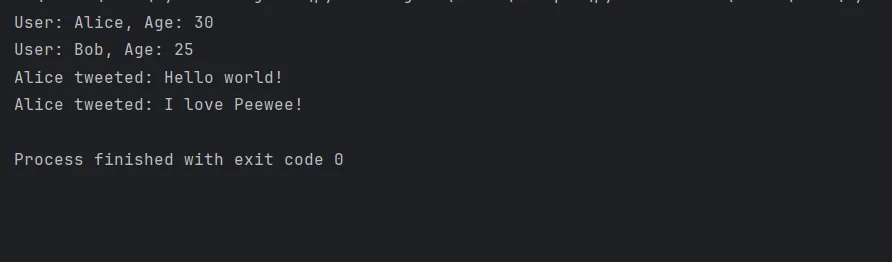
まず、オブジェクトリレーショナルマッピングに関連する機能のためにPeeweeを、PDF生成のためにIronPDFをインポートする必要があります。 このチュートリアルは、すでにPythonの知識とPython .NETを介してIronPDFがPythonで動作するように設定する方法、およびPeeweeの知識を持っていることを前提としています。 以下のステップは、Peeweeを使用してデータベースとやり取りするシンプルなアプリケーションを作成する方法を紹介し、IronPDFを使用してPDFレポートを生成します。
IronPDF Pythonモジュールは、PDFの作成、編集、読み取りのための高度なライブラリです。 プログラマーがPDFで多くのプログラム可能なアクティビティを実行できるように多くの機能を提供します。 これは、HTMLファイルをPDFファイルに変換して既存のPDFを編集するためのものを含みます。 これにより、柔軟性が高まり、優れたレポートをPDF形式で生成しやすくなります。 PDFを動的に生成および処理するプログラムは、これを利用することができます。
どんな時点で日付をつけられたHTMLデータでも、IronPDFの能力を利用してPDFドキュメントに簡単に変換できます。 さらに、HTML5、CSS3、JavaScriptの最新機能をすべて活用してオンライン資料から直接非常に創造的で魅力的なPDF出版物を作成するためのプラットフォームをユーザーに提供します。
プログラミング言語を用いて、テキスト、画像、テーブルなどの新しいPDFドキュメントを生成できます。 IronPDFを使用して事前に準備されたドキュメントを開いて編集し、さらに個別のカスタマイズを追加することができます。 PDFドキュメントのいかなるコンテンツもいつでも追加、変更、削除することができます。
PDFには内容スタイルが備わっているため、複数のフォント、色、およびデザイン要素を使用して複雑なレイアウトを制御できます。 さらに、JavaScriptはPDF内の動的な素材を処理するために適用できず、HTMLコンテンツの簡単なレンダリングを可能にします。
IronPDFはPipでインストールできます。インストールコマンドは下に示されています。
Peewee ORMを作成して設定し、データを挿入し、PDFレポートを生成することで、すべてのステージを組み合わせてapp.pyファイルに組み込むことができます。
from peewee import SqliteDatabase, Model, CharField, IntegerField, ForeignKeyField
import os
from ironpdf import *   # Import IronPDF for PDF generation
import warnings  # Suppress any warning messages for clean output

warnings.filterwarnings('ignore')

# You must specify your license key if IronPDF requires it; use an empty string for trial
License.LicenseKey = ""

# Define the database connection using SQLite
db = SqliteDatabase('my_database.db')

# BaseModel class that will define common configurations for all models
class BaseModel(Model):
    class Meta:
        database = db

# Define a User model to interact with the 'User' table in the database
class User(BaseModel):
    username = CharField(unique=True)  # Ensure username is unique
    age = IntegerField()

# Define a Tweet model for the 'Tweet' table that references User
class Tweet(BaseModel):
    user = ForeignKeyField(User, backref='tweets')  # Define relationship with User
    content = CharField()

# Connect to the database and create the necessary tables if they don't exist
db.connect()
db.create_tables([User, Tweet])

def insert_data():
    # Insert some sample data into the User and Tweet models
    alice = User.create(username='Alice', age=30)
    Tweet.create(user=alice, content='Hello world!')
    Tweet.create(user=alice, content='I love Peewee!')
    bob = User.create(username='Bob', age=25)
    Tweet.create(user=bob, content='This is Bob')

def generate_pdf():
    # Fetch the data from the database
    users = User.select()
    tweets = Tweet.select().join(User)

    # Prepare HTML content for the PDF generation
    html_content = """
    <html>
    <head><title>Data Report</title></head>
    <body>
        <h1>User Data Report</h1>
        <h2>Users</h2>
        <ul>
    """
    for user in users:
        html_content += f"<li>{user.username}, Age: {user.age}</li>"
    html_content += "</ul><h2>Tweets</h2><ul>"
    for tweet in tweets:
        html_content += f"<li>{tweet.user.username} tweeted: {tweet.content}</li>"
    html_content += "</ul></body></html>"

    # Create a PDF document using IronPDF
    renderer = ChromePdfRenderer()
    pdf = renderer.RenderHtmlAsPdf(html_content)

    # Save the PDF file to the current working directory
    output_path = os.path.join(os.getcwd(), "Data_Report.pdf")
    pdf.SaveAs(output_path)
    print(f"PDF Report saved to {output_path}")

if __name__ == '__main__':
    insert_data()       # Insert data into the database
generate_pdf() # Generate a PDF report based on the dataこのコードは、Python .NETを使用してIronPDF(PythonのPDF作成ライブラリ)をPeewee(軽量 for Python用ORM)と組み合わせる方法を示しています。 Peeweeを使用して、まずSQLiteデータベースを作成し、適切なフィールドでUserおよびTweetモデルを定義します。 データベーステーブルを作成した後、サンプルデータを追加します。 次に、IronPDFのChromePdfRendererクラスを使用してgenerate_pdf関数がこのデータを取得し、それをHTML文字列に変換します。その後、PDFとしてレンダリングされます。

作業ディレクトリにPDFが保存されます。 この構成により、Pythonアプリケーション内でのデータベースとのスムーズなやり取りと自動化されたPDFレポート出力を可能にし、Peeweeのデータベース管理の利点とIronPDFの洗練されたPDFドキュメント作成能力を組み合わせます。
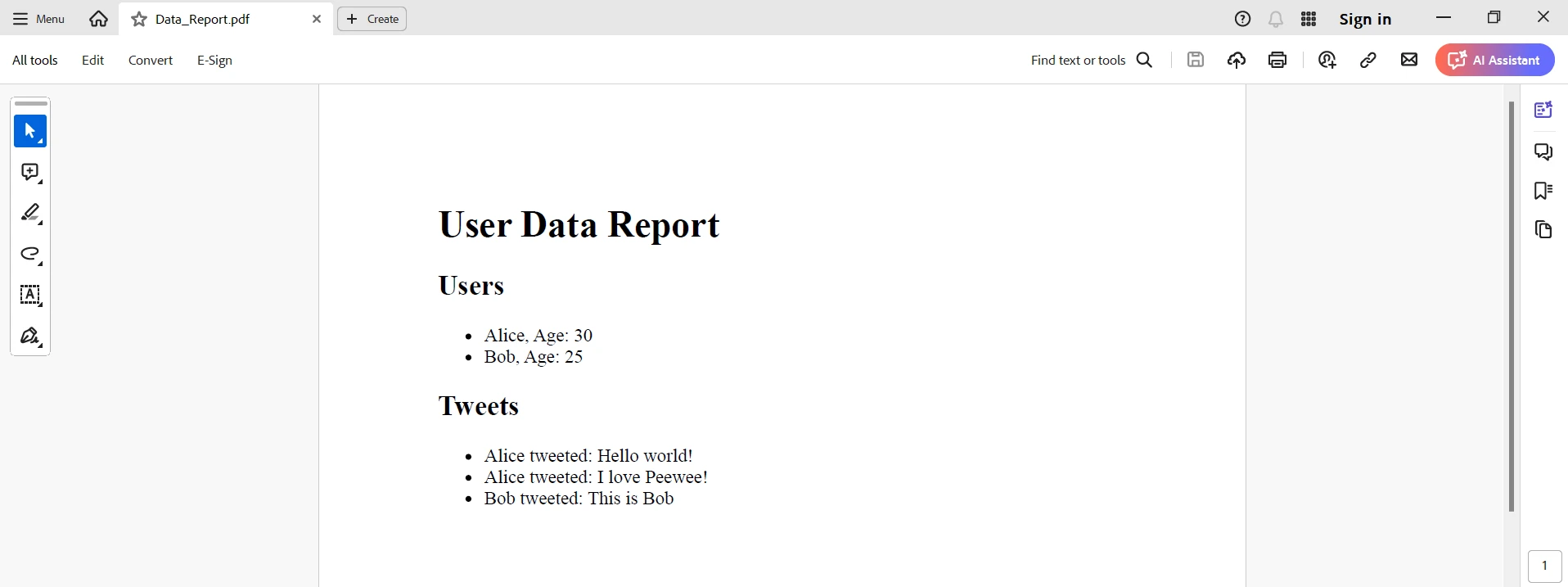
PeeweeにIronPDFを組み合わせることにより、Python開発者がデータベースを管理し、動的なPDFドキュメントを生成する際の信頼できるオプションとなります。 使いやすいORM機能により、Peeweeでのデータベースとのやり取りが簡単になり、開発者がデータベーススキームを構築および変更するのを容易にします。 一方、IronPDFにはHTMLコンテンツを高品質のPDFレポートに変換するためのパッケージがあります。
この組み合わせは、データベースから取得した動的データを使用して自動レポートを生成するアプリケーションに非常に役立ちます。 開発者は、Peeweeを使用してモデルを定義し、クエリを実行するのがいかに簡単であるか、またIronPDFがいかに強力にPDFを作成するかを利用して、効率と生産性を効果的に向上させることができます。 PeeweeとIronPDFの組み合わせにより、Python開発の世界内でさまざまな方法で多様なアプリケーションニーズに対応する柔軟で強力なツールに変わります。 これには、請求書から特別なドキュメントに関するレポートまで範囲が含まれます。
IronPDFを他のIron Software製品と組み合わせることで、ユーザーに複雑なソリューションを提供する卓越したソフトウェアソリューションをクライアントに提供するのに役立ちます。 これにより、プロジェクトの操作と手順を全般的に改善する作業が簡素化され、利益のために役立ちます。
コア機能に加えて、IronPDFには詳細なドキュメント、活発なコミュニティ、および定期的な更新サイクルがあります。 前述の情報に基づいて、開発者はIron Softwareを現代のソフトウェア開発プロジェクトの信頼できるパートナーとみなすことができます。 このライブラリのすべての機能を学ぶために、IronPDFは開発者に無料トライアルを提供しています。 今後数日間で、ライセンス料金に費やした$999の価値を十分に得られるようにするでしょう。

Curtis Chauは、カールトン大学でコンピュータサイエンスの学士号を取得し、Node.js、TypeScript、JavaScript、およびReactに精通したフロントエンド開発を専門としています。直感的で美しいユーザーインターフェースを作成することに情熱を持ち、Curtisは現代のフレームワークを用いた開発や、構造の良い視覚的に魅力的なマニュアルの作成を楽しんでいます。



IronPDF はIRONSUITEの一部です
オフィス文書向けの.NET API製品10個

PDFがHTMLのように見える必要があるとき、迅速に。











