

peewee Python(開發者指南)

Peewee是一個微小而富有表現力的ORM,旨在讓Python中與資料庫的互動變得簡單。 它輕量化、易於使用,而且足夠自信地支持複雜查詢或資料庫架構。 Peewee支持SQLite、MySQL和PostgreSQL,並且語法直覺,非常容易學習,因此很受學生和專業人士的歡迎。
IronPDF是一個Python程式庫,能夠完成與PDF文件的端到端操作:建立、讀取、編輯和管理。 使用Python .NET,可以在Python應用程式中使用IronPDF,從而獲得非常強大的PDF生成能力。 因此,這種組合在基於從資料庫檢索資料生成PDF報告方面非常有用。
此整合將Peewee與IronPDF結合起來,以便Python開發人員建立應用程式,使有效的資料庫管理和查詢能夠與生成動態資料驅動的PDF文件一起實現。 這種結合準備了一個完美的工作流程,從資料檢索到報告生成,從而提供了一套非常強大的工具集,用於建立專業和自動化的文件。 從簡單的商業報告,如發票,到複雜報告,Peewee和IronPDF一起為任何Python應用提供了一個完美無瑕的資料庫驅動的PDF生成解決方案。
PeeWee Python 是什麼?
Peewee 為 Python 提供了一個微小而富有表現力的 ORM,旨在輕鬆與資料庫工作。 它輕鬆建立模型,並使得建立常見的查詢如搜索、新增、更新和刪除資料庫中的多條記錄變得簡單。 Peewee可以在許多不同的用例中使用,原因是它支持不同的後端:SQLite、MySQL和PostgreSQL。
Peewee讓人喜歡的一點是它的簡單性和易用性。 對開發者來說,在Python中作為類建立模型非常簡單,而所有對資料庫的查詢都由於一個簡單的API以Python程式碼的形式完成。 儘管這種簡單性,Peewee非常強大,因為它支持複雜的問題、聯結和複雜的關係,並支持連接池。
靈活性和簡約的設計使得Peewee對於小型項目和更大的應用程式都非常有用,因為易於使用和快速開發成為重中之重。 以非常少的樣板程式碼處理複雜的資料庫交互,使其成為任何Python開發者的一個有吸引力的ORM。
Peewee Python的特性
Peewee是Python的一個輕量級的表現力強的ORM庫,能夠輕鬆與資料庫互動。 以下列舉了其中一些重要特性:
簡單易用: Peewee有一個非常簡單且直觀的API。 開發者可以通過使用它定義具有其所有常規屬性的模型,並通過Python程式碼輕鬆與資料庫互動。
多種資料庫: 它支持SQLite、MySQL、PostgreSQL和CockroachDB。
表現力強的查詢語法: Peewee有一個乾淨而表現力強的語法用於查詢資料庫; 我們可以使用任何查詢操作如Select、Create、Update和刪除查詢,讓開發者使用具有Python特性的結構來寫硬查詢。
模型定義: 在Peewee中,人們定義資料庫模型為Python類。 類中的字段匹配資料庫列。 此定義確保如果資料庫架構中做了任何改變,相應的更改也會在Python程式碼中做出,反之亦然。
關係: 它支持所有關係——包括外鍵、一對一和多對多關係——需要在建模複雜資料中。
連接池: Peewee內建連接池以通過重用資料庫連接來提高性能。
事務: 原子事務確保一組資料庫操作被執行;但如果其中某操作失敗,所有操作將回滾以保持資料的有效性。
事件和掛鉤: Peewee提供告知和掛鉤以在一事件之前或之後實施自定義行為,如保存或刪除記錄。
遷移: 此外這整合了與主要的、第三方程式庫的整合,從而管理資料庫架構的遷移。 這將有助於流暢地過渡資料庫的版本。
可擴展性: Peewee可以容易地通過自定義字段、查詢或其他功能來擴展,具體取決於具體應用的需求。
Playhouse擴展: 此模組附帶多個到playhouse的擴展,包括SQLite的全文檢索、一些PostgreSQL特定的功能和一些管理連接的工具。
- 非同步支持: aiopeewee是一個擴展,讓Peewee支持適合高性能應用程式的非同步操作。
建立和配置Peewee
以下步驟將幫助您在任何Python項目中開始使用Peewee,設置一個使用Peewee ORM的簡單應用程式。
安裝Peewee
首先,使用pip安裝Peewee:
pip install peeweepip install peewee定義您的模型
確保在名為app.py的Python文件中定義您的資料庫模型。 這裡,為了簡單起見,我們將使用SQLite做同樣的事情。
from peewee import SqliteDatabase, Model, CharField, IntegerField, ForeignKeyField

# Define the database connection
db = SqliteDatabase('my_database.db')

# Define a base model class
class BaseModel(Model):
    class Meta:
        database = db

# Define a User model
class User(BaseModel):
    username = CharField(unique=True)
    age = IntegerField()

# Define a Tweet model, which is related to the User model
class Tweet(BaseModel):
    user = ForeignKeyField(User, backref='tweets')
    content = CharField()

# Create the tables
db.connect()
db.create_tables([User, Tweet])
from peewee import SqliteDatabase, Model, CharField, IntegerField, ForeignKeyField
# Define the database connection
db = SqliteDatabase('my_database.db')
# Define a base model class
class BaseModel(Model):
class Meta:
database = db
# Define a User model
class User(BaseModel):
username = CharField(unique=True)
age = IntegerField()
# Define a Tweet model, which is related to the User model
class Tweet(BaseModel):
user = ForeignKeyField(User, backref='tweets')
content = CharField()
# Create the tables
db.connect()
db.create_tables([User, Tweet])插入資料
現在讓我們向資料庫中新增一些資料。
def insert_data():
    # Insert a new user
    alice = User.create(username='Alice', age=30)
    # Insert some tweets for Alice
    Tweet.create(user=alice, content='Hello world!')
    Tweet.create(user=alice, content='I love Peewee!')
    # Insert another user and a tweet for that user
    bob = User.create(username='Bob', age=25)
    Tweet.create(user=bob, content='This is Bob')

insert_data()
def insert_data():
# Insert a new user
alice = User.create(username='Alice', age=30)
# Insert some tweets for Alice
Tweet.create(user=alice, content='Hello world!')
Tweet.create(user=alice, content='I love Peewee!')
# Insert another user and a tweet for that user
bob = User.create(username='Bob', age=25)
Tweet.create(user=bob, content='This is Bob')
insert_data()查詢資料
現在,讓我們建構一些程式碼從資料庫中提取這些資訊。
def query_data():
    # Query to select all users and print their usernames and ages
    for user in User.select():
        print(f'User: {user.username}, Age: {user.age}')

    # Find tweets for a specific user, in this case, 'Alice'
    for tweet in Tweet.select().join(User).where(User.username == 'Alice'):
        print(f'{tweet.user.username} tweeted: {tweet.content}')

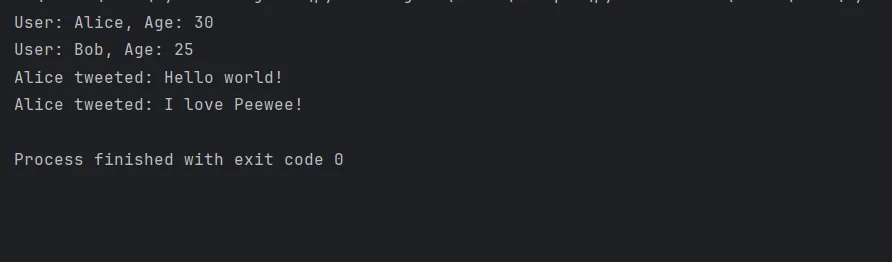
query_data()
def query_data():
# Query to select all users and print their usernames and ages
for user in User.select():
print(f'User: {user.username}, Age: {user.age}')
# Find tweets for a specific user, in this case, 'Alice'
for tweet in Tweet.select().join(User).where(User.username == 'Alice'):
print(f'{tweet.user.username} tweeted: {tweet.content}')
query_data()以下是所有上述程式碼的合成截圖。
開始
首先,您需要導入Peewee以獲取與物件關係映射相關的功能,以及IronPDF以生成PDF。 本教程假設您已經了解Python及如何通過Python .NET設置IronPDF和Peewee來工作。 以下步驟將帶您了解如何使用Peewee與資料庫互動建立簡單的應用程式,並將使用IronPDF生成PDF報告。
什麼是IronPDF?
IronPDF Python模塊是一個高級程式庫,用於建立、編輯和閱讀PDF。 它提供了大量的功能,使程式設計師可以對PDF進行許多可編程活動。 這包括將HTML文件轉換為PDF文件,以便編輯現有的PDF。 這將使得以PDF格式生成精美報告變得更靈活和簡單。 生成和處理PDF的程式可以利用這一優勢。
HTML 到 PDF 轉換
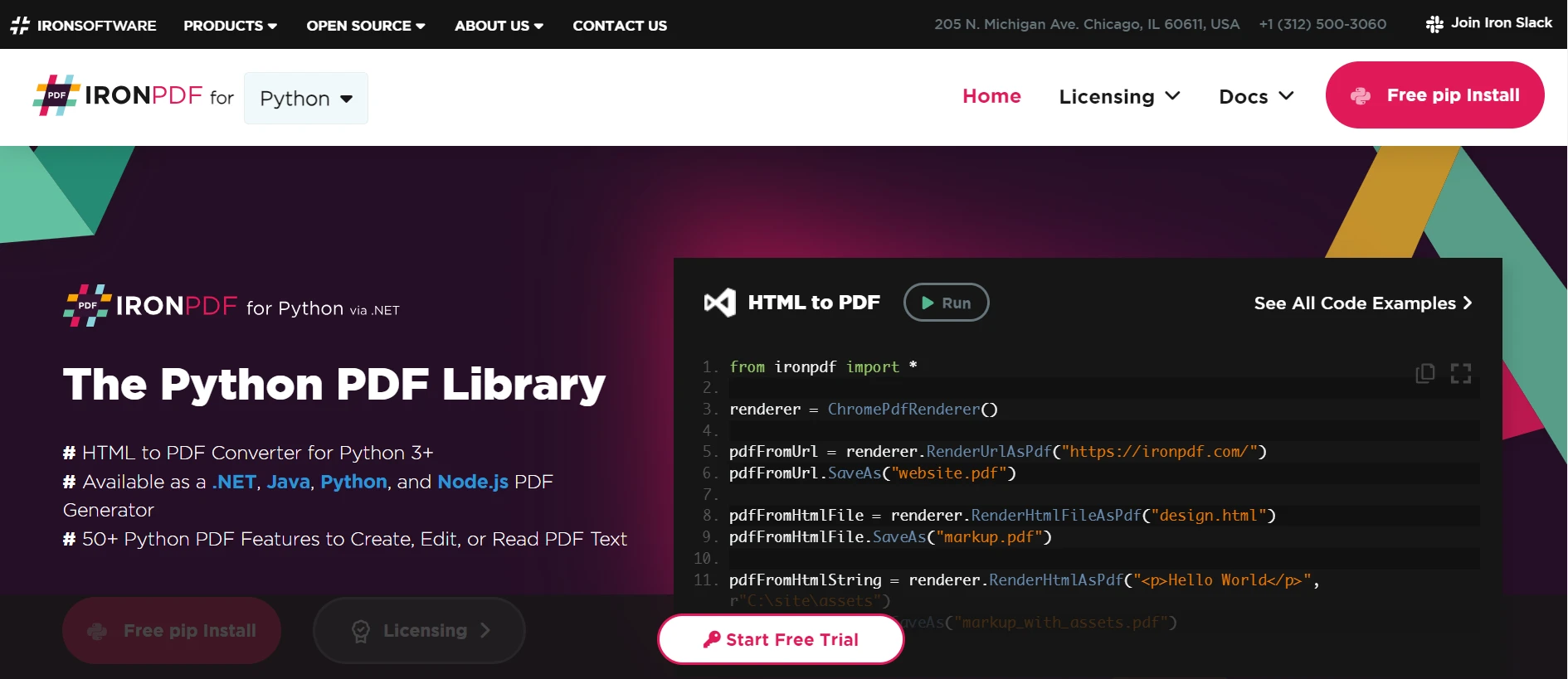
使用IronPDF的能力,任何時候的HTML資料都可以輕鬆轉換為PDF文件。 它進一步為使用者提供了一個平台,讓使用者可以從在線材料中直接建立極具創新性和吸引力的PDF出版物,同時利用HTML5、CSS3及JavaScript的各種最新功能。
生成和編輯PDF
您可以生成包含文字、圖片、表格等新PDF文件,甚至借助某種程式語言。 您可提前開啟准備好的文件並使用IronPDF對其進行編輯,增加進一步的個性化。 隨時都可以向PDF文件的任何內容進行新增、更改或刪除。
複雜的設計和樣式
由於它天生就有PDF的內容樣式,復雜的版面可以用多種字體、顏色和其他設計元素來控制,這一點使得實現成為可能。 此外,JavaScript不能被應用於處理PDF中的動態材料以便於HTML內容的輕鬆渲染。
安裝IronPDF
IronPDF可以用Pip安裝。安裝指令如下所示:
pip install ironpdf
將Peewee與IronPDF結合
可以建立和配置Peewee ORM,插入資料,並通過將所有階段結合到app.py文件中來生成PDF報告。
from peewee import SqliteDatabase, Model, CharField, IntegerField, ForeignKeyField
import os
from ironpdf import *   # Import IronPDF for PDF generation
import warnings  # Suppress any warning messages for clean output

warnings.filterwarnings('ignore')

# You must specify your license key if IronPDF requires it; use an empty string for trial
License.LicenseKey = ""

# Define the database connection using SQLite
db = SqliteDatabase('my_database.db')

# BaseModel class that will define common configurations for all models
class BaseModel(Model):
    class Meta:
        database = db

# Define a User model to interact with the 'User' table in the database
class User(BaseModel):
    username = CharField(unique=True)  # Ensure username is unique
    age = IntegerField()

# Define a Tweet model for the 'Tweet' table that references User
class Tweet(BaseModel):
    user = ForeignKeyField(User, backref='tweets')  # Define relationship with User
    content = CharField()

# Connect to the database and create the necessary tables if they don't exist
db.connect()
db.create_tables([User, Tweet])

def insert_data():
    # Insert some sample data into the User and Tweet models
    alice = User.create(username='Alice', age=30)
    Tweet.create(user=alice, content='Hello world!')
    Tweet.create(user=alice, content='I love Peewee!')
    bob = User.create(username='Bob', age=25)
    Tweet.create(user=bob, content='This is Bob')

def generate_pdf():
    # Fetch the data from the database
    users = User.select()
    tweets = Tweet.select().join(User)

    # Prepare HTML content for the PDF generation
    html_content = """
    <html>
    <head><title>Data Report</title></head>
    <body>
        <h1>User Data Report</h1>
        <h2>Users</h2>
        <ul>
    """
    for user in users:
        html_content += f"<li>{user.username}, Age: {user.age}</li>"
    html_content += "</ul><h2>Tweets</h2><ul>"
    for tweet in tweets:
        html_content += f"<li>{tweet.user.username} tweeted: {tweet.content}</li>"
    html_content += "</ul></body></html>"

    # Create a PDF document using IronPDF
    renderer = ChromePdfRenderer()
    pdf = renderer.RenderHtmlAsPdf(html_content)

    # Save the PDF file to the current working directory
    output_path = os.path.join(os.getcwd(), "Data_Report.pdf")
    pdf.SaveAs(output_path)
    print(f"PDF Report saved to {output_path}")

if __name__ == '__main__':
    insert_data()       # Insert data into the database
    generate_pdf()      # Generate a PDF report based on the data
from peewee import SqliteDatabase, Model, CharField, IntegerField, ForeignKeyField
import os
from ironpdf import * # Import IronPDF for PDF generation
import warnings # Suppress any warning messages for clean output
warnings.filterwarnings('ignore')
# You must specify your license key if IronPDF requires it; use an empty string for trial
License.LicenseKey = ""
# Define the database connection using SQLite
db = SqliteDatabase('my_database.db')
# BaseModel class that will define common configurations for all models
class BaseModel(Model):
class Meta:
database = db
# Define a User model to interact with the 'User' table in the database
class User(BaseModel):
username = CharField(unique=True) # Ensure username is unique
age = IntegerField()
# Define a Tweet model for the 'Tweet' table that references User
class Tweet(BaseModel):
user = ForeignKeyField(User, backref='tweets') # Define relationship with User
content = CharField()
# Connect to the database and create the necessary tables if they don't exist
db.connect()
db.create_tables([User, Tweet])
def insert_data():
# Insert some sample data into the User and Tweet models
alice = User.create(username='Alice', age=30)
Tweet.create(user=alice, content='Hello world!')
Tweet.create(user=alice, content='I love Peewee!')
bob = User.create(username='Bob', age=25)
Tweet.create(user=bob, content='This is Bob')
def generate_pdf():
# Fetch the data from the database
users = User.select()
tweets = Tweet.select().join(User)
# Prepare HTML content for the PDF generation
html_content = """
<html>
<head><title>Data Report</title></head>
<body>
<h1>User Data Report</h1>
<h2>Users</h2>
<ul>
"""
for user in users:
html_content += f"<li>{user.username}, Age: {user.age}</li>"
html_content += "</ul><h2>Tweets</h2><ul>"
for tweet in tweets:
html_content += f"<li>{tweet.user.username} tweeted: {tweet.content}</li>"
html_content += "</ul></body></html>"
# Create a PDF document using IronPDF
renderer = ChromePdfRenderer()
pdf = renderer.RenderHtmlAsPdf(html_content)
# Save the PDF file to the current working directory
output_path = os.path.join(os.getcwd(), "Data_Report.pdf")
pdf.SaveAs(output_path)
print(f"PDF Report saved to {output_path}")
if __name__ == '__main__':
insert_data() # Insert data into the database
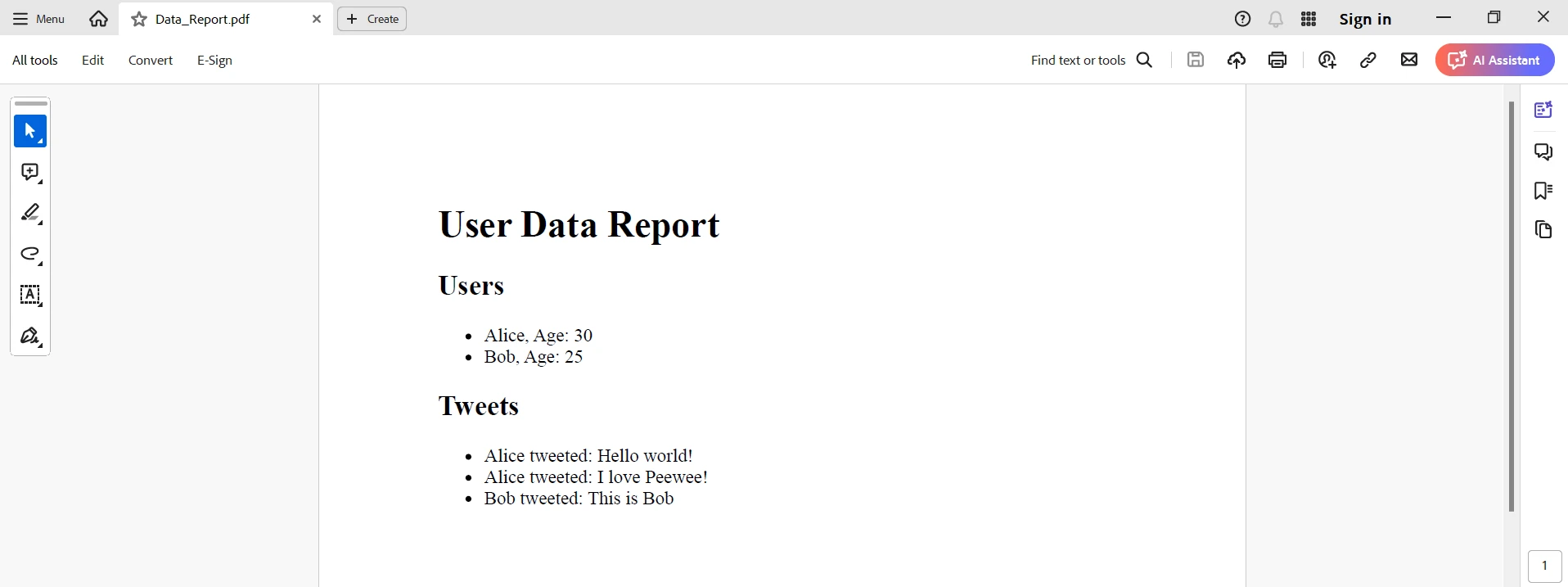
generate_pdf() # Generate a PDF report based on the data這段程式碼展示如何使用Python .NET來將一個用於生成PDF的Python程式庫IronPDF與一個Python的輕量級ORM,Peewee結合起來。 使用Peewee,首先建立一個SQLite資料庫並用適當的字段定義User和Tweet模型。 在建立資料庫表後,向它們中加入範例資料。 然後,使用IronPDF的ChromePdfRenderer類,generate_pdf 函式檢索此資料並將其轉換成一個HTML字串,然後將其渲染為PDF。

PDF儲存於當前工作目錄中。 利用Peewee在資料庫管理上的優勢和IronPDF在生成優質PDF文件方面的優勢,這種配置使得流暢的資料庫交互和自動PDF報告輸出在Python應用中成為可能。
結論
一旦IronPDF整合到Peewee中,這將為希望管理資料庫和生成動態PDF文件的Python開發者提供可靠的選擇。 透過使用簡單的ORM功能,資料庫交互在Peewee中變得更加容易,使得開發者可以輕鬆建構和變更資料庫架構。 另一方面,IronPDF有設計的包裝功能,使得HTML內容簡易轉譯為高質量的PDF報告。
因此,這種組合在使用動態資料從資料庫檢索生成自動報告的應用中將非常有用。 開發者可以利用Peewee定義模型和運行查詢的簡單以及IronPDF有效建立PDF的強大能力,有效提升效率和生產力。 Peewee與IronPDF作為一個組合,變成了靈活而強大的工具,可以在Python開發領域裡以多種方式滿足廣泛的應用需求。 這些可能從開具賬單到特殊文件的報告。
將IronPDF與其他Iron Software產品結合會有助提供卓越的軟體解決方案給提供複雜解決方案的客戶。 這將為了您的好處,簡化提升項目和流程操作的任務。
除核心功能外,IronPDF還有詳細的文件、活躍的社群和定期的更新週期。 基於前述段落的資訊,開發者可以認為Iron Software是現代軟體開發專案中的一個可靠合作夥伴。 要學習此庫的所有功能,IronPDF為開發者提供了一個免費試用。 在接下來的幾天裡,您將確保您在[$999]上的支出可以充分發揮價值。








 免費開始
免費開始 免費開始
免費開始 預訂免費直播演示
















