



업데이트됨 2026년 4월 21일
Java에서 참조에 의한 전달(개발자를 위한 작동 방식)
Java 프로그래밍 언어에서 매개변수 전달은 항상 값으로 전달됩니다. 객체를 다룰 때는 참조 변수가 값으로 전달됩니다.
더 읽어보기

현대 프로그래밍 영역에서 JSON(JavaScript Object Notation) 형식의 데이터를 처리하는 것은 매우 중요한 작업이 되었습니다. JSON은 단순하고 사용하기 쉬워서 서버와 클라이언트 간의 데이터 교환에 널리 사용됩니다. 자바 개발자들에게 있어 잭슨 라이브러리는 JSON 처리를 위한 강력한 도구로 두드러집니다. 이 글에서는 Jackson Java의 특징, 사용법 및 장점을 자세히 살펴보고, 그 기능을 보여주는 코드 예제를 제공합니다. 또한, IronPDF for Java를 살펴보고 이를 Jackson과 통합하여 JSON 데이터에서 PDF 문서를 생성하는 방법을 시연해 보겠습니다.
Jackson은 Java용 고성능 JSON 처리기입니다. 이 라이브러리는 JSON에 대한 포괄적인 지원을 제공하며, Java 객체를 JSON으로 직렬화하고 JSON을 Java 객체로 역직렬화하는 도구 모음을 제공합니다. FasterXML에서 개발한 Jackson은 견고성, 유연성 및 사용 편의성 덕분에 Java 커뮤니티에서 널리 사용되고 있습니다.
Java 프로젝트에서 Jackson을 사용하려면 필요한 종속성을 추가해야 합니다. Maven을 사용하는 사용자는 pom.xml 파일에 다음 코드를 추가하십시오.
<dependency>
    <groupId>com.fasterxml.jackson.core</groupId>
    <artifactId>jackson-databind</artifactId>
    <version>2.13.2</version>
</dependency>Jackson의 가장 일반적인 용도는 JSON 데이터를 Java 객체(POJO)에 바인딩하거나 그 반대로 하는 것입니다. 이를 설명하기 위한 간단한 예시를 들어보겠습니다.
import com.fasterxml.jackson.databind.ObjectMapper;

// Class demonstrating JSON data binding using Jackson
class Main {
    public static void main(String[] args) {
        ObjectMapper objectMapper = new ObjectMapper();

        // Try-catch block to handle potential exceptions during JSON processing
        try {
            // Create a User object and serialize it to a JSON string
            User user = new User("John", "Doe", 30);
            String jsonString = objectMapper.writeValueAsString(user);
            System.out.println("JSON String: " + jsonString);

            // Deserialize JSON string back into a User object
            String jsonInput = "{\"firstName\":\"Jane\",\"lastName\":\"Doe\",\"age\":25}";
            User userFromJson = objectMapper.readValue(jsonInput, User.class);
            System.out.println("User from JSON: " + userFromJson);
        } catch (Exception e) {
            e.printStackTrace();
        }
    }
}

// A simple User class with basic attributes
class User {
    public String firstName;
    public String lastName;
    public int age;

    // Default constructor
    public User() {
    }

    // Parameterized constructor
    public User(String firstName, String lastName, int age) {
        this.firstName = firstName;
        this.lastName = lastName;
        this.age = age;
    }

    // Override toString for easier printing
    @Override
    public String toString() {
        return "User [firstName=" + firstName + ", lastName=" + lastName + ", age=" + age + "]";
    }
}
잭슨의 트리 모델은 자바 클래스를 만들 필요 없이 JSON 데이터를 조작하는 데 유용합니다. 다음은 예시입니다.
import com.fasterxml.jackson.databind.JsonNode;
import com.fasterxml.jackson.databind.ObjectMapper;
import com.fasterxml.jackson.databind.node.ObjectNode;

// Example of utilizing the Tree Model feature of Jackson
class TreeModelExample {
    public static void main(String[] args) {
        ObjectMapper objectMapper = new ObjectMapper();
        try {
            // JSON string that we need to parse
            String jsonString = "{\"name\":\"John\", \"age\":30}";

            // Parse JSON string into a JsonNode (tree structure)
            JsonNode rootNode = objectMapper.readTree(jsonString);
            System.out.println("Name: " + rootNode.get("name").asText());
            System.out.println("Age: " + rootNode.get("age").asInt());

            // Modify the JSON structure using Tree Model
            ((ObjectNode) rootNode).put("age", 31);
            System.out.println("Modified JSON: " + rootNode.toString());
        } catch (Exception e) {
            e.printStackTrace();
        }
    }
}
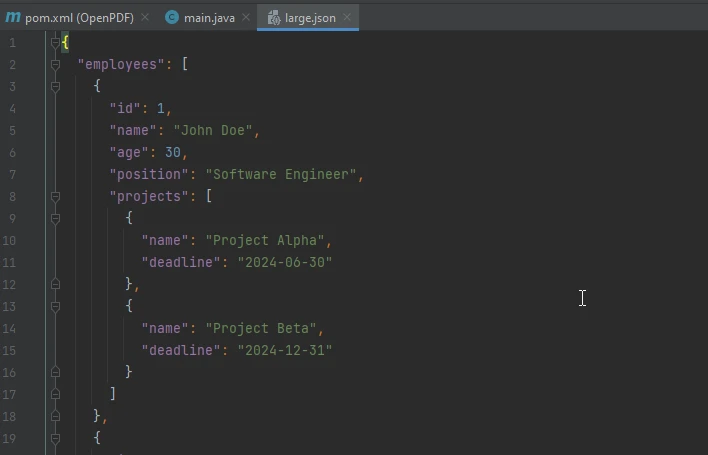
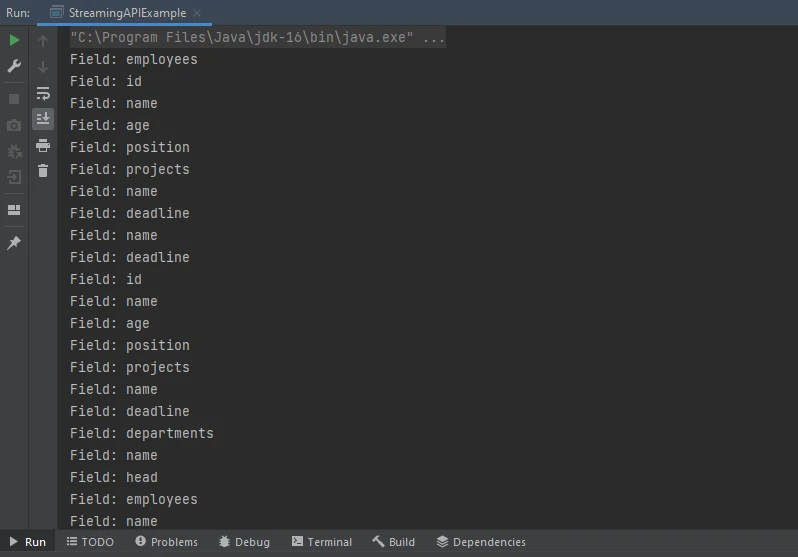
대용량 JSON 파일을 처리하는 데에는 스트리밍 API가 효율적입니다.
import com.fasterxml.jackson.core.JsonFactory;
import com.fasterxml.jackson.core.JsonParser;
import com.fasterxml.jackson.core.JsonToken;
import java.io.File;

// Example of using Jackson's Streaming API for large files
class StreamingAPIExample {
    public static void main(String[] args) {
        JsonFactory factory = new JsonFactory();
        try (JsonParser parser = factory.createParser(new File("large.json"))) {

            // Iterate over JSON tokens for efficient reading
            while (!parser.isClosed()) {
                JsonToken token = parser.nextToken();
                if (token == JsonToken.FIELD_NAME) {
                    // Print each field name as we parse through JSON
                    String fieldName = parser.getCurrentName();
                    System.out.println("Field: " + fieldName);
                }
            }
        } catch (Exception e) {
            e.printStackTrace();
        }
    }
}
IronPDF 는 Java를 사용하여 PDF 문서를 생성, 편집 및 렌더링하기 위한 포괄적인 라이브러리입니다. 이 서비스는 HTML, URL 또는 기존 문서와 같은 다양한 소스에서 PDF를 생성할 수 있는 간단한 API를 제공합니다. IronPDF Jackson에서 처리한 JSON 데이터를 기반으로 PDF를 생성해야 할 때 특히 유용합니다. 예를 들어, 개발자가 데이터를 기반으로 보고서를 생성하는 Spring Boot 애플리케이션을 개발하는 경우 IronPDF 사용하면 워크플로를 크게 간소화할 수 있습니다.
프로젝트에서 IronPDF 사용하려면 다음 종속성을 추가하세요.
<dependency>
    <groupId>com.ironsoftware</groupId>
    <artifactId>ironpdf</artifactId>
    <version>2023.6.0</version>
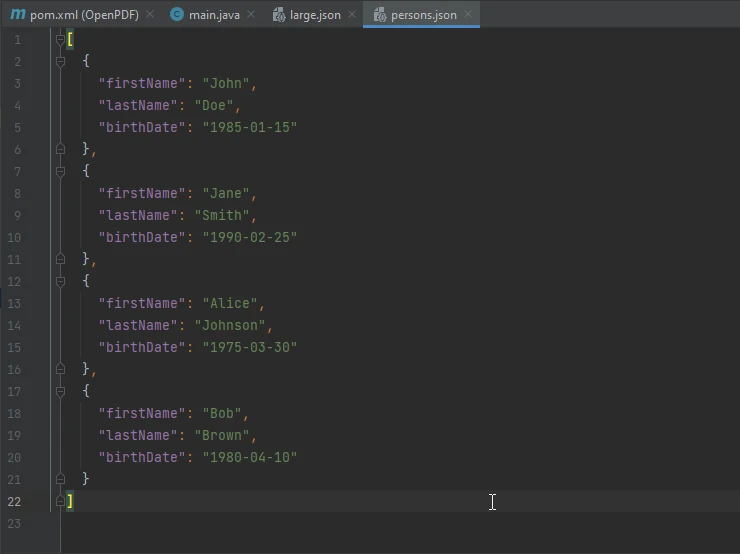
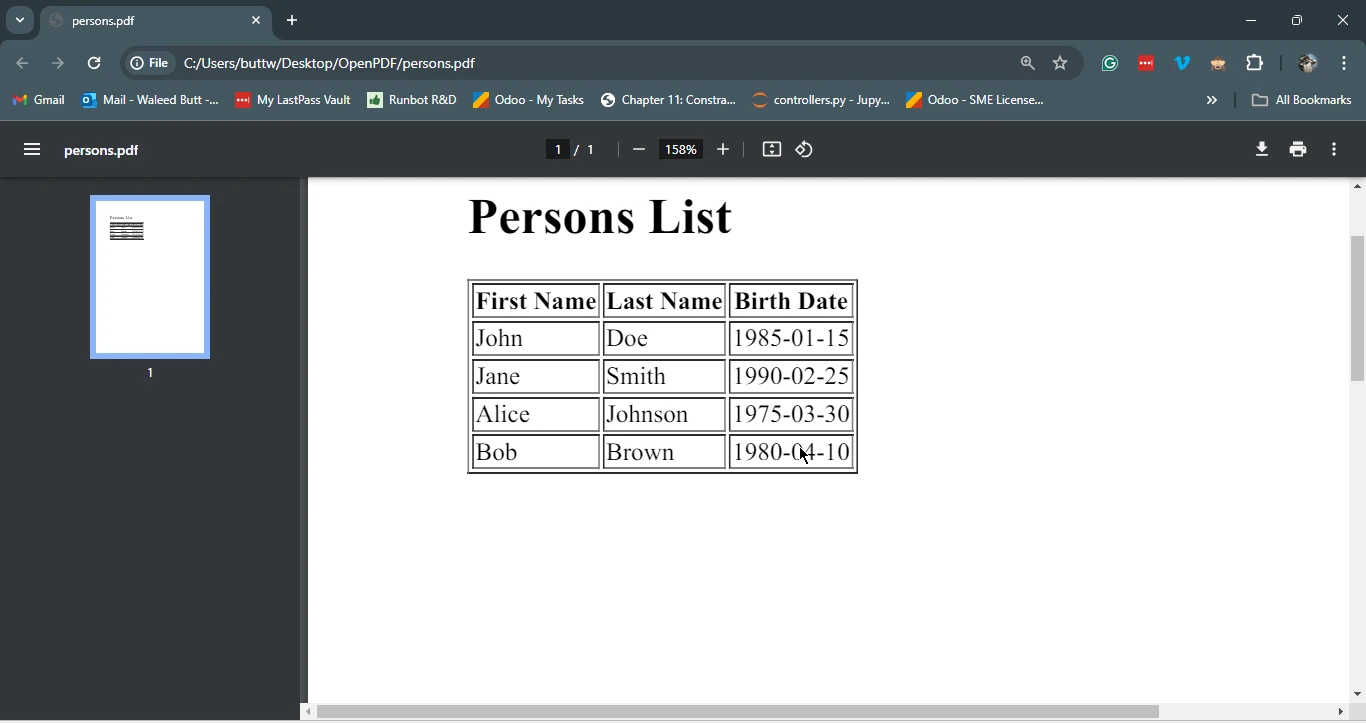
</dependency>Jackson과 IronPDF 결합하면 JSON 데이터에서 PDF 문서를 생성하는 강력한 솔루션을 만들 수 있습니다. 아래는 JSON 데이터를 읽고, Jackson을 사용하여 처리한 다음, IronPDF 사용하여 PDF 문서를 생성하는 포괄적인 예제입니다.
import com.fasterxml.jackson.databind.ObjectMapper;
import com.ironsoftware.ironpdf.PdfDocument;
import java.io.File;
import java.util.List;

// Example of integrating Jackson to handle JSON and IronPDF to generate PDFs
class JacksonIronPDFExample {
    public static void main(String[] args) {
        try {
            ObjectMapper objectMapper = new ObjectMapper();

            // Read JSON data from a file and convert it to a List of Person objects
            List<Person> persons = objectMapper.readValue(new File("persons.json"),
                    objectMapper.getTypeFactory().constructCollectionType(List.class, Person.class));

            // Generate HTML content based on JSON data
            StringBuilder htmlContent = new StringBuilder("<h1>Persons List</h1><table border='1'><tr><th>First Name</th><th>Last Name</th><th>Birth Date</th></tr>");
            for (Person person : persons) {
                htmlContent.append("<tr>")
                        .append("<td>").append(person.getFirstName()).append("</td>")
                        .append("<td>").append(person.getLastName()).append("</td>")
                        .append("<td>").append(person.getBirthDate()).append("</td>")
                        .append("</tr>");
            }
            htmlContent.append("</table>");

            // Use IronPDF to create a PDF from the HTML content
            PdfDocument pdf = PdfDocument.renderHtmlAsPdf(htmlContent.toString());
            pdf.saveAs("persons.pdf");
            System.out.println("PDF created successfully from JSON data!");
        } catch (Exception e) {
            e.printStackTrace();
        }
    }
}

// Sample Person class with basic attributes and necessary methods
class Person {
    private String firstName;
    private String lastName;
    private String birthDate;

    // Constructors, getters, and setters (omitted for brevity)
    public String getFirstName() {
        return firstName;
    }
    public void setFirstName(String firstName) {
        this.firstName = firstName;
    }
    public String getLastName() {
        return lastName;
    }
    public void setLastName(String lastName) {
        this.lastName = lastName;
    }
    public String getBirthDate() {
        return birthDate;
    }
    public void setBirthDate(String birthDate) {
        this.birthDate = birthDate;
    }
}
Jackson은 JSON 데이터를 다루는 Java 개발자에게 없어서는 안 될 필수 도구입니다. 다재다능함, 성능 및 사용 편의성 덕분에 JSON 처리에 선호되는 선택지가 되었습니다. IronPDF 와 함께 사용하면 더욱 강력해져 개발자가 JSON 데이터를 서식이 잘 갖춰진 PDF 문서로 쉽게 변환할 수 있습니다. 이 두 라이브러리를 통합하면 데이터 처리 및 보고 워크플로를 간소화하고 최소한의 노력으로 역동적이고 전문적인 PDF를 생성할 수 있습니다. 잭슨 데이터바인드 프로젝트를 포함한 자바 생태계는 마이너 버전과 메이저 업데이트를 통해 끊임없이 진화하고 있습니다. 프로젝트에서 최신 도구를 사용하려면 항상 중앙 Maven 저장소에서 최신 Jackson 릴리스 및 버전 번호 업데이트를 확인하세요.
HTML을 PDF로 렌더링하는 방법에 대한 자세한 내용은 IronPDF 개요를 참조하세요. Jackson 코어 및 Jackson 어노테이션에 대한 자세한 내용은 외부 링크를 클릭하여 Jackson 공식 문서를 참조하십시오.

커티스 차우는 칼턴 대학교에서 컴퓨터 과학 학사 학위를 취득했으며, Node.js, TypeScript, JavaScript, React를 전문으로 하는 프론트엔드 개발자입니다. 직관적이고 미적으로 뛰어난 사용자 인터페이스를 만드는 데 열정을 가진 그는 최신 프레임워크를 활용하고, 잘 구성되고 시각적으로 매력적인 매뉴얼을 제작하는 것을 즐깁니다.


IronPDF는 IRON SUITE 의 일부입니다.
10개의 .NET API 제품, 당신의 사무 문서를 위해

PDF 파일을 HTML처럼 빠르게 변환해야 할 때.

