

Java printf 함수 사용법 (개발자를 위한 작동 원리)

IronPDF 는 PDF 생성 및 조작을 간소화하도록 설계된 Java 라이브러리입니다. 문서 생성 및 보고 솔루션을 개발하는 개발자에게 완벽한 선택입니다. IronPDF Java의 printf 기능 과 통합하면 정확한 텍스트 서식을 적용하여 PDF 출력물의 품질을 향상시킬 수 있습니다. 특정 레이아웃 및 서식 요구 사항을 충족하는 전문 문서의 품질을 향상시킵니다. IronPDF의 강력한 문서 조작 기능과 Java의 유연한 형식 출력 기능을 통해 동적 보고서, 송장 및 기타 구조화된 문서를 효율적으로 생성할 수 있습니다.
자바 문자열 형식 지정
Java의 문자열 서식 지정은 서식 지정자를 사용하여 서식이 지정된 출력을 생성하는 방법을 제공합니다. 십진 정수, 유니코드 문자, 부동 소수점 숫자 및 부울 값을 포함한 다양한 데이터 유형의 출력 형식과 표시 방식을 제어할 수 있습니다.
형식 문자열에는 텍스트와 형식 지정자가 포함됩니다. 각 형식 지정자는 '%' 문자로 시작하고 변환 문자로 끝납니다. 일반적인 구문은 다음과 같습니다.
%[flags][width][.precision]conversion-
십진수 정수 형식화: 십진수 정수에는
%d를 사용하세요. 예:System.out.printf("Score: %d", 100); // Output: Score: 100System.out.printf("Score: %d", 100); // Output: Score: 100JAVA -
부동 소수점 숫자: 부동 소수점 숫자에는
%f를 사용하세요. 소수점 정밀도를 조절할 수 있습니다. 예:System.out.printf("Pi: %.2f", Math.PI); // Output: Pi: 3.14System.out.printf("Pi: %.2f", Math.PI); // Output: Pi: 3.14JAVA -
과학적 표기법: 부동 소수점 숫자의 과학적 표기법에는
%e를 사용하세요. 예:System.out.printf("Large number: %e", 1234567.89); // Output: Large number: 1.234568e+06System.out.printf("Large number: %e", 1234567.89); // Output: Large number: 1.234568e+06JAVA -
문자 형식화: Unicode 문자를 포함한 문자 형식화에는
%c를 사용하세요. 예:System.out.printf("Unicode heart: %c", '\u2665'); // Output: Unicode heart:System.out.printf("Unicode heart: %c", '\u2665'); // Output: Unicode heart:JAVA -
부울 형식화: 부울 형식화에는
%b를 사용하세요. 예:System.out.printf("Is Java fun? %b", true); // Output: Is Java fun? trueSystem.out.printf("Is Java fun? %b", true); // Output: Is Java fun? trueJAVA -
문자열 형식화: 문자열 형식화에는
%s를 사용하세요. 예:System.out.printf("Hello, %s!", "World"); // Output: Hello, World!System.out.printf("Hello, %s!", "World"); // Output: Hello, World!JAVA
IronPDF 시작하기
IronPDF를 Java 프로젝트에서 사용하려면, 먼저 pom.xml을 사용하여 IronPDF 체험판을 설치해야 합니다. 이 라이브러리는 PDF 파일을 프로그래밍 방식으로 생성, 수정 및 보호하는 데 필요한 포괄적인 도구 세트를 제공합니다.
Java용 IronPDF 체험판 설치
IronPDF Windows, Linux, macOS 시스템을 포함한 최신 프레임워크 및 환경과 호환되는 Java 버전을 지원합니다. IronPDF 설치하기 전에 개발 환경이 호환되는 JDK(Java Development Kit)로 구성되어 있는지 확인하십시오.
Maven 기반 Java 프로젝트에 IronPDF를 설치하려면, 다음 종속성을 pom.xml 파일에 추가하세요:
<dependency>
    <groupId>com.ironsoftware</groupId>
    <artifactId>ironpdf-engine-windows-x64</artifactId>
    <version>20xx.xx.xxxx</version>
</dependency>
<dependency>
<groupId>com.ironsoftware</groupId>
<artifactId>ironpdf-engine-windows-x64</artifactId>
<version>20xx.xx.xxxx</version>
</dependency>버전 부분을 현재 사용 중인 IronPDF 버전 번호로 바꿔주세요. 종속성을 추가한 후, mvn install을 실행하여 IronPDF를 프로젝트에 다운로드하고 통합하세요.
기본 설정 및 구성
IronPDF 프로젝트의 종속성에 추가하면 필요한 클래스를 가져와 라이브러리를 사용할 수 있습니다.
import com.ironsoftware.ironpdf.PdfDocument;import com.ironsoftware.ironpdf.PdfDocument;IronPDF 에서 Java Printf 사용하기
printf를 사용하여 서식이 지정된 텍스트 생성
Java의 printf 함수는 형식화된 텍스트를 생성하는 데 매우 유용하며, 이를 PDF에 주입할 수 있습니다. printf을 사용하면 텍스트 정렬, 간격 및 형식을 제어할 수 있으며, 이는 구조화된 보고서나 청구서를 만들 때 중요할 수 있습니다.
// Format a string with name and salary using specific format specifiers
String formattedText = String.format("Employee Name: %s | Salary: $%,.2f", "Iron Dev", 55000.50);
// Format a string with name and salary using specific format specifiers
String formattedText = String.format("Employee Name: %s | Salary: $%,.2f", "Iron Dev", 55000.50);위의 형식화된 문자열은 숫자 값이 쉼표와 소수점 두 자리까지 표시되도록 합니다. 복잡한 텍스트 형식은 여러 printf 또는 String.format 호출을 연결하여 달성할 수 있습니다. 예를 들어 표와 같은 구조를 만들려면 간격과 정렬이 일정한 여러 줄의 서식 있는 텍스트를 사용하세요.
서식이 지정된 텍스트를 PDF에 통합하기
printf을 사용하여 형식화된 텍스트를 생성한 후, IronPDF의 PdfDocument 클래스를 사용하여 이 텍스트를 PDF에 주입할 수 있습니다.
// Retrieve the license key for IronPDF from the system environment variables
String licenseKey = System.getenv("IRONPDF_LICENSE_KEY");
License.setLicenseKey(licenseKey);

// Format text to include employee information
String formattedText = String.format("Employee Name: %s | Salary: $%,.2f", "Iron Dev", 55000.50);

// Create a PDF document from the formatted text
PdfDocument pdf = PdfDocument.renderHtmlAsPdf(formattedText);

// Save the generated PDF document
pdf.saveAs("formatted_report.pdf");
// Retrieve the license key for IronPDF from the system environment variables
String licenseKey = System.getenv("IRONPDF_LICENSE_KEY");
License.setLicenseKey(licenseKey);
// Format text to include employee information
String formattedText = String.format("Employee Name: %s | Salary: $%,.2f", "Iron Dev", 55000.50);
// Create a PDF document from the formatted text
PdfDocument pdf = PdfDocument.renderHtmlAsPdf(formattedText);
// Save the generated PDF document
pdf.saveAs("formatted_report.pdf");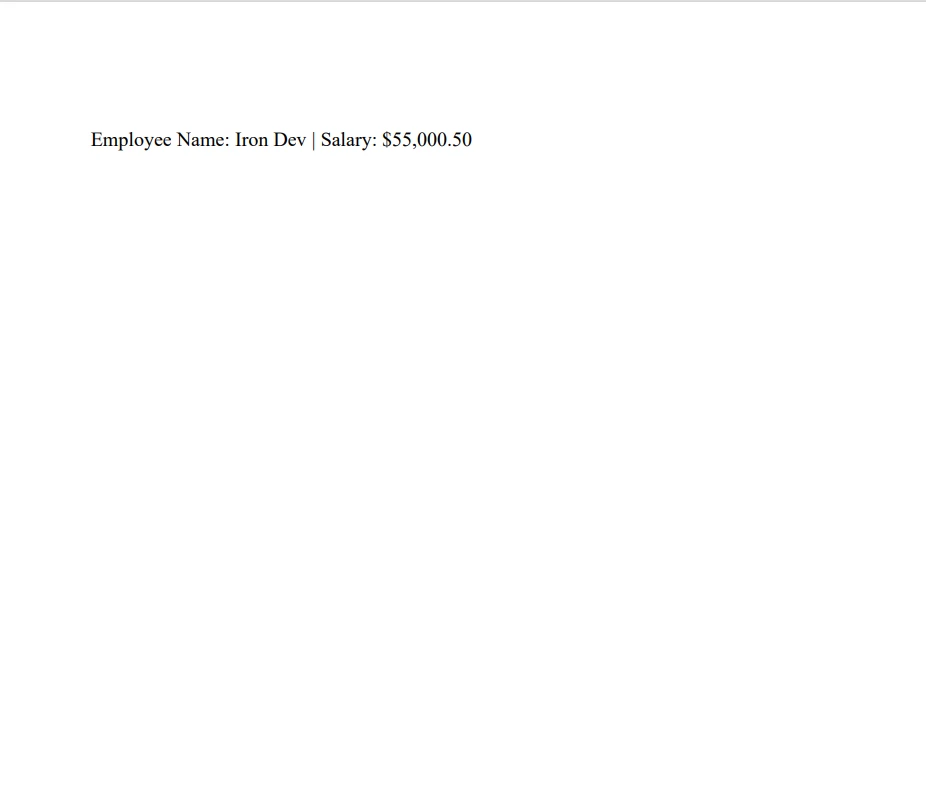
이 코드 조각은 새 PDF 파일을 생성하고 이전에 생성된 서식이 지정된 텍스트를 단락으로 추가합니다.
실용적인 코드 예제
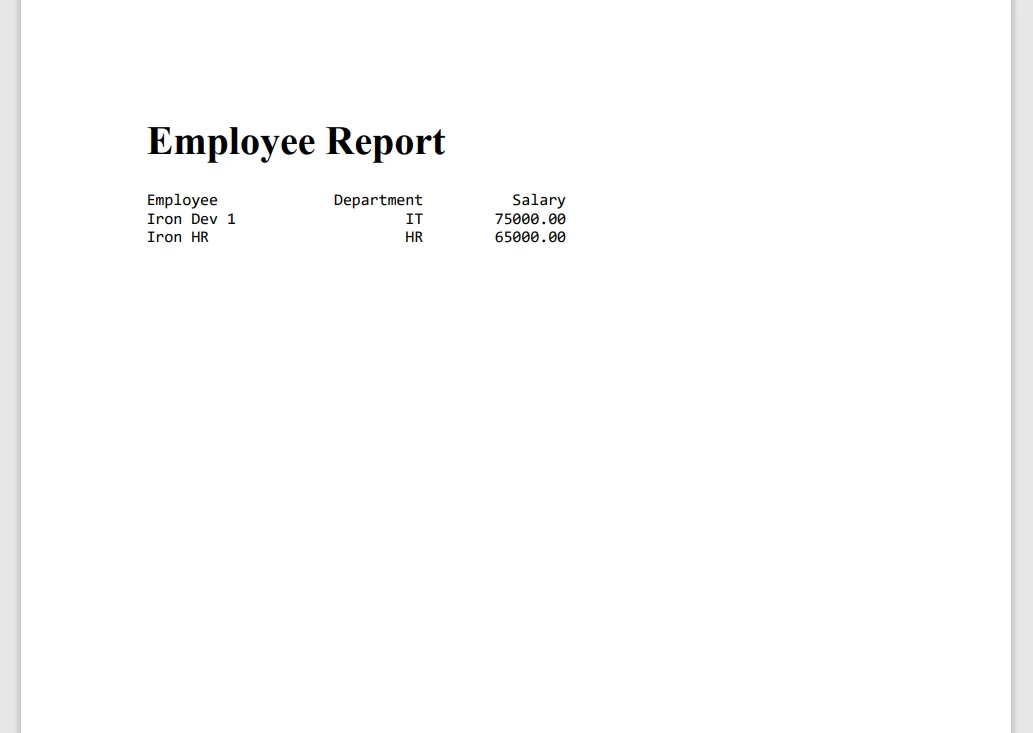
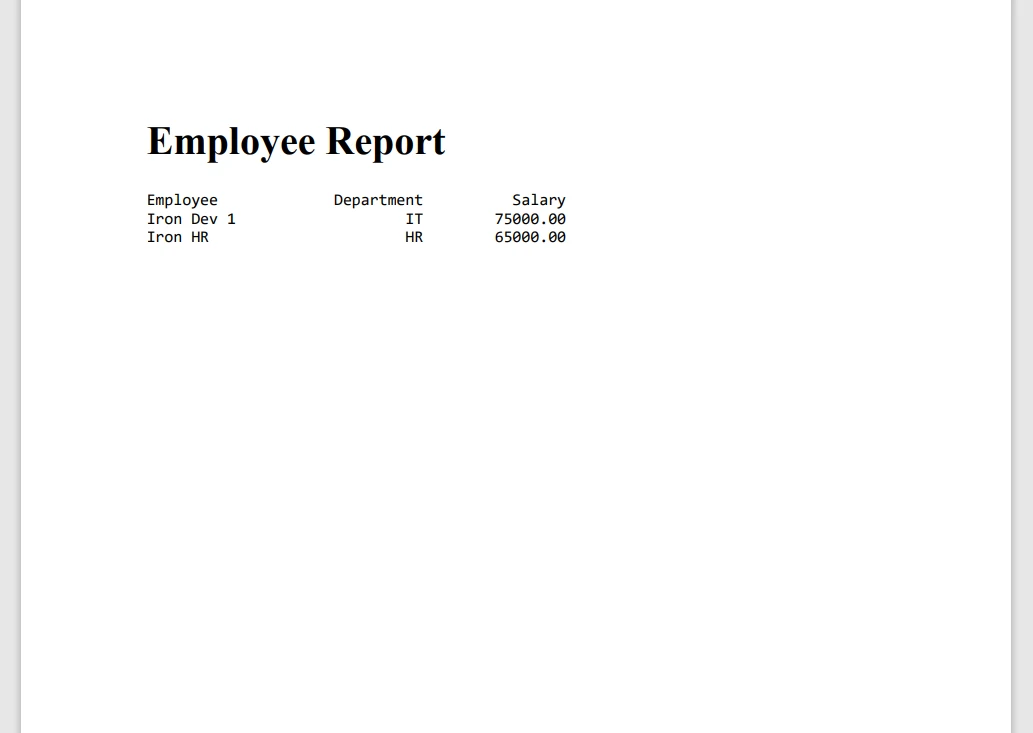
다음은 Java의 printf 함수와 IronPDF 완벽하게 통합하여 서식이 지정된 PDF 보고서를 생성하는 방법을 보여주는 Java 코드 예시입니다.
import com.ironsoftware.ironpdf.License;
import com.ironsoftware.ironpdf.PdfDocument;

public class PDFReport {
    public static void main(String[] args) {
        // Get IronPDF license key from environment variables and set it
        String licenseKey = System.getenv("IRONPDF_LICENSE_KEY");
        License.setLicenseKey(licenseKey);

        // Define headers and rows using String.format for consistent formatting
        String title = String.format("%-20s %10s %15s", "Employee", "Department", "Salary");
        String row1 = String.format("%-20s %10s %15.2f", "Iron Dev 1", "IT", 75000.00);
        String row2 = String.format("%-20s %10s %15.2f", "Iron HR", "HR", 65000.00);

        // Create an HTML formatted string including the data rows
        String htmlContent = String.format(
            "<html><body>" +
            "<h1>Employee Report</h1>" +
            "<pre>" +
            "%s\n%s\n%s" +
            "</pre>" +
            "</body></html>",
            title, row1, row2
        );

        // Generate a PDF document from the HTML content
        PdfDocument pdf = PdfDocument.renderHtmlAsPdf(htmlContent);

        // Save the created PDF with a specified file name
        pdf.saveAs("EmployeeReport.pdf");
    }
}
import com.ironsoftware.ironpdf.License;
import com.ironsoftware.ironpdf.PdfDocument;
public class PDFReport {
public static void main(String[] args) {
// Get IronPDF license key from environment variables and set it
String licenseKey = System.getenv("IRONPDF_LICENSE_KEY");
License.setLicenseKey(licenseKey);
// Define headers and rows using String.format for consistent formatting
String title = String.format("%-20s %10s %15s", "Employee", "Department", "Salary");
String row1 = String.format("%-20s %10s %15.2f", "Iron Dev 1", "IT", 75000.00);
String row2 = String.format("%-20s %10s %15.2f", "Iron HR", "HR", 65000.00);
// Create an HTML formatted string including the data rows
String htmlContent = String.format(
"<html><body>" +
"<h1>Employee Report</h1>" +
"<pre>" +
"%s\n%s\n%s" +
"</pre>" +
"</body></html>",
title, row1, row2
);
// Generate a PDF document from the HTML content
PdfDocument pdf = PdfDocument.renderHtmlAsPdf(htmlContent);
// Save the created PDF with a specified file name
pdf.saveAs("EmployeeReport.pdf");
}
}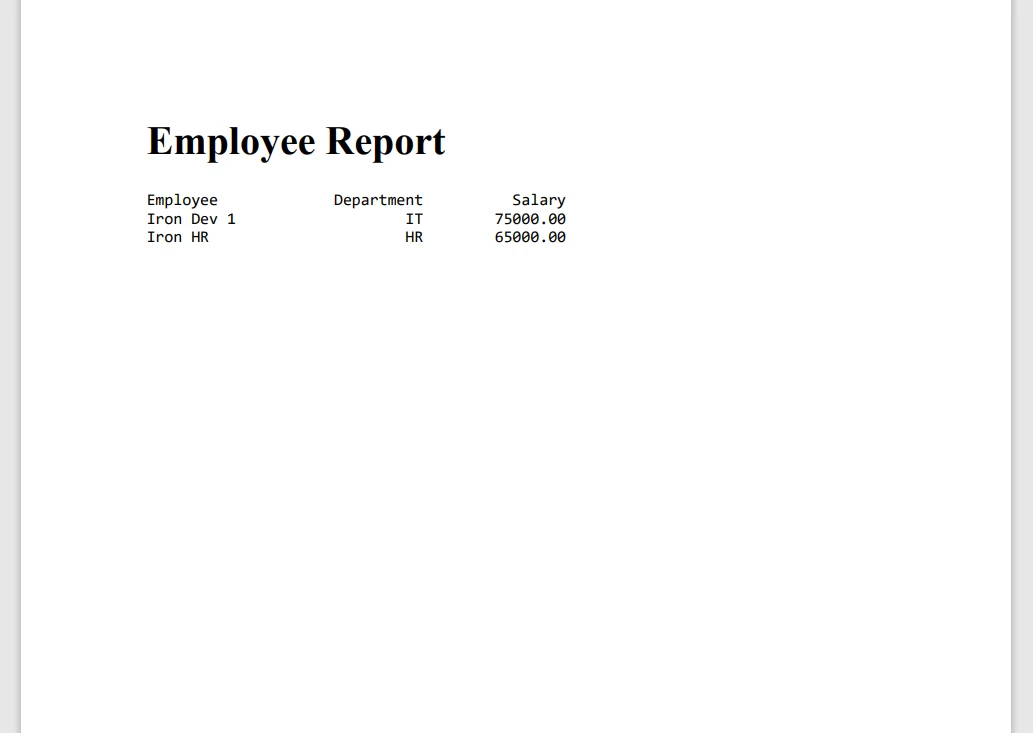
이 예제는 printf을 사용하여 직원 데이터의 행을 형식화한 후, 이러한 행을 새 PDF 문서에 추가합니다. 최종 문서는 EmployeeReport.pdf로 저장됩니다.
IronPDF와 Java의 printf를 결합하여 최소한의 노력으로 매우 구조적이고 전문적인 문서를 만들 수 있습니다. 이 통합 기능은 보고서, 송장 및 기타 형식화된 출력물을 생성할 때 특히 유용하며, 이러한 출력물은 텍스트 표현에 있어 정확성과 일관성이 요구됩니다.
IronPDF 사용의 장점
IronPDF 는 Java 애플리케이션에서 PDF를 간편하고 효율적으로 생성할 수 있도록 설계되었습니다. 이 소프트웨어는 복잡한 서식과 대용량 문서에서도 빠른 PDF 생성을 위한 고성능과 안정성을 제공합니다. IronPDF 오류를 효과적으로 처리하여 PDF 처리 중 중단을 최소화합니다.
개발을 간소화하는 사용자 친화적인 API를 갖추고 있습니다. pom.xml을 사용하여 기존 Java 프로젝트에 쉽게 IronPDF를 추가할 수 있으며, 인기 있는 프레임워크와의 호환성은 원활한 통합을 보장합니다. 복잡한 설정이 필요하지 않으며, 대부분의 설정은 몇 줄의 코드만으로 바로 사용할 수 있습니다.
IronPDF 또한 광범위한 문서, 튜토리얼 및 코드 샘플을 제공합니다. 이를 통해 쉽게 시작하고 고급 사용 사례에 대한 솔루션을 찾을 수 있습니다. 지원팀은 신속하게 대응하고 발생하는 모든 문제를 해결해 주기 때문에 장기 프로젝트에 믿을 수 있는 선택입니다.
결론
IronPDF Java를 사용하여 PDF 문서를 생성하고 조작하는 과정을 간소화합니다. 뛰어난 성능, 사용 편의성 및 안정적인 지원을 제공함으로써 PDF 처리와 관련된 여러 가지 문제점을 해결합니다. 동적인 보고서를 작성하거나 PDF를 더 큰 애플리케이션에 통합하려는 경우, IronPDF 개발 도구 키트에 유용한 추가 기능이 될 것입니다.
IronPDF 최대한 활용하려면 평가판을 사용해 디지털 서명, 암호화, 양식 처리와 같은 고급 기능을 살펴보세요. 이를 통해 IronPDF 달성할 수 있는 모든 범위와 PDF 기반 워크플로를 어떻게 향상시킬 수 있는지 완전히 이해할 수 있습니다. 라이선스는 $999부터 시작되며, 전체 기능 세트 접근 및 전용 지원을 제공합니다.










 무료로 시작하세요
 무료로 시작하세요
 무료 라이브 데모 예약하기





 신용카드나 계정 생성은 필요하지 않습니다.










