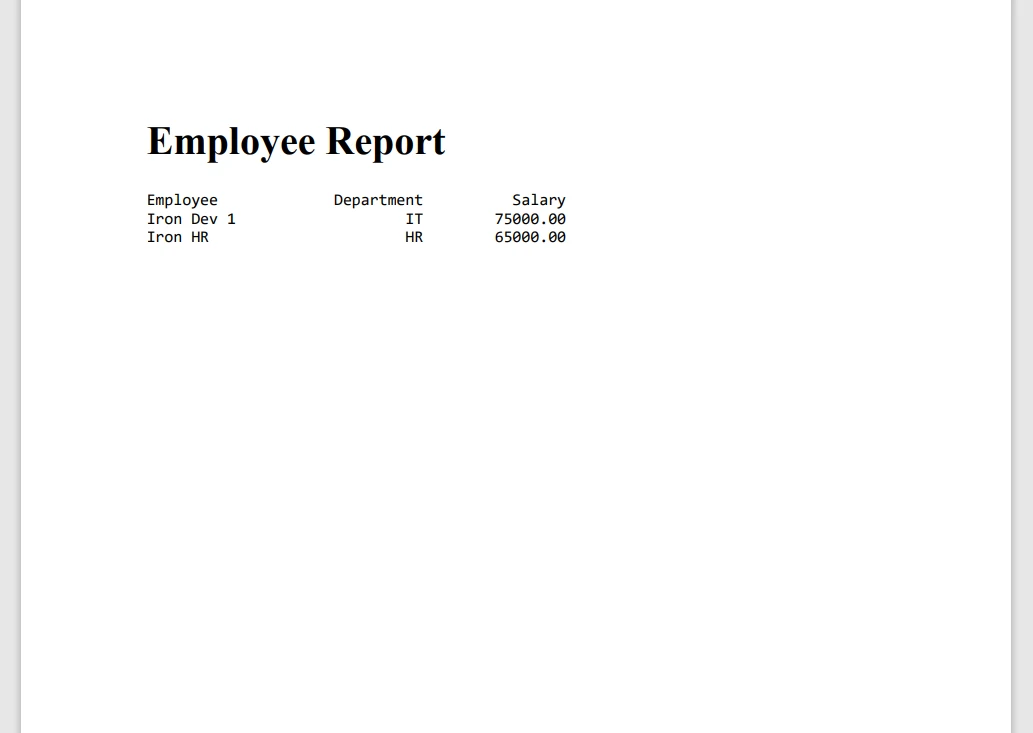
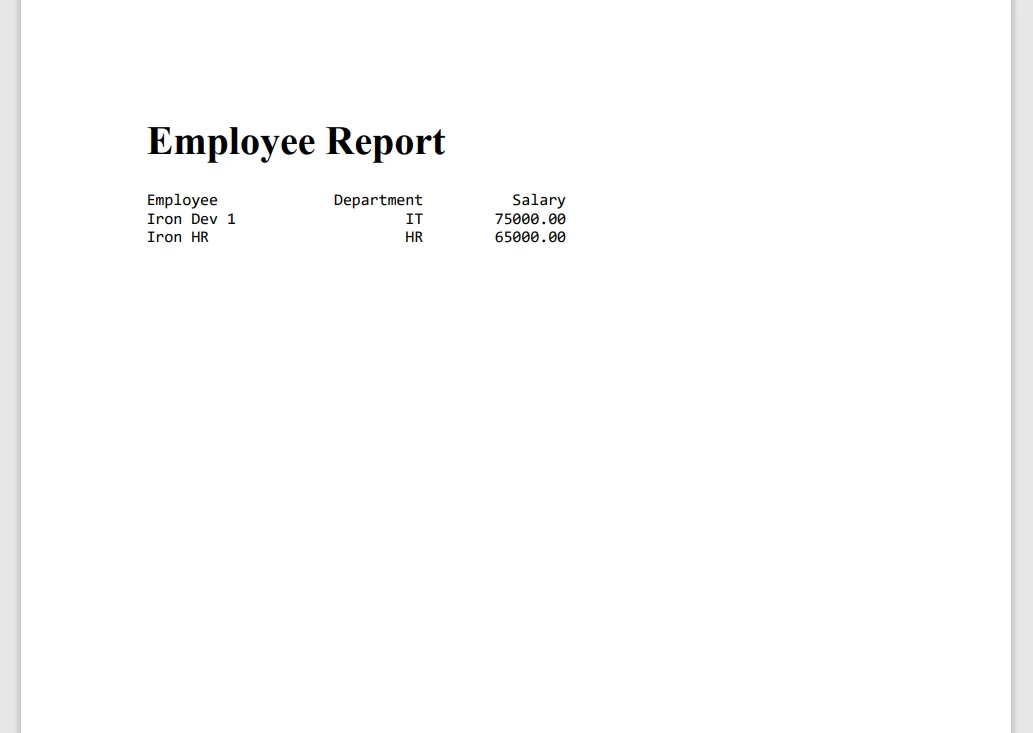
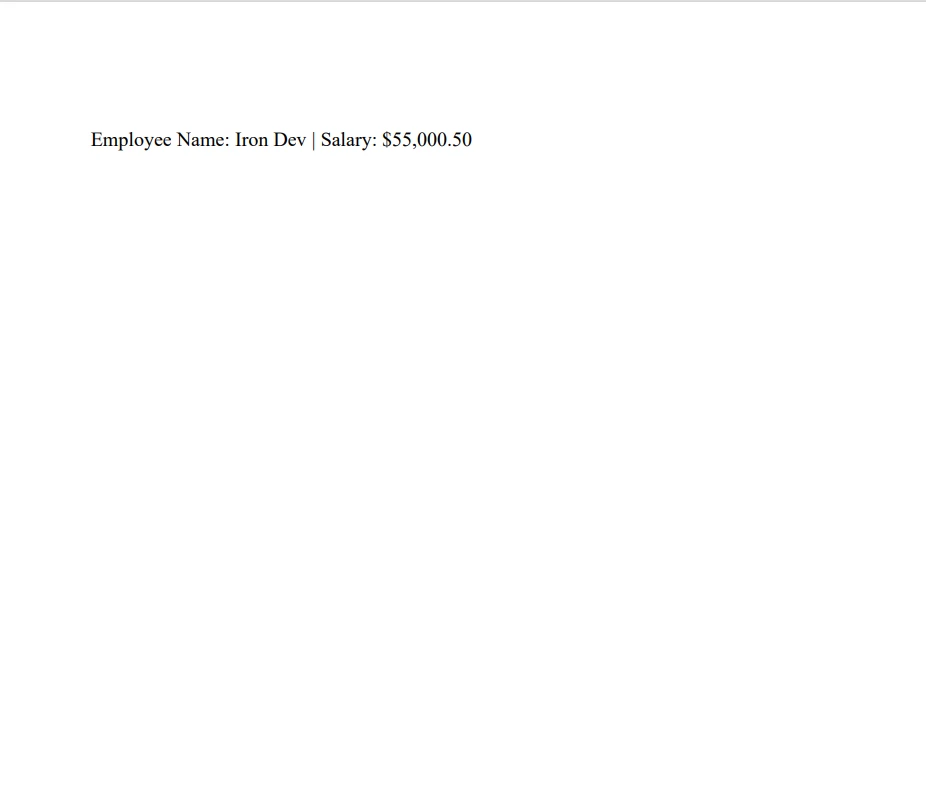
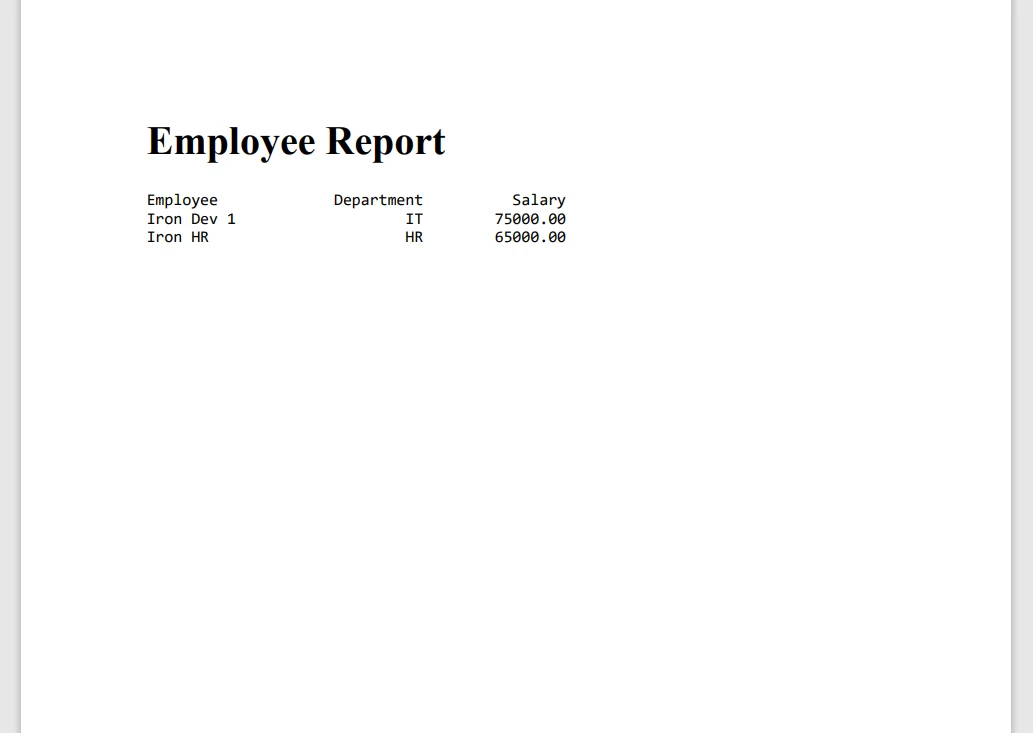
JAVA 도움말 Java Printf(개발자를 위한 작동 방식) 커티스 차우 업데이트됨:8월 31, 2025 다운로드 IronPDF 메이븐 다운로드 JAR 다운로드 무료 체험 시작하기 LLM용 사본 LLM용 사본 LLM용 마크다운 형식으로 페이지를 복사하세요 ChatGPT에서 열기 ChatGPT에 이 페이지에 대해 문의하세요 제미니에서 열기 제미니에게 이 페이지에 대해 문의하세요 Grok에서 열기 Grok에게 이 페이지에 대해 문의하세요 혼란 속에서 열기 Perplexity에게 이 페이지에 대해 문의하세요 공유하다 페이스북에 공유하기 트위터에 공유하기 LinkedIn에 공유하기 URL 복사 이메일로 기사 보내기 IronPDF is a Java library designed to simplify PDF creation and manipulation. It's a perfect choice for developers working on document generation and reporting solutions. By integrating IronPDF with Java's printf functionality, you can enhance PDF outputs with precise text formatting. It increases the quality of professional documents that meet specific layout and formatting requirements. IronPDF’s powerful document manipulation capabilities and Java’s flexible formatted output make it easier to efficiently generate dynamic reports, invoices, and other structured documents. Java String Formatting String formatting in Java provides a way for creating formatted output using format specifiers. You can control the format output and presentation of various data types, including decimal integers, Unicode characters, floating point numbers, and boolean values. A format string contains text and format specifiers. Each format specifier begins with a '%' character and ends with a conversion character. The general syntax is: %[flags][width][.precision]conversion Decimal Integer Formatting: Use %d for decimal integers. Example: System.out.printf("Score: %d", 100); // Output: Score: 100 System.out.printf("Score: %d", 100); // Output: Score: 100 JAVA Floating Point Number: Use %f for floating point numbers. You can control the decimal point precision. Example: System.out.printf("Pi: %.2f", Math.PI); // Output: Pi: 3.14 System.out.printf("Pi: %.2f", Math.PI); // Output: Pi: 3.14 JAVA Scientific Notation: Use %e for scientific notation of floating point numbers. Example: System.out.printf("Large number: %e", 1234567.89); // Output: Large number: 1.234568e+06 System.out.printf("Large number: %e", 1234567.89); // Output: Large number: 1.234568e+06 JAVA Character Formatting: Use %c for char formatting, including the Unicode character. Example: System.out.printf("Unicode heart: %c", '\u2665'); // Output: Unicode heart: System.out.printf("Unicode heart: %c", '\u2665'); // Output: Unicode heart: JAVA Boolean Formatting: Use %b for boolean formatting. Example: System.out.printf("Is Java fun? %b", true); // Output: Is Java fun? true System.out.printf("Is Java fun? %b", true); // Output: Is Java fun? true JAVA String Formatting: Use %s for string formatting. Example: System.out.printf("Hello, %s!", "World"); // Output: Hello, World! System.out.printf("Hello, %s!", "World"); // Output: Hello, World! JAVA Getting Started with IronPDF To start using IronPDF in your Java projects, the first step is to install the IronPDF trial version using pom.xml. The library provides a comprehensive set of tools to create, modify, and secure PDF files programmatically. Installing IronPDF Trial for Java IronPDF supports Java versions compatible with modern frameworks and environments, including Windows, Linux, and macOS systems. Before installing IronPDF, ensure your development environment is configured with a compatible JDK (Java Development Kit). To install IronPDF in a Maven-based Java project, add the following dependency to your pom.xml file: <dependency> <groupId>com.ironsoftware</groupId> <artifactId>ironpdf-engine-windows-x64</artifactId> <version>20xx.xx.xxxx</version> </dependency> <dependency> <groupId>com.ironsoftware</groupId> <artifactId>ironpdf-engine-windows-x64</artifactId> <version>20xx.xx.xxxx</version> </dependency> XML Replace the version with the current version number of IronPDF. After adding the dependency, run mvn install to download and integrate IronPDF into your project. Basic Setup and Configuration Once IronPDF is added to your project’s dependencies, you can import the necessary classes and start utilizing the library: import com.ironsoftware.ironpdf.PdfDocument; import com.ironsoftware.ironpdf.PdfDocument; JAVA Using Java Printf with IronPDF Generating Formatted Text with printf Java’s printf function is invaluable for generating formatted text that can then be injected into your PDFs. Using printf allows you to control text alignment, spacing, and formatting, which can be critical when creating structured reports or invoices. // Format a string with name and salary using specific format specifiers String formattedText = String.format("Employee Name: %s | Salary: $%,.2f", "Iron Dev", 55000.50); // Format a string with name and salary using specific format specifiers String formattedText = String.format("Employee Name: %s | Salary: $%,.2f", "Iron Dev", 55000.50); JAVA The formatted string above ensures that the numerical value is presented with commas and two decimal places. Complex text formatting can be achieved by chaining multiple printf or String.format calls. For instance, if you want to create a table-like structure, use multiple lines of formatted text with consistent spacing and alignment. Integrating Formatted Text into PDFs After generating formatted text using printf, you can inject this text into a PDF using IronPDF’s PdfDocument class. // Retrieve the license key for IronPDF from the system environment variables String licenseKey = System.getenv("IRONPDF_LICENSE_KEY"); License.setLicenseKey(licenseKey); // Format text to include employee information String formattedText = String.format("Employee Name: %s | Salary: $%,.2f", "Iron Dev", 55000.50); // Create a PDF document from the formatted text PdfDocument pdf = PdfDocument.renderHtmlAsPdf(formattedText); // Save the generated PDF document pdf.saveAs("formatted_report.pdf"); // Retrieve the license key for IronPDF from the system environment variables String licenseKey = System.getenv("IRONPDF_LICENSE_KEY"); License.setLicenseKey(licenseKey); // Format text to include employee information String formattedText = String.format("Employee Name: %s | Salary: $%,.2f", "Iron Dev", 55000.50); // Create a PDF document from the formatted text PdfDocument pdf = PdfDocument.renderHtmlAsPdf(formattedText); // Save the generated PDF document pdf.saveAs("formatted_report.pdf"); JAVA This code snippet creates a new PDF and adds the formatted text generated earlier as a paragraph. Practical Code Examples Below is a sample Java code snippet that demonstrates the full integration of Java’s printf with IronPDF to generate a formatted PDF report: import com.ironsoftware.ironpdf.License; import com.ironsoftware.ironpdf.PdfDocument; public class PDFReport { public static void main(String[] args) { // Get IronPDF license key from environment variables and set it String licenseKey = System.getenv("IRONPDF_LICENSE_KEY"); License.setLicenseKey(licenseKey); // Define headers and rows using String.format for consistent formatting String title = String.format("%-20s %10s %15s", "Employee", "Department", "Salary"); String row1 = String.format("%-20s %10s %15.2f", "Iron Dev 1", "IT", 75000.00); String row2 = String.format("%-20s %10s %15.2f", "Iron HR", "HR", 65000.00); // Create an HTML formatted string including the data rows String htmlContent = String.format( "<html><body>" + "<h1>Employee Report</h1>" + "<pre>" + "%s\n%s\n%s" + "</pre>" + "</body></html>", title, row1, row2 ); // Generate a PDF document from the HTML content PdfDocument pdf = PdfDocument.renderHtmlAsPdf(htmlContent); // Save the created PDF with a specified file name pdf.saveAs("EmployeeReport.pdf"); } } import com.ironsoftware.ironpdf.License; import com.ironsoftware.ironpdf.PdfDocument; public class PDFReport { public static void main(String[] args) { // Get IronPDF license key from environment variables and set it String licenseKey = System.getenv("IRONPDF_LICENSE_KEY"); License.setLicenseKey(licenseKey); // Define headers and rows using String.format for consistent formatting String title = String.format("%-20s %10s %15s", "Employee", "Department", "Salary"); String row1 = String.format("%-20s %10s %15.2f", "Iron Dev 1", "IT", 75000.00); String row2 = String.format("%-20s %10s %15.2f", "Iron HR", "HR", 65000.00); // Create an HTML formatted string including the data rows String htmlContent = String.format( "<html><body>" + "<h1>Employee Report</h1>" + "<pre>" + "%s\n%s\n%s" + "</pre>" + "</body></html>", title, row1, row2 ); // Generate a PDF document from the HTML content PdfDocument pdf = PdfDocument.renderHtmlAsPdf(htmlContent); // Save the created PDF with a specified file name pdf.saveAs("EmployeeReport.pdf"); } } JAVA This example uses printf to format rows of employee data and then adds these rows to a new PDF document. The final document is saved as EmployeeReport.pdf. By combining IronPDF with Java's printf, you can create highly structured and professional-looking documents with minimal effort. This integration is especially useful for generating reports, invoices, and other formatted outputs that require precision and consistency in text presentation. Advantages of Using IronPDF IronPDF is designed to make PDF generation in Java applications straightforward and efficient. It offers high performance and reliability for fast PDF creation even with complex formatting and large documents. IronPDF handles errors effectively, minimizing interruptions during PDF processing. It has a user-friendly API that simplifies development. You can easily add IronPDF to your existing Java projects using pom.xml, and its compatibility with popular frameworks ensures seamless integration. You don't need extensive configuration, and most setups are ready to go with just a few lines of code. IronPDF also provides extensive documentation, tutorials, and code samples. This makes it easy to get started and find solutions for advanced use cases. The support team is responsive and helps with any issues that arise, making it a reliable choice for long-term projects. Conclusion IronPDF simplifies the process of generating and manipulating PDF documents in Java. By offering high performance, ease of use, and reliable support, it addresses many challenges associated with PDF handling. Whether you’re looking to create dynamic reports or integrate PDFs into larger applications, IronPDF is a valuable addition to your development toolkit. To make the most out of your IronPDF experience, consider using the trial version and explore its advanced functionalities, such as digital signatures, encryption, and form handling. This will help you understand the full scope of what IronPDF can achieve and how it can enhance your PDF-based workflows. Licenses start from $799, providing access to the full feature set and dedicated support. 커티스 차우 지금 바로 엔지니어링 팀과 채팅하세요 기술 문서 작성자 커티스 차우는 칼턴 대학교에서 컴퓨터 과학 학사 학위를 취득했으며, Node.js, TypeScript, JavaScript, React를 전문으로 하는 프론트엔드 개발자입니다. 직관적이고 미적으로 뛰어난 사용자 인터페이스를 만드는 데 열정을 가진 그는 최신 프레임워크를 활용하고, 잘 구성되고 시각적으로 매력적인 매뉴얼을 제작하는 것을 즐깁니다. 커티스는 개발 분야 외에도 사물 인터넷(IoT)에 깊은 관심을 가지고 있으며, 하드웨어와 소프트웨어를 통합하는 혁신적인 방법을 연구합니다. 여가 시간에는 게임을 즐기거나 디스코드 봇을 만들면서 기술에 대한 애정과 창의성을 결합합니다. 관련 기사 업데이트됨 10월 26, 2025 참조를 통한 Java 패스(개발자를 위한 작동 방식) Java 프로그래밍 언어에서 매개변수 전달은 항상 값으로 전달됩니다. 객체를 다룰 때 참조 변수는 값으로 전달됩니다 더 읽어보기 업데이트됨 10월 26, 2025 Java 스캐너(개발자를 위한 작동 방식) 이 문서에서는 Java Scanner 클래스의 작동 방식을 자세히 살펴보고 예제를 통해 그 사용법을 살펴봅니다 더 읽어보기 업데이트됨 6월 22, 2025 Java용 Google HTTP 클라이언트 라이브러리(개발자를 위한 작동 방식) Java용 Google HTTP 클라이언트 라이브러리는 Java 애플리케이션에서 HTTP 요청을 하고 응답을 처리하는 프로세스를 간소화하도록 설계된 강력한 라이브러리입니다 더 읽어보기 Java 스캐너(개발자를 위한 작동 방식)Java용 Google HTTP 클라이언트...

업데이트됨 10월 26, 2025 참조를 통한 Java 패스(개발자를 위한 작동 방식) Java 프로그래밍 언어에서 매개변수 전달은 항상 값으로 전달됩니다. 객체를 다룰 때 참조 변수는 값으로 전달됩니다 더 읽어보기
업데이트됨 10월 26, 2025 Java 스캐너(개발자를 위한 작동 방식) 이 문서에서는 Java Scanner 클래스의 작동 방식을 자세히 살펴보고 예제를 통해 그 사용법을 살펴봅니다 더 읽어보기
업데이트됨 6월 22, 2025 Java용 Google HTTP 클라이언트 라이브러리(개발자를 위한 작동 방식) Java용 Google HTTP 클라이언트 라이브러리는 Java 애플리케이션에서 HTTP 요청을 하고 응답을 처리하는 프로세스를 간소화하도록 설계된 강력한 라이브러리입니다 더 읽어보기