



업데이트됨 2026년 4월 21일
Java에서 참조에 의한 전달(개발자를 위한 작동 방식)
Java 프로그래밍 언어에서 매개변수 전달은 항상 값으로 전달됩니다. 객체를 다룰 때는 참조 변수가 값으로 전달됩니다.
더 읽어보기

자바 프로그래밍 영역에서 효율적인 문자열 조작은 핵심적인 기술입니다. 문자열을 분석하고, 분할하고, 조작하는 능력은 데이터 처리부터 텍스트 분석에 이르기까지 다양한 작업에 필수적입니다. 자바에서 문자열을 분할하는 기본적인 방법 중 하나는 split() 메서드입니다.
이 글에서는 Java의 Split Pipe 메서드의 복잡한 부분들을 자세히 살펴보고, 특히 파이프(pipe)와의 사용법에 초점을 맞추겠습니다.|) 구분자. 또한, Java Split Pipe를 사용하여 문자열을 분할하는 방식으로 IronPDF for Java를 이용해 PDF 파일을 생성할 것입니다.
**split()** 메서드는 Java의 String 클래스에서 제공하는 편리한 도구로, 개발자가 지정된 구분자를 기준으로 문자열을 부분 문자열 배열로 분할할 수 있도록 해줍니다. 서명은 다음과 같습니다.
public String[] split(String regex)여기서 regex는 문자열을 분할하는 데 사용되는 구분자를 정의하는 정규 표현식입니다. 정규 표현식은 텍스트 일치 및 조작을 위한 패턴을 지정하는 강력한 방법을 제공합니다.
파이프 (|) 문자는 정규 표현식을 포함한 다양한 맥락에서 대체 구분 기호로 사용됩니다. 자바에서 파이프(|) 기호는 정규 표현식 내에서 메타 문자로 취급되며 논리 OR 연산을 나타냅니다. split() 메서드 내에서 사용될 때, 파이프(|) 문자는 구분 기호 역할을 하며, 해당 문자가 나타나는 위치에서 문자열을 분할합니다.
split() 메서드와 파이프 구분 기호의 사용법을 설명하기 위한 기본적인 예제부터 시작해 보겠습니다.
public class SplitExample {
    public static void main(String[] args) {
        String text = "apple|banana|orange|grape";
        // Splitting the string using the pipe character as a delimiter.
        String[] fruits = text.split("\\|");

        // Iterating through the split parts and printing each fruit.
        for (String fruit : fruits) {
            System.out.println(fruit);
        }
    }
}이 예시에서 문자열은** "사과|banana|orange|"grape" 는 파이프 문자(|)를 사용하여 부분 문자열 배열로 분할됩니다.|**)를 구분자로 사용합니다. 이중 백슬래시( \ )는 파이프 문자가 정규 표현식에서 메타 문자이기 때문에 이를 이스케이프하는 데 사용됩니다.
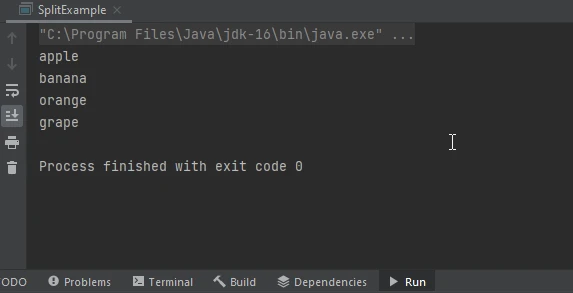
파이프 기호와 같은 특수 문자를 구분 기호로 사용할 때는 예기치 않은 동작을 방지하기 위해 올바르게 처리하는 것이 중요합니다. 파이프 기호(|)는 정규 표현식에서 특정한 의미를 가지므로, 일반 문자로 처리하려면 이스케이프 처리를 해야 합니다. 이는 이전 예시에서처럼 앞에 역슬래시( ** )를 붙여서 구현할 수 있습니다.
split() 메서드의 장점 중 하나는 여러 구분자를 기준으로 문자열을 분할할 수 있다는 점입니다. 이는 구분 기호 사이의 논리적 OR을 나타내는 정규 표현식을 구성함으로써 달성됩니다. 예를 들어:
String text = "apple,banana;orange|grape";

// Splitting the string using commas, semicolons, and pipe characters as delimiters.
String[] fruits = text.split("[,;\\|]");이 예시에서 문자열은** 사과, 바나나, 오렌지|"grape"는 쉼표(, ), 세미콜론( ; ), 파이프 문자(|)와 일치하는 정규 표현식을 사용하여 분할됩니다.|**.
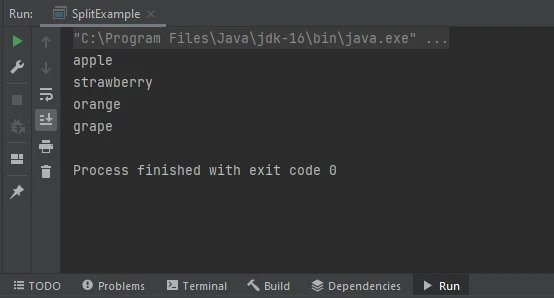
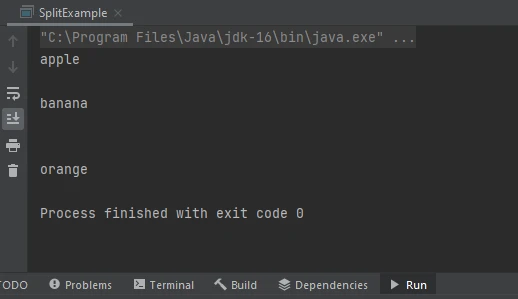
기본적으로 split() 메서드는 연속된 구분자로 인해 생성된 빈 문자열을 버립니다. 하지만 빈 문자열을 유지하는 것이 바람직한 시나리오도 있습니다. 이를 위해 split() 메서드의 두 번째 인수로 음수 제한값을 지정할 수 있습니다. 예를 들어:
String text = "apple||banana|||orange";

// Splitting the string with a negative limit to preserve empty strings.
String[] fruits = text.split("\\|", -1);이 예에서 파이프 문자(|)는 구분 기호로 사용되며, 빈 문자열을 유지하기 위해 음수 제한값이 지정됩니다. 결과적으로, 배열 fruits 에는 구분 기호가 연속해서 나타나는 경우를 포함하여 모든 경우에 대한 요소가 포함됩니다.
IronPDF Java용 는 개발자가 Java 애플리케이션 내에서 PDF 문서를 생성, 조작 및 렌더링할 수 있도록 해주는 강력한 라이브러리입니다. 이 서비스는 PDF 생성의 복잡성을 추상화하는 직관적인 API를 제공하여 개발자가 하위 수준의 PDF 조작 작업에 시간을 쏟는 대신 애플리케이션 개발에 집중할 수 있도록 합니다.
소프트웨어 개발 분야에서 PDF 문서를 프로그램적으로 생성하는 것은 흔히 요구되는 사항입니다. 보고서, 송장, 증명서 등 어떤 문서를 생성하든 PDF를 동적으로 생성할 수 있는 안정적인 도구는 매우 중요합니다. Java 개발자를 위한 PDF 생성을 간소화하는 도구 중 하나는 IronPDF 입니다.
IronPDF 설치하려면 안정적인 Java 컴파일러가 있는지 확인하십시오. 이 튜토리얼에서는 IntelliJ IDEA를 사용하겠습니다.
IntelliJ IDEA를 실행하고 새 Maven 프로젝트를 시작합니다.
프로젝트가 생성되면 Pom.XML 파일에 접근합니다. IronPDF 통합하기 위해 다음 Maven 종속성을 삽입하십시오.
<dependency>
   <groupId>com.ironsoftware</groupId>
   <artifactId>ironpdf</artifactId>
   <version>2024.3.1</version>
</dependency>이러한 종속성을 추가한 후 화면 오른쪽에 나타나는 작은 버튼을 클릭하여 설치하십시오.
import com.ironsoftware.ironpdf.*;
import java.io.IOException;
import java.nio.file.Paths;

public class PdfGenerator {
    public static void main(String[] args) {
        // Apply your license key
        License.setLicenseKey("YOUR-LICENSE-KEY");

        // Define a string with pipe-separated values
        String data = "Item1|Item2|Item3|Item4|Item5";

        // Split data into an array
        String[] items = data.split("\\|");

        // Create HTML list from the split items
        StringBuilder htmlList = new StringBuilder("<ul>\n");
        for (String item : items) {
            htmlList.append("  <li>").append(item).append("</li>\n");
        }
        htmlList.append("</ul>");

        try {
            // Convert HTML list to PDF
            PdfDocument myPdf = PdfDocument.renderHtmlAsPdf(htmlList.toString());

            // Save the PdfDocument to a file
            myPdf.saveAs(Paths.get("htmlCode.pdf"));
        } catch (IOException e) {
            e.printStackTrace();
        }
    }
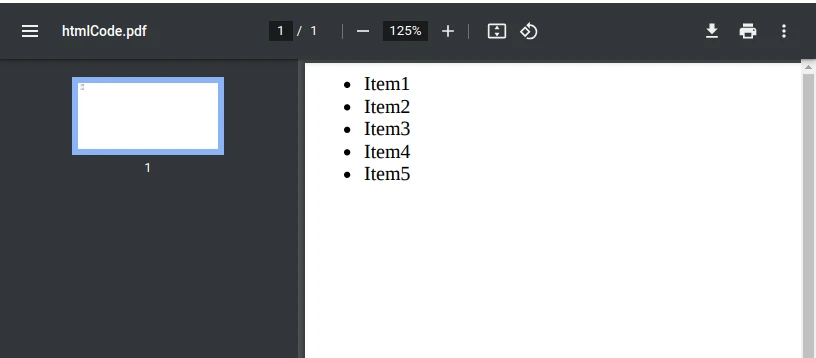
}이 코드 조각은 HTML 형식의 문자열에서 PDF 문서를 생성하는 방법을 보여줍니다. 먼저 PDF 생성 및 파일 작업에 필요한 라이브러리를 가져옵니다. 그런 다음 PDF 작업에 사용되는 라이브러리인 IronPDF 에 대한 라이선스 키를 설정합니다.
문자열 데이터는 파이프(|)로 구분된 값으로 정의됩니다. 해당 문자열은 파이프 문자(|)를 구분자로 사용하여 items 라는 문자열 배열로 분할됩니다.
다음으로, items 배열의 각 항목을 list item에 추가하여 HTML 목록( htmlList )을 구성합니다.<li> ) 순서 없는 목록 내의 태그(<ul> ).
PdfDocument.renderHtmlAsPdf() 메서드는 이 HTML 문자열을 PDF 문서로 변환한 다음 saveAs() 메서드를 사용하여 "htmlCode.pdf"로 저장합니다.
요약하자면, 이 코드는 데이터 문자열을 입력받아 HTML 목록 형식으로 변환하고, IronPDF 사용하여 해당 HTML을 PDF로 변환한 다음, 결과 PDF를 "htmlCode.pdf"로 저장합니다.
자바의 문자열 조작 및 PDF 생성 기능에 대한 이 포괄적인 개요에서는 split() 메서드의 기능, 특히 파이프 연산자(|)와의 사용법을 살펴보았습니다.|) 구분자. split() 메서드는 특수 문자 및 여러 구분 기호를 처리하는 것을 포함하여 지정된 구분 기호를 기반으로 문자열을 하위 문자열로 분할하는 다양한 방법을 제공합니다. IronPDF 자바에서 PDF 문서를 동적으로 생성하는 강력한 도구로 등장했으며, 저수준 PDF 조작을 추상화하여 프로세스를 간소화합니다.
제공된 예제는 Java의 문자열 분할 기능과 IronPDF 활용하여 HTML 형식의 문자열을 PDF 문서로 변환하는 방법을 보여주며, Java에서 문자열 조작과 PDF 생성의 원활한 통합을 보여줍니다.
소프트웨어 개발에서는 보고서, 송장 등을 위해 PDF 파일을 생성하는 경우가 빈번하므로, 이러한 기술을 숙달하면 개발자는 이러한 작업을 효율적으로 처리하는 데 필수적인 역량을 갖추게 됩니다.
IronPDF 기능에 대해 더 자세히 알아보려면 IronPDF 문서 페이지를 방문하여 IronPDF 프로젝트에 어떻게 도움이 될 수 있는지 확인하십시오. IronPDF 라이선스 정보가 $999 USD에서 시작합니다.

커티스 차우는 칼턴 대학교에서 컴퓨터 과학 학사 학위를 취득했으며, Node.js, TypeScript, JavaScript, React를 전문으로 하는 프론트엔드 개발자입니다. 직관적이고 미적으로 뛰어난 사용자 인터페이스를 만드는 데 열정을 가진 그는 최신 프레임워크를 활용하고, 잘 구성되고 시각적으로 매력적인 매뉴얼을 제작하는 것을 즐깁니다.


IronPDF는 IRON SUITE 의 일부입니다.
10개의 .NET API 제품, 당신의 사무 문서를 위해

PDF 파일을 HTML처럼 빠르게 변환해야 할 때.

