


업데이트됨 2025년 6월 22일
Java에서 String.split을 사용하는 방법
Java의 `String.split()` 메서드는 매개변수로 제공된 구분자를 기준으로 문자열을 분할하는 데 사용되는 강력한 도구입니다. 이 메서드를 사용할 때,
더 읽어보기

예외 처리는 자바 프로그래밍의 중요한 측면으로, 개발자가 예상치 못한 오류를 효율적으로 관리하고 소프트웨어 애플리케이션의 안정성을 향상시킬 수 있도록 해줍니다. 자바의 다양한 프로그래밍 환경에서 try-catch 메커니즘은 예외 처리를 위한 기본적인 도구로 자리 잡고 있습니다. Java의 예외 처리기는 컴파일러에 의해 표시된 체크 예외와 컴파일러에 의해 강제되지 않는 언체크 예외가 런타임 동안 발생할 수 있는 상황을 찾도록 허용합니다.
이 글에서는 자바의 try-catch 블록 의 기본 원리, 구문, 그리고 이러한 블록이 복원력이 뛰어나고 오류에 강한 애플리케이션을 구축하는 데 어떻게 기여하는지 살펴봅니다.
자바의 try-catch 블록은 검사 예외와 비검사 예외 모두를 관리하는 데 핵심적인 역할을 하는 다재다능한 구조입니다. 특정 예외들을 전용 catch 블록에서 처리하든, 더 광범위한 예외 범주를 처리하는 일반적인 catch 블록을 사용하든, try-catch 구조는 실행 중에 발생하는 오류를 적절하게 관리함으로써 Java 프로그램의 견고성을 향상시킵니다.
자바에서 try 블록은 예외가 발생할 수 있는 코드를 포함합니다. 관련 예외 처리 블록은 이러한 예외를 처리하는 방법을 지정합니다. try 블록 내에서 예외가 발생하면 해당 catch 블록이 실행되어 프로그램이 정상적으로 복구되거나 오류에 대한 정보를 로그에 기록할 수 있습니다.
다음은 try-catch 블록의 기본 구조입니다.
try {
    // Code that may cause an exception
} catch (ExceptionType1 exception1) {
    // Handle exception1
} catch (ExceptionType2 exception2) {
    // Handle exception2
} finally {
    // Optional: Code that always executes, regardless of whether an exception occurred
}try-catch 블록이 실제로 어떻게 작동하는지 이해하기 위해 몇 가지 예제를 살펴보겠습니다.
public class TryCatchExample {
    public static void main(String[] args) {
        int numerator = 10;
        int denominator = 0;
        try {
            int result = numerator / denominator; // This line may throw ArithmeticException
            System.out.println("Result: " + result);
        } catch (ArithmeticException ex) {
            System.err.println("Error: Division by zero is not allowed.");
        }
    }
}위의 자바 코드 예제에서 try 블록은 나눗셈을 시도하는데, 이로 인해 ArithmeticException 이 발생할 수 있습니다. 다음 catch 블록에는 발생한 예외 유형을 처리하는 코드가 포함되어 있습니다. 이 예외는 산술 예외이며, 오류 발생 시 오류 메시지가 출력됩니다.
public class MultiCatchExample {
    public static void main(String[] args) {
        try {
            String str = null;
            System.out.println(str.length()); // This line may throw NullPointerException
        } catch (NullPointerException ex) {
            System.err.println("Error: Null pointer encountered.");
        } catch (Exception e) {
            System.err.println("Error: An unexpected exception occurred.");
        }
    }
}여기서 try 블록은 null 문자열의 길이에 접근하려고 시도하므로 NullPointerException 이 발생할 수 있습니다. 첫 번째 catch 블록은 이 특정 예외를 처리하고, 두 번째 catch 블록은 선언된 예외에 해당하지 않는 다른 예상치 못한 예외에 대한 대체 처리 역할을 합니다. 이 두 번째 catch 블록은 상위 클래스인 Exception에서 처리됩니다. 여러 개의 catch 블록을 사용하면 각 예외를 다르게 처리할 수 있습니다.
finally 블록은 예외 발생 여부와 관계없이 반드시 실행해야 하는 정리 작업이나 작업에 자주 사용됩니다. 예를 들어:
FileInputStream fileInputStream = null;
try {
    // Code that may throw exceptions while working with the file
    fileInputStream = new FileInputStream("example.txt");
    // ...
} catch (FileNotFoundException ex) {
    System.err.println("Error: File not found.");
} finally {
    // Close the file stream, regardless of whether an exception occurred
    if (fileInputStream != null) {
        try {
            fileInputStream.close();
        } catch (IOException ex) {
            System.err.println("Error: Unable to close the file stream.");
        }
    }
}여기서 finally 블록은 파일 작업 중 예외가 발생하더라도 파일 스트림이 닫히도록 보장합니다.
IronPDF 라이브러리는 Java 개발자가 PDF 파일을 원활하게 다룰 수 있도록 해주는 강력한 Java 라이브러리입니다. PDF 문서를 생성, 수정 또는 추출해야 하는 경우, IronPDF PDF 관련 작업을 효율적이고 간편하게 수행할 수 있도록 포괄적인 기능을 제공합니다. IronPDF HTML을 PDF로 변환하는 것부터 기존 파일을 변환하는 것까지, PDF 생성 및 조작의 복잡성을 간소화합니다.
Java 프로젝트에서 IronPDF 사용하려면 프로젝트 구성 파일에 IronPDF를 종속성으로 정의해야 합니다. 다음 단계는 Maven Dependency Setup을 사용하여 이 작업을 수행하는 방법을 보여줍니다.
pom.xml 파일에 다음 종속성을 추가하세요.
<dependencies>
    <!-- Adds IronPDF Java. Use the latest version in the version tag. -->
    <dependency>
        <groupId>com.ironsoftware</groupId>
        <artifactId>ironpdf</artifactId>
        <version>20xx.xx.xxxx</version>
    </dependency>
    <!-- Adds the slf4j logger which IronPDF Java uses. -->
    <dependency>
        <groupId>org.slf4j</groupId>
        <artifactId>slf4j-simple</artifactId>
        <version>2.0.3</version>
    </dependency>
</dependencies>또는 Sonatype 저장소 에서 JAR 파일을 수동으로 다운로드할 수도 있습니다.
다음은 Java 환경에서 IronPDF 사용하여 HTML을 PDF로 변환하는 방법을 보여주는 간단한 예제입니다.
import com.ironsoftware.ironpdf.*;

public class IronPDFExample {
    public static void main(String[] args) {
        // Create a PDF document
        PdfDocument myPdf = PdfDocument.renderHtmlAsPdf("<h1>Hello, IronPDF!</h1>");

        // Save the PdfDocument to a file
        myPdf.saveAs("output.pdf");
        System.out.println("PDF created successfully.");
    }
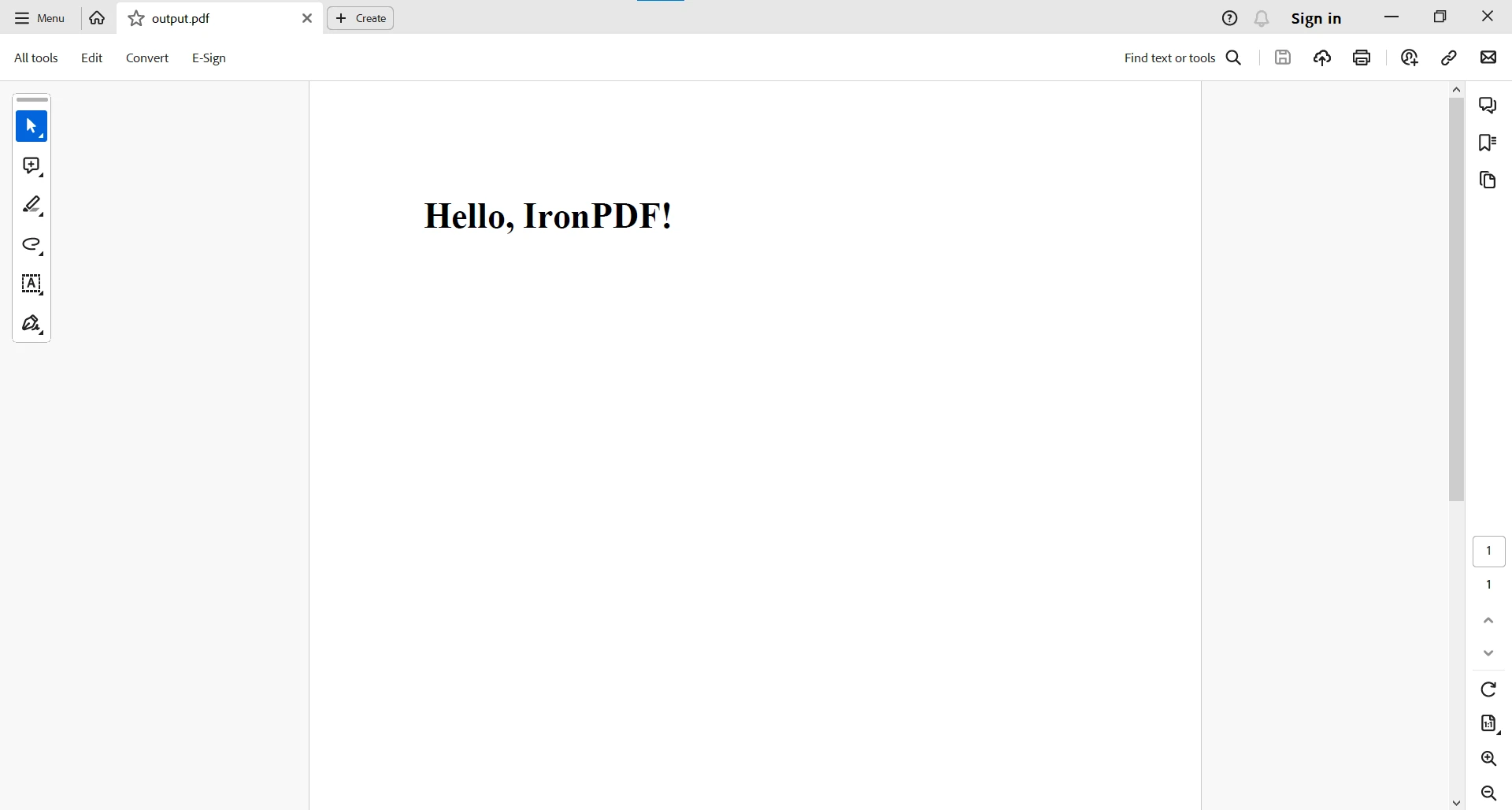
}이 코드 예제는 HTML 문자열로부터 PDF 파일을 생성합니다. 다음은 출력 결과입니다.
보다 복잡한 PDF 작업을 위해서는 이 Java PDF 코드 예제 페이지를 참조하십시오.
Java의 try-catch 블록은 IronPDF 오류 처리 와 완벽하게 통합되어 PDF 관련 작업 중에 발생할 수 있는 예외를 구조화된 방식으로 처리할 수 있도록 지원합니다. HTML을 PDF로 변환하든 기존 문서에서 텍스트를 추출하든, try-catch 메커니즘은 예상치 못한 상황에 직면하더라도 Java 애플리케이션이 안정적으로 작동하도록 보장합니다.
try {
    PdfDocument pdf = PdfDocument.fromFile(Paths.get(filePath));
    String text = pdf.extractAllText();
    System.out.println(text);
} catch (IOException e) {
    System.err.println("An IOException occurred: " + e.getMessage());
} catch (PdfException e) {
    System.err.println("A PdfException occurred: " + e.getMessage());
} catch (Exception e) {
    System.err.println("An unexpected exception occurred: " + e.getMessage());
}위 코드에서 try-catch 블록은 IronPDF 사용하여 PDF 파일에서 텍스트를 읽고 추출하는 과정을 캡슐화합니다. try-catch 구문을 사용하면 IOExceptions 및 PdfExceptions와 같은 잠재적인 예외를 적절하게 처리하여 코드의 안정성을 향상시킬 수 있습니다.
자바에서 try-catch 블록을 이해하고 효과적으로 사용하는 것은 견고하고 신뢰할 수 있는 프로그램을 작성하는 데 필수적입니다. 개발자는 예외 상황을 예측하고 처리함으로써 예기치 않은 문제에 원활하게 대응하는 애플리케이션을 만들 수 있으며, 이를 통해 전반적인 안정성과 사용자 경험을 향상시킬 수 있습니다. try , catch , finally 의 조합은 강력한 예외 관리 메커니즘을 제공하여 개발자가 다양한 시나리오를 처리할 수 있는 탄력적인 소프트웨어를 구축할 수 있도록 합니다.
결론적으로, Java try-catch 블록과 IronPDF Java 솔루션 의 협업은 개발자에게 PDF 관련 작업을 위한 강력한 솔루션을 제공하여 더욱 원활하고 안전한 사용자 경험을 보장합니다. IOExceptions, PdfExceptions 또는 기타 예상치 못한 예외를 처리할 수 있는 기능은 IronPDF 와 Java의 예외 처리 메커니즘을 결합했을 때의 다재다능함을 보여줍니다. 이러한 통합은 PDF 작업을 간소화할 뿐만 아니라 더욱 안정적이고 오류에 강한 Java 애플리케이션 개발에도 기여합니다.
PDF 관련 작업에 대한 자세한 내용은 IronPDF 문서 페이지를 참조하십시오.
IronPDF 는 개발 목적으로는 무료로 사용할 수 있으며, 모든 기능을 사용하려면 라이선스가 필요합니다. 라이선스를 통해 개발자는 충분한 정보를 바탕으로 구매 결정을 내리기 전에 모든 기능을 테스트할 수 있습니다. IronPDF Java 라이브러리 페이지 에서 라이브러리를 다운로드하여 사용해 보세요.

커티스 차우는 칼턴 대학교에서 컴퓨터 과학 학사 학위를 취득했으며, Node.js, TypeScript, JavaScript, React를 전문으로 하는 프론트엔드 개발자입니다. 직관적이고 미적으로 뛰어난 사용자 인터페이스를 만드는 데 열정을 가진 그는 최신 프레임워크를 활용하고, 잘 구성되고 시각적으로 매력적인 매뉴얼을 제작하는 것을 즐깁니다.

IronPDF는 IRON SUITE 의 일부입니다.
10개의 .NET API 제품, 당신의 사무 문서를 위해

PDF 파일을 HTML처럼 빠르게 변환해야 할 때.

