

如何在 Java 中使用 Try Catch 區塊

例外處理是Java程式設計中的重要方面,允許開發人員有效地管理意外錯誤並增強其軟體應用程式的穩健性。 在Java的多元程式設計環境中,try-catch機制是一個基本工具,用於處理例外情況。 Java中的例外處理程式允許查找由編譯器標記的受檢例外,還有未檢查的例外,這可能在運行期間發生。
本文探討了Java的try-catch塊的基本原理、語法以及它們如何促進構建抗錯度高且容錯的應用程式。
理解Java Try-Catch塊:有效處理例外
Java中的try-catch塊是一個多功能的構造,在管理受檢和未檢查的例外方面起著關鍵作用。 無論是在專用的catch塊中處理特定的多個例外,還是使用更一般的catch塊來涵蓋更廣泛的例外類別,try-catch結構通過優雅地管理執行中出現的錯誤來增強Java程式的健壯性。
Try-Catch塊的基礎知識
在Java中,try塊包含可能發生例外的程式碼。 相關的catch塊指定如何處理這些例外。 如果在try塊內發生例外,則執行對應的catch塊,允許程式優雅地復原或記錄錯誤資訊。
以下是try-catch塊的基本結構:
try {
    // Code that may cause an exception
} catch (ExceptionType1 exception1) {
    // Handle exception1
} catch (ExceptionType2 exception2) {
    // Handle exception2
} finally {
    // Optional: Code that always executes, regardless of whether an exception occurred
}
try {
// Code that may cause an exception
} catch (ExceptionType1 exception1) {
// Handle exception1
} catch (ExceptionType2 exception2) {
// Handle exception2
} finally {
// Optional: Code that always executes, regardless of whether an exception occurred
}- try塊包圍可能拋出例外的程式碼。
- 每個catch塊指定它可以處理的例外型別並提供相應的處理邏輯。
- 如果存在,finally塊包含無論是否發生例外都會執行的程式碼。
例外處理的實際應用
讓我們探討一些範例來理解實際中try-catch塊如何運作:
範例1:處理ArithmeticException
public class TryCatchExample {
    public static void main(String[] args) {
        int numerator = 10;
        int denominator = 0;
        try {
            int result = numerator / denominator; // This line may throw ArithmeticException
            System.out.println("Result: " + result);
        } catch (ArithmeticException ex) {
            System.err.println("Error: Division by zero is not allowed.");
        }
    }
}
public class TryCatchExample {
public static void main(String[] args) {
int numerator = 10;
int denominator = 0;
try {
int result = numerator / denominator; // This line may throw ArithmeticException
System.out.println("Result: " + result);
} catch (ArithmeticException ex) {
System.err.println("Error: Division by zero is not allowed.");
}
}
}在上述Java程式碼範例中,try塊試圖進行除法,這可能導致ArithmeticException。 下一個catch塊包含處理生成的例外型別的程式碼。 該例外是一個算術例外,在錯誤發生時列印出錯資訊。
範例2:使用多個Catch塊
public class MultiCatchExample {
    public static void main(String[] args) {
        try {
            String str = null;
            System.out.println(str.length()); // This line may throw NullPointerException
        } catch (NullPointerException ex) {
            System.err.println("Error: Null pointer encountered.");
        } catch (Exception e) {
            System.err.println("Error: An unexpected exception occurred.");
        }
    }
}
public class MultiCatchExample {
public static void main(String[] args) {
try {
String str = null;
System.out.println(str.length()); // This line may throw NullPointerException
} catch (NullPointerException ex) {
System.err.println("Error: Null pointer encountered.");
} catch (Exception e) {
System.err.println("Error: An unexpected exception occurred.");
}
}
}在這裡,try塊試圖存取一個空字串的長度,可能會引發NullPointerException。 第一個catch塊處理這個特定的例外,而第二個catch塊作為其他任何未包括在宣告的例外中的意外情況的後備。 這第二個catch塊由父類別Exception處理。 使用多個catch塊可以讓我們對每個例外進行不同的處理。
Finally塊的重要性
強烈建議您在處理例外時使用finally塊來實現清理操作或必須執行的任務,無論是否發生例外。 例如:
FileInputStream fileInputStream = null;
try {
    // Code that may throw exceptions while working with the file
    fileInputStream = new FileInputStream("example.txt");
    // ...
} catch (FileNotFoundException ex) {
    System.err.println("Error: File not found.");
} finally {
    // Close the file stream, regardless of whether an exception occurred
    if (fileInputStream != null) {
        try {
            fileInputStream.close();
        } catch (IOException ex) {
            System.err.println("Error: Unable to close the file stream.");
        }
    }
}
FileInputStream fileInputStream = null;
try {
// Code that may throw exceptions while working with the file
fileInputStream = new FileInputStream("example.txt");
// ...
} catch (FileNotFoundException ex) {
System.err.println("Error: File not found.");
} finally {
// Close the file stream, regardless of whether an exception occurred
if (fileInputStream != null) {
try {
fileInputStream.close();
} catch (IOException ex) {
System.err.println("Error: Unable to close the file stream.");
}
}
}在這裡,finally塊確保即使在處理檔案時發生例外,文件流仍會被關閉。
利用IronPDF for Java的強大功能搭配Try-Catch塊
IronPDF for Java:簡要概述
IronPDF Java程式庫是一個功能強大的Java程式庫,讓開發人員可以順利地處理PDF文件。 無論您需要建立、修改或提取PDF文件中的資料,IronPDF都提供了一整套功能,使您的PDF相關任務高效且簡單明瞭。 從將HTML渲染為PDF到轉換現有文件,IronPDF簡化了PDF生成和操作的複雜性。
從渲染HTML到PDF的IronPDF for Java (如何為開發者運作):圖1-Java PDF庫
將IronPDF定義為Java依賴項
要在您的Java專案中使用IronPDF,您需要在專案配置中將其定義為依賴項。 以下步驟展示如何使用Maven Dependency Setup進行操作。
pom.xml依賴項
將以下依賴項新增到您的pom.xml檔中:
<dependencies>

    <dependency>
        <groupId>com.ironsoftware</groupId>
        <artifactId>ironpdf</artifactId>
        <version>20xx.xx.xxxx</version>
    </dependency>

    <dependency>
        <groupId>org.slf4j</groupId>
        <artifactId>slf4j-simple</artifactId>
        <version>2.0.3</version>
    </dependency>
</dependencies>
<dependencies>
<dependency>
<groupId>com.ironsoftware</groupId>
<artifactId>ironpdf</artifactId>
<version>20xx.xx.xxxx</version>
</dependency>
<dependency>
<groupId>org.slf4j</groupId>
<artifactId>slf4j-simple</artifactId>
<version>2.0.3</version>
</dependency>
</dependencies>下載JAR文件
或者,您可以從Sonatype Repository手動下載JAR檔案。
使用IronPDF建立PDF文件
這裡有一個簡單的範例,演示了如何在Java中使用IronPDF從HTML轉換為PDF生成PDF文件:
import com.ironsoftware.ironpdf.*;

public class IronPDFExample {
    public static void main(String[] args) {
        // Create a PDF document
        PdfDocument myPdf = PdfDocument.renderHtmlAsPdf("<h1>Hello, IronPDF!</h1>");

        // Save the PdfDocument to a file
        myPdf.saveAs("output.pdf");
        System.out.println("PDF created successfully.");
    }
}
import com.ironsoftware.ironpdf.*;
public class IronPDFExample {
public static void main(String[] args) {
// Create a PDF document
PdfDocument myPdf = PdfDocument.renderHtmlAsPdf("<h1>Hello, IronPDF!</h1>");
// Save the PdfDocument to a file
myPdf.saveAs("output.pdf");
System.out.println("PDF created successfully.");
}
}程式碼範例從HTML字串生成了一個PDF文件。 這裡是輸出:
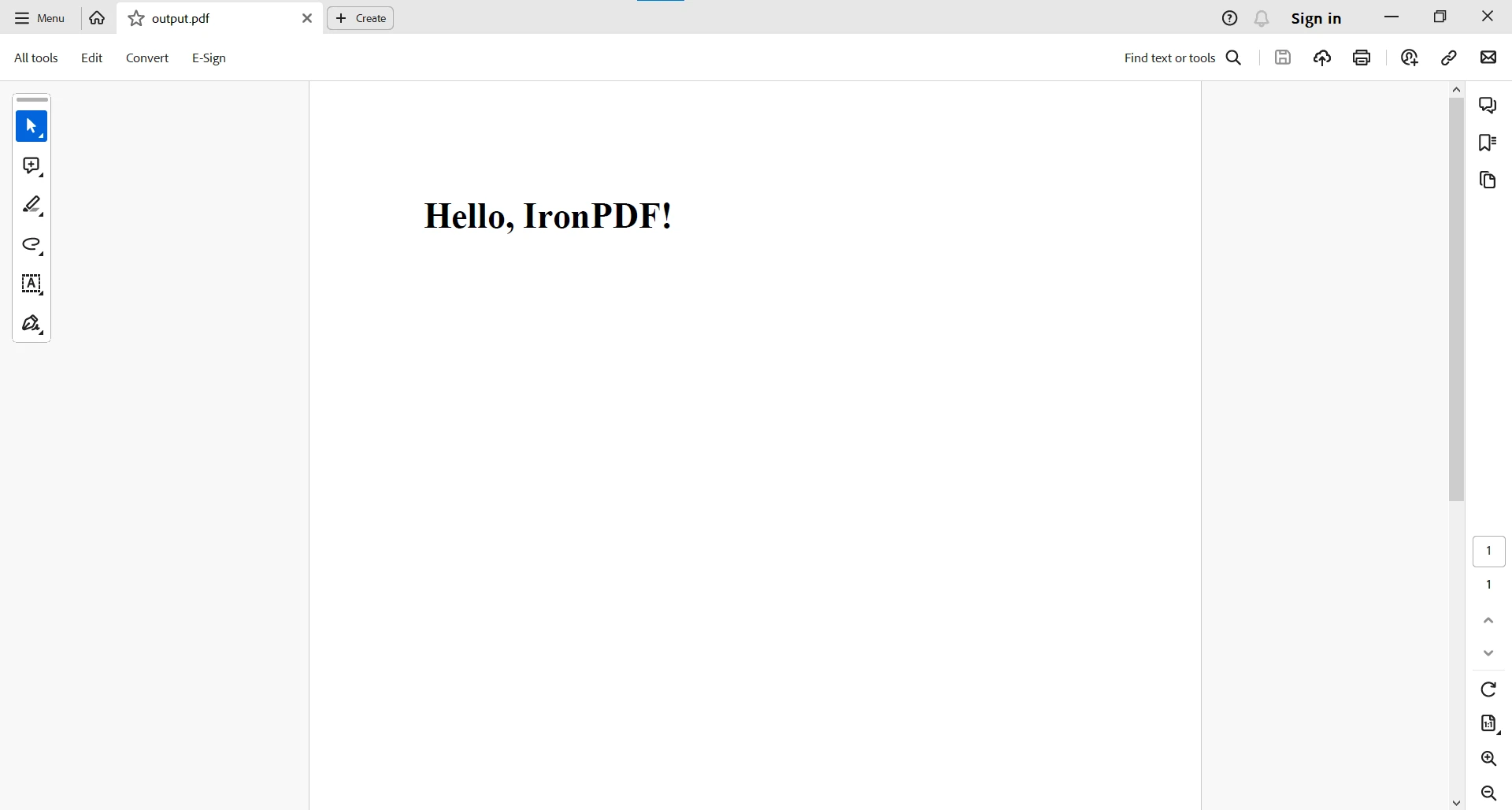
如需更複雜的PDF任務,您可以存取此Java PDF程式碼範例頁面。
使用Java Try-Catch與IronPDF
Java的try-catch塊與IronPDF Error Handling無縫整合,提供了一種結構化方法來處理PDF相關操作中可能出現的例外情況。 無論是將HTML渲染為PDF還是從現有文件中提取文字,try-catch機制確保了您的Java應用程式在面對意外情況時的堅韌性。
從PDF文件中讀取和提取文字
try {
    PdfDocument pdf = PdfDocument.fromFile(Paths.get(filePath));
    String text = pdf.extractAllText();
    System.out.println(text);
} catch (IOException e) {
    System.err.println("An IOException occurred: " + e.getMessage());
} catch (PdfException e) {
    System.err.println("A PdfException occurred: " + e.getMessage());
} catch (Exception e) {
    System.err.println("An unexpected exception occurred: " + e.getMessage());
}
try {
PdfDocument pdf = PdfDocument.fromFile(Paths.get(filePath));
String text = pdf.extractAllText();
System.out.println(text);
} catch (IOException e) {
System.err.println("An IOException occurred: " + e.getMessage());
} catch (PdfException e) {
System.err.println("A PdfException occurred: " + e.getMessage());
} catch (Exception e) {
System.err.println("An unexpected exception occurred: " + e.getMessage());
}在上述程式碼中,try-catch塊封裝了使用IronPDF從PDF文件中讀取和提取文字的過程。 通過使用try-catch,IOExceptions和PdfExceptions等潛在例外得到了優雅的處理,提高了程式碼的健壯性。
結論
在Java中理解和有效使用try-catch塊對於撰寫穩健且可靠的程式至關重要。 通過預見和處理例外,開發人員可以建立優雅響應突發狀況的應用程式,提高整體可靠性和使用者體驗。 結合try、catch和finally提供了一種強大的例外管理機制,使開發人員能夠構建能夠處理廣泛場景的堅韌軟體。
總之,Java try-catch塊與IronPDF Java解決方案之間的團隊合作為開發人員提供了針對PDF相關任務的強大解決方案,確保更流暢且更安全的使用者體驗。 能夠處理IOExceptions、PdfExceptions或任何意外例外情況展示了將IronPDF與Java出色的處理機制結合的多功能性。 這種整合不僅簡化了PDF操作,還有助於開發更可靠且容錯的Java應用程式。
有關處理PDF相關任務的更多資料,請造訪IronPDF Documentation頁面。
IronPDF可以免費用於開發目的,需要授權以實現完整功能,這有助於開發人員在做出明智決定前測試完整功能。 從IronPDF Java程式庫頁面下載程式庫並試試看。







 免費開始
免費開始 免費開始
免費開始 預訂免費直播演示
















