using IronPdf;

// Disable local disk access or cross-origin requests
Installation.EnableWebSecurity = true;

// Instantiate Renderer
var renderer = new ChromePdfRenderer();

// Create a PDF from a HTML string using C#
var pdf = renderer.RenderHtmlAsPdf("<h1>Hello World</h1>");

// Export to a file or Stream
pdf.SaveAs("output.pdf");

// Advanced Example with HTML Assets
// Load external html assets: Images, CSS and JavaScript.
// An optional BasePath 'C:\site\assets\' is set as the file location to load assets from
var myAdvancedPdf = renderer.RenderHtmlAsPdf("<img src='icons/iron.png'>", @"C:\site\assets\");
myAdvancedPdf.SaveAs("html-with-assets.pdf");
using IronPdf;// Disable local disk access or cross-origin requestsInstallation.EnableWebSecurity = true;// Instantiate Renderervar renderer = new ChromePdfRenderer();// Create a PDF from a HTML string using C#var pdf = renderer.RenderHtmlAsPdf("<h1>Hello World</h1>");// Export to a file or Streampdf.SaveAs("output.pdf");// Advanced Example with HTML Assets// Load external html assets: Images, CSS and JavaScript.// An optional BasePath 'C:\site\assets\' is set as the file location to load assets fromvar myAdvancedPdf = renderer.RenderHtmlAsPdf("<img src='icons/iron.png'>", @"C:\site\assets\");myAdvancedPdf.SaveAs("html-with-assets.pdf");
W swiecie programowania C#, metadane odgrywaja kluczowa role w wzbogacaniu semantyki i zachowania kodu. [**Atrybuty C#**](https://learn.microsoft.com/en-us/dotnet/csharp/advanced-topics/reflection-and-attributes/) stanowia potezne narzedzia umozliwiajace programistom dolaczanie metadanych do roznych elementow ich kodu, ksztaltujac sposob w jaki kompilatory, narzedzia i srodowiska uruchomieniowe interpretuja i wspolpracuja z tymi elementami.
W tym obszernym przewodniku przyjrzymy sie atrybutom C#, odkrywajac ich skladnie, zastosowania i to, jak stanowia uniwersalny mechanizm zwiekszania wyrazistosci i funkcjonalnosci kodu.
## Zrozumienie atrybutow C#: Wprowadzenie
Atrybuty, oznaczone nawiasami kwadratowymi (`[]`), są deklaratywnymi tagami umieszczanymi nad elementami kodu, aby dostarczyć dodatkowe informacje na ich temat. Te dodatkowe informacje, znane rowniez jako metadane, nie wplywaja na podstawowa funkcjonalnosc kodu, ale oferuja cenne wskazowki dla kompilatorow, srodowisk uruchomieniowych i narzedzi.
W C#, atrybut obiektu reprezentuje metadane zwiazane z encja programu, jak klasa czy metoda. Instancje atrybutów, zdefiniowane przy użyciu składni atrybutów, wzbogacają opis jednostki programu, na przykład użycie `Conditional("DEBUG")` do warunkowego włączenia kodu.
Oto podstawowy przyklad uzycia atrybutu w C#:
```csharp
[Serializable]
public class Person
{
    // Class Implementation
}
```
W tym przykładzie, atrybut `Serializable` wskazuje, że instancje klasy `Person` mogą być serializowane.
## Typy atrybutow C#
Atrybuty sa stosowane do roznych elementow w kodzie C#, w tym:
1. **Zlozenie:** Stosowane do calego zlozenia, wplywajac na jego zachowanie podczas kompilacji i wykonania.
```csharp
[assembly: AssemblyVersion("1.0.0.0")]
```
2. **Modul:** Stosowane do modulu w ramach zlozenia, dostarczajac informacji o samym module.
```csharp
[module: SomeCustomModuleAttribute]
```
3. **Typ:** Stosowane do typow, wplywajac na ich zachowanie lub dostarczajac dodatkowych informacji.
```csharp
[Serializable]
public class Person
{
    // Class Implementation
}
```
4. **Metoda:** Stosowane do metod, zmieniajace ich zachowanie lub dostarczajace informacji narzedziom.
```csharp
[Obsolete("Use the newMethod instead.")]
public void DeprecatedMethod()
{
// Method implementation
}
```
5. **Wlasciwosc, Pola, Zdarzenia, itp.:** Stosowane do specyficznych czlonkow w typie, oferujac metadane istotne dla tych czlonkow.
```csharp
public class Example
{
[DefaultValue(42)]
public int Answer { get; set; }
}
```
## Creating Custom Attributes in C#
Chociaz C# oferuje liczne wbudowane atrybuty, programisci moga tworzyc niestandardowe atrybuty, aby przekazywac specyficzne informacje o ich kodzie. Niestandardowe atrybuty definiuje sie poprzez stworzenie klasy dziedziczacej po **System.Attribute:**
```csharp
[AttributeUsage(AttributeTargets.Class | AttributeTargets.Method, AllowMultiple = true)]
public class CustomAttribute : Attribute
{
// Attribute Implementation
}
```
W tym przykładzie, `CustomAttribute` może być stosowany do klas i metod, a właściwość `AllowMultiple` określa, czy wiele instancji atrybutu jest dozwolonych na jednym celu. Tworzac klase niestandardowych atrybutow, dodaje sie koncowke "Attribute" do nazwy klasy, aby odroznic ja od zwyklych klas. Konstruktor atrybutu inicjalizuje te wlasciwosci, a parametry pozycyjne odgrywaja role w przekazywaniu wartosci do tych atrybutow, dostarczajac strukturalnych informacji w kodzie.
## Zastosowania atrybutow C#
### 1. Dokumentacja kodu
Atrybuty odgrywaja kluczowa role w dokumentowaniu kodu i dostarczaniu dodatkowych informacji programistom lub narzedziom. Na przyklad, atrybut **[Przestarzaly]** wskazuje, ze konkretny element nie powinien byc juz uzywany, a programisci powinni przejsc do alternatywy.
```csharp
[Obsolete("This method is obsolete. Use the newMethod instead.")]
public void DeprecatedMethod()
{
// Method Implementation
}
```
### 2. Serializacja i trwalosc danych
Atrybuty takie jak **[Serializowalny]** informuja srodowisko uruchomieniowe, ze instancje typu moga byc serializowane. Jest to kluczowe przy rozwiazywaniu sytuacji jak trwalosc danych.
```csharp
[Serializable]
public class Person
{
// Class implementation
}
```
### 3. Analiza kodu i integracja narzedzi
Atrybuty przyczyniaja sie do narzedzi analizy statycznej i generowania kodu. Na przykład, narzędzia takie jak frameworki do testów jednostkowych używają atrybutów takich jak `TestMethod` do identyfikacji metod testowych.
```csharp
[TestClass]
public class MyTestClass
{
[TestMethod]
public void TestMethod()
{
// Test method implementation
}
}
```
### 4. Rutowanie w ASP.NET MVC
W ASP.NET MVC, atrybuty sa szeroko stosowane do rutowania. Atrybut `Route` pozwala deweloperom określić szablon trasy dla metody akcji.
```csharp
[Route("api/[controller]")]
public class SampleController : Controller
{
[HttpGet]
[Route("GetSampleData")]
public IActionResult GetSampleData()
{
// Action method implementation
}
}
```
## Przedstawiamy IronPDF: krótki przegląd
[**Przeglad IronPDF**](/) jest wszechstronna biblioteka dopasowana do programistow .NET Framework C#, oferujaca obszerny zestaw narzedzi do generowania i manipulacji PDF. Od tworzenia PDF z HTML po wyciaganie zawartosci z istniejacych dokumentow, IronPDF upraszcza zlozone zadania, czyniac je wartosciowym narzedziem w zestawie narzedzi programisty.
### Instalacja IronPDF: Szybki start
Aby rozpocząć korzystanie z biblioteki IronPDF w projekcie C#, wystarczy zainstalować pakiet IronPDF NuGet. Użyj następującego polecenia w konsoli menedżera pakietów:
```shell
:ProductInstall
```
Alternatywnie można wyszukać "IronPDF" w menedżerze pakietów NuGet i zainstalować go stamtąd.
### Atrybuty C#: Szybki przeglad
Atrybuty C# to deklaratywne tagi, ktore dostarczaja dodatkowych informacji o encjach w kodzie, takich jak klasy, metody czy wlasciwosci. Umozliwiaja programistom dolaczanie metadanych lub definiowanie zachowan bez zmieniania podstawowej funkcjonalnosci kodu, jak wspomniano wczesniej. Podczas dalszego badania integracji atrybutow z IronPDF, odkryjemy, jak moga przyczynic sie do bardziej zniuansowanego podejscia do generowania PDF.
## Polepszanie generowania PDF przy uzyciu atrybutow C#
### 1. Dostosowywanie metadanych dokumentu
Atrybuty moga byc uzywane do wzbogacania metadanych zwiazanych z dokumentem PDF. IronPDF pozwala programistom dostosowywac elementy metadanych, takie jak tytul, autor i temat. Uzywajac atrybutow, mozna dynamicznie wstrzyknac te informacje do generowanego PDF. Nastepujacy przyklad pokazuje, jak uzywac roznych klas atrybutow z IronPDF:
```csharp
// Define the DocumentMetadataAttribute
public class DocumentMetadataAttribute : Attribute
{
public string Title { get; set; }
public string Author { get; set; }
public string Subject { get; set; }
}
[DocumentMetadata(Title = "Custom PDF Title", Author = "John Doe", Subject = "Document Subject")]
public class PdfGenerationWithAttributes
{
public void GeneratePdf()
{
// Instantiate IronPDF PdfDocument
var pdfDocument = new PdfDocument("StyledDocument.pdf");
// Retrieve DocumentMetadataAttribute using reflection
var documentMetadata = typeof(PdfGenerationWithAttributes)
.GetCustomAttributes(typeof(DocumentMetadataAttribute), false)
.FirstOrDefault() as DocumentMetadataAttribute;
// Set metadata values
pdfDocument.MetaData.Title = documentMetadata?.Title;
pdfDocument.MetaData.Author = documentMetadata?.Author;
pdfDocument.MetaData.Subject = documentMetadata?.Subject;
// Perform document generation
pdfDocument.SaveAs("CustomizedDocument.pdf");
}
}
// Usage
PdfGenerationWithAttributes obj = new PdfGenerationWithAttributes();
obj.GeneratePdf();
```
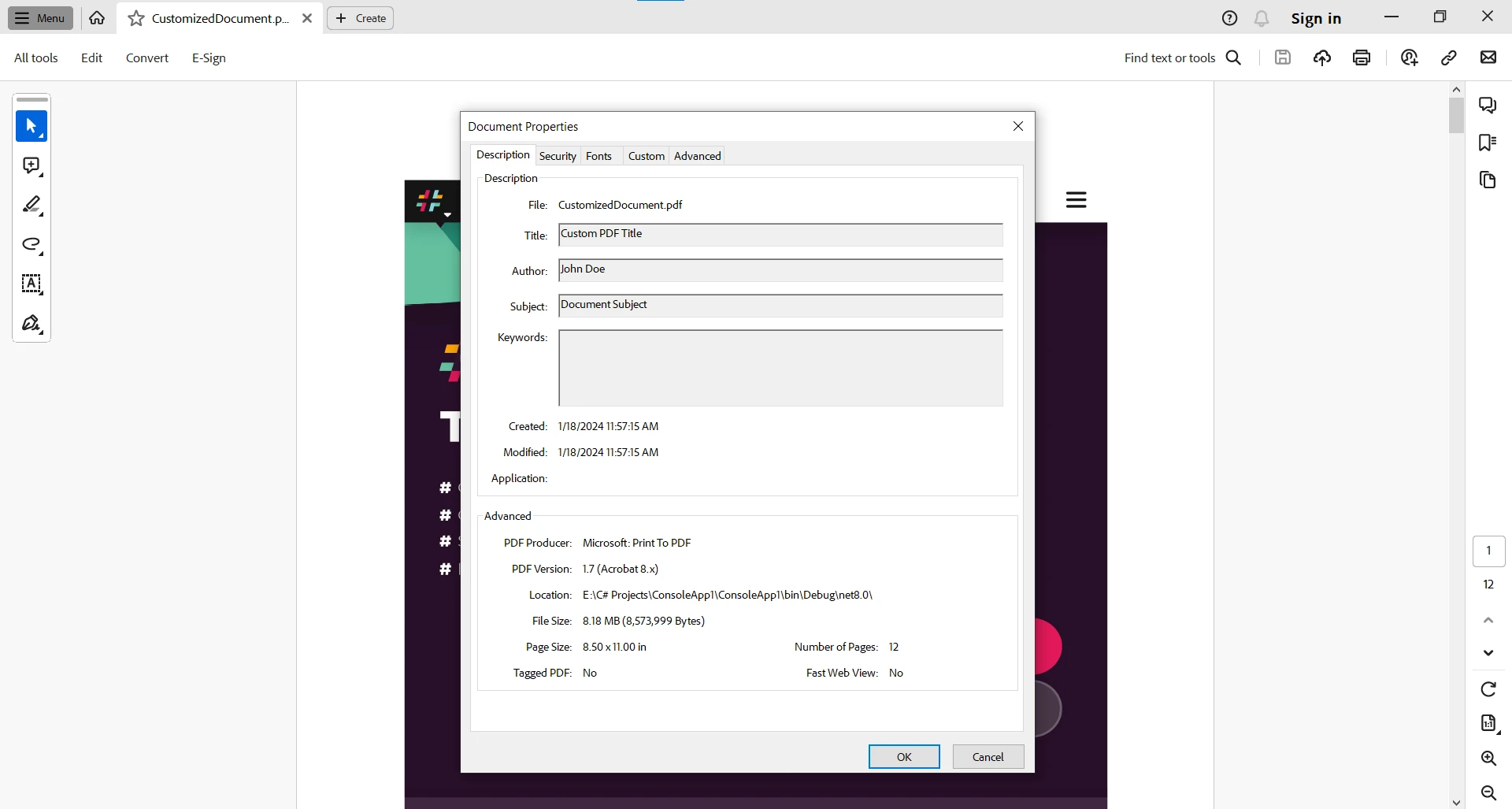
W tym przykładzie, `DocumentMetadataAttribute` służy jako atrybut niestandardowy do przekazywania informacji o metadanych, umożliwiając dynamiczną personalizację podczas generowania PDF. Dostarczony kod definiuje klasę atrybutu niestandardowego o nazwie `DocumentMetadataAttribute` w C#. Atrybuty to sposob dolaczania metadanych lub informacji deklaratywnych do encji programu, takich jak klasy, metody czy wlasciwosci. Te atrybuty są następnie używane do edycji `MetaData` dokumentu PDF za pomocą refleksji.
### 2. Sterowanie układem pliku PDF za pomocą atrybutów
Atrybuty mogą być również wykorzystywane do kontrolowania układu dokumentu PDF. IronPDF oferuje opcje ustawiania rozmiaru strony, marginesów i orientacji. Korzystając z atrybutów, można sparametryzować te ustawienia układu w oparciu o konkretne wymagania:
```csharp
// Define the PageLayoutAttribute
public class PageLayoutAttribute : Attribute
{
public IronPdf.Rendering.PdfPaperSize Size { get; set; }
public int MarginTop { get; set; }
public int MarginBottom { get; set; }
public int MarginLeft { get; set; }
public int MarginRight { get; set; }
}
[PageLayout(Size = IronPdf.Rendering.PdfPaperSize.A4, MarginTop = 20, MarginBottom = 20, MarginLeft = 10, MarginRight = 10)]
public class PdfGenerationWithLayoutAttributes
{
public void GeneratePdf()
{
// Instantiate IronPDF PdfDocument
var pdfDocument = new ChromePdfRenderer();
// Retrieve PageLayoutAttribute using reflection
var pageLayout = typeof(PdfGenerationWithLayoutAttributes)
.GetCustomAttributes(typeof(PageLayoutAttribute), false)
.FirstOrDefault() as PageLayoutAttribute;
// Set layout values
pdfDocument.RenderingOptions.PaperSize = pageLayout?.Size;
pdfDocument.RenderingOptions.MarginTop = pageLayout?.MarginTop ?? 0;
pdfDocument.RenderingOptions.MarginBottom = pageLayout?.MarginBottom ?? 0;
pdfDocument.RenderingOptions.MarginLeft = pageLayout?.MarginLeft ?? 0;
pdfDocument.RenderingOptions.MarginRight = pageLayout?.MarginRight ?? 0;
// Perform document generation
pdfDocument.RenderHtmlAsPdf("<html><body><h1>Hello, IronPDF!</h1></body></html>")
.SaveAs("CustomLayoutDocument.pdf");
}
}
// Usage
PdfGenerationWithLayoutAttributes obj = new PdfGenerationWithLayoutAttributes();
obj.GeneratePdf();
```
W tym przykładzie, `PageLayoutAttribute` jest używany do kapsułkowania ustawień układu strony, umożliwiając dynamiczne dostosowania na podstawie wartości atrybutów.
## Wnioski
Podsumowując, atrybuty C# stanowią nieoceniony mechanizm osadzania metadanych w kodzie, wpływając na sposób, w jaki narzędzia, kompilatory i środowiska uruchomieniowe interpretują i przetwarzają ten kod. Niezależnie od tego, czy korzystają z wbudowanych atrybutów, czy tworzą własne, programiści mogą wykorzystywać atrybuty do zwiększania wyrazistości kodu, umożliwiania integracji narzędzi oraz kształtowania zachowania swoich aplikacji.
Integracja atrybutów C# z IronPDF otwiera możliwości bardziej zróżnicowanego i dynamicznego generowania plików PDF. Niezależnie od tego, czy chodzi o dostosowywanie metadanych, czy o precyzyjne dostosowywanie ustawień układu, atrybuty zapewniają deklaratywne podejście do rozszerzania możliwości IronPDF. Rozważając dostępne możliwości, weź pod uwagę konkretne potrzeby związane z generowaniem plików PDF oraz to, w jaki sposób atrybuty mogą przyczynić się do bardziej dostosowanego i wydajnego procesu dzięki IronPDF.
IronPDF jest bezpłatny do celów programistycznych z kilkoma ograniczeniami, które można odblokować za pomocą [licencji umożliwiającej pełne testowanie funkcjonalności IronPDF](/licensing/).
W swiecie programowania C#, metadane odgrywaja kluczowa role w wzbogacaniu semantyki i zachowania kodu. Atrybuty C# stanowia potezne narzedzia umozliwiajace programistom dolaczanie metadanych do roznych elementow ich kodu, ksztaltujac sposob w jaki kompilatory, narzedzia i srodowiska uruchomieniowe interpretuja i wspolpracuja z tymi elementami.
W tym obszernym przewodniku przyjrzymy sie atrybutom C#, odkrywajac ich skladnie, zastosowania i to, jak stanowia uniwersalny mechanizm zwiekszania wyrazistosci i funkcjonalnosci kodu.
Zrozumienie atrybutow C#: Wprowadzenie
Atrybuty, oznaczone nawiasami kwadratowymi ([]), są deklaratywnymi tagami umieszczanymi nad elementami kodu, aby dostarczyć dodatkowe informacje na ich temat. Te dodatkowe informacje, znane rowniez jako metadane, nie wplywaja na podstawowa funkcjonalnosc kodu, ale oferuja cenne wskazowki dla kompilatorow, srodowisk uruchomieniowych i narzedzi.
W C#, atrybut obiektu reprezentuje metadane zwiazane z encja programu, jak klasa czy metoda. Instancje atrybutów, zdefiniowane przy użyciu składni atrybutów, wzbogacają opis jednostki programu, na przykład użycie Conditional("DEBUG") do warunkowego włączenia kodu.
Oto podstawowy przyklad uzycia atrybutu w C#:
[Serializable]public class Person{ // Class Implementation}
[Serializable]
public class Person
{
// Class Implementation
}
<Serializable>Public Class Person ' Class ImplementationEnd Class
<Serializable>
Public Class Person
	' Class Implementation
End Class
W tym przykładzie, atrybut Serializable wskazuje, że instancje klasy Person mogą być serializowane.
Typy atrybutow C#
Atrybuty sa stosowane do roznych elementow w kodzie C#, w tym:
Zlozenie: Stosowane do calego zlozenia, wplywajac na jego zachowanie podczas kompilacji i wykonania.
[assembly: AssemblyVersion("1.0.0.0")]
[assembly: AssemblyVersion("1.0.0.0")]
<Assembly: AssemblyVersion("1.0.0.0")>
<Assembly: AssemblyVersion("1.0.0.0")>
Modul: Stosowane do modulu w ramach zlozenia, dostarczajac informacji o samym module.
[module: SomeCustomModuleAttribute]
[module: SomeCustomModuleAttribute]
<Module: SomeCustomModuleAttribute>
<Module: SomeCustomModuleAttribute>
Typ: Stosowane do typow, wplywajac na ich zachowanie lub dostarczajac dodatkowych informacji.
[Serializable]public class Person{ // Class Implementation}
[Serializable]
public class Person
{
// Class Implementation
}
<Serializable>Public Class Person ' Class ImplementationEnd Class
<Serializable>
Public Class Person
	' Class Implementation
End Class
Metoda: Stosowane do metod, zmieniajace ich zachowanie lub dostarczajace informacji narzedziom.
[Obsolete("Use the newMethod instead.")]public voidDeprecatedMethod(){ // Method implementation}
[Obsolete("Use the newMethod instead.")]
public void DeprecatedMethod()
{
    // Method implementation
}
<Obsolete("Use the newMethod instead.")>Public Sub DeprecatedMethod() ' Method implementationEnd Sub
<Obsolete("Use the newMethod instead.")>
Public Sub DeprecatedMethod()
	' Method implementation
End Sub
Wlasciwosc, Pola, Zdarzenia, itp.: Stosowane do specyficznych czlonkow w typie, oferujac metadane istotne dla tych czlonkow.
public class Example{ [DefaultValue(42)] public intAnswer { get; set; }}
public class Example
{
    [DefaultValue(42)]
    public int Answer { get; set; }
}
Public Class Example <DefaultValue(42)> Public Property Answer() AsIntegerEnd Class
Public Class Example
	<DefaultValue(42)>
	Public Property Answer() As Integer
End Class
Creating Custom Attributes in C#
Chociaz C# oferuje liczne wbudowane atrybuty, programisci moga tworzyc niestandardowe atrybuty, aby przekazywac specyficzne informacje o ich kodzie. Niestandardowe atrybuty definiuje sie poprzez stworzenie klasy dziedziczacej po System.Attribute:
[AttributeUsage(AttributeTargets.Class | AttributeTargets.Method, AllowMultiple = true)]
public class CustomAttribute : Attribute
{
    // Attribute Implementation
}
<AttributeUsage(AttributeTargets.Class OrAttributeTargets.Method, AllowMultiple := True)>Public Class CustomAttributeInheritsAttribute ' Attribute ImplementationEnd Class
<AttributeUsage(AttributeTargets.Class Or AttributeTargets.Method, AllowMultiple := True)>
Public Class CustomAttribute
	Inherits Attribute

	' Attribute Implementation
End Class
W tym przykładzie, CustomAttribute może być stosowany do klas i metod, a właściwość AllowMultiple określa, czy wiele instancji atrybutu jest dozwolonych na jednym celu. Tworzac klase niestandardowych atrybutow, dodaje sie koncowke "Attribute" do nazwy klasy, aby odroznic ja od zwyklych klas. Konstruktor atrybutu inicjalizuje te wlasciwosci, a parametry pozycyjne odgrywaja role w przekazywaniu wartosci do tych atrybutow, dostarczajac strukturalnych informacji w kodzie.
Zastosowania atrybutow C#
1. Dokumentacja kodu
Atrybuty odgrywaja kluczowa role w dokumentowaniu kodu i dostarczaniu dodatkowych informacji programistom lub narzedziom. Na przyklad, atrybut [Przestarzaly] wskazuje, ze konkretny element nie powinien byc juz uzywany, a programisci powinni przejsc do alternatywy.
[Obsolete("This method is obsolete. Use the newMethod instead.")]public voidDeprecatedMethod(){ // Method Implementation}
[Obsolete("This method is obsolete. Use the newMethod instead.")]
public void DeprecatedMethod()
{
    // Method Implementation
}
<Obsolete("This method is obsolete. Use the newMethod instead.")>Public Sub DeprecatedMethod() ' Method ImplementationEnd Sub
<Obsolete("This method is obsolete. Use the newMethod instead.")>
Public Sub DeprecatedMethod()
	' Method Implementation
End Sub
2. Serializacja i trwalosc danych
Atrybuty takie jak [Serializowalny] informuja srodowisko uruchomieniowe, ze instancje typu moga byc serializowane. Jest to kluczowe przy rozwiazywaniu sytuacji jak trwalosc danych.
[Serializable]public class Person{ // Class implementation}
[Serializable]
public class Person
{
    // Class implementation
}
<Serializable>Public Class Person ' Class implementationEnd Class
<Serializable>
Public Class Person
	' Class implementation
End Class
3. Analiza kodu i integracja narzedzi
Atrybuty przyczyniaja sie do narzedzi analizy statycznej i generowania kodu. Na przykład, narzędzia takie jak frameworki do testów jednostkowych używają atrybutów takich jak TestMethod do identyfikacji metod testowych.
[TestClass]public class MyTestClass{ [TestMethod] public voidTestMethod() { // Test method implementation }}
[TestClass]
public class MyTestClass
{
    [TestMethod]
    public void TestMethod()
    {
        // Test method implementation
    }
}
<TestClass>Public Class MyTestClass <TestMethod> Public Sub TestMethod() ' Test method implementation End SubEnd Class
<TestClass>
Public Class MyTestClass
	<TestMethod>
	Public Sub TestMethod()
		' Test method implementation
	End Sub
End Class
4. Rutowanie w ASP.NET MVC
W ASP.NET MVC, atrybuty sa szeroko stosowane do rutowania. Atrybut Route pozwala deweloperom określić szablon trasy dla metody akcji.
[Route("api/[controller]")]public class SampleController : Controller{ [HttpGet] [Route("GetSampleData")] public IActionResultGetSampleData() { // Action method implementation }}
[Route("api/[controller]")]
public class SampleController : Controller
{
    [HttpGet]
    [Route("GetSampleData")]
    public IActionResult GetSampleData()
    {
        // Action method implementation
    }
}
<Route("api/[controller]")>Public Class SampleControllerInheritsController <HttpGet> <Route("GetSampleData")> Public Function GetSampleData() AsIActionResult ' Action method implementation End FunctionEnd Class
<Route("api/[controller]")>
Public Class SampleController
	Inherits Controller

	<HttpGet>
	<Route("GetSampleData")>
	Public Function GetSampleData() As IActionResult
		' Action method implementation
	End Function
End Class
Przedstawiamy IronPDF: krótki przegląd
Przeglad IronPDF jest wszechstronna biblioteka dopasowana do programistow .NET Framework C#, oferujaca obszerny zestaw narzedzi do generowania i manipulacji PDF. Od tworzenia PDF z HTML po wyciaganie zawartosci z istniejacych dokumentow, IronPDF upraszcza zlozone zadania, czyniac je wartosciowym narzedziem w zestawie narzedzi programisty.
Instalacja IronPDF: Szybki start
Aby rozpocząć korzystanie z biblioteki IronPDF w projekcie C#, wystarczy zainstalować pakiet IronPDF NuGet. Użyj następującego polecenia w konsoli menedżera pakietów:
PM > Install-Package IronPdf
Install-Package IronPdf
Alternatywnie można wyszukać "IronPDF" w menedżerze pakietów NuGet i zainstalować go stamtąd.
Atrybuty C#: Szybki przeglad
Atrybuty C# to deklaratywne tagi, ktore dostarczaja dodatkowych informacji o encjach w kodzie, takich jak klasy, metody czy wlasciwosci. Umozliwiaja programistom dolaczanie metadanych lub definiowanie zachowan bez zmieniania podstawowej funkcjonalnosci kodu, jak wspomniano wczesniej. Podczas dalszego badania integracji atrybutow z IronPDF, odkryjemy, jak moga przyczynic sie do bardziej zniuansowanego podejscia do generowania PDF.
Polepszanie generowania PDF przy uzyciu atrybutow C#
1. Dostosowywanie metadanych dokumentu
Atrybuty moga byc uzywane do wzbogacania metadanych zwiazanych z dokumentem PDF. IronPDF pozwala programistom dostosowywac elementy metadanych, takie jak tytul, autor i temat. Uzywajac atrybutow, mozna dynamicznie wstrzyknac te informacje do generowanego PDF. Nastepujacy przyklad pokazuje, jak uzywac roznych klas atrybutow z IronPDF:
// Define the DocumentMetadataAttributepublic class DocumentMetadataAttribute : Attribute{ public stringTitle { get; set; } public stringAuthor { get; set; } public stringSubject { get; set; }}[DocumentMetadata(Title = "Custom PDF Title", Author = "John Doe", Subject = "Document Subject")]public class PdfGenerationWithAttributes{ public voidGeneratePdf() { // Instantiate IronPDF PdfDocument var pdfDocument = new PdfDocument("StyledDocument.pdf"); // Retrieve DocumentMetadataAttribute using reflection var documentMetadata = typeof(PdfGenerationWithAttributes) .GetCustomAttributes(typeof(DocumentMetadataAttribute), false) .FirstOrDefault() as DocumentMetadataAttribute; // Set metadata values pdfDocument.MetaData.Title = documentMetadata?.Title; pdfDocument.MetaData.Author = documentMetadata?.Author; pdfDocument.MetaData.Subject = documentMetadata?.Subject; // Perform document generation pdfDocument.SaveAs("CustomizedDocument.pdf"); }}// UsagePdfGenerationWithAttributes obj = new PdfGenerationWithAttributes();obj.GeneratePdf();
// Define the DocumentMetadataAttribute
public class DocumentMetadataAttribute : Attribute
{
    public string Title { get; set; }
    public string Author { get; set; }
    public string Subject { get; set; }
}

[DocumentMetadata(Title = "Custom PDF Title", Author = "John Doe", Subject = "Document Subject")]
public class PdfGenerationWithAttributes
{
    public void GeneratePdf()
    {
        // Instantiate IronPDF PdfDocument
        var pdfDocument = new PdfDocument("StyledDocument.pdf");
        // Retrieve DocumentMetadataAttribute using reflection
        var documentMetadata = typeof(PdfGenerationWithAttributes)
            .GetCustomAttributes(typeof(DocumentMetadataAttribute), false)
            .FirstOrDefault() as DocumentMetadataAttribute;
        // Set metadata values
        pdfDocument.MetaData.Title = documentMetadata?.Title;
        pdfDocument.MetaData.Author = documentMetadata?.Author;
        pdfDocument.MetaData.Subject = documentMetadata?.Subject;
        // Perform document generation
        pdfDocument.SaveAs("CustomizedDocument.pdf");
    }
}

// Usage
PdfGenerationWithAttributes obj = new PdfGenerationWithAttributes();
obj.GeneratePdf();
' Define the DocumentMetadataAttributePublic Class DocumentMetadataAttributeInheritsAttribute Public Property Title() AsString Public Property Author() AsString Public Property Subject() AsStringEnd Class<DocumentMetadata(Title := "Custom PDF Title", Author := "John Doe", Subject := "Document Subject")>Public Class PdfGenerationWithAttributes Public Sub GeneratePdf() ' Instantiate IronPDF PdfDocument Dim pdfDocument As New PdfDocument("StyledDocument.pdf") ' Retrieve DocumentMetadataAttribute using reflection Dim documentMetadata = TryCast(GetType(PdfGenerationWithAttributes).GetCustomAttributes(GetType(DocumentMetadataAttribute), False).FirstOrDefault(), DocumentMetadataAttribute) ' Set metadata values pdfDocument.MetaData.Title = documentMetadata?.Title pdfDocument.MetaData.Author = documentMetadata?.Author pdfDocument.MetaData.Subject = documentMetadata?.Subject ' Perform document generation pdfDocument.SaveAs("CustomizedDocument.pdf") End SubEnd Class' UsagePrivate obj As New PdfGenerationWithAttributes()obj.GeneratePdf()
' Define the DocumentMetadataAttribute
Public Class DocumentMetadataAttribute
	Inherits Attribute

	Public Property Title() As String
	Public Property Author() As String
	Public Property Subject() As String
End Class

<DocumentMetadata(Title := "Custom PDF Title", Author := "John Doe", Subject := "Document Subject")>
Public Class PdfGenerationWithAttributes
	Public Sub GeneratePdf()
		' Instantiate IronPDF PdfDocument
		Dim pdfDocument As New PdfDocument("StyledDocument.pdf")
		' Retrieve DocumentMetadataAttribute using reflection
		Dim documentMetadata = TryCast(GetType(PdfGenerationWithAttributes).GetCustomAttributes(GetType(DocumentMetadataAttribute), False).FirstOrDefault(), DocumentMetadataAttribute)
		' Set metadata values
		pdfDocument.MetaData.Title = documentMetadata?.Title
		pdfDocument.MetaData.Author = documentMetadata?.Author
		pdfDocument.MetaData.Subject = documentMetadata?.Subject
		' Perform document generation
		pdfDocument.SaveAs("CustomizedDocument.pdf")
	End Sub
End Class

' Usage
Private obj As New PdfGenerationWithAttributes()
obj.GeneratePdf()
W tym przykładzie, DocumentMetadataAttribute służy jako atrybut niestandardowy do przekazywania informacji o metadanych, umożliwiając dynamiczną personalizację podczas generowania PDF. Dostarczony kod definiuje klasę atrybutu niestandardowego o nazwie DocumentMetadataAttribute w C#. Atrybuty to sposob dolaczania metadanych lub informacji deklaratywnych do encji programu, takich jak klasy, metody czy wlasciwosci. Te atrybuty są następnie używane do edycji MetaData dokumentu PDF za pomocą refleksji.
2. Sterowanie układem pliku PDF za pomocą atrybutów
Atrybuty mogą być również wykorzystywane do kontrolowania układu dokumentu PDF. IronPDF oferuje opcje ustawiania rozmiaru strony, marginesów i orientacji. Korzystając z atrybutów, można sparametryzować te ustawienia układu w oparciu o konkretne wymagania:
// Define the PageLayoutAttributepublic class PageLayoutAttribute : Attribute{ public IronPdf.Rendering.PdfPaperSizeSize { get; set; } public intMarginTop { get; set; } public intMarginBottom { get; set; } public intMarginLeft { get; set; } public intMarginRight { get; set; }}[PageLayout(Size = IronPdf.Rendering.PdfPaperSize.A4, MarginTop = 20, MarginBottom = 20, MarginLeft = 10, MarginRight = 10)]public class PdfGenerationWithLayoutAttributes{ public voidGeneratePdf() { // Instantiate IronPDF PdfDocument var pdfDocument = new ChromePdfRenderer(); // Retrieve PageLayoutAttribute using reflection var pageLayout = typeof(PdfGenerationWithLayoutAttributes) .GetCustomAttributes(typeof(PageLayoutAttribute), false) .FirstOrDefault() as PageLayoutAttribute; // Set layout values pdfDocument.RenderingOptions.PaperSize = pageLayout?.Size; pdfDocument.RenderingOptions.MarginTop = pageLayout?.MarginTop ?? 0; pdfDocument.RenderingOptions.MarginBottom = pageLayout?.MarginBottom ?? 0; pdfDocument.RenderingOptions.MarginLeft = pageLayout?.MarginLeft ?? 0; pdfDocument.RenderingOptions.MarginRight = pageLayout?.MarginRight ?? 0; // Perform document generation pdfDocument.RenderHtmlAsPdf("<html><body><h1>Hello, IronPDF!</h1></body></html>") .SaveAs("CustomLayoutDocument.pdf"); }}// UsagePdfGenerationWithLayoutAttributes obj = new PdfGenerationWithLayoutAttributes();obj.GeneratePdf();
// Define the PageLayoutAttribute
public class PageLayoutAttribute : Attribute
{
    public IronPdf.Rendering.PdfPaperSize Size { get; set; }
    public int MarginTop { get; set; }
    public int MarginBottom { get; set; }
    public int MarginLeft { get; set; }
    public int MarginRight { get; set; }
}

[PageLayout(Size = IronPdf.Rendering.PdfPaperSize.A4, MarginTop = 20, MarginBottom = 20, MarginLeft = 10, MarginRight = 10)]
public class PdfGenerationWithLayoutAttributes
{
    public void GeneratePdf()
    {
        // Instantiate IronPDF PdfDocument
        var pdfDocument = new ChromePdfRenderer();
        // Retrieve PageLayoutAttribute using reflection
        var pageLayout = typeof(PdfGenerationWithLayoutAttributes)
            .GetCustomAttributes(typeof(PageLayoutAttribute), false)
            .FirstOrDefault() as PageLayoutAttribute;
        // Set layout values
        pdfDocument.RenderingOptions.PaperSize = pageLayout?.Size;
        pdfDocument.RenderingOptions.MarginTop = pageLayout?.MarginTop ?? 0;
        pdfDocument.RenderingOptions.MarginBottom = pageLayout?.MarginBottom ?? 0;
        pdfDocument.RenderingOptions.MarginLeft = pageLayout?.MarginLeft ?? 0;
        pdfDocument.RenderingOptions.MarginRight = pageLayout?.MarginRight ?? 0;
        // Perform document generation
        pdfDocument.RenderHtmlAsPdf("<html><body><h1>Hello, IronPDF!</h1></body></html>")
            .SaveAs("CustomLayoutDocument.pdf");
    }
}

// Usage
PdfGenerationWithLayoutAttributes obj = new PdfGenerationWithLayoutAttributes();
obj.GeneratePdf();
' Define the PageLayoutAttributePublic Class PageLayoutAttributeInheritsAttribute Public Property Size() AsIronPdf.Rendering.PdfPaperSize Public Property MarginTop() AsInteger Public Property MarginBottom() AsInteger Public Property MarginLeft() AsInteger Public Property MarginRight() AsIntegerEnd Class<PageLayout(Size := IronPdf.Rendering.PdfPaperSize.A4, MarginTop := 20, MarginBottom := 20, MarginLeft := 10, MarginRight := 10)>Public Class PdfGenerationWithLayoutAttributes Public Sub GeneratePdf() ' Instantiate IronPDF PdfDocument Dim pdfDocument = New ChromePdfRenderer() ' Retrieve PageLayoutAttribute using reflection Dim pageLayout = TryCast(GetType(PdfGenerationWithLayoutAttributes).GetCustomAttributes(GetType(PageLayoutAttribute), False).FirstOrDefault(), PageLayoutAttribute) ' Set layout values pdfDocument.RenderingOptions.PaperSize = pageLayout?.Size pdfDocument.RenderingOptions.MarginTop = If(pageLayout?.MarginTop, 0) pdfDocument.RenderingOptions.MarginBottom = If(pageLayout?.MarginBottom, 0) pdfDocument.RenderingOptions.MarginLeft = If(pageLayout?.MarginLeft, 0) pdfDocument.RenderingOptions.MarginRight = If(pageLayout?.MarginRight, 0) ' Perform document generation pdfDocument.RenderHtmlAsPdf("<html><body><h1>Hello, IronPDF!</h1></body></html>").SaveAs("CustomLayoutDocument.pdf") End SubEnd Class' UsagePrivate obj As New PdfGenerationWithLayoutAttributes()obj.GeneratePdf()
' Define the PageLayoutAttribute
Public Class PageLayoutAttribute
	Inherits Attribute

	Public Property Size() As IronPdf.Rendering.PdfPaperSize
	Public Property MarginTop() As Integer
	Public Property MarginBottom() As Integer
	Public Property MarginLeft() As Integer
	Public Property MarginRight() As Integer
End Class

<PageLayout(Size := IronPdf.Rendering.PdfPaperSize.A4, MarginTop := 20, MarginBottom := 20, MarginLeft := 10, MarginRight := 10)>
Public Class PdfGenerationWithLayoutAttributes
	Public Sub GeneratePdf()
		' Instantiate IronPDF PdfDocument
		Dim pdfDocument = New ChromePdfRenderer()
		' Retrieve PageLayoutAttribute using reflection
		Dim pageLayout = TryCast(GetType(PdfGenerationWithLayoutAttributes).GetCustomAttributes(GetType(PageLayoutAttribute), False).FirstOrDefault(), PageLayoutAttribute)
		' Set layout values
		pdfDocument.RenderingOptions.PaperSize = pageLayout?.Size
		pdfDocument.RenderingOptions.MarginTop = If(pageLayout?.MarginTop, 0)
		pdfDocument.RenderingOptions.MarginBottom = If(pageLayout?.MarginBottom, 0)
		pdfDocument.RenderingOptions.MarginLeft = If(pageLayout?.MarginLeft, 0)
		pdfDocument.RenderingOptions.MarginRight = If(pageLayout?.MarginRight, 0)
		' Perform document generation
		pdfDocument.RenderHtmlAsPdf("<html><body><h1>Hello, IronPDF!</h1></body></html>").SaveAs("CustomLayoutDocument.pdf")
	End Sub
End Class

' Usage
Private obj As New PdfGenerationWithLayoutAttributes()
obj.GeneratePdf()
W tym przykładzie, PageLayoutAttribute jest używany do kapsułkowania ustawień układu strony, umożliwiając dynamiczne dostosowania na podstawie wartości atrybutów.
Wnioski
Podsumowując, atrybuty C# stanowią nieoceniony mechanizm osadzania metadanych w kodzie, wpływając na sposób, w jaki narzędzia, kompilatory i środowiska uruchomieniowe interpretują i przetwarzają ten kod. Niezależnie od tego, czy korzystają z wbudowanych atrybutów, czy tworzą własne, programiści mogą wykorzystywać atrybuty do zwiększania wyrazistości kodu, umożliwiania integracji narzędzi oraz kształtowania zachowania swoich aplikacji.
Integracja atrybutów C# z IronPDF otwiera możliwości bardziej zróżnicowanego i dynamicznego generowania plików PDF. Niezależnie od tego, czy chodzi o dostosowywanie metadanych, czy o precyzyjne dostosowywanie ustawień układu, atrybuty zapewniają deklaratywne podejście do rozszerzania możliwości IronPDF. Rozważając dostępne możliwości, weź pod uwagę konkretne potrzeby związane z generowaniem plików PDF oraz to, w jaki sposób atrybuty mogą przyczynić się do bardziej dostosowanego i wydajnego procesu dzięki IronPDF.
Jacob Mellor jest Chief Technology Officer w Iron Software i wizjonerskim inżynierem, pionierem technologii C# PDF. Jako pierwotny deweloper głównej bazy kodowej Iron Software, kształtuje architekturę produktów firmy od jej początku, przekształcając ją wspólnie z CEO Cameron Rimington w firmę liczącą ponad 50 osób, obsługującą NASA, Teslę i światowe agencje rządowe.















