using IronPdf;

// Disable local disk access or cross-origin requests
Installation.EnableWebSecurity = true;

// Instantiate Renderer
var renderer = new ChromePdfRenderer();

// Create a PDF from a HTML string using C#
var pdf = renderer.RenderHtmlAsPdf("<h1>Hello World</h1>");

// Export to a file or Stream
pdf.SaveAs("output.pdf");

// Advanced Example with HTML Assets
// Load external html assets: Images, CSS and JavaScript.
// An optional BasePath 'C:\site\assets\' is set as the file location to load assets from
var myAdvancedPdf = renderer.RenderHtmlAsPdf("<img src='icons/iron.png'>", @"C:\site\assets\");
myAdvancedPdf.SaveAs("html-with-assets.pdf");
using IronPdf;// Disable local disk access or cross-origin requestsInstallation.EnableWebSecurity = true;// Instantiate Renderervar renderer = new ChromePdfRenderer();// Create a PDF from a HTML string using C#var pdf = renderer.RenderHtmlAsPdf("<h1>Hello World</h1>");// Export to a file or Streampdf.SaveAs("output.pdf");// Advanced Example with HTML Assets// Load external html assets: Images, CSS and JavaScript.// An optional BasePath 'C:\site\assets\' is set as the file location to load assets fromvar myAdvancedPdf = renderer.RenderHtmlAsPdf("<img src='icons/iron.png'>", @"C:\site\assets\");myAdvancedPdf.SaveAs("html-with-assets.pdf");
PM >Install-Package IronPdf
Install-Package IronPdf
AKTUALNOŚCI DLA PROGRAMISTÓW
Serializator JSON w języku C# (jak to działa dla programistów)
W obszarze nowoczesnego rozwoju oprogramowania formaty wymiany danych odgrywają kluczową rolę w umożliwianiu komunikacji między różnymi systemami. Jednym z takich formatów, który zyskał ogromną popularność, jest JSON (JavaScript Object Notation).
Programiści C# często mają do czynienia z danymi JSON, a aby ułatwić płynną interakcję, C# oferuje potężne narzędzie - C# JSON Serializer.
W tym artykule omówimy, czym jest [serializacja JSON](https://www.c-sharpcorner.com/UploadFile/manas1/json-serialization-and-deserialization-using-json-net-librar/) i jej zastosowania. Postaramy się też zrozumieć proces serializacji JSON na przykładzie z [biblioteką IronPDF](/).
## 1. Zrozumienie serializatora JSON w C#
Serializator JSON w C# to komponent, który konwertuje obiekty C# do ich reprezentacji w formacie JSON i odwrotnie. Ten proces, znany jako serializacja i deserializacja, jest niezbędny podczas wymiany danych między aplikacją C# a zewnętrznymi systemami lub usługami.
Rozważmy scenariusz, w którym aplikacja e-commerce musi przesłać informacje o produkcie do aplikacji mobilnej. Zamiast wysyłać surowe obiekty C#, których aplikacja mobilna mogłaby nie zrozumieć, aplikacja może użyć serializatora JSON do konwersji obiektów na format JSON, który jest powszechnie rozpoznawany i łatwo konsumowany przez różne platformy.
### 1.1. Przykłady serializacji JSON w C#
Przyjrzyjmy się prostemu przykładowi, aby zilustrować ten koncept. Załóżmy, że mamy klasę C# reprezentującą osobę:
```csharp
public class Person
{
    public string Name { get; set; }
    public int Age { get; set; }
}
```
Używając serializacji JSON w C#, możemy przekonwertować instancję tej klasy na ciąg JSON:
```csharp
Person person = new Person { Name = "John Doe", Age = 30 };
string json = JsonConvert.SerializeObject(person);
```
Otrzymany ciąg **JSON** to **`{"Name":"John Doe","Age":30}`**, przedstawiający obiekt osoby w formacie JSON.
## 2. Rodzaje serializatorów JSON w C# oraz przykłady kodu
C# oferuje różne sposoby wykonywania serializacji JSON, z których każdy ma swoją własną grupę funkcji i zastosowań. Oto niektóre z najczęściej używanych metod serializacji JSON w C#:
### 2.1. DataContractJsonSerializer
Ten serializator jest częścią przestrzeni nazw **System.Runtime.Serialization.Json** i używa atrybutów kontraktu danych do kontrolowania procesu serializacji.
```csharp
using System;
using System.IO;
using System.Runtime.Serialization.Json;
using System.Text;
public class Person
{
    public string Name { get; set; }
    public int Age { get; set; }
}
class Program
{
static void Main()
{
Person person = new Person { Name = "John Doe", Age = 30 };
DataContractJsonSerializer serializer = new DataContractJsonSerializer(typeof(Person));
using (MemoryStream stream = new MemoryStream())
{
serializer.WriteObject(stream, person);
string json = Encoding.UTF8.GetString(stream.ToArray());
Console.WriteLine("Serialized JSON using DataContractJsonSerializer:");
Console.WriteLine(json);
}
}
}
```
### 2.2. JavaScriptSerializer
Zlokalizowany w przestrzeni nazw **System.Web.Script.Serialization**, ten serializator jest częścią ASP.NET i zapewnia prosty sposób serializacji obiektów do formatu JSON.
```csharp
using System;
using System.Web.Script.Serialization;
public class Person
{
public string Name { get; set; }
public int Age { get; set; }
}
class Program
{
static void Main()
{
Person person = new Person { Name = "John Doe", Age = 30 };
JavaScriptSerializer serializer = new JavaScriptSerializer();
string json = serializer.Serialize(person);
Console.WriteLine("Serialized JSON using JavaScriptSerializer:");
Console.WriteLine(json);
}
}
```
### 2.3. Json.NET (Newtonsoft.Json)
[Json.NET (Newtonsoft.Json)](http://Json.NET) to szeroko stosowana zewnętrzna biblioteka do serializacji JSON w C#. Oferuje elastyczność, wydajność i bogaty zestaw funkcji.
```csharp
using System;
using Newtonsoft.Json;
public class Person
{
public string Name { get; set; }
public int Age { get; set; }
}
class Program
{
static void Main()
{
Person person = new Person { Name = "John Doe", Age = 30 };
string json = JsonConvert.SerializeObject(person);
Console.WriteLine("Serialized JSON using Json.NET (Newtonsoft.Json):");
Console.WriteLine(json);
}
}
```
## 3. Kiedy używać serializatorów JSON w C#
Wiedza, kiedy stosować serializację JSON w C#, jest kluczowa dla efektywnej i bezbłędnej wymiany danych. Oto typowe scenariusze, w których korzystanie z serializatora JSON jest korzystne:
### 3.1. Web API
Podczas tworzenia webowych interfejsów API, które komunikują się z aplikacjami klienckimi, JSON jest preferowanym formatem wymiany danych ze względu na jego lekkość i czytelność przez człowieka.
### 3.2. Ustawienia konfiguracyjne
Przechowywanie i odczytywanie ustawień konfiguracyjnych w formacie JSON jest powszechną praktyką. Serializacja JSON upraszcza proces konwersji tych ustawień między obiektami C# a JSON.
### 3.3. Interoperacyjność
Podczas integracji aplikacji C# z systemami rozwijanymi w innych językach, JSON zapewnia językoobojętny format danych, gwarantując bezproblemową interoperacyjność.
## 4. Czym jest deserializowany ciąg JSON?
Deserializacja to proces przekształcania ciągu JSON z powrotem na jego równoważny obiekt C#. Jest to kluczowy krok podczas pracy z danymi otrzymanymi z zewnętrznych źródeł, takich jak web API lub przechowywane dane JSON.
W C#, te same serializatory używane do serializacji mogą być często wykorzystywane do deserializacji. Zilustrujmy deserializację prostym przykładem korzystając z Json.NET (Newtonsoft.Json):
```csharp
using System;
using Newtonsoft.Json;
public class Person
{
public string Name { get; set; }
public int Age { get; set; }
}
class Program
{
static void Main()
{
string json = "{\"Name\":\"John Doe\",\"Age\":30}";
Person deserializedPerson = JsonConvert.DeserializeObject<Person>(json);
Console.WriteLine("Deserialized Person:");
Console.WriteLine($"Name: {deserializedPerson.Name}, Age: {deserializedPerson.Age}");
}
}
```
## 5. Wprowadzenie do IronPDF w C#
Teraz, gdy mamy solidne podstawy serializacji JSON w C#, przyjrzyjmy się integracji [biblioteki IronPDF do C#](/), potężnej biblioteki do pracy z dokumentami PDF w C#. IronPDF upraszcza proces generowania i manipulowania dokumentami PDF, czyniąc ją doskonałym wyborem w scenariuszach, gdzie zaangażowane są dokumenty PDF.
### 5.1. IronPDF w pigułce
IronPDF to biblioteka C# umożliwiająca programistom tworzenie, manipulowanie i renderowanie dokumentów PDF w ich aplikacjach. Zarówno do generowania faktur, raportów, czy innych typów dokumentów PDF, IronPDF dostarcza wygodnego i bogatego w funkcje rozwiązania.
Funkcja [konwersji HTML na PDF](/tutorials/html-to-pdf/) w IronPDF to główna atrakcja, utrzymująca twoje układy i style. Przekształca treści internetowe w pliki PDF, odpowiednie do raportów, faktur i dokumentacji. Możesz z łatwością konwertować pliki HTML, adresy URL i ciągi HTML do formatów PDF.
```csharp
using IronPdf;
class Program
{
static void Main(string[] args)
{
var renderer = new ChromePdfRenderer();
// 1. Convert an HTML String to PDF
var htmlContent = "<h1>Hello, IronPDF!</h1><p>This is a PDF from an HTML string.</p>";
var pdfFromHtmlString = renderer.RenderHtmlAsPdf(htmlContent);
pdfFromHtmlString.SaveAs("HTMLStringToPDF.pdf");
// 2. Convert an HTML File to PDF
var htmlFilePath = "path_to_your_html_file.html"; // Specify the path to your HTML file
var pdfFromHtmlFile = renderer.RenderHtmlFileAsPdf(htmlFilePath);
pdfFromHtmlFile.SaveAs("HTMLFileToPDF.pdf");
// 3. Convert a URL to PDF
var url = "http://ironpdf.com"; // Specify the URL
var pdfFromUrl = renderer.RenderUrlAsPdf(url);
pdfFromUrl.SaveAs("URLToPDF.pdf");
}
}
```
Aby rozpocząć pracę z IronPDF, najpierw musisz zainstalować pakiet NuGet IronPDF:
```shell
:ProductInstall
```
Po zainstalowaniu, możesz używać biblioteki IronPDF do wykonywania różnych zadań związanych z PDF w aplikacji C#.
### 5.2. Użycie serializatora JSON w C# z kodem IronPDF
Teraz przyjrzyjmy się praktycznemu przykładowi, jak serializacja JSON w C# może być płynnie zintegrowana z IronPDF. Rozważ scenariusz, w którym masz kolekcję danych, która musi być przedstawiona w raporcie PDF.
Dane są początkowo przechowywane jako obiekty C# i muszą zostać przekonwertowane na format JSON przed wstawieniem ich do dokumentu PDF przy użyciu IronPDF.
#### 5.3. Przykładowy kod
```csharp
using IronPdf;
using Newtonsoft.Json;
using System.Collections.Generic;
public class ReportData
{
public string Title { get; set; }
public string Content { get; set; }
}
public class Program
{
static void Main()
{
var data = new List<ReportData>
{
new ReportData { Title = "Section 1", Content = "Lorem ipsum dolor sit amet." },
new ReportData { Title = "Section 2", Content = "Consectetur adipiscing elit." },
// Add more data as needed
};
// Convert data to JSON format
string jsonData = JsonConvert.SerializeObject(data);
// Create a PDF document using IronPDF
var renderer = new ChromePdfRenderer();
// Embed JSON data into the PDF
string htmlContent = $"<html><body><h4>{jsonData}</h4></body></html>";
var pdfDocument = renderer.RenderHtmlAsPdf(htmlContent);
// Save or display the PDF as needed
pdfDocument.SaveAs("Report.pdf");
}
}
```
W tym przykładzie klasa **ReportData** reprezentuje strukturę danych dla każdej sekcji raportu. Lista **danych** zawiera instancje tej klasy.
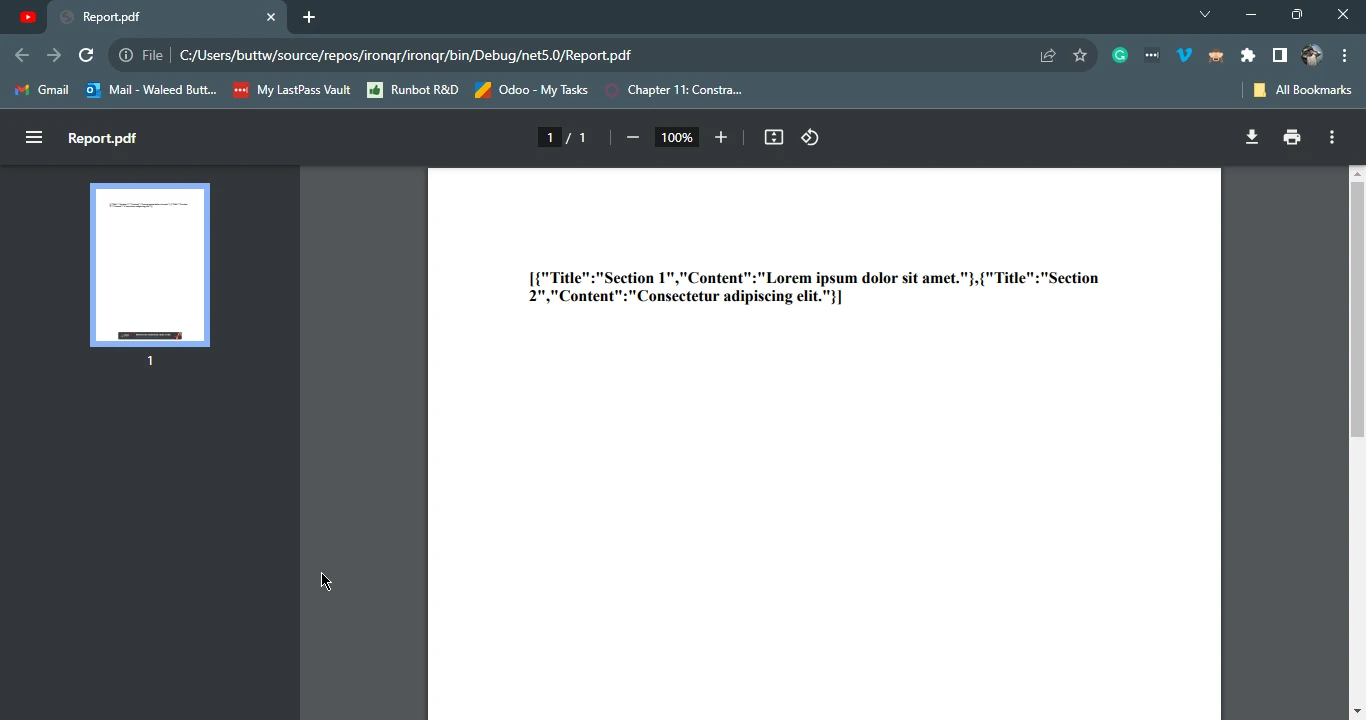
Dane są serializowane do formatu JSON przy użyciu **metody JsonConvert.SerializeObject**, a wynikowy ciąg JSON jest osadzany w szablonie HTML. Następnie do konwersji tego szablonu HTML na dokument PDF używa się IronPDF.
#### 5.4. Wynik
## 6. Podsumowanie
Podsumowując, serializacja JSON w języku C# jest podstawowym narzędziem do obsługi wymiany danych w aplikacjach napisanych w języku C#.
Niezależnie od tego, czy pracujesz z interfejsami API, ustawieniami konfiguracyjnymi, czy integrujesz systemy w innych językach, zrozumienie i wykorzystanie serializacji JSON w języku C# może znacznie zwiększyć wydajność i elastyczność Twoich aplikacji.
Jeśli chodzi o pracę z plikami PDF w języku C#, IronPDF zapewnia solidne rozwiązanie do tworzenia, edycji i renderowania dokumentów PDF.
Łącząc możliwości serializacji JSON w języku C# z biblioteką IronPDF, programiści mogą płynnie integrować dane z obiektów C# z raportami PDF, otwierając nowe możliwości generowania dynamicznej i opartej na danych zawartości PDF w swoich aplikacjach.
W miarę ewolucji świata tworzenia oprogramowania opanowanie tych narzędzi staje się coraz ważniejsze dla budowania solidnych i interoperacyjnych rozwiązań.
IronPDF oferuje [bezpłatną licencję próbną](trial-license), która jest doskonałą okazją do przetestowania i zapoznania się z biblioteką C# PDF [IronPDF Pricing](/licensing/) z cenami zaczynającymi się od `$liteLicense` dla wersji lite.
Aby dowiedzieć się, jak rozpocząć pracę z IronPDF, odwiedź [dokumentację](/docs/) [IronPDF](/docs/).
W obszarze nowoczesnego rozwoju oprogramowania formaty wymiany danych odgrywają kluczową rolę w umożliwianiu komunikacji między różnymi systemami. Jednym z takich formatów, który zyskał ogromną popularność, jest JSON (JavaScript Object Notation).
Programiści C# często mają do czynienia z danymi JSON, a aby ułatwić płynną interakcję, C# oferuje potężne narzędzie - C# JSON Serializer.
W tym artykule omówimy, czym jest serializacja JSON i jej zastosowania. Postaramy się też zrozumieć proces serializacji JSON na przykładzie z biblioteką IronPDF.
1. Zrozumienie serializatora JSON w C#
Serializator JSON w C# to komponent, który konwertuje obiekty C# do ich reprezentacji w formacie JSON i odwrotnie. Ten proces, znany jako serializacja i deserializacja, jest niezbędny podczas wymiany danych między aplikacją C# a zewnętrznymi systemami lub usługami.
Rozważmy scenariusz, w którym aplikacja e-commerce musi przesłać informacje o produkcie do aplikacji mobilnej. Zamiast wysyłać surowe obiekty C#, których aplikacja mobilna mogłaby nie zrozumieć, aplikacja może użyć serializatora JSON do konwersji obiektów na format JSON, który jest powszechnie rozpoznawany i łatwo konsumowany przez różne platformy.
1.1. Przykłady serializacji JSON w C#
Przyjrzyjmy się prostemu przykładowi, aby zilustrować ten koncept. Załóżmy, że mamy klasę C# reprezentującą osobę:
public class Person{ public stringName { get; set; } public intAge { get; set; }}
public class Person
{
public string Name { get; set; }
public int Age { get; set; }
}
Public Class Person Public Property Name() AsString Public Property Age() AsIntegerEnd Class
Public Class Person
	Public Property Name() As String
	Public Property Age() As Integer
End Class
Używając serializacji JSON w C#, możemy przekonwertować instancję tej klasy na ciąg JSON:
Person person = new Person { Name = "John Doe", Age = 30 };string json = JsonConvert.SerializeObject(person);
Person person = new Person { Name = "John Doe", Age = 30 };
string json = JsonConvert.SerializeObject(person);
Dim person As New PersonWith { .Name = "John Doe", .Age = 30}Dim json AsString = JsonConvert.SerializeObject(person)
Dim person As New Person With {
.Name = "John Doe",
.Age = 30
}
Dim json As String = JsonConvert.SerializeObject(person)
Otrzymany ciąg JSON to {"Name":"John Doe","Age":30}, przedstawiający obiekt osoby w formacie JSON.
2. Rodzaje serializatorów JSON w C# oraz przykłady kodu
C# oferuje różne sposoby wykonywania serializacji JSON, z których każdy ma swoją własną grupę funkcji i zastosowań. Oto niektóre z najczęściej używanych metod serializacji JSON w C#:
2.1. DataContractJsonSerializer
Ten serializator jest częścią przestrzeni nazw System.Runtime.Serialization.Json i używa atrybutów kontraktu danych do kontrolowania procesu serializacji.
using System;using System.IO;using System.Runtime.Serialization.Json;using System.Text;public class Person{ public stringName { get; set; } public intAge { get; set; }}class Program{ static voidMain() { Person person = new Person { Name = "John Doe", Age = 30 }; DataContractJsonSerializer serializer = new DataContractJsonSerializer(typeof(Person)); using (MemoryStream stream = new MemoryStream()) { serializer.WriteObject(stream, person); string json = Encoding.UTF8.GetString(stream.ToArray());Console.WriteLine("Serialized JSON using DataContractJsonSerializer:");Console.WriteLine(json); } }}
using System;
using System.IO;
using System.Runtime.Serialization.Json;
using System.Text;
public class Person
{
public string Name { get; set; }
public int Age { get; set; }
}
class Program
{
static void Main()
{
Person person = new Person { Name = "John Doe", Age = 30 };
DataContractJsonSerializer serializer = new DataContractJsonSerializer(typeof(Person));
using (MemoryStream stream = new MemoryStream())
{
serializer.WriteObject(stream, person);
string json = Encoding.UTF8.GetString(stream.ToArray());
Console.WriteLine("Serialized JSON using DataContractJsonSerializer:");
Console.WriteLine(json);
}
}
}
ImportsSystemImportsSystem.IOImportsSystem.Runtime.Serialization.JsonImportsSystem.TextPublic Class Person Public Property Name() AsString Public Property Age() AsIntegerEnd ClassFriend Class ProgramShared Sub Main() Dim person As New PersonWith { .Name = "John Doe", .Age = 30 } Dim serializer As New DataContractJsonSerializer(GetType(Person))Using stream As New MemoryStream() serializer.WriteObject(stream, person) Dim json AsString = Encoding.UTF8.GetString(stream.ToArray())Console.WriteLine("Serialized JSON using DataContractJsonSerializer:")Console.WriteLine(json)EndUsing End SubEnd Class
Imports System
Imports System.IO
Imports System.Runtime.Serialization.Json
Imports System.Text
Public Class Person
	Public Property Name() As String
	Public Property Age() As Integer
End Class
Friend Class Program
Shared Sub Main()
Dim person As New Person With {
.Name = "John Doe",
.Age = 30
}
Dim serializer As New DataContractJsonSerializer(GetType(Person))
Using stream As New MemoryStream()
serializer.WriteObject(stream, person)
Dim json As String = Encoding.UTF8.GetString(stream.ToArray())
Console.WriteLine("Serialized JSON using DataContractJsonSerializer:")
Console.WriteLine(json)
End Using
End Sub
End Class
2.2. JavaScriptSerializer
Zlokalizowany w przestrzeni nazw System.Web.Script.Serialization, ten serializator jest częścią ASP.NET i zapewnia prosty sposób serializacji obiektów do formatu JSON.
using System;using System.Web.Script.Serialization;public class Person{ public stringName { get; set; } public intAge { get; set; }}class Program{ static voidMain() { Person person = new Person { Name = "John Doe", Age = 30 }; JavaScriptSerializer serializer = new JavaScriptSerializer(); string json = serializer.Serialize(person);Console.WriteLine("Serialized JSON using JavaScriptSerializer:");Console.WriteLine(json); }}
using System;
using System.Web.Script.Serialization;
public class Person
{
public string Name { get; set; }
public int Age { get; set; }
}
class Program
{
static void Main()
{
Person person = new Person { Name = "John Doe", Age = 30 };
JavaScriptSerializer serializer = new JavaScriptSerializer();
string json = serializer.Serialize(person);
Console.WriteLine("Serialized JSON using JavaScriptSerializer:");
Console.WriteLine(json);
}
}
ImportsSystemImportsSystem.Web.Script.SerializationPublic Class Person Public Property Name() AsString Public Property Age() AsIntegerEnd ClassFriend Class ProgramShared Sub Main() Dim person As New PersonWith { .Name = "John Doe", .Age = 30 } Dim serializer As New JavaScriptSerializer() Dim json AsString = serializer.Serialize(person)Console.WriteLine("Serialized JSON using JavaScriptSerializer:")Console.WriteLine(json) End SubEnd Class
Imports System
Imports System.Web.Script.Serialization
Public Class Person
Public Property Name() As String
Public Property Age() As Integer
End Class
Friend Class Program
Shared Sub Main()
Dim person As New Person With {
.Name = "John Doe",
.Age = 30
}
Dim serializer As New JavaScriptSerializer()
Dim json As String = serializer.Serialize(person)
Console.WriteLine("Serialized JSON using JavaScriptSerializer:")
Console.WriteLine(json)
End Sub
End Class
2.3. Json.NET (Newtonsoft.Json)
Json.NET (Newtonsoft.Json) to szeroko stosowana zewnętrzna biblioteka do serializacji JSON w C#. Oferuje elastyczność, wydajność i bogaty zestaw funkcji.
using System;using Newtonsoft.Json;public class Person{ public stringName { get; set; } public intAge { get; set; }}class Program{ static voidMain() { Person person = new Person { Name = "John Doe", Age = 30 }; string json = JsonConvert.SerializeObject(person);Console.WriteLine("Serialized JSON using Json.NET (Newtonsoft.Json):");Console.WriteLine(json); }}
using System;
using Newtonsoft.Json;
public class Person
{
public string Name { get; set; }
public int Age { get; set; }
}
class Program
{
static void Main()
{
Person person = new Person { Name = "John Doe", Age = 30 };
string json = JsonConvert.SerializeObject(person);
Console.WriteLine("Serialized JSON using Json.NET (Newtonsoft.Json):");
Console.WriteLine(json);
}
}
ImportsSystemImportsNewtonsoft.JsonPublic Class Person Public Property Name() AsString Public Property Age() AsIntegerEnd ClassFriend Class ProgramShared Sub Main() Dim person As New PersonWith { .Name = "John Doe", .Age = 30 } Dim json AsString = JsonConvert.SerializeObject(person)Console.WriteLine("Serialized JSON using Json.NET (Newtonsoft.Json):")Console.WriteLine(json) End SubEnd Class
Imports System
Imports Newtonsoft.Json
Public Class Person
Public Property Name() As String
Public Property Age() As Integer
End Class
Friend Class Program
Shared Sub Main()
Dim person As New Person With {
	.Name = "John Doe",
	.Age = 30
}
Dim json As String = JsonConvert.SerializeObject(person)
Console.WriteLine("Serialized JSON using Json.NET (Newtonsoft.Json):")
Console.WriteLine(json)
End Sub
End Class
3. Kiedy używać serializatorów JSON w C#
Wiedza, kiedy stosować serializację JSON w C#, jest kluczowa dla efektywnej i bezbłędnej wymiany danych. Oto typowe scenariusze, w których korzystanie z serializatora JSON jest korzystne:
3.1. Web API
Podczas tworzenia webowych interfejsów API, które komunikują się z aplikacjami klienckimi, JSON jest preferowanym formatem wymiany danych ze względu na jego lekkość i czytelność przez człowieka.
3.2. Ustawienia konfiguracyjne
Przechowywanie i odczytywanie ustawień konfiguracyjnych w formacie JSON jest powszechną praktyką. Serializacja JSON upraszcza proces konwersji tych ustawień między obiektami C# a JSON.
3.3. Interoperacyjność
Podczas integracji aplikacji C# z systemami rozwijanymi w innych językach, JSON zapewnia językoobojętny format danych, gwarantując bezproblemową interoperacyjność.
4. Czym jest deserializowany ciąg JSON?
Deserializacja to proces przekształcania ciągu JSON z powrotem na jego równoważny obiekt C#. Jest to kluczowy krok podczas pracy z danymi otrzymanymi z zewnętrznych źródeł, takich jak web API lub przechowywane dane JSON.
W C#, te same serializatory używane do serializacji mogą być często wykorzystywane do deserializacji. Zilustrujmy deserializację prostym przykładem korzystając z Json.NET (Newtonsoft.Json):
using System;using Newtonsoft.Json;public class Person{ public stringName { get; set; } public intAge { get; set; }}class Program{ static voidMain() { string json = "{\"Name\":\"John Doe\",\"Age\":30}"; Person deserializedPerson = JsonConvert.DeserializeObject<Person>(json);Console.WriteLine("Deserialized Person:");Console.WriteLine($"Name: {deserializedPerson.Name}, Age: {deserializedPerson.Age}"); }}
using System;
using Newtonsoft.Json;

public class Person
{
    public string Name { get; set; }
    public int Age { get; set; }
}

class Program
{
    static void Main()
    {
        string json = "{\"Name\":\"John Doe\",\"Age\":30}";
        Person deserializedPerson = JsonConvert.DeserializeObject<Person>(json);
        Console.WriteLine("Deserialized Person:");
        Console.WriteLine($"Name: {deserializedPerson.Name}, Age: {deserializedPerson.Age}");
    }
}
ImportsSystemImportsNewtonsoft.JsonPublic Class Person Public Property Name() AsString Public Property Age() AsIntegerEnd ClassFriend Class ProgramShared Sub Main() Dim json AsString = "{""Name"":""John Doe"",""Age"":30}" Dim deserializedPerson AsPerson = JsonConvert.DeserializeObject(OfPerson)(json)Console.WriteLine("Deserialized Person:")Console.WriteLine($"Name: {deserializedPerson.Name}, Age: {deserializedPerson.Age}") End SubEnd Class
Imports System
Imports Newtonsoft.Json

Public Class Person
	Public Property Name() As String
	Public Property Age() As Integer
End Class

Friend Class Program
	Shared Sub Main()
		Dim json As String = "{""Name"":""John Doe"",""Age"":30}"
		Dim deserializedPerson As Person = JsonConvert.DeserializeObject(Of Person)(json)
		Console.WriteLine("Deserialized Person:")
		Console.WriteLine($"Name: {deserializedPerson.Name}, Age: {deserializedPerson.Age}")
	End Sub
End Class
5. Wprowadzenie do IronPDF w C#
Teraz, gdy mamy solidne podstawy serializacji JSON w C#, przyjrzyjmy się integracji biblioteki IronPDF do C#, potężnej biblioteki do pracy z dokumentami PDF w C#. IronPDF upraszcza proces generowania i manipulowania dokumentami PDF, czyniąc ją doskonałym wyborem w scenariuszach, gdzie zaangażowane są dokumenty PDF.
5.1. IronPDF w pigułce
IronPDF to biblioteka C# umożliwiająca programistom tworzenie, manipulowanie i renderowanie dokumentów PDF w ich aplikacjach. Zarówno do generowania faktur, raportów, czy innych typów dokumentów PDF, IronPDF dostarcza wygodnego i bogatego w funkcje rozwiązania.
Funkcja konwersji HTML na PDF w IronPDF to główna atrakcja, utrzymująca twoje układy i style. Przekształca treści internetowe w pliki PDF, odpowiednie do raportów, faktur i dokumentacji. Możesz z łatwością konwertować pliki HTML, adresy URL i ciągi HTML do formatów PDF.
using IronPdf;class Program{ static voidMain(string[] args) { var renderer = new ChromePdfRenderer(); // 1. Convert an HTML String to PDF var htmlContent = "<h1>Hello, IronPDF!</h1><p>This is a PDF from an HTML string.</p>"; var pdfFromHtmlString = renderer.RenderHtmlAsPdf(htmlContent); pdfFromHtmlString.SaveAs("HTMLStringToPDF.pdf"); // 2. Convert an HTML File to PDF var htmlFilePath = "path_to_your_html_file.html"; // Specify the path to your HTML file var pdfFromHtmlFile = renderer.RenderHtmlFileAsPdf(htmlFilePath); pdfFromHtmlFile.SaveAs("HTMLFileToPDF.pdf"); // 3. Convert a URL to PDF var url = "http://ironpdf.com"; // Specify the URL var pdfFromUrl = renderer.RenderUrlAsPdf(url); pdfFromUrl.SaveAs("URLToPDF.pdf"); }}
using IronPdf;

class Program
{
    static void Main(string[] args)
    {
        var renderer = new ChromePdfRenderer();

        // 1. Convert an HTML String to PDF
        var htmlContent = "<h1>Hello, IronPDF!</h1><p>This is a PDF from an HTML string.</p>";
        var pdfFromHtmlString = renderer.RenderHtmlAsPdf(htmlContent);
        pdfFromHtmlString.SaveAs("HTMLStringToPDF.pdf");

        // 2. Convert an HTML File to PDF
        var htmlFilePath = "path_to_your_html_file.html"; // Specify the path to your HTML file
        var pdfFromHtmlFile = renderer.RenderHtmlFileAsPdf(htmlFilePath);
        pdfFromHtmlFile.SaveAs("HTMLFileToPDF.pdf");

        // 3. Convert a URL to PDF
        var url = "http://ironpdf.com"; // Specify the URL
        var pdfFromUrl = renderer.RenderUrlAsPdf(url);
        pdfFromUrl.SaveAs("URLToPDF.pdf");
    }
}
ImportsIronPdfFriend Class ProgramShared Sub Main(ByVal args() AsString) Dim renderer = New ChromePdfRenderer() ' 1. Convert an HTML String to PDF Dim htmlContent = "<h1>Hello, IronPDF!</h1><p>This is a PDF from an HTML string.</p>" Dim pdfFromHtmlString = renderer.RenderHtmlAsPdf(htmlContent) pdfFromHtmlString.SaveAs("HTMLStringToPDF.pdf") ' 2. Convert an HTML File to PDF Dim htmlFilePath = "path_to_your_html_file.html" ' Specify the path to your HTML file Dim pdfFromHtmlFile = renderer.RenderHtmlFileAsPdf(htmlFilePath) pdfFromHtmlFile.SaveAs("HTMLFileToPDF.pdf") ' 3. Convert a URL to PDF Dim url = "http://ironpdf.com" ' Specify the URL Dim pdfFromUrl = renderer.RenderUrlAsPdf(url) pdfFromUrl.SaveAs("URLToPDF.pdf") End SubEnd Class
Imports IronPdf

Friend Class Program
	Shared Sub Main(ByVal args() As String)
		Dim renderer = New ChromePdfRenderer()

		' 1. Convert an HTML String to PDF
		Dim htmlContent = "<h1>Hello, IronPDF!</h1><p>This is a PDF from an HTML string.</p>"
		Dim pdfFromHtmlString = renderer.RenderHtmlAsPdf(htmlContent)
		pdfFromHtmlString.SaveAs("HTMLStringToPDF.pdf")

		' 2. Convert an HTML File to PDF
		Dim htmlFilePath = "path_to_your_html_file.html" ' Specify the path to your HTML file
		Dim pdfFromHtmlFile = renderer.RenderHtmlFileAsPdf(htmlFilePath)
		pdfFromHtmlFile.SaveAs("HTMLFileToPDF.pdf")

		' 3. Convert a URL to PDF
		Dim url = "http://ironpdf.com" ' Specify the URL
		Dim pdfFromUrl = renderer.RenderUrlAsPdf(url)
		pdfFromUrl.SaveAs("URLToPDF.pdf")
	End Sub
End Class
Aby rozpocząć pracę z IronPDF, najpierw musisz zainstalować pakiet NuGet IronPDF:
PM > Install-Package IronPdf
Install-Package IronPdf
Po zainstalowaniu, możesz używać biblioteki IronPDF do wykonywania różnych zadań związanych z PDF w aplikacji C#.
5.2. Użycie serializatora JSON w C# z kodem IronPDF
Teraz przyjrzyjmy się praktycznemu przykładowi, jak serializacja JSON w C# może być płynnie zintegrowana z IronPDF. Rozważ scenariusz, w którym masz kolekcję danych, która musi być przedstawiona w raporcie PDF.
Dane są początkowo przechowywane jako obiekty C# i muszą zostać przekonwertowane na format JSON przed wstawieniem ich do dokumentu PDF przy użyciu IronPDF.
5.3. Przykładowy kod
using IronPdf;using Newtonsoft.Json;using System.Collections.Generic;public class ReportData{ public stringTitle { get; set; } public stringContent { get; set; }}public class Program{ static voidMain() { var data = new List<ReportData> { new ReportData { Title = "Section 1", Content = "Lorem ipsum dolor sit amet." }, new ReportData { Title = "Section 2", Content = "Consectetur adipiscing elit." }, // Add more data as needed }; // Convert data to JSON format string jsonData = JsonConvert.SerializeObject(data); // Create a PDF document using IronPDF var renderer = new ChromePdfRenderer(); // Embed JSON data into the PDF string htmlContent = $"<html><body><h4>{jsonData}</h4></body></html>"; var pdfDocument = renderer.RenderHtmlAsPdf(htmlContent); // Save or display the PDF as needed pdfDocument.SaveAs("Report.pdf"); }}
using IronPdf;
using Newtonsoft.Json;
using System.Collections.Generic;

public class ReportData
{
    public string Title { get; set; }
    public string Content { get; set; }
}

public class Program
{
    static void Main()
    {
        var data = new List<ReportData>
        {
            new ReportData { Title = "Section 1", Content = "Lorem ipsum dolor sit amet." },
            new ReportData { Title = "Section 2", Content = "Consectetur adipiscing elit." },
            // Add more data as needed
        };

        // Convert data to JSON format
        string jsonData = JsonConvert.SerializeObject(data);

        // Create a PDF document using IronPDF
        var renderer = new ChromePdfRenderer();

        // Embed JSON data into the PDF
        string htmlContent = $"<html><body><h4>{jsonData}</h4></body></html>";
        var pdfDocument = renderer.RenderHtmlAsPdf(htmlContent);

        // Save or display the PDF as needed
        pdfDocument.SaveAs("Report.pdf");
    }
}
ImportsIronPdfImportsNewtonsoft.JsonImportsSystem.Collections.GenericPublic Class ReportData Public Property Title() AsString Public Property Content() AsStringEnd ClassPublic Class ProgramShared Sub Main() Dim data = New List(OfReportData) From { New ReportDataWith { .Title = "Section 1", .Content = "Lorem ipsum dolor sit amet." }, New ReportDataWith { .Title = "Section 2", .Content = "Consectetur adipiscing elit." } } ' Convert data to JSON format Dim jsonData AsString = JsonConvert.SerializeObject(data) ' Create a PDF document using IronPDF Dim renderer = New ChromePdfRenderer() ' Embed JSON data into the PDF Dim htmlContent AsString = $"<html><body><h4>{jsonData}</h4></body></html>" Dim pdfDocument = renderer.RenderHtmlAsPdf(htmlContent) ' Save or display the PDF as needed pdfDocument.SaveAs("Report.pdf") End SubEnd Class
Imports IronPdf
Imports Newtonsoft.Json
Imports System.Collections.Generic

Public Class ReportData
	Public Property Title() As String
	Public Property Content() As String
End Class

Public Class Program
	Shared Sub Main()
		Dim data = New List(Of ReportData) From {
			New ReportData With {
				.Title = "Section 1",
				.Content = "Lorem ipsum dolor sit amet."
			},
			New ReportData With {
				.Title = "Section 2",
				.Content = "Consectetur adipiscing elit."
			}
		}

		' Convert data to JSON format
		Dim jsonData As String = JsonConvert.SerializeObject(data)

		' Create a PDF document using IronPDF
		Dim renderer = New ChromePdfRenderer()

		' Embed JSON data into the PDF
		Dim htmlContent As String = $"<html><body><h4>{jsonData}</h4></body></html>"
		Dim pdfDocument = renderer.RenderHtmlAsPdf(htmlContent)

		' Save or display the PDF as needed
		pdfDocument.SaveAs("Report.pdf")
	End Sub
End Class
W tym przykładzie klasa ReportData reprezentuje strukturę danych dla każdej sekcji raportu. Lista danych zawiera instancje tej klasy.
Dane są serializowane do formatu JSON przy użyciu metody JsonConvert.SerializeObject, a wynikowy ciąg JSON jest osadzany w szablonie HTML. Następnie do konwersji tego szablonu HTML na dokument PDF używa się IronPDF.
5.4. Wynik
6. Podsumowanie
Podsumowując, serializacja JSON w języku C# jest podstawowym narzędziem do obsługi wymiany danych w aplikacjach napisanych w języku C#.
Niezależnie od tego, czy pracujesz z interfejsami API, ustawieniami konfiguracyjnymi, czy integrujesz systemy w innych językach, zrozumienie i wykorzystanie serializacji JSON w języku C# może znacznie zwiększyć wydajność i elastyczność Twoich aplikacji.
Jeśli chodzi o pracę z plikami PDF w języku C#, IronPDF zapewnia solidne rozwiązanie do tworzenia, edycji i renderowania dokumentów PDF.
Łącząc możliwości serializacji JSON w języku C# z biblioteką IronPDF, programiści mogą płynnie integrować dane z obiektów C# z raportami PDF, otwierając nowe możliwości generowania dynamicznej i opartej na danych zawartości PDF w swoich aplikacjach.
W miarę ewolucji świata tworzenia oprogramowania opanowanie tych narzędzi staje się coraz ważniejsze dla budowania solidnych i interoperacyjnych rozwiązań.
IronPDF oferuje bezpłatną licencję próbną, która jest doskonałą okazją do przetestowania i zapoznania się z biblioteką C# PDF IronPDF Pricing z cenami zaczynającymi się od $999 dla wersji lite.
Aby dowiedzieć się, jak rozpocząć pracę z IronPDF, odwiedź dokumentacjęIronPDF.
Jacob Mellor jest Chief Technology Officer w Iron Software i wizjonerskim inżynierem, pionierem technologii C# PDF. Jako pierwotny deweloper głównej bazy kodowej Iron Software, kształtuje architekturę produktów firmy od jej początku, przekształcając ją wspólnie z CEO Cameron Rimington w firmę liczącą ponad 50 osób, obsługującą NASA, Teslę i światowe agencje rządowe.














