using IronPdf;

// Disable local disk access or cross-origin requests
Installation.EnableWebSecurity = true;

// Instantiate Renderer
var renderer = new ChromePdfRenderer();

// Create a PDF from a HTML string using C#
var pdf = renderer.RenderHtmlAsPdf("<h1>Hello World</h1>");

// Export to a file or Stream
pdf.SaveAs("output.pdf");

// Advanced Example with HTML Assets
// Load external html assets: Images, CSS and JavaScript.
// An optional BasePath 'C:\site\assets\' is set as the file location to load assets from
var myAdvancedPdf = renderer.RenderHtmlAsPdf("<img src='icons/iron.png'>", @"C:\site\assets\");
myAdvancedPdf.SaveAs("html-with-assets.pdf");
using IronPdf;// Disable local disk access or cross-origin requestsInstallation.EnableWebSecurity = true;// Instantiate Renderervar renderer = new ChromePdfRenderer();// Create a PDF from a HTML string using C#var pdf = renderer.RenderHtmlAsPdf("<h1>Hello World</h1>");// Export to a file or Streampdf.SaveAs("output.pdf");// Advanced Example with HTML Assets// Load external html assets: Images, CSS and JavaScript.// An optional BasePath 'C:\site\assets\' is set as the file location to load assets fromvar myAdvancedPdf = renderer.RenderHtmlAsPdf("<img src='icons/iron.png'>", @"C:\site\assets\");myAdvancedPdf.SaveAs("html-with-assets.pdf");
W przypadku programowania w języku C# wykorzystanie wydajnych bibliotek może znacznie zwiększyć wydajność i możliwości. Dwie biblioteki, które dobrze ze sobą współpracują, to Flurl i [IronPDF](/), które zapewniają programistom potężne narzędzia odpowiednio do tworzenia plików PDF i interakcji z internetowymi interfejsami API.
Flurl oferuje płynną, ekspresyjną składnię, która ułatwia pracę z żądaniami HTTP, interfejsami API i ich punktami końcowymi w języku C#. Wysyłanie żądań HTTP, odpowiadanie na nie oraz zarządzanie parametrami zapytania lub nagłówkami to tylko niektóre z zadań, które ułatwia. Dzięki Flurl programiści mogą szybko i skutecznie zarządzać uwierzytelnianiem, serializować i deserializować JSON oraz korzystać z internetowych interfejsów API - a wszystko to przy pisaniu czytelnego i dobrze zorganizowanego kodu.
Programiści mogą wykorzystać łatwość obsługi i wszechstronność Flurl w połączeniu z IronPDF do tworzenia szczegółowych i gotowych dokumentów PDF poprzez łączenie się z interfejsami API sieci Web, pobieranie danych i łatwą integrację ich z IronPDF. Dzięki tej integracji programiści mogą projektować złożone aplikacje, które poprzez automatyzację tworzenia dokumentów przy użyciu danych w czasie rzeczywistym pobieranych z usług internetowych poprawiają wydajność i komfort użytkowania.
W niniejszym wprowadzeniu przyjrzymy się, jak używać i łączyć Flurl oraz IronPDF w programie napisanym w języku C#, podkreślając ich zalety i potencjał synergii we współczesnym tworzeniu oprogramowania.
## What is [Flurl](https://flurl.dev/) C#?
Flurl to solidna i przyjazna dla użytkownika biblioteka C# do zarządzania żądaniami HTTP i komunikacji z internetowymi interfejsami API. Zapewnia płynną, łańcuchową składnię, która poprawia czytelność i łatwość utrzymania kodu oraz zmniejsza złożoność interakcji z interfejsami API RESTful. Dzięki Flurl programiści mogą łatwo tworzyć i wysyłać żądania HTTP, obsługiwać odpowiedzi w łatwy do zrozumienia sposób oraz zarządzać parametrami zapytania, nagłówkami i danymi.
Jedną z najbardziej charakterystycznych cech Flurl jest możliwość dynamicznego zarządzania tworzeniem adresów URL, co ułatwia tworzenie i modyfikowanie adresów URL w zależności od warunków środowiska uruchomieniowego, a także pozwala na wykorzystanie go jako samodzielnego Buildersa do tworzenia adresów URL. Oferuje silne wsparcie dla zarządzania serializacją i deserializacją danych JSON oraz obsługuje popularne funkcje HTTP, takie jak GET, POST, PUT, DELETE itp. Dodatkowo Flurl posiada wbudowaną funkcjonalność do zarządzania danymi formularzy i parametrami zapytań, co sprawia, że można go dostosować do szerokiego zakresu scenariuszy integracji API.
### Interfejs płynny
Płynna, łańcuchowa składnia zapewniana przez Flurl poprawia czytelność i łatwość utrzymania kodu. Programiści mogą tworzyć proste i wyraziste żądania HTTP oraz pracować z adresami URL, parametrami zapytania, nagłówkami i danymi.
### Obsługa metod HTTP
Obsługiwane są wszystkie standardowe metody HTTP, w tym GET, POST, PUT, DELETE, PATCH, HEAD i OPTIONS. Dzięki takiemu kompleksowemu podejściu do wsparcia programiści mogą realizować różne zadania podczas pracy z interfejsami API sieci Web.
### Obsługa parametrów zapytania
Flurl oferuje proste sposoby modyfikowania, dodawania i usuwania parametrów zapytania w adresach URL. Ułatwia to tworzenie dynamicznych adresów URL na podstawie danych wprowadzonych przez użytkownika lub sytuacji w czasie wykonywania.
### Obsługa JSON
Obsługa danych JSON jest natywnie obsługiwana przez Flurl. Może z łatwością deserializować odpowiedzi JSON do obiektów C# oraz serializować obiekty do formatu JSON na potrzeby ładunków żądań. Dzięki temu korzystanie z interfejsów API opartych na JSON jest proste i łatwe.
### Obsługa danych formularzy i przesyłania wieloczęściowego
Ułatwia to zarządzanie żądaniami wieloczęściowymi i danymi formularzy. Flurl ułatwia programistom dołączanie ładunków typu multipart/form-data lub danych zakodowanych w formularzach do żądań HTTP.
### Obsługa błędów i zasady ponawiania prób
Flurl oferuje definiowanie zasad ponawiania prób oraz funkcje obsługi błędów dla wszystkich wywołań HTTP. Definiując unikalną logikę obsługi błędów lub techniki ponawiania prób, programiści mogą zwiększyć odporność i niezawodność wywołań API oraz interakcji. Zapewnia to również ochronę i pomaga programistom zapobiegać błędom anonimowych obiektów w odpowiedziach.
### Uwierzytelnianie
Obsługuje kilka popularnych metod uwierzytelniania dla interfejsów API, w tym OAuth, niestandardowe schematy uwierzytelniania, uwierzytelnianie podstawowe oraz klucze API. Zapewnia to bezpieczną komunikację z interfejsami API wymagającymi uwierzytelnienia.
### Wsparcie dla testów
Poprzez izolowanie logiki związanej z HTTP do komponentów wielokrotnego użytku z wyraźnym podziałem odpowiedzialności, Flurl wspiera testowalność. To sprawia, że pisanie testów jednostkowych dla interakcji z API jest prostsze, ponieważ nie są wymagane rzeczywiste wywołania sieciowe do ich przetestowania.
### Elastyczność konfiguracji
Zapewnia elastyczność konfiguracji dla klientów HTTP i parametrów żądań. Deweloperzy mogą zmieniać zachowania klientów, czas oczekiwania, ilość odpowiedzi błędów, nagłówki i inne ustawienia, aby dostosować je do potrzeb konkretnych aplikacji lub ograniczeń API.
### Rozszerzalność
Dzięki swojemu systemowi wtyczek, Flurl jest bardzo rozbudowywalny. Deweloperzy mogą zwiększać funkcjonalność platformy poprzez budowanie unikalnych rozszerzeń lub włączanie wtyczek zewnętrznych dla dodatkowych funkcji.
## Create and configure Flurl C#
Oto kroki, aby zbudować i skonfigurować Flurl w projekcie C#:
### Tworzenie nowego projektu w Visual Studio
W programie Visual Studio łatwo jest utworzyć projekt konsolowy. Aby rozpocząć aplikację konsolową w środowisku Visual Studio, wykonaj te proste kroki:
Upewnij się, że Visual Studio jest zainstalowane na twoim komputerze, zanim spróbujesz go użyć.
#### Rozpocznij nowy projekt
Wybierz Plik, Projekt, a następnie wybierz opcję Nowy.
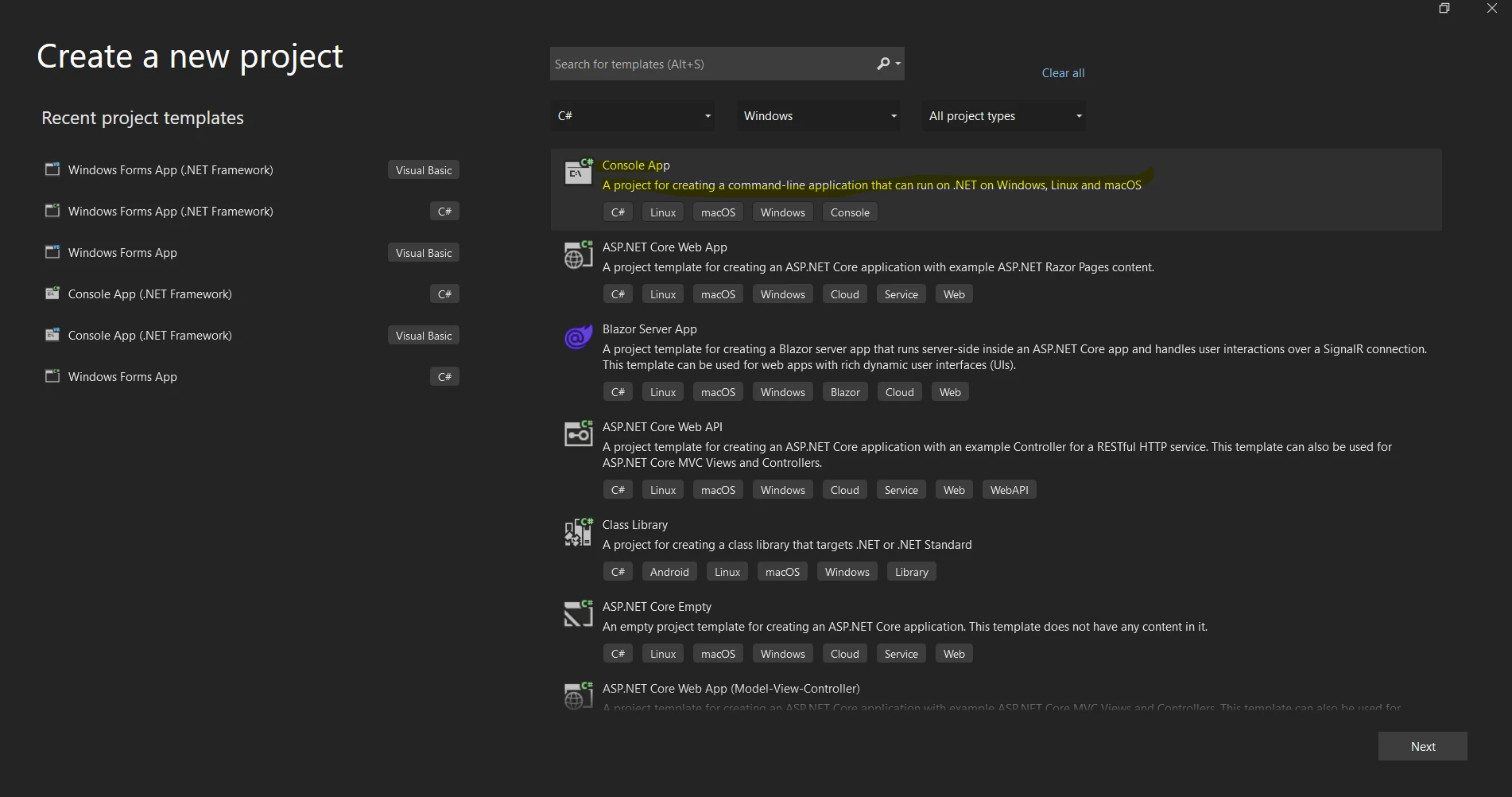
Selkecjonuj szablon "Aplikacja konsolowa" lub "Aplikacja konsolowa (.NET Core)" z listy szablonów projektu poniżej.
Proszę wypełnić formularz "Nazwa", aby nadać swojemu projektowi nazwę.
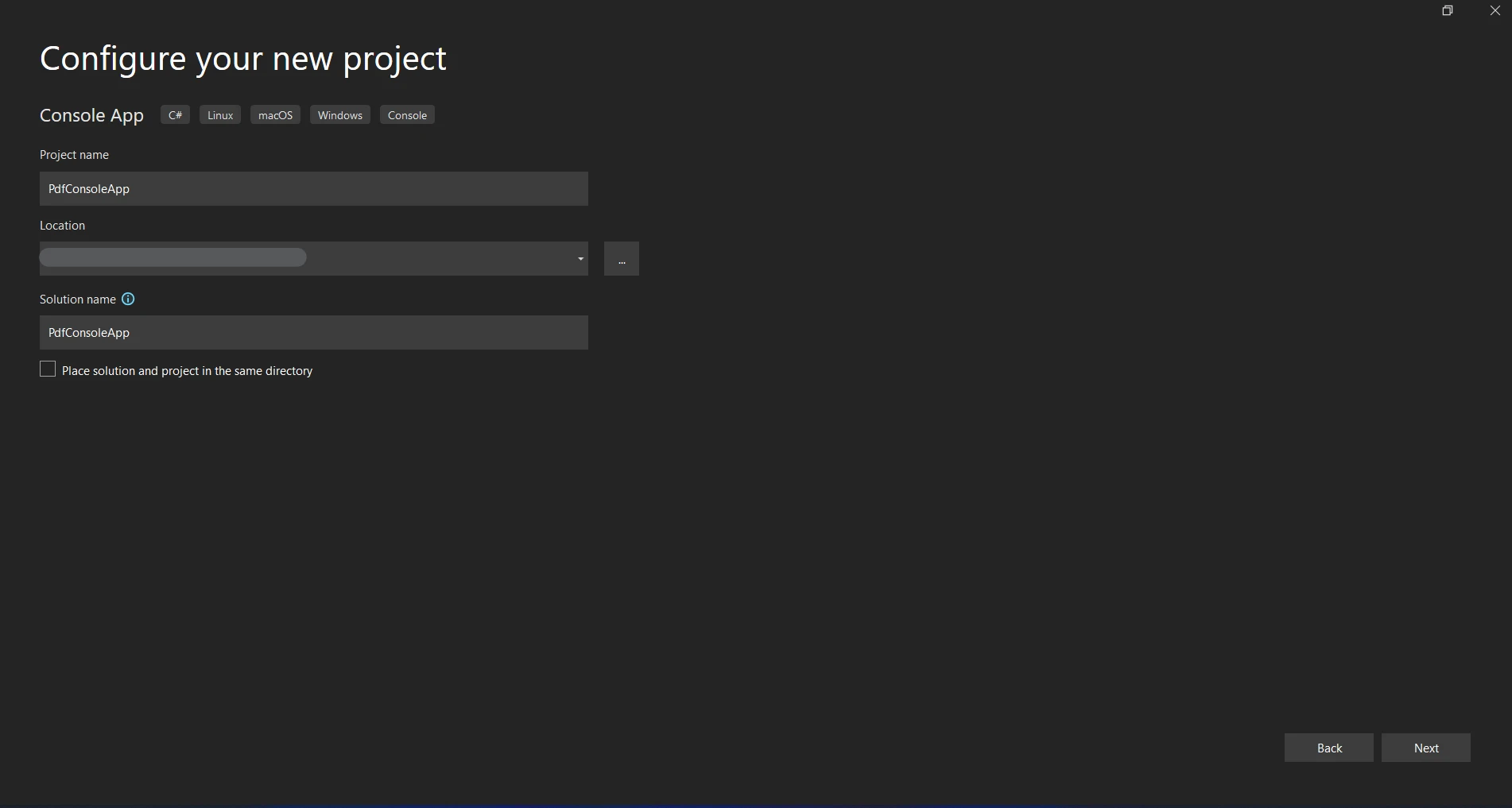
Wybierz miejsce, aby przechowywać projekt.
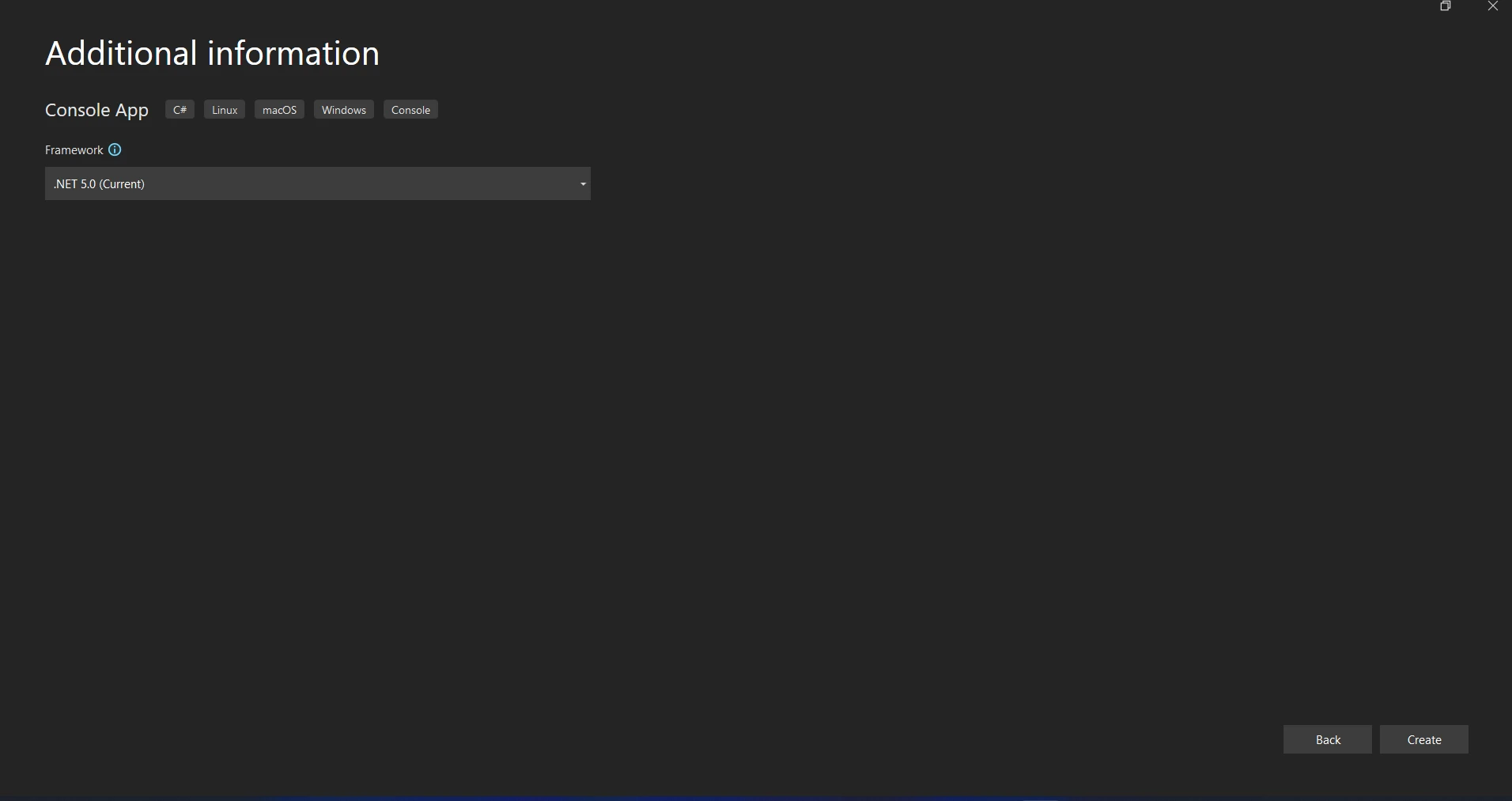
Kliknięcie przycisku "Utwórz" spowoduje otwarcie projektu aplikacji konsolowej.
#### Zainstaluj pakiet Flurl.Http
Pierwszym krokiem jest zainstalowanie pakietu Flurl.Http przy użyciu konsoli NuGet Package Manager lub menedżera pakietów NuGet w Visual Studio.
```shell
:InstallCmd Install-Package Flurl.Http
```
#### Tworzenie konfiguracji FlurlClient
Flurl oferuje klasę FlurlClient, która pozwala na ustanowienie domyślnych parametrów dla każdego żądania HTTP przy użyciu tylko kreatora URL. Ten opcjonalny, lecz pomocny krok można wykonać poprzez ustawienie bazowych URL-ów lub domyślnych nagłówków.
```csharp
using Flurl;
using Flurl.Http;

// Configure a FlurlClient instance with base URL and headers
FlurlClient flurlClient = new FlurlClient("https://api.example.com/");
flurlClient.WithHeader("Authorization", "Bearer YourAccessTokenHere");
```
#### Wykonywanie żądań HTTP
Teraz możesz wykonywać żądania HTTP przy użyciu płynnej URL Flurl.
```csharp
var response = await "http://localhost:5013/users".GetAsync();
Console.WriteLine(response.ToString());
if (response.ResponseMessage.IsSuccessStatusCode)
{
var result = await response.ResponseMessage.Content.ReadAsStringAsync();
Console.WriteLine(result);
}
else
{
Console.WriteLine($"Error: {response.StatusCode}");
}
```

#### Obsługa odpowiedzi
Aby zarządzać treścią odpowiedzi na podstawie zamierzonego formatu (JSON, string, itp.), HttpResponseMessageExtensions Flurl oferuje metody rozszerzające, takie jak ReceiveJson i ReceiveString.
```csharp
// Handling JSON response
var responseObject = await "https://api.example.com/resource"
.WithClient(flurlClient)
.GetJsonAsync<ResponseType>();
// Assuming ResponseType is a class representing the expected JSON structure
Console.WriteLine($"Response: {responseObject.Property}");
```
#### Dodatkowa konfiguracja
- **Parametry zapytania:** Aby dodać parametry zapytania, użyj metody `.SetQueryParams()`. Upewnij się, że każde żądanie działa przy użyciu tej samej instancji `HttpClient` dla efektywności.
- **Limit czasowy:** Na przykład, można ustawić limit czasowy za pomocą `.WithTimeout(TimeSpan.FromSeconds(30))`.
- **Obsługa błędów:** Aby obsłużyć konkretne scenariusze błędów, użyj `.OnError()`.
## Pierwsze kroki
Kiedy potrzebujesz pobrać dane z zewnętrznego API i tworzyć dokumenty PDF przy użyciu tych danych, integracja Flurl z IronPDF w projekcie C# może być pomocna. Aby zacząć z Flurl i IronPDF, postępuj zgodnie z tymi krokami:
### Czym jest [IronPDF](/)?
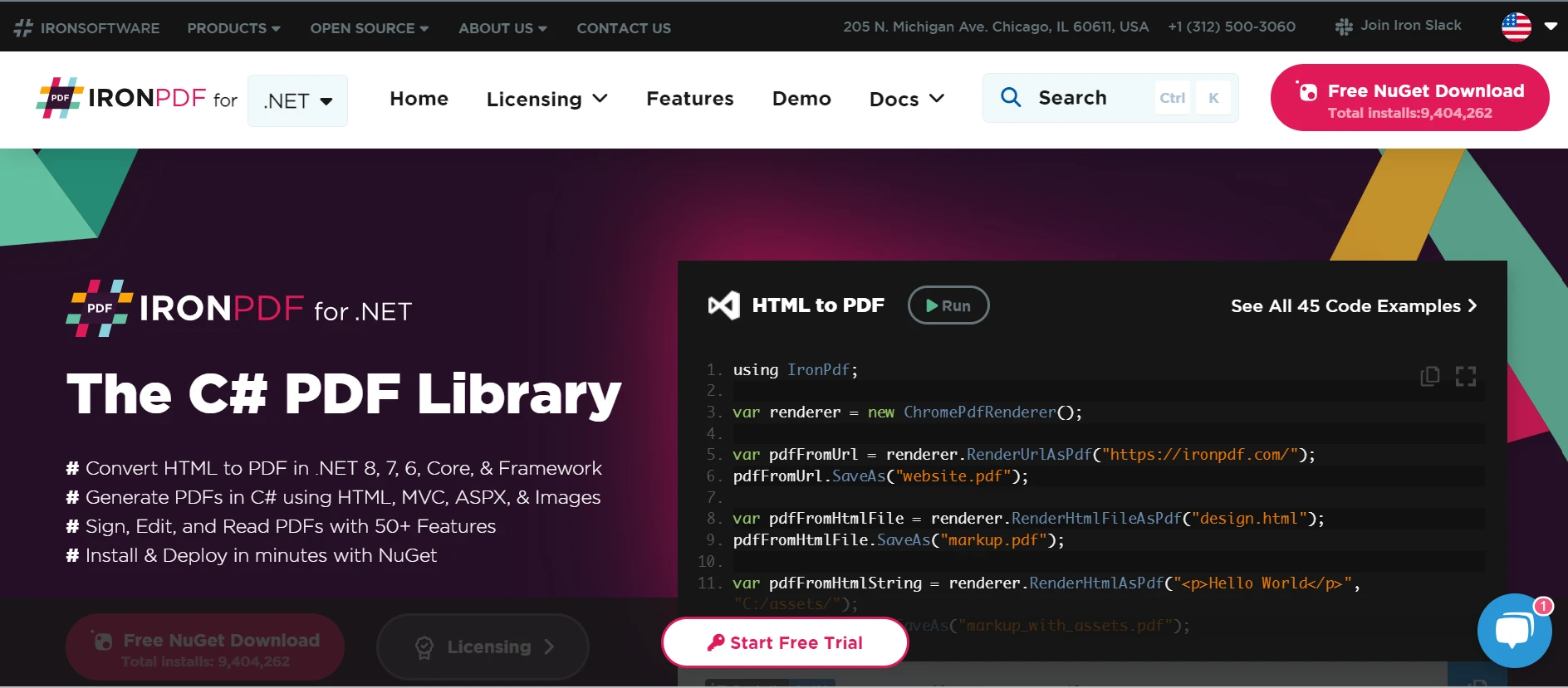
IronPDF jest bogatą w funkcje biblioteką .NET, dostępną w programach C#, która pozwala na tworzenie, odczyt i modyfikację dokumentów PDF. Dzięki temu narzędziu, deweloperzy mogą szybko generować gotowe do druku, wysokiej jakości dokumenty PDF z zawartości HTML, CSS i JavaScript. Niektóre z podstawowych funkcji obejmują możliwość dodawania znaków wodnych, tworzenia nagłówków i stopek, dzielenia i łączenia plików PDF oraz konwertowania HTML do PDF. IronPDF obsługuje .NET Framework oraz .NET Core, co czyni ją przydatną dla różnorodnych aplikacji.
Ponieważ pliki PDF są proste do integracji i mają bogatą dokumentację, deweloperzy mogą łatwo je stosować w swoich aplikacjach. IronPDF zapewnia, że generowane pliki PDF ściśle przypominają źródłową zawartość HTML poprzez efektywne zarządzanie skomplikowanymi układami i stylowaniem.
IronPDF sprawia, że to naprawdę proste przekształcić strony internetowe, URL-e i HTML w wysokiej jakości PDF-y, które wyglądają dokładnie jak oryginalna zawartość. Jest idealny do tworzenia PDF-ów z raportów online, faktur i innych. Jeśli szukałeś sposobu na przekształcenie [HTML do PDF](/tutorials/html-to-pdf/), IronPDF ma dla Ciebie rozwiązanie!
```csharp
using IronPdf;
class Program
{
static void Main(string[] args)
{
var renderer = new ChromePdfRenderer();
// 1. Convert HTML String to PDF
var htmlContent = "<h1>Hello, IronPDF!</h1><p>This is a PDF from an HTML string.</p>";
var pdfFromHtmlString = renderer.RenderHtmlAsPdf(htmlContent);
pdfFromHtmlString.SaveAs("HTMLStringToPDF.pdf");
// 2. Convert HTML File to PDF
var htmlFilePath = "path_to_your_html_file.html"; // Specify the path to your HTML file
var pdfFromHtmlFile = renderer.RenderHtmlFileAsPdf(htmlFilePath);
pdfFromHtmlFile.SaveAs("HTMLFileToPDF.pdf");
// 3. Convert URL to PDF
var url = "http://ironpdf.com"; // Specify the URL
var pdfFromUrl = renderer.RenderUrlAsPdf(url);
pdfFromUrl.SaveAs("URLToPDF.pdf");
}
}
```
### Funkcje IronPDF
**Generowanie plików PDF z HTML**
Konwertuj JavaScript, HTML i CSS do formatu PDF. Obsługuje zapytania medialne i responsywny design, dwa współczesne standardy webowe. Przydatny do dynamicznego ozdabiania raportów PDF, faktur i dokumentów za pomocą HTML i CSS.
**Edycja plików PDF**
Tekst, zdjęcia i inna zawartość mogą być dodawane do istniejących plików PDF. Tekst i zdjęcia mogą być usuwane z plików PDF. Liczne pliki PDF można połączyć w jeden plik. Pliki PDF mogą być dzielone na wiele separate pól. Można dodać znaki wodne, adnotacje, nagłówki i stopki.
**Konwersja plików PDF**
Konwertuj kilka rodzajów plików, w tym dokumenty Word, Excel i pliki graficzne, do formatu PDF. Konwersja PDF na obraz (PNG, JPEG, itp.).
**Wydajność i niezawodność**
Wysoka wydajność i niezawodność to pożądane cechy projektowe w przemysłowych środowiskach, ponieważ mogą skutecznie zarządzać rozległymi zbiorami dokumentów.
### Zainstaluj IronPDF
Aby uzyskać narzędzia potrzebne do pracy z plikami PDF w projektach .NET, zainstaluj pakiet IronPDF.
```shell
:ProductInstall
```
### Pobierz dane za pomocą Flurl, aby wygenerować PDF
Aby wykonywać zapytania HTTP i pobierać dane z Twojego API, użyj płynnego interfejsu API Flurl. Oto przykład pobierania danych JSON:
```csharp
using Flurl;
using Flurl.Http;
using IronPdf;
using System;
using System.Threading.Tasks;
class Program
{
static async Task Main(string[] args)
{
try
{
var response = await "http://localhost:5013/users/1".GetJsonAsync<User>();
var id = response?.Id;
var name = response?.Name;
Console.WriteLine($"Data fetched successfully: {name}");
// Generate PDF using IronPDF
var renderer = new ChromePdfRenderer();
string htmlTemplate = $@"
<html>
<body>
<h1>{id}</h1>
<p>{name}</p>
</body>
</html>";
// Generate PDF document from HTML template
var pdfDocument = renderer.RenderHtmlAsPdf(htmlTemplate);
// Save or stream the PDF document
pdfDocument.SaveAs(@"document.pdf");
Console.WriteLine("PDF document generated successfully.");
}
catch (FlurlHttpException ex)
{
Console.WriteLine($"HTTP Error: {ex.Message}");
}
catch (Exception ex)
{
Console.WriteLine($"Error: {ex.Message}");
}
}
}
// Example model class for JSON deserialization
public class User
{
public int Id { get; set; }
public string Name { get; set; }
}
```
W tym przykładzie, funkcja `.GetJsonAsync()` Flurl jest używana do wysłania żądania GET i pobrania danych JSON. Zastąp `User` swoją klasą modelu, która reprezentuje strukturę odpowiedzi API, oraz "URL" swoim rzeczywistym punktem końcowym API. Szablon HTML (`htmlTemplate`) może być wyrenderowany do dokumentu PDF za pomocą klasy `ChromePdfRenderer` IronPDF. Tutaj, tytuł i dane treści pobrane z API są używane do dynamicznego konstruowania szablonu HTML. Utworzony dokument PDF (`pdfDocument`) jest zapisany w określonej lokalizacji ("document.pdf") w systemie plików. Dostosuj ścieżkę w razie potrzeby.
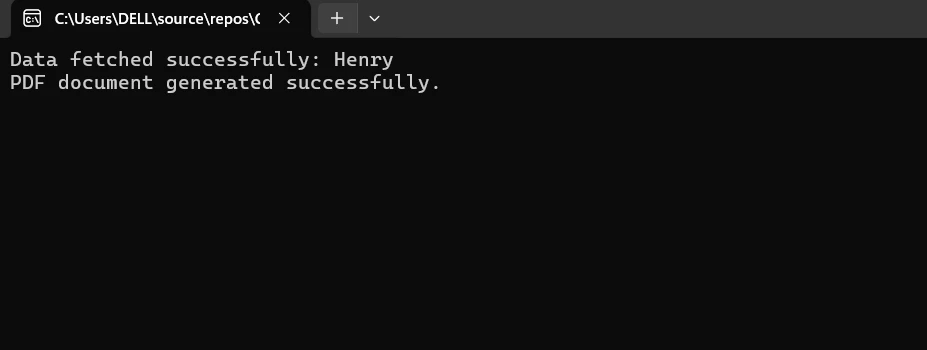
Zaprojektuj solidną obsługę błędów dla problemów takich jak awarie sieci (`FlurlHttpException`) lub ogólne wyjątki (`Exception`) podczas pobierania danych lub produkcji PDF. Możesz zmieniać rozmiar strony, marginesy, nagłówki, stopki i inne ustawienia PDF przy użyciu IronPDF. Dla bardziej zaawansowanych możliwości dostosowywania zobacz podręcznik IronPDF. Podczas wysyłania zapytań HTTP do API, upewnij się, że dane wrażliwe i tokeny dostępu są obsługiwane bezpiecznie. Używaj odpowiednich metod uwierzytelniania wymaganych przez Twoje API.
## Wnioski
Podsumowując, połączenie IronPDF do generowania PDF-ów z Flurl do interakcji z API w aplikacji C# oferuje potężną kombinację do dynamicznego pobierania danych i tworzenia wysokiej jakości dokumentów PDF. Dzięki płynnemu API biblioteka Flurl upraszcza żądania HTTP i zapewnia elastyczność oraz przyjazność użytkownika podczas pobierania danych z odległych punktów końcowych. Dodatkowo, IronPDF ułatwia łatwe przekształcanie materiałów HTML na format PDF, oferując regulowane funkcje, takie jak nagłówki, marginesy i rozmiar strony.
Podczas wdrażania tej integracji ważne jest również rozważenie optymalizacji szybkości, bezpieczeństwa danych i obsługi błędów. Stosując się do najlepszych praktyk i wykorzystując zalety zarówno Flurl, jak i IronPDF, deweloperzy mogą tworzyć niezawodne i skalowalne rozwiązania, które z powodzeniem spełniają wymagania współczesnych aplikacji.
IronPDF i [Suite Iron Software](https://ironsoftware.com/) oferują dodatkowe aplikacje online i możliwości oraz bardziej efektywne rozwijanie dzięki połączeniu wysoce elastycznych systemów i suite Iron Software z jego bazowym wsparciem.
Jeśli opcje licencjonowania są jasne i dostosowane do potrzeb projektu, deweloperzy są lepiej w stanie określić, który model jest idealny i zgodny z dobrymi praktykami. Te korzyści pozwalają deweloperom zarządzać różnorodnymi zagadnieniami w sposób klarowny, przekonujący i płynnie zintegrowany.
W przypadku programowania w języku C# wykorzystanie wydajnych bibliotek może znacznie zwiększyć wydajność i możliwości. Dwie biblioteki, które dobrze ze sobą współpracują, to Flurl i IronPDF, które zapewniają programistom potężne narzędzia odpowiednio do tworzenia plików PDF i interakcji z internetowymi interfejsami API.
Flurl oferuje płynną, ekspresyjną składnię, która ułatwia pracę z żądaniami HTTP, interfejsami API i ich punktami końcowymi w języku C#. Wysyłanie żądań HTTP, odpowiadanie na nie oraz zarządzanie parametrami zapytania lub nagłówkami to tylko niektóre z zadań, które ułatwia. Dzięki Flurl programiści mogą szybko i skutecznie zarządzać uwierzytelnianiem, serializować i deserializować JSON oraz korzystać z internetowych interfejsów API - a wszystko to przy pisaniu czytelnego i dobrze zorganizowanego kodu.
Programiści mogą wykorzystać łatwość obsługi i wszechstronność Flurl w połączeniu z IronPDF do tworzenia szczegółowych i gotowych dokumentów PDF poprzez łączenie się z interfejsami API sieci Web, pobieranie danych i łatwą integrację ich z IronPDF. Dzięki tej integracji programiści mogą projektować złożone aplikacje, które poprzez automatyzację tworzenia dokumentów przy użyciu danych w czasie rzeczywistym pobieranych z usług internetowych poprawiają wydajność i komfort użytkowania.
W niniejszym wprowadzeniu przyjrzymy się, jak używać i łączyć Flurl oraz IronPDF w programie napisanym w języku C#, podkreślając ich zalety i potencjał synergii we współczesnym tworzeniu oprogramowania.
Flurl to solidna i przyjazna dla użytkownika biblioteka C# do zarządzania żądaniami HTTP i komunikacji z internetowymi interfejsami API. Zapewnia płynną, łańcuchową składnię, która poprawia czytelność i łatwość utrzymania kodu oraz zmniejsza złożoność interakcji z interfejsami API RESTful. Dzięki Flurl programiści mogą łatwo tworzyć i wysyłać żądania HTTP, obsługiwać odpowiedzi w łatwy do zrozumienia sposób oraz zarządzać parametrami zapytania, nagłówkami i danymi.
Jedną z najbardziej charakterystycznych cech Flurl jest możliwość dynamicznego zarządzania tworzeniem adresów URL, co ułatwia tworzenie i modyfikowanie adresów URL w zależności od warunków środowiska uruchomieniowego, a także pozwala na wykorzystanie go jako samodzielnego Buildersa do tworzenia adresów URL. Oferuje silne wsparcie dla zarządzania serializacją i deserializacją danych JSON oraz obsługuje popularne funkcje HTTP, takie jak GET, POST, PUT, DELETE itp. Dodatkowo Flurl posiada wbudowaną funkcjonalność do zarządzania danymi formularzy i parametrami zapytań, co sprawia, że można go dostosować do szerokiego zakresu scenariuszy integracji API.
Interfejs płynny
Płynna, łańcuchowa składnia zapewniana przez Flurl poprawia czytelność i łatwość utrzymania kodu. Programiści mogą tworzyć proste i wyraziste żądania HTTP oraz pracować z adresami URL, parametrami zapytania, nagłówkami i danymi.
Obsługa metod HTTP
Obsługiwane są wszystkie standardowe metody HTTP, w tym GET, POST, PUT, DELETE, PATCH, HEAD i OPTIONS. Dzięki takiemu kompleksowemu podejściu do wsparcia programiści mogą realizować różne zadania podczas pracy z interfejsami API sieci Web.
Obsługa parametrów zapytania
Flurl oferuje proste sposoby modyfikowania, dodawania i usuwania parametrów zapytania w adresach URL. Ułatwia to tworzenie dynamicznych adresów URL na podstawie danych wprowadzonych przez użytkownika lub sytuacji w czasie wykonywania.
Obsługa JSON
Obsługa danych JSON jest natywnie obsługiwana przez Flurl. Może z łatwością deserializować odpowiedzi JSON do obiektów C# oraz serializować obiekty do formatu JSON na potrzeby ładunków żądań. Dzięki temu korzystanie z interfejsów API opartych na JSON jest proste i łatwe.
Obsługa danych formularzy i przesyłania wieloczęściowego
Ułatwia to zarządzanie żądaniami wieloczęściowymi i danymi formularzy. Flurl ułatwia programistom dołączanie ładunków typu multipart/form-data lub danych zakodowanych w formularzach do żądań HTTP.
Obsługa błędów i zasady ponawiania prób
Flurl oferuje definiowanie zasad ponawiania prób oraz funkcje obsługi błędów dla wszystkich wywołań HTTP. Definiując unikalną logikę obsługi błędów lub techniki ponawiania prób, programiści mogą zwiększyć odporność i niezawodność wywołań API oraz interakcji. Zapewnia to również ochronę i pomaga programistom zapobiegać błędom anonimowych obiektów w odpowiedziach.
Uwierzytelnianie
Obsługuje kilka popularnych metod uwierzytelniania dla interfejsów API, w tym OAuth, niestandardowe schematy uwierzytelniania, uwierzytelnianie podstawowe oraz klucze API. Zapewnia to bezpieczną komunikację z interfejsami API wymagającymi uwierzytelnienia.
Wsparcie dla testów
Poprzez izolowanie logiki związanej z HTTP do komponentów wielokrotnego użytku z wyraźnym podziałem odpowiedzialności, Flurl wspiera testowalność. To sprawia, że pisanie testów jednostkowych dla interakcji z API jest prostsze, ponieważ nie są wymagane rzeczywiste wywołania sieciowe do ich przetestowania.
Elastyczność konfiguracji
Zapewnia elastyczność konfiguracji dla klientów HTTP i parametrów żądań. Deweloperzy mogą zmieniać zachowania klientów, czas oczekiwania, ilość odpowiedzi błędów, nagłówki i inne ustawienia, aby dostosować je do potrzeb konkretnych aplikacji lub ograniczeń API.
Rozszerzalność
Dzięki swojemu systemowi wtyczek, Flurl jest bardzo rozbudowywalny. Deweloperzy mogą zwiększać funkcjonalność platformy poprzez budowanie unikalnych rozszerzeń lub włączanie wtyczek zewnętrznych dla dodatkowych funkcji.
Create and configure Flurl C#
Oto kroki, aby zbudować i skonfigurować Flurl w projekcie C#:
Tworzenie nowego projektu w Visual Studio
W programie Visual Studio łatwo jest utworzyć projekt konsolowy. Aby rozpocząć aplikację konsolową w środowisku Visual Studio, wykonaj te proste kroki:
Upewnij się, że Visual Studio jest zainstalowane na twoim komputerze, zanim spróbujesz go użyć.
Rozpocznij nowy projekt
Wybierz Plik, Projekt, a następnie wybierz opcję Nowy.
Selkecjonuj szablon "Aplikacja konsolowa" lub "Aplikacja konsolowa (.NET Core)" z listy szablonów projektu poniżej.
Proszę wypełnić formularz "Nazwa", aby nadać swojemu projektowi nazwę.
Wybierz miejsce, aby przechowywać projekt.
Kliknięcie przycisku "Utwórz" spowoduje otwarcie projektu aplikacji konsolowej.
Zainstaluj pakiet Flurl.Http
Pierwszym krokiem jest zainstalowanie pakietu Flurl.Http przy użyciu konsoli NuGet Package Manager lub menedżera pakietów NuGet w Visual Studio.
PM > Install-Package Flurl.Http
Install-Package Flurl.Http
Tworzenie konfiguracji FlurlClient
Flurl oferuje klasę FlurlClient, która pozwala na ustanowienie domyślnych parametrów dla każdego żądania HTTP przy użyciu tylko kreatora URL. Ten opcjonalny, lecz pomocny krok można wykonać poprzez ustawienie bazowych URL-ów lub domyślnych nagłówków.
using Flurl;using Flurl.Http;// Configure a FlurlClient instance with base URL and headersFlurlClient flurlClient = new FlurlClient("https://api.example.com/");flurlClient.WithHeader("Authorization", "Bearer YourAccessTokenHere");
using Flurl;
using Flurl.Http;

// Configure a FlurlClient instance with base URL and headers
FlurlClient flurlClient = new FlurlClient("https://api.example.com/");
flurlClient.WithHeader("Authorization", "Bearer YourAccessTokenHere");
ImportsFlurlImportsFlurl.Http' Configure a FlurlClient instance with base URL and headersPrivate flurlClient As New FlurlClient("https://api.example.com/")flurlClient.WithHeader("Authorization", "Bearer YourAccessTokenHere")
Imports Flurl
Imports Flurl.Http

' Configure a FlurlClient instance with base URL and headers
Private flurlClient As New FlurlClient("https://api.example.com/")
flurlClient.WithHeader("Authorization", "Bearer YourAccessTokenHere")
Wykonywanie żądań HTTP
Teraz możesz wykonywać żądania HTTP przy użyciu płynnej URL Flurl.
var response = await "http://localhost:5013/users".GetAsync();Console.WriteLine(response.ToString());if (response.ResponseMessage.IsSuccessStatusCode){ var result = await response.ResponseMessage.Content.ReadAsStringAsync();Console.WriteLine(result);}else{Console.WriteLine($"Error: {response.StatusCode}");}
var response = await "http://localhost:5013/users".GetAsync();
Console.WriteLine(response.ToString());

if (response.ResponseMessage.IsSuccessStatusCode)
{
    var result = await response.ResponseMessage.Content.ReadAsStringAsync();
    Console.WriteLine(result);
}
else
{
    Console.WriteLine($"Error: {response.StatusCode}");
}
Dim response = await "http://localhost:5013/users".GetAsync()Console.WriteLine(response.ToString())If response.ResponseMessage.IsSuccessStatusCodeThen Dim result = Awaitresponse.ResponseMessage.Content.ReadAsStringAsync()Console.WriteLine(result)ElseConsole.WriteLine($"Error: {response.StatusCode}")End If
Dim response = await "http://localhost:5013/users".GetAsync()
Console.WriteLine(response.ToString())

If response.ResponseMessage.IsSuccessStatusCode Then
	Dim result = Await response.ResponseMessage.Content.ReadAsStringAsync()
	Console.WriteLine(result)
Else
	Console.WriteLine($"Error: {response.StatusCode}")
End If
Obsługa odpowiedzi
Aby zarządzać treścią odpowiedzi na podstawie zamierzonego formatu (JSON, string, itp.), HttpResponseMessageExtensions Flurl oferuje metody rozszerzające, takie jak ReceiveJson i ReceiveString.
// Handling JSON responsevar responseObject = await "https://api.example.com/resource" .WithClient(flurlClient) .GetJsonAsync<ResponseType>();// Assuming ResponseType is a class representing the expected JSON structureConsole.WriteLine($"Response: {responseObject.Property}");
// Handling JSON response
var responseObject = await "https://api.example.com/resource"
    .WithClient(flurlClient)
    .GetJsonAsync<ResponseType>();
// Assuming ResponseType is a class representing the expected JSON structure
Console.WriteLine($"Response: {responseObject.Property}");
ImportsSystemImportsFlurl.Http' Handling JSON responseDim responseObject AsResponseType = Await"https://api.example.com/resource" _ .WithClient(flurlClient) _ .GetJsonAsync(OfResponseType)()' Assuming ResponseType is a class representing the expected JSON structureConsole.WriteLine($"Response: {responseObject.Property}")
Imports System
Imports Flurl.Http

' Handling JSON response
Dim responseObject As ResponseType = Await "https://api.example.com/resource" _
    .WithClient(flurlClient) _
    .GetJsonAsync(Of ResponseType)()
' Assuming ResponseType is a class representing the expected JSON structure
Console.WriteLine($"Response: {responseObject.Property}")
Dodatkowa konfiguracja
Parametry zapytania: Aby dodać parametry zapytania, użyj metody .SetQueryParams(). Upewnij się, że każde żądanie działa przy użyciu tej samej instancji HttpClient dla efektywności.
Limit czasowy: Na przykład, można ustawić limit czasowy za pomocą .WithTimeout(TimeSpan.FromSeconds(30)).
Obsługa błędów: Aby obsłużyć konkretne scenariusze błędów, użyj .OnError().
Pierwsze kroki
Kiedy potrzebujesz pobrać dane z zewnętrznego API i tworzyć dokumenty PDF przy użyciu tych danych, integracja Flurl z IronPDF w projekcie C# może być pomocna. Aby zacząć z Flurl i IronPDF, postępuj zgodnie z tymi krokami:
IronPDF jest bogatą w funkcje biblioteką .NET, dostępną w programach C#, która pozwala na tworzenie, odczyt i modyfikację dokumentów PDF. Dzięki temu narzędziu, deweloperzy mogą szybko generować gotowe do druku, wysokiej jakości dokumenty PDF z zawartości HTML, CSS i JavaScript. Niektóre z podstawowych funkcji obejmują możliwość dodawania znaków wodnych, tworzenia nagłówków i stopek, dzielenia i łączenia plików PDF oraz konwertowania HTML do PDF. IronPDF obsługuje .NET Framework oraz .NET Core, co czyni ją przydatną dla różnorodnych aplikacji.
Ponieważ pliki PDF są proste do integracji i mają bogatą dokumentację, deweloperzy mogą łatwo je stosować w swoich aplikacjach. IronPDF zapewnia, że generowane pliki PDF ściśle przypominają źródłową zawartość HTML poprzez efektywne zarządzanie skomplikowanymi układami i stylowaniem.
IronPDF sprawia, że to naprawdę proste przekształcić strony internetowe, URL-e i HTML w wysokiej jakości PDF-y, które wyglądają dokładnie jak oryginalna zawartość. Jest idealny do tworzenia PDF-ów z raportów online, faktur i innych. Jeśli szukałeś sposobu na przekształcenie HTML do PDF, IronPDF ma dla Ciebie rozwiązanie!
using IronPdf;class Program{ static voidMain(string[] args) { var renderer = new ChromePdfRenderer(); // 1. Convert HTML String to PDF var htmlContent = "<h1>Hello, IronPDF!</h1><p>This is a PDF from an HTML string.</p>"; var pdfFromHtmlString = renderer.RenderHtmlAsPdf(htmlContent); pdfFromHtmlString.SaveAs("HTMLStringToPDF.pdf"); // 2. Convert HTML File to PDF var htmlFilePath = "path_to_your_html_file.html"; // Specify the path to your HTML file var pdfFromHtmlFile = renderer.RenderHtmlFileAsPdf(htmlFilePath); pdfFromHtmlFile.SaveAs("HTMLFileToPDF.pdf"); // 3. Convert URL to PDF var url = "http://ironpdf.com"; // Specify the URL var pdfFromUrl = renderer.RenderUrlAsPdf(url); pdfFromUrl.SaveAs("URLToPDF.pdf"); }}
using IronPdf;

class Program
{
    static void Main(string[] args)
    {
        var renderer = new ChromePdfRenderer();

        // 1. Convert HTML String to PDF
        var htmlContent = "<h1>Hello, IronPDF!</h1><p>This is a PDF from an HTML string.</p>";
        var pdfFromHtmlString = renderer.RenderHtmlAsPdf(htmlContent);
        pdfFromHtmlString.SaveAs("HTMLStringToPDF.pdf");

        // 2. Convert HTML File to PDF
        var htmlFilePath = "path_to_your_html_file.html"; // Specify the path to your HTML file
        var pdfFromHtmlFile = renderer.RenderHtmlFileAsPdf(htmlFilePath);
        pdfFromHtmlFile.SaveAs("HTMLFileToPDF.pdf");

        // 3. Convert URL to PDF
        var url = "http://ironpdf.com"; // Specify the URL
        var pdfFromUrl = renderer.RenderUrlAsPdf(url);
        pdfFromUrl.SaveAs("URLToPDF.pdf");
    }
}
ImportsIronPdfFriend Class ProgramShared Sub Main(ByVal args() AsString) Dim renderer = New ChromePdfRenderer() ' 1. Convert HTML String to PDF Dim htmlContent = "<h1>Hello, IronPDF!</h1><p>This is a PDF from an HTML string.</p>" Dim pdfFromHtmlString = renderer.RenderHtmlAsPdf(htmlContent) pdfFromHtmlString.SaveAs("HTMLStringToPDF.pdf") ' 2. Convert HTML File to PDF Dim htmlFilePath = "path_to_your_html_file.html" ' Specify the path to your HTML file Dim pdfFromHtmlFile = renderer.RenderHtmlFileAsPdf(htmlFilePath) pdfFromHtmlFile.SaveAs("HTMLFileToPDF.pdf") ' 3. Convert URL to PDF Dim url = "http://ironpdf.com" ' Specify the URL Dim pdfFromUrl = renderer.RenderUrlAsPdf(url) pdfFromUrl.SaveAs("URLToPDF.pdf") End SubEnd Class
Imports IronPdf

Friend Class Program
	Shared Sub Main(ByVal args() As String)
		Dim renderer = New ChromePdfRenderer()

		' 1. Convert HTML String to PDF
		Dim htmlContent = "<h1>Hello, IronPDF!</h1><p>This is a PDF from an HTML string.</p>"
		Dim pdfFromHtmlString = renderer.RenderHtmlAsPdf(htmlContent)
		pdfFromHtmlString.SaveAs("HTMLStringToPDF.pdf")

		' 2. Convert HTML File to PDF
		Dim htmlFilePath = "path_to_your_html_file.html" ' Specify the path to your HTML file
		Dim pdfFromHtmlFile = renderer.RenderHtmlFileAsPdf(htmlFilePath)
		pdfFromHtmlFile.SaveAs("HTMLFileToPDF.pdf")

		' 3. Convert URL to PDF
		Dim url = "http://ironpdf.com" ' Specify the URL
		Dim pdfFromUrl = renderer.RenderUrlAsPdf(url)
		pdfFromUrl.SaveAs("URLToPDF.pdf")
	End Sub
End Class
Funkcje IronPDF
Generowanie plików PDF z HTML
Konwertuj JavaScript, HTML i CSS do formatu PDF. Obsługuje zapytania medialne i responsywny design, dwa współczesne standardy webowe. Przydatny do dynamicznego ozdabiania raportów PDF, faktur i dokumentów za pomocą HTML i CSS.
Edycja plików PDF
Tekst, zdjęcia i inna zawartość mogą być dodawane do istniejących plików PDF. Tekst i zdjęcia mogą być usuwane z plików PDF. Liczne pliki PDF można połączyć w jeden plik. Pliki PDF mogą być dzielone na wiele separate pól. Można dodać znaki wodne, adnotacje, nagłówki i stopki.
Konwersja plików PDF
Konwertuj kilka rodzajów plików, w tym dokumenty Word, Excel i pliki graficzne, do formatu PDF. Konwersja PDF na obraz (PNG, JPEG, itp.).
Wydajność i niezawodność
Wysoka wydajność i niezawodność to pożądane cechy projektowe w przemysłowych środowiskach, ponieważ mogą skutecznie zarządzać rozległymi zbiorami dokumentów.
Zainstaluj IronPDF
Aby uzyskać narzędzia potrzebne do pracy z plikami PDF w projektach .NET, zainstaluj pakiet IronPDF.
PM > Install-Package IronPdf
Install-Package IronPdf
Pobierz dane za pomocą Flurl, aby wygenerować PDF
Aby wykonywać zapytania HTTP i pobierać dane z Twojego API, użyj płynnego interfejsu API Flurl. Oto przykład pobierania danych JSON:
using Flurl;using Flurl.Http;using IronPdf;using System;using System.Threading.Tasks;class Program{ static async TaskMain(string[] args) { try { var response = await "http://localhost:5013/users/1".GetJsonAsync<User>(); var id = response?.Id; var name = response?.Name;Console.WriteLine($"Data fetched successfully: {name}"); // Generate PDF using IronPDF var renderer = new ChromePdfRenderer(); string htmlTemplate = $@" <html> <body> <h1>{id}</h1> <p>{name}</p> </body> </html>"; // Generate PDF document from HTML template var pdfDocument = renderer.RenderHtmlAsPdf(htmlTemplate); // Save or stream the PDF document pdfDocument.SaveAs(@"document.pdf");Console.WriteLine("PDF document generated successfully."); } catch (FlurlHttpException ex) {Console.WriteLine($"HTTP Error: {ex.Message}"); } catch (Exception ex) {Console.WriteLine($"Error: {ex.Message}"); } }}// Example model class for JSON deserializationpublic class User{ public intId { get; set; } public stringName { get; set; }}
using Flurl;
using Flurl.Http;
using IronPdf;
using System;
using System.Threading.Tasks;

class Program
{
    static async Task Main(string[] args)
    {
        try
        {
            var response = await "http://localhost:5013/users/1".GetJsonAsync<User>();
            var id = response?.Id;
            var name = response?.Name;
            Console.WriteLine($"Data fetched successfully: {name}");

            // Generate PDF using IronPDF
            var renderer = new ChromePdfRenderer();
            string htmlTemplate = $@"
                <html>
                <body>
                    <h1>{id}</h1>
                    <p>{name}</p>
                </body>
                </html>";

            // Generate PDF document from HTML template
            var pdfDocument = renderer.RenderHtmlAsPdf(htmlTemplate);

            // Save or stream the PDF document
            pdfDocument.SaveAs(@"document.pdf");
            Console.WriteLine("PDF document generated successfully.");
        }
        catch (FlurlHttpException ex)
        {
            Console.WriteLine($"HTTP Error: {ex.Message}");
        }
        catch (Exception ex)
        {
            Console.WriteLine($"Error: {ex.Message}");
        }
    }
}

// Example model class for JSON deserialization
public class User
{
    public int Id { get; set; }
    public string Name { get; set; }
}
ImportsFlurlImportsFlurl.HttpImportsIronPdfImportsSystemImportsSystem.Threading.TasksFriend Class ProgramSharedAsync Function Main(ByVal args() AsString) AsTaskTry Dim response = await "http://localhost:5013/users/1".GetJsonAsync(OfUser)() Dim id = response?.Id Dim name = response?.NameConsole.WriteLine($"Data fetched successfully: {name}") ' Generate PDF using IronPDF Dim renderer = New ChromePdfRenderer() Dim htmlTemplate AsString = $" <html> <body> <h1>{id}</h1> <p>{name}</p> </body> </html>" ' Generate PDF document from HTML template Dim pdfDocument = renderer.RenderHtmlAsPdf(htmlTemplate) ' Save or stream the PDF document pdfDocument.SaveAs("document.pdf")Console.WriteLine("PDF document generated successfully.")Catch ex AsFlurlHttpExceptionConsole.WriteLine($"HTTP Error: {ex.Message}")Catch ex AsExceptionConsole.WriteLine($"Error: {ex.Message}")EndTry End FunctionEnd Class' Example model class for JSON deserializationPublic Class User Public Property Id() AsInteger Public Property Name() AsStringEnd Class
Imports Flurl
Imports Flurl.Http
Imports IronPdf
Imports System
Imports System.Threading.Tasks

Friend Class Program
	Shared Async Function Main(ByVal args() As String) As Task
		Try
			Dim response = await "http://localhost:5013/users/1".GetJsonAsync(Of User)()
			Dim id = response?.Id
			Dim name = response?.Name
			Console.WriteLine($"Data fetched successfully: {name}")

			' Generate PDF using IronPDF
			Dim renderer = New ChromePdfRenderer()
			Dim htmlTemplate As String = $"
                <html>
                <body>
                    <h1>{id}</h1>
                    <p>{name}</p>
                </body>
                </html>"

			' Generate PDF document from HTML template
			Dim pdfDocument = renderer.RenderHtmlAsPdf(htmlTemplate)

			' Save or stream the PDF document
			pdfDocument.SaveAs("document.pdf")
			Console.WriteLine("PDF document generated successfully.")
		Catch ex As FlurlHttpException
			Console.WriteLine($"HTTP Error: {ex.Message}")
		Catch ex As Exception
			Console.WriteLine($"Error: {ex.Message}")
		End Try
	End Function
End Class

' Example model class for JSON deserialization
Public Class User
	Public Property Id() As Integer
	Public Property Name() As String
End Class
W tym przykładzie, funkcja .GetJsonAsync() Flurl jest używana do wysłania żądania GET i pobrania danych JSON. Zastąp User swoją klasą modelu, która reprezentuje strukturę odpowiedzi API, oraz "URL" swoim rzeczywistym punktem końcowym API. Szablon HTML (htmlTemplate) może być wyrenderowany do dokumentu PDF za pomocą klasy ChromePdfRenderer IronPDF. Tutaj, tytuł i dane treści pobrane z API są używane do dynamicznego konstruowania szablonu HTML. Utworzony dokument PDF (pdfDocument) jest zapisany w określonej lokalizacji ("document.pdf") w systemie plików. Dostosuj ścieżkę w razie potrzeby.
Zaprojektuj solidną obsługę błędów dla problemów takich jak awarie sieci (FlurlHttpException) lub ogólne wyjątki (Exception) podczas pobierania danych lub produkcji PDF. Możesz zmieniać rozmiar strony, marginesy, nagłówki, stopki i inne ustawienia PDF przy użyciu IronPDF. Dla bardziej zaawansowanych możliwości dostosowywania zobacz podręcznik IronPDF. Podczas wysyłania zapytań HTTP do API, upewnij się, że dane wrażliwe i tokeny dostępu są obsługiwane bezpiecznie. Używaj odpowiednich metod uwierzytelniania wymaganych przez Twoje API.
Wnioski
Podsumowując, połączenie IronPDF do generowania PDF-ów z Flurl do interakcji z API w aplikacji C# oferuje potężną kombinację do dynamicznego pobierania danych i tworzenia wysokiej jakości dokumentów PDF. Dzięki płynnemu API biblioteka Flurl upraszcza żądania HTTP i zapewnia elastyczność oraz przyjazność użytkownika podczas pobierania danych z odległych punktów końcowych. Dodatkowo, IronPDF ułatwia łatwe przekształcanie materiałów HTML na format PDF, oferując regulowane funkcje, takie jak nagłówki, marginesy i rozmiar strony.
Podczas wdrażania tej integracji ważne jest również rozważenie optymalizacji szybkości, bezpieczeństwa danych i obsługi błędów. Stosując się do najlepszych praktyk i wykorzystując zalety zarówno Flurl, jak i IronPDF, deweloperzy mogą tworzyć niezawodne i skalowalne rozwiązania, które z powodzeniem spełniają wymagania współczesnych aplikacji.
IronPDF i Suite Iron Software oferują dodatkowe aplikacje online i możliwości oraz bardziej efektywne rozwijanie dzięki połączeniu wysoce elastycznych systemów i suite Iron Software z jego bazowym wsparciem.
Jeśli opcje licencjonowania są jasne i dostosowane do potrzeb projektu, deweloperzy są lepiej w stanie określić, który model jest idealny i zgodny z dobrymi praktykami. Te korzyści pozwalają deweloperom zarządzać różnorodnymi zagadnieniami w sposób klarowny, przekonujący i płynnie zintegrowany.
Jacob Mellor jest Chief Technology Officer w Iron Software i wizjonerskim inżynierem, pionierem technologii C# PDF. Jako pierwotny deweloper głównej bazy kodowej Iron Software, kształtuje architekturę produktów firmy od jej początku, przekształcając ją wspólnie z CEO Cameron Rimington w firmę liczącą ponad 50 osób, obsługującą NASA, Teslę i światowe agencje rządowe.



















