using IronPdf;

// Disable local disk access or cross-origin requests
Installation.EnableWebSecurity = true;

// Instantiate Renderer
var renderer = new ChromePdfRenderer();

// Create a PDF from a HTML string using C#
var pdf = renderer.RenderHtmlAsPdf("<h1>Hello World</h1>");

// Export to a file or Stream
pdf.SaveAs("output.pdf");

// Advanced Example with HTML Assets
// Load external html assets: Images, CSS and JavaScript.
// An optional BasePath 'C:\site\assets\' is set as the file location to load assets from
var myAdvancedPdf = renderer.RenderHtmlAsPdf("<img src='icons/iron.png'>", @"C:\site\assets\");
myAdvancedPdf.SaveAs("html-with-assets.pdf");
using IronPdf;// Disable local disk access or cross-origin requestsInstallation.EnableWebSecurity = true;// Instantiate Renderervar renderer = new ChromePdfRenderer();// Create a PDF from a HTML string using C#var pdf = renderer.RenderHtmlAsPdf("<h1>Hello World</h1>");// Export to a file or Streampdf.SaveAs("output.pdf");// Advanced Example with HTML Assets// Load external html assets: Images, CSS and JavaScript.// An optional BasePath 'C:\site\assets\' is set as the file location to load assets fromvar myAdvancedPdf = renderer.RenderHtmlAsPdf("<img src='icons/iron.png'>", @"C:\site\assets\");myAdvancedPdf.SaveAs("html-with-assets.pdf");
Programowanie w języku C# jest elastyczne i zapewnia szeroki wachlarz struktur danych, umożliwiających efektywne zarządzanie różnymi zadaniami. [HashSet](https://learn.microsoft.com/en-us/dotnet/api/system.collections.generic.hashset-1?view=net-8.0) jest jedną z takich potężnych struktur danych, która oferuje odrębne komponenty i stałą średnią złożoność czasową dla podstawowych operacji. W tym poście przyjrzymy się wykorzystaniu HashSet w języku C# oraz temu, jak można go używać z [IronPDF](/), potężną biblioteką do pracy z dokumentami PDF.
## Jak używać HashSet w C#
1. Utwórz nowy projekt aplikacji konsolowej.
2. Utwórz obiekt dla HashSet w języku C#. Dodaj wartość domyślną do HashSet.
3. Podczas dodawania HashSet automatycznie usunie zduplikowane elementy, sprawdzając, czy dany element już istnieje.
4. Przetwarzaj unikalne elementy z HashSetu pojedynczo.
5. Wyświetl wynik i zwolnij obiekt.
### Zrozumienie HashSet w C#
HashSet w języku C# został zaprojektowany w celu zapewnienia wysokowydajnych operacji na zbiorach. HashSet to idealna kolekcja do wykorzystania w sytuacjach, gdy trzeba zachować odrębny zestaw danych, ponieważ zapobiega ona powielaniu elementów. Znajduje się w przestrzeni nazw System.Collections.Generic i zapewnia szybkie wstawianie, usuwanie, szybsze pobieranie oraz operacje wyszukiwania. W języku C# należy używać metod operacji na zbiorach z klasy HashSet, które pozwalają w łatwy sposób wykonywać standardowe operacje na zbiorach. Klasa HashSet udostępnia metody operacji na zbiorach.
Poniżej przedstawiono kilka zastosowań HashSet w języku C#:
#### Inicjalizacja i podstawowe operacje
Tworzenie zestawu HashSet i wykonywanie podstawowych czynności, takich jak dodawanie, usuwanie i sprawdzanie istnienia wpisów.
```csharp
using System;
using System.Collections.Generic;

class Program
{
    static void Main()
    {
        // Initializes a HashSet of integers
        HashSet<int> numbers = new HashSet<int>();

        // Adds elements to the HashSet
        numbers.Add(1);
        numbers.Add(2);
        numbers.Add(3);

        // Removes an element from the HashSet
        numbers.Remove(2);

        // Checks for membership of an element
        bool containsThree = numbers.Contains(3);

        Console.WriteLine($"Contains 3: {containsThree}");
    }
}
```
#### Inicjalizacja za pomocą kolekcji
Wykorzystanie istniejącej kolekcji jako punktu wyjścia dla HashSet pozwala natychmiast wyeliminować duplikaty.
```csharp
using System;
using System.Collections.Generic;
class Program
{
static void Main()
{
// Creates a list with duplicate elements
List<int> duplicateNumbers = new List<int> { 1, 2, 2, 3, 3, 4 };
// Initializes a HashSet with the list, automatically removes duplicates
HashSet<int> uniqueNumbers = new HashSet<int>(duplicateNumbers);
Console.WriteLine("Unique numbers:");
foreach (var number in uniqueNumbers)
{
Console.WriteLine(number);
}
}
}
```
#### Połączenie z innym zestawem HashSet
Połączenie dwóch instancji HashSet w celu utworzenia nowego zestawu, który łączy różne elementy z obu zestawów przy użyciu funkcji UnionWith.
```csharp
using System;
using System.Collections.Generic;
class Program
{
static void Main()
{
HashSet<int> set1 = new HashSet<int> { 1, 2, 3 };
HashSet<int> set2 = new HashSet<int> { 3, 4, 5 };
// Merges set2 into set1
set1.UnionWith(set2);
Console.WriteLine("Union of set1 and set2:");
foreach (var item in set1)
{
Console.WriteLine(item);
}
}
}
```
#### Przecinanie się z innym zestawem HashSet
Za pomocą funkcji IntersectWith określ wspólne elementy między dwiema instancjami HashSet.
```csharp
using System;
using System.Collections.Generic;
class Program
{
static void Main()
{
HashSet<int> set1 = new HashSet<int> { 1, 2, 3 };
HashSet<int> set2 = new HashSet<int> { 3, 4, 5 };
// Keeps only elements that are present in both sets
set1.IntersectWith(set2);
Console.WriteLine("Intersection of set1 and set2:");
foreach (var item in set1)
{
Console.WriteLine(item);
}
}
}
```
#### Różnica w stosunku do innego zestawu HashSet
Za pomocą funkcji ExceptWith znajdź elementy, które znajdują się w jednym zestawie HashSet, ale nie w innym.
```csharp
using System;
using System.Collections.Generic;
class Program
{
static void Main()
{
HashSet<int> set1 = new HashSet<int> { 1, 2, 3 };
HashSet<int> set2 = new HashSet<int> { 3, 4, 5 };
// Removes elements from set1 that are also in set2
set1.ExceptWith(set2);
Console.WriteLine("Difference of set1 and set2:");
foreach (var item in set1)
{
Console.WriteLine(item);
}
}
}
```
**Sprawdzanie podzbioru lub nadzbioru:**
Korzystając z metod IsSubsetOf i IsSupersetOf, można ustalić, czy dana instancja HashSet jest podzbiorem lub nadzbiorem innej.
```csharp
using System;
using System.Collections.Generic;
class Program
{
static void Main()
{
HashSet<int> set1 = new HashSet<int> { 1, 2, 3 };
HashSet<int> set2 = new HashSet<int> { 2, 3 };
// Checks if set2 is a subset of set1
bool isSubset = set2.IsSubsetOf(set1);
// Checks if set1 is a superset of set2
bool isSuperset = set1.IsSupersetOf(set2);
Console.WriteLine($"Is set2 a subset of set1: {isSubset}");
Console.WriteLine($"Is set1 a superset of set2: {isSuperset}");
}
}
```
#### Różnica symetryczna
Wykorzystując technikę SymmetricExceptWith, określ różnicę symetryczną (elementy obecne w jednym zbiorze, ale nie w obu).
```csharp
using System;
using System.Collections.Generic;
class Program
{
static void Main()
{
HashSet<int> set1 = new HashSet<int> { 1, 2, 3 };
HashSet<int> set2 = new HashSet<int> { 3, 4, 5 };
// Keeps elements that are in set1 or set2 but not in both
set1.SymmetricExceptWith(set2);
Console.WriteLine("Symmetric difference of set1 and set2:");
foreach (var item in set1)
{
Console.WriteLine(item);
}
}
}
```
### IronPDF
Programiści mogą używać języka C# do tworzenia, edytowania i modyfikowania dokumentów PDF, korzystając z [biblioteki](/) [IronPDF .NET](/). Aplikacja oferuje szeroki zakres narzędzi i funkcji umożliwiających różne operacje na plikach PDF, w tym tworzenie nowych plików PDF z HTML, konwersję HTML do PDF, łączenie lub dzielenie dokumentów PDF oraz dodawanie adnotacji do istniejących plików PDF w postaci tekstu, zdjęć i innych danych. Aby dowiedzieć się więcej o IronPDF, zapoznaj się z [oficjalną dokumentacją](/docs/).
IronPDF wyróżnia się w konwersji [HTML do PDF](/tutorials/html-to-pdf/), zapewniając precyzyjne zachowanie oryginalnych układów i stylów. Idealnie nadaje się do tworzenia plików PDF z treści internetowych, takich jak raporty, faktury i dokumentacja. Dzięki obsłudze plików HTML, adresów URL i surowych ciągów znaków HTML, IronPDF z łatwością tworzy wysokiej jakości dokumenty PDF.
```csharp
using IronPdf;
class Program
{
static void Main(string[] args)
{
var renderer = new ChromePdfRenderer();
// 1. Convert HTML String to PDF
var htmlContent = "<h1>Hello, IronPDF!</h1><p>This is a PDF from an HTML string.</p>";
var pdfFromHtmlString = renderer.RenderHtmlAsPdf(htmlContent);
pdfFromHtmlString.SaveAs("HTMLStringToPDF.pdf");
// 2. Convert HTML File to PDF
var htmlFilePath = "path_to_your_html_file.html"; // Specify the path to your HTML file
var pdfFromHtmlFile = renderer.RenderHtmlFileAsPdf(htmlFilePath);
pdfFromHtmlFile.SaveAs("HTMLFileToPDF.pdf");
// 3. Convert URL to PDF
var url = "http://ironpdf.com"; // Specify the URL
var pdfFromUrl = renderer.RenderUrlAsPdf(url);
pdfFromUrl.SaveAs("URLToPDF.pdf");
}
}
```
### Funkcje IronPDF
* **Konwersja HTML do PDF:** Za pomocą IronPDF można konwertować dowolne dane HTML, w tym pliki, adresy URL i ciągi kodu HTML, na dokumenty PDF.
* **Generowanie plików PDF:** Tekst, obrazy i inne obiekty można programowo dodawać do dokumentów PDF przy użyciu języka programowania C#.
* **Manipulacja plikami PDF:** IronPDF może dzielić plik PDF na wiele plików oraz edytować istniejące pliki PDF. Może łączyć kilka plików PDF w jeden plik.
* **Formularze PDF:** Ponieważ biblioteka umożliwia użytkownikom tworzenie i wypełnianie formularzy PDF, jest przydatna w sytuacjach, w których konieczne jest gromadzenie i przetwarzanie danych z formularzy.
* **Funkcje bezpieczeństwa:** IronPDF umożliwia szyfrowanie dokumentów PDF, a także zabezpieczenia hasłem i uprawnieniami.
### Zainstaluj IronPDF
Pobierz bibliotekę IronPDF; wymaga tego nadchodząca aktualizacja. Aby to zrobić, wprowadź następujący kod do menedżera pakietów:
```shell
:ProductInstall
```
or
```shell
:InstallCmd dotnet add package IronPdf
```
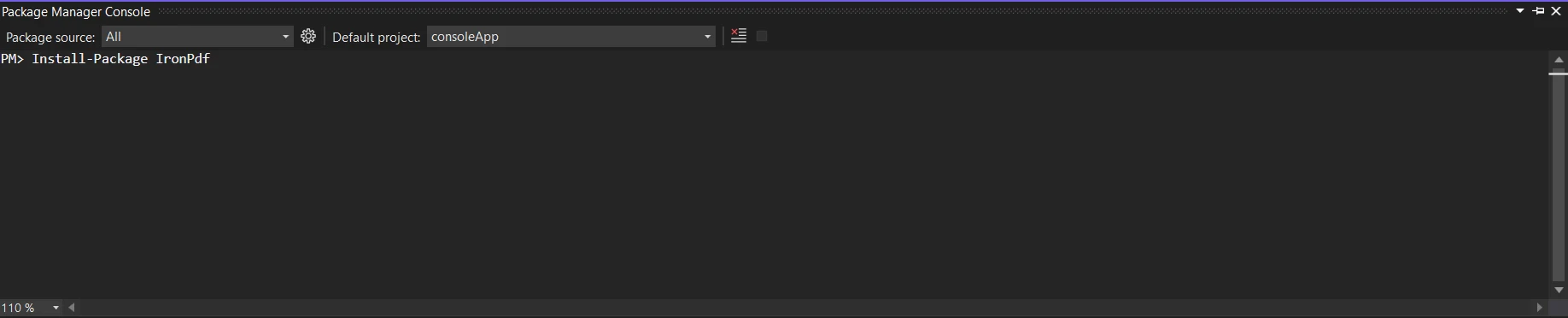
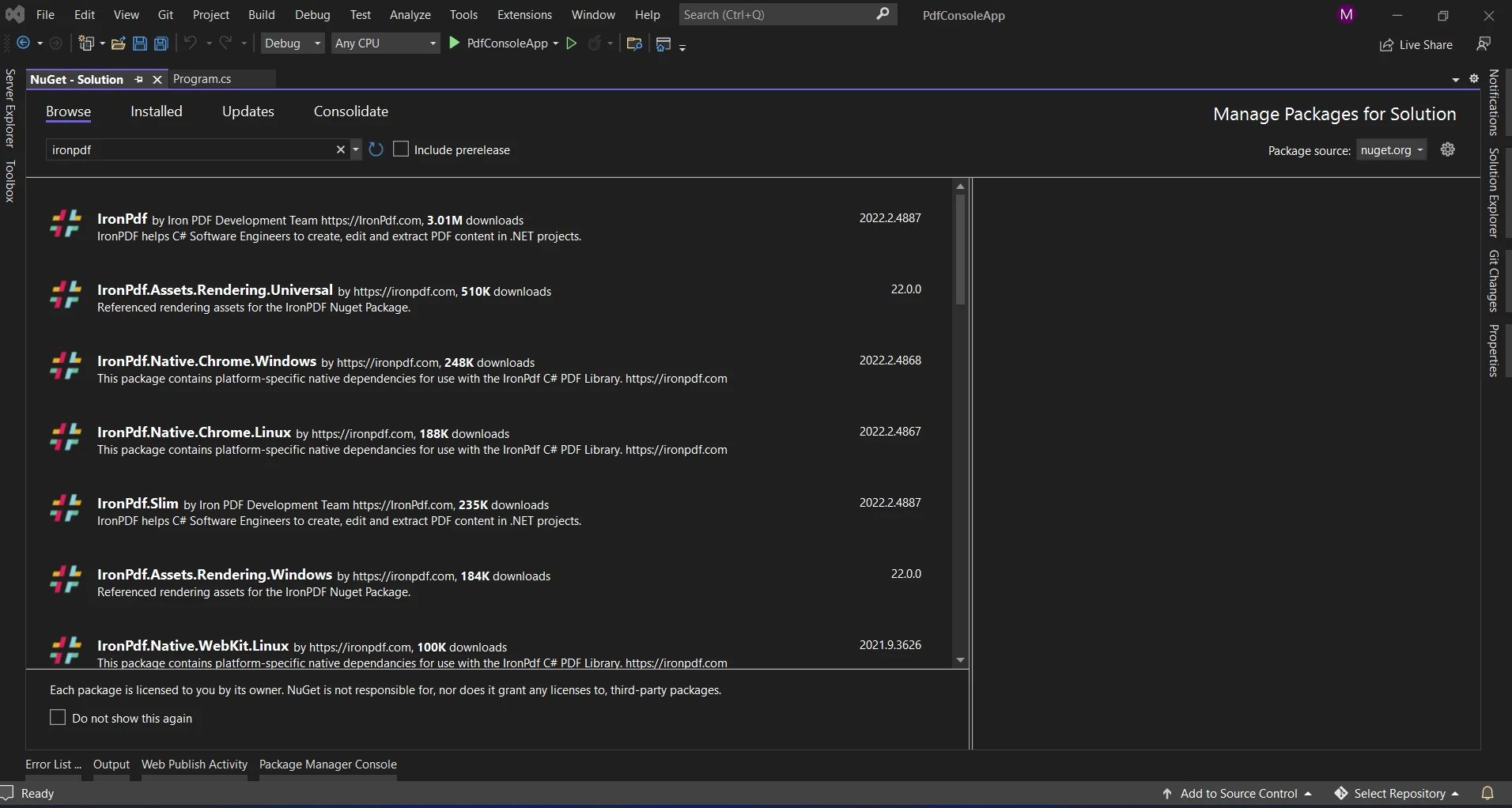
Inną opcją jest wyszukanie pakietu "IronPDF" za pomocą menedżera pakietów NuGet. Spośród wszystkich pakietów NuGet związanych z IronPDF możemy wybrać i pobrać wymagany pakiet z tej listy.
### HashSet z IronPDF
W środowisku C# IronPDF to potężna biblioteka, która ułatwia pracę z dokumentami PDF. W sytuacjach, w których kluczowe znaczenie ma wyraźna reprezentacja danych i efektywne tworzenie dokumentów, połączenie wydajności HashSet z możliwościami manipulacji dokumentami oferowanymi przez IronPDF może zaowocować kreatywnymi rozwiązaniami.
### Korzyści z używania HashSet z IronPDF
* **Ograniczenie nadmiarowości danych:** Dzięki temu, że zachowywane są tylko unikalne elementy, zestawy HashSet pomagają uniknąć powielania danych. Jest to bardzo pomocne podczas pracy z ogromnymi zbiorami danych w celu usunięcia zduplikowanych informacji.
* **Efektywne wyszukiwanie:** Podstawowe operacje, takie jak wstawianie, usuwanie i wyszukiwanie, mogą być wykonywane ze stałą średnią złożonością czasową przy użyciu HashSet. Tego rodzaju wydajność jest bardzo ważna podczas pracy z zestawami danych o różnej wielkości.
* **Uproszczone tworzenie dokumentów:** IronPDF usprawnia proces tworzenia dokumentów PDF w języku C#. Możesz stworzyć szybkie i skuteczne procesy tworzenia oryginalnych i dynamicznych treści do plików PDF, integrując HashSet z IronPDF.
Przyjrzyjmy się teraz rzeczywistemu scenariuszowi, w którym użycie HashSet z IronPDF może być przydatne.
### Generowanie plików PDF z unikalnymi danymi
```csharp
using IronPdf;
using System;
using System.Collections.Generic;
class PdfGenerator
{
static void Main()
{
// Sample user names with duplicates
string[] userNames = { "Alice", "Bob", "Charlie", "Bob", "David", "Alice" };
// Using HashSet to ensure unique user names
HashSet<string> uniqueUserNames = new HashSet<string>(userNames);
// Generating PDF with unique user names
GeneratePdf(uniqueUserNames);
}
static void GeneratePdf(HashSet<string> uniqueUserNames)
{
// Create a new PDF document using IronPDF
HtmlToPdf renderer = new HtmlToPdf();
// Render a PDF from an HTML document consisting of unique user names
var pdf = renderer.RenderHtmlAsPdf(BuildHtmlDocument(uniqueUserNames));
// Save the PDF to a file
string pdfFilePath = "UniqueUserNames.pdf";
pdf.SaveAs(pdfFilePath);
// Display a message with the file path
Console.WriteLine($"PDF generated successfully. File saved at: {pdfFilePath}");
}
static string BuildHtmlDocument(HashSet<string> uniqueUserNames)
{
// Build an HTML document with unique user names
string htmlDocument = "<html><body><ul>";
foreach (var userName in uniqueUserNames)
{
htmlDocument += $"<li>{userName}</li>";
}
htmlDocument += "</ul></body></html>";
return htmlDocument;
}
}
```
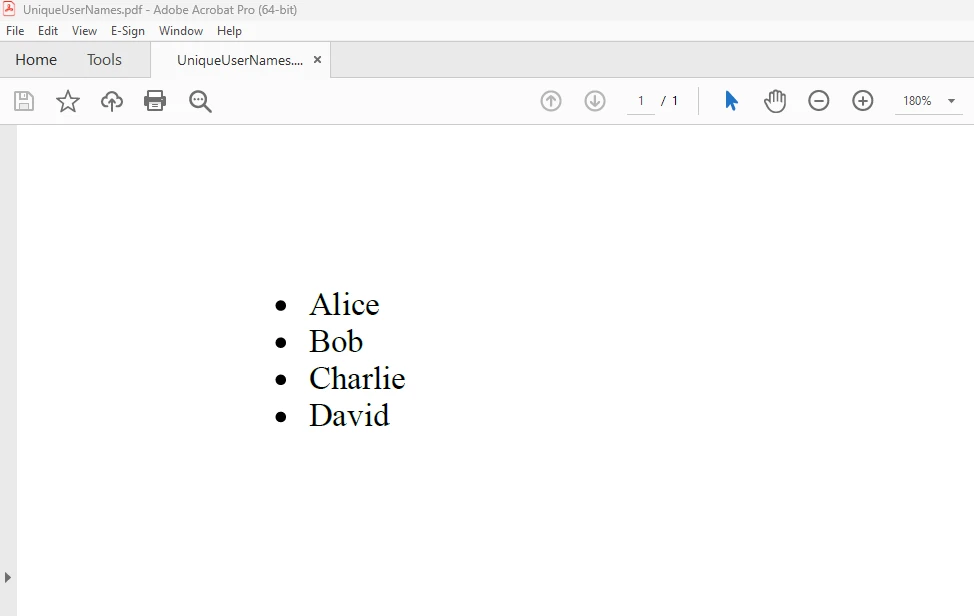
W powyższym przykładzie kodu zapisujemy unikalne nazwy użytkowników pobrane z tablicy przy użyciu obiektu HashSet **o nazwie uniqueUserNames**. HashSet automatycznie eliminuje duplikaty. Następnie tworzymy nieuporządkowaną listę tych różnych nazw użytkowników w dokumencie PDF przy użyciu IronPDF. Aby dowiedzieć się więcej o kodzie, sprawdź [tworzenie pliku PDF za pomocą HTML](/examples/using-html-to-create-a-pdf/).
#### WYNIK
### Wnioski
Podsumowując, struktura danych HashSet w języku C# jest skutecznym narzędziem do organizowania zbiorów odrębnych elementów. W połączeniu z IronPDF stwarza to nowe możliwości tworzenia dynamicznych, unikalnych i zoptymalizowanych pod kątem wydajności dokumentów PDF.
W podanym przykładzie pokazaliśmy, jak używać HashSet do zagwarantowania unikalności danych podczas tworzenia dokumentów PDF za pomocą [IronPDF](/). Tworzenie solidnych i wydajnych aplikacji w języku C# może zyskać dzięki połączeniu HashSet i IronPDF, niezależnie od tego, czy pracujesz nad deduplikacją danych, raportowaniem czy zarządzaniem treścią dynamiczną. W miarę zgłębiania tematu weź pod uwagę wiele kontekstów, w których możesz wykorzystać tę kombinację, aby poprawić użyteczność i funkcjonalność swoich aplikacji.
Wersja `$liteLicense` Lite IronPDF jest dostępna z licencją wieczystą, opcjami ulepszeń i rocznym wsparciem oprogramowania. Przez cały [okres próbny](trial-license) z znakiem wodnym [na licencji](trial-license), aby dowiedzieć się więcej o cenie, licencjonowaniu i bezpłatnej wersji próbnej IronPDF. Więcej informacji na temat Iron Software można znaleźć na [stronie internetowej Iron Software](https://ironsoftware.com/).
Programowanie w języku C# jest elastyczne i zapewnia szeroki wachlarz struktur danych, umożliwiających efektywne zarządzanie różnymi zadaniami. HashSet jest jedną z takich potężnych struktur danych, która oferuje odrębne komponenty i stałą średnią złożoność czasową dla podstawowych operacji. W tym poście przyjrzymy się wykorzystaniu HashSet w języku C# oraz temu, jak można go używać z IronPDF, potężną biblioteką do pracy z dokumentami PDF.
Jak używać HashSet w C#
Utwórz nowy projekt aplikacji konsolowej.
Utwórz obiekt dla HashSet w języku C#. Dodaj wartość domyślną do HashSet.
Podczas dodawania HashSet automatycznie usunie zduplikowane elementy, sprawdzając, czy dany element już istnieje.
Przetwarzaj unikalne elementy z HashSetu pojedynczo.
Wyświetl wynik i zwolnij obiekt.
Zrozumienie HashSet w C#
HashSet w języku C# został zaprojektowany w celu zapewnienia wysokowydajnych operacji na zbiorach. HashSet to idealna kolekcja do wykorzystania w sytuacjach, gdy trzeba zachować odrębny zestaw danych, ponieważ zapobiega ona powielaniu elementów. Znajduje się w przestrzeni nazw System.Collections.Generic i zapewnia szybkie wstawianie, usuwanie, szybsze pobieranie oraz operacje wyszukiwania. W języku C# należy używać metod operacji na zbiorach z klasy HashSet, które pozwalają w łatwy sposób wykonywać standardowe operacje na zbiorach. Klasa HashSet udostępnia metody operacji na zbiorach.
Poniżej przedstawiono kilka zastosowań HashSet w języku C#:
Inicjalizacja i podstawowe operacje
Tworzenie zestawu HashSet i wykonywanie podstawowych czynności, takich jak dodawanie, usuwanie i sprawdzanie istnienia wpisów.
using System;using System.Collections.Generic;class Program{ static voidMain() { // Initializes a HashSet of integers HashSet<int> numbers = new HashSet<int>(); // Adds elements to the HashSet numbers.Add(1); numbers.Add(2); numbers.Add(3); // Removes an element from the HashSet numbers.Remove(2); // Checks for membership of an element bool containsThree = numbers.Contains(3);Console.WriteLine($"Contains 3: {containsThree}"); }}
using System;
using System.Collections.Generic;

class Program
{
    static void Main()
    {
        // Initializes a HashSet of integers
        HashSet<int> numbers = new HashSet<int>();

        // Adds elements to the HashSet
        numbers.Add(1);
        numbers.Add(2);
        numbers.Add(3);

        // Removes an element from the HashSet
        numbers.Remove(2);

        // Checks for membership of an element
        bool containsThree = numbers.Contains(3);

        Console.WriteLine($"Contains 3: {containsThree}");
    }
}
ImportsSystemImportsSystem.Collections.GenericFriend Class ProgramShared Sub Main() ' Initializes a HashSet of integers Dim numbers As New HashSet(OfInteger)() ' Adds elements to the HashSet numbers.Add(1) numbers.Add(2) numbers.Add(3) ' Removes an element from the HashSet numbers.Remove(2) ' Checks for membership of an element Dim containsThree AsBoolean = numbers.Contains(3)Console.WriteLine($"Contains 3: {containsThree}") End SubEnd Class
Imports System
Imports System.Collections.Generic

Friend Class Program
	Shared Sub Main()
		' Initializes a HashSet of integers
		Dim numbers As New HashSet(Of Integer)()

		' Adds elements to the HashSet
		numbers.Add(1)
		numbers.Add(2)
		numbers.Add(3)

		' Removes an element from the HashSet
		numbers.Remove(2)

		' Checks for membership of an element
		Dim containsThree As Boolean = numbers.Contains(3)

		Console.WriteLine($"Contains 3: {containsThree}")
	End Sub
End Class
Inicjalizacja za pomocą kolekcji
Wykorzystanie istniejącej kolekcji jako punktu wyjścia dla HashSet pozwala natychmiast wyeliminować duplikaty.
using System;using System.Collections.Generic;class Program{ static voidMain() { // Creates a list with duplicate elements List<int> duplicateNumbers = new List<int> { 1, 2, 2, 3, 3, 4 }; // Initializes a HashSet with the list, automatically removes duplicates HashSet<int> uniqueNumbers = new HashSet<int>(duplicateNumbers);Console.WriteLine("Unique numbers:"); foreach (var number in uniqueNumbers) {Console.WriteLine(number); } }}
using System;
using System.Collections.Generic;

class Program
{
    static void Main()
    {
        // Creates a list with duplicate elements
        List<int> duplicateNumbers = new List<int> { 1, 2, 2, 3, 3, 4 };

        // Initializes a HashSet with the list, automatically removes duplicates
        HashSet<int> uniqueNumbers = new HashSet<int>(duplicateNumbers);

        Console.WriteLine("Unique numbers:");
        foreach (var number in uniqueNumbers)
        {
            Console.WriteLine(number);
        }
    }
}
ImportsSystemImportsSystem.Collections.GenericFriend Class ProgramShared Sub Main() ' Creates a list with duplicate elements Dim duplicateNumbers As New List(OfInteger) From {1, 2, 2, 3, 3, 4} ' Initializes a HashSet with the list, automatically removes duplicates Dim uniqueNumbers As New HashSet(OfInteger)(duplicateNumbers)Console.WriteLine("Unique numbers:") For Each number In uniqueNumbersConsole.WriteLine(number) Next number End SubEnd Class
Imports System
Imports System.Collections.Generic

Friend Class Program
	Shared Sub Main()
		' Creates a list with duplicate elements
		Dim duplicateNumbers As New List(Of Integer) From {1, 2, 2, 3, 3, 4}

		' Initializes a HashSet with the list, automatically removes duplicates
		Dim uniqueNumbers As New HashSet(Of Integer)(duplicateNumbers)

		Console.WriteLine("Unique numbers:")
		For Each number In uniqueNumbers
			Console.WriteLine(number)
		Next number
	End Sub
End Class
Połączenie z innym zestawem HashSet
Połączenie dwóch instancji HashSet w celu utworzenia nowego zestawu, który łączy różne elementy z obu zestawów przy użyciu funkcji UnionWith.
using System;using System.Collections.Generic;class Program{ static voidMain() { HashSet<int> set1 = new HashSet<int> { 1, 2, 3 }; HashSet<int> set2 = new HashSet<int> { 3, 4, 5 }; // Merges set2 into set1 set1.UnionWith(set2);Console.WriteLine("Union of set1 and set2:"); foreach (var item in set1) {Console.WriteLine(item); } }}
using System;
using System.Collections.Generic;

class Program
{
    static void Main()
    {
        HashSet<int> set1 = new HashSet<int> { 1, 2, 3 };
        HashSet<int> set2 = new HashSet<int> { 3, 4, 5 };

        // Merges set2 into set1
        set1.UnionWith(set2);

        Console.WriteLine("Union of set1 and set2:");
        foreach (var item in set1)
        {
            Console.WriteLine(item);
        }
    }
}
ImportsSystemImportsSystem.Collections.GenericFriend Class ProgramShared Sub Main() Dim set1 As New HashSet(OfInteger) From {1, 2, 3} Dim set2 As New HashSet(OfInteger) From {3, 4, 5} ' Merges set2 into set1 set1.UnionWith(set2)Console.WriteLine("Union of set1 and set2:") For Each item In set1Console.WriteLine(item) Next item End SubEnd Class
Imports System
Imports System.Collections.Generic

Friend Class Program
	Shared Sub Main()
		Dim set1 As New HashSet(Of Integer) From {1, 2, 3}
		Dim set2 As New HashSet(Of Integer) From {3, 4, 5}

		' Merges set2 into set1
		set1.UnionWith(set2)

		Console.WriteLine("Union of set1 and set2:")
		For Each item In set1
			Console.WriteLine(item)
		Next item
	End Sub
End Class
Przecinanie się z innym zestawem HashSet
Za pomocą funkcji IntersectWith określ wspólne elementy między dwiema instancjami HashSet.
using System;using System.Collections.Generic;class Program{ static voidMain() { HashSet<int> set1 = new HashSet<int> { 1, 2, 3 }; HashSet<int> set2 = new HashSet<int> { 3, 4, 5 }; // Keeps only elements that are present in both sets set1.IntersectWith(set2);Console.WriteLine("Intersection of set1 and set2:"); foreach (var item in set1) {Console.WriteLine(item); } }}
using System;
using System.Collections.Generic;

class Program
{
    static void Main()
    {
        HashSet<int> set1 = new HashSet<int> { 1, 2, 3 };
        HashSet<int> set2 = new HashSet<int> { 3, 4, 5 };

        // Keeps only elements that are present in both sets
        set1.IntersectWith(set2);

        Console.WriteLine("Intersection of set1 and set2:");
        foreach (var item in set1)
        {
            Console.WriteLine(item);
        }
    }
}
ImportsSystemImportsSystem.Collections.GenericFriend Class ProgramShared Sub Main() Dim set1 As New HashSet(OfInteger) From {1, 2, 3} Dim set2 As New HashSet(OfInteger) From {3, 4, 5} ' Keeps only elements that are present in both sets set1.IntersectWith(set2)Console.WriteLine("Intersection of set1 and set2:") For Each item In set1Console.WriteLine(item) Next item End SubEnd Class
Imports System
Imports System.Collections.Generic

Friend Class Program
	Shared Sub Main()
		Dim set1 As New HashSet(Of Integer) From {1, 2, 3}
		Dim set2 As New HashSet(Of Integer) From {3, 4, 5}

		' Keeps only elements that are present in both sets
		set1.IntersectWith(set2)

		Console.WriteLine("Intersection of set1 and set2:")
		For Each item In set1
			Console.WriteLine(item)
		Next item
	End Sub
End Class
Różnica w stosunku do innego zestawu HashSet
Za pomocą funkcji ExceptWith znajdź elementy, które znajdują się w jednym zestawie HashSet, ale nie w innym.
using System;using System.Collections.Generic;class Program{ static voidMain() { HashSet<int> set1 = new HashSet<int> { 1, 2, 3 }; HashSet<int> set2 = new HashSet<int> { 3, 4, 5 }; // Removes elements from set1 that are also in set2 set1.ExceptWith(set2);Console.WriteLine("Difference of set1 and set2:"); foreach (var item in set1) {Console.WriteLine(item); } }}
using System;
using System.Collections.Generic;

class Program
{
    static void Main()
    {
        HashSet<int> set1 = new HashSet<int> { 1, 2, 3 };
        HashSet<int> set2 = new HashSet<int> { 3, 4, 5 };

        // Removes elements from set1 that are also in set2
        set1.ExceptWith(set2);

        Console.WriteLine("Difference of set1 and set2:");
        foreach (var item in set1)
        {
            Console.WriteLine(item);
        }
    }
}
ImportsSystemImportsSystem.Collections.GenericFriend Class ProgramShared Sub Main() Dim set1 As New HashSet(OfInteger) From {1, 2, 3} Dim set2 As New HashSet(OfInteger) From {3, 4, 5} ' Removes elements from set1 that are also in set2 set1.ExceptWith(set2)Console.WriteLine("Difference of set1 and set2:") For Each item In set1Console.WriteLine(item) Next item End SubEnd Class
Imports System
Imports System.Collections.Generic

Friend Class Program
	Shared Sub Main()
		Dim set1 As New HashSet(Of Integer) From {1, 2, 3}
		Dim set2 As New HashSet(Of Integer) From {3, 4, 5}

		' Removes elements from set1 that are also in set2
		set1.ExceptWith(set2)

		Console.WriteLine("Difference of set1 and set2:")
		For Each item In set1
			Console.WriteLine(item)
		Next item
	End Sub
End Class
Sprawdzanie podzbioru lub nadzbioru:
Korzystając z metod IsSubsetOf i IsSupersetOf, można ustalić, czy dana instancja HashSet jest podzbiorem lub nadzbiorem innej.
using System;using System.Collections.Generic;class Program{ static voidMain() { HashSet<int> set1 = new HashSet<int> { 1, 2, 3 }; HashSet<int> set2 = new HashSet<int> { 2, 3 }; // Checks if set2 is a subset of set1 bool isSubset = set2.IsSubsetOf(set1); // Checks if set1 is a superset of set2 bool isSuperset = set1.IsSupersetOf(set2);Console.WriteLine($"Is set2 a subset of set1: {isSubset}");Console.WriteLine($"Is set1 a superset of set2: {isSuperset}"); }}
using System;
using System.Collections.Generic;

class Program
{
    static void Main()
    {
        HashSet<int> set1 = new HashSet<int> { 1, 2, 3 };
        HashSet<int> set2 = new HashSet<int> { 2, 3 };

        // Checks if set2 is a subset of set1
        bool isSubset = set2.IsSubsetOf(set1);

        // Checks if set1 is a superset of set2
        bool isSuperset = set1.IsSupersetOf(set2);

        Console.WriteLine($"Is set2 a subset of set1: {isSubset}");
        Console.WriteLine($"Is set1 a superset of set2: {isSuperset}");
    }
}
ImportsSystemImportsSystem.Collections.GenericFriend Class ProgramShared Sub Main() Dim set1 As New HashSet(OfInteger) From {1, 2, 3} Dim set2 As New HashSet(OfInteger) From {2, 3} ' Checks if set2 is a subset of set1 Dim isSubset AsBoolean = set2.IsSubsetOf(set1) ' Checks if set1 is a superset of set2 Dim isSuperset AsBoolean = set1.IsSupersetOf(set2)Console.WriteLine($"Is set2 a subset of set1: {isSubset}")Console.WriteLine($"Is set1 a superset of set2: {isSuperset}") End SubEnd Class
Imports System
Imports System.Collections.Generic

Friend Class Program
	Shared Sub Main()
		Dim set1 As New HashSet(Of Integer) From {1, 2, 3}
		Dim set2 As New HashSet(Of Integer) From {2, 3}

		' Checks if set2 is a subset of set1
		Dim isSubset As Boolean = set2.IsSubsetOf(set1)

		' Checks if set1 is a superset of set2
		Dim isSuperset As Boolean = set1.IsSupersetOf(set2)

		Console.WriteLine($"Is set2 a subset of set1: {isSubset}")
		Console.WriteLine($"Is set1 a superset of set2: {isSuperset}")
	End Sub
End Class
Różnica symetryczna
Wykorzystując technikę SymmetricExceptWith, określ różnicę symetryczną (elementy obecne w jednym zbiorze, ale nie w obu).
using System;using System.Collections.Generic;class Program{ static voidMain() { HashSet<int> set1 = new HashSet<int> { 1, 2, 3 }; HashSet<int> set2 = new HashSet<int> { 3, 4, 5 }; // Keeps elements that are in set1 or set2 but not in both set1.SymmetricExceptWith(set2);Console.WriteLine("Symmetric difference of set1 and set2:"); foreach (var item in set1) {Console.WriteLine(item); } }}
using System;
using System.Collections.Generic;

class Program
{
    static void Main()
    {
        HashSet<int> set1 = new HashSet<int> { 1, 2, 3 };
        HashSet<int> set2 = new HashSet<int> { 3, 4, 5 };

        // Keeps elements that are in set1 or set2 but not in both
        set1.SymmetricExceptWith(set2);

        Console.WriteLine("Symmetric difference of set1 and set2:");
        foreach (var item in set1)
        {
            Console.WriteLine(item);
        }
    }
}
ImportsSystemImportsSystem.Collections.GenericFriend Class ProgramShared Sub Main() Dim set1 As New HashSet(OfInteger) From {1, 2, 3} Dim set2 As New HashSet(OfInteger) From {3, 4, 5} ' Keeps elements that are in set1 or set2 but not in both set1.SymmetricExceptWith(set2)Console.WriteLine("Symmetric difference of set1 and set2:") For Each item In set1Console.WriteLine(item) Next item End SubEnd Class
Imports System
Imports System.Collections.Generic

Friend Class Program
	Shared Sub Main()
		Dim set1 As New HashSet(Of Integer) From {1, 2, 3}
		Dim set2 As New HashSet(Of Integer) From {3, 4, 5}

		' Keeps elements that are in set1 or set2 but not in both
		set1.SymmetricExceptWith(set2)

		Console.WriteLine("Symmetric difference of set1 and set2:")
		For Each item In set1
			Console.WriteLine(item)
		Next item
	End Sub
End Class
IronPDF
Programiści mogą używać języka C# do tworzenia, edytowania i modyfikowania dokumentów PDF, korzystając z bibliotekiIronPDF .NET. Aplikacja oferuje szeroki zakres narzędzi i funkcji umożliwiających różne operacje na plikach PDF, w tym tworzenie nowych plików PDF z HTML, konwersję HTML do PDF, łączenie lub dzielenie dokumentów PDF oraz dodawanie adnotacji do istniejących plików PDF w postaci tekstu, zdjęć i innych danych. Aby dowiedzieć się więcej o IronPDF, zapoznaj się z oficjalną dokumentacją.
IronPDF wyróżnia się w konwersji HTML do PDF, zapewniając precyzyjne zachowanie oryginalnych układów i stylów. Idealnie nadaje się do tworzenia plików PDF z treści internetowych, takich jak raporty, faktury i dokumentacja. Dzięki obsłudze plików HTML, adresów URL i surowych ciągów znaków HTML, IronPDF z łatwością tworzy wysokiej jakości dokumenty PDF.
using IronPdf;class Program{ static voidMain(string[] args) { var renderer = new ChromePdfRenderer(); // 1. Convert HTML String to PDF var htmlContent = "<h1>Hello, IronPDF!</h1><p>This is a PDF from an HTML string.</p>"; var pdfFromHtmlString = renderer.RenderHtmlAsPdf(htmlContent); pdfFromHtmlString.SaveAs("HTMLStringToPDF.pdf"); // 2. Convert HTML File to PDF var htmlFilePath = "path_to_your_html_file.html"; // Specify the path to your HTML file var pdfFromHtmlFile = renderer.RenderHtmlFileAsPdf(htmlFilePath); pdfFromHtmlFile.SaveAs("HTMLFileToPDF.pdf"); // 3. Convert URL to PDF var url = "http://ironpdf.com"; // Specify the URL var pdfFromUrl = renderer.RenderUrlAsPdf(url); pdfFromUrl.SaveAs("URLToPDF.pdf"); }}
using IronPdf;

class Program
{
    static void Main(string[] args)
    {
        var renderer = new ChromePdfRenderer();

        // 1. Convert HTML String to PDF
        var htmlContent = "<h1>Hello, IronPDF!</h1><p>This is a PDF from an HTML string.</p>";
        var pdfFromHtmlString = renderer.RenderHtmlAsPdf(htmlContent);
        pdfFromHtmlString.SaveAs("HTMLStringToPDF.pdf");

        // 2. Convert HTML File to PDF
        var htmlFilePath = "path_to_your_html_file.html"; // Specify the path to your HTML file
        var pdfFromHtmlFile = renderer.RenderHtmlFileAsPdf(htmlFilePath);
        pdfFromHtmlFile.SaveAs("HTMLFileToPDF.pdf");

        // 3. Convert URL to PDF
        var url = "http://ironpdf.com"; // Specify the URL
        var pdfFromUrl = renderer.RenderUrlAsPdf(url);
        pdfFromUrl.SaveAs("URLToPDF.pdf");
    }
}
ImportsIronPdfFriend Class ProgramShared Sub Main(ByVal args() AsString) Dim renderer = New ChromePdfRenderer() ' 1. Convert HTML String to PDF Dim htmlContent = "<h1>Hello, IronPDF!</h1><p>This is a PDF from an HTML string.</p>" Dim pdfFromHtmlString = renderer.RenderHtmlAsPdf(htmlContent) pdfFromHtmlString.SaveAs("HTMLStringToPDF.pdf") ' 2. Convert HTML File to PDF Dim htmlFilePath = "path_to_your_html_file.html" ' Specify the path to your HTML file Dim pdfFromHtmlFile = renderer.RenderHtmlFileAsPdf(htmlFilePath) pdfFromHtmlFile.SaveAs("HTMLFileToPDF.pdf") ' 3. Convert URL to PDF Dim url = "http://ironpdf.com" ' Specify the URL Dim pdfFromUrl = renderer.RenderUrlAsPdf(url) pdfFromUrl.SaveAs("URLToPDF.pdf") End SubEnd Class
Imports IronPdf

Friend Class Program
	Shared Sub Main(ByVal args() As String)
		Dim renderer = New ChromePdfRenderer()

		' 1. Convert HTML String to PDF
		Dim htmlContent = "<h1>Hello, IronPDF!</h1><p>This is a PDF from an HTML string.</p>"
		Dim pdfFromHtmlString = renderer.RenderHtmlAsPdf(htmlContent)
		pdfFromHtmlString.SaveAs("HTMLStringToPDF.pdf")

		' 2. Convert HTML File to PDF
		Dim htmlFilePath = "path_to_your_html_file.html" ' Specify the path to your HTML file
		Dim pdfFromHtmlFile = renderer.RenderHtmlFileAsPdf(htmlFilePath)
		pdfFromHtmlFile.SaveAs("HTMLFileToPDF.pdf")

		' 3. Convert URL to PDF
		Dim url = "http://ironpdf.com" ' Specify the URL
		Dim pdfFromUrl = renderer.RenderUrlAsPdf(url)
		pdfFromUrl.SaveAs("URLToPDF.pdf")
	End Sub
End Class
Funkcje IronPDF
Konwersja HTML do PDF: Za pomocą IronPDF można konwertować dowolne dane HTML, w tym pliki, adresy URL i ciągi kodu HTML, na dokumenty PDF.
Generowanie plików PDF: Tekst, obrazy i inne obiekty można programowo dodawać do dokumentów PDF przy użyciu języka programowania C#.
Manipulacja plikami PDF: IronPDF może dzielić plik PDF na wiele plików oraz edytować istniejące pliki PDF. Może łączyć kilka plików PDF w jeden plik.
Formularze PDF: Ponieważ biblioteka umożliwia użytkownikom tworzenie i wypełnianie formularzy PDF, jest przydatna w sytuacjach, w których konieczne jest gromadzenie i przetwarzanie danych z formularzy.
Funkcje bezpieczeństwa: IronPDF umożliwia szyfrowanie dokumentów PDF, a także zabezpieczenia hasłem i uprawnieniami.
Zainstaluj IronPDF
Pobierz bibliotekę IronPDF; wymaga tego nadchodząca aktualizacja. Aby to zrobić, wprowadź następujący kod do menedżera pakietów:
PM > Install-Package IronPdf
Install-Package IronPdf
or
> dotnet add package IronPdf
dotnet add package IronPdf
Inną opcją jest wyszukanie pakietu "IronPDF" za pomocą menedżera pakietów NuGet. Spośród wszystkich pakietów NuGet związanych z IronPDF możemy wybrać i pobrać wymagany pakiet z tej listy.
HashSet z IronPDF
W środowisku C# IronPDF to potężna biblioteka, która ułatwia pracę z dokumentami PDF. W sytuacjach, w których kluczowe znaczenie ma wyraźna reprezentacja danych i efektywne tworzenie dokumentów, połączenie wydajności HashSet z możliwościami manipulacji dokumentami oferowanymi przez IronPDF może zaowocować kreatywnymi rozwiązaniami.
Korzyści z używania HashSet z IronPDF
Ograniczenie nadmiarowości danych: Dzięki temu, że zachowywane są tylko unikalne elementy, zestawy HashSet pomagają uniknąć powielania danych. Jest to bardzo pomocne podczas pracy z ogromnymi zbiorami danych w celu usunięcia zduplikowanych informacji.
Efektywne wyszukiwanie: Podstawowe operacje, takie jak wstawianie, usuwanie i wyszukiwanie, mogą być wykonywane ze stałą średnią złożonością czasową przy użyciu HashSet. Tego rodzaju wydajność jest bardzo ważna podczas pracy z zestawami danych o różnej wielkości.
Uproszczone tworzenie dokumentów: IronPDF usprawnia proces tworzenia dokumentów PDF w języku C#. Możesz stworzyć szybkie i skuteczne procesy tworzenia oryginalnych i dynamicznych treści do plików PDF, integrując HashSet z IronPDF.
Przyjrzyjmy się teraz rzeczywistemu scenariuszowi, w którym użycie HashSet z IronPDF może być przydatne.
Generowanie plików PDF z unikalnymi danymi
using IronPdf;using System;using System.Collections.Generic;class PdfGenerator{ static voidMain() { // Sample user names with duplicates string[] userNames = { "Alice", "Bob", "Charlie", "Bob", "David", "Alice" }; // Using HashSet to ensure unique user names HashSet<string> uniqueUserNames = new HashSet<string>(userNames); // Generating PDF with unique user namesGeneratePdf(uniqueUserNames); } static voidGeneratePdf(HashSet<string> uniqueUserNames) { // Create a new PDF document using IronPDF HtmlToPdf renderer = new HtmlToPdf(); // Render a PDF from an HTML document consisting of unique user names var pdf = renderer.RenderHtmlAsPdf(BuildHtmlDocument(uniqueUserNames)); // Save the PDF to a file string pdfFilePath = "UniqueUserNames.pdf"; pdf.SaveAs(pdfFilePath); // Display a message with the file pathConsole.WriteLine($"PDF generated successfully. File saved at: {pdfFilePath}"); } static stringBuildHtmlDocument(HashSet<string> uniqueUserNames) { // Build an HTML document with unique user names string htmlDocument = "<html><body><ul>"; foreach (var userName in uniqueUserNames) { htmlDocument += $"<li>{userName}</li>"; } htmlDocument += "</ul></body></html>"; return htmlDocument; }}
using IronPdf;
using System;
using System.Collections.Generic;

class PdfGenerator
{
    static void Main()
    {
        // Sample user names with duplicates
        string[] userNames = { "Alice", "Bob", "Charlie", "Bob", "David", "Alice" };

        // Using HashSet to ensure unique user names
        HashSet<string> uniqueUserNames = new HashSet<string>(userNames);

        // Generating PDF with unique user names
        GeneratePdf(uniqueUserNames);
    }

    static void GeneratePdf(HashSet<string> uniqueUserNames)
    {
        // Create a new PDF document using IronPDF
        HtmlToPdf renderer = new HtmlToPdf();

        // Render a PDF from an HTML document consisting of unique user names
        var pdf = renderer.RenderHtmlAsPdf(BuildHtmlDocument(uniqueUserNames));

        // Save the PDF to a file
        string pdfFilePath = "UniqueUserNames.pdf";
        pdf.SaveAs(pdfFilePath);

        // Display a message with the file path
        Console.WriteLine($"PDF generated successfully. File saved at: {pdfFilePath}");
    }

    static string BuildHtmlDocument(HashSet<string> uniqueUserNames)
    {
        // Build an HTML document with unique user names
        string htmlDocument = "<html><body><ul>";
        foreach (var userName in uniqueUserNames)
        {
            htmlDocument += $"<li>{userName}</li>";
        }
        htmlDocument += "</ul></body></html>";
        return htmlDocument;
    }
}
ImportsIronPdfImportsSystemImportsSystem.Collections.GenericFriend Class PdfGeneratorShared Sub Main() ' Sample user names with duplicates Dim userNames() AsString = { "Alice", "Bob", "Charlie", "Bob", "David", "Alice" } ' Using HashSet to ensure unique user names Dim uniqueUserNames As New HashSet(OfString)(userNames) ' Generating PDF with unique user namesGeneratePdf(uniqueUserNames) End Sub PrivateShared Sub GeneratePdf(ByVal uniqueUserNames AsHashSet(OfString)) ' Create a new PDF document using IronPDF Dim renderer As New HtmlToPdf() ' Render a PDF from an HTML document consisting of unique user names Dim pdf = renderer.RenderHtmlAsPdf(BuildHtmlDocument(uniqueUserNames)) ' Save the PDF to a file Dim pdfFilePath AsString = "UniqueUserNames.pdf" pdf.SaveAs(pdfFilePath) ' Display a message with the file pathConsole.WriteLine($"PDF generated successfully. File saved at: {pdfFilePath}") End Sub PrivateShared Function BuildHtmlDocument(ByVal uniqueUserNames AsHashSet(OfString)) AsString ' Build an HTML document with unique user names Dim htmlDocument AsString = "<html><body><ul>" For Each userName In uniqueUserNames htmlDocument &= $"<li>{userName}</li>" Next userName htmlDocument &= "</ul></body></html>" Return htmlDocument End FunctionEnd Class
Imports IronPdf
Imports System
Imports System.Collections.Generic

Friend Class PdfGenerator
	Shared Sub Main()
		' Sample user names with duplicates
		Dim userNames() As String = { "Alice", "Bob", "Charlie", "Bob", "David", "Alice" }

		' Using HashSet to ensure unique user names
		Dim uniqueUserNames As New HashSet(Of String)(userNames)

		' Generating PDF with unique user names
		GeneratePdf(uniqueUserNames)
	End Sub

	Private Shared Sub GeneratePdf(ByVal uniqueUserNames As HashSet(Of String))
		' Create a new PDF document using IronPDF
		Dim renderer As New HtmlToPdf()

		' Render a PDF from an HTML document consisting of unique user names
		Dim pdf = renderer.RenderHtmlAsPdf(BuildHtmlDocument(uniqueUserNames))

		' Save the PDF to a file
		Dim pdfFilePath As String = "UniqueUserNames.pdf"
		pdf.SaveAs(pdfFilePath)

		' Display a message with the file path
		Console.WriteLine($"PDF generated successfully. File saved at: {pdfFilePath}")
	End Sub

	Private Shared Function BuildHtmlDocument(ByVal uniqueUserNames As HashSet(Of String)) As String
		' Build an HTML document with unique user names
		Dim htmlDocument As String = "<html><body><ul>"
		For Each userName In uniqueUserNames
			htmlDocument &= $"<li>{userName}</li>"
		Next userName
		htmlDocument &= "</ul></body></html>"
		Return htmlDocument
	End Function
End Class
W powyższym przykładzie kodu zapisujemy unikalne nazwy użytkowników pobrane z tablicy przy użyciu obiektu HashSet o nazwie uniqueUserNames. HashSet automatycznie eliminuje duplikaty. Następnie tworzymy nieuporządkowaną listę tych różnych nazw użytkowników w dokumencie PDF przy użyciu IronPDF. Aby dowiedzieć się więcej o kodzie, sprawdź tworzenie pliku PDF za pomocą HTML.
WYNIK
Wnioski
Podsumowując, struktura danych HashSet w języku C# jest skutecznym narzędziem do organizowania zbiorów odrębnych elementów. W połączeniu z IronPDF stwarza to nowe możliwości tworzenia dynamicznych, unikalnych i zoptymalizowanych pod kątem wydajności dokumentów PDF.
W podanym przykładzie pokazaliśmy, jak używać HashSet do zagwarantowania unikalności danych podczas tworzenia dokumentów PDF za pomocą IronPDF. Tworzenie solidnych i wydajnych aplikacji w języku C# może zyskać dzięki połączeniu HashSet i IronPDF, niezależnie od tego, czy pracujesz nad deduplikacją danych, raportowaniem czy zarządzaniem treścią dynamiczną. W miarę zgłębiania tematu weź pod uwagę wiele kontekstów, w których możesz wykorzystać tę kombinację, aby poprawić użyteczność i funkcjonalność swoich aplikacji.
Wersja $999 Lite IronPDF jest dostępna z licencją wieczystą, opcjami ulepszeń i rocznym wsparciem oprogramowania. Przez cały okres próbny z znakiem wodnym na licencji, aby dowiedzieć się więcej o cenie, licencjonowaniu i bezpłatnej wersji próbnej IronPDF. Więcej informacji na temat Iron Software można znaleźć na stronie internetowej Iron Software.
Jacob Mellor jest Chief Technology Officer w Iron Software i wizjonerskim inżynierem, pionierem technologii C# PDF. Jako pierwotny deweloper głównej bazy kodowej Iron Software, kształtuje architekturę produktów firmy od jej początku, przekształcając ją wspólnie z CEO Cameron Rimington w firmę liczącą ponad 50 osób, obsługującą NASA, Teslę i światowe agencje rządowe.
















