using IronPdf;

// Disable local disk access or cross-origin requests
Installation.EnableWebSecurity = true;

// Instantiate Renderer
var renderer = new ChromePdfRenderer();

// Create a PDF from a HTML string using C#
var pdf = renderer.RenderHtmlAsPdf("<h1>Hello World</h1>");

// Export to a file or Stream
pdf.SaveAs("output.pdf");

// Advanced Example with HTML Assets
// Load external html assets: Images, CSS and JavaScript.
// An optional BasePath 'C:\site\assets\' is set as the file location to load assets from
var myAdvancedPdf = renderer.RenderHtmlAsPdf("<img src='icons/iron.png'>", @"C:\site\assets\");
myAdvancedPdf.SaveAs("html-with-assets.pdf");
using IronPdf;// Disable local disk access or cross-origin requestsInstallation.EnableWebSecurity = true;// Instantiate Renderervar renderer = new ChromePdfRenderer();// Create a PDF from a HTML string using C#var pdf = renderer.RenderHtmlAsPdf("<h1>Hello World</h1>");// Export to a file or Streampdf.SaveAs("output.pdf");// Advanced Example with HTML Assets// Load external html assets: Images, CSS and JavaScript.// An optional BasePath 'C:\site\assets\' is set as the file location to load assets fromvar myAdvancedPdf = renderer.RenderHtmlAsPdf("<img src='icons/iron.png'>", @"C:\site\assets\");myAdvancedPdf.SaveAs("html-with-assets.pdf");
Popularny pakiet open-source o nazwie [Topshelf](https://github.com/Topshelf/Topshelf) został stworzony, aby ułatwić tworzenie usług Windows w .NET. Framework, który oferuje, upraszcza i ułatwia zrozumienie procesu tworzenia, wdrażania i zarządzania [usługami Windows](https://en.wikipedia.org/wiki/Windows_service), umożliwiając programistom koncentrowanie się na logice biznesowej zamiast na złożonościach zarządzania kontrolą usług. W połączeniu z IronPDF, bogatą w funkcje biblioteką C# do tworzenia i modyfikowania plików PDF, programiści mogą budować solidne i niezawodne usługi zdolne do obsługi skomplikowanych zadań przetwarzania dokumentów.
To połączenie zapewnia płynne rozwiązanie dla przedsiębiorstw, które wymagają efektywnych i zautomatyzowanych przepływów pracy z dokumentami poprzez automatyzację tworzenia, rewizji i dystrybucji PDF w pełnym frameworku usług Windows. Programiści mogą uzyskać wysoki stopień funkcjonalności i łatwości utrzymania w swoich aplikacjach serwisowych, zapewniając zarówno solidność, jak i łatwość użycia, korzystając z Topshelf z [IronPDF dla .NET](https://ironpdf.com) w C#.
## Co to jest Topshelf C#?
Rozwój, konfiguracja i wdrażanie usług Windows są ułatwione dzięki projekcie open-source Topshelf .NET package. Usuwając wiele złożoności związanej z tworzeniem usług Windows, programiści mogą bardziej skupić się na podstawowych funkcjach swoich aplikacji, a nie na niuansach zarządzania usługami Windows.
Przy niewielkich zmianach w kodzie Topshelf umożliwia łatwe przekształcenie aplikacji konsolowych w usługi. Oferuje również płynne API do ustalania ustawień usług, w tym zależności, opcji odzyskiwania oraz działań rozpoczynania i zatrzymywania usług. Dla deweloperów .NET poszukujących efektywnego tworzenia stabilnych i zarządzalnych usług Windows, Topshelf jest popularnym wyborem z uwagi na jego łatwość użycia i elastyczność.
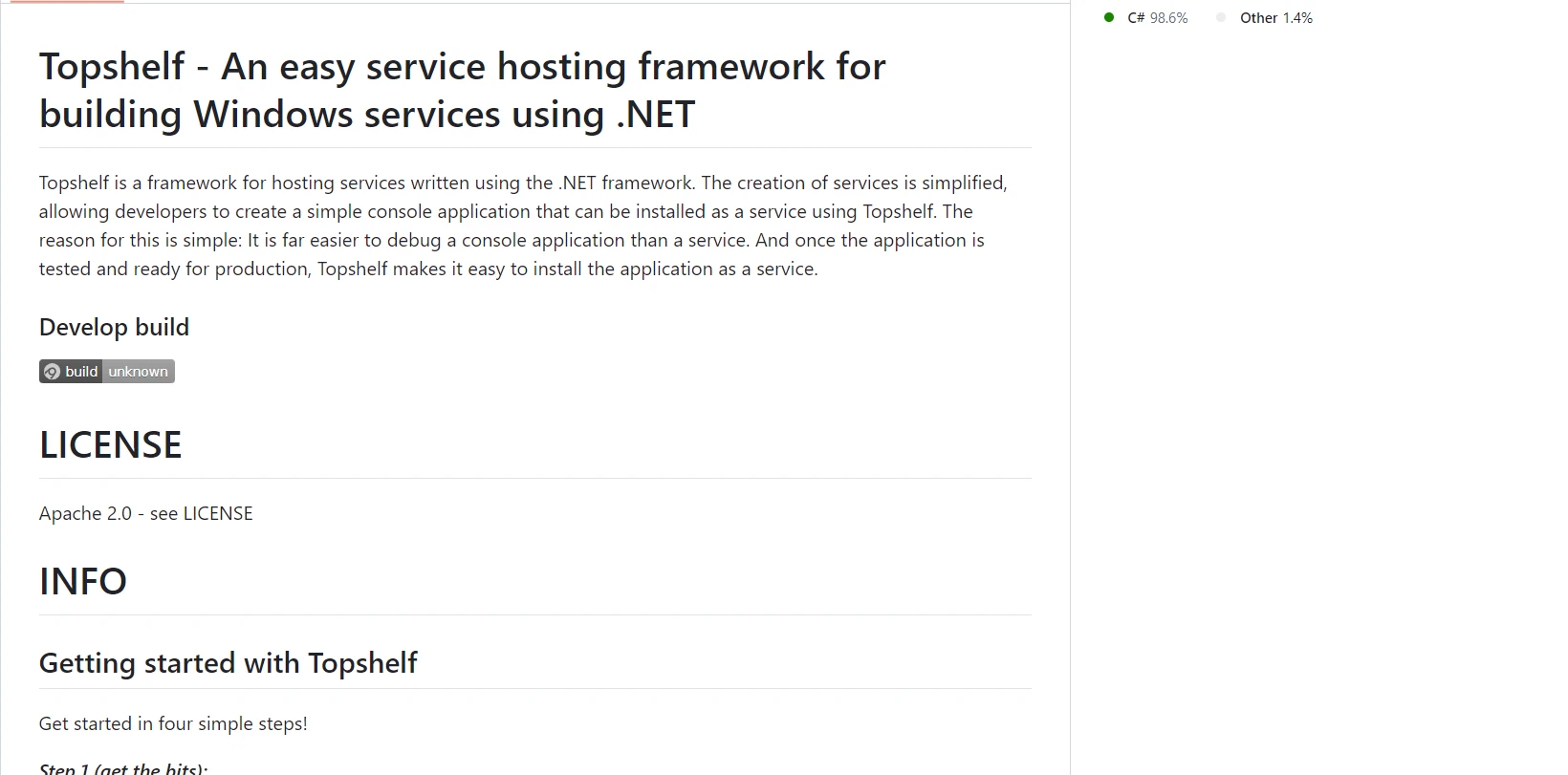
Liczba funkcji oferowanych przez Topshelf ułatwia projektowanie i utrzymanie usług Windows w .NET. Oto kilka jego najważniejszych cech:
#### Łatwość użytkowania
Topshelf dostarcza proste i płynne API, które upraszcza proces konfiguracji i zarządzania usługami Windows. Aplikacje konsolowe mogą być łatwo przekształcone w usługi przez programistów przy niewielkich lub żadnych zmianach w kodzie.
#### Elastyczność konfiguracji
Działania start, stop, pauza i kontynuacja to niektóre z obsługiwanych opcji konfiguracji. Zależności usług i opcje przywracania dla klas usług mogą być również określone przez programistów.
#### Instalacja i deinstalacja
Wdrażanie usług hostingowych napisanych przy użyciu .NET Framework jest ułatwione dzięki wbudowanym funkcjom Topshelf do instalacji i odinstalacji usług. Usługi mogą być instalowane programowo lub za pomocą wiersza poleceń.
#### Logowanie
Topshelf ułatwia programistom możliwość efektywnego logowania operacji usług i błędów poprzez integrację z popularnymi frameworkami do logowania takimi jak log4net, NLog i Serilog.
#### Kontrola usług
Jest kompatybilny ze wszystkimi popularnymi kontrolkami usług Windows, takimi jak pauza, kontynuacja, start i stop. Programiści mają teraz pełną kontrolę nad całym cyklem życia usługi.
#### Obsługa wyjątków
Solidna obsługa wyjątków to funkcja Topshelf, która gwarantuje, że usługi mogą odpowiednio obsługiwać błędy i pozostaną stabilne.
#### Wiele instancji usług
Zapewnia elastyczność dla skomplikowanych architektur usług, umożliwiając tworzenie i zarządzanie wieloma instancjami usług w tej samej aplikacji.
#### Dostosowane opcje wiersza poleceń
Dostosowane opcje wiersza poleceń pozwalają programistom dodatkowo dostosować i kontrolować zachowanie swoich usług.
#### Świadomość środowiskowa
Bez względu na to, czy to serwer produkcyjny, środowisko testowe, czy system deweloperski, Topshelf może rozpoznać i dostosować się do otaczających go warunków.
#### Wsparcie dla wstrzykiwania zależności
Topshelf ułatwia lepszą architekturę oprogramowania i upraszcza zarządzanie zależnościami usług, gdy jest używany w połączeniu z frameworkami do wstrzykiwania zależności.
#### Możliwości międzyplatformowe
Topshelf został głównie stworzony dla Windows, ale może również wykonywać usługi na Linux i macOS, gdy wykorzystuje się .NET Core, co zwiększa jego zgodność z innymi systemami operacyjnymi.
### Create and Config Topshelf C#
Użyj Topshelf w C#, aby stworzyć i skonfigurować usługę Windows, wykonując następujące kroki:
#### Utwórz nowy projekt Visual Studio
W programie Visual Studio łatwo jest utworzyć projekt konsolowy. Aby rozpocząć aplikację konsolową w środowisku Visual Studio, wykonaj te proste kroki:
Zanim użyjesz Visual Studio, upewnij się, że zainstalowałeś go na swoim komputerze.
#### Rozpocznij nowy projekt
Po wybraniu Pliku, Projekt, wybierz menu Nowy.
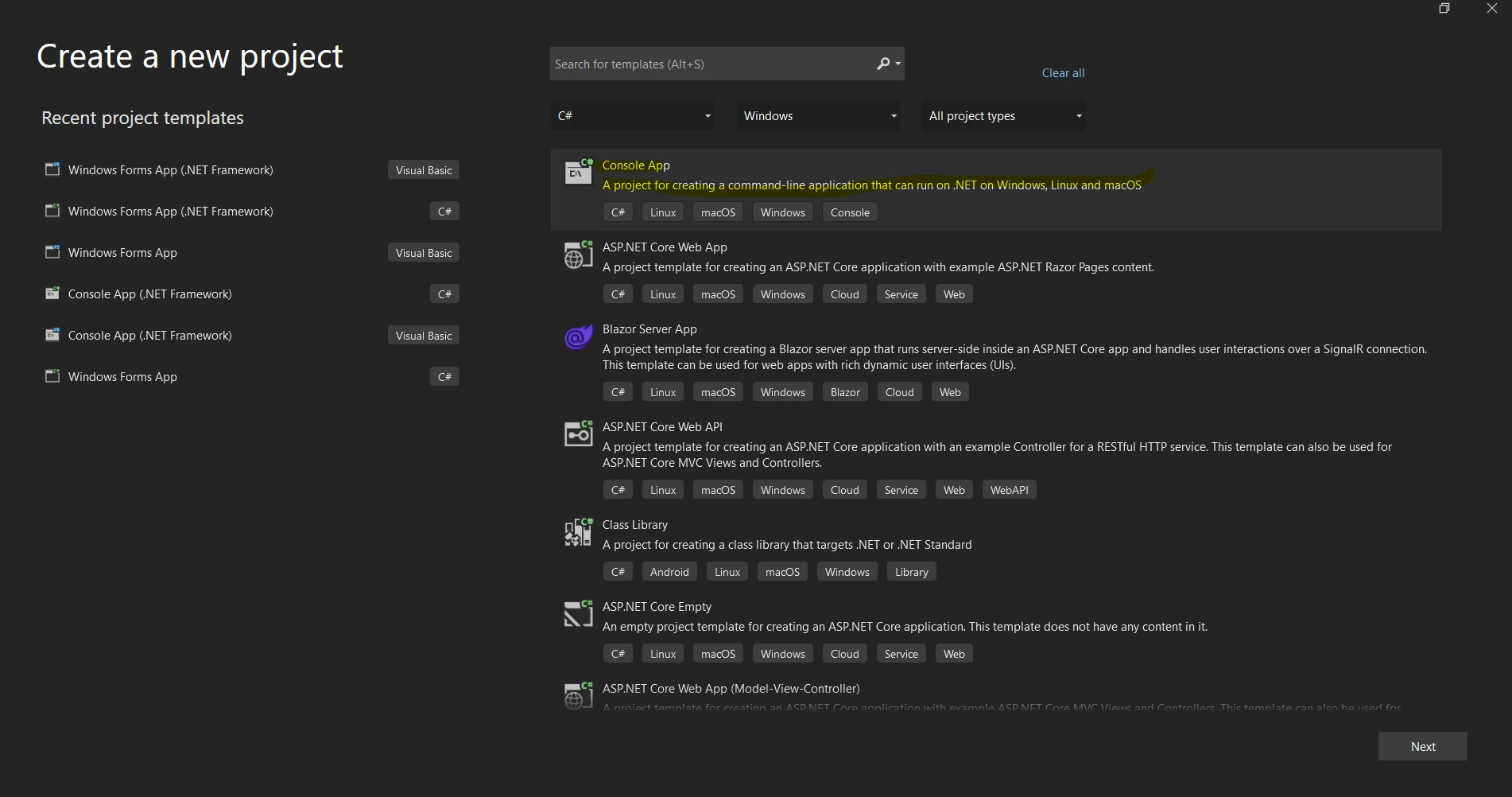
Wybierz "Aplikacja konsolowa" lub "Aplikacja konsolowa (.NET Core)" z listy referencyjnych szablonów projektów poniżej.
Aby nadać projektowi nazwę, wypełnij pole "Nazwa".
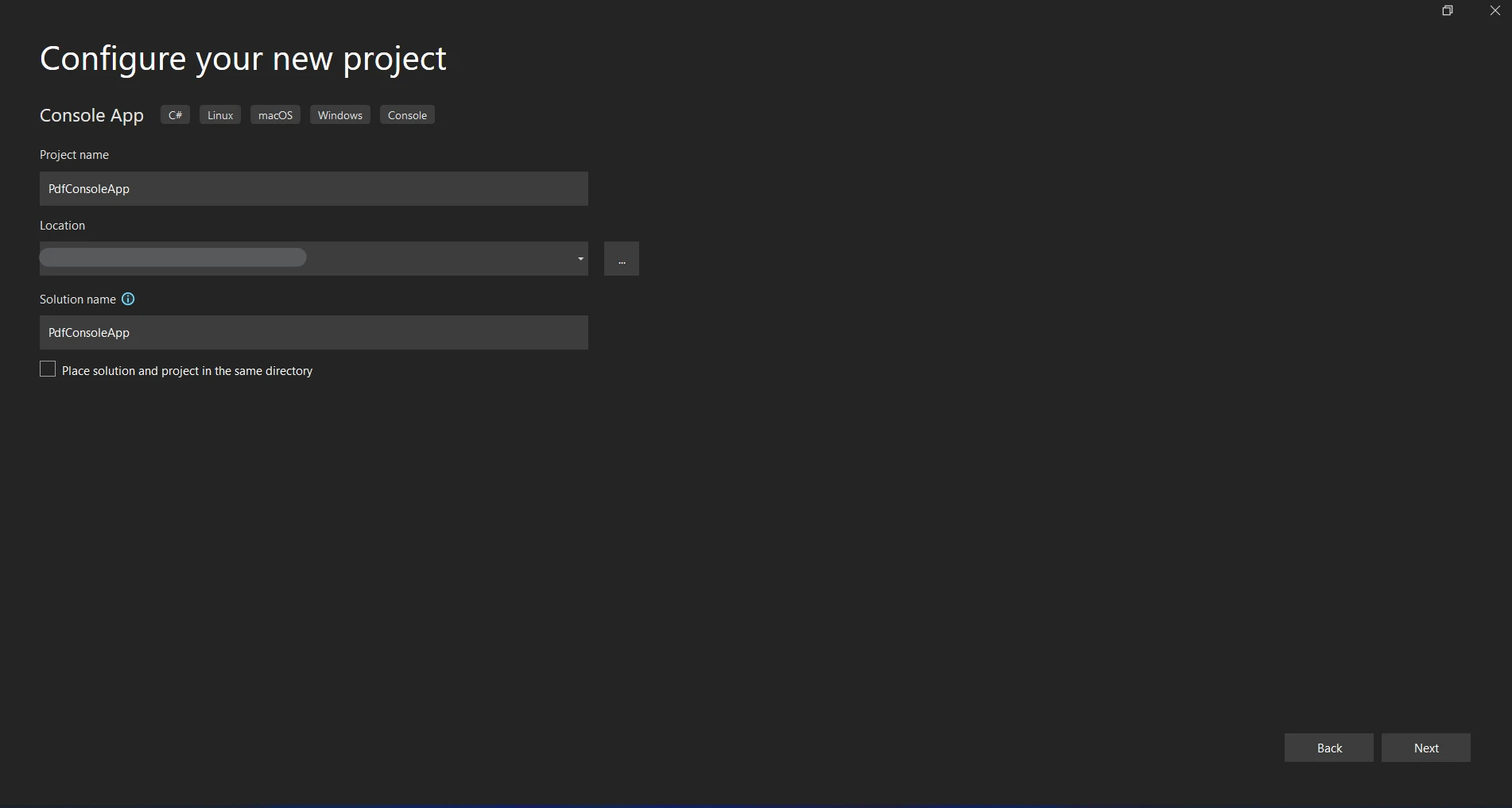
Wybierz miejsce do przechowywania projektu.
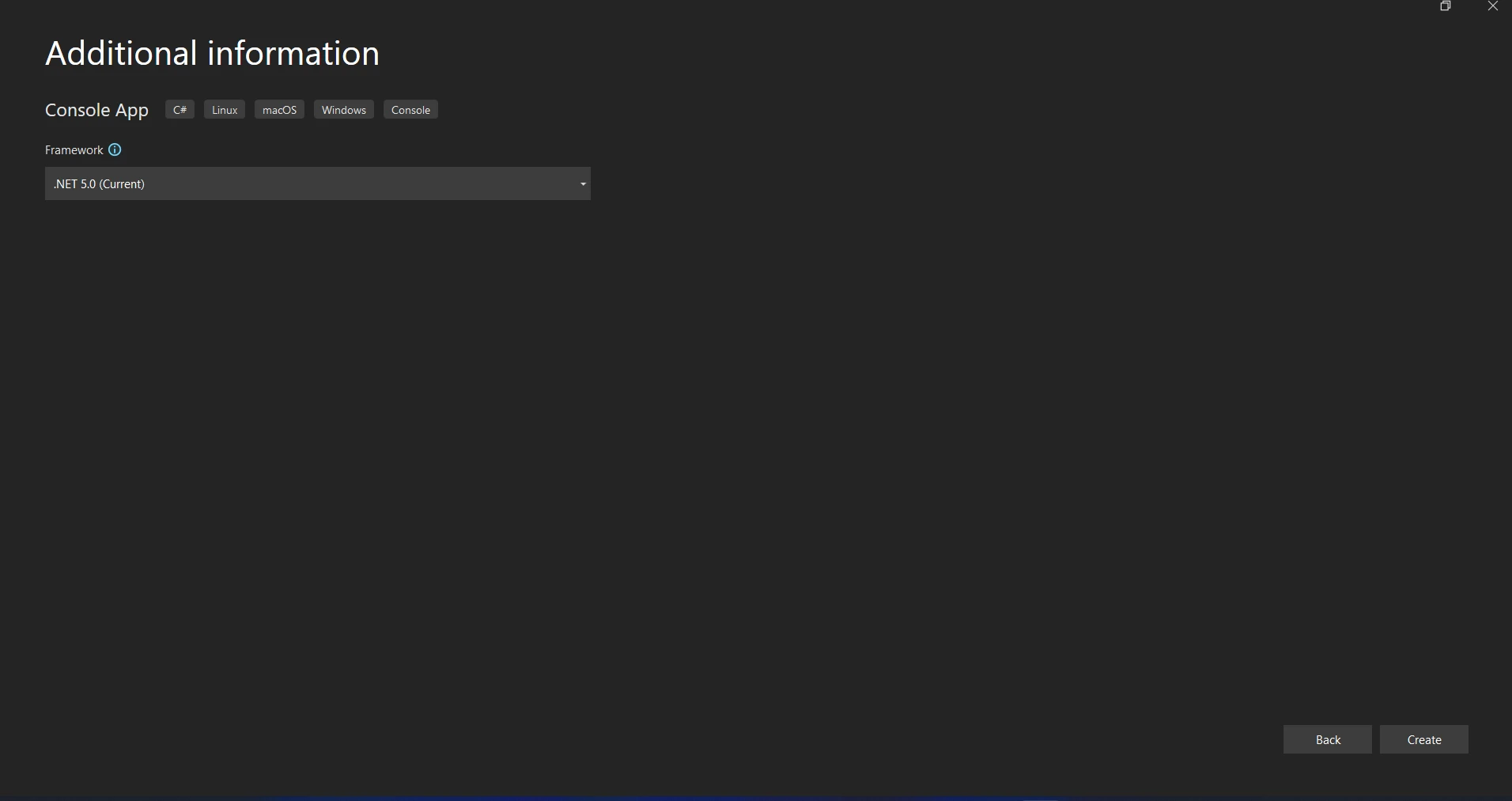
Projekt aplikacji konsolowej otworzy się po kliknięciu "Utwórz".
#### Zainstaluj Topshelf przez NuGet
Korzystając z Menedżera Pakietów NuGet, dodaj Topshelf do swojego projektu na początku. W Menedżerze Pakietów i aplikacji Console, wykonaj następujące polecenie:
```shell
:InstallCmd Install-Package Topshelf
```
#### **Stwórz klasę usługi**
Opisz logikę usługi tej klasy. Działania start i stop oraz inne akcje usługi powinny być zaimplementowane w tej klasie.
```csharp
using System;
using Topshelf;

namespace MyWindowsService
{
    // Define a simple service class with Start and Stop methods
    public class MyService
    {
        public bool Start()
        {
            // Service start logic
            Console.WriteLine("Service Started.");
            return true;
        }

        public bool Stop()
        {
            // Service stop logic
            Console.WriteLine("Service Stopped.");
            return true;
        }
    }

    // Main program class to run the Topshelf service
    class Program
    {
        static void Main(string[] args)
        {
            HostFactory.Run(x =>
            {
                // Configure the service
                x.Service<MyService>(s =>
                {
                    s.ConstructUsing(name => new MyService());
                    s.WhenStarted(tc => tc.Start());
                    s.WhenStopped(tc => tc.Stop());
                });

                // Run the service as a local system
                x.RunAsLocalSystem();

                // Set service details
                x.SetServiceName("MyService");
                x.SetDisplayName("My Service");
                x.SetDescription("This is a sample service created using Topshelf.");
            });
        }
    }
}
```
#### Skonfiguruj usługę
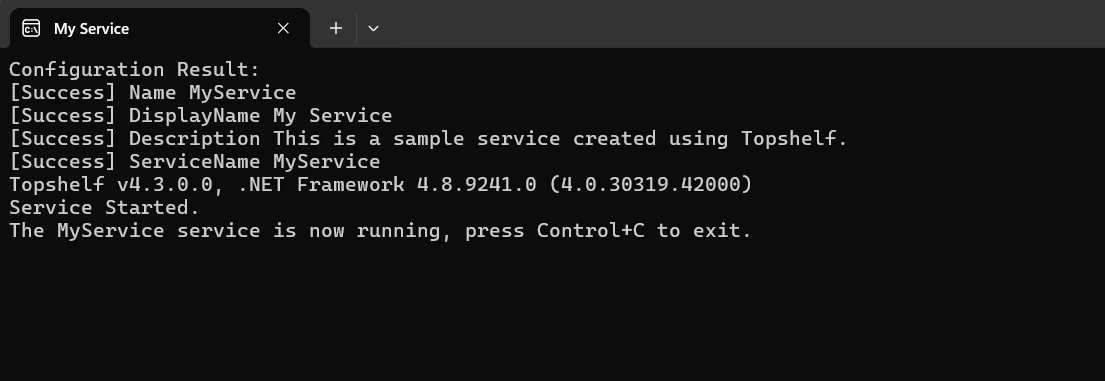
Mechanizm inicjowania i kończenia usługi znajduje się w klasie `MyService`. Definicja usługi i jej metody cyklu życia (Start i Stop) są połączone z odpowiadającymi im akcjami usługi w klasie Program, która zawiera konfigurację Topshelf. Właściwości usługi, takie jak nazwa, nazwa wyświetlana i opis, są ustawiane za pomocą metody run pojedynczej klasy usługi. Korzystanie z Topshelf do zarządzania i wdrażania usług Windows jest ułatwione dzięki tej zwięzłej konfiguracji.
#### **Budowa i instalacja usługi**
Podczas konstruowania projektu upewnij się, że jest wolny od błędów. Użyj polecenia instalacji wraz ze skompilowanym plikiem wykonywalnym, aby uruchomić usługę z wiersza poleceń:
```shell
MyWindowsService.exe install
```
#### **Uruchom usługę**
Użyj następującego polecenia, aby uruchomić usługę po jej zainstalowaniu:
```shell
MyWindowsService.exe start
```
#### Odinstaluj usługę
Użyj następującego polecenia, aby wyświetlić monit o odinstalowanie usługi, jeśli to konieczne:
```shell
MyWindowsService.exe uninstall
```
Ten przykład pokazuje, jak używać Topshelf w C#, aby tworzyć i konfigurować usługę Windows. Topshelf upraszcza procedurę, ułatwiając definicję, instalację, konfigurację i zarządzanie usługami Windows przy niewielkich lub żadnych wymaganiach zakodowania.
## Pierwsze kroki
Aby rozpocząć budowanie usługi Windows w C# przy użyciu IronPDF i Topshelf, wykonaj następujące kroki:
### Czym jest IronPDF?
[IronPDF dla bibliotek .NET](https://ironpdf.com) to bogata w funkcje bibliotekę .NET, którą programy C# mogą używać do tworzenia, odczytywania i edytowania dokumentów PDF. Dzięki temu programiści mogą łatwo tworzyć do druku, wysokiej jakości PDF z treści HTML, CSS i JavaScript. Możliwość rozdzielania i scalania PDF, oznaczania dokumentów znakami wodnymi, dodawania nagłówków i stopek oraz konwersji HTML do PDF to niektóre z podstawowych funkcji. IronPDF obsługuje zarówno .NET Framework, jak i .NET Core, co czyni go przydatnym dla szerokiego zakresu aplikacji.
Ponieważ PDF-y są łatwe do zintegrowania i mają bogatą dokumentację, programiści mogą je łatwo włączać do swoich programów. IronPDF zapewnia, że generowane PDF jest ściśle dopasowane do źródłowej treści HTML, radząc sobie z złożonymi układami i formatowaniem z łatwością.
### Funkcje IronPDF
**Generowanie plików PDF z HTML**
Konwertuj JavaScript, HTML i CSS do formatu PDF. Obsługuje zapytania o media i responsywny projekt, dwa współczesne standardy internetowe. Przydatne do dynamicznego ozdabiania faktur, raportów i dokumentów PDF za pomocą HTML i CSS.
**Edycja plików PDF**
Do istniejących plików PDF można dodawać tekst, zdjęcia i inne treści. Wyciągnij tekst i obrazy z plików PDF. Połącz wiele plików PDF w jeden plik. Podziel pliki PDF na wiele oddzielnych dokumentów. Należy uwzględnić znaki wodne, adnotacje, nagłówki i stopki.
**Konwersja plików PDF**
Konwertuj kilka formatów plików, w tym Word, Excel i pliki obrazów, na format PDF. Konwersja PDF na obraz (PNG, JPEG, itp.).
**Wydajność i niezawodność**
Wysoka wydajność i niezawodność to cechy projektowe pożądane w środowiskach przemysłowych. Z łatwością zarządza dużymi zbiorami dokumentów.
### Zainstaluj IronPDF
Aby uzyskać narzędzia potrzebne do pracy z plikami PDF w projektach .NET, zainstaluj pakiet IronPDF.
```shell
:ProductInstall
```
### Utwórz klasę swojej usługi z IronPDF
Zdefiniuj funkcjonalność IronPDF dla tworzenia i modyfikowania plików PDF, a także logikę usługi dla tej klasy.
```csharp
using System;
using IronPdf;
using Topshelf;
namespace PdfService
{
// Define a service class with PDF generation logic
public class MyPdfService
{
public bool Start()
{
Console.WriteLine("Service Starting...");
GeneratePdf();
return true;
}
public bool Stop()
{
Console.WriteLine("Service Stopping...");
return true;
}
// Method to generate a PDF using IronPDF
private void GeneratePdf()
{
var renderer = new HtmlToPdf();
var pdf = renderer.RenderHtmlAsPdf("<h1>Hello, PDF!</h1>");
pdf.SaveAs("GeneratedDocument.pdf");
Console.WriteLine("PDF Generated.");
}
}
// Main program to configure and run the service using Topshelf
class Program
{
static void Main(string[] args)
{
HostFactory.Run(x =>
{
x.Service<MyPdfService>(s =>
{
s.ConstructUsing(name => new MyPdfService());
s.WhenStarted(tc => tc.Start());
s.WhenStopped(tc => tc.Stop());
});
x.RunAsLocalSystem();
x.SetServiceName("MyPdfService");
x.SetDisplayName("My PDF Service");
x.SetDescription("A service that generates PDF files using IronPDF and Topshelf.");
});
}
}
}
```
Programiści mogą szybko projektować silne usługi Windows do produkcji i manipulowania PDF, łącząc Topshelf z IronPDF w C#. Topshelf oferuje płynne i przyjazne użytkownikowi API, które ułatwia konfigurację i zarządzanie usługami Windows.
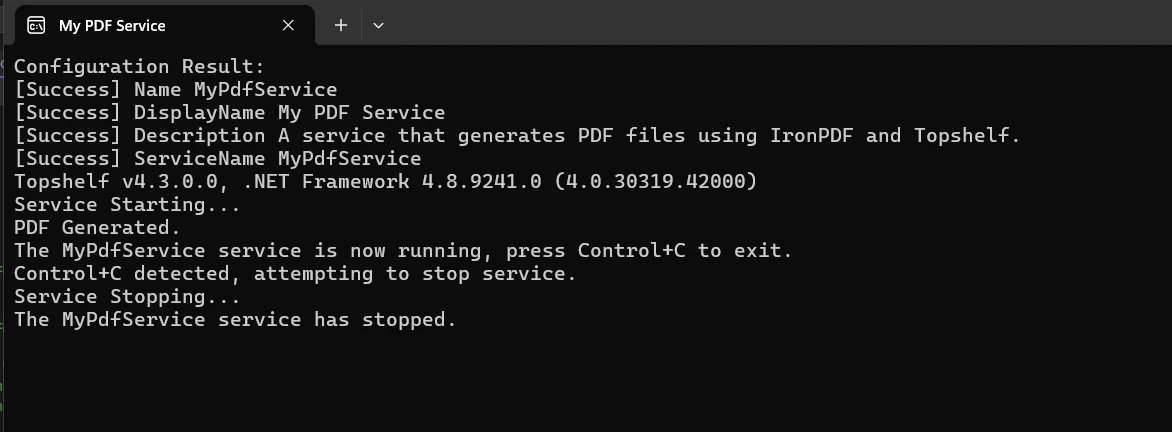
Klasa `MyPdfService`, która implementuje metody uruchamiania (`Start`) i kończenia (`Stop`) usługi, kapsułkuje logikę usługi w podanym przykładzie. IronPDF jest używany w metodzie `Start` do tworzenia prostego [dokumentu PDF przy użyciu HTML](/examples/using-html-to-create-a-pdf/) z tekstu HTML. The ability to render HTML into a PDF format using IronPDF's `HtmlToPdf` class is demonstrated, showing how to turn basic HTML information (such as "<h1>Hello, PDF!</h1>") into a PDF file ("GeneratedDocument.pdf").
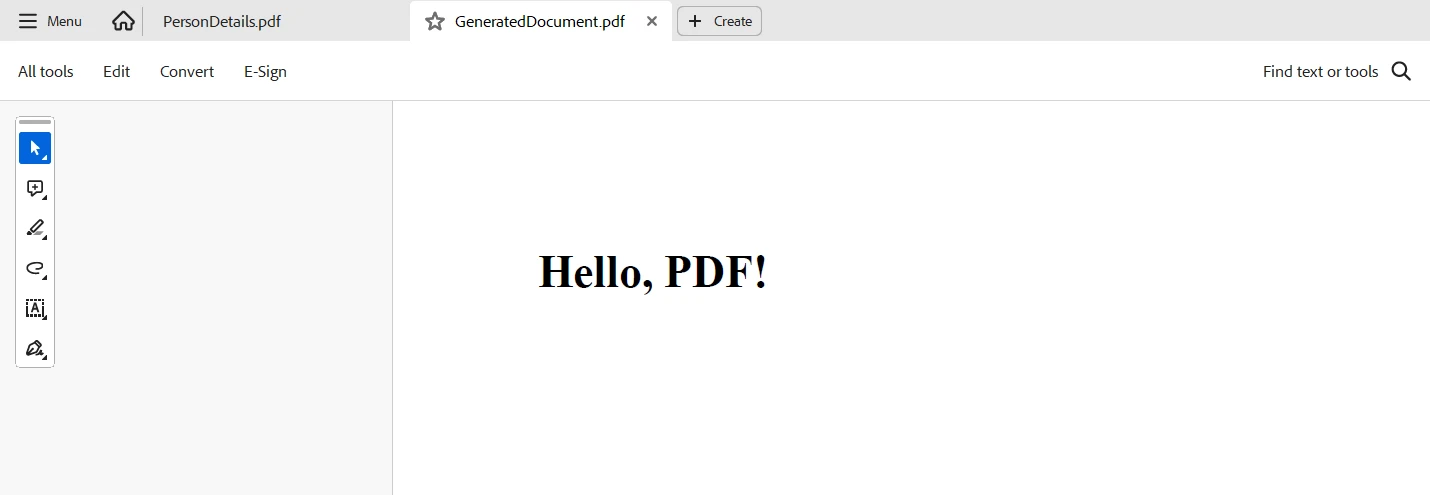
Ta integracja pokazuje, w jaki sposób Topshelf zarządza cyklem życia usługi, aby zapewnić jej działanie jako pełnoprawnej usługi systemu Windows, oraz w jaki sposób IronPDF z łatwością radzi sobie z trudnym procesem tworzenia plików PDF. Dzięki połączonym możliwościom Topshelf i IronPDF w języku C# ta integracja idealnie nadaje się do aplikacji wymagających automatycznego tworzenia lub modyfikacji dokumentów. Zapewnia niezawodność i łatwość konserwacji.
## Wnioski
Podsumowując, tworzenie i administrowanie usługami Windows, które obejmują tworzenie i edycję plików PDF, jest możliwe dzięki połączeniu bibliotek Topshelf i IronPDF w języku C#. Oferując przyjazny dla użytkownika interfejs API do konfiguracji i zarządzania usługami, Topshelf usprawnia wdrażanie usług Windows. Ułatwiając płynne generowanie dokumentów PDF na podstawie informacji HTML w ramach logiki usługi, IronPDF tymczasowo poprawia funkcjonalność.
Ta integracja gwarantuje niezawodną i wysoką wydajność w zautomatyzowanych procesach obiegu dokumentów, a jednocześnie usprawnia proces tworzenia oprogramowania. Topshelf z IronPDF w języku C# wyróżnia się jako elastyczna i skuteczna opcja, umożliwiająca programistom łatwe tworzenie złożonych rozwiązań do przetwarzania dokumentów, czy to w celu tworzenia raportów, faktur, czy też wykonywania innych zadań związanych z plikami PDF.
[Informacje dotyczące licencji](/licensing/) IronPDF i [Iron Software](/licensing/) łączą niezwykle elastyczne systemy i pakiet oprogramowania Iron Software z podstawowym wsparciem, oferując programistom więcej aplikacji i funkcji online, a także bardziej efektywne tworzenie oprogramowania.
Jeśli opcje licencji są jasne i dostosowane do projektu, programiści mogą łatwiej określić, który model jest optymalny. Korzyści te pozwalają programistom rozwiązywać szeroki zakres problemów w jasny, skuteczny i spójny sposób.
Popularny pakiet open-source o nazwie Topshelf został stworzony, aby ułatwić tworzenie usług Windows w .NET. Framework, który oferuje, upraszcza i ułatwia zrozumienie procesu tworzenia, wdrażania i zarządzania usługami Windows, umożliwiając programistom koncentrowanie się na logice biznesowej zamiast na złożonościach zarządzania kontrolą usług. W połączeniu z IronPDF, bogatą w funkcje biblioteką C# do tworzenia i modyfikowania plików PDF, programiści mogą budować solidne i niezawodne usługi zdolne do obsługi skomplikowanych zadań przetwarzania dokumentów.
To połączenie zapewnia płynne rozwiązanie dla przedsiębiorstw, które wymagają efektywnych i zautomatyzowanych przepływów pracy z dokumentami poprzez automatyzację tworzenia, rewizji i dystrybucji PDF w pełnym frameworku usług Windows. Programiści mogą uzyskać wysoki stopień funkcjonalności i łatwości utrzymania w swoich aplikacjach serwisowych, zapewniając zarówno solidność, jak i łatwość użycia, korzystając z Topshelf z IronPDF dla .NET w C#.
Co to jest Topshelf C#?
Rozwój, konfiguracja i wdrażanie usług Windows są ułatwione dzięki projekcie open-source Topshelf .NET package. Usuwając wiele złożoności związanej z tworzeniem usług Windows, programiści mogą bardziej skupić się na podstawowych funkcjach swoich aplikacji, a nie na niuansach zarządzania usługami Windows.
Przy niewielkich zmianach w kodzie Topshelf umożliwia łatwe przekształcenie aplikacji konsolowych w usługi. Oferuje również płynne API do ustalania ustawień usług, w tym zależności, opcji odzyskiwania oraz działań rozpoczynania i zatrzymywania usług. Dla deweloperów .NET poszukujących efektywnego tworzenia stabilnych i zarządzalnych usług Windows, Topshelf jest popularnym wyborem z uwagi na jego łatwość użycia i elastyczność.
Liczba funkcji oferowanych przez Topshelf ułatwia projektowanie i utrzymanie usług Windows w .NET. Oto kilka jego najważniejszych cech:
Łatwość użytkowania
Topshelf dostarcza proste i płynne API, które upraszcza proces konfiguracji i zarządzania usługami Windows. Aplikacje konsolowe mogą być łatwo przekształcone w usługi przez programistów przy niewielkich lub żadnych zmianach w kodzie.
Elastyczność konfiguracji
Działania start, stop, pauza i kontynuacja to niektóre z obsługiwanych opcji konfiguracji. Zależności usług i opcje przywracania dla klas usług mogą być również określone przez programistów.
Instalacja i deinstalacja
Wdrażanie usług hostingowych napisanych przy użyciu .NET Framework jest ułatwione dzięki wbudowanym funkcjom Topshelf do instalacji i odinstalacji usług. Usługi mogą być instalowane programowo lub za pomocą wiersza poleceń.
Logowanie
Topshelf ułatwia programistom możliwość efektywnego logowania operacji usług i błędów poprzez integrację z popularnymi frameworkami do logowania takimi jak log4net, NLog i Serilog.
Kontrola usług
Jest kompatybilny ze wszystkimi popularnymi kontrolkami usług Windows, takimi jak pauza, kontynuacja, start i stop. Programiści mają teraz pełną kontrolę nad całym cyklem życia usługi.
Obsługa wyjątków
Solidna obsługa wyjątków to funkcja Topshelf, która gwarantuje, że usługi mogą odpowiednio obsługiwać błędy i pozostaną stabilne.
Wiele instancji usług
Zapewnia elastyczność dla skomplikowanych architektur usług, umożliwiając tworzenie i zarządzanie wieloma instancjami usług w tej samej aplikacji.
Dostosowane opcje wiersza poleceń
Dostosowane opcje wiersza poleceń pozwalają programistom dodatkowo dostosować i kontrolować zachowanie swoich usług.
Świadomość środowiskowa
Bez względu na to, czy to serwer produkcyjny, środowisko testowe, czy system deweloperski, Topshelf może rozpoznać i dostosować się do otaczających go warunków.
Wsparcie dla wstrzykiwania zależności
Topshelf ułatwia lepszą architekturę oprogramowania i upraszcza zarządzanie zależnościami usług, gdy jest używany w połączeniu z frameworkami do wstrzykiwania zależności.
Możliwości międzyplatformowe
Topshelf został głównie stworzony dla Windows, ale może również wykonywać usługi na Linux i macOS, gdy wykorzystuje się .NET Core, co zwiększa jego zgodność z innymi systemami operacyjnymi.
Create and Config Topshelf C#
Użyj Topshelf w C#, aby stworzyć i skonfigurować usługę Windows, wykonując następujące kroki:
Utwórz nowy projekt Visual Studio
W programie Visual Studio łatwo jest utworzyć projekt konsolowy. Aby rozpocząć aplikację konsolową w środowisku Visual Studio, wykonaj te proste kroki:
Zanim użyjesz Visual Studio, upewnij się, że zainstalowałeś go na swoim komputerze.
Rozpocznij nowy projekt
Po wybraniu Pliku, Projekt, wybierz menu Nowy.
Wybierz "Aplikacja konsolowa" lub "Aplikacja konsolowa (.NET Core)" z listy referencyjnych szablonów projektów poniżej.
Aby nadać projektowi nazwę, wypełnij pole "Nazwa".
Wybierz miejsce do przechowywania projektu.
Projekt aplikacji konsolowej otworzy się po kliknięciu "Utwórz".
Zainstaluj Topshelf przez NuGet
Korzystając z Menedżera Pakietów NuGet, dodaj Topshelf do swojego projektu na początku. W Menedżerze Pakietów i aplikacji Console, wykonaj następujące polecenie:
PM > Install-Package Topshelf
Install-Package Topshelf
Stwórz klasę usługi
Opisz logikę usługi tej klasy. Działania start i stop oraz inne akcje usługi powinny być zaimplementowane w tej klasie.
using System;using Topshelf;namespace MyWindowsService{ // Define a simple service class with Start and Stop methods public class MyService { public boolStart() { // Service start logicConsole.WriteLine("Service Started."); return true; } public boolStop() { // Service stop logicConsole.WriteLine("Service Stopped."); return true; } } // Main program class to run the Topshelf service class Program { static voidMain(string[] args) {HostFactory.Run(x => { // Configure the service x.Service<MyService>(s => { s.ConstructUsing(name => new MyService()); s.WhenStarted(tc => tc.Start()); s.WhenStopped(tc => tc.Stop()); }); // Run the service as a local system x.RunAsLocalSystem(); // Set service details x.SetServiceName("MyService"); x.SetDisplayName("My Service"); x.SetDescription("This is a sample service created using Topshelf."); }); } }}
using System;
using Topshelf;

namespace MyWindowsService
{
    // Define a simple service class with Start and Stop methods
    public class MyService
    {
        public bool Start()
        {
            // Service start logic
            Console.WriteLine("Service Started.");
            return true;
        }

        public bool Stop()
        {
            // Service stop logic
            Console.WriteLine("Service Stopped.");
            return true;
        }
    }

    // Main program class to run the Topshelf service
    class Program
    {
        static void Main(string[] args)
        {
            HostFactory.Run(x =>
            {
                // Configure the service
                x.Service<MyService>(s =>
                {
                    s.ConstructUsing(name => new MyService());
                    s.WhenStarted(tc => tc.Start());
                    s.WhenStopped(tc => tc.Stop());
                });

                // Run the service as a local system
                x.RunAsLocalSystem();

                // Set service details
                x.SetServiceName("MyService");
                x.SetDisplayName("My Service");
                x.SetDescription("This is a sample service created using Topshelf.");
            });
        }
    }
}
ImportsSystemImportsTopshelfNamespaceMyWindowsService ' Define a simple service class with Start and Stop methods Public Class MyService Public Function Start() AsBoolean ' Service start logicConsole.WriteLine("Service Started.") Return True End Function Public Function [Stop]() AsBoolean ' Service stop logicConsole.WriteLine("Service Stopped.") Return True End Function End Class ' Main program class to run the Topshelf serviceFriend Class ProgramShared Sub Main(ByVal args() AsString)HostFactory.Run(Sub(x) ' Configure the service x.Service(OfMyService)(Sub(s) s.ConstructUsing(Function(name) New MyService()) s.WhenStarted(Function(tc) tc.Start()) s.WhenStopped(Function(tc) tc.Stop()) End Sub) ' Run the service as a local system x.RunAsLocalSystem() ' Set service details x.SetServiceName("MyService") x.SetDisplayName("My Service") x.SetDescription("This is a sample service created using Topshelf.") End Sub) End Sub End ClassEndNamespace
Imports System
Imports Topshelf

Namespace MyWindowsService
	' Define a simple service class with Start and Stop methods
	Public Class MyService
		Public Function Start() As Boolean
			' Service start logic
			Console.WriteLine("Service Started.")
			Return True
		End Function

		Public Function [Stop]() As Boolean
			' Service stop logic
			Console.WriteLine("Service Stopped.")
			Return True
		End Function
	End Class

	' Main program class to run the Topshelf service
	Friend Class Program
		Shared Sub Main(ByVal args() As String)
			HostFactory.Run(Sub(x)
				' Configure the service
				x.Service(Of MyService)(Sub(s)
					s.ConstructUsing(Function(name) New MyService())
					s.WhenStarted(Function(tc) tc.Start())
					s.WhenStopped(Function(tc) tc.Stop())
				End Sub)

				' Run the service as a local system
				x.RunAsLocalSystem()

				' Set service details
				x.SetServiceName("MyService")
				x.SetDisplayName("My Service")
				x.SetDescription("This is a sample service created using Topshelf.")
			End Sub)
		End Sub
	End Class
End Namespace
Skonfiguruj usługę
Mechanizm inicjowania i kończenia usługi znajduje się w klasie MyService. Definicja usługi i jej metody cyklu życia (Start i Stop) są połączone z odpowiadającymi im akcjami usługi w klasie Program, która zawiera konfigurację Topshelf. Właściwości usługi, takie jak nazwa, nazwa wyświetlana i opis, są ustawiane za pomocą metody run pojedynczej klasy usługi. Korzystanie z Topshelf do zarządzania i wdrażania usług Windows jest ułatwione dzięki tej zwięzłej konfiguracji.
Budowa i instalacja usługi
Podczas konstruowania projektu upewnij się, że jest wolny od błędów. Użyj polecenia instalacji wraz ze skompilowanym plikiem wykonywalnym, aby uruchomić usługę z wiersza poleceń:
MyWindowsService.exe install
MyWindowsService.exe install
SHELL
Uruchom usługę
Użyj następującego polecenia, aby uruchomić usługę po jej zainstalowaniu:
MyWindowsService.exe start
MyWindowsService.exe start
SHELL
Odinstaluj usługę
Użyj następującego polecenia, aby wyświetlić monit o odinstalowanie usługi, jeśli to konieczne:
MyWindowsService.exe uninstall
MyWindowsService.exe uninstall
SHELL
Ten przykład pokazuje, jak używać Topshelf w C#, aby tworzyć i konfigurować usługę Windows. Topshelf upraszcza procedurę, ułatwiając definicję, instalację, konfigurację i zarządzanie usługami Windows przy niewielkich lub żadnych wymaganiach zakodowania.
Pierwsze kroki
Aby rozpocząć budowanie usługi Windows w C# przy użyciu IronPDF i Topshelf, wykonaj następujące kroki:
Czym jest IronPDF?
IronPDF dla bibliotek .NET to bogata w funkcje bibliotekę .NET, którą programy C# mogą używać do tworzenia, odczytywania i edytowania dokumentów PDF. Dzięki temu programiści mogą łatwo tworzyć do druku, wysokiej jakości PDF z treści HTML, CSS i JavaScript. Możliwość rozdzielania i scalania PDF, oznaczania dokumentów znakami wodnymi, dodawania nagłówków i stopek oraz konwersji HTML do PDF to niektóre z podstawowych funkcji. IronPDF obsługuje zarówno .NET Framework, jak i .NET Core, co czyni go przydatnym dla szerokiego zakresu aplikacji.
Ponieważ PDF-y są łatwe do zintegrowania i mają bogatą dokumentację, programiści mogą je łatwo włączać do swoich programów. IronPDF zapewnia, że generowane PDF jest ściśle dopasowane do źródłowej treści HTML, radząc sobie z złożonymi układami i formatowaniem z łatwością.
Funkcje IronPDF
Generowanie plików PDF z HTML
Konwertuj JavaScript, HTML i CSS do formatu PDF. Obsługuje zapytania o media i responsywny projekt, dwa współczesne standardy internetowe. Przydatne do dynamicznego ozdabiania faktur, raportów i dokumentów PDF za pomocą HTML i CSS.
Edycja plików PDF
Do istniejących plików PDF można dodawać tekst, zdjęcia i inne treści. Wyciągnij tekst i obrazy z plików PDF. Połącz wiele plików PDF w jeden plik. Podziel pliki PDF na wiele oddzielnych dokumentów. Należy uwzględnić znaki wodne, adnotacje, nagłówki i stopki.
Konwersja plików PDF
Konwertuj kilka formatów plików, w tym Word, Excel i pliki obrazów, na format PDF. Konwersja PDF na obraz (PNG, JPEG, itp.).
Wydajność i niezawodność
Wysoka wydajność i niezawodność to cechy projektowe pożądane w środowiskach przemysłowych. Z łatwością zarządza dużymi zbiorami dokumentów.
Zainstaluj IronPDF
Aby uzyskać narzędzia potrzebne do pracy z plikami PDF w projektach .NET, zainstaluj pakiet IronPDF.
PM > Install-Package IronPdf
Install-Package IronPdf
Utwórz klasę swojej usługi z IronPDF
Zdefiniuj funkcjonalność IronPDF dla tworzenia i modyfikowania plików PDF, a także logikę usługi dla tej klasy.
using System;using IronPdf;using Topshelf;namespace PdfService{ // Define a service class with PDF generation logic public class MyPdfService { public boolStart() {Console.WriteLine("Service Starting...");GeneratePdf(); return true; } public boolStop() {Console.WriteLine("Service Stopping..."); return true; } // Method to generate a PDF using IronPDF private voidGeneratePdf() { var renderer = new HtmlToPdf(); var pdf = renderer.RenderHtmlAsPdf("<h1>Hello, PDF!</h1>"); pdf.SaveAs("GeneratedDocument.pdf");Console.WriteLine("PDF Generated."); } } // Main program to configure and run the service using Topshelf class Program { static voidMain(string[] args) {HostFactory.Run(x => { x.Service<MyPdfService>(s => { s.ConstructUsing(name => new MyPdfService()); s.WhenStarted(tc => tc.Start()); s.WhenStopped(tc => tc.Stop()); }); x.RunAsLocalSystem(); x.SetServiceName("MyPdfService"); x.SetDisplayName("My PDF Service"); x.SetDescription("A service that generates PDF files using IronPDF and Topshelf."); }); } }}
using System;
using IronPdf;
using Topshelf;

namespace PdfService
{
    // Define a service class with PDF generation logic
    public class MyPdfService
    {
        public bool Start()
        {
            Console.WriteLine("Service Starting...");
            GeneratePdf();
            return true;
        }

        public bool Stop()
        {
            Console.WriteLine("Service Stopping...");
            return true;
        }

        // Method to generate a PDF using IronPDF
        private void GeneratePdf()
        {
            var renderer = new HtmlToPdf();
            var pdf = renderer.RenderHtmlAsPdf("<h1>Hello, PDF!</h1>");
            pdf.SaveAs("GeneratedDocument.pdf");
            Console.WriteLine("PDF Generated.");
        }
    }

    // Main program to configure and run the service using Topshelf
    class Program
    {
        static void Main(string[] args)
        {
            HostFactory.Run(x =>
            {
                x.Service<MyPdfService>(s =>
                {
                    s.ConstructUsing(name => new MyPdfService());
                    s.WhenStarted(tc => tc.Start());
                    s.WhenStopped(tc => tc.Stop());
                });

                x.RunAsLocalSystem();
                x.SetServiceName("MyPdfService");
                x.SetDisplayName("My PDF Service");
                x.SetDescription("A service that generates PDF files using IronPDF and Topshelf.");
            });
        }
    }
}
ImportsSystemImportsIronPdfImportsTopshelfNamespacePdfService ' Define a service class with PDF generation logic Public Class MyPdfService Public Function Start() AsBooleanConsole.WriteLine("Service Starting...")GeneratePdf() Return True End Function Public Function [Stop]() AsBooleanConsole.WriteLine("Service Stopping...") Return True End Function ' Method to generate a PDF using IronPDF Private Sub GeneratePdf() Dim renderer = New HtmlToPdf() Dim pdf = renderer.RenderHtmlAsPdf("<h1>Hello, PDF!</h1>") pdf.SaveAs("GeneratedDocument.pdf")Console.WriteLine("PDF Generated.") End Sub End Class ' Main program to configure and run the service using TopshelfFriend Class ProgramShared Sub Main(ByVal args() AsString)HostFactory.Run(Sub(x) x.Service(OfMyPdfService)(Sub(s) s.ConstructUsing(Function(name) New MyPdfService()) s.WhenStarted(Function(tc) tc.Start()) s.WhenStopped(Function(tc) tc.Stop()) End Sub) x.RunAsLocalSystem() x.SetServiceName("MyPdfService") x.SetDisplayName("My PDF Service") x.SetDescription("A service that generates PDF files using IronPDF and Topshelf.") End Sub) End Sub End ClassEndNamespace
Imports System
Imports IronPdf
Imports Topshelf

Namespace PdfService
	' Define a service class with PDF generation logic
	Public Class MyPdfService
		Public Function Start() As Boolean
			Console.WriteLine("Service Starting...")
			GeneratePdf()
			Return True
		End Function

		Public Function [Stop]() As Boolean
			Console.WriteLine("Service Stopping...")
			Return True
		End Function

		' Method to generate a PDF using IronPDF
		Private Sub GeneratePdf()
			Dim renderer = New HtmlToPdf()
			Dim pdf = renderer.RenderHtmlAsPdf("<h1>Hello, PDF!</h1>")
			pdf.SaveAs("GeneratedDocument.pdf")
			Console.WriteLine("PDF Generated.")
		End Sub
	End Class

	' Main program to configure and run the service using Topshelf
	Friend Class Program
		Shared Sub Main(ByVal args() As String)
			HostFactory.Run(Sub(x)
				x.Service(Of MyPdfService)(Sub(s)
					s.ConstructUsing(Function(name) New MyPdfService())
					s.WhenStarted(Function(tc) tc.Start())
					s.WhenStopped(Function(tc) tc.Stop())
				End Sub)

				x.RunAsLocalSystem()
				x.SetServiceName("MyPdfService")
				x.SetDisplayName("My PDF Service")
				x.SetDescription("A service that generates PDF files using IronPDF and Topshelf.")
			End Sub)
		End Sub
	End Class
End Namespace
Programiści mogą szybko projektować silne usługi Windows do produkcji i manipulowania PDF, łącząc Topshelf z IronPDF w C#. Topshelf oferuje płynne i przyjazne użytkownikowi API, które ułatwia konfigurację i zarządzanie usługami Windows.
Klasa MyPdfService, która implementuje metody uruchamiania (Start) i kończenia (Stop) usługi, kapsułkuje logikę usługi w podanym przykładzie. IronPDF jest używany w metodzie Start do tworzenia prostego dokumentu PDF przy użyciu HTML z tekstu HTML. The ability to render HTML into a PDF format using IronPDF's HtmlToPdf class is demonstrated, showing how to turn basic HTML information (such as "
Hello, PDF!
") into a PDF file ("GeneratedDocument.pdf").
Ta integracja pokazuje, w jaki sposób Topshelf zarządza cyklem życia usługi, aby zapewnić jej działanie jako pełnoprawnej usługi systemu Windows, oraz w jaki sposób IronPDF z łatwością radzi sobie z trudnym procesem tworzenia plików PDF. Dzięki połączonym możliwościom Topshelf i IronPDF w języku C# ta integracja idealnie nadaje się do aplikacji wymagających automatycznego tworzenia lub modyfikacji dokumentów. Zapewnia niezawodność i łatwość konserwacji.
Wnioski
Podsumowując, tworzenie i administrowanie usługami Windows, które obejmują tworzenie i edycję plików PDF, jest możliwe dzięki połączeniu bibliotek Topshelf i IronPDF w języku C#. Oferując przyjazny dla użytkownika interfejs API do konfiguracji i zarządzania usługami, Topshelf usprawnia wdrażanie usług Windows. Ułatwiając płynne generowanie dokumentów PDF na podstawie informacji HTML w ramach logiki usługi, IronPDF tymczasowo poprawia funkcjonalność.
Ta integracja gwarantuje niezawodną i wysoką wydajność w zautomatyzowanych procesach obiegu dokumentów, a jednocześnie usprawnia proces tworzenia oprogramowania. Topshelf z IronPDF w języku C# wyróżnia się jako elastyczna i skuteczna opcja, umożliwiająca programistom łatwe tworzenie złożonych rozwiązań do przetwarzania dokumentów, czy to w celu tworzenia raportów, faktur, czy też wykonywania innych zadań związanych z plikami PDF.
Informacje dotyczące licencji IronPDF i Iron Software łączą niezwykle elastyczne systemy i pakiet oprogramowania Iron Software z podstawowym wsparciem, oferując programistom więcej aplikacji i funkcji online, a także bardziej efektywne tworzenie oprogramowania.
Jeśli opcje licencji są jasne i dostosowane do projektu, programiści mogą łatwiej określić, który model jest optymalny. Korzyści te pozwalają programistom rozwiązywać szeroki zakres problemów w jasny, skuteczny i spójny sposób.
Jacob Mellor jest Chief Technology Officer w Iron Software i wizjonerskim inżynierem, pionierem technologii C# PDF. Jako pierwotny deweloper głównej bazy kodowej Iron Software, kształtuje architekturę produktów firmy od jej początku, przekształcając ją wspólnie z CEO Cameron Rimington w firmę liczącą ponad 50 osób, obsługującą NASA, Teslę i światowe agencje rządowe.





















