

react hook form NPM (Wie es für Entwickler funktioniert)

React Hook Form ist eine leistungsstarke und effiziente Bibliothek zur Verwaltung von Formularwerten in React-Anwendungen. Es nutzt React Hooks, um ein nahtloses und performantes Erlebnis ohne Controller-Komponente zu bieten. In diesem Artikel werden wir die Grundlagen der React Hook Form-Einreichung mit benutzerdefinierten Fehlermeldungen, deren Vorteile und Codebeispiele erkunden, um Ihnen den Einstieg zu erleichtern.
Warum React Hook Form verwenden?
- Leistung: React Hook Form verwendet unkontrollierte Komponenten und native HTML-Eingabefelder, wodurch die Anzahl der Neuzeichnungen reduziert und die Leistung verbessert wird.
- Einfachheit: Die API ist intuitiv und einfach zu bedienen und erfordert weniger Codezeilen als andere Formularbibliotheken.
- Flexibilität: Es unterstützt komplexe React Hook Form-Validierung, Constraint-basierte Validierungs-API und lässt sich gut in UI-Bibliotheken integrieren.
Installation
Um React Hook Form zu installieren, führen Sie den folgenden Befehl aus:
npm install react-hook-form
# or
yarn add react-hook-form
npm install react-hook-form
# or
yarn add react-hook-formGrundlegende Nutzung
Lassen Sie uns ein einfaches Registrierungsformular ohne kontrollierte Komponente und Kindkomponente mit React Hook Form erstellen.
- Importieren Sie den useForm-Hook:
import { useForm } from "react-hook-form";import { useForm } from "react-hook-form";- Initialisiere den Hook:
const { register, handleSubmit, formState: { errors } } = useForm();const { register, handleSubmit, formState: { errors } } = useForm();- Erstellen Sie das Formular mit Eingabefeldern und Fehlerbehandlung:
function RegistrationForm() {
  const { register, handleSubmit, formState: { errors } } = useForm();

  // Function to handle form submission
  const onSubmit = (data) => {
    console.log(data);
  };

  return (
    <form onSubmit={handleSubmit(onSubmit)}>
      <div>
        <label>First Name</label>
        <input {...register("firstName", { required: true })} />
        {errors.firstName && <span>This field is required</span>}
      </div>
      <div>
        <label>Last Name</label>
        <input {...register("lastName", { required: true })} />
        {errors.lastName && <span>This field is required</span>}
      </div>
      <div>
        <label>Email</label>
        <input {...register("email", { required: true, pattern: /^[a-z0-9._%+-]+@[a-z0-9.-]+\.[a-z]{2,4}$/ })} />
        {errors.email && <span>Invalid email address</span>}
      </div>
      <button type="submit">Submit</button>
    </form>
  );
}
function RegistrationForm() {
const { register, handleSubmit, formState: { errors } } = useForm();
// Function to handle form submission
const onSubmit = (data) => {
console.log(data);
};
return (
<form onSubmit={handleSubmit(onSubmit)}>
<div>
<label>First Name</label>
<input {...register("firstName", { required: true })} />
{errors.firstName && <span>This field is required</span>}
</div>
<div>
<label>Last Name</label>
<input {...register("lastName", { required: true })} />
{errors.lastName && <span>This field is required</span>}
</div>
<div>
<label>Email</label>
<input {...register("email", { required: true, pattern: /^[a-z0-9._%+-]+@[a-z0-9.-]+\.[a-z]{2,4}$/ })} />
{errors.email && <span>Invalid email address</span>}
</div>
<button type="submit">Submit</button>
</form>
);
}Ausgabe
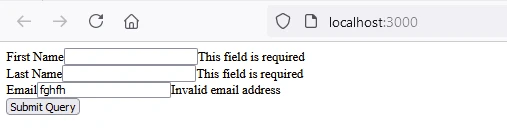
Erweiterte Nutzung
React Hook Form unterstützt anspruchsvollere Anwendungsfälle, wie die Integration mit Drittanbieter-UI-Bibliotheken und benutzerdefinierte Validierungen.
- Integration mit Material-UI:
import { TextField, Button } from '@material-ui/core';
import { useForm, Controller } from 'react-hook-form';

function MaterialUIForm() {
  const { control, handleSubmit } = useForm();

  // Function to handle form submission
  const onSubmit = (data) => {
    console.log(data);
  };

  return (
    <form onSubmit={handleSubmit(onSubmit)}>
      <Controller
        name="firstName"
        control={control}
        defaultValue=""
        // Using Material-UI's TextField as a controlled component
        render={({ field }) => <TextField {...field} label="First Name" />}
      />
      <Controller
        name="lastName"
        control={control}
        defaultValue=""
        render={({ field }) => <TextField {...field} label="Last Name" />}
      />
      <Button type="submit">Submit</Button>
    </form>
  );
}
import { TextField, Button } from '@material-ui/core';
import { useForm, Controller } from 'react-hook-form';
function MaterialUIForm() {
const { control, handleSubmit } = useForm();
// Function to handle form submission
const onSubmit = (data) => {
console.log(data);
};
return (
<form onSubmit={handleSubmit(onSubmit)}>
<Controller
name="firstName"
control={control}
defaultValue=""
// Using Material-UI's TextField as a controlled component
render={({ field }) => <TextField {...field} label="First Name" />}
/>
<Controller
name="lastName"
control={control}
defaultValue=""
render={({ field }) => <TextField {...field} label="Last Name" />}
/>
<Button type="submit">Submit</Button>
</form>
);
}Ausgabe
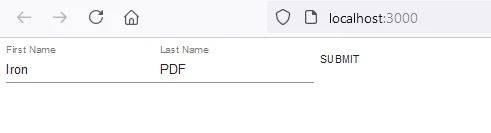
- Benutzerdefinierte Validierung:
function CustomValidationForm() {
  const { register, handleSubmit, formState: { errors } } = useForm();

  // Function to handle form submission
  const onSubmit = (data) => {
    console.log(data);
  };

  return (
    <form onSubmit={handleSubmit(onSubmit)}>
      <div>
        <label>Username</label>
        <input {...register("username", {
          required: "Username is required",
          validate: value => value !== "admin" || "Username cannot be 'admin'"
        })} />
        {errors.username && <span>{errors.username.message}</span>}
      </div>
      <button type="submit">Submit</button>
    </form>
  );
}
function CustomValidationForm() {
const { register, handleSubmit, formState: { errors } } = useForm();
// Function to handle form submission
const onSubmit = (data) => {
console.log(data);
};
return (
<form onSubmit={handleSubmit(onSubmit)}>
<div>
<label>Username</label>
<input {...register("username", {
required: "Username is required",
validate: value => value !== "admin" || "Username cannot be 'admin'"
})} />
{errors.username && <span>{errors.username.message}</span>}
</div>
<button type="submit">Submit</button>
</form>
);
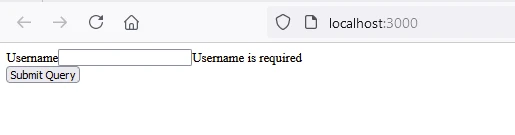
}Ausgabe
Einführung in IronPDF
IronPDF for Node.js ist eine beliebte PDF-Dokumentgenerierungsbibliothek zum Erstellen, Bearbeiten und Konvertieren von PDFs. Das IronPDF-Paket ist speziell für Node.js-Anwendungen konzipiert. Hier sind einige wichtige Funktionen und Details zum IronPDF NPM-Paket.
Hauptmerkmale
URL zu PDF-Konvertierung
Erstellen Sie PDF-Dokumente direkt von URLs, sodass Sie den Inhalt von Webseiten erfassen und als PDF-Dateien programmatisch speichern können.
HTML-zu-PDF-Konvertierung
Konvertieren Sie HTML-Inhalte mühelos in PDF-Dokumente. Dieses Feature ist besonders nützlich zur Erzeugung dynamischer PDFs aus Webinhalten.
PDF-Manipulation
Verschmelzen, teilen und manipulieren Sie vorhandene PDF-Dokumente mit Leichtigkeit. IronPDF bietet Funktionen wie das Anhängen von Seiten, das Splitten von Dokumenten und mehr.
PDF-Sicherheit
Sichern Sie Ihre PDF-Dokumente, indem Sie sie mit Passwörtern verschlüsseln oder digitale Signaturen anwenden. IronPDF bietet Optionen zum Schutz Ihrer sensiblen Dokumente vor unberechtigtem Zugriff.
Hohe Ausgabequalität
Erzeugen Sie hochwertige PDF-Dokumente mit präziser Wiedergabe von Text, Bildern und Formatierungen. IronPDF stellt sicher, dass Ihre generierten PDFs die Originalinhalte getreu wiedergeben.
Plattformübergreifende Kompatibilität
IronPDF ist mit verschiedenen Plattformen kompatibel, einschließlich Windows, Linux und macOS, was es für eine Vielzahl von Entwicklungsumgebungen geeignet macht.
Einfache Integration
Integrieren Sie IronPDF mühelos in Ihre Node.js-Anwendungen mithilfe seines npm-Pakets. Die API ist gut dokumentiert, was es einfach macht, PDF-Erzeugungsfunktionen in Ihre Projekte einzubauen.
Installation
Um das IronPDF NPM-Paket zu installieren, verwenden Sie den folgenden Befehl:
yarn add @ironsoftware/ironpdf @ironsoftware/ironpdf-engine-windows-x64yarn add @ironsoftware/ironpdf @ironsoftware/ironpdf-engine-windows-x64PDF-Dokument mit IronPDF erstellen und Prettier NPM-Paket verwenden
Abhängigkeiten installieren: Erstellen Sie zunächst ein neues Next.js-Projekt (falls Sie dies noch nicht getan haben) mit dem folgenden Befehl. Verweisen Sie auf die Next.js-Einrichtungsseite
npx create-next-app@latest reacthookform-pdf --use-npm --example "https://github.com/vercel/next-learn/tree/main/basics/learn-starter"npx create-next-app@latest reacthookform-pdf --use-npm --example "https://github.com/vercel/next-learn/tree/main/basics/learn-starter"Navigieren Sie als Nächstes in Ihr Projektverzeichnis:
cd reacthookform-pdfcd reacthookform-pdfInstallieren Sie die erforderlichen Pakete:
yarn add @ironsoftware/ironpdf @ironsoftware/ironpdf-engine-windows-x64
yarn add -D prettier
yarn add @ironsoftware/ironpdf @ironsoftware/ironpdf-engine-windows-x64
yarn add -D prettierErstellen eines PDFs
Nun erstellen wir ein einfaches Beispiel für die Erstellung eines PDFs mit IronPDF.
PDF-Generierungs-API: Der erste Schritt besteht darin, eine Backend-API zur Generierung des PDF-Dokuments zu erstellen. Da IronPDF nur serverseitig läuft, müssen wir eine API erstellen, die aufgerufen wird, wenn ein Benutzer ein PDF generieren möchte. Erstellen Sie eine Datei im Pfad pages/api/pdf.js und fügen Sie die folgenden Inhalte hinzu.
IronPDF benötigt einen Lizenzschlüssel, den Sie von der Lizenzseite erhalten und im unten stehenden Code platzieren können.
// pages/api/pdf.js
import { IronPdfGlobalConfig, PdfDocument } from "@ironsoftware/ironpdf";

// Apply your IronPDF license key
IronPdfGlobalConfig.getConfig().licenseKey = "your license";

export default async function handler(req, res) {
  try {
    const f = req.query.f;
    const l = req.query.l;
    const e = req.query.e;

    // Define HTML content for the PDF
    let content = "<h1>Demo React Hook Form and Generate PDF Using IronPDF</h1>";
    content += "<p>First Name: " + f + "</p>";
    content += "<p>Last Name: " + l + "</p>";
    content += "<p>Email: " + e + "</p>";

    // Generate PDF from HTML
    const pdf = await PdfDocument.fromHtml(content);
    const data = await pdf.saveAsBuffer();

    res.setHeader("Content-Type", "application/pdf");
    res.setHeader(
      "Content-Disposition",
      "attachment; filename=awesomeIron.pdf"
    );
    res.send(data);
  } catch (error) {
    console.error("Error generating PDF:", error);
    res.status(500).end();
  }
}
// pages/api/pdf.js
import { IronPdfGlobalConfig, PdfDocument } from "@ironsoftware/ironpdf";
// Apply your IronPDF license key
IronPdfGlobalConfig.getConfig().licenseKey = "your license";
export default async function handler(req, res) {
try {
const f = req.query.f;
const l = req.query.l;
const e = req.query.e;
// Define HTML content for the PDF
let content = "<h1>Demo React Hook Form and Generate PDF Using IronPDF</h1>";
content += "<p>First Name: " + f + "</p>";
content += "<p>Last Name: " + l + "</p>";
content += "<p>Email: " + e + "</p>";
// Generate PDF from HTML
const pdf = await PdfDocument.fromHtml(content);
const data = await pdf.saveAsBuffer();
res.setHeader("Content-Type", "application/pdf");
res.setHeader(
"Content-Disposition",
"attachment; filename=awesomeIron.pdf"
);
res.send(data);
} catch (error) {
console.error("Error generating PDF:", error);
res.status(500).end();
}
}Modifizieren Sie nun den index.js.
import Head from "next/head";
import styles from "../styles/Home.module.css";
import React from "react";
import { useForm } from "react-hook-form";

export default function Home() {
  const { register, handleSubmit, formState: { errors } } = useForm();

  // Handle form submission to generate PDF
  const onSubmit = (data) => {
    generatePdf(data);
  };

  // Function to generate PDF by calling the backend API
  const generatePdf = async (data) => {
    try {
      const response = await fetch(`/api/pdf-html?f=${data["firstName"]}&l=${data["lastName"]}&e=${data["email"]}`);
      const blob = await response.blob();
      const url = window.URL.createObjectURL(new Blob([blob]));
      const link = document.createElement("a");
      link.href = url;
      link.setAttribute("download", "awesomeIron.pdf");
      document.body.appendChild(link);
      link.click();
      link.parentNode.removeChild(link);
    } catch (error) {
      console.error("Error generating PDF:", error);
    }
  };

  return (
    <div className={styles.container}>
      <Head>
        <title>Generate PDF Using IronPDF</title>
        <link rel="icon" href="/favicon.ico" />
      </Head>
      <main>
        <h1>Demo React Hook Form and Generate PDF Using IronPDF</h1>
        <form onSubmit={handleSubmit(onSubmit)}>
          <div>
            <label>First Name</label>
            <input {...register("firstName", { required: true })} />
            {errors.firstName && <span>This field is required</span>}
          </div>
          <div>
            <label>Last Name</label>
            <input {...register("lastName", { required: true })} />
            {errors.lastName && <span>This field is required</span>}
          </div>
          <div>
            <label>Email</label>
            <input {...register("email", { required: true, pattern: /^[a-z0-9._%+-]+@[a-z0-9.-]+\.[a-z]{2,4}$/ })} />
            {errors.email && <span>Invalid email address</span>}
          </div>
          <button type="submit">Submit and Generate PDF</button>
        </form>
      </main>
      <style jsx>{`
        main {
          padding: 5rem 0;
          flex: 1;
          display: flex;
          flex-direction: column;
          justify-content: center;
          align-items: center;
        }
        footer {
          width: 100%;
          height: 100px;
          border-top: 1px solid #eaeaea;
          display: flex;
          justify-content: center;
          align-items: center;
        }
        footer img {
          margin-left: 0.5rem;
        }
        footer a {
          display: flex;
          justify-content: center;
          align-items: center;
          text-decoration: none;
          color: inherit;
        }
        code {
          background: #fafafa;
          border-radius: 5px;
          padding: 0.75rem;
          font-size: 1.1rem;
          font-family: Menlo, Monaco, Lucida Console, Liberation Mono,
            DejaVu Sans Mono, Bitstream Vera Sans Mono, Courier New, monospace;
        }
      `}</style>
      <style jsx global>{`
        html,
        body {
          padding: 0;
          margin: 0;
          font-family: -apple-system, BlinkMacSystemFont, Segoe UI, Roboto,
            Oxygen, Ubuntu, Cantarell, Fira Sans, Droid Sans, Helvetica Neue,
            sans-serif;
        }
        * {
          box-sizing: border-box;
        }
      `}</style>
    </div>
  );
}
import Head from "next/head";
import styles from "../styles/Home.module.css";
import React from "react";
import { useForm } from "react-hook-form";
export default function Home() {
const { register, handleSubmit, formState: { errors } } = useForm();
// Handle form submission to generate PDF
const onSubmit = (data) => {
generatePdf(data);
};
// Function to generate PDF by calling the backend API
const generatePdf = async (data) => {
try {
const response = await fetch(`/api/pdf-html?f=${data["firstName"]}&l=${data["lastName"]}&e=${data["email"]}`);
const blob = await response.blob();
const url = window.URL.createObjectURL(new Blob([blob]));
const link = document.createElement("a");
link.href = url;
link.setAttribute("download", "awesomeIron.pdf");
document.body.appendChild(link);
link.click();
link.parentNode.removeChild(link);
} catch (error) {
console.error("Error generating PDF:", error);
}
};
return (
<div className={styles.container}>
<Head>
<title>Generate PDF Using IronPDF</title>
<link rel="icon" href="/favicon.ico" />
</Head>
<main>
<h1>Demo React Hook Form and Generate PDF Using IronPDF</h1>
<form onSubmit={handleSubmit(onSubmit)}>
<div>
<label>First Name</label>
<input {...register("firstName", { required: true })} />
{errors.firstName && <span>This field is required</span>}
</div>
<div>
<label>Last Name</label>
<input {...register("lastName", { required: true })} />
{errors.lastName && <span>This field is required</span>}
</div>
<div>
<label>Email</label>
<input {...register("email", { required: true, pattern: /^[a-z0-9._%+-]+@[a-z0-9.-]+\.[a-z]{2,4}$/ })} />
{errors.email && <span>Invalid email address</span>}
</div>
<button type="submit">Submit and Generate PDF</button>
</form>
</main>
<style jsx>{`
main {
padding: 5rem 0;
flex: 1;
display: flex;
flex-direction: column;
justify-content: center;
align-items: center;
}
footer {
width: 100%;
height: 100px;
border-top: 1px solid #eaeaea;
display: flex;
justify-content: center;
align-items: center;
}
footer img {
margin-left: 0.5rem;
}
footer a {
display: flex;
justify-content: center;
align-items: center;
text-decoration: none;
color: inherit;
}
code {
background: #fafafa;
border-radius: 5px;
padding: 0.75rem;
font-size: 1.1rem;
font-family: Menlo, Monaco, Lucida Console, Liberation Mono,
DejaVu Sans Mono, Bitstream Vera Sans Mono, Courier New, monospace;
}
`}</style>
<style jsx global>{`
html,
body {
padding: 0;
margin: 0;
font-family: -apple-system, BlinkMacSystemFont, Segoe UI, Roboto,
Oxygen, Ubuntu, Cantarell, Fira Sans, Droid Sans, Helvetica Neue,
sans-serif;
}
* {
box-sizing: border-box;
}
`}</style>
</div>
);
}Code Erklärung
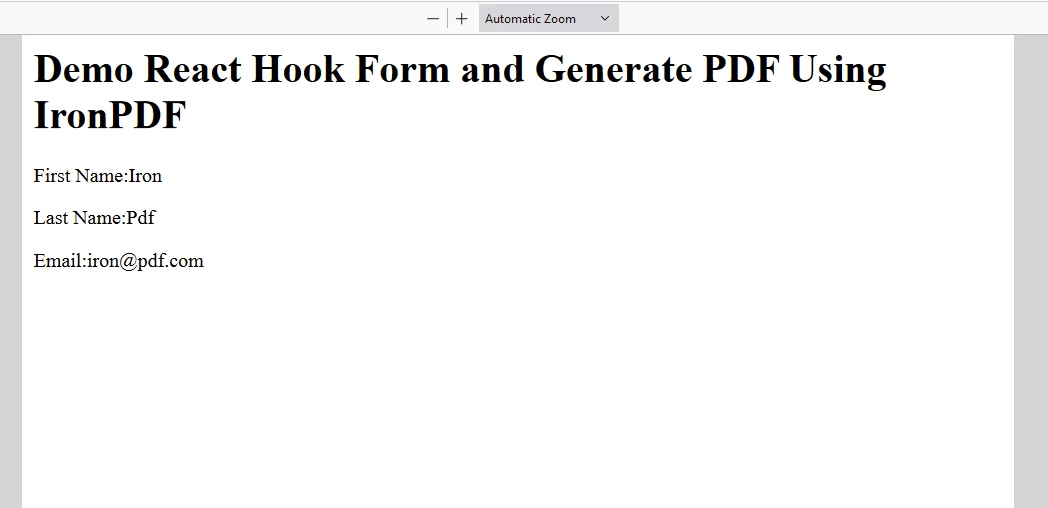
- Erstellen Sie eine React-Formularansicht, um Vorname, Nachname und E-Mail mit der React Hook Form-Bibliothek entgegenzunehmen.
- Erstellen Sie eine API, um die Benutzereingabe zu akzeptieren und das PDF mithilfe der IronPDF-Bibliothek zu generieren.
- In der
index.jsDatei, wenn der Benutzer auf die Schaltfläche "Absenden" klickt, ruft die Schaltfläche "PDF generieren" die Backend-API auf, um ein PDF zu generieren.
Ausgabe
IronPDF-Lizenz
Das IronPDF npm-Paket läuft mit einem Lizenzschlüssel für jeden Benutzer. IronPDF bietet eine kostenlose Testlizenz an, damit Benutzer die umfangreichen Funktionen vor dem Kauf ausprobieren können.
Platzieren Sie den Lizenzschlüssel hier, bevor Sie das IronPDF-Paket verwenden:
import { IronPdfGlobalConfig, PdfDocument } from "@ironsoftware/ironpdf";
// Apply your IronPDF license key
IronPdfGlobalConfig.getConfig().licenseKey = "Add Your key here";
import { IronPdfGlobalConfig, PdfDocument } from "@ironsoftware/ironpdf";
// Apply your IronPDF license key
IronPdfGlobalConfig.getConfig().licenseKey = "Add Your key here";Abschluss
React Hook Form ist eine vielseitige und effiziente Bibliothek zur Handhabung von Formularen in React. Seine Einfachheit, Leistung und Flexibilität machen es zu einer großartigen Wahl für sowohl einfache als auch komplexe Formulare. Egal, ob Sie ein kleines Projekt oder eine große Anwendung entwickeln, React Hook Form kann Ihnen helfen, Ihre Formulare einfach zu verwalten. IronPDF hebt sich als robuste Lösung for .NET-Entwickler hervor, die mit PDF-Dokumenten programmatisch arbeiten müssen. Mit seinem umfangreichen Funktionsumfang, einschließlich der Erstellung von PDFs aus verschiedenen Formaten, Manipulationsmöglichkeiten wie Zusammenführen und Bearbeiten, Sicherheitsoptionen, Formularerstellung und Formatkonvertierung, erleichtert IronPDF die Integration von PDF-Funktionalität in .NET-Anwendungen. Seine benutzerfreundliche API und Vielseitigkeit machen es zu einem wertvollen Werkzeug für die effiziente Verwaltung von PDF-Aufgaben innerhalb von Entwicklungsprojekten.








 Kostenlos loslegen
 Kostenlos loslegen
 Kostenlose Live-Demo buchen
















