



更新日 2026年4月21日
linkify-react(そのしくみ:開発者向けガイド)
Linkify React は、URL を含むプレインテキストの変換を自動化する軽量で使いやすい npm パッケージです。
詳しく読む

ビジネスプロセスモデルと表記法(BPMN)は、ワークフロー内でビジネスプロセスを指定するためのグラフィカル表現を提供するプロセスモデリングの標準です。 bpmn-jsは、BPMN要素図をWebアプリケーションに組み込み、インタラクティブな機能と豊富なカスタマイズオプションを提供する強力なライブラリです。 Camundaによって開発されたbpmn-jsは、現代のWebモデラーテクノロジーの上に構築されており、JavaScriptアプリケーションにシームレスに統合できます。 また、IronPDFを使用してBPMN図要素を持つPDFを作成する方法も見ていきます。
インタラクティブモデリング: bpmn-jsは、ユーザーにBPMN要素の作成、修正、および図をインタラクティブに表示する能力を与えます。 その使いやすいインターフェースはドラッグアンドドロップ機能をサポートしており、複雑なワークフローを簡単に設計できます。
カスタマイゼーション: このライブラリは非常にカスタマイズ可能であり、開発者がアプリケーションのブランドや要件に合わせてBPMN図の外観を調整できます。
拡張性: bpmn-jsは、拡張性を念頭に設計されています。 開発者は、BPMN図のインタラクションモデルにカスタム要素、プロパティ、および動作を追加することで、コア機能を拡張できます。
統合: AngularやReactなどの他のライブラリやフレームワークとよく統合され、さまざまなWebアプリケーションでの使用が容易です。
標準準拠: bpmn-jsはBPMN 2.0標準に準拠し、他のBPMNツールや編集ツールキットシステムと互換性のある図を作成できることを保証します。
bpmn-jsの使用を始めるには、基本的なWebプロジェクトをセットアップする必要があります。 ここでは、bpmn-jsを使用して簡単な図を作成するステップバイステップガイドです。
まず、新しいディレクトリを作成し、次のコマンドを使用してNode.jsプロジェクトを初期化します:
mkdir bpmn-js-demo
cd bpmn-js-demo
npm init -y次に、bpmn-jsライブラリをインストールします:
npm install bpmn-js次のソースコードを含むindex.htmlファイルを作成します:
<!DOCTYPE html>
<html lang="en">
<head>
  <meta charset="UTF-8">
  <meta name="viewport" content="width=device-width, initial-scale=1.0">
  <title>bpmn-js Demo</title>
  <style>
    #canvas {
      width: 100%;
      height: 600px;
      border: 1px solid #ccc;
    }
  </style>
</head>
<body>
  <div id="canvas"></div>
  <script src="app.js"></script>
</body>
</html>BPMN図を初期化してレンダリングするためのapp.jsファイルを作成します:
// Import the BpmnViewer class from bpmn-js
import BpmnViewer from 'bpmn-js/lib/NavigatedViewer';

// BPMN XML data as a string
const bpmnXML = `<?xml version="1.0" encoding="UTF-8"?>
<definitions xmlns="http://www.omg.org/spec/BPMN/20100524/MODEL"
             xmlns:xsi="http://www.w3.org/2001/XMLSchema-instance"
             xmlns:bpmndi="http://www.omg.org/spec/BPMN/20100524/DI"
             xmlns:omgdc="http://www.omg.org/spec/DD/20100524/DC"
             xmlns:omgdi="http://www.omg.org/spec/DD/20100524/DI"
             id="sample-diagram"
             targetNamespace="http://bpmn.io/schema/bpmn">
  <process id="Process_1" isExecutable="false">
    <startEvent id="StartEvent_1">
      <outgoing>Flow_1a5niwu</outgoing>
    </startEvent>
    <task id="Activity_0ncu32f" name="This is the Test Diagram">
      <incoming>Flow_1a5niwu</incoming>
    </task>
    <sequenceFlow id="Flow_1a5niwu" sourceRef="StartEvent_1" targetRef="Activity_0ncu32f" />
  </process>
  <bpmndi:BPMNDiagram id="BPMNDiagram_1">
    <bpmndi:BPMNPlane id="BPMNPlane_1" bpmnElement="Process_1">
      <bpmndi:BPMNShape id="StartEvent_1_di" bpmnElement="StartEvent_1">
        <omgdc:Bounds x="152" y="102" width="36" height="36" />
      </bpmndi:BPMNShape>
      <bpmndi:BPMNShape id="Activity_0ncu32f_di" bpmnElement="Activity_0ncu32f">
        <omgdc:Bounds x="240" y="80" width="100" height="80" />
        <bpmndi:BPMNLabel />
      </bpmndi:BPMNShape>
      <bpmndi:BPMNEdge id="Flow_1a5niwu_di" bpmnElement="Flow_1a5niwu">
        <omgdi:waypoint x="188" y="120" />
        <omgdi:waypoint x="240" y="120" />
      </bpmndi:BPMNEdge>
    </bpmndi:BPMNPlane>
  </bpmndi:BPMNDiagram>
</definitions>`;

// Initialize the viewer with the container where the BPMN diagram will be rendered
const viewer = new BpmnViewer({
  container: '#canvas'
});

// Import the BPMN XML and render the diagram
viewer.importXML(bpmnXML, function(err) {
  if (err) {
    console.error('Error rendering', err); // Log an error message if rendering fails
  } else {
    console.log('BPMN diagram rendered'); // Log success message if rendering is successful
  }
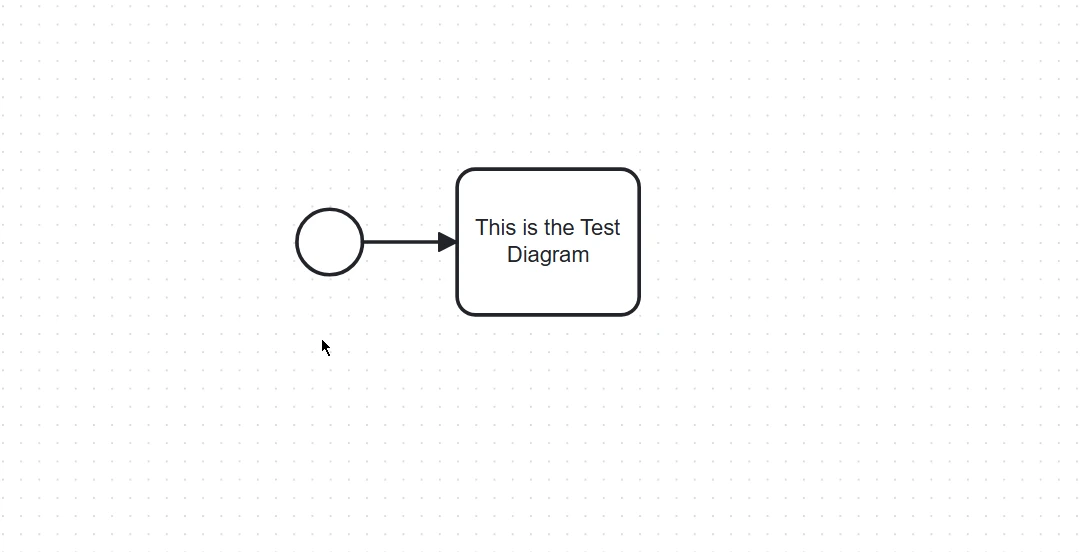
});
プロジェクトを提供するには、 http-server のような単純な静的サーバーを使用できます。
npm install -g http-server
http-server .ブラウザを開いて**http://localhost:8080**にアクセスし、ページ上にレンダリングされたBPMN図を確認します。
上記の例は基本をカバーしていますが、bpmn-jsはカスタム要素の追加、バックエンドシステムとの統合、および図のエクスポートなど、より高度な機能を提供します。 これらの機能はbpmn-jsのドキュメントで探索できます。
IronPDFは、開発者がPDFドキュメントを生成、操作、およびプログラムで変換できる強力なライブラリです。 元々は.NET向けに設計されたIronPDFは、JavaScriptをサポートするように拡張され、Webアプリケーション向けに強力なPDF生成機能を提供します。
PDF生成: HTML、URL、または生のコンテンツから簡単にPDFを作成します。
PDF操作: 既存のPDFドキュメントを結合、分割、および変更します。
変換: HTMLや画像などのさまざまなドキュメント形式をPDFに変換します。
カスタマイゼーション: スタイリングオプションを駆使してPDFの外観やレイアウトをカスタマイズします。
IronPDFとbpmn-jsの統合を示すために、BPMN図からPDFを生成するNode.jsプロジェクトを作成しましょう。
プロジェクト用に新しいディレクトリを作成し、それを初期化します:
mkdir bpmn-ironpdf-demo
cd bpmn-ironpdf-demo
npm init -yIronPDFをインストールします:
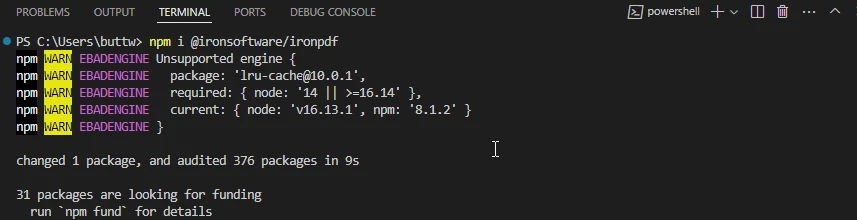
generatePDF.js という名前のファイルを作成します。
const fs = require('fs');
const { createCanvas } = require('canvas');
const BpmnViewer = require('bpmn-js/lib/Viewer');
const PdfGenerator = require('@ironsoftware/ironpdf');

// BPMN XML data
const bpmnXML = `<?xml version="1.0" encoding="UTF-8"?>
<definitions xmlns="http://www.omg.org/spec/BPMN/20100524/MODEL"
             xmlns:xsi="http://www.w3.org/2001/XMLSchema-instance"
             xmlns:bpmndi="http://www.omg.org/spec/BPMN/20100524/DI"
             xmlns:omgdc="http://www.omg.org/spec/DD/20100524/DC"
             xmlns:omgdi="http://www.omg.org/spec/DD/20100524/DI"
             xsi:schemaLocation="http://www.omg.org/spec/BPMN/20100524/MODEL BPMN20.xsd"
             id="sample-diagram"
             targetNamespace="http://bpmn.io/schema/bpmn">
  <process id="Process_1" isExecutable="false">
    <startEvent id="StartEvent_1"/>
  </process>
  <bpmndi:BPMNDiagram id="BPMNDiagram_1">
    <bpmndi:BPMNPlane id="BPMNPlane_1" bpmnElement="Process_1">
      <bpmndi:BPMNShape id="StartEvent_1_di" bpmnElement="StartEvent_1">
        <omgdc:Bounds x="173" y="102" width="36" height="36"/>
      </bpmndi:BPMNShape>
    </bpmndi:BPMNPlane>
  </bpmndi:BPMNDiagram>
</definitions>`;

// Create a canvas for rendering the BPMN diagram
const canvas = createCanvas(800, 600);
const viewer = new BpmnViewer({ container: canvas });

// Import the BPMN XML and render the diagram
viewer.importXML(bpmnXML, function(err) {
  if (err) {
    console.error('Error rendering BPMN diagram:', err);
    return;
  }

  // Fit the diagram to the viewport
  viewer.get('canvas').zoom('fit-viewport');

  // Create a PNG stream and save the diagram as an image
  const stream = canvas.createPNGStream();
  const out = fs.createWriteStream('diagram.png');

  stream.pipe(out);
  out.on('finish', () => {
    console.log('BPMN diagram saved as PNG');

    // Generate PDF from the saved PNG
    PdfGenerator.ImageToPdf(['diagram.png']).then((pdf) => {
      pdf.saveAs('diagram.pdf');
      console.log('PDF generated and saved as diagram.pdf');
    }).catch((error) => {
      console.error('Error generating PDF:', error);
    });
  });
});スクリプトを実行してBPMN図を生成し、PDFとして保存します:
node generatePDF.js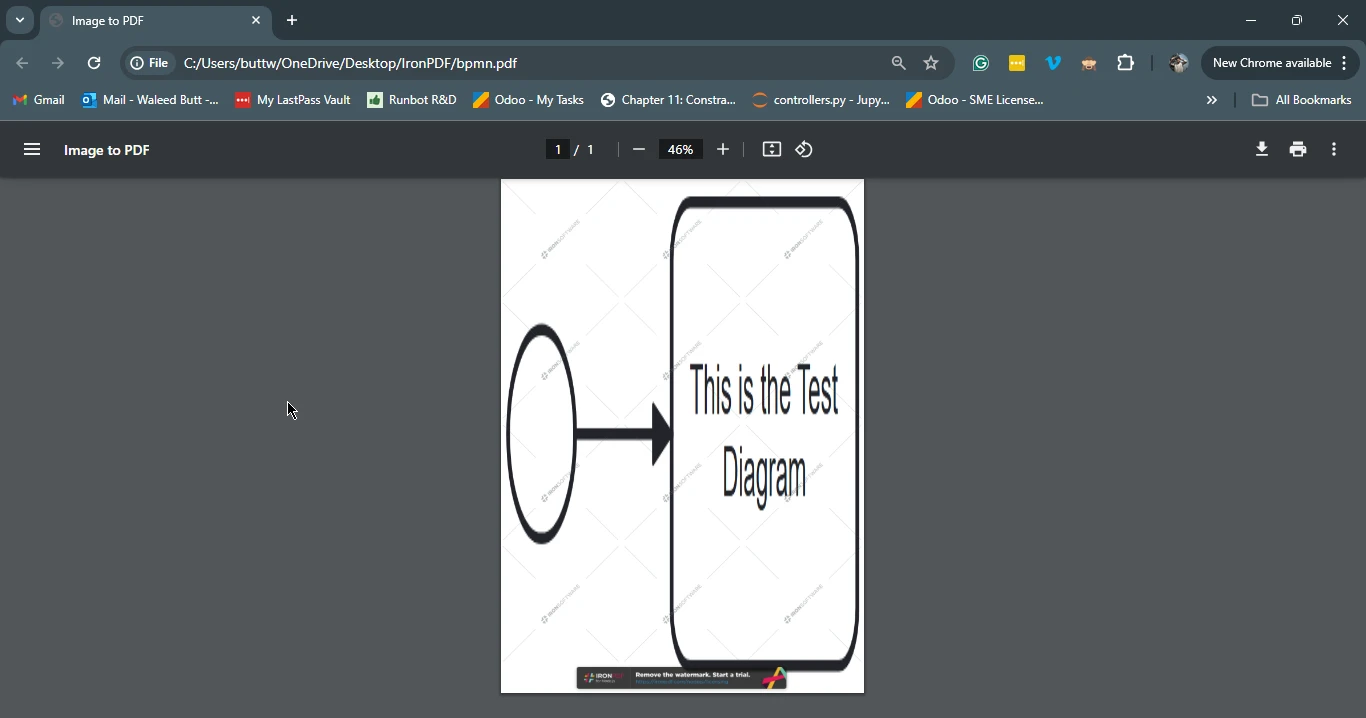
bpmn-jsとIronPDFを統合することで、インタラクティブなBPMN図を作成し、それらをPDFドキュメントに変換することができ、ビジュアルプロセスモデリングのパワーとPDF生成の柔軟性を組み合わせます。 この統合は、ドキュメント、レポート、またはプロセスのビジュアル表現が必要なその他の形式を生成するのに特に役立ちます。 両方のライブラリは、豊富なドキュメントとサポートを提供しており、開始および提供された基本的な例を拡張するのが簡単です。
IronPDFのライセンスに関する包括的な詳細については、IronPDFライセンスページを参照してください。 より多くの理解や追加のリソースを得るためには、HTMLからPDFへの変換に関する詳細なチュートリアルをチェックしてください。

Curtis Chauは、カールトン大学でコンピュータサイエンスの学士号を取得し、Node.js、TypeScript、JavaScript、およびReactに精通したフロントエンド開発を専門としています。直感的で美しいユーザーインターフェースを作成することに情熱を持ち、Curtisは現代のフレームワークを用いた開発や、構造の良い視覚的に魅力的なマニュアルの作成を楽しんでいます。


IronPDF はIRONSUITEの一部です
オフィス文書向けの.NET API製品10個

PDFがHTMLのように見える必要があるとき、迅速に。











