



更新日 2026年4月21日
next-auth NPM (開発者向けのしくみ)
NextAuth.js は Next.js アプリケーション用のオープンソース認証ライブラリで、ウェブアプリケーションに柔軟かつ安全な認証を実装する方法を提供します。
詳しく読む

ウェブ開発の広い世界では、テキスト内にクリッカブルなリンクやアンカータグを作成することは基本的な作業です。 ブログ、ソーシャルメディアプラットフォーム、またはメールクライアントを構築しているかどうかに関わらず、URL、メールアドレス、その他のテキストを自動的に検出してクリック可能なリンクに変換する能力は、シームレスなユーザー体験を提供するために重要です。 Linkify Reactの登場 – このプロセスをReactアプリケーションで合理化するために設計された強力なnpmパッケージです。 この記事では、Reactプロジェクトでのリンク作成を簡略化するためにLinkifyを使用する方法を、使用例を交えて紹介します。
さらに、IronPDFという、ウェブページから高品質のPDFドキュメントを生成できる多用途なライブラリを紹介します。 LinkifyとともにIronPDFを使用することで、Linkifyによって識別され変換されたクリッカブルなリンクを保持するPDFを簡単に作成でき、ドキュメントがウェブコンテンツと同じインタラクティビティを維持できることをお見せします。
Linkify Reactは、子ストリング内のURL、メールアドレス、他の検出されたリンクを含むプレーンテキストをクリック可能なハイパーリンクとしてネストされた要素に自動変換する軽量で使いやすいnpmパッケージです。 手動でのリンク解析やフォーマットの必要性を排除し、開発者の貴重な時間と労力を節約します。 LinkifyをReactアプリケーションに統合する方法を見ていきましょう。
React Linkifyを始めるには、まずプロジェクトの依存関係としてインストールする必要があります。 npmまたはyarnを使用してこれを行うことができます。 ターミナルを開き、次のコマンドを実行してください。
npm install react-linkify
# or
yarn add react-linkifyReact Linkifyがインストールされたら、簡単にReactコンポーネントに統合できます。 React Linkifyを使用してテキストコンテンツ内にクリック可能なリンクをレンダリングする方法を示す簡単な例です。
import React from 'react';
import Linkify from 'react-linkify';

// A React component to display clickable links
const MyComponent = () => {
  return (
    <div>
      <h1>Clickable Links with React Linkify</h1>
      <Linkify>
        <p>
          Check out this cool website: https://example.com
          <br />
          You can also reach me at hello@example.com
        </p>
      </Linkify>
    </div>
  );
};

export default MyComponent;この例では、react-linkify パッケージからLinkifyコンポーネントをインポートし、テキストコンテンツをその中にラップします。 React Linkifyはテキスト内のURLやメールアドレスを自動的に検出し、それらをクリック可能なハイパーリンクに変換します。
Linkifyは生成されたリンクの動作と外観をカスタマイズするための様々なプロップ、属性、オプションを提供しています。 たとえば、リンクの開き方を制御するためにtarget属性を指定できます。 React Linkifyの動作をカスタマイズする方法はこちらです。
<Linkify properties={{target: '_blank'}}>
  <p>
    Clickable links will open in a new tab: https://example.com
  </p>
</Linkify>IronPDFは、Node.jsアプリケーション内でPDF生成を促進するために設計された強力なnpmパッケージです。 HTMLコンテンツ、URL、または既存のPDFファイルからPDFドキュメントを作成できます。 請求書、レポート、またはその他のドキュメントを生成する際には、直感的なAPIと堅固な機能セットを備えたIronPDFによりプロセスが簡略化されます。

HTML要素を簡単にPDFドキュメントに変換します。 この機能は、動的なPDFをウェブコンテンツから生成するのに特に便利です。
URLから直接PDFを生成します。 これにより、ウェブページの内容をキャプチャし、プログラムでPDFファイルとして保存できます。
既存のPDFドキュメントを簡単にマージ、分割、および操作します。 IronPDFはPDFファイルを操作するための機能を提供し、ページを追加したり、文書を分割したり、その他のことが可能です。
パスワードで暗号化したりデジタル署名を適用したりしてPDFドキュメントを保護します。 IronPDFは、機密文書の不正アクセスから保護するためのオプションを提供します。
テキスト、画像、およびフォーマットの正確なレンダリングを備えた高品質のPDFドキュメントを作成します。 IronPDFは、生成されたPDFが元のコンテンツの忠実度を保つことを保証します。
IronPDFは、Windows、Linux、macOSを含む様々なプラットフォームと互換性があり、幅広い開発環境に適しています。
npmパッケージを使用してNode.jsアプリケーションにIronPDFを簡単に統合します。 APIは十分に文書化されており、プロジェクトにPDF生成機能を組み込むのが簡単です。
IronPDFを使用して、ウェブアプリケーション、サーバーサイドスクリプト、またはコマンドラインツールを構築する際に、専門的な品質のPDFドキュメントを効率的かつ信頼性の高い方法で作成できるようになります。
まず、(まだしていない場合)次のコマンドを使用して新しいNext.jsプロジェクトを作成してください。
npx create-next-app@latest linkify-ironpdf --use-npm --example "https://github.com/vercel/next-learn/tree/main/basics/learn-starter"次に、プロジェクトディレクトリに移動します。
cd linkify-ironpdf必要なパッケージをインストールします。
yarn add @ironsoftware/ironpdf @ironsoftware/ironpdf-engine-windows-x64
yarn add react-linkifyでは、IronPDFを使用してPDFを生成する簡単な例を作成しましょう。 Next.jsコンポーネント(例:pages/index.tsx)で次のコードを追加します。
**PDF 生成 API:**最初のステップは、PDF ドキュメントを生成するためのバックエンド API を作成することです。 IronPDFはサーバー側でのみ実行されるため、ユーザーがPDFを生成したいときに呼び出すAPIを作成する必要があります。 パスpages/api/pdf.jsにファイルを作成し、以下の内容を追加します。
IronPDFはライセンスキーも必要です。ライセンスページで入手し、以下のコードに配置してください。
// pages/api/pdf.js

import { IronPdfGlobalConfig, PdfDocument } from "@ironsoftware/ironpdf";

// Apply your IronPDF license key
IronPdfGlobalConfig.getConfig().licenseKey = "Your license key goes here";

export default async function handler(req, res) {
  try {
    const url = req.query.url;
    const pdf = await PdfDocument.fromUrl(url);
    const data = await pdf.saveAsBuffer();
    console.error('data PDF:', data);
    res.setHeader('Content-Type', 'application/pdf');
    res.setHeader('Content-Disposition', 'attachment; filename=awesomeIron.pdf');
    res.send(data);
  } catch (error) {
    console.error('Error generating PDF:', error);
    res.status(500).end();
  }
}以下は、ユーザーのためにPDF生成ページをセットアップするindex.jsコードです:
import Head from "next/head";
import styles from "../styles/Home.module.css";
import React, { useState } from "react";
import Linkify from 'react-linkify';

// Home component for link conversion and PDF generation
export default function Home() {
  const [text, setText] = useState("");

  // Function to generate PDF from entered URL
  const generatePdf = async () => {
    try {
      const response = await fetch("/api/pdf?url=" + text);
      const blob = await response.blob();
      const url = window.URL.createObjectURL(new Blob([blob]));
      const link = document.createElement("a");
      link.href = url;
      link.setAttribute("download", "awesomeIron.pdf");
      document.body.appendChild(link);
      link.click();
      link.parentNode.removeChild(link);
    } catch (error) {
      console.error("Error generating PDF:", error);
    }
  };

  // Handle changes in the input text field
  const handleChange = (event) => {
    setText(event.target.value);
  };

  return (
    <div className={styles.container}>
      <Head>
        <title>Generate PDF Using IronPDF</title>
        <link rel="icon" href="/favicon.ico" />
      </Head>
      <main>
        <h1>Demo Linkify and Generate PDF Using IronPDF</h1>
        <p>
          <span>Enter URL to Linkify and Convert to PDF:</span>{" "}
        </p>
        <input type="text" value={text} onChange={handleChange} />
        <Linkify properties={{target: '_blank'}}>
          <p>
            Clickable links from input text: {text}
          </p>
        </Linkify>
        <button style={{margin: 20, padding: 5}} onClick={generatePdf}>
          Generate PDF From Link
        </button>
      </main>
      <style jsx>{`
        main {
          padding: 5rem 0;
          flex: 1;
          display: flex;
          flex-direction: column;
          justify-content: center;
          align-items: center;
        }
        footer {
          width: 100%;
          height: 100px;
          border-top: 1px solid #eaeaea;
          display: flex;
          justify-content: center;
          align-items: center;
        }
        footer img {
          margin-left: 0.5rem;
        }
        footer a {
          display: flex;
          justify-content: center;
          align-items: center;
          text-decoration: none;
          color: inherit;
        }
        code {
          background: #fafafa;
          border-radius: 5px;
          padding: 0.75rem;
          font-size: 1.1rem;
          font-family:
            Menlo,
            Monaco,
            Lucida Console,
            Liberation Mono,
            DejaVu Sans Mono,
            Bitstream Vera Sans Mono,
            Courier New,
            monospace;
        }
      `}</style>
      <style jsx global>{`
        html,
        body {
          padding: 0;
          margin: 0;
          font-family:
            -apple-system,
            BlinkMacSystemFont,
            Segoe UI,
            Roboto,
            Oxygen,
            Ubuntu,
            Cantarell,
            Fira Sans,
            Droid Sans,
            Helvetica Neue,
            sans-serif;
        }
        * {
          box-sizing: border-box;
        }
      `}</style>
    </div>
  );
}Linkify統合:
Linkifyコンポーネント。PDF生成:
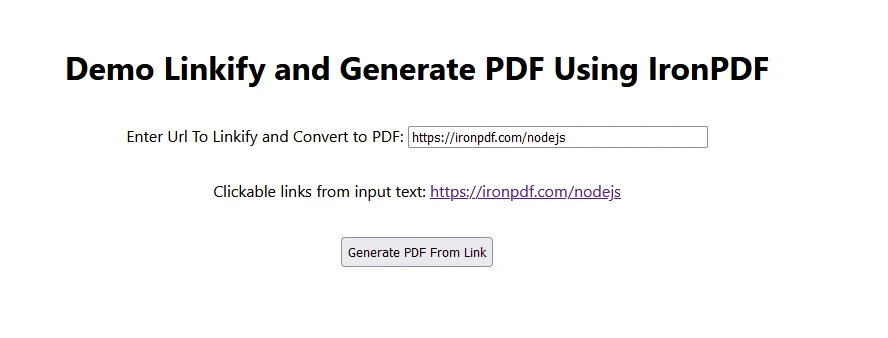
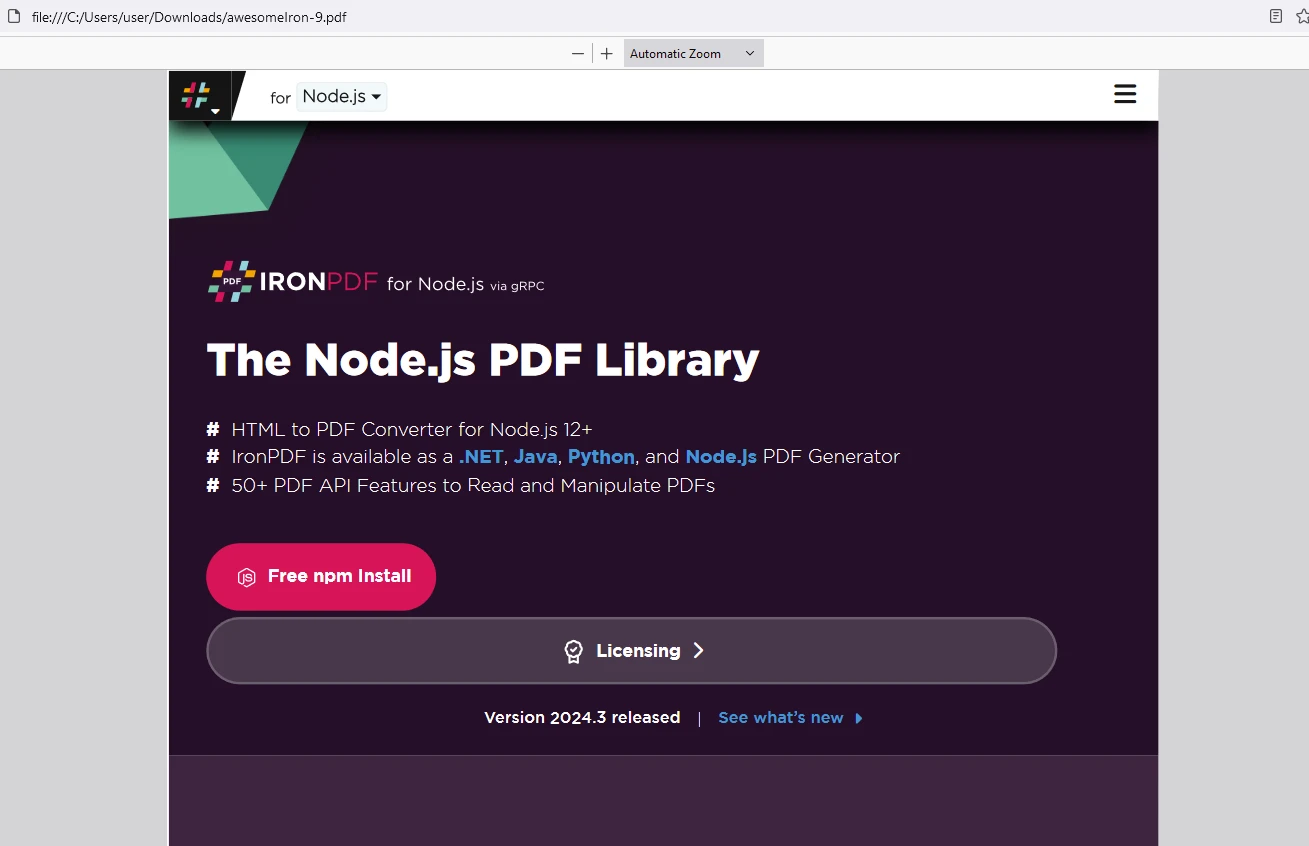
ライセンスキーをここに配置してください:
import { IronPdfGlobalConfig, PdfDocument } from "@ironsoftware/ironpdf";

// Apply your IronPDF license key
IronPdfGlobalConfig.getConfig().licenseKey = "Add Your license key here";React Linkifyは、Reactアプリケーションでテキストコンテンツ内にクリック可能なリンクを作成するプロセスを簡単にします。 URL、メールアドレス、その他のリンクをクリック可能なハイパーリンクに自動的に検出して変換することで、Linkifyは開発ワークフローを合理化し、ユーザー体験を向上させます。 簡単な統合、カスタマイズオプション、および堅牢な機能を備えたReact Linkifyは、エンゲージメントの高いユーザーインターフェースを作成しようとするReact開発者にとって貴重なツールです。
それに加えて、IronPDFは、包括的なPDF生成、操作、および編集機能をアプリケーションに統合しようとする開発者向けに特化された堅牢なNode.jsライブラリであることが証明されています。 さまざまな形式をPDFに変換し、既存のPDFドキュメントを編集し、PDFのセキュリティを管理するサポートを持つIronPDFは、Node.js環境内でプログラム的にPDFファイルを作成およびカスタマイズするための多用途キットを提供します。 その機能は単純なドキュメント生成から複雑なドキュメント管理作業にまで対応し、PDFを扱うNode.js開発者にとって価値のあるツールとなっています。

Curtis Chauは、カールトン大学でコンピュータサイエンスの学士号を取得し、Node.js、TypeScript、JavaScript、およびReactに精通したフロントエンド開発を専門としています。直感的で美しいユーザーインターフェースを作成することに情熱を持ち、Curtisは現代のフレームワークを用いた開発や、構造の良い視覚的に魅力的なマニュアルの作成を楽しんでいます。

IronPDF はIRONSUITEの一部です
オフィス文書向けの.NET API製品10個

PDFがHTMLのように見える必要があるとき、迅速に。











