푸터 콘텐츠로 바로가기
제품 비교

Java용 IronPDF와 BFO Java PDF 라이브러리 비교

When it comes to working with PDF documents in Java, developers often seek reliable and efficient libraries to simplify their tasks. BFO Java and IronPDF for Java are two popular options that provide features for creating, manipulating, and managing PDF files. In this article, we will delve into a comprehensive comparison of these two libraries, exploring their key features, ease of use, performance, and community support to help you make an informed decision.

Overview of BFO Java

BFO Java, or Big Faceless Organization Java (BFO Java), is a highly regarded Java library for PDF document generation and manipulation. With its extensive feature set and robust functionality, BFO Java has established itself as a reliable tool for developers working with PDF files. It offers features such as PDF generation, form filling, digital signatures, encryption, and text extraction. Developers can programmatically create professional-looking PDF documents, customize page formatting, and easily manipulate existing PDFs by adding or removing pages, merging documents, and adding annotations or form fields. BFO Java's intuitive API, comprehensive documentation, and strong community support make it a popular choice among developers, providing them with the necessary tools to efficiently handle PDF documents and incorporate advanced features.

Overview of IronPDF

IronPDF for Java is a powerful and user-friendly Java library specifically designed for working with PDF files. Its standout feature is its exceptional HTML to PDF conversion capabilities, making it an ideal choice for web-based applications that require converting HTML content into PDF documents while preserving the layout, styles, and interactivity of the original web page. Developers can easily generate PDF documents programmatically, customize page formatting, and manipulate existing PDFs by adding or removing pages, merging documents, and adding annotations or form fields. With an intuitive API, comprehensive documentation, and dedicated support channels, IronPDF provides developers with the necessary tools to efficiently handle PDF-related tasks and seamlessly integrate PDF generation, manipulation, and HTML to PDF conversion functionalities into their Java projects.

Features Comparison

When comparing the features of IronPDF for Java and BFO Java, both libraries offer a range of functionalities for PDF document handling. Let's explore the key features and highlight the differences.

PDF Document Generation

Both IronPDF and BFO Java provide capabilities for generating PDF documents programmatically. Developers can create PDF files, customize page formatting, and add text, images, and other elements. BFO Java has a long-standing reputation for its comprehensive PDF generation features, while IronPDF offers a more streamlined approach with a focus on HTML to PDF conversion.

HTML to PDF Conversion

When comparing the HTML to PDF Conversion functionality of IronPDF for Java and BFO Java, IronPDF stands out as a superior choice. IronPDF offers robust HTML parsing capabilities, allowing it to handle complex HTML structures effectively. It provides full support for CSS styling, ensuring that the PDF output retains the original look and feel of the HTML content. IronPDF excels in maintaining the layout and formatting of the HTML, including tables, images, hyperlinks, and form fields. The library offers extensive customization options, allowing developers to tailor the PDF output to their specific requirements. It also supports modern HTML and CSS standards, ensuring compatibility with a wide range of HTML content. In contrast, BFO Java may have limitations in handling complex HTML structures and advanced customization options. Overall, IronPDF provides a more comprehensive and feature-rich HTML to PDF functionality, making it a preferred choice for developers who require precise rendering of HTML content into PDF format.

PDF Manipulation

Both libraries offer capabilities for altering existing PDF documents. Developers have the ability to insert or delete pages, combine multiple PDFs, extract particular content, and include annotations or form fields. BFO Java presents an extensive range of PDF manipulation functionalities, whereas IronPDF provides a more simplified and user-friendly API specifically tailored for PDF manipulation duties.

Merge PDFs

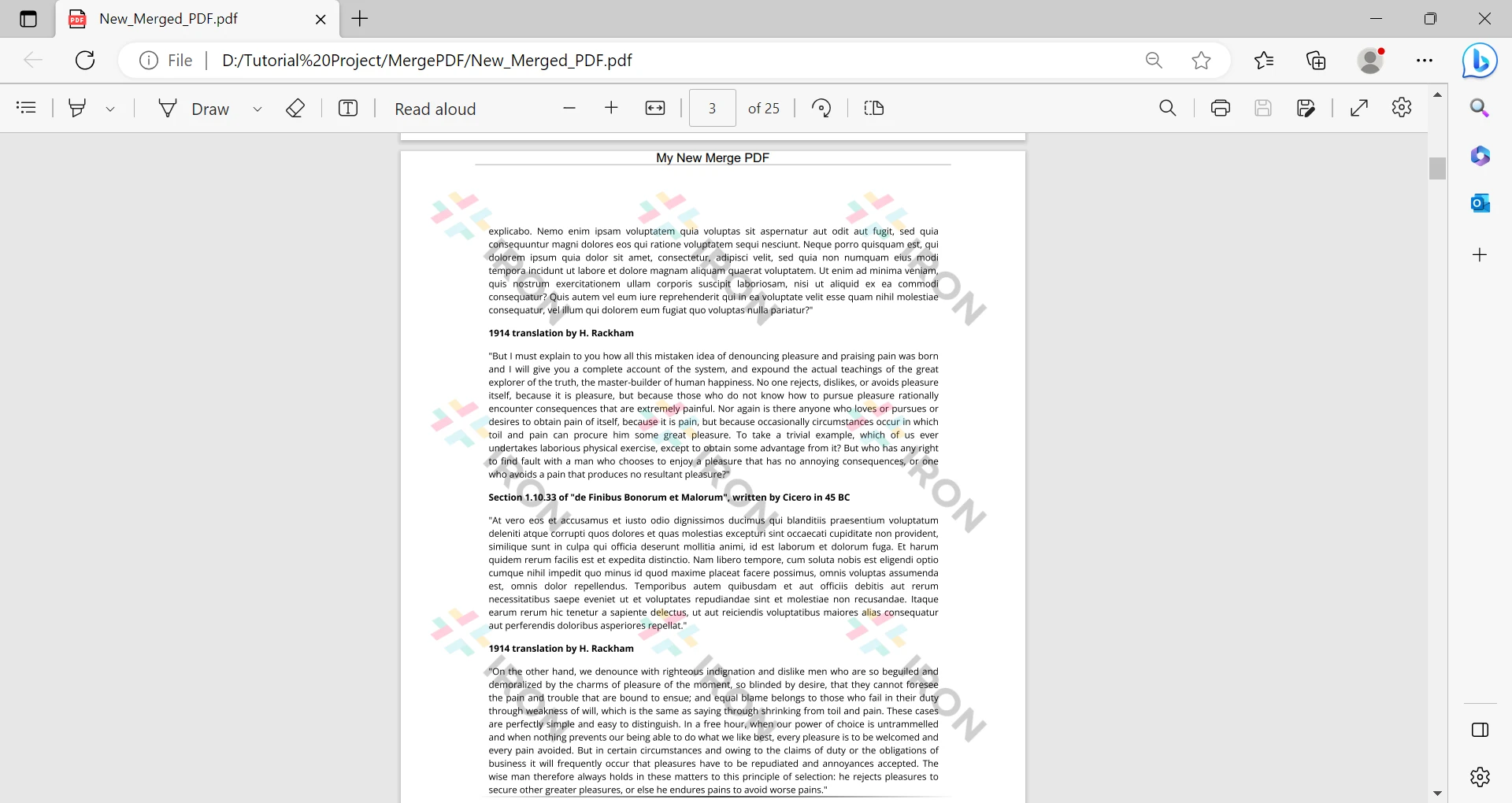
When it comes to combining PDF documents, IronPDF for Java excels with its intuitive and efficient approach. Developers can effortlessly merge multiple PDF files, specifying the order and placement of pages. IronPDF goes beyond by supporting the merging of PDFs with different formats, ensuring compatibility and flexibility. Notably, it handles large PDF files with optimized performance, maintaining the integrity and quality of the content. In contrast, BFO Java also offers PDF merging capabilities; however, it involves a more manual and intricate process. Developers must manually extract and assemble pages, which can be time-consuming, especially for complex or extensive PDF files. Overall, IronPDF's simplicity, flexibility, and efficient performance make it the preferred choice for seamlessly merging PDF documents within Java applications. It provides a hassle-free solution for developers seeking an effective PDF merging solution.

A Comparison Between IronPDF For Java & BFO Java PDF Library: Figure 1

Extract Text

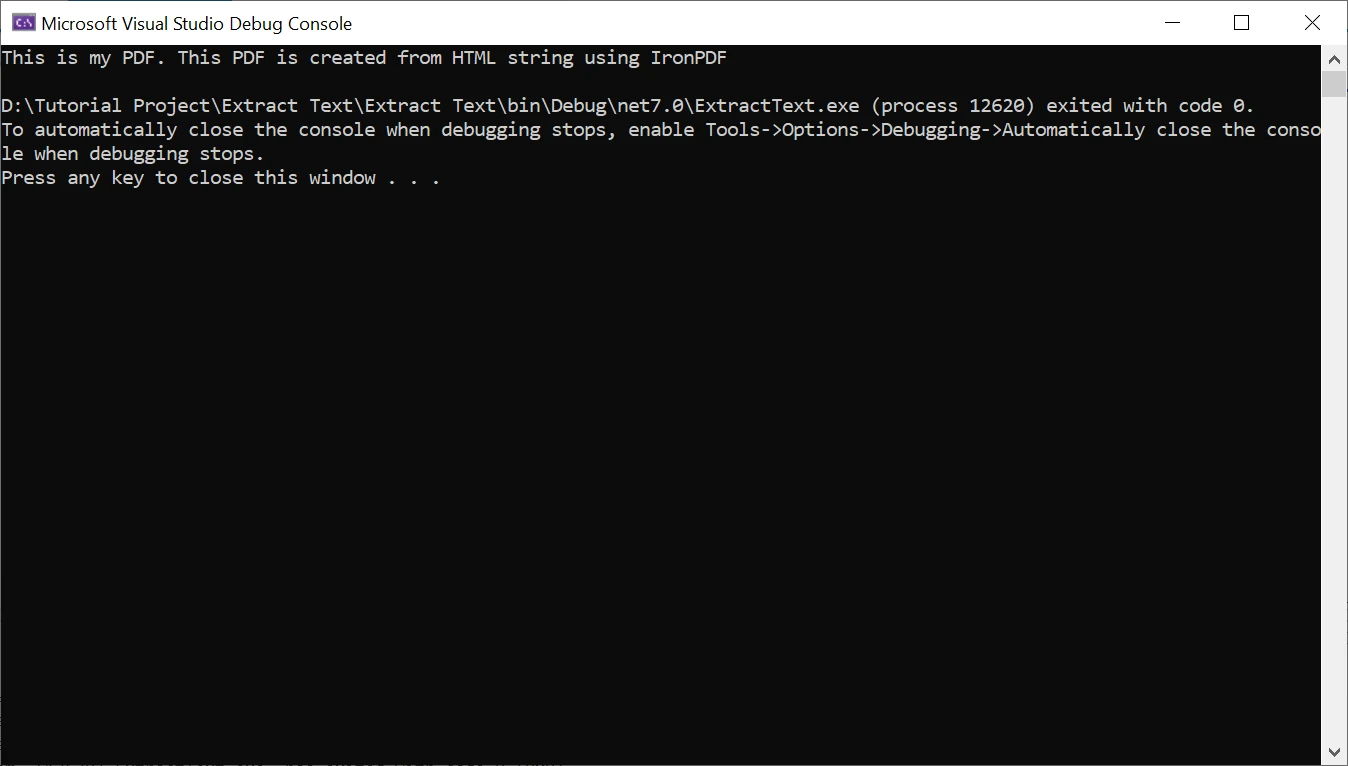
When comparing the text extraction feature, IronPDF for Java offers a more user-friendly and efficient solution. With its convenient API, developers can easily extract text from PDF files while preserving formatting, layout, and Unicode characters. IronPDF ensures accurate extraction, making the extracted text suitable for further processing or analysis. On the other hand, BFO Java also supports text extraction but may require more manual intervention and lack the streamlined functionality of IronPDF. In terms of performance, IronPDF is designed for optimized and fast text extraction, even from large PDF documents. Overall, IronPDF provides a superior text extraction experience with its intuitive API, accurate results, and efficient processing, making it the preferred choice for developers who need reliable text extraction from PDF files in Java applications.

A Comparison Between IronPDF For Java & BFO Java PDF Library: Figure 2

Form Completion

BFO Java and IronPDF for Java both support form completion capabilities, enabling developers to programmatically populate PDF forms with data. This feature is useful for generating dynamic documents such as invoices or reports that require the insertion of variable content.

Digital Signatures

BFO Java and IronPDF for Java support digital signatures, allowing developers to add electronic signatures to PDF documents for authentication and integrity. This feature ensures the security and authenticity of the PDF files.

Licensing and Cost

BFO Java and IronPDF have different licensing models and associated costs. Let's explore the licensing and cost details of both libraries and how IronPDF offers certain advantages in terms of licensing.

IronPDF

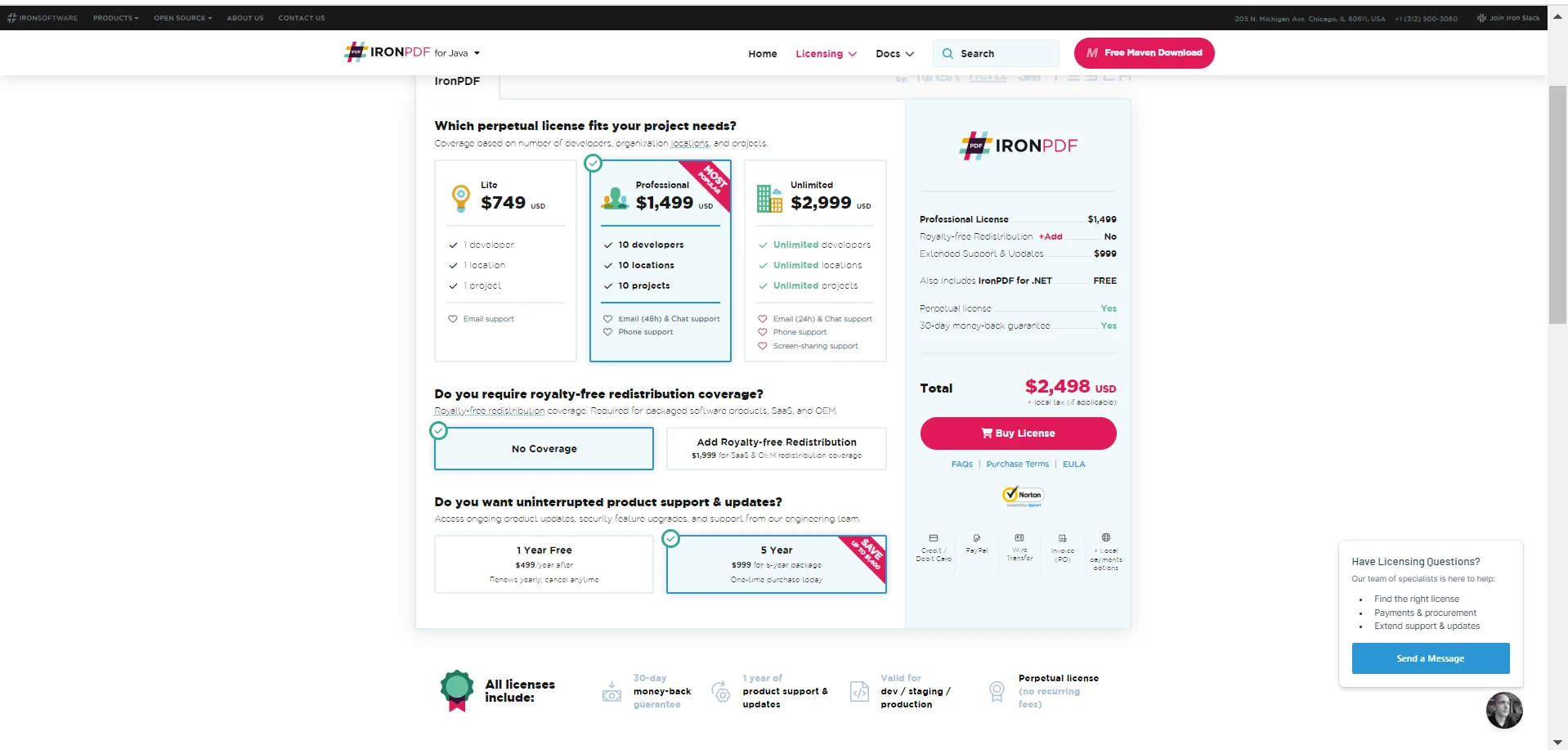
IronPDF is free for development and does not require any licensing in the development environment. However, licensing is required for the production environment. IronPDF follows a commercial licensing model with a free trial. The licensing and cost structure of IronPDF is based on different pricing plans that cater to various usage scenarios and requirements. Developers can choose the plan that aligns with their needs and pay the associated cost. The commercial license of IronPDF provides access to the full range of features and capabilities offered by the library, along with dedicated support channels. This licensing approach offers more flexibility and transparency in terms of understanding the costs upfront and selecting the appropriate plan based on the project's requirements.

A Comparison Between IronPDF For Java & BFO Java PDF Library: Figure 3

BFO Java

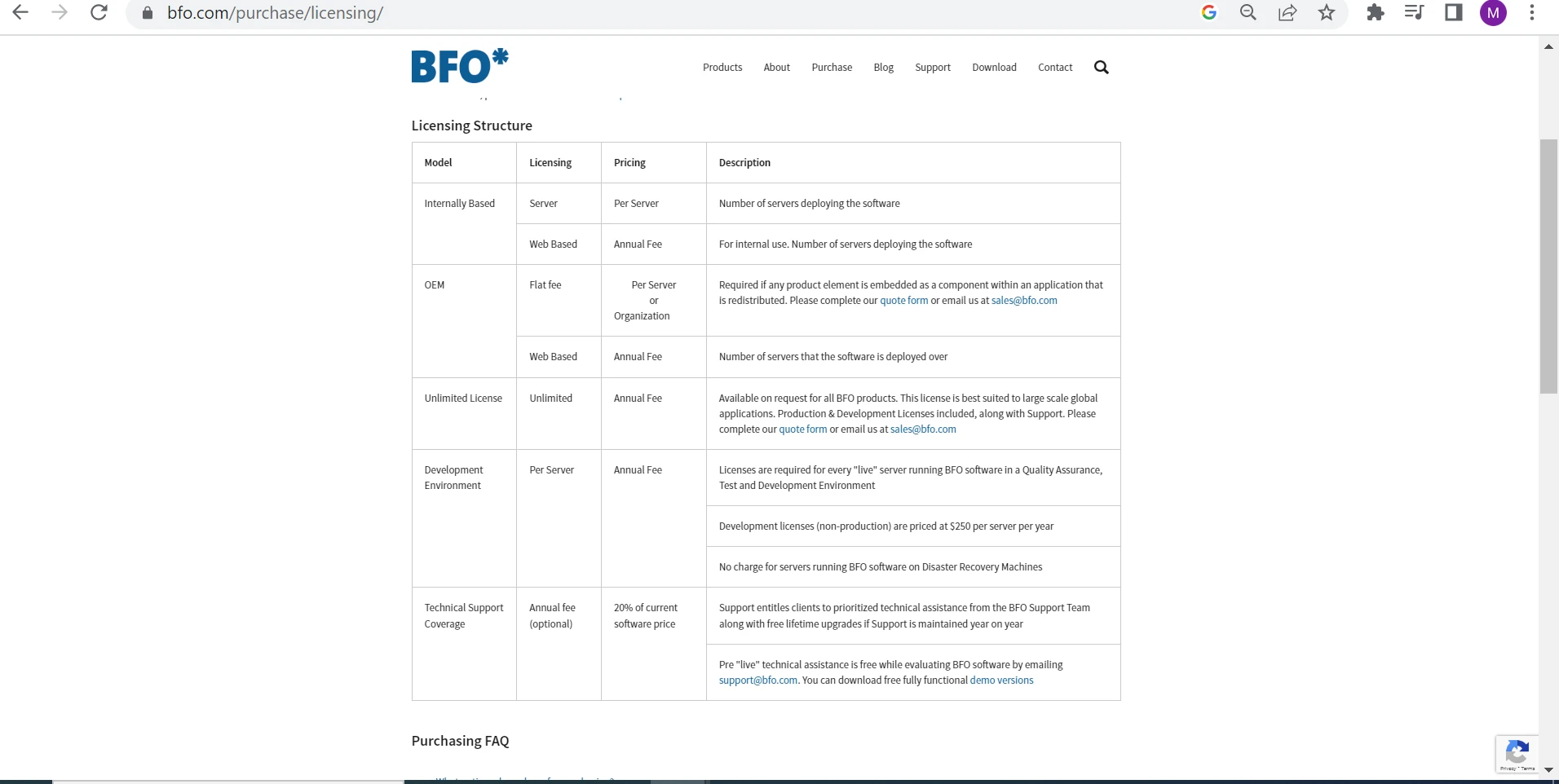
BFO Java offers various licensing options for their software, including internally based (server) pricing per server, web-based licensing with an annual fee based on the number of deployed servers, OEM licensing with a flat fee for embedding components, an unlimited license suited for large-scale applications, development environment licensing for "live" servers in development and testing, and optional technical support coverage with an annual fee of 20% of the software price.

A Comparison Between IronPDF For Java & BFO Java PDF Library: Figure 4

Code Examples

Let's write code for generating PDF documents using both libraries.

Generate a PDF File using the IronPDF Library

First, we need to add a dependency in our pom.xml file.

  1. Open your project's pom.xml file.
  2. Locate the <dependencies> section.
  3. Add the following <dependency> code snippet inside the <dependencies> section:
<dependency>
    <groupId>com.ironsoftware</groupId>
    <artifactId>ironpdf</artifactId>
    <version>your_version_here</version>
</dependency>
<dependency>
    <groupId>com.ironsoftware</groupId>
    <artifactId>ironpdf</artifactId>
    <version>your_version_here</version>
</dependency>
XML

Save the pom.xml file.

Add the following import in your Java source file:

import com.ironsoftware.ironpdf.*;
JAVA

Next, add the following code in the same source file:

public class PDFCreator {
    public static void main(String[] args) {
        // Create a new PDF document from HTML content
        PdfDocument pdf = PdfDocument.renderHtmlAsPdf("<h1>Sample PDF Document by IronPDF</h1>");

        // Save the PDF document to a file
        pdf.saveAs("myPDF.pdf");
    }
}
public class PDFCreator {
    public static void main(String[] args) {
        // Create a new PDF document from HTML content
        PdfDocument pdf = PdfDocument.renderHtmlAsPdf("<h1>Sample PDF Document by IronPDF</h1>");

        // Save the PDF document to a file
        pdf.saveAs("myPDF.pdf");
    }
}
JAVA

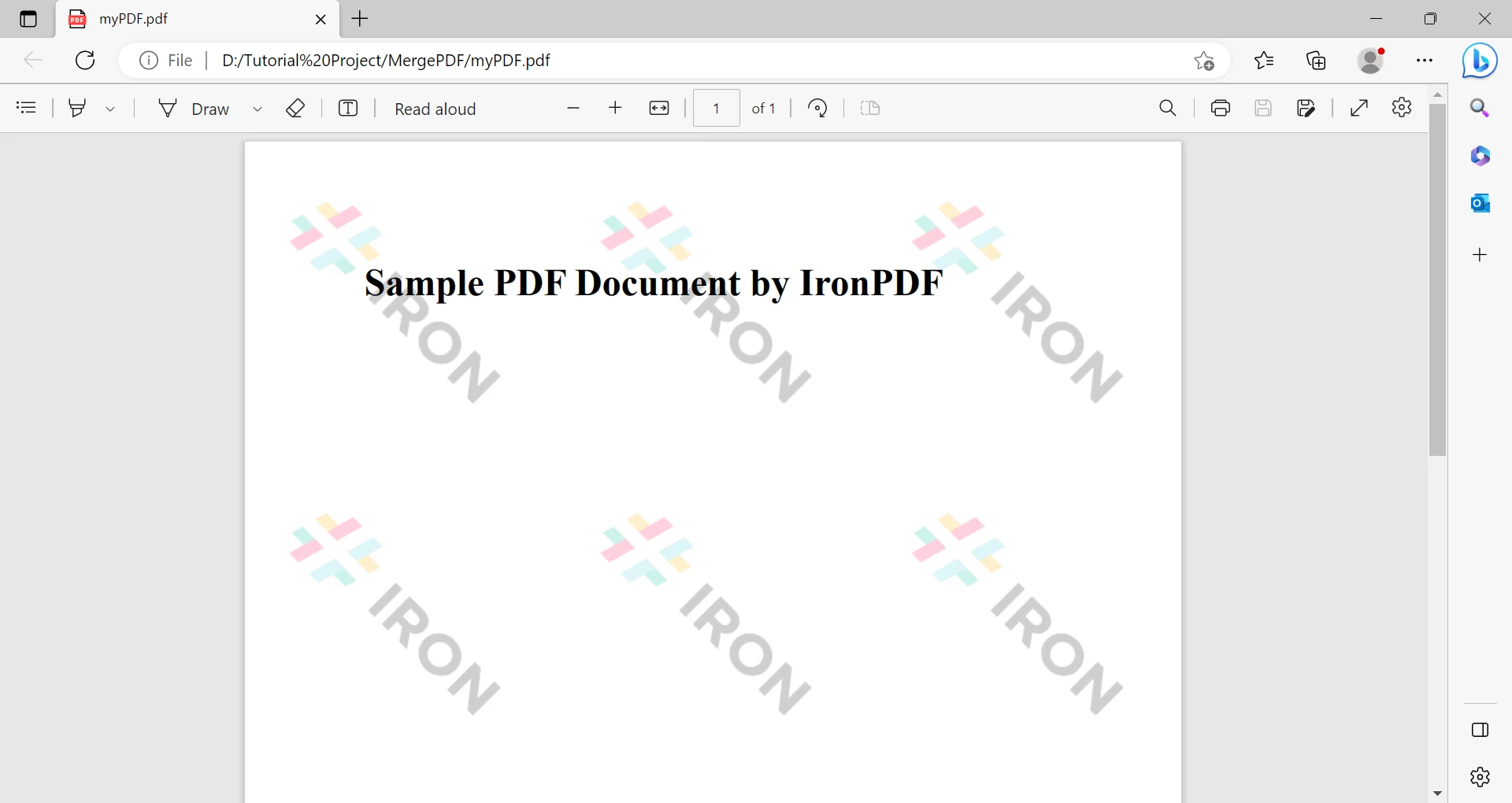
In the code above, a PDF file is created using HTML code. This is a very easy and simple way to create a PDF file with IronPDF.

A Comparison Between IronPDF For Java & BFO Java PDF Library: Figure 5

Creating a PDF File using BFO Java

We need to add a BFO JAR file to our Java project in order to use it. Follow the steps below to add the dependency:

  1. Download BFO.
  2. Copy the downloaded BFO Java PDF library (JAR file) into your project's library or dependency folder.
  3. In your IDE, right-click on your project and select "Properties" or "Build Path."
  4. Navigate to the "Libraries" or "Dependencies" section.
  5. Click on the "Add JARs" or "Add External JARs" button.
  6. Browse and select the BFO Java library (JAR file) you downloaded in Step 1.
  7. Click "Apply" or "OK" to add the BFO Java dependency to your project.

Now, add the following import in the main.java file:

import org.faceless.pdf2.*;
JAVA

Write the following code inside the main function:

public class PDFCreator {
    public static void main(String[] args) {
        try {
            // Create a new PDF document
            PDF pdf = new PDF();

            // Add a new page with A4 size
            PDFPage page = pdf.newPage("A4");

            // Set style for the page text
            PDFStyle mystyle = new PDFStyle();
            mystyle.setFont(new StandardFont(StandardFont.TIMES), 24);
            mystyle.setFillColor(Color.black);

            // Apply style and write text on the page
            page.setStyle(mystyle);
            page.drawText("Hello, World! This PDF is generated by BFO", 100, page.getHeight() - 100);

            // Save the PDF document to a file
            OutputStream out = new FileOutputStream("HelloWorld.pdf");
            pdf.render(out);
            out.close();
        } catch (Exception e) {
            e.printStackTrace();
        }
    }
}
public class PDFCreator {
    public static void main(String[] args) {
        try {
            // Create a new PDF document
            PDF pdf = new PDF();

            // Add a new page with A4 size
            PDFPage page = pdf.newPage("A4");

            // Set style for the page text
            PDFStyle mystyle = new PDFStyle();
            mystyle.setFont(new StandardFont(StandardFont.TIMES), 24);
            mystyle.setFillColor(Color.black);

            // Apply style and write text on the page
            page.setStyle(mystyle);
            page.drawText("Hello, World! This PDF is generated by BFO", 100, page.getHeight() - 100);

            // Save the PDF document to a file
            OutputStream out = new FileOutputStream("HelloWorld.pdf");
            pdf.render(out);
            out.close();
        } catch (Exception e) {
            e.printStackTrace();
        }
    }
}
JAVA

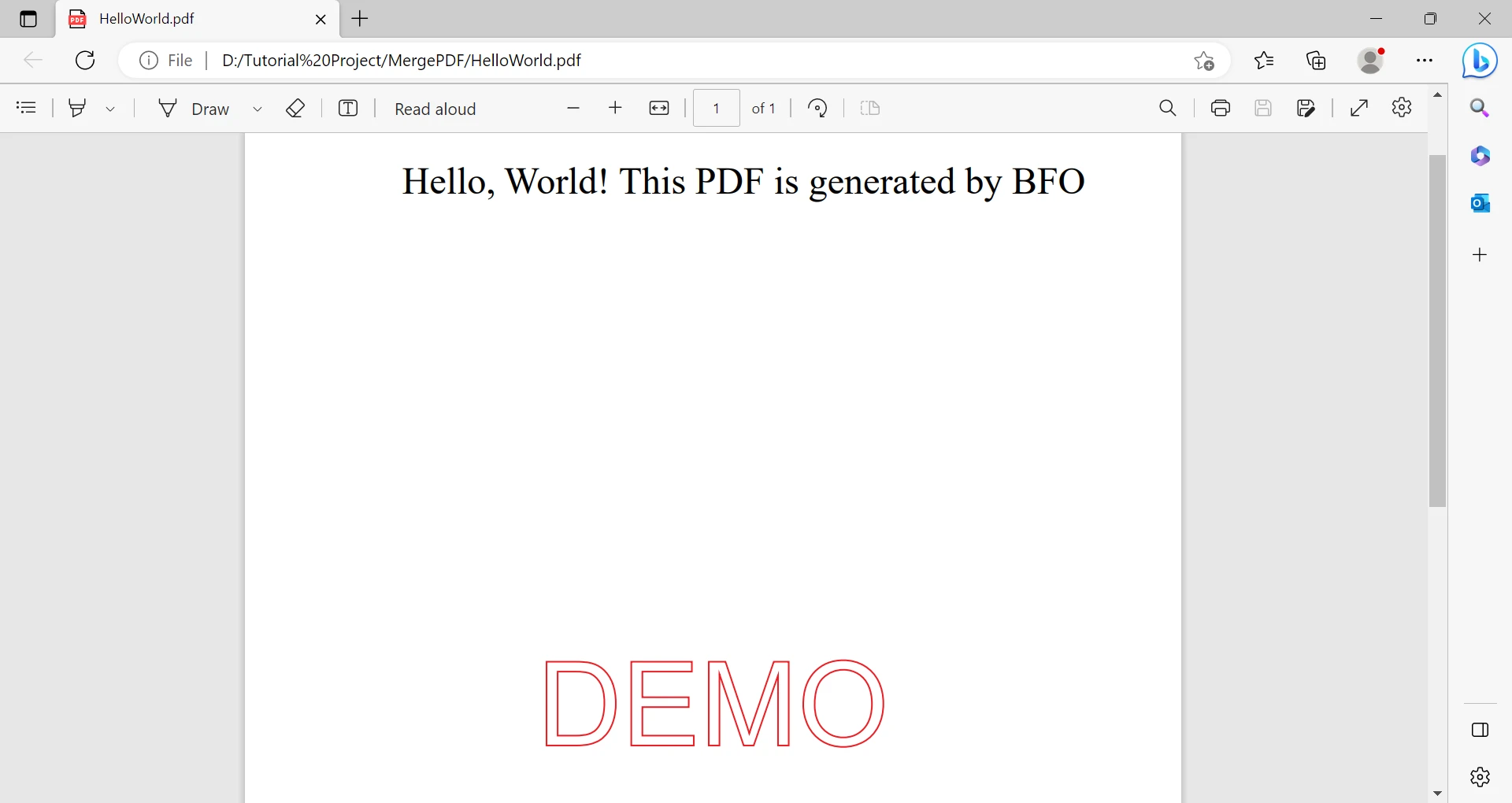
This code snippet demonstrates how to create a PDF file in Java using BFO. It is worth noting that the process requires multiple lines of code compared to IronPDF's simple and concise approach. The difference in usability and ease between IronPDF and BFO is quite apparent. IronPDF stands out as an exceptional library that offers a streamlined experience for generating PDF files in Java. Its simplicity and efficiency make it a preferred choice for developers.

The output of the above code is the following:

A Comparison Between IronPDF For Java & BFO Java PDF Library: Figure 6

With IronPDF, the process is simplified by leveraging Maven as a dependency management tool. By adding a few lines to the project's Maven configuration file (pom.xml), the IronPDF library is automatically downloaded and integrated into the project. This eliminates the need for manual downloading, library management, and explicit classpath configuration. In contrast, using BFO Java may require a more manual approach, involving downloading the library, managing the JAR file, and adding it to the project manually. While both libraries offer PDF generation capabilities, the convenience of IronPDF's Maven dependency integration can be advantageous, especially for developers who prefer a streamlined approach to dependency management.

Conclusion

IronPDF is a Java library that provides extensive functionality for programmatically working with PDF files. It utilizes a powerful rendering engine to convert HTML, CSS, and JavaScript content into PDF format, allowing developers to generate PDF documents from web pages or modern HTML templates. The library offers a wide range of features for editing PDFs, such as adding text, images, tables, and hyperlinks to PDF pages. It also supports advanced operations like document encryption, digital signatures, and optimization. IronPDF integrates seamlessly with popular Java frameworks and technologies, making it versatile and adaptable for different development scenarios. Its documentation and well-designed API enable developers to efficiently work with PDF files, making it a valuable asset in Java application development.

BFO Java is a powerful PDF library designed for Java applications, providing a wide range of features and capabilities for working with PDF documents. With BFO Java, developers can easily generate, manipulate, and customize PDF files programmatically. It offers functionalities such as creating PDFs from scratch, converting HTML and XML content to PDF, adding text, images, and tables to PDF pages, and applying advanced layout and formatting options. Additionally, BFO Java supports document encryption and digital signatures for enhanced security. Its optimized performance ensures the efficient processing of PDF documents. Overall, BFO Java is a versatile and robust PDF library that empowers developers to effectively handle PDF generation and manipulation tasks in their Java projects.

IronPDF offers flexible and cost-effective licensing options for developers and businesses. They provide a Professional License, which includes royalty-free redistribution and extended support and updates, available at a specific cost. IronPDF's pricing structure is designed to provide affordability and value for a wide range of users. On the other hand, BFO Java follows a different licensing model, which may be more tailored toward enterprise-level usage. BFO Java's licensing fees may be higher due to advanced features, specialized support, or additional services offered. By comparing the pricing structures of both libraries, it becomes evident that IronPDF licensing is generally more cost-effective. However, it is important to assess individual project requirements and consider factors such as features, support, and additional services to make an informed decision regarding licensing costs.

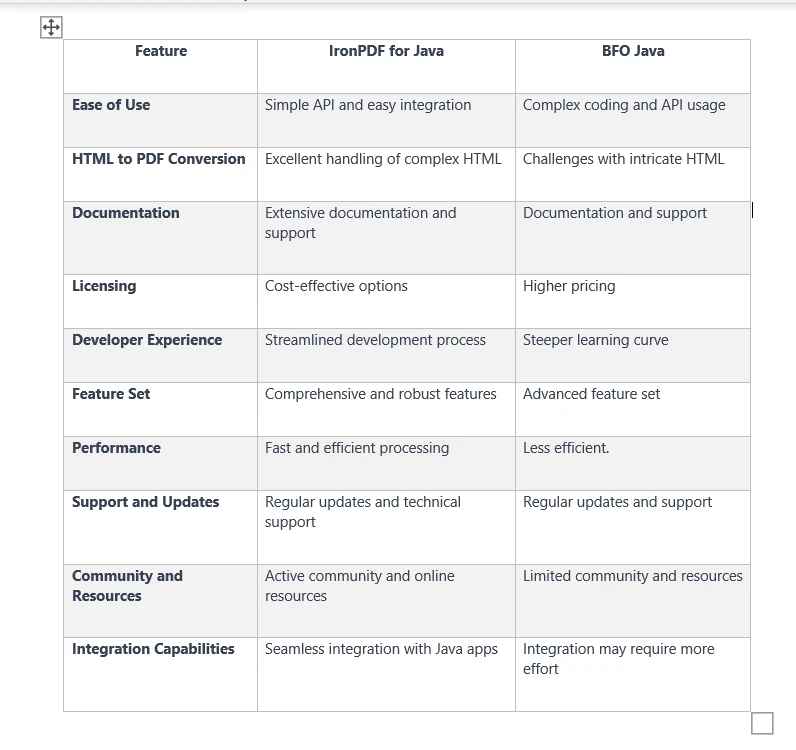
IronPDF for Java offers significant advantages over BFO Java, making it a superior choice for developers. Its simple API and easy integration allow for streamlined PDF generation with minimal code. IronPDF excels in HTML-to-PDF conversion, handling complex layouts and styling effortlessly. The library provides extensive documentation, code examples, and tutorials, ensuring a smooth development experience. Additionally, IronPDF's cost-effective licensing options make it an attractive choice for businesses. Overall, IronPDF offers superior usability, HTML-to-PDF conversion capabilities, comprehensive documentation, and competitive pricing, positioning it as the preferred solution over BFO Java.

A Comparison Between IronPDF For Java & BFO Java PDF Library: Figure 7

참고해 주세요BFO Java is a registered trademark of its respective owner. This site is not affiliated with, endorsed by, or sponsored by BFO Java. All product names, logos, and brands are property of their respective owners. Comparisons are for informational purposes only and reflect publicly available information at the time of writing.

자주 묻는 질문

Java에서 HTML을 PDF로 변환하려면 어떻게 해야 하나요?

Java용 IronPDF를 사용하여 HTML을 PDF로 변환할 수 있습니다. IronPDF를 사용하면 HTML 문자열을 PDF로 변환하는 RenderHtmlAsPdf 메서드를 활용하거나 HTML 파일의 경우 RenderHtmlFileAsPdf를 사용할 수 있습니다.

PDF 처리를 위한 BFO Java의 주요 기능은 무엇인가요?

BFO Java는 PDF 생성, 양식 작성, 디지털 서명, 암호화, 텍스트 추출 등 광범위한 기능을 제공하므로 PDF 조작을 위한 강력한 선택입니다.

HTML을 PDF로 변환할 때 IronPDF가 선호되는 이유는 무엇인가요?

IronPDF는 웹 기반 애플리케이션에 필수적인 탁월한 HTML 구문 분석 기능, 완벽한 CSS 지원, 복잡한 HTML 구조의 정확한 렌더링으로 인해 HTML을 PDF로 변환하는 데 선호됩니다.

Java용 IronPDF를 사용하여 PDF 문서를 병합할 수 있나요?

예, Java용 IronPDF는 PDF 문서 병합을 위한 사용자 친화적인 API를 제공하여 대용량 파일을 처리할 때도 여러 PDF를 효율적으로 결합할 수 있습니다.

IronPDF는 PDF에서 텍스트 추출을 어떻게 처리하나요?

Java용 IronPDF는 텍스트 추출을 위한 간소화되고 효율적인 솔루션을 제공하여 원본 서식을 보존하고 정확한 결과를 보장하므로 개발자의 프로세스를 간소화합니다.

Java용 IronPDF의 라이선스 옵션은 무엇인가요?

IronPDF는 무료 평가판이 포함된 상용 라이선스 모델을 제공하며, 비용 효율적이도록 설계되어 다양한 규모의 비즈니스와 개발자가 이용할 수 있습니다.

Java에서 디지털 서명을 처리하는 데 더 적합한 라이브러리는 무엇인가요?

Java용 IronPDF와 BFO Java는 모두 디지털 서명을 지원하므로 개발자는 PDF 문서에 전자 서명을 안전하게 추가하여 진위성과 무결성을 보장할 수 있습니다.

IronPDF와 BFO Java는 사용성 측면에서 어떻게 비교되나요?

IronPDF는 사용성이 뛰어나기로 유명하며, 간소화된 코드 통합과 포괄적인 문서를 제공하여 BFO Java보다 접근성이 높습니다.

IronPDF가 PDF 조작을 위한 비용 효율적인 솔루션인 이유는 무엇인가요?

IronPDF는 경쟁력 있는 가격과 비용 효율적인 라이선스 구조, 광범위한 기능 및 사용자 친화적인 API를 제공하므로 Java에서 PDF 조작을 위한 경제적인 선택이 될 수 있습니다.

Java용 IronPDF에 대한 커뮤니티 지원이 제공되나요?

예, Java용 IronPDF는 포괄적인 문서와 강력한 커뮤니티를 통해 개발자가 효율적인 문제 해결을 위한 지원과 리소스를 제공합니다.

커티스 차우
기술 문서 작성자

커티스 차우는 칼턴 대학교에서 컴퓨터 과학 학사 학위를 취득했으며, Node.js, TypeScript, JavaScript, React를 전문으로 하는 프론트엔드 개발자입니다. 직관적이고 미적으로 뛰어난 사용자 인터페이스를 만드는 데 열정을 가진 그는 최신 프레임워크를 활용하고, 잘 구성되고 시각적으로 매력적인 매뉴얼을 제작하는 것을 즐깁니다.
커티스는 개발 분야 외에도 사물 인터넷(IoT)에 깊은 관심을 가지고 있으며, 하드웨어와 소프트웨어를 통합하는 혁신적인 방법을 연구합니다. 여가 시간에는 게임을 즐기거나 디스코드 봇을 만들면서 기술에 대한 애정과 창의성을 결합합니다.