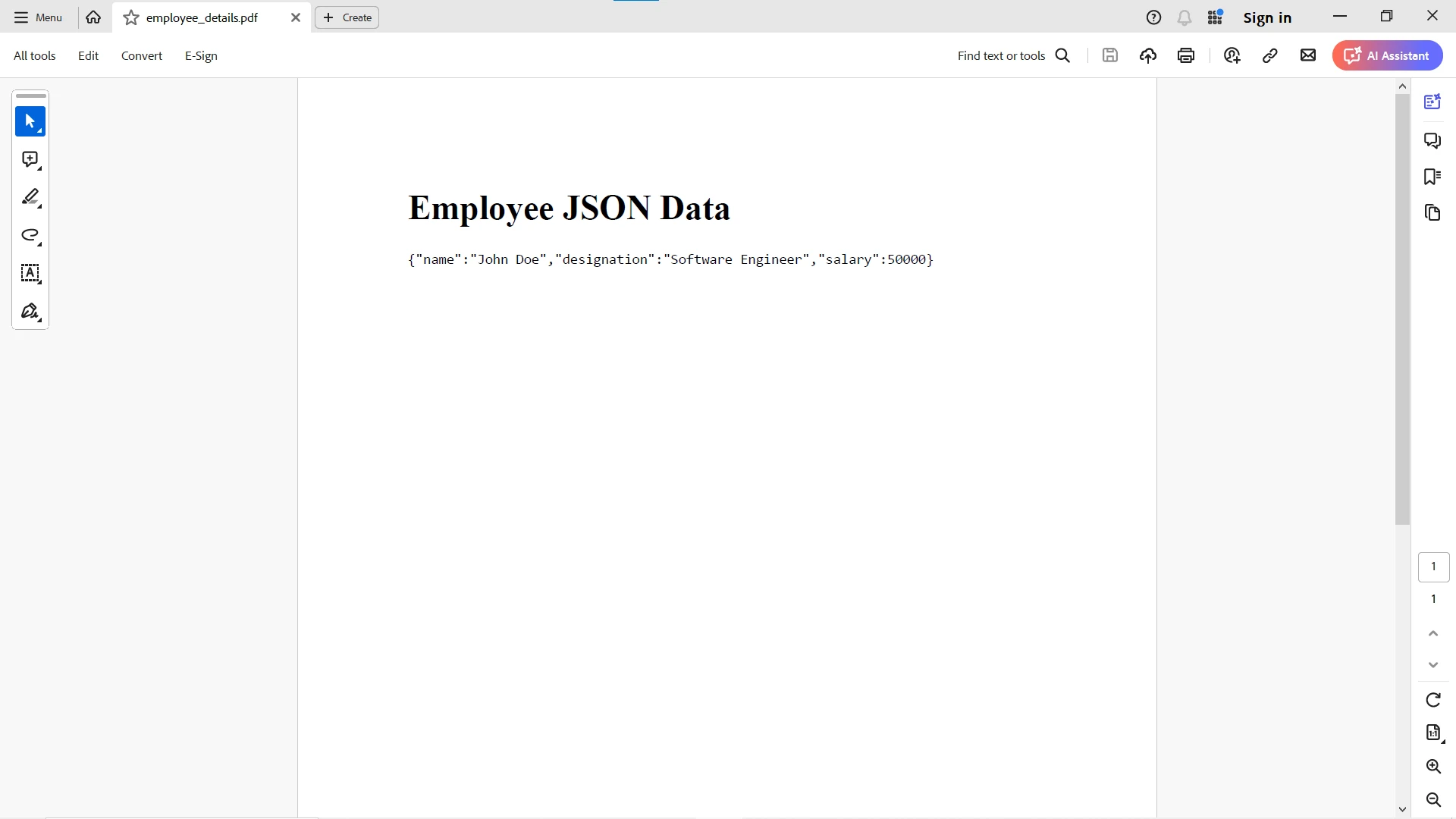
JAVA 도움말 Java용 Gson: 객체를 JSON으로 변환하기 커티스 차우 업데이트됨:6월 22, 2025 다운로드 IronPDF 메이븐 다운로드 JAR 다운로드 무료 체험 시작하기 LLM용 사본 LLM용 사본 LLM용 마크다운 형식으로 페이지를 복사하세요 ChatGPT에서 열기 ChatGPT에 이 페이지에 대해 문의하세요 제미니에서 열기 제미니에게 이 페이지에 대해 문의하세요 Grok에서 열기 Grok에게 이 페이지에 대해 문의하세요 혼란 속에서 열기 Perplexity에게 이 페이지에 대해 문의하세요 공유하다 페이스북에 공유하기 트위터에 공유하기 LinkedIn에 공유하기 URL 복사 이메일로 기사 보내기 In the realm of Java programming, data serialization and deserialization are integral processes for transferring data between applications. Gson, a library developed by Google, stands out as a powerful tool for converting Java objects into their JSON representation and vice versa. This article aims to provide a comprehensive guide to Gson in Java, exploring its features, implementation, and best practices. What is Gson? Gson is a Java library developed by Google that can be used to convert Java objects into their JSON representation. It can also be used to convert a whole JSON file or string to an equivalent Java object. Google Gson provides simple-to-use APIs that allow developers to work with JSON data effortlessly. Key Features of Gson Simple API: Gson provides a straightforward API for converting Java objects to JSON and vice versa, making it easy to integrate into Java applications. Flexible Serialization: Gson offers customization options for serialization, allowing developers to exclude specific fields or customize the output format. Deserialization Support: Gson can deserialize JSON strings into Java objects, simplifying the process of parsing JSON data. Type Safety: Gson ensures type safety during serialization and deserialization, reducing the risk of runtime errors. Integration with Java Collections: Gson seamlessly integrates with Java collections, enabling the serialization and deserialization of complex data structures. Getting Started with Gson To use the Google Gson library in a Java project, you first need to include the Gson library in your project's dependencies. If you're using Maven, you can add the following dependency to your pom.xml file: <dependency> <groupId>com.google.code.gson</groupId> <artifactId>gson</artifactId> <version>2.11.0</version> </dependency> <dependency> <groupId>com.google.code.gson</groupId> <artifactId>gson</artifactId> <version>2.11.0</version> </dependency> XML After adding the dependency, you can start using Gson in your Java code. Basic Usage Here's a basic example demonstrating serialization and deserialization with Gson: import com.google.gson.Gson; public class GsonExample { public static void main(String[] args) { // Initialize Gson object for JSON operations Gson gson = new Gson(); // Create a new MyObject instance and serialize it to JSON String json = gson.toJson(new MyObject()); System.out.println("Serialized JSON: " + json); // Deserialize the JSON back into a MyObject instance MyObject obj = gson.fromJson(json, MyObject.class); System.out.println("Deserialized Object: Name - " + obj.name + ", Version - " + obj.version); } // Define a simple Java class to be serialized/deserialized static class MyObject { private String name = "Gson"; // Default object name private int version = 2; // Default object version } } import com.google.gson.Gson; public class GsonExample { public static void main(String[] args) { // Initialize Gson object for JSON operations Gson gson = new Gson(); // Create a new MyObject instance and serialize it to JSON String json = gson.toJson(new MyObject()); System.out.println("Serialized JSON: " + json); // Deserialize the JSON back into a MyObject instance MyObject obj = gson.fromJson(json, MyObject.class); System.out.println("Deserialized Object: Name - " + obj.name + ", Version - " + obj.version); } // Define a simple Java class to be serialized/deserialized static class MyObject { private String name = "Gson"; // Default object name private int version = 2; // Default object version } } JAVA In this example, we create a Gson object and use it to serialize a MyObject instance into a JSON string (toJson method). We then deserialize the JSON string and convert it back into a MyObject instance (fromJson method). Advanced Usage Gson provides advanced features for customizing serialization and deserialization to convert arbitrary Java objects to their JSON representation. Some of these features include: Custom Serialization and Deserialization: Gson allows you to define custom serializers and deserializers for specific types or fields. Excluding Fields: You can annotate fields with @Expose to control whether they should be included in the JSON output. Handling Null Values: Gson provides options for handling null values during serialization and deserialization. Code Example Here's an example demonstrating the advanced usage of Gson. In the following example, we demonstrate Gson's capabilities by utilizing Java classes to convert a Java object to its JSON representation and parse JSON data back into an equivalent Java object. import com.google.gson.Gson; import com.google.gson.annotations.Expose; import com.google.gson.annotations.SerializedName; public class AdvancedGsonExample { public static void main(String[] args) { // Define a custom Java class class CustomObject { @SerializedName("full_name") private String name; private int age; // The 'ignoredAge' field is excluded from JSON serialization @Expose(serialize = false) private int ignoredAge; public CustomObject(String name, int age) { this.name = name; this.age = age; this.ignoredAge = age; // Excluded from JSON output } } // Create an instance of the custom Java class CustomObject customObject = new CustomObject("John Doe", 30); // Serialize the Java object to its JSON representation Gson gson = new Gson(); String json = gson.toJson(customObject); System.out.println("JSON Representation:"); System.out.println(json); // Parse the JSON back to an equivalent Java object CustomObject parsedObject = gson.fromJson(json, CustomObject.class); System.out.println("\nEquivalent Java Object:"); System.out.println("Name: " + parsedObject.name); System.out.println("Age: " + parsedObject.age); // Ignored age field won't be included in JSON output System.out.println("Ignored Age: " + parsedObject.ignoredAge); } } import com.google.gson.Gson; import com.google.gson.annotations.Expose; import com.google.gson.annotations.SerializedName; public class AdvancedGsonExample { public static void main(String[] args) { // Define a custom Java class class CustomObject { @SerializedName("full_name") private String name; private int age; // The 'ignoredAge' field is excluded from JSON serialization @Expose(serialize = false) private int ignoredAge; public CustomObject(String name, int age) { this.name = name; this.age = age; this.ignoredAge = age; // Excluded from JSON output } } // Create an instance of the custom Java class CustomObject customObject = new CustomObject("John Doe", 30); // Serialize the Java object to its JSON representation Gson gson = new Gson(); String json = gson.toJson(customObject); System.out.println("JSON Representation:"); System.out.println(json); // Parse the JSON back to an equivalent Java object CustomObject parsedObject = gson.fromJson(json, CustomObject.class); System.out.println("\nEquivalent Java Object:"); System.out.println("Name: " + parsedObject.name); System.out.println("Age: " + parsedObject.age); // Ignored age field won't be included in JSON output System.out.println("Ignored Age: " + parsedObject.ignoredAge); } } JAVA Best Practices When using Gson in your Java projects, consider the following best practices: Use Gson Builder: Instead of directly creating Gson instances, use Gson's builder pattern (GsonBuilder) to customize Gson's behavior. Handle Exceptions: Always handle exceptions that may occur during serialization or deserialization to ensure robust error handling. Version Compatibility: Be mindful of Gson version compatibility when upgrading your Gson dependency to avoid breaking changes. Leveraging Gson Output to Generate PDFs Using IronPDF in Java In the Java ecosystem, Gson helps convert Java objects to a JSON document, and vice versa. By integrating Gson with IronPDF, we can leverage JSON data to dynamically generate PDF documents. Gson allows us to serialize Java objects into JSON strings, which can then be utilized as input data for PDF generation using IronPDF. Introducing IronPDF for Java IronPDF, developed by Iron Software, is a feature-rich library for creating, editing, and manipulating PDF documents in Java. It offers a comprehensive set of APIs for rendering HTML, converting URLs to PDFs, and generating PDFs from HTML content. Getting Started To get started with Gson and IronPDF, simply include their respective dependencies in your Java project. Add the following dependencies in your pom.xml file: <dependencies> <dependency> <groupId>com.google.code.gson</groupId> <artifactId>gson</artifactId> <version>2.11.0</version> </dependency> <dependency> <groupId>com.ironsoftware</groupId> <artifactId>ironpdf</artifactId> <version>2024.3.1</version> </dependency> <dependency> <groupId>org.slf4j</groupId> <artifactId>slf4j-simple</artifactId> <version>2.0.3</version> </dependency> </dependencies> <dependencies> <dependency> <groupId>com.google.code.gson</groupId> <artifactId>gson</artifactId> <version>2.11.0</version> </dependency> <dependency> <groupId>com.ironsoftware</groupId> <artifactId>ironpdf</artifactId> <version>2024.3.1</version> </dependency> <dependency> <groupId>org.slf4j</groupId> <artifactId>slf4j-simple</artifactId> <version>2.0.3</version> </dependency> </dependencies> XML Integration Steps Here is the source code for the two-step process to convert Java objects to JSON objects and then convert them to PDF: Serialize Data with Gson: Begin by using Gson to serialize your Java objects into JSON format. This JSON data will serve as the content for your PDF document. Ensure that the Gson output represents the structure and content you wish to include in the PDF. Gson gson = new Gson(); // Gson instance MyDataObject data = ...; // Your data object String jsonData = gson.toJson(data); Gson gson = new Gson(); // Gson instance MyDataObject data = ...; // Your data object String jsonData = gson.toJson(data); JAVA Generate PDF Using IronPDF: With the Gson output ready, utilize IronPDF to generate a PDF document. You can choose from various methods provided by IronPDF, such as rendering HTML, converting URLs, or directly inputting HTML content. // Using Gson output as HTML content PdfDocument pdfFromJson = PdfDocument.renderHtmlAsPdf(jsonData); pdfFromJson.saveAs(Paths.get("output.pdf")); // Using Gson output as HTML content PdfDocument pdfFromJson = PdfDocument.renderHtmlAsPdf(jsonData); pdfFromJson.saveAs(Paths.get("output.pdf")); JAVA Alternatively, you can use Gson output to dynamically populate HTML templates and then render them as PDFs using IronPDF. Example Integration Consider an example where we have a simple Java object representing employee data, which we serialize using Gson. We then use the Gson output to dynamically populate an HTML template, which is subsequently rendered as a PDF using IronPDF. // Serialize employee data using Gson Gson gson = new Gson(); // Create an EmployeeData class with name, position, and salary EmployeeData employee = new EmployeeData("John Doe", "Software Engineer", 50000); String jsonData = gson.toJson(employee); // Populate HTML template with Gson output String htmlContent = "<html><body><h1>Employee JSON Data</h1><pre>" + jsonData + "</pre></body></html>"; // Generate PDF using IronPDF PdfDocument pdfFromHtml = PdfDocument.renderHtmlAsPdf(htmlContent); pdfFromHtml.saveAs(Paths.get("employee_details.pdf")); // Serialize employee data using Gson Gson gson = new Gson(); // Create an EmployeeData class with name, position, and salary EmployeeData employee = new EmployeeData("John Doe", "Software Engineer", 50000); String jsonData = gson.toJson(employee); // Populate HTML template with Gson output String htmlContent = "<html><body><h1>Employee JSON Data</h1><pre>" + jsonData + "</pre></body></html>"; // Generate PDF using IronPDF PdfDocument pdfFromHtml = PdfDocument.renderHtmlAsPdf(htmlContent); pdfFromHtml.saveAs(Paths.get("employee_details.pdf")); JAVA Output Explore more with IronPDF's documentation and code examples page, which serve as valuable resources for developers, offering an abundance of ready-to-use code snippets and comprehensive documentation to expedite PDF-related development tasks. Conclusion Gson is a powerful and versatile library for JSON serialization and deserialization in Java. Its simple API, flexibility, and advanced features make it a popular choice among Java developers. By understanding Gson's features, implementation, and best practices, you can leverage its capabilities to effectively work with JSON data in your Java projects. Integrating Gson with IronPDF in Java opens up countless possibilities for dynamically generating PDF documents from JSON data. By leveraging Gson's robust serialization capabilities and IronPDF's powerful PDF generation features, developers can create seamless workflows for producing PDFs tailored to their application's requirements. Experience the power of PDF generation with IronPDF's free trial. Seamlessly integrate Gson output into dynamic PDFs tailored to your Java applications. Download now and unlock the convenience and efficiency of IronPDF today! 커티스 차우 지금 바로 엔지니어링 팀과 채팅하세요 기술 문서 작성자 커티스 차우는 칼턴 대학교에서 컴퓨터 과학 학사 학위를 취득했으며, Node.js, TypeScript, JavaScript, React를 전문으로 하는 프론트엔드 개발자입니다. 직관적이고 미적으로 뛰어난 사용자 인터페이스를 만드는 데 열정을 가진 그는 최신 프레임워크를 활용하고, 잘 구성되고 시각적으로 매력적인 매뉴얼을 제작하는 것을 즐깁니다. 커티스는 개발 분야 외에도 사물 인터넷(IoT)에 깊은 관심을 가지고 있으며, 하드웨어와 소프트웨어를 통합하는 혁신적인 방법을 연구합니다. 여가 시간에는 게임을 즐기거나 디스코드 봇을 만들면서 기술에 대한 애정과 창의성을 결합합니다. 관련 기사 업데이트됨 10월 26, 2025 참조를 통한 Java 패스(개발자를 위한 작동 방식) Java 프로그래밍 언어에서 매개변수 전달은 항상 값으로 전달됩니다. 객체를 다룰 때 참조 변수는 값으로 전달됩니다 더 읽어보기 업데이트됨 10월 26, 2025 Java 스캐너(개발자를 위한 작동 방식) 이 문서에서는 Java Scanner 클래스의 작동 방식을 자세히 살펴보고 예제를 통해 그 사용법을 살펴봅니다 더 읽어보기 업데이트됨 8월 31, 2025 Java Printf(개발자를 위한 작동 방식) IronPDF와 Java의 printf 기능을 통합하면 정확한 텍스트 서식으로 PDF 출력을 향상시킬 수 있습니다 더 읽어보기 OkHttp Java: 간소화된 HTTP 요청Java에서 파이프로 문자열 ...

업데이트됨 10월 26, 2025 참조를 통한 Java 패스(개발자를 위한 작동 방식) Java 프로그래밍 언어에서 매개변수 전달은 항상 값으로 전달됩니다. 객체를 다룰 때 참조 변수는 값으로 전달됩니다 더 읽어보기
업데이트됨 10월 26, 2025 Java 스캐너(개발자를 위한 작동 방식) 이 문서에서는 Java Scanner 클래스의 작동 방식을 자세히 살펴보고 예제를 통해 그 사용법을 살펴봅니다 더 읽어보기
업데이트됨 8월 31, 2025 Java Printf(개발자를 위한 작동 방식) IronPDF와 Java의 printf 기능을 통합하면 정확한 텍스트 서식으로 PDF 출력을 향상시킬 수 있습니다 더 읽어보기