

OkHttp Java: HTTP 요청 간소화

현대 자바 개발에서 효율적인 HTTP 요청 처리는 특히 웹 서비스와 API에 의존하는 견고한 애플리케이션 구축에 매우 중요합니다. OkHttp는 자바 및 코틀린용 강력한 HTTP 및 HTTP/2 클라이언트로서, 뛰어난 성능, 사용 편의성 및 고급 기능 덕분에 널리 사용되고 있습니다.
이 글에서는 OkHttp의 주요 기능, 설치 방법 및 일반적인 사용 사례를 다루는 종합적인 가이드를 제공합니다.
OkHttp란 무엇인가요?
OkHttp는 HTTP 요청 처리를 위한 다재다능한 오픈 소스 Java 라이브러리로, 애플리케이션에 원활하게 통합할 수 있는 포괄적인 기능 세트를 제공합니다. 직관적인 API를 통해 새로운 요청을 생성하거나 간단한 POST 요청을 실행하는 것은 쿼리 매개변수와 문자열 URL을 사용하여 새 요청 빌더를 구성하는 것만큼 쉽습니다.
또한 OkHttp는 효율적인 응답 처리를 지원하며, 응답 본문, 응답 헤더에 대한 접근을 제공하고, 네트워크 트래픽을 최적화하고 서버 가용성 문제를 줄이기 위해 응답 캐싱까지 지원합니다. 동기 호출이든 비동기 호출이든 관계없이 OkHttp의 연결 풀링은 여러 IP 주소를 사용하는 경우에도 최적의 성능을 보장합니다.
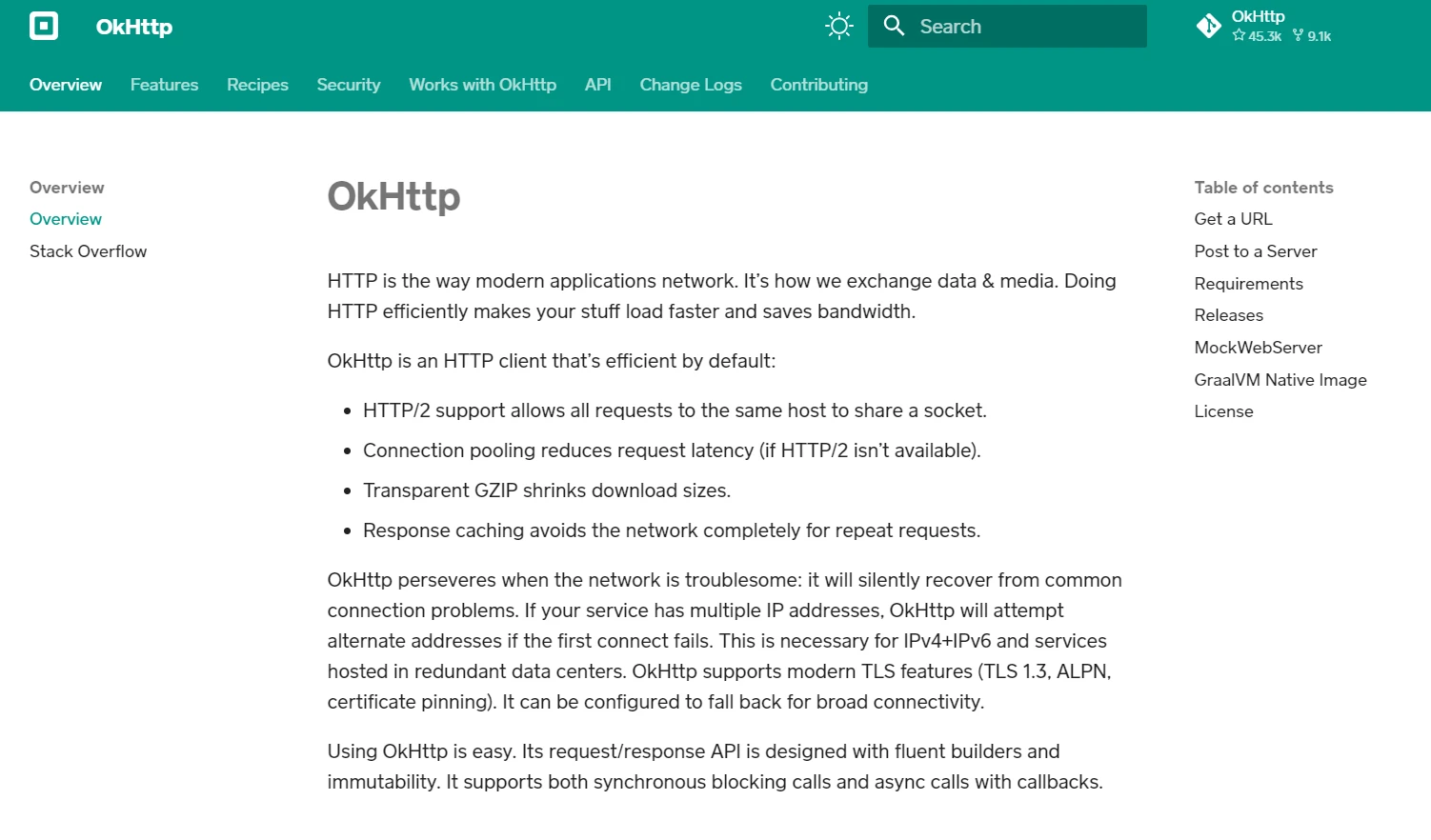
Apache HTTP 클라이언트 사용에 익숙한 개발자들에게 OkHttp는 향상된 성능과 유연성을 제공하는 더욱 현대적이고 효율적인 대안입니다. 비동기 호출 및 콜백을 지원하기 때문에 응답성과 확장성이 요구되는 애플리케이션에 적합한 선택입니다.
OkHttp를 사용하면 수많은 HTTP 클라이언트와 요청을 손쉽게 관리할 수 있으므로 개발자는 성능이나 기능을 저하시키지 않고 견고하고 안정적인 애플리케이션 구축에 집중할 수 있습니다.
주요 특징
OkHttp의 주요 기능은 다음과 같습니다.
- 동기 및 비동기 요청 처리: OkHttp는 동기(차단) 및 비동기(비차단) 작업을 모두 지원합니다.
- 연결 풀링: HTTP 연결을 재사용하여 클라이언트 연결 문제를 최소화하고 성능을 향상시킵니다.
- 투명 GZIP 압축: HTTP 응답 크기를 줄여 대역폭을 절약하고 데이터 전송 속도를 향상시킵니다.
- 캐싱: 응답 캐싱을 지원하여 반복적인 네트워크 요청 필요성을 줄입니다.
- HTTP/2 지원: 단일 연결을 통해 여러 요청과 응답을 다중화하여 성능을 향상시킵니다.
- 타임아웃 및 재시도: 연결 및 읽기 타임아웃에 대한 세밀한 제어는 물론, 실패한 요청에 대한 재시도 메커니즘을 제공합니다.
OkHttp 설치 중
Java 프로젝트에서 OkHttp를 사용하려면 빌드 구성에 OkHttp 종속성을 추가해야 합니다. Maven을 사용하는 경우, 다음 종속성을 pom.xml 파일에 추가하십시오.
<dependency>
    <groupId>com.squareup.okhttp3</groupId>
    <artifactId>okhttp</artifactId>
    <version>5.0.0-alpha.14</version>
</dependency>
<dependency>
<groupId>com.squareup.okhttp3</groupId>
<artifactId>okhttp</artifactId>
<version>5.0.0-alpha.14</version>
</dependency>Gradle의 경우, 이 줄을 build.gradle 파일에 추가하십시오.
implementation 'com.squareup.okhttp3:okhttp:5.0.0-alpha.14'Maven Central 또는 GitHub 에서 최신 버전을 확인하세요.
기본 사용법
OkHttpClient 생성하기
OkHttpClient 클래스는 HTTP 요청을 실행하기 위한 주요 진입점입니다. 연결 풀링의 이점을 활용하려면 OkHttpClient 인스턴스를 하나 생성하고 애플리케이션 전반에 걸쳐 재사용하는 것이 좋습니다.
import okhttp3.OkHttpClient;

OkHttpClient client = new OkHttpClient();
import okhttp3.OkHttpClient;
OkHttpClient client = new OkHttpClient();GET 요청 생성
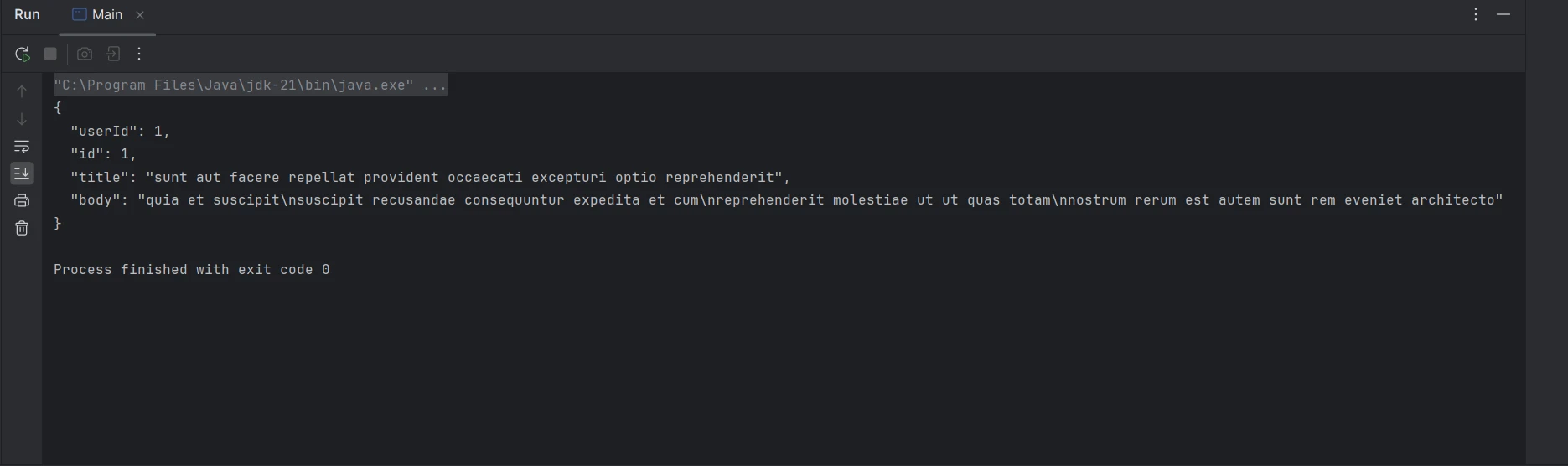
간단한 GET 요청을 하려면 Request 객체를 생성하고 OkHttpClient를 사용하여 실행해야 합니다.
import okhttp3.OkHttpClient;
import okhttp3.Request;
import okhttp3.Response;
import java.io.IOException;

public class OkHttpExample {
    public static void main(String[] args) {
        OkHttpClient client = new OkHttpClient();

        // Create a request specifying the URL
        Request request = new Request.Builder()
                .url("https://jsonplaceholder.typicode.com/posts/1")
                .build();

        // Execute the request and handle the response
        try (Response response = client.newCall(request).execute()) {
            if (response.isSuccessful()) { // Check if the response was successful
                System.out.println(response.body().string()); // Print the response body
            } else {
                System.err.println("Request failed: " + response.code()); // Print error code
            }
        } catch (IOException e) {
            e.printStackTrace(); // Handle exceptions
        }
    }
}
import okhttp3.OkHttpClient;
import okhttp3.Request;
import okhttp3.Response;
import java.io.IOException;
public class OkHttpExample {
public static void main(String[] args) {
OkHttpClient client = new OkHttpClient();
// Create a request specifying the URL
Request request = new Request.Builder()
.url("https://jsonplaceholder.typicode.com/posts/1")
.build();
// Execute the request and handle the response
try (Response response = client.newCall(request).execute()) {
if (response.isSuccessful()) { // Check if the response was successful
System.out.println(response.body().string()); // Print the response body
} else {
System.err.println("Request failed: " + response.code()); // Print error code
}
} catch (IOException e) {
e.printStackTrace(); // Handle exceptions
}
}
}
POST 요청 생성
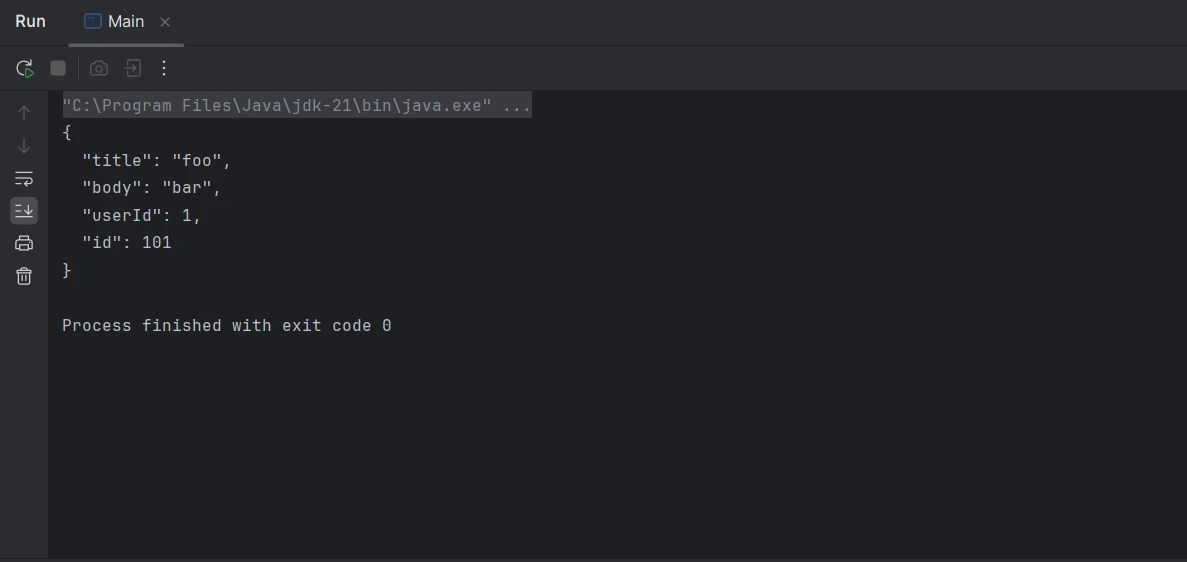
POST 요청의 경우 요청 본문과 반환 응답을 포함해야 합니다. OkHttp는 이를 처리하기 위해 RequestBody 클래스를 제공합니다.
import okhttp3.MediaType;
import okhttp3.OkHttpClient;
import okhttp3.Request;
import okhttp3.RequestBody;
import okhttp3.Response;
import java.io.IOException;

public class OkHttpExample {
    // Define the JSON media type
    public static final MediaType JSON = MediaType.get("application/json; charset=utf-8");

    public static void main(String[] args) {
        OkHttpClient client = new OkHttpClient();

        // JSON data to be sent
        String json = "{\"title\":\"foo\",\"body\":\"bar\",\"userId\":1}";

        // Create request body with JSON data
        RequestBody body = RequestBody.create(json, JSON);

        // Build the POST request
        Request request = new Request.Builder()
                .url("https://jsonplaceholder.typicode.com/posts")
                .post(body)
                .build();

        // Execute the request and handle the response
        try (Response response = client.newCall(request).execute()) {
            if (response.isSuccessful()) { // Check if the response was successful
                System.out.println(response.body().string()); // Print the response body
            } else {
                System.err.println("Request failed: " + response.code()); // Print error code
            }
        } catch (IOException e) {
            e.printStackTrace(); // Handle exceptions
        }
    }
}
import okhttp3.MediaType;
import okhttp3.OkHttpClient;
import okhttp3.Request;
import okhttp3.RequestBody;
import okhttp3.Response;
import java.io.IOException;
public class OkHttpExample {
// Define the JSON media type
public static final MediaType JSON = MediaType.get("application/json; charset=utf-8");
public static void main(String[] args) {
OkHttpClient client = new OkHttpClient();
// JSON data to be sent
String json = "{\"title\":\"foo\",\"body\":\"bar\",\"userId\":1}";
// Create request body with JSON data
RequestBody body = RequestBody.create(json, JSON);
// Build the POST request
Request request = new Request.Builder()
.url("https://jsonplaceholder.typicode.com/posts")
.post(body)
.build();
// Execute the request and handle the response
try (Response response = client.newCall(request).execute()) {
if (response.isSuccessful()) { // Check if the response was successful
System.out.println(response.body().string()); // Print the response body
} else {
System.err.println("Request failed: " + response.code()); // Print error code
}
} catch (IOException e) {
e.printStackTrace(); // Handle exceptions
}
}
}
비동기 요청
비동기 요청은 콜백을 사용하여 처리되므로 애플리케이션은 응답을 기다리는 동안에도 응답성을 유지할 수 있습니다.
import okhttp3.Call;
import okhttp3.Callback;
import okhttp3.OkHttpClient;
import okhttp3.Request;
import okhttp3.Response;
import java.io.IOException;

public class OkHttpExample {
    public static void main(String[] args) {
        OkHttpClient client = new OkHttpClient();

        // Create a request specifying the URL
        Request request = new Request.Builder()
                .url("https://jsonplaceholder.typicode.com/posts/1")
                .build();

        // Enqueue the request to be executed asynchronously
        client.newCall(request).enqueue(new Callback() {

            // Handle failure of the request
            @Override
            public void onFailure(Call call, IOException e) {
                e.printStackTrace(); // Handle exceptions
            }

            // Handle successful response
            @Override
            public void onResponse(Call call, Response response) throws IOException {
                if (response.isSuccessful()) { // Check if the response was successful
                    System.out.println(response.body().string()); // Print the response body
                } else {
                    System.err.println("Request failed: " + response.code()); // Print error code
                }
            }
        });
    }
}
import okhttp3.Call;
import okhttp3.Callback;
import okhttp3.OkHttpClient;
import okhttp3.Request;
import okhttp3.Response;
import java.io.IOException;
public class OkHttpExample {
public static void main(String[] args) {
OkHttpClient client = new OkHttpClient();
// Create a request specifying the URL
Request request = new Request.Builder()
.url("https://jsonplaceholder.typicode.com/posts/1")
.build();
// Enqueue the request to be executed asynchronously
client.newCall(request).enqueue(new Callback() {
// Handle failure of the request
@Override
public void onFailure(Call call, IOException e) {
e.printStackTrace(); // Handle exceptions
}
// Handle successful response
@Override
public void onResponse(Call call, Response response) throws IOException {
if (response.isSuccessful()) { // Check if the response was successful
System.out.println(response.body().string()); // Print the response body
} else {
System.err.println("Request failed: " + response.code()); // Print error code
}
}
});
}
}고급 기능
요격기
인터셉터는 요청과 응답을 검사, 수정 또는 재시도할 수 있도록 해주는 강력한 기능입니다. 이러한 기능은 로깅, 헤더 추가 또는 인증 처리에 사용할 수 있습니다.
import okhttp3.Interceptor;
import okhttp3.OkHttpClient;
import okhttp3.Request;
import okhttp3.Response;
import java.io.IOException;

public class OkHttpExample {
    public static void main(String[] args) {
        // Add an interceptor for modifying requests
        OkHttpClient client = new OkHttpClient.Builder()
                .addInterceptor(new Interceptor() {
                    @Override
                    public Response intercept(Chain chain) throws IOException {
                        // Modify the request to add the authorization header
                        Request request = chain.request().newBuilder()
                                .addHeader("Authorization", "Bearer your_token_here")
                                .build();
                        return chain.proceed(request);
                    }
                })
                .build();

        // Create a request specifying the URL
        Request request = new Request.Builder()
                .url("https://jsonplaceholder.typicode.com/posts/1")
                .build();

        // Execute the request and handle the response
        try (Response response = client.newCall(request).execute()) {
            if (response.isSuccessful()) { // Check if the response was successful
                System.out.println(response.body().string()); // Print the response body
            } else {
                System.err.println("Request failed: " + response.code()); // Print error code
            }
        } catch (IOException e) {
            e.printStackTrace(); // Handle exceptions
        }
    }
}
import okhttp3.Interceptor;
import okhttp3.OkHttpClient;
import okhttp3.Request;
import okhttp3.Response;
import java.io.IOException;
public class OkHttpExample {
public static void main(String[] args) {
// Add an interceptor for modifying requests
OkHttpClient client = new OkHttpClient.Builder()
.addInterceptor(new Interceptor() {
@Override
public Response intercept(Chain chain) throws IOException {
// Modify the request to add the authorization header
Request request = chain.request().newBuilder()
.addHeader("Authorization", "Bearer your_token_here")
.build();
return chain.proceed(request);
}
})
.build();
// Create a request specifying the URL
Request request = new Request.Builder()
.url("https://jsonplaceholder.typicode.com/posts/1")
.build();
// Execute the request and handle the response
try (Response response = client.newCall(request).execute()) {
if (response.isSuccessful()) { // Check if the response was successful
System.out.println(response.body().string()); // Print the response body
} else {
System.err.println("Request failed: " + response.code()); // Print error code
}
} catch (IOException e) {
e.printStackTrace(); // Handle exceptions
}
}
}타임아웃 처리
OkHttp는 HTTP 요청의 여러 단계에 대한 타임아웃을 설정하는 메서드를 제공합니다.
import okhttp3.OkHttpClient;
import okhttp3.Request;
import okhttp3.Response;
import java.io.IOException;
import java.util.concurrent.TimeUnit;

public class OkHttpExample {
    public static void main(String[] args) {
        // Configure timeouts for connections, writes, and reads
        OkHttpClient client = new OkHttpClient.Builder()
                .connectTimeout(10, TimeUnit.SECONDS)
                .writeTimeout(10, TimeUnit.SECONDS)
                .readTimeout(30, TimeUnit.SECONDS)
                .build();

        // Create a request specifying the URL
        Request request = new Request.Builder()
                .url("https://jsonplaceholder.typicode.com/posts/1")
                .build();

        // Execute the request and handle the response
        try (Response response = client.newCall(request).execute()) {
            if (response.isSuccessful()) { // Check if the response was successful
                System.out.println(response.body().string()); // Print the response body
            } else {
                System.err.println("Request failed: " + response.code()); // Print error code
            }
        } catch (IOException e) {
            e.printStackTrace(); // Handle exceptions
        }
    }
}
import okhttp3.OkHttpClient;
import okhttp3.Request;
import okhttp3.Response;
import java.io.IOException;
import java.util.concurrent.TimeUnit;
public class OkHttpExample {
public static void main(String[] args) {
// Configure timeouts for connections, writes, and reads
OkHttpClient client = new OkHttpClient.Builder()
.connectTimeout(10, TimeUnit.SECONDS)
.writeTimeout(10, TimeUnit.SECONDS)
.readTimeout(30, TimeUnit.SECONDS)
.build();
// Create a request specifying the URL
Request request = new Request.Builder()
.url("https://jsonplaceholder.typicode.com/posts/1")
.build();
// Execute the request and handle the response
try (Response response = client.newCall(request).execute()) {
if (response.isSuccessful()) { // Check if the response was successful
System.out.println(response.body().string()); // Print the response body
} else {
System.err.println("Request failed: " + response.code()); // Print error code
}
} catch (IOException e) {
e.printStackTrace(); // Handle exceptions
}
}
}응답 캐싱
OkHttp는 응답을 캐싱하여 요청 지연 시간을 줄이고 성능을 향상시킬 수 있습니다. 이를 위해서는 캐시 디렉터리와 크기를 설정해야 합니다.
import okhttp3.Cache;
import okhttp3.OkHttpClient;
import okhttp3.Request;
import okhttp3.Response;
import java.io.File;
import java.io.IOException;

public class OkHttpExample {
    public static void main(String[] args) {
        // Define the cache directory and size
        File cacheDirectory = new File("cacheDirectory");
        Cache cache = new Cache(cacheDirectory, 10 * 1024 * 1024); // 10 MB cache

        // Build OkHttpClient with caching capability
        OkHttpClient client = new OkHttpClient.Builder()
                .cache(cache)
                .build();

        // Create a request specifying the URL
        Request request = new Request.Builder()
                .url("https://jsonplaceholder.typicode.com/posts/1")
                .build();

        // Execute the request and handle the response
        try (Response response = client.newCall(request).execute()) {
            if (response.isSuccessful()) { // Check if the response was successful
                System.out.println(response.body().string()); // Print the response body
            } else {
                System.err.println("Request failed: " + response.code()); // Print error code
            }
        } catch (IOException e) {
            e.printStackTrace(); // Handle exceptions
        }
    }
}
import okhttp3.Cache;
import okhttp3.OkHttpClient;
import okhttp3.Request;
import okhttp3.Response;
import java.io.File;
import java.io.IOException;
public class OkHttpExample {
public static void main(String[] args) {
// Define the cache directory and size
File cacheDirectory = new File("cacheDirectory");
Cache cache = new Cache(cacheDirectory, 10 * 1024 * 1024); // 10 MB cache
// Build OkHttpClient with caching capability
OkHttpClient client = new OkHttpClient.Builder()
.cache(cache)
.build();
// Create a request specifying the URL
Request request = new Request.Builder()
.url("https://jsonplaceholder.typicode.com/posts/1")
.build();
// Execute the request and handle the response
try (Response response = client.newCall(request).execute()) {
if (response.isSuccessful()) { // Check if the response was successful
System.out.println(response.body().string()); // Print the response body
} else {
System.err.println("Request failed: " + response.code()); // Print error code
}
} catch (IOException e) {
e.printStackTrace(); // Handle exceptions
}
}
}Java에서 OkHttp와 IronPDF 통합하기
OkHttp와 IronPDF 의 기능을 결합하면 Java 개발자는 웹에서 데이터를 가져와 PDF로 변환할 수 있습니다. OkHttp는 네트워크 요청 처리를 위한 강력한 HTTP 클라이언트이며, IronPDF 다양한 소스에서 PDF를 생성하는 강력한 라이브러리입니다.
IronPDF - 개요
IronPDF for Java는 Java 애플리케이션 내에서 PDF 생성을 간소화하도록 설계된 종합 라이브러리입니다. 직관적인 API를 활용하여 개발자는 HTML, 이미지, 텍스트를 포함한 다양한 데이터 소스에서 PDF 문서를 손쉽게 생성, 조작 및 렌더링할 수 있습니다.
PDF 암호화, 디지털 서명, 대화형 양식 작성과 같은 고급 기능을 지원하는 IronPDF 개발자가 특정 요구 사항에 맞춰 전문가 수준의 PDF를 제작할 수 있도록 지원합니다. 원활한 통합과 광범위한 문서 덕분에 이 솔루션은 강력한 PDF 생성 기능을 통해 애플리케이션을 향상시키려는 Java 개발자에게 최적의 선택입니다.
종속성 설정
먼저, 필요한 종속성을 pom.xml (Maven용) 파일 또는 build.gradle (Gradle용) 파일에 추가하십시오.
Maven
<dependency>
    <groupId>com.ironsoftware</groupId>
    <artifactId>ironpdf</artifactId>
    <version>2024.3.1</version>
</dependency>
<dependency>
<groupId>com.ironsoftware</groupId>
<artifactId>ironpdf</artifactId>
<version>2024.3.1</version>
</dependency>그레이들
implementation 'com.ironsoftware:ironpdf:2024.3.1'OkHttp와 IronPDF 통합
이제 OkHttp를 사용하여 HTML 콘텐츠를 가져오고 IronPDF 사용하여 PDF를 생성하는 두 가지 기능을 결합해 보겠습니다.
import com.ironsoftware.ironpdf.PdfDocument;
import okhttp3.OkHttpClient;
import okhttp3.Request;
import okhttp3.Response;
import java.io.IOException;
import java.nio.file.Paths;

public class OkHttpToPdf {
    private final OkHttpClient client = new OkHttpClient(); // Initialize the OkHttpClient

    // Method to fetch HTML content from a given URL
    public String fetchHtml(String url) throws IOException {
        Request request = new Request.Builder()
                .url(url)
                .build();

        // Execute the request and return the response body as a string
        try (Response response = client.newCall(request).execute()) {
            if (!response.isSuccessful()) throw new IOException("Unexpected code " + response);
            return response.body().string();
        }
    }

    // Method to generate a PDF from a URL
    public void generatePdfFromUrl(String url, String outputFilePath) {
        try {
            String htmlContent = fetchHtml(url); // Fetch the HTML content
            PdfDocument pdf = PdfDocument.renderHtmlAsPdf(htmlContent); // Render HTML as PDF
            pdf.saveAs(Paths.get(outputFilePath)); // Save the PDF to the specified path
            System.out.println("PDF generated successfully at " + outputFilePath);
        } catch (IOException e) {
            System.err.println("Failed to fetch HTML content: " + e.getMessage());
        } catch (Exception e) {
            System.err.println("Failed to generate PDF: " + e.getMessage());
        }
    }

    // Main method to demonstrate fetching HTML and generating a PDF
    public static void main(String[] args) {
        OkHttpToPdf converter = new OkHttpToPdf(); // Create an instance of OkHttpToPdf
        converter.generatePdfFromUrl("https://ironpdf.com/java", "website.pdf"); // Fetch HTML and generate PDF
    }
}
import com.ironsoftware.ironpdf.PdfDocument;
import okhttp3.OkHttpClient;
import okhttp3.Request;
import okhttp3.Response;
import java.io.IOException;
import java.nio.file.Paths;
public class OkHttpToPdf {
private final OkHttpClient client = new OkHttpClient(); // Initialize the OkHttpClient
// Method to fetch HTML content from a given URL
public String fetchHtml(String url) throws IOException {
Request request = new Request.Builder()
.url(url)
.build();
// Execute the request and return the response body as a string
try (Response response = client.newCall(request).execute()) {
if (!response.isSuccessful()) throw new IOException("Unexpected code " + response);
return response.body().string();
}
}
// Method to generate a PDF from a URL
public void generatePdfFromUrl(String url, String outputFilePath) {
try {
String htmlContent = fetchHtml(url); // Fetch the HTML content
PdfDocument pdf = PdfDocument.renderHtmlAsPdf(htmlContent); // Render HTML as PDF
pdf.saveAs(Paths.get(outputFilePath)); // Save the PDF to the specified path
System.out.println("PDF generated successfully at " + outputFilePath);
} catch (IOException e) {
System.err.println("Failed to fetch HTML content: " + e.getMessage());
} catch (Exception e) {
System.err.println("Failed to generate PDF: " + e.getMessage());
}
}
// Main method to demonstrate fetching HTML and generating a PDF
public static void main(String[] args) {
OkHttpToPdf converter = new OkHttpToPdf(); // Create an instance of OkHttpToPdf
converter.generatePdfFromUrl("https://ironpdf.com/java", "website.pdf"); // Fetch HTML and generate PDF
}
}코드 설명
위 코드는 Java에서 OkHttp 및 IronPDF 라이브러리를 사용하여 URL에서 HTML 콘텐츠를 가져와 PDF 파일로 변환하는 방법을 보여줍니다.
-
임포트 문: PDF 생성을 위한 IronPDF 와 HTTP 요청을 위한 OkHttp를 포함하여 필요한 라이브러리가 임포트되었습니다.
-
OkHttpClient 초기화:
OkHttpClient의 인스턴스가 생성됩니다. -
fetchHtml메서드: 이 메서드는 지정된 URL에서 HTML 콘텐츠를 가져옵니다.- 제공된 URL을 사용하여 요청이 생성됩니다.
- 요청이 실행되고 응답이 수신됩니다.
- 응답이 성공하지 않으면
IOException가 발생합니다. - 응답 본문은 문자열로 반환됩니다.
-
generatePdfFromUrl메서드: 이 메서드는 지정된 URL의 HTML 콘텐츠에서 PDF를 생성하고, 지정된 파일 경로에 저장합니다.- HTML 콘텐츠는
fetchHtml메서드를 사용하여 가져옵니다. - HTML 콘텐츠는
IronPDF을 사용하여 PDF로 렌더링됩니다. - PDF 파일은 지정된 파일 경로에 저장됩니다.
- HTML 가져오기 및 PDF 생성 모두에 대해 적절한 오류 처리가 포함되어 있습니다.
- HTML 콘텐츠는
-
main메서드: 이 메서드는 프로그램의 진입점입니다.OkHttpToPdf의 인스턴스가 생성됩니다.- 특정 URL과 출력 파일 경로를 사용하여
generatePdfFromUrl메서드가 호출됩니다.
산출
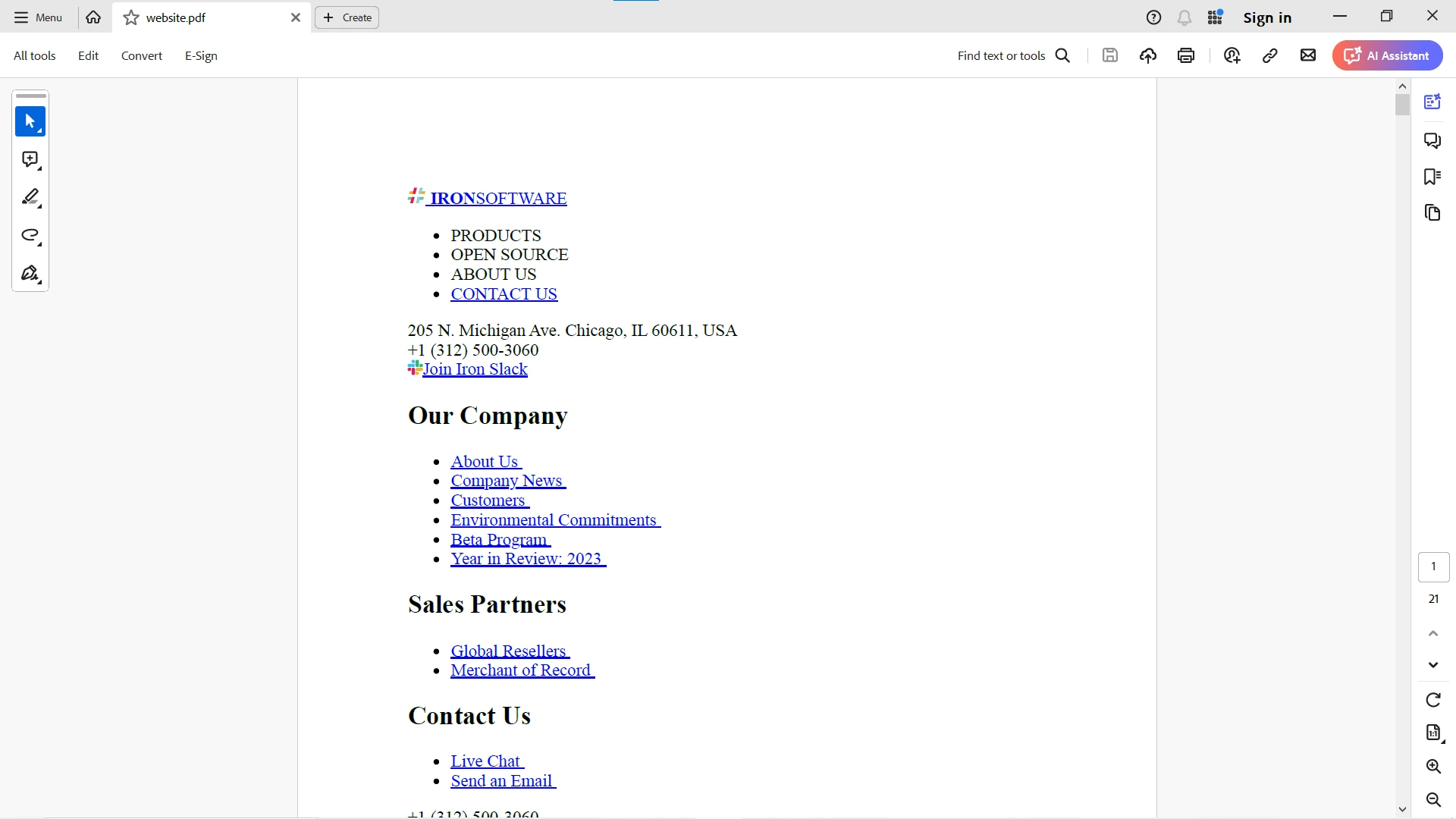
URL 데이터는 OkHttp 클라이언트를 사용하여 가져온 다음 IronPDF 사용하여 효율적으로 PDF로 변환합니다(아래 참조).
IronPDF 에 대한 더 자세한 정보는 IronPDF 문서 페이지를 참조하십시오. IronPDF 더욱 효과적으로 활용하려면 IronPDF 코드 예제 및 IronPDF API 참조 페이지도 확인해 보세요.
결론
OkHttp는 자바 및 안드로이드용으로 개발된 다재다능하고 강력한 HTTP 클라이언트로, 네트워크 요청 과정을 간소화합니다. OkHttp 클라이언트는 동기 및 비동기 작업 지원, 연결 풀링, 투명한 GZIP 압축, 캐싱 및 HTTP/2를 통해 다양한 사용 사례에 적합합니다. OkHttp를 Java 애플리케이션에 통합하면 성능, 안정성 및 효율성을 향상시킬 수 있습니다.
OkHttp를 IronPDF 와 통합하면 웹 소스에서 HTML 콘텐츠를 효율적으로 가져와 PDF 문서로 변환할 수 있습니다. 이 접근 방식은 보고서를 생성하거나, 웹 페이지를 저장하거나, 웹 콘텐츠를 오프라인 문서로 변환해야 하는 애플리케이션에 특히 유용합니다.
IronPDF 무료 체험판을 통해 Java 애플리케이션에서 PDF 생성의 잠재력을 최대한 활용해 보세요. 전문가 수준의 PDF 생성 기능을 프로젝트에 원활하게 통합할 수 있습니다. 지금 다운로드하여 PDF 생성 경험을 한 단계 업그레이드하세요!









 무료로 시작하세요
 무료로 시작하세요
 무료 라이브 데모 예약하기





 신용카드나 계정 생성은 필요하지 않습니다.










