푸터 콘텐츠로 바로가기
JAVA용 IRONPDF 사용

Java에서 PDF 파일을 보는 방법

This article illustrates how to view PDF files in Java using IronPDF and walks you through the steps to set up a Maven project. Additionally, it explores other features of IronPDF and discusses its utility in creating powerful PDF-processing applications in Java.

IronPDF: Java PDF Library

IronPDF Java Library is a comprehensive and easy-to-use PDF library specifically designed for Java developers. The library integrates powerful PDF processing features with minimal effort. IronPDF is an all-in-one solution for creating, editing, viewing, and extracting content from PDF files. It simplifies PDF handling in Java applications, allowing developers to focus on their core tasks.

Getting Started with IronPDF for Java

Setting Up the Maven Project

First, set up a Maven project and add the necessary dependencies for IronPDF and the SLF4J logger. Add the following code to your project's pom.xml file:


<dependencies>
    <dependency>
        <groupId>com.ironsoftware</groupId>
        <artifactId>ironpdf</artifactId>
        <version>YOUR_VERSION_HERE</version>
    </dependency>
    <dependency>
        <groupId>org.slf4j</groupId>
        <artifactId>slf4j-api</artifactId>
        <version>YOUR_VERSION_HERE</version>
    </dependency>
</dependencies>

<dependencies>
    <dependency>
        <groupId>com.ironsoftware</groupId>
        <artifactId>ironpdf</artifactId>
        <version>YOUR_VERSION_HERE</version>
    </dependency>
    <dependency>
        <groupId>org.slf4j</groupId>
        <artifactId>slf4j-api</artifactId>
        <version>YOUR_VERSION_HERE</version>
    </dependency>
</dependencies>
XML

Creating a Java Class to View PDF Files

Next, create a Java class to use IronPDF for reading and extracting text from a PDF file. Use the following code as a template:

import java.awt.print.PrinterException;
import java.io.IOException;
import java.nio.file.Paths;

import com.ironsoftware.ironpdf.License;
import com.ironsoftware.ironpdf.PdfDocument;

public class App {

    public static void main(String[] args) throws IOException, PrinterException {
        // Set the IronPDF license key
        License.setLicenseKey("Your-License-Key");

        // Load the PDF file
        PdfDocument pdf = new PdfDocument(Paths.get("C:\\dotnet.pdf"));

        // Extract text from the PDF file
        String text = pdf.extractAllText();

        // Display the extracted text
        System.out.println("Text extracted from the PDF: " + text);
    }
}
import java.awt.print.PrinterException;
import java.io.IOException;
import java.nio.file.Paths;

import com.ironsoftware.ironpdf.License;
import com.ironsoftware.ironpdf.PdfDocument;

public class App {

    public static void main(String[] args) throws IOException, PrinterException {
        // Set the IronPDF license key
        License.setLicenseKey("Your-License-Key");

        // Load the PDF file
        PdfDocument pdf = new PdfDocument(Paths.get("C:\\dotnet.pdf"));

        // Extract text from the PDF file
        String text = pdf.extractAllText();

        // Display the extracted text
        System.out.println("Text extracted from the PDF: " + text);
    }
}
JAVA

Let's break down the code to understand it better:

Import statements: Import the necessary classes and packages to work with IronPDF and handle exceptions. The java.nio.file.Paths class works with file paths, while the java.awt.print.PrinterException and java.io.IOException handle exceptions that may occur during the PDF processing.

Setting the IronPDF license key: Before using IronPDF, set the license key. Replace "Your-License-Key" with your IronPDF license key to enable the library features.

License.setLicenseKey("Your-License-Key");
JAVA

Loading the PDF file: Create a PdfDocument object by providing the PDF file path. Use Paths.get to create a Path object pointing to the "C:\dotnet.pdf" file.

PdfDocument pdf = new PdfDocument(Paths.get("C:\\dotnet.pdf"));
JAVA

Extracting text from the PDF file: Once loaded, use the [extractAllText](/java/object-reference/api/com/ironsoftware/ironpdf/PdfDocument.html#extractAllText()) method to extract all text from the PDF.

String text = pdf.extractAllText();
JAVA

Displaying the Extracted Text: Print the extracted text to the console for viewing.

System.out.println("Text extracted from the PDF: " + text);
JAVA

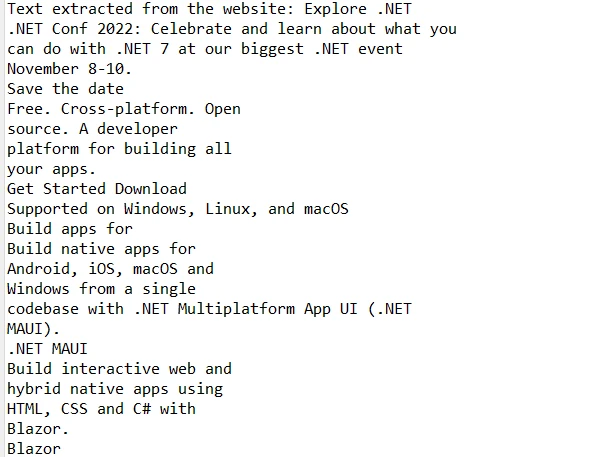
IronPDF extracts the text from the PDF file as shown in the extracted text section.

How to View PDF File in Java, Figure 1: The extracted texts The extracted texts

Features of IronPDF

PDF Generation with IronPDF: IronPDF can generate PDF files from various sources like HTML, images, and plain text. This feature is useful for creating dynamic reports, invoices, and documents in PDF format directly from Java applications.

PDF Editing: IronPDF offers tools for editing existing PDFs. Developers can merge PDF documents, split PDFs, and manipulate content within files, allowing creation of custom PDFs for specific needs.

PDF Viewing and Text Extraction with IronPDF: IronPDF makes viewing and extracting text easy, crucial for apps needing text searching, indexing, or parsing within PDFs.

Rasterize PDF to Images: IronPDF can render PDFs as images, simplifying their display in apps or websites. It supports formats like Bitmap, PNG, or JPEG.

PDF Form Filling: IronPDF enables programmatic form filling, automating form tasks, pre-populating forms, and streamlining workflows.

Security Features: IronPDF supports PDF encryption and digital signatures, protecting sensitive information and ensuring document authenticity.

Platform Independence: IronPDF is platform-independent, compatible with various OS like Windows, macOS, and Linux. Java apps using IronPDF can be deployed across different environments smoothly.

Conclusion

In conclusion, IronPDF is an excellent solution for developers aiming to view and manipulate PDFs in Java applications. With features like PDF generation, editing, rendering, and form filling, IronPDF creates powerful, efficient, and user-friendly document management tools. Its platform-independent nature ensures compatibility across environments, ideal for modern Java applications.

IronPDF is not an open-source library but offers a free trial, enabling developers to explore its capabilities. Licensing options start at $799, providing a cost-effective solution for streamlining PDF processing tasks.

자주 묻는 질문

Java 애플리케이션에서 PDF 파일을 보려면 어떻게 해야 하나요?

IronPDF를 사용하여 Java에서 PDF 파일을 볼 수 있습니다. 여기에는 IronPDF 및 SLF4J 종속성이 있는 Maven 프로젝트를 설정하고, Java 클래스를 생성하고, IronPDF의 메서드를 사용하여 PDF 파일에서 텍스트를 로드하고 추출하는 작업이 포함됩니다.

Java용 Maven 프로젝트에서 IronPDF를 설정하는 단계는 무엇인가요?

Maven 프로젝트에서 IronPDF를 설정하려면 프로젝트의 pom.xml 파일에 IronPDF 및 SLF4J 종속성을 추가하세요. 이 설정을 하려면 각 종속성에 대해 올바른 groupId, artifactId 및 버전을 지정해야 합니다.

IronPDF를 사용하여 Java에서 HTML로 PDF 파일을 생성할 수 있나요?

예, IronPDF는 HTML, 이미지 및 텍스트에서 PDF 파일을 생성할 수 있으므로 Java 애플리케이션에서 직접 동적 보고서, 송장 및 문서를 생성하는 데 적합합니다.

IronPDF는 Java에서 PDF 관리를 위해 어떤 기능을 제공하나요?

IronPDF는 다양한 형식의 PDF 생성, 편집, 병합, 분할, 텍스트 추출, PDF를 이미지로 래스터화, 양식 채우기, 암호화 및 디지털 서명과 같은 보안 기능 등의 기능을 제공합니다.

IronPDF는 다른 운영 체제와 호환되나요?

예, IronPDF는 플랫폼에 구애받지 않고 Windows, macOS, Linux와 호환되므로 다양한 환경에서 IronPDF를 사용하는 Java 애플리케이션을 원활하게 배포할 수 있습니다.

IronPDF는 Java로 된 PDF 파일에서 텍스트 추출을 지원하나요?

예, IronPDF는 PDF 파일에서 텍스트 추출을 지원하므로 PDF 내에서 텍스트 검색, 인덱싱 또는 구문 분석이 필요한 애플리케이션에 유용합니다.

Java용 IronPDF에서 사용할 수 있는 보안 기능이 있나요?

IronPDF에는 PDF 암호화 및 디지털 서명과 같은 보안 기능이 포함되어 있어 민감한 정보를 보호하고 문서의 신뢰성을 보장합니다.

IronPDF는 Java에서 PDF 양식 작성을 어떻게 처리하나요?

IronPDF는 프로그래밍 방식의 양식 채우기를 지원하여 양식 관련 작업을 자동화하고 양식을 미리 채우며 PDF 문서 내 워크플로우를 간소화할 수 있습니다.

IronPDF는 Java PDF 처리를 위한 오픈 소스 라이브러리인가요?

아니요, IronPDF는 오픈 소스가 아닙니다. 하지만 개발자가 기능을 살펴볼 수 있는 무료 평가판을 제공하며 라이선스 옵션을 구매할 수 있습니다.

Java 개발자를 위해 IronPDF를 사용하면 어떤 이점이 있나요?

IronPDF는 플랫폼 독립성 및 Java 애플리케이션과의 손쉬운 통합과 함께 PDF 생성, 편집 및 보안을 위한 기능을 갖춘 Java 개발자를 위한 포괄적인 솔루션을 제공합니다.

커티스 차우
기술 문서 작성자

커티스 차우는 칼턴 대학교에서 컴퓨터 과학 학사 학위를 취득했으며, Node.js, TypeScript, JavaScript, React를 전문으로 하는 프론트엔드 개발자입니다. 직관적이고 미적으로 뛰어난 사용자 인터페이스를 만드는 데 열정을 가진 그는 최신 프레임워크를 활용하고, 잘 구성되고 시각적으로 매력적인 매뉴얼을 제작하는 것을 즐깁니다.


커티스는 개발 분야 외에도 사물 인터넷(IoT)에 깊은 관심을 가지고 있으며, 하드웨어와 소프트웨어를 통합하는 혁신적인 방법을 연구합니다. 여가 시간에는 게임을 즐기거나 디스코드 봇을 만들면서 기술에 대한 애정과 창의성을 결합합니다.