Na rozległym krajobrazie języków programowania poprawa czytelności i efektywności kodu ma kluczowe znaczenie, a język C# wyróżnia się jako niezawodny, oferując różnorodne konstrukcje, które wspierają Twoje potrzeby programistyczne. Wśród jego arsenału potężnych narzędzi, "instrukcja switch C#" wyróżnia się znacząco. Ten kompleksowy przewodnik zbada ich złożone niuanse w ramach języka C#. Zagłębimy się w jego wieloaspektowe zastosowania i rozświetlimy jego praktyczne zastosowanie poprzez rzeczywisty scenariusz z udziałem IronPDF, wszechstronnej biblioteki C# do generacji PDF. Celem tej podróży jest nie tylko rozplątanie jego mechaniki, ale także podkreślenie jego znaczenia w szerszym kontekście rozwoju C#.
1. Zrozumienie Instrukcji Switch
Instrukcja switch w C# to instrukcja sterująca przepływem, która pozwala programistom pisać czystszy i bardziej zwięzły kod przy pracy z wieloma warunkami. Jest szczególnie przydatna, gdy chcesz wykonywać różne działania w zależności od wartości określonej zmiennej.
Sprawia to, że jest ona idealną alternatywą dla instrukcji if-else, gdy kluczowym elementem jest słowo kluczowe/zmienna, ponieważ zwiększa czytelność kodu i zdolność do jego utrzymania. W przeciwieństwie do instrukcji if-else, która może prowadzić do zagnieżdżonych struktur i potencjalnej złożoności kodu, instrukcja switch oferuje bardziej zorganizowaną alternatywę. Jest szczególnie korzystna przy pracy ze zmienną, która musi wyzwalać różne działania w zależności od swojej wartości.
Teraz przyjrzyjmy się bliżej roli przerywania w kontekście instrukcji switch. W C#, instrukcja break jest używana do zakończenia wykonania bloku kodu związanego z określoną sprawą w obrębie bloku switch. Gdy zostanie znalezione dopasowanie lub wyrażenie case switch pasuje, a blok kodu odpowiadający tej sprawie jest wykonywany, instrukcja break jest kluczowa dla zapobiegania ocenie kolejnych przypadków. Jeśli chcesz zaimplementować zachowanie przejścia w swojej instrukcji, powinieneś użyć instrukcji goto zamiast break.
Oto podstawowa struktura instrukcji switch w C#:
switch (variable)
{
    case value1:
        // Code to be executed if variable equals value1
        break;
    case value2:
        // Code to be executed if variable equals value2
        break;
    // More cases can be added as needed
    default:
        // Default Case to be executed if none of the cases match
        break;
}
switch (variable)
{
    case value1:
        // Code to be executed if variable equals value1
        break;
    case value2:
        // Code to be executed if variable equals value2
        break;
    // More cases can be added as needed
    default:
        // Default Case to be executed if none of the cases match
        break;
}
Select Case variable
Case value1
' Code to be executed if variable equals value1
Case value2
' Code to be executed if variable equals value2
' More cases can be added as needed
Case Else
' Default Case to be executed if none of the cases match
End Select
Select Case variable
	Case value1
		' Code to be executed if variable equals value1
	Case value2
		' Code to be executed if variable equals value2
	' More cases can be added as needed
	Case Else
		' Default Case to be executed if none of the cases match
End Select
Teraz zbadajmy różne rodzaje instrukcji switch i ich przypadki użycia.
2. Rodzaje Instrukcji Switch i Ich Zastosowania
2.1. Prosta Instrukcja Switch
To najbardziej podstawowa forma instrukcji switch. Porównuje zmienną z wartościami stałymi i wykonuje blok kodu związany z pierwszą pasującą wartością lub przypadkiem. Jeśli nie znaleziono dopasowania, wykonywany jest domyślny blok kodu.
int day = 3;
switch (day)
{
    case 1:
        Console.WriteLine("Monday");
        break;
    case 2:
        Console.WriteLine("Tuesday");
        break;
    // More cases...
    default:
        Console.WriteLine("Invalid day");
        break;
}
int day = 3;
switch (day)
{
    case 1:
        Console.WriteLine("Monday");
        break;
    case 2:
        Console.WriteLine("Tuesday");
        break;
    // More cases...
    default:
        Console.WriteLine("Invalid day");
        break;
}
Dim day As Integer = 3
Select Case day
Case 1
Console.WriteLine("Monday")
Case 2
Console.WriteLine("Tuesday")
' More cases...
Case Else
Console.WriteLine("Invalid day")
End Select
Dim day As Integer = 3
Select Case day
	Case 1
		Console.WriteLine("Monday")
	Case 2
		Console.WriteLine("Tuesday")
	' More cases...
	Case Else
		Console.WriteLine("Invalid day")
End Select
2.2. Instrukcja Switch z Wzorcami (C# 7.0 i nowsze)
C# 7.0 wprowadził dopasowanie wzorców case, które pozwala na bardziej ekspresywną i elastyczną instrukcję switch. Wyrażenie dopasowania wzorca może zawierać wzorce typów, wzorce właściwości i inne, co czyni kod jeszcze bardziej czytelnym.
object obj = "Hello";
switch (obj)
{
    case string s:
        Console.WriteLine($"String of length {s.Length}");
        break;
    case int i:
        Console.WriteLine($"Integer: {i}");
        break;
    // More cases...
    default:
        Console.WriteLine("Other type");
        break;
}
object obj = "Hello";
switch (obj)
{
    case string s:
        Console.WriteLine($"String of length {s.Length}");
        break;
    case int i:
        Console.WriteLine($"Integer: {i}");
        break;
    // More cases...
    default:
        Console.WriteLine("Other type");
        break;
}
Dim obj As Object = "Hello"
Select Case obj
'INSTANT VB TODO TASK: The following 'case' pattern variable is not converted by Instant VB:
'ORIGINAL LINE: case string s:
Case String s
Console.WriteLine($"String of length {s.Length}")
'INSTANT VB TODO TASK: The following 'case' pattern variable is not converted by Instant VB:
'ORIGINAL LINE: case int i:
Case Integer i
Console.WriteLine($"Integer: {i}")
' More cases...
Case Else
Console.WriteLine("Other type")
End Select
Dim obj As Object = "Hello"
Select Case obj
'INSTANT VB TODO TASK: The following 'case' pattern variable is not converted by Instant VB:
'ORIGINAL LINE: case string s:
	Case String s
		Console.WriteLine($"String of length {s.Length}")
'INSTANT VB TODO TASK: The following 'case' pattern variable is not converted by Instant VB:
'ORIGINAL LINE: case int i:
	Case Integer i
		Console.WriteLine($"Integer: {i}")
	' More cases...
	Case Else
		Console.WriteLine("Other type")
End Select
2.3. Wyrażenie Switch (C# 8.0 i nowsze)
W C# 8.0 wprowadzono nową i bardziej zwięzłą formę instrukcji switch jako wyrażenia switch. Mogą być używane w miejscach, gdzie potrzebne jest wyrażenie stałej wartości, co czyni kod krótszym i bardziej eleganckim.
int day = 2;
string result = day switch
{
    1 => "Monday",
    2 => "Tuesday",
    // More cases...
    _ => "Invalid day"
};
Console.WriteLine(result);
int day = 2;
string result = day switch
{
    1 => "Monday",
    2 => "Tuesday",
    // More cases...
    _ => "Invalid day"
};
Console.WriteLine(result);
Dim day As Integer = 2
Dim tempVar As String
Select Case day
Case 1
tempVar = "Monday"
Case 2
tempVar = "Tuesday"
' More cases...
Case Else
tempVar = "Invalid day"
End Select
Dim result As String = tempVar
Console.WriteLine(result)
Dim day As Integer = 2
Dim tempVar As String
Select Case day
	Case 1
		tempVar = "Monday"
	Case 2
		tempVar = "Tuesday"
	' More cases...
	Case Else
		tempVar = "Invalid day"
End Select
Dim result As String = tempVar
Console.WriteLine(result)
Teraz, gdy mamy solidne zrozumienie instrukcji switch, zobaczmy, jak mogą one być stosowane w rzeczywistym scenariuszu używając IronPDF w C#.
3. Introducing IronPDF in C#
IronPDF to popularna biblioteka C#, która pozwala programistom łatwo generować i manipulować dokumentami PDF. Upraszcza zadania związane z tworzeniem, edytowaniem i renderowaniem plików PDF. Zobaczmy, jak można wykorzystać instrukcję switch w IronPDF, aby poprawić funkcjonalność i organizację kodu.
3.1. Korzystanie z instrukcji switch w IronPDF
Załóżmy, że pracujesz nad systemem zarządzania dokumentami, w którym musisz generować różne typy plików PDF w zależności od przeznaczenia treści dokumentu. Oto jak można wykorzystać instrukcję switch w IronPDF:
using IronPdf;
using System;

class GeneratePDF
{
    public static void Main(String[] args)
    {
        var renderer = new ChromePdfRenderer();
        string userInput;

        Console.WriteLine("Enter your input:");
        Console.WriteLine("Enter 'I' for Invoice");
        Console.WriteLine("Enter 'R' for Report");
        userInput = Console.ReadLine();

        switch (userInput)
        {
            case "R":
                // Render and save a PDF for a report
                var reportPdf = renderer.RenderHtmlFileAsPdf("report.html");
                reportPdf.SaveAs("Report.pdf");
                break;
            case "I":
                // Render and save a PDF for an invoice
                var invoicePdf = renderer.RenderHtmlFileAsPdf("invoice.html");
                invoicePdf.SaveAs("Invoice.pdf");
                break;
            default:
                Console.WriteLine("Invalid input");
                break;
        }
    }
}
using IronPdf;
using System;

class GeneratePDF
{
    public static void Main(String[] args)
    {
        var renderer = new ChromePdfRenderer();
        string userInput;

        Console.WriteLine("Enter your input:");
        Console.WriteLine("Enter 'I' for Invoice");
        Console.WriteLine("Enter 'R' for Report");
        userInput = Console.ReadLine();

        switch (userInput)
        {
            case "R":
                // Render and save a PDF for a report
                var reportPdf = renderer.RenderHtmlFileAsPdf("report.html");
                reportPdf.SaveAs("Report.pdf");
                break;
            case "I":
                // Render and save a PDF for an invoice
                var invoicePdf = renderer.RenderHtmlFileAsPdf("invoice.html");
                invoicePdf.SaveAs("Invoice.pdf");
                break;
            default:
                Console.WriteLine("Invalid input");
                break;
        }
    }
}
Imports IronPdf
Imports System
Class GeneratePDF
Public Shared Sub Main(ByVal args As String())
Dim renderer = New ChromePdfRenderer()
Dim userInput As String
Console.WriteLine("Enter your input:")
Console.WriteLine("Enter 'I' for Invoice")
Console.WriteLine("Enter 'R' for Report")
userInput = Console.ReadLine()
Select Case userInput
Case "R"
' Render and save a PDF for a report
Dim reportPdf = renderer.RenderHtmlFileAsPdf("report.html")
reportPdf.SaveAs("Report.pdf")
Case "I"
' Render and save a PDF for an invoice
Dim invoicePdf = renderer.RenderHtmlFileAsPdf("invoice.html")
invoicePdf.SaveAs("Invoice.pdf")
Case Else
Console.WriteLine("Invalid input")
End Select
End Sub
End Class
Imports IronPdf
Imports System

Class GeneratePDF
    Public Shared Sub Main(ByVal args As String())
        Dim renderer = New ChromePdfRenderer()
        Dim userInput As String

        Console.WriteLine("Enter your input:")
        Console.WriteLine("Enter 'I' for Invoice")
        Console.WriteLine("Enter 'R' for Report")
        userInput = Console.ReadLine()

        Select Case userInput
            Case "R"
                ' Render and save a PDF for a report
                Dim reportPdf = renderer.RenderHtmlFileAsPdf("report.html")
                reportPdf.SaveAs("Report.pdf")
            Case "I"
                ' Render and save a PDF for an invoice
                Dim invoicePdf = renderer.RenderHtmlFileAsPdf("invoice.html")
                invoicePdf.SaveAs("Invoice.pdf")
            Case Else
                Console.WriteLine("Invalid input")
        End Select
    End Sub
End Class
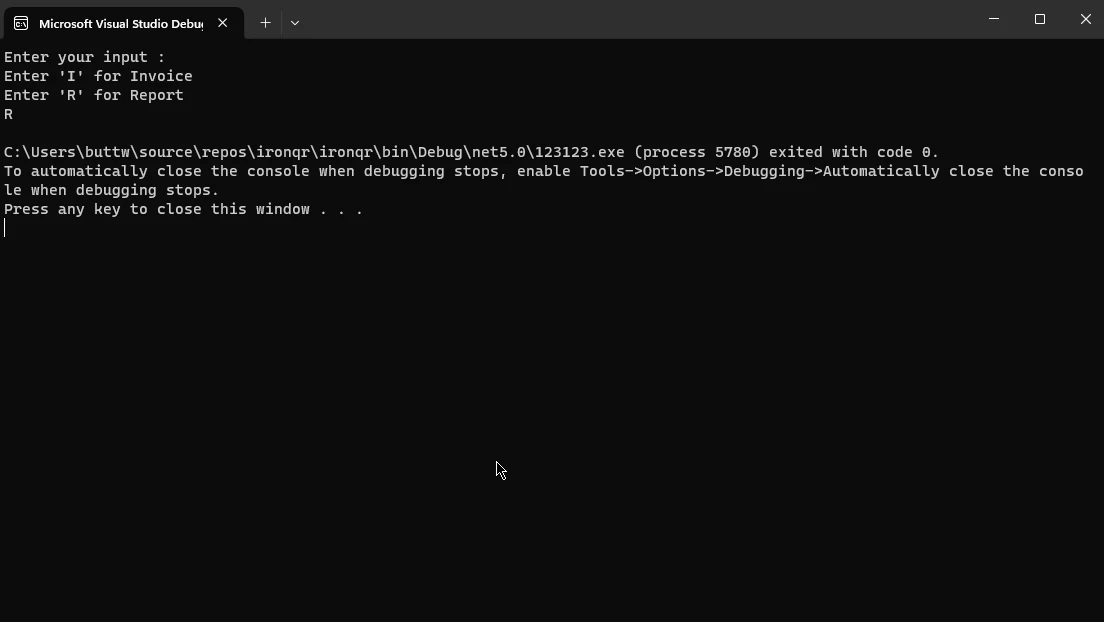
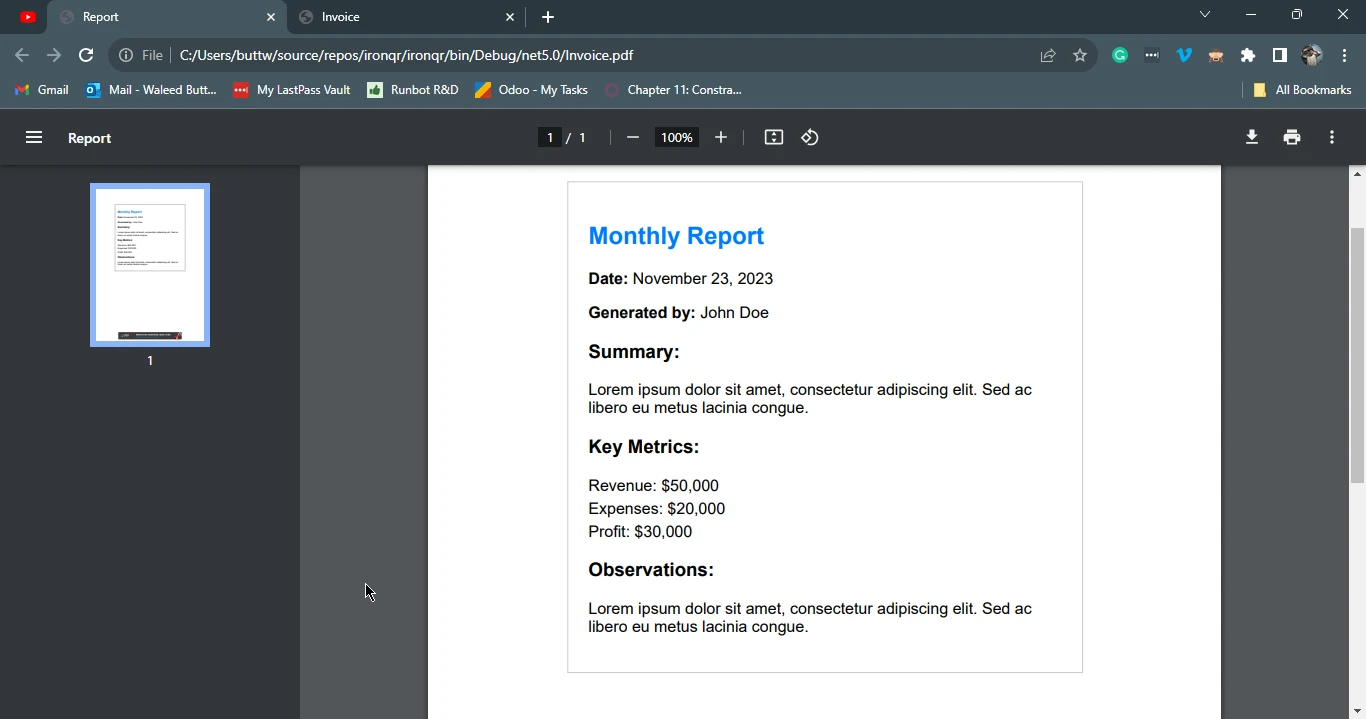
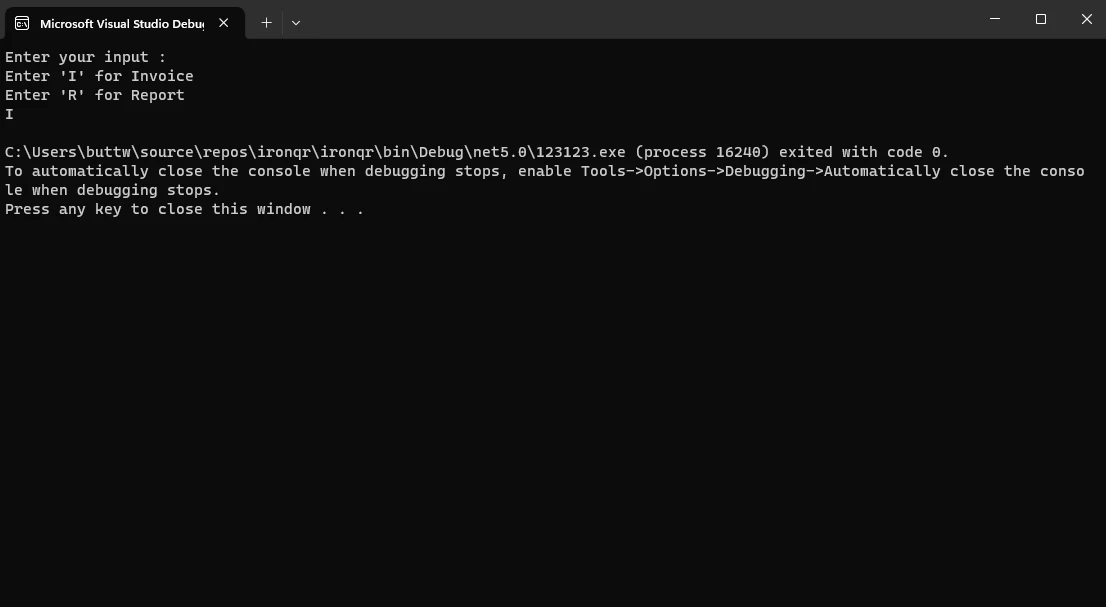
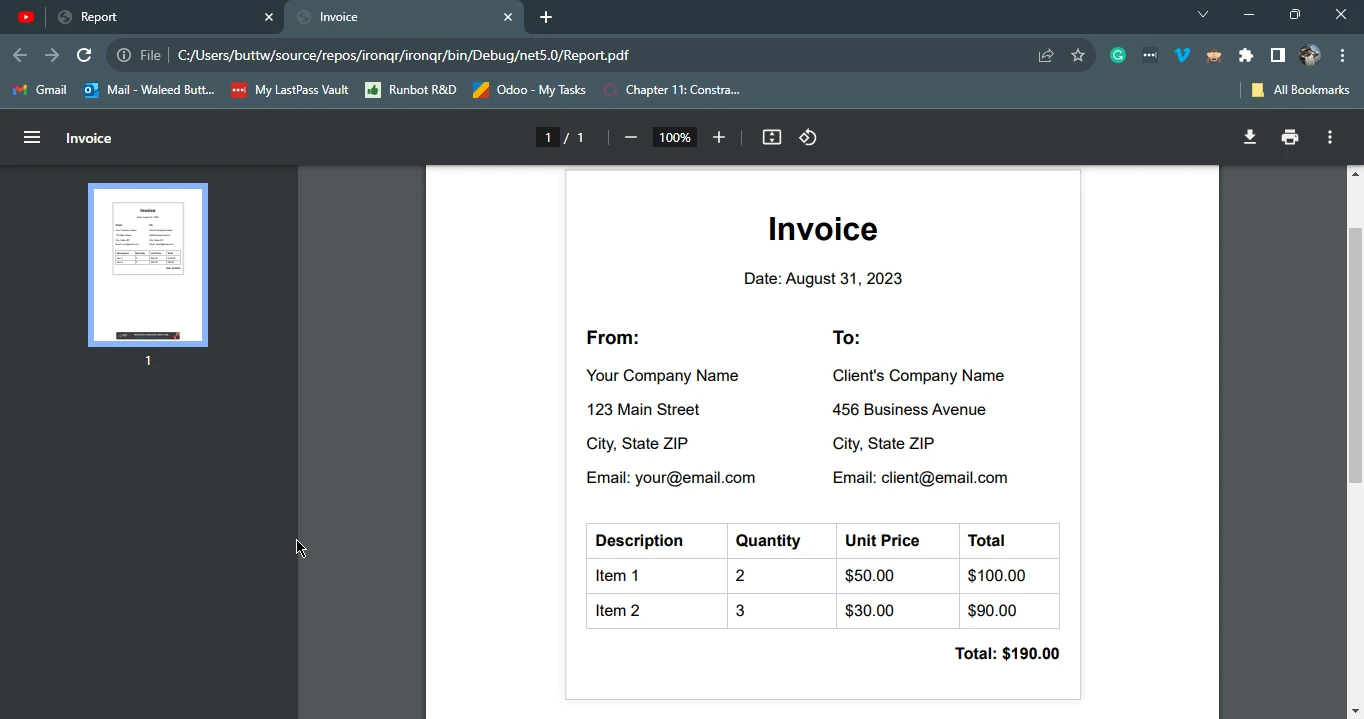
Ten program napisany w języku C# wykorzystuje bibliotekę IronPDF do dynamicznego generowania plików PDF na podstawie danych wprowadzonych przez użytkownika. Użytkownik jest proszony o wprowadzenie litery "I" dla faktury (Invoice) lub "R" dla raportu (Report). W zależności od danych wejściowych program wykorzystuje klasę ChromePdfRenderer do renderowania odpowiedniego pliku HTML ("report.html" dla raportu lub "invoice.html" dla faktury) do formatu PDF. Wygenerowany plik PDF jest następnie zapisywany pod odpowiednią nazwą: "Report.pdf" dla raportu i "Invoice.pdf" dla faktury. Takie podejście zapewnia elastyczny i interaktywny sposób generowania określonych typów dokumentów PDF za pośrednictwem interfejsu konsoli.
3.2. Przykład raportu
W poniższym przykładzie utworzymy raport na podstawie danych wprowadzonych przez użytkownika.
Dane wejściowe z konsoli:
Wynik w formacie PDF:
3.3. Przykład faktury
W tym przykładzie instrukcji case utworzymy fakturę na podstawie danych wprowadzonych przez użytkownika oraz instrukcji switch.
Dane wejściowe z konsoli:
Wynik w formacie PDF:
4. Podsumowanie
Podsumowując, instrukcja switch w języku C# wyróżnia się jako solidne narzędzie kontroli przepływu, które oferuje programistom bardziej uporządkowane i zwięzłe podejście do obsługi wielu warunków w porównaniu z tradycyjnymi instrukcjami if-else. Dzięki kategoryzacji wykonywania kodu na podstawie wartości zmiennych instrukcje switch mogą ułatwić pisanie kodu poprzez poprawę czytelności i łatwości utrzymania.
Wszechstronność instrukcji switch jest ilustrowana poprzez różne typy, w tym proste instrukcje switch, bloki switch oparte na wzorcach oraz wyrażenia switch, z których każdy jest dostosowany do konkretnych scenariuszy kodowania.
Integracja biblioteki IronPDF stanowi przykład praktycznego zastosowania instrukcji switch w generowaniu dynamicznych dokumentów PDF na podstawie danych wprowadzonych przez użytkownika i pokazuje, w jaki sposób tę funkcję można wykorzystać w rzeczywistych scenariuszach w celu zwiększenia elastyczności i wydajności kodowania w języku C#.
Aby poznać możliwości IronPDF i dowiedzieć się więcej o konwersji HTML do PDF, odwiedź samouczki IronPDF.













