using IronPdf;

// Disable local disk access or cross-origin requests
Installation.EnableWebSecurity = true;

// Instantiate Renderer
var renderer = new ChromePdfRenderer();

// Create a PDF from a HTML string using C#
var pdf = renderer.RenderHtmlAsPdf("<h1>Hello World</h1>");

// Export to a file or Stream
pdf.SaveAs("output.pdf");

// Advanced Example with HTML Assets
// Load external html assets: Images, CSS and JavaScript.
// An optional BasePath 'C:\site\assets\' is set as the file location to load assets from
var myAdvancedPdf = renderer.RenderHtmlAsPdf("<img src='icons/iron.png'>", @"C:\site\assets\");
myAdvancedPdf.SaveAs("html-with-assets.pdf");
using IronPdf;// Disable local disk access or cross-origin requestsInstallation.EnableWebSecurity = true;// Instantiate Renderervar renderer = new ChromePdfRenderer();// Create a PDF from a HTML string using C#var pdf = renderer.RenderHtmlAsPdf("<h1>Hello World</h1>");// Export to a file or Streampdf.SaveAs("output.pdf");// Advanced Example with HTML Assets// Load external html assets: Images, CSS and JavaScript.// An optional BasePath 'C:\site\assets\' is set as the file location to load assets fromvar myAdvancedPdf = renderer.RenderHtmlAsPdf("<img src='icons/iron.png'>", @"C:\site\assets\");myAdvancedPdf.SaveAs("html-with-assets.pdf");
## Deedle C#
[`Deedle`](https://github.com/fslaborg/Deedle) to potężna biblioteka do manipulacji danymi i analizy danych. Oferuje pełne ramki danych i serie, umożliwiając efektywne zarządzanie ustrukturyzowanymi ramkami danych. Deedle zapewnia narzędzia do brakujących danych, wyrównania danych i stosowania funkcji pomocniczych z członkami statycznymi `ofNullables` oraz `ofObservations`. Jest szeroko stosowane w naukach o danych ze względu na swoją elastyczność i wydajność.
[`IronPDF`](/) to biblioteka do tworzenia i manipulacji dokumentami PDF w .NET. Pomaga generować pliki PDF z HTML, konwertować obrazy na PDF i wyciągać zawartość z plików PDF. IronPDF upraszcza zadania związane z PDF w projektach .NET.
W tym artykule dowiesz się, jak zacząć korzystać z Deedle dla C#, skonfigurować je w projektach .NET używając Visual Studio oraz wdrożyć kluczowe funkcje z automatycznie generowaną dokumentacją. Zobaczysz przykłady kodu i wyjaśnienia, które pomogą ci zrozumieć, jak efektywnie korzystać z Deedle, w tym jak zastosować określoną funkcję.
## Getting Started with Deedle C#
### Konfiguracja Deedle w projektach .NET
Na początek stwórz nowy projekt C# Console Application w [Visual Studio](https://visualstudio.microsoft.com/).
Aby użyć Deedle w projekcie .NET, musisz zainstalować pakiet NuGet Deedle. Uruchom następującą komendę w konsoli NuGet:
```powershell
Install-Package Deedle
```
Po zainstalowaniu musisz zaimportować przestrzeń nazw Deedle do swojego projektu:
```csharp
using Deedle;
```
### Podstawowy przykład kodu
Zacznijmy od prostego przykładu stworzenia i manipulacji ramką danych. To pomoże zrozumieć podstawy Deedle.
```csharp
using System;
using Deedle;

class Program
{
    static void Main()
    {
        // Creating a series with integer keys and double values
        var series = new Series<int, double>(new[] { 1, 2, 3 }, new[] { 3.5, 4.2, 5.1 });
        Console.WriteLine("Series:");
        Console.WriteLine(series);

        // Creating a data frame from a 2D array
        var rowIndex = new[] { 1, 2, 3 };
        var colIndex = new[] { "A", "B" };
        var data = new double[,] { { 1.0, 3.5 }, { 2.0, 4.2 }, { 3.0, 5.1 } };
        var dataFrame = Frame.FromArray2D(data)
                             .IndexRowsWith(rowIndex)
                             .IndexColumnsWith(colIndex);
        Console.WriteLine("Data Frame:");
        Console.WriteLine(dataFrame);
    }
}
```
W tym przykładzie tworzysz serię z kluczami wierszy typu całkowitego i wartościami typu podwójnego. Następnie tworzysz ramkę danych używając dwuwymiarowej tablicy wartości typu podwójnego. Indeksujesz wiersze za pomocą liczb całkowitych, a kolumny za pomocą łańcuchów znaków.
## Implementing Features of Deedle C#
### Obsługa brakujących wartości
Obsługa brakujących wartości jest kluczowa w manipulacji danymi. Deedle zapewnia solidne wsparcie do brakujących danych. Możesz stworzyć serię z brakującymi wartościami i wykonać operacje, aby sobie z nimi poradzić.
```csharp
using System;
using Deedle;
class Program
{
static void Main()
{
// Creating a series with nullable doubles to represent missing values
var series = new Series<int, double?>(
new[] { 75, 8, 47, 5 },
new double?[] { 75.0, null, 47.0, 5.0 }
);
Console.WriteLine("Original Series with Missing Values:");
Console.WriteLine(series);
// Fill missing values with a specified value (e.g., 0.0)
var filledSeries = series.FillMissing(0.0);
Console.WriteLine("Series after Filling Missing Values:");
Console.WriteLine(filledSeries);
}
}
```
Ten przykład tworzy serię z brakującymi wartościami i wypełnia je określoną wartością. Można również użyć metod członków statycznych, takich jak `ofOptionalObservations` oraz `ofValues` w bardziej złożonych scenariuszach.
### Manipulacja danymi
Deedle pozwala na wykonywanie różnorodnych zadań manipulacji danymi. Możesz filtrować, przekształcać i agregować dane w ramkach danych.
```csharp
using System;
using Deedle;
class Program
{
static void Main()
{
// Creating a data frame
var rowIndex = new[] { 1, 2, 3 };
var colIndex = new[] { "A", "B" };
var data = new double[,] { { 1.0, 3.5 }, { 2.0, 4.2 }, { 3.0, 5.1 } };
var dataFrame = Frame.FromArray2D(data)
.IndexRowsWith(rowIndex)
.IndexColumnsWith(colIndex);
Console.WriteLine("Original Data Frame:");
Console.WriteLine(dataFrame);
// Filter rows where column 'A' is greater than 1.5
var filteredFrame = dataFrame.Where(row => row.Value.GetAs<double>("A") > 1.5);
Console.WriteLine("Filtered Data Frame:");
Console.WriteLine(filteredFrame);
// Add a new column 'C' which is the sum of columns 'A' and 'B'
dataFrame.AddColumn("C", dataFrame["A"] + dataFrame["B"]);
Console.WriteLine("Transformed Data Frame with New Column 'C':");
Console.WriteLine(dataFrame);
}
}
```
Ten przykład demonstruje filtrowanie wierszy na podstawie warunku i dodawanie nowej kolumny z przekształconymi danymi. Deedle wdraża standardowe metody rozszerzania ramek, aby analiza danych była prosta.
### Funkcje statystyczne
Deedle udostępnia standardowe funkcje statystyczne do analizy danych. Korzystając z funkcji statystycznych, można obliczyć średnią, odchylenie standardowe i inne miary statystyczne.
```csharp
using System;
using Deedle;
class Program
{
static void Main()
{
// Creating a series with integer keys and double values
var series = new Series<int, double>(
new[] { 1, 2, 3, 4 },
new[] { 1.0, 2.0, 3.0, 4.0 }
);
Console.WriteLine("Series:");
Console.WriteLine(series);
// Calculate the mean of the series
var mean = series.Mean();
Console.WriteLine($"Mean: {mean}");
// Calculate the standard deviation of the series
var stddev = series.StdDev();
Console.WriteLine($"Standard Deviation: {stddev}");
}
}
```
Ten przykład kodu Deedle implementuje standardowe funkcje statystyczne `Mean()` oraz `StdDev()`, aby obliczyć średnią i odchylenie standardowe serii.
### Tworzenie ram danych z plików CSV
Deedle pozwala w łatwy sposób tworzyć ramki danych z plików CSV. Jest to pomocne przy ładowaniu i analizowaniu danych strukturalnych.
```csharp
using System;
using Deedle;
class Program
{
static void Main()
{
// Load a data frame from a CSV file
var dataFrame = Frame.ReadCsv("data.csv");
Console.WriteLine("Data Frame from CSV:");
Console.WriteLine(dataFrame);
// Aggregate rows by a specified column and compute sum
var summary = dataFrame.AggregateRowsBy<string, double>(
new[] { "ColumnName" }, // rowKeys
null, // columnKeys, you can pass null if not required
v => v.Sum() // aggFunc
);
Console.WriteLine("Summary of Data Frame:");
Console.WriteLine(summary);
}
}
```
W tym przykładzie plik CSV jest wczytywany do ramki danych, a następnie wykonywana jest operacja podsumowująca na danych.
## Integracja Deedle z IronPDF
### Wprowadzenie IronPDF
IronPDF to potężna biblioteka, która pozwala tworzyć, modyfikować i wyodrębniać zawartość z plików PDF w aplikacjach .NET. Jest bardzo wszechstronny i może obsługiwać różne zadania związane z plikami PDF, takie jak generowanie [plików PDF z HTML](/examples/using-html-to-create-a-pdf/), wyodrębnianie tekstu, scałanie plików PDF i wiele więcej. Integracja IronPDF z Deedle może być szczególnie przydatna w scenariuszach analizy danych i raportowania, w których konieczne jest generowanie dynamicznych raportów na podstawie ram danych.
### Instalacja IronPDF
Aby zainstalować IronPDF w projekcie .NET za pomocą konsoli NuGet Package Manager Console, dodaj następujące polecenie:
```shell
:ProductInstall
```
Można również zainstalować IronPDF za pomocą menedżera pakietów NuGet dla rozwiązań. W wynikach wyszukiwania [na NuGet](https://www.nuget.org/packages/IronPdf) znajdź [pakiet IronPDF](https://www.nuget.org/packages/IronPdf), wybierz go, a następnie kliknij przycisk "Zainstaluj". Visual Studio automatycznie zajmie się pobraniem i instalacją.
Po zakończeniu instalacji można wykorzystać IronPDF w swoim projekcie.
### Przykład zastosowania połączenia IronPDF z Deedle
Wyobraź sobie, że masz ramkę danych zawierającą pewne dane statystyczne, które chcesz przedstawić w raporcie PDF. Deedle może zająć się częścią dotyczącą manipulacji danymi i analizy, natomiast IronPDF może posłużyć do formatowania i generowania końcowego raportu. Na przykład można wygenerować plik PDF zawierający tabele, wykresy i statystyki opisowe, co ułatwia udostępnianie i prezentowanie danych.
### Przykładowy kod przedstawiający przypadek użycia
Oto kompletny przykład kodu pokazujący, jak zintegrować Deedle z IronPDF. Stworzymy prosty raport na podstawie ramki danych Deedle i wygenerujemy plik PDF przy użyciu IronPDF.
```csharp
using System;
using System.Linq;
using Deedle;
using IronPdf;
namespace Deedle IronPDFIntegration
{
class Program
{
static void Main(string[] args)
{
// Set IronPDF license key
IronPdf.License.LicenseKey = "License-Key";
// Create a sample data frame from in-memory records
var data = new[]
{
new { Name = "Robert", Age = 30, City = "New York" },
new { Name = "Johnny", Age = 25, City = "San Francisco" },
new { Name = "Charlie", Age = 35, City = "Los Angeles" }
};
var frame = Frame.FromRecords(data);
// Convert the data frame to an HTML table format
var htmlTable = "<table border='1' cellpadding='5' cellspacing='0'><thead><tr><th>Name</th><th>Age</th><th>City</th></tr></thead><tbody>" +
string.Join("", frame.Rows.Select(row =>
$"<tr><td>{row.Value.GetAs<string>("Name")}</td><td>{row.Value.GetAs<int>("Age")}</td><td>{row.Value.GetAs<string>("City")}</td></tr>")
) +
"</tbody></table>";
// Wrap the HTML table in basic HTML structure with CSS styling
var htmlContent = $@"
<html>
<head>
<style>
table {{width: 100%;
border-collapse: collapse;}}
th, td {{border: 1px solid black;
padding: 8px;
text-align: left;}}
th {{background-color: #f2f2f2;}}
</style>
</head>
<body>
{htmlTable}
</body>
</html>";
// Create a PDF from the HTML content
var renderer = new ChromePdfRenderer();
var pdfDocument = renderer.RenderHtmlAsPdf(htmlContent);
// Save the generated PDF to a file
pdfDocument.SaveAs("f:\\DeedleReport.pdf");
Console.WriteLine("PDF report created successfully!");
}
}
}
```
#### Wynik
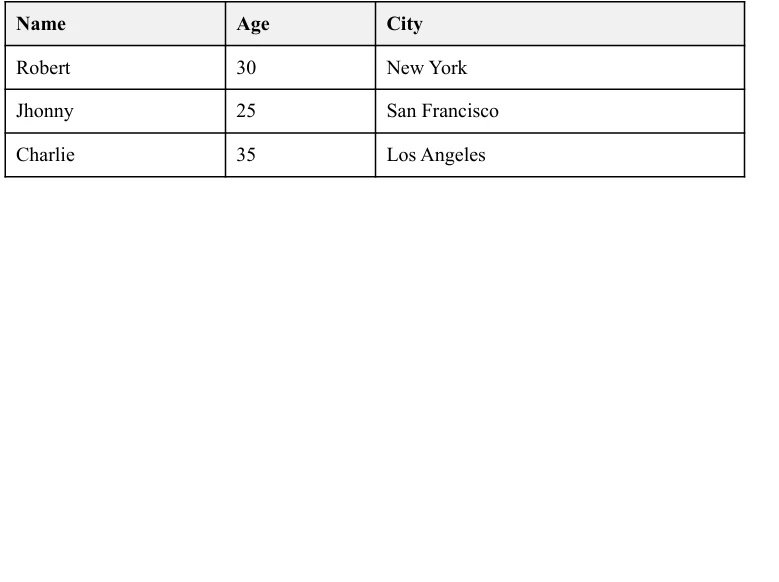
I to wszystko! Właśnie stworzyłeś w pełni funkcjonalną aplikację, która pobiera złożone dane z [Deedle](https://github.com/fslaborg/Deedle) i przekształca je w sformatowany raport PDF przy użyciu [biblioteki .NET PDF firmy IronPDF](/). To skuteczny sposób na przekazanie wyników analizy danych w profesjonalnym formacie.
## Wnioski
W tym artykułe omówiliśmy, jak zintegrować [Deedle](https://github.com/fslaborg/Deedle) z [IronPDF](/) w celu tworzenia dynamicznych raportów PDF na podstawie ram danych. Korzystając z Deedle, można efektywnie przetwarzać i analizować dane, podczas gdy IronPDF zajmuje się tworzeniem i formatowaniem końcowego dokumentu PDF. To połączenie pozwala z łatwością generować profesjonalne raporty, automatyzując proces od analizy danych po prezentację.
IronPDF oferuje szczegółową [dokumentację dotyczącą funkcji i użytkowania](/docs/) wraz z różnymi [przykładami kodu IronPDF](/examples/using-html-to-create-a-pdf/), które pomogą Ci rozpocząć pracę i efektywnie korzystać z jego rozbudowanych funkcji.
[Poznaj opcje licencjonowania IronPDF](/licensing/) zaczynając od `$liteLicense`. Wypróbuj to i przekonaj się, jak może to poprawić Twoje możliwości raportowania.
Deedle to potężna biblioteka do manipulacji danymi i analizy danych. Oferuje pełne ramki danych i serie, umożliwiając efektywne zarządzanie ustrukturyzowanymi ramkami danych. Deedle zapewnia narzędzia do brakujących danych, wyrównania danych i stosowania funkcji pomocniczych z członkami statycznymi ofNullables oraz ofObservations. Jest szeroko stosowane w naukach o danych ze względu na swoją elastyczność i wydajność.
IronPDF to biblioteka do tworzenia i manipulacji dokumentami PDF w .NET. Pomaga generować pliki PDF z HTML, konwertować obrazy na PDF i wyciągać zawartość z plików PDF. IronPDF upraszcza zadania związane z PDF w projektach .NET.
W tym artykule dowiesz się, jak zacząć korzystać z Deedle dla C#, skonfigurować je w projektach .NET używając Visual Studio oraz wdrożyć kluczowe funkcje z automatycznie generowaną dokumentacją. Zobaczysz przykłady kodu i wyjaśnienia, które pomogą ci zrozumieć, jak efektywnie korzystać z Deedle, w tym jak zastosować określoną funkcję.
Getting Started with Deedle C#
Konfiguracja Deedle w projektach .NET
Na początek stwórz nowy projekt C# Console Application w Visual Studio.
Aby użyć Deedle w projekcie .NET, musisz zainstalować pakiet NuGet Deedle. Uruchom następującą komendę w konsoli NuGet:
Install-Package Deedle
Install-Package Deedle
PowerShell
Po zainstalowaniu musisz zaimportować przestrzeń nazw Deedle do swojego projektu:
using Deedle;
using Deedle;
ImportsDeedle
Imports Deedle
Podstawowy przykład kodu
Zacznijmy od prostego przykładu stworzenia i manipulacji ramką danych. To pomoże zrozumieć podstawy Deedle.
using System;using Deedle;class Program{ static voidMain() { // Creating a series with integer keys and double values var series = new Series<int, double>(new[] { 1, 2, 3 }, new[] { 3.5, 4.2, 5.1 });Console.WriteLine("Series:");Console.WriteLine(series); // Creating a data frame from a 2D array var rowIndex = new[] { 1, 2, 3 }; var colIndex = new[] { "A", "B" }; var data = new double[,] { { 1.0, 3.5 }, { 2.0, 4.2 }, { 3.0, 5.1 } }; var dataFrame = Frame.FromArray2D(data) .IndexRowsWith(rowIndex) .IndexColumnsWith(colIndex);Console.WriteLine("Data Frame:");Console.WriteLine(dataFrame); }}
using System;
using Deedle;

class Program
{
    static void Main()
    {
        // Creating a series with integer keys and double values
        var series = new Series<int, double>(new[] { 1, 2, 3 }, new[] { 3.5, 4.2, 5.1 });
        Console.WriteLine("Series:");
        Console.WriteLine(series);

        // Creating a data frame from a 2D array
        var rowIndex = new[] { 1, 2, 3 };
        var colIndex = new[] { "A", "B" };
        var data = new double[,] { { 1.0, 3.5 }, { 2.0, 4.2 }, { 3.0, 5.1 } };
        var dataFrame = Frame.FromArray2D(data)
                             .IndexRowsWith(rowIndex)
                             .IndexColumnsWith(colIndex);
        Console.WriteLine("Data Frame:");
        Console.WriteLine(dataFrame);
    }
}
ImportsSystemImportsDeedleFriend Class ProgramShared Sub Main() ' Creating a series with integer keys and double values Dim series As New Series(OfInteger, Double)( { 1, 2, 3 }, { 3.5, 4.2, 5.1 })Console.WriteLine("Series:")Console.WriteLine(series) ' Creating a data frame from a 2D array Dim rowIndex = { 1, 2, 3 } Dim colIndex = { "A", "B" } Dim data = New Double(, ) { { 1.0, 3.5 }, { 2.0, 4.2 }, { 3.0, 5.1 } } Dim dataFrame = Frame.FromArray2D(data).IndexRowsWith(rowIndex).IndexColumnsWith(colIndex)Console.WriteLine("Data Frame:")Console.WriteLine(dataFrame) End SubEnd Class
Imports System
Imports Deedle

Friend Class Program
	Shared Sub Main()
		' Creating a series with integer keys and double values
		Dim series As New Series(Of Integer, Double)( { 1, 2, 3 }, { 3.5, 4.2, 5.1 })
		Console.WriteLine("Series:")
		Console.WriteLine(series)

		' Creating a data frame from a 2D array
		Dim rowIndex = { 1, 2, 3 }
		Dim colIndex = { "A", "B" }
		Dim data = New Double(, ) {
			{ 1.0, 3.5 },
			{ 2.0, 4.2 },
			{ 3.0, 5.1 }
		}
		Dim dataFrame = Frame.FromArray2D(data).IndexRowsWith(rowIndex).IndexColumnsWith(colIndex)
		Console.WriteLine("Data Frame:")
		Console.WriteLine(dataFrame)
	End Sub
End Class
W tym przykładzie tworzysz serię z kluczami wierszy typu całkowitego i wartościami typu podwójnego. Następnie tworzysz ramkę danych używając dwuwymiarowej tablicy wartości typu podwójnego. Indeksujesz wiersze za pomocą liczb całkowitych, a kolumny za pomocą łańcuchów znaków.
Implementing Features of Deedle C#
Obsługa brakujących wartości
Obsługa brakujących wartości jest kluczowa w manipulacji danymi. Deedle zapewnia solidne wsparcie do brakujących danych. Możesz stworzyć serię z brakującymi wartościami i wykonać operacje, aby sobie z nimi poradzić.
using System;using Deedle;class Program{ static voidMain() { // Creating a series with nullable doubles to represent missing values var series = new Series<int, double?>( new[] { 75, 8, 47, 5 }, new double?[] { 75.0, null, 47.0, 5.0 } );Console.WriteLine("Original Series with Missing Values:");Console.WriteLine(series); // Fill missing values with a specified value (e.g., 0.0) var filledSeries = series.FillMissing(0.0);Console.WriteLine("Series after Filling Missing Values:");Console.WriteLine(filledSeries); }}
using System;
using Deedle;

class Program
{
    static void Main()
    {
        // Creating a series with nullable doubles to represent missing values
        var series = new Series<int, double?>(
            new[] { 75, 8, 47, 5 },
            new double?[] { 75.0, null, 47.0, 5.0 }
        );
        Console.WriteLine("Original Series with Missing Values:");
        Console.WriteLine(series);

        // Fill missing values with a specified value (e.g., 0.0)
        var filledSeries = series.FillMissing(0.0);
        Console.WriteLine("Series after Filling Missing Values:");
        Console.WriteLine(filledSeries);
    }
}
ImportsSystemImportsDeedleFriend Class ProgramShared Sub Main() ' Creating a series with nullable doubles to represent missing values Dim series As New Series(OfInteger, Double?)( { 75, 8, 47, 5 }, New Double?() { 75.0, Nothing, 47.0, 5.0 })Console.WriteLine("Original Series with Missing Values:")Console.WriteLine(series) ' Fill missing values with a specified value (e.g., 0.0) Dim filledSeries = series.FillMissing(0.0)Console.WriteLine("Series after Filling Missing Values:")Console.WriteLine(filledSeries) End SubEnd Class
Imports System
Imports Deedle

Friend Class Program
	Shared Sub Main()
		' Creating a series with nullable doubles to represent missing values
		Dim series As New Series(Of Integer, Double?)( { 75, 8, 47, 5 }, New Double?() { 75.0, Nothing, 47.0, 5.0 })
		Console.WriteLine("Original Series with Missing Values:")
		Console.WriteLine(series)

		' Fill missing values with a specified value (e.g., 0.0)
		Dim filledSeries = series.FillMissing(0.0)
		Console.WriteLine("Series after Filling Missing Values:")
		Console.WriteLine(filledSeries)
	End Sub
End Class
Ten przykład tworzy serię z brakującymi wartościami i wypełnia je określoną wartością. Można również użyć metod członków statycznych, takich jak ofOptionalObservations oraz ofValues w bardziej złożonych scenariuszach.
Manipulacja danymi
Deedle pozwala na wykonywanie różnorodnych zadań manipulacji danymi. Możesz filtrować, przekształcać i agregować dane w ramkach danych.
using System;using Deedle;class Program{ static voidMain() { // Creating a data frame var rowIndex = new[] { 1, 2, 3 }; var colIndex = new[] { "A", "B" }; var data = new double[,] { { 1.0, 3.5 }, { 2.0, 4.2 }, { 3.0, 5.1 } }; var dataFrame = Frame.FromArray2D(data) .IndexRowsWith(rowIndex) .IndexColumnsWith(colIndex);Console.WriteLine("Original Data Frame:");Console.WriteLine(dataFrame); // Filter rows where column 'A' is greater than 1.5 var filteredFrame = dataFrame.Where(row => row.Value.GetAs<double>("A") > 1.5);Console.WriteLine("Filtered Data Frame:");Console.WriteLine(filteredFrame); // Add a new column 'C' which is the sum of columns 'A' and 'B' dataFrame.AddColumn("C", dataFrame["A"] + dataFrame["B"]);Console.WriteLine("Transformed Data Frame with New Column 'C':");Console.WriteLine(dataFrame); }}
using System;
using Deedle;

class Program
{
    static void Main()
    {
        // Creating a data frame
        var rowIndex = new[] { 1, 2, 3 };
        var colIndex = new[] { "A", "B" };
        var data = new double[,] { { 1.0, 3.5 }, { 2.0, 4.2 }, { 3.0, 5.1 } };
        var dataFrame = Frame.FromArray2D(data)
                             .IndexRowsWith(rowIndex)
                             .IndexColumnsWith(colIndex);
        Console.WriteLine("Original Data Frame:");
        Console.WriteLine(dataFrame);

        // Filter rows where column 'A' is greater than 1.5
        var filteredFrame = dataFrame.Where(row => row.Value.GetAs<double>("A") > 1.5);
        Console.WriteLine("Filtered Data Frame:");
        Console.WriteLine(filteredFrame);

        // Add a new column 'C' which is the sum of columns 'A' and 'B'
        dataFrame.AddColumn("C", dataFrame["A"] + dataFrame["B"]);
        Console.WriteLine("Transformed Data Frame with New Column 'C':");
        Console.WriteLine(dataFrame);
    }
}
ImportsSystemImportsDeedleFriend Class ProgramShared Sub Main() ' Creating a data frame Dim rowIndex = { 1, 2, 3 } Dim colIndex = { "A", "B" } Dim data = New Double(, ) { { 1.0, 3.5 }, { 2.0, 4.2 }, { 3.0, 5.1 } } Dim dataFrame = Frame.FromArray2D(data).IndexRowsWith(rowIndex).IndexColumnsWith(colIndex)Console.WriteLine("Original Data Frame:")Console.WriteLine(dataFrame) ' Filter rows where column 'A' is greater than 1.5 Dim filteredFrame = dataFrame.Where(Function(row) row.Value.GetAs(OfDouble)("A") > 1.5)Console.WriteLine("Filtered Data Frame:")Console.WriteLine(filteredFrame) ' Add a new column 'C' which is the sum of columns 'A' and 'B' dataFrame.AddColumn("C", dataFrame("A") + dataFrame("B"))Console.WriteLine("Transformed Data Frame with New Column 'C':")Console.WriteLine(dataFrame) End SubEnd Class
Imports System
Imports Deedle

Friend Class Program
	Shared Sub Main()
		' Creating a data frame
		Dim rowIndex = { 1, 2, 3 }
		Dim colIndex = { "A", "B" }
		Dim data = New Double(, ) {
			{ 1.0, 3.5 },
			{ 2.0, 4.2 },
			{ 3.0, 5.1 }
		}
		Dim dataFrame = Frame.FromArray2D(data).IndexRowsWith(rowIndex).IndexColumnsWith(colIndex)
		Console.WriteLine("Original Data Frame:")
		Console.WriteLine(dataFrame)

		' Filter rows where column 'A' is greater than 1.5
		Dim filteredFrame = dataFrame.Where(Function(row) row.Value.GetAs(Of Double)("A") > 1.5)
		Console.WriteLine("Filtered Data Frame:")
		Console.WriteLine(filteredFrame)

		' Add a new column 'C' which is the sum of columns 'A' and 'B'
		dataFrame.AddColumn("C", dataFrame("A") + dataFrame("B"))
		Console.WriteLine("Transformed Data Frame with New Column 'C':")
		Console.WriteLine(dataFrame)
	End Sub
End Class
Ten przykład demonstruje filtrowanie wierszy na podstawie warunku i dodawanie nowej kolumny z przekształconymi danymi. Deedle wdraża standardowe metody rozszerzania ramek, aby analiza danych była prosta.
Funkcje statystyczne
Deedle udostępnia standardowe funkcje statystyczne do analizy danych. Korzystając z funkcji statystycznych, można obliczyć średnią, odchylenie standardowe i inne miary statystyczne.
using System;using Deedle;class Program{ static voidMain() { // Creating a series with integer keys and double values var series = new Series<int, double>( new[] { 1, 2, 3, 4 }, new[] { 1.0, 2.0, 3.0, 4.0 } );Console.WriteLine("Series:");Console.WriteLine(series); // Calculate the mean of the series var mean = series.Mean();Console.WriteLine($"Mean: {mean}"); // Calculate the standard deviation of the series var stddev = series.StdDev();Console.WriteLine($"Standard Deviation: {stddev}"); }}
using System;
using Deedle;

class Program
{
    static void Main()
    {
        // Creating a series with integer keys and double values
        var series = new Series<int, double>(
            new[] { 1, 2, 3, 4 },
            new[] { 1.0, 2.0, 3.0, 4.0 }
        );
        Console.WriteLine("Series:");
        Console.WriteLine(series);

        // Calculate the mean of the series
        var mean = series.Mean();
        Console.WriteLine($"Mean: {mean}");

        // Calculate the standard deviation of the series
        var stddev = series.StdDev();
        Console.WriteLine($"Standard Deviation: {stddev}");
    }
}
ImportsSystemImportsDeedleFriend Class ProgramShared Sub Main() ' Creating a series with integer keys and double values Dim series As New Series(OfInteger, Double)( { 1, 2, 3, 4 }, { 1.0, 2.0, 3.0, 4.0 })Console.WriteLine("Series:")Console.WriteLine(series) ' Calculate the mean of the series Dim mean = series.Mean()Console.WriteLine($"Mean: {mean}") ' Calculate the standard deviation of the series Dim stddev = series.StdDev()Console.WriteLine($"Standard Deviation: {stddev}") End SubEnd Class
Imports System
Imports Deedle

Friend Class Program
	Shared Sub Main()
		' Creating a series with integer keys and double values
		Dim series As New Series(Of Integer, Double)( { 1, 2, 3, 4 }, { 1.0, 2.0, 3.0, 4.0 })
		Console.WriteLine("Series:")
		Console.WriteLine(series)

		' Calculate the mean of the series
		Dim mean = series.Mean()
		Console.WriteLine($"Mean: {mean}")

		' Calculate the standard deviation of the series
		Dim stddev = series.StdDev()
		Console.WriteLine($"Standard Deviation: {stddev}")
	End Sub
End Class
Ten przykład kodu Deedle implementuje standardowe funkcje statystyczne Mean() oraz StdDev(), aby obliczyć średnią i odchylenie standardowe serii.
Tworzenie ram danych z plików CSV
Deedle pozwala w łatwy sposób tworzyć ramki danych z plików CSV. Jest to pomocne przy ładowaniu i analizowaniu danych strukturalnych.
using System;using Deedle;class Program{ static voidMain() { // Load a data frame from a CSV file var dataFrame = Frame.ReadCsv("data.csv");Console.WriteLine("Data Frame from CSV:");Console.WriteLine(dataFrame); // Aggregate rows by a specified column and compute sum var summary = dataFrame.AggregateRowsBy<string, double>( new[] { "ColumnName" }, // rowKeys null, // columnKeys, you can pass null if not required v => v.Sum() // aggFunc );Console.WriteLine("Summary of Data Frame:");Console.WriteLine(summary); }}
using System;
using Deedle;

class Program
{
    static void Main()
    {
        // Load a data frame from a CSV file
        var dataFrame = Frame.ReadCsv("data.csv");
        Console.WriteLine("Data Frame from CSV:");
        Console.WriteLine(dataFrame);

        // Aggregate rows by a specified column and compute sum
        var summary = dataFrame.AggregateRowsBy<string, double>(
            new[] { "ColumnName" }, // rowKeys
            null, // columnKeys, you can pass null if not required
            v => v.Sum() // aggFunc
        );
        Console.WriteLine("Summary of Data Frame:");
        Console.WriteLine(summary);
    }
}
ImportsSystemImportsDeedleFriend Class ProgramShared Sub Main() ' Load a data frame from a CSV file Dim dataFrame = Frame.ReadCsv("data.csv")Console.WriteLine("Data Frame from CSV:")Console.WriteLine(dataFrame) ' Aggregate rows by a specified column and compute sum Dim summary = dataFrame.AggregateRowsBy(OfString, Double)( { "ColumnName" }, Nothing, Function(v) v.Sum())Console.WriteLine("Summary of Data Frame:")Console.WriteLine(summary) End SubEnd Class
Imports System
Imports Deedle

Friend Class Program
	Shared Sub Main()
		' Load a data frame from a CSV file
		Dim dataFrame = Frame.ReadCsv("data.csv")
		Console.WriteLine("Data Frame from CSV:")
		Console.WriteLine(dataFrame)

		' Aggregate rows by a specified column and compute sum
		Dim summary = dataFrame.AggregateRowsBy(Of String, Double)( { "ColumnName" }, Nothing, Function(v) v.Sum())
		Console.WriteLine("Summary of Data Frame:")
		Console.WriteLine(summary)
	End Sub
End Class
W tym przykładzie plik CSV jest wczytywany do ramki danych, a następnie wykonywana jest operacja podsumowująca na danych.
Integracja Deedle z IronPDF
Wprowadzenie IronPDF
IronPDF to potężna biblioteka, która pozwala tworzyć, modyfikować i wyodrębniać zawartość z plików PDF w aplikacjach .NET. Jest bardzo wszechstronny i może obsługiwać różne zadania związane z plikami PDF, takie jak generowanie plików PDF z HTML, wyodrębnianie tekstu, scałanie plików PDF i wiele więcej. Integracja IronPDF z Deedle może być szczególnie przydatna w scenariuszach analizy danych i raportowania, w których konieczne jest generowanie dynamicznych raportów na podstawie ram danych.
Instalacja IronPDF
Aby zainstalować IronPDF w projekcie .NET za pomocą konsoli NuGet Package Manager Console, dodaj następujące polecenie:
PM > Install-Package IronPdf
Install-Package IronPdf
Można również zainstalować IronPDF za pomocą menedżera pakietów NuGet dla rozwiązań. W wynikach wyszukiwania na NuGet znajdź pakiet IronPDF, wybierz go, a następnie kliknij przycisk "Zainstaluj". Visual Studio automatycznie zajmie się pobraniem i instalacją.
Po zakończeniu instalacji można wykorzystać IronPDF w swoim projekcie.
Przykład zastosowania połączenia IronPDF z Deedle
Wyobraź sobie, że masz ramkę danych zawierającą pewne dane statystyczne, które chcesz przedstawić w raporcie PDF. Deedle może zająć się częścią dotyczącą manipulacji danymi i analizy, natomiast IronPDF może posłużyć do formatowania i generowania końcowego raportu. Na przykład można wygenerować plik PDF zawierający tabele, wykresy i statystyki opisowe, co ułatwia udostępnianie i prezentowanie danych.
Przykładowy kod przedstawiający przypadek użycia
Oto kompletny przykład kodu pokazujący, jak zintegrować Deedle z IronPDF. Stworzymy prosty raport na podstawie ramki danych Deedle i wygenerujemy plik PDF przy użyciu IronPDF.
using System;using System.Linq;using Deedle;using IronPdf;namespace Deedle IronPDFIntegration{ class Program { static voidMain(string[] args) { // Set IronPDF license keyIronPdf.License.LicenseKey = "License-Key"; // Create a sample data frame from in-memory records var data = new[] { new { Name = "Robert", Age = 30, City = "New York" }, new { Name = "Johnny", Age = 25, City = "San Francisco" }, new { Name = "Charlie", Age = 35, City = "Los Angeles" } }; var frame = Frame.FromRecords(data); // Convert the data frame to an HTML table format var htmlTable = "<table border='1' cellpadding='5' cellspacing='0'><thead><tr><th>Name</th><th>Age</th><th>City</th></tr></thead><tbody>" + string.Join("", frame.Rows.Select(row => $"<tr><td>{row.Value.GetAs<string>("Name")}</td><td>{row.Value.GetAs<int>("Age")}</td><td>{row.Value.GetAs<string>("City")}</td></tr>") ) + "</tbody></table>"; // Wrap the HTML table in basic HTML structure with CSS styling var htmlContent = $@" <html> <head> <style> table {{width: 100%; border-collapse: collapse;}} th, td {{border: 1px solid black; padding: 8px; text-align: left;}} th {{background-color: #f2f2f2;}} </style> </head> <body> {htmlTable} </body> </html>"; // Create a PDF from the HTML content var renderer = new ChromePdfRenderer(); var pdfDocument = renderer.RenderHtmlAsPdf(htmlContent); // Save the generated PDF to a file pdfDocument.SaveAs("f:\\DeedleReport.pdf");Console.WriteLine("PDF report created successfully!"); } }}
using System;
using System.Linq;
using Deedle;
using IronPdf;

namespace Deedle IronPDFIntegration
{
    class Program
    {
        static void Main(string[] args)
        {
            // Set IronPDF license key
            IronPdf.License.LicenseKey = "License-Key";

            // Create a sample data frame from in-memory records
            var data = new[]
            {
                new { Name = "Robert", Age = 30, City = "New York" },
                new { Name = "Johnny", Age = 25, City = "San Francisco" },
                new { Name = "Charlie", Age = 35, City = "Los Angeles" }
            };
            var frame = Frame.FromRecords(data);

            // Convert the data frame to an HTML table format
            var htmlTable = "<table border='1' cellpadding='5' cellspacing='0'><thead><tr><th>Name</th><th>Age</th><th>City</th></tr></thead><tbody>" +
                            string.Join("", frame.Rows.Select(row =>
                                $"<tr><td>{row.Value.GetAs<string>("Name")}</td><td>{row.Value.GetAs<int>("Age")}</td><td>{row.Value.GetAs<string>("City")}</td></tr>")
                            ) +
                            "</tbody></table>";

            // Wrap the HTML table in basic HTML structure with CSS styling
            var htmlContent = $@"
            <html>
            <head>
                <style>
                    table {{width: 100%;
                        border-collapse: collapse;}}
                    th, td {{border: 1px solid black;
                        padding: 8px;
                        text-align: left;}}
                    th {{background-color: #f2f2f2;}}
                </style>
            </head>
            <body>
                {htmlTable}
            </body>
            </html>";

            // Create a PDF from the HTML content
            var renderer = new ChromePdfRenderer();
            var pdfDocument = renderer.RenderHtmlAsPdf(htmlContent);

            // Save the generated PDF to a file
            pdfDocument.SaveAs("f:\\DeedleReport.pdf");
            Console.WriteLine("PDF report created successfully!");
        }
    }
}
ImportsSystemImportsSystem.LinqImportsDeedleImportsIronPdfNamespaceDeedleIronPDFIntegration Class ProgramShared Sub Main(ByVal args AsString()) ' Set IronPDF license keyIronPdf.License.LicenseKey = "License-Key" ' Create a sample data frame from in-memory records Dim data = New() { New With {Key .Name = "Robert", .Age = 30, .City = "New York"}, New With {Key .Name = "Johnny", .Age = 25, .City = "San Francisco"}, New With {Key .Name = "Charlie", .Age = 35, .City = "Los Angeles"} } Dim frame = Frame.FromRecords(data) ' Convert the data frame to an HTML table format Dim htmlTable = "<table border='1' cellpadding='5' cellspacing='0'><thead><tr><th>Name</th><th>Age</th><th>City</th></tr></thead><tbody>" & String.Join("", frame.Rows.Select(Function(row) $"<tr><td>{row.Value.GetAs(Of String)("Name")}</td><td>{row.Value.GetAs(Of Integer)("Age")}</td><td>{row.Value.GetAs(Of String)("City")}</td></tr>")) & "</tbody></table>" ' Wrap the HTML table in basic HTML structure with CSS styling Dim htmlContent = $" <html> <head> <style> table {{width: 100%; border-collapse: collapse;}} th, td {{border: 1px solid black; padding: 8px; text-align: left;}} th {{background-color: #f2f2f2;}} </style> </head> <body> {htmlTable} </body> </html>" ' Create a PDF from the HTML content Dim renderer = New ChromePdfRenderer() Dim pdfDocument = renderer.RenderHtmlAsPdf(htmlContent) ' Save the generated PDF to a file pdfDocument.SaveAs("f:\DeedleReport.pdf")Console.WriteLine("PDF report created successfully!") End Sub End ClassEndNamespace
Imports System
Imports System.Linq
Imports Deedle
Imports IronPdf

Namespace DeedleIronPDFIntegration
    Class Program
        Shared Sub Main(ByVal args As String())
            ' Set IronPDF license key
            IronPdf.License.LicenseKey = "License-Key"

            ' Create a sample data frame from in-memory records
            Dim data = New() {
                New With {Key .Name = "Robert", .Age = 30, .City = "New York"},
                New With {Key .Name = "Johnny", .Age = 25, .City = "San Francisco"},
                New With {Key .Name = "Charlie", .Age = 35, .City = "Los Angeles"}
            }
            Dim frame = Frame.FromRecords(data)

            ' Convert the data frame to an HTML table format
            Dim htmlTable = "<table border='1' cellpadding='5' cellspacing='0'><thead><tr><th>Name</th><th>Age</th><th>City</th></tr></thead><tbody>" & String.Join("", frame.Rows.Select(Function(row) $"<tr><td>{row.Value.GetAs(Of String)("Name")}</td><td>{row.Value.GetAs(Of Integer)("Age")}</td><td>{row.Value.GetAs(Of String)("City")}</td></tr>")) & "</tbody></table>"

            ' Wrap the HTML table in basic HTML structure with CSS styling
            Dim htmlContent = $"
            <html>
            <head>
                <style>
                    table {{width: 100%;
                        border-collapse: collapse;}}
                    th, td {{border: 1px solid black;
                        padding: 8px;
                        text-align: left;}}
                    th {{background-color: #f2f2f2;}}
                </style>
            </head>
            <body>
                {htmlTable}
            </body>
            </html>"

            ' Create a PDF from the HTML content
            Dim renderer = New ChromePdfRenderer()
            Dim pdfDocument = renderer.RenderHtmlAsPdf(htmlContent)

            ' Save the generated PDF to a file
            pdfDocument.SaveAs("f:\DeedleReport.pdf")
            Console.WriteLine("PDF report created successfully!")
        End Sub
    End Class
End Namespace
Wynik
I to wszystko! Właśnie stworzyłeś w pełni funkcjonalną aplikację, która pobiera złożone dane z Deedle i przekształca je w sformatowany raport PDF przy użyciu biblioteki .NET PDF firmy IronPDF. To skuteczny sposób na przekazanie wyników analizy danych w profesjonalnym formacie.
Wnioski
W tym artykułe omówiliśmy, jak zintegrować Deedle z IronPDF w celu tworzenia dynamicznych raportów PDF na podstawie ram danych. Korzystając z Deedle, można efektywnie przetwarzać i analizować dane, podczas gdy IronPDF zajmuje się tworzeniem i formatowaniem końcowego dokumentu PDF. To połączenie pozwala z łatwością generować profesjonalne raporty, automatyzując proces od analizy danych po prezentację.
Jacob Mellor jest Chief Technology Officer w Iron Software i wizjonerskim inżynierem, pionierem technologii C# PDF. Jako pierwotny deweloper głównej bazy kodowej Iron Software, kształtuje architekturę produktów firmy od jej początku, przekształcając ją wspólnie z CEO Cameron Rimington w firmę liczącą ponad 50 osób, obsługującą NASA, Teslę i światowe agencje rządowe.















