


Deedle C# (jak to działa dla programistów)

Deedle C
Deedle to potężna biblioteka do manipulacji danymi i analizy danych. Oferuje pełne ramki danych i serie, umożliwiając efektywne zarządzanie ustrukturyzowanymi ramkami danych. Deedle zapewnia narzędzia do brakujących danych, wyrównania danych i stosowania funkcji pomocniczych z członkami statycznymi ofNullables oraz ofObservations. Jest szeroko stosowane w naukach o danych ze względu na swoją elastyczność i wydajność.
IronPDF to biblioteka do tworzenia i manipulacji dokumentami PDF w .NET. Pomaga generować pliki PDF z HTML, konwertować obrazy na PDF i wyciągać zawartość z plików PDF. IronPDF upraszcza zadania związane z PDF w projektach .NET.
W tym artykule dowiesz się, jak zacząć korzystać z Deedle dla C#, skonfigurować je w projektach .NET używając Visual Studio oraz wdrożyć kluczowe funkcje z automatycznie generowaną dokumentacją. Zobaczysz przykłady kodu i wyjaśnienia, które pomogą ci zrozumieć, jak efektywnie korzystać z Deedle, w tym jak zastosować określoną funkcję.
Getting Started with Deedle C
Konfiguracja Deedle w projektach .NET
Na początek stwórz nowy projekt C# Console Application w Visual Studio.
Aby użyć Deedle w projekcie .NET, musisz zainstalować pakiet NuGet Deedle. Uruchom następującą komendę w konsoli NuGet:
Install-Package DeedlePo zainstalowaniu musisz zaimportować przestrzeń nazw Deedle do swojego projektu:
using Deedle;using Deedle;Imports DeedlePodstawowy przykład kodu
Zacznijmy od prostego przykładu stworzenia i manipulacji ramką danych. To pomoże zrozumieć podstawy Deedle.
using System;
using Deedle;

class Program
{
    static void Main()
    {
        // Creating a series with integer keys and double values
        var series = new Series<int, double>(new[] { 1, 2, 3 }, new[] { 3.5, 4.2, 5.1 });
        Console.WriteLine("Series:");
        Console.WriteLine(series);

        // Creating a data frame from a 2D array
        var rowIndex = new[] { 1, 2, 3 };
        var colIndex = new[] { "A", "B" };
        var data = new double[,] { { 1.0, 3.5 }, { 2.0, 4.2 }, { 3.0, 5.1 } };
        var dataFrame = Frame.FromArray2D(data)
                             .IndexRowsWith(rowIndex)
                             .IndexColumnsWith(colIndex);
        Console.WriteLine("Data Frame:");
        Console.WriteLine(dataFrame);
    }
}
using System;
using Deedle;
class Program
{
static void Main()
{
// Creating a series with integer keys and double values
var series = new Series<int, double>(new[] { 1, 2, 3 }, new[] { 3.5, 4.2, 5.1 });
Console.WriteLine("Series:");
Console.WriteLine(series);
// Creating a data frame from a 2D array
var rowIndex = new[] { 1, 2, 3 };
var colIndex = new[] { "A", "B" };
var data = new double[,] { { 1.0, 3.5 }, { 2.0, 4.2 }, { 3.0, 5.1 } };
var dataFrame = Frame.FromArray2D(data)
.IndexRowsWith(rowIndex)
.IndexColumnsWith(colIndex);
Console.WriteLine("Data Frame:");
Console.WriteLine(dataFrame);
}
}Imports System
Imports Deedle
Friend Class Program
Shared Sub Main()
' Creating a series with integer keys and double values
Dim series As New Series(Of Integer, Double)( { 1, 2, 3 }, { 3.5, 4.2, 5.1 })
Console.WriteLine("Series:")
Console.WriteLine(series)
' Creating a data frame from a 2D array
Dim rowIndex = { 1, 2, 3 }
Dim colIndex = { "A", "B" }
Dim data = New Double(, ) {
{ 1.0, 3.5 },
{ 2.0, 4.2 },
{ 3.0, 5.1 }
}
Dim dataFrame = Frame.FromArray2D(data).IndexRowsWith(rowIndex).IndexColumnsWith(colIndex)
Console.WriteLine("Data Frame:")
Console.WriteLine(dataFrame)
End Sub
End ClassW tym przykładzie tworzysz serię z kluczami wierszy typu całkowitego i wartościami typu podwójnego. Następnie tworzysz ramkę danych używając dwuwymiarowej tablicy wartości typu podwójnego. Indeksujesz wiersze za pomocą liczb całkowitych, a kolumny za pomocą łańcuchów znaków.
Implementing Features of Deedle C
Obsługa brakujących wartości
Obsługa brakujących wartości jest kluczowa w manipulacji danymi. Deedle zapewnia solidne wsparcie do brakujących danych. Możesz stworzyć serię z brakującymi wartościami i wykonać operacje, aby sobie z nimi poradzić.
using System;
using Deedle;

class Program
{
    static void Main()
    {
        // Creating a series with nullable doubles to represent missing values
        var series = new Series<int, double?>(
            new[] { 75, 8, 47, 5 },
            new double?[] { 75.0, null, 47.0, 5.0 }
        );
        Console.WriteLine("Original Series with Missing Values:");
        Console.WriteLine(series);

        // Fill missing values with a specified value (e.g., 0.0)
        var filledSeries = series.FillMissing(0.0);
        Console.WriteLine("Series after Filling Missing Values:");
        Console.WriteLine(filledSeries);
    }
}
using System;
using Deedle;
class Program
{
static void Main()
{
// Creating a series with nullable doubles to represent missing values
var series = new Series<int, double?>(
new[] { 75, 8, 47, 5 },
new double?[] { 75.0, null, 47.0, 5.0 }
);
Console.WriteLine("Original Series with Missing Values:");
Console.WriteLine(series);
// Fill missing values with a specified value (e.g., 0.0)
var filledSeries = series.FillMissing(0.0);
Console.WriteLine("Series after Filling Missing Values:");
Console.WriteLine(filledSeries);
}
}Imports System
Imports Deedle
Friend Class Program
Shared Sub Main()
' Creating a series with nullable doubles to represent missing values
Dim series As New Series(Of Integer, Double?)( { 75, 8, 47, 5 }, New Double?() { 75.0, Nothing, 47.0, 5.0 })
Console.WriteLine("Original Series with Missing Values:")
Console.WriteLine(series)
' Fill missing values with a specified value (e.g., 0.0)
Dim filledSeries = series.FillMissing(0.0)
Console.WriteLine("Series after Filling Missing Values:")
Console.WriteLine(filledSeries)
End Sub
End ClassTen przykład tworzy serię z brakującymi wartościami i wypełnia je określoną wartością. Można również użyć metod członków statycznych, takich jak ofOptionalObservations oraz ofValues w bardziej złożonych scenariuszach.
Manipulacja danymi
Deedle pozwala na wykonywanie różnorodnych zadań manipulacji danymi. Możesz filtrować, przekształcać i agregować dane w ramkach danych.
using System;
using Deedle;

class Program
{
    static void Main()
    {
        // Creating a data frame
        var rowIndex = new[] { 1, 2, 3 };
        var colIndex = new[] { "A", "B" };
        var data = new double[,] { { 1.0, 3.5 }, { 2.0, 4.2 }, { 3.0, 5.1 } };
        var dataFrame = Frame.FromArray2D(data)
                             .IndexRowsWith(rowIndex)
                             .IndexColumnsWith(colIndex);
        Console.WriteLine("Original Data Frame:");
        Console.WriteLine(dataFrame);

        // Filter rows where column 'A' is greater than 1.5
        var filteredFrame = dataFrame.Where(row => row.Value.GetAs<double>("A") > 1.5);
        Console.WriteLine("Filtered Data Frame:");
        Console.WriteLine(filteredFrame);

        // Add a new column 'C' which is the sum of columns 'A' and 'B'
        dataFrame.AddColumn("C", dataFrame["A"] + dataFrame["B"]);
        Console.WriteLine("Transformed Data Frame with New Column 'C':");
        Console.WriteLine(dataFrame);
    }
}
using System;
using Deedle;
class Program
{
static void Main()
{
// Creating a data frame
var rowIndex = new[] { 1, 2, 3 };
var colIndex = new[] { "A", "B" };
var data = new double[,] { { 1.0, 3.5 }, { 2.0, 4.2 }, { 3.0, 5.1 } };
var dataFrame = Frame.FromArray2D(data)
.IndexRowsWith(rowIndex)
.IndexColumnsWith(colIndex);
Console.WriteLine("Original Data Frame:");
Console.WriteLine(dataFrame);
// Filter rows where column 'A' is greater than 1.5
var filteredFrame = dataFrame.Where(row => row.Value.GetAs<double>("A") > 1.5);
Console.WriteLine("Filtered Data Frame:");
Console.WriteLine(filteredFrame);
// Add a new column 'C' which is the sum of columns 'A' and 'B'
dataFrame.AddColumn("C", dataFrame["A"] + dataFrame["B"]);
Console.WriteLine("Transformed Data Frame with New Column 'C':");
Console.WriteLine(dataFrame);
}
}Imports System
Imports Deedle
Friend Class Program
Shared Sub Main()
' Creating a data frame
Dim rowIndex = { 1, 2, 3 }
Dim colIndex = { "A", "B" }
Dim data = New Double(, ) {
{ 1.0, 3.5 },
{ 2.0, 4.2 },
{ 3.0, 5.1 }
}
Dim dataFrame = Frame.FromArray2D(data).IndexRowsWith(rowIndex).IndexColumnsWith(colIndex)
Console.WriteLine("Original Data Frame:")
Console.WriteLine(dataFrame)
' Filter rows where column 'A' is greater than 1.5
Dim filteredFrame = dataFrame.Where(Function(row) row.Value.GetAs(Of Double)("A") > 1.5)
Console.WriteLine("Filtered Data Frame:")
Console.WriteLine(filteredFrame)
' Add a new column 'C' which is the sum of columns 'A' and 'B'
dataFrame.AddColumn("C", dataFrame("A") + dataFrame("B"))
Console.WriteLine("Transformed Data Frame with New Column 'C':")
Console.WriteLine(dataFrame)
End Sub
End ClassTen przykład demonstruje filtrowanie wierszy na podstawie warunku i dodawanie nowej kolumny z przekształconymi danymi. Deedle wdraża standardowe metody rozszerzania ramek, aby analiza danych była prosta.
Funkcje statystyczne
Deedle udostępnia standardowe funkcje statystyczne do analizy danych. Korzystając z funkcji statystycznych, można obliczyć średnią, odchylenie standardowe i inne miary statystyczne.
using System;
using Deedle;

class Program
{
    static void Main()
    {
        // Creating a series with integer keys and double values
        var series = new Series<int, double>(
            new[] { 1, 2, 3, 4 },
            new[] { 1.0, 2.0, 3.0, 4.0 }
        );
        Console.WriteLine("Series:");
        Console.WriteLine(series);

        // Calculate the mean of the series
        var mean = series.Mean();
        Console.WriteLine($"Mean: {mean}");

        // Calculate the standard deviation of the series
        var stddev = series.StdDev();
        Console.WriteLine($"Standard Deviation: {stddev}");
    }
}
using System;
using Deedle;
class Program
{
static void Main()
{
// Creating a series with integer keys and double values
var series = new Series<int, double>(
new[] { 1, 2, 3, 4 },
new[] { 1.0, 2.0, 3.0, 4.0 }
);
Console.WriteLine("Series:");
Console.WriteLine(series);
// Calculate the mean of the series
var mean = series.Mean();
Console.WriteLine($"Mean: {mean}");
// Calculate the standard deviation of the series
var stddev = series.StdDev();
Console.WriteLine($"Standard Deviation: {stddev}");
}
}Imports System
Imports Deedle
Friend Class Program
Shared Sub Main()
' Creating a series with integer keys and double values
Dim series As New Series(Of Integer, Double)( { 1, 2, 3, 4 }, { 1.0, 2.0, 3.0, 4.0 })
Console.WriteLine("Series:")
Console.WriteLine(series)
' Calculate the mean of the series
Dim mean = series.Mean()
Console.WriteLine($"Mean: {mean}")
' Calculate the standard deviation of the series
Dim stddev = series.StdDev()
Console.WriteLine($"Standard Deviation: {stddev}")
End Sub
End ClassTen przykład kodu Deedle implementuje standardowe funkcje statystyczne Mean() oraz StdDev(), aby obliczyć średnią i odchylenie standardowe serii.
Tworzenie ram danych z plików CSV
Deedle pozwala w łatwy sposób tworzyć ramki danych z plików CSV. Jest to pomocne przy ładowaniu i analizowaniu danych strukturalnych.
using System;
using Deedle;

class Program
{
    static void Main()
    {
        // Load a data frame from a CSV file
        var dataFrame = Frame.ReadCsv("data.csv");
        Console.WriteLine("Data Frame from CSV:");
        Console.WriteLine(dataFrame);

        // Aggregate rows by a specified column and compute sum
        var summary = dataFrame.AggregateRowsBy<string, double>(
            new[] { "ColumnName" }, // rowKeys
            null, // columnKeys, you can pass null if not required
            v => v.Sum() // aggFunc
        );
        Console.WriteLine("Summary of Data Frame:");
        Console.WriteLine(summary);
    }
}
using System;
using Deedle;
class Program
{
static void Main()
{
// Load a data frame from a CSV file
var dataFrame = Frame.ReadCsv("data.csv");
Console.WriteLine("Data Frame from CSV:");
Console.WriteLine(dataFrame);
// Aggregate rows by a specified column and compute sum
var summary = dataFrame.AggregateRowsBy<string, double>(
new[] { "ColumnName" }, // rowKeys
null, // columnKeys, you can pass null if not required
v => v.Sum() // aggFunc
);
Console.WriteLine("Summary of Data Frame:");
Console.WriteLine(summary);
}
}Imports System
Imports Deedle
Friend Class Program
Shared Sub Main()
' Load a data frame from a CSV file
Dim dataFrame = Frame.ReadCsv("data.csv")
Console.WriteLine("Data Frame from CSV:")
Console.WriteLine(dataFrame)
' Aggregate rows by a specified column and compute sum
Dim summary = dataFrame.AggregateRowsBy(Of String, Double)( { "ColumnName" }, Nothing, Function(v) v.Sum())
Console.WriteLine("Summary of Data Frame:")
Console.WriteLine(summary)
End Sub
End ClassW tym przykładzie plik CSV jest wczytywany do ramki danych, a następnie wykonywana jest operacja podsumowująca na danych.
Integracja Deedle z IronPDF
Wprowadzenie IronPDF
IronPDF to potężna biblioteka, która pozwala tworzyć, modyfikować i wyodrębniać zawartość z plików PDF w aplikacjach .NET. Jest bardzo wszechstronny i może obsługiwać różne zadania związane z plikami PDF, takie jak generowanie plików PDF z HTML, wyodrębnianie tekstu, scałanie plików PDF i wiele więcej. Integracja IronPDF z Deedle może być szczególnie przydatna w scenariuszach analizy danych i raportowania, w których konieczne jest generowanie dynamicznych raportów na podstawie ram danych.
Instalacja IronPDF
Aby zainstalować IronPDF w projekcie .NET za pomocą konsoli NuGet Package Manager Console, dodaj następujące polecenie:
Install-Package IronPdf
Można również zainstalować IronPDF za pomocą menedżera pakietów NuGet dla rozwiązań. W wynikach wyszukiwania na NuGet znajdź pakiet IronPDF, wybierz go, a następnie kliknij przycisk "Zainstaluj". Visual Studio automatycznie zajmie się pobraniem i instalacją.
Po zakończeniu instalacji można wykorzystać IronPDF w swoim projekcie.
Przykład zastosowania połączenia IronPDF z Deedle
Wyobraź sobie, że masz ramkę danych zawierającą pewne dane statystyczne, które chcesz przedstawić w raporcie PDF. Deedle może zająć się częścią dotyczącą manipulacji danymi i analizy, natomiast IronPDF może posłużyć do formatowania i generowania końcowego raportu. Na przykład można wygenerować plik PDF zawierający tabele, wykresy i statystyki opisowe, co ułatwia udostępnianie i prezentowanie danych.
Przykładowy kod przedstawiający przypadek użycia
Oto kompletny przykład kodu pokazujący, jak zintegrować Deedle z IronPDF. Stworzymy prosty raport na podstawie ramki danych Deedle i wygenerujemy plik PDF przy użyciu IronPDF.
using System;
using System.Linq;
using Deedle;
using IronPdf;

namespace Deedle IronPDFIntegration
{
    class Program
    {
        static void Main(string[] args)
        {
            // Set IronPDF license key
            IronPdf.License.LicenseKey = "License-Key";

            // Create a sample data frame from in-memory records
            var data = new[]
            {
                new { Name = "Robert", Age = 30, City = "New York" },
                new { Name = "Johnny", Age = 25, City = "San Francisco" },
                new { Name = "Charlie", Age = 35, City = "Los Angeles" }
            };
            var frame = Frame.FromRecords(data);

            // Convert the data frame to an HTML table format
            var htmlTable = "<table border='1' cellpadding='5' cellspacing='0'><thead><tr><th>Name</th><th>Age</th><th>City</th></tr></thead><tbody>" +
                            string.Join("", frame.Rows.Select(row =>
                                $"<tr><td>{row.Value.GetAs<string>("Name")}</td><td>{row.Value.GetAs<int>("Age")}</td><td>{row.Value.GetAs<string>("City")}</td></tr>")
                            ) +
                            "</tbody></table>";

            // Wrap the HTML table in basic HTML structure with CSS styling
            var htmlContent = $@"
            <html>
            <head>
                <style>
                    table {{width: 100%;
                        border-collapse: collapse;}}
                    th, td {{border: 1px solid black;
                        padding: 8px;
                        text-align: left;}}
                    th {{background-color: #f2f2f2;}}
                </style>
            </head>
            <body>
                {htmlTable}
            </body>
            </html>";

            // Create a PDF from the HTML content
            var renderer = new ChromePdfRenderer();
            var pdfDocument = renderer.RenderHtmlAsPdf(htmlContent);

            // Save the generated PDF to a file
            pdfDocument.SaveAs("f:\\DeedleReport.pdf");
            Console.WriteLine("PDF report created successfully!");
        }
    }
}
using System;
using System.Linq;
using Deedle;
using IronPdf;
namespace Deedle IronPDFIntegration
{
class Program
{
static void Main(string[] args)
{
// Set IronPDF license key
IronPdf.License.LicenseKey = "License-Key";
// Create a sample data frame from in-memory records
var data = new[]
{
new { Name = "Robert", Age = 30, City = "New York" },
new { Name = "Johnny", Age = 25, City = "San Francisco" },
new { Name = "Charlie", Age = 35, City = "Los Angeles" }
};
var frame = Frame.FromRecords(data);
// Convert the data frame to an HTML table format
var htmlTable = "<table border='1' cellpadding='5' cellspacing='0'><thead><tr><th>Name</th><th>Age</th><th>City</th></tr></thead><tbody>" +
string.Join("", frame.Rows.Select(row =>
$"<tr><td>{row.Value.GetAs<string>("Name")}</td><td>{row.Value.GetAs<int>("Age")}</td><td>{row.Value.GetAs<string>("City")}</td></tr>")
) +
"</tbody></table>";
// Wrap the HTML table in basic HTML structure with CSS styling
var htmlContent = $@"
<html>
<head>
<style>
table {{width: 100%;
border-collapse: collapse;}}
th, td {{border: 1px solid black;
padding: 8px;
text-align: left;}}
th {{background-color: #f2f2f2;}}
</style>
</head>
<body>
{htmlTable}
</body>
</html>";
// Create a PDF from the HTML content
var renderer = new ChromePdfRenderer();
var pdfDocument = renderer.RenderHtmlAsPdf(htmlContent);
// Save the generated PDF to a file
pdfDocument.SaveAs("f:\\DeedleReport.pdf");
Console.WriteLine("PDF report created successfully!");
}
}
}Imports System
Imports System.Linq
Imports Deedle
Imports IronPdf
Namespace DeedleIronPDFIntegration
Class Program
Shared Sub Main(args As String())
' Set IronPDF license key
IronPdf.License.LicenseKey = "License-Key"
' Create a sample data frame from in-memory records
Dim data = {
New With {.Name = "Robert", .Age = 30, .City = "New York"},
New With {.Name = "Johnny", .Age = 25, .City = "San Francisco"},
New With {.Name = "Charlie", .Age = 35, .City = "Los Angeles"}
}
Dim frame = Frame.FromRecords(data)
' Convert the data frame to an HTML table format
Dim htmlTable = "<table border='1' cellpadding='5' cellspacing='0'><thead><tr><th>Name</th><th>Age</th><th>City</th></tr></thead><tbody>" &
String.Join("", frame.Rows.Select(Function(row)
$"<tr><td>{row.Value.GetAs(Of String)("Name")}</td><td>{row.Value.GetAs(Of Integer)("Age")}</td><td>{row.Value.GetAs(Of String)("City")}</td></tr>")
) &
"</tbody></table>"
' Wrap the HTML table in basic HTML structure with CSS styling
Dim htmlContent = $"
<html>
<head>
<style>
table {{width: 100%;
border-collapse: collapse;}}
th, td {{border: 1px solid black;
padding: 8px;
text-align: left;}}
th {{background-color: #f2f2f2;}}
</style>
</head>
<body>
{htmlTable}
</body>
</html>"
' Create a PDF from the HTML content
Dim renderer = New ChromePdfRenderer()
Dim pdfDocument = renderer.RenderHtmlAsPdf(htmlContent)
' Save the generated PDF to a file
pdfDocument.SaveAs("f:\DeedleReport.pdf")
Console.WriteLine("PDF report created successfully!")
End Sub
End Class
End NamespaceWynik
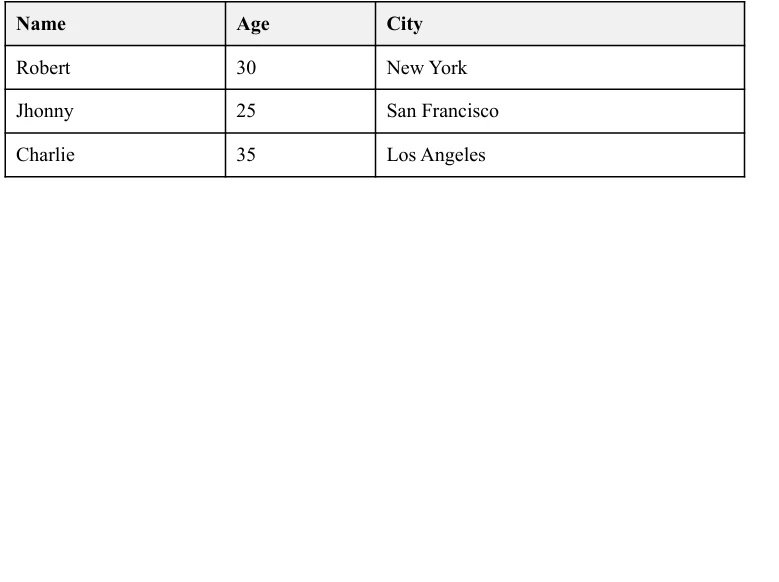
I to wszystko! Właśnie stworzyłeś w pełni funkcjonalną aplikację, która pobiera złożone dane z Deedle i przekształca je w sformatowany raport PDF przy użyciu biblioteki .NET PDF firmy IronPDF. To skuteczny sposób na przekazanie wyników analizy danych w profesjonalnym formacie.
Wnioski
W tym artykułe omówiliśmy, jak zintegrować Deedle z IronPDF w celu tworzenia dynamicznych raportów PDF na podstawie ram danych. Korzystając z Deedle, można efektywnie przetwarzać i analizować dane, podczas gdy IronPDF zajmuje się tworzeniem i formatowaniem końcowego dokumentu PDF. To połączenie pozwala z łatwością generować profesjonalne raporty, automatyzując proces od analizy danych po prezentację.
IronPDF oferuje szczegółową dokumentację dotyczącą funkcji i użytkowania wraz z różnymi przykładami kodu IronPDF, które pomogą Ci rozpocząć pracę i efektywnie korzystać z jego rozbudowanych funkcji.
Poznaj opcje licencjonowania IronPDF zaczynając od $999. Wypróbuj to i przekonaj się, jak może to poprawić Twoje możliwości raportowania.
Często Zadawane Pytania
Do czego służy Deedle C#?
Deedle C# służy do manipulacji i analizy danych, oferując narzędzia do efektywnego zarządzania zorganizowanymi ramkami i seriami danych. Jest szczególnie przydatny w aplikacjach data science ze względu na zdolność do zarządzania brakującymi danymi, wyrównywania danych i stosowania funkcji.
Jak mogę zintegrować Deedle z generowaniem PDF w .NET?
Można zintegrować Deedle z IronPDF, aby generować dynamiczne raporty PDF z ramek danych. Deedle obsługuje manipulację danymi, podczas gdy IronPDF formatuje i generuje końcowy raport PDF zawierający tabele, wykresy i statystyki.
Jak zainstalować Deedle w projekcie .NET?
Aby zainstalować Deedle w projekcie .NET, można użyć Visual Studio do stworzenia nowej aplikacji konsolowej C#, a następnie zainstalować pakiet NuGet Deedle za pomocą komendy Install-Package Deedle i dołączyć go do projektu za pomocą using Deedle;.
Jaki jest proces tworzenia ramek danych z plików CSV za pomocą Deedle?
Aby tworzyć ramki danych z plików CSV używając Deedle, można użyć metody Frame.ReadCsv(). Umożliwia to wczytywanie zorganizowanych danych z plików CSV do ramek danych do analizy i manipulacji.
Czy Deedle może obsługiwać brakujące wartości w ramkach danych?
Tak, Deedle zapewnia solidne wsparcie w zakresie obsługi brakujących wartości w ramkach danych. Można używać funkcji takich jak FillMissing(), aby właściwie zarządzać i uzupełniać brakujące dane w serii lub ramce danych.
Jak mogę przeprowadzić analizę statystyczną za pomocą Deedle?
Deedle oferuje wbudowane funkcje statystyczne, które pozwalają na przeprowadzanie analizy danych, w tym obliczenia średniej, odchylenia standardowego i innych metryk statystycznych bezpośrednio na ramkach danych i seriach.
Jak generować raporty PDF z ramek danych w .NET?
Aby generować raporty PDF z ramek danych w .NET, można użyć Deedle do manipulacji danymi oraz IronPDF do generowania PDF. Po przetworzeniu danych za pomocą Deedle, należy użyć IronPDF do formatowania i wyprowadzania danych w profesjonalnie stylizowanym raporcie PDF.










 Rozpocznij za DARMO
 Rozpocznij za DARMO
 Zarezerwuj darmowe Demo na żywo





 Nie wymaga karty kredytowej ani tworzenia konta










