using IronPdf;

// Disable local disk access or cross-origin requests
Installation.EnableWebSecurity = true;

// Instantiate Renderer
var renderer = new ChromePdfRenderer();

// Create a PDF from a HTML string using C#
var pdf = renderer.RenderHtmlAsPdf("<h1>Hello World</h1>");

// Export to a file or Stream
pdf.SaveAs("output.pdf");

// Advanced Example with HTML Assets
// Load external html assets: Images, CSS and JavaScript.
// An optional BasePath 'C:\site\assets\' is set as the file location to load assets from
var myAdvancedPdf = renderer.RenderHtmlAsPdf("<img src='icons/iron.png'>", @"C:\site\assets\");
myAdvancedPdf.SaveAs("html-with-assets.pdf");
using IronPdf;// Disable local disk access or cross-origin requestsInstallation.EnableWebSecurity = true;// Instantiate Renderervar renderer = new ChromePdfRenderer();// Create a PDF from a HTML string using C#var pdf = renderer.RenderHtmlAsPdf("<h1>Hello World</h1>");// Export to a file or Streampdf.SaveAs("output.pdf");// Advanced Example with HTML Assets// Load external html assets: Images, CSS and JavaScript.// An optional BasePath 'C:\site\assets\' is set as the file location to load assets fromvar myAdvancedPdf = renderer.RenderHtmlAsPdf("<img src='icons/iron.png'>", @"C:\site\assets\");myAdvancedPdf.SaveAs("html-with-assets.pdf");
DotNetify to framework typu open source stworzony przy użyciu .NET Framework i Blazor, przeznaczony do tworzenia aplikacji internetowych działających w czasie rzeczywistym na platformie .NET. Wykorzystując możliwości SignalR do interakcji w czasie rzeczywistym między klientem a serwerem, upraszcza tworzenie dynamicznych i interaktywnych aplikacji internetowych. DotNetify zapewnia model programowania, który synchronizuje widoki po stronie klienta z danymi [skryptowymi po stronie serwera](https://en.wikipedia.org/wiki/Server-side_scripting), umożliwiając programistom szybkie i łatwe projektowanie bogatych, responsywnych i wydajnych interfejsów internetowych.
Z kolei [biblioteka IronPDF PDF Generation Library](https://ironpdf.com) to potężny pakiet .NET, który ułatwia programowe tworzenie, edycję i manipulowanie dokumentami PDF. Jest to doskonały wybór do tworzenia dynamicznych, opartych na danych dokumentów, takich jak raporty, faktury i formularze, oferujący intuicyjny interfejs API do przekształcania tekstu HTML w pliki PDF.
Dzięki integracji DotNetify z IronPDF w aplikacji napisanej w języku C# połączono interaktywność internetową w czasie rzeczywistym z solidnymi możliwościami tworzenia plików PDF. Ta integracja jest szczególnie przydatna w aplikacjach wymagających wyświetlania danych w czasie rzeczywistym oraz możliwości dynamicznego tworzenia i dystrybucji dokumentów PDF na podstawie najnowszych danych. Programiści mogą tworzyć rozbudowane, interaktywne aplikacje internetowe, które spełniają złożone wymagania biznesowe i poprawiają komfort użytkowania dzięki płynnemu generowaniu i dystrybucji dokumentów, wykorzystując wszechstronne funkcje generowania plików PDF w IronPDF oraz synchronizację danych w czasie rzeczywistym w DotNetify.
## Czym jest DotNetify?
[DotNetify](https://dotnetify.net/) to framework typu open source zaprojektowany w celu uproszczenia tworzenia interaktywnych aplikacji internetowych działających w czasie rzeczywistym przy użyciu .NET Framework i Blazor. Programiści mogą tworzyć dynamiczne i responsywne interfejsy użytkownika, które bez wysiłku synchronizują się z danymi po stronie serwera dzięki wykorzystaniu SignalR, ułatwiając komunikację w czasie rzeczywistym między klientem a serwerem. DotNetify wykorzystuje podejście programowania reaktywnego, abstrakcyjnie przedstawiając złożoność wiązania danych w czasie rzeczywistym i obsługi zdarzeń, co pozwala uprościć tworzenie złożonych aplikacji internetowych przy minimalnej ilości kodu.
DotNetify pozwala programistom tworzyć modele widoku po stronie serwera, które natychmiast przekazują zmiany do klienta, zapewniając, że interfejs użytkownika zawsze odzwierciedla stan aplikacji. Ta platforma oferuje elastyczność w wyborze technologii po stronie klienta, obsługując zarówno klasyczne interfejsy użytkownika oparte na JavaScript, jak i interfejsy Blazor. Dzięki łatwości obsługi i skuteczności idealnie nadaje się do aplikacji wymagających aktualizacji w czasie rzeczywistym, takich jak pulpity nawigacyjne, narzędzia do współpracy i strumienie danych na żywo.
Obsługa skomplikowanych interakcji i przepływów danych w czasie rzeczywistym przez DotNetify znacznie poprawia komfort użytkowania, umożliwiając płynną synchronizację danych i natychmiastową informację zwrotną. Ogólnie rzecz biorąc, DotNetify to wartościowe narzędzie dla programistów .NET, którzy pragną szybko i efektywnie tworzyć reaktywne, nowoczesne aplikacje internetowe w czasie rzeczywistym.
### Funkcje DotNetify
DotNetify w C# oferuje szereg funkcji, które upraszczają tworzenie interaktywnych aplikacji online w czasie rzeczywistym, w tym:
- **Komunikacja w czasie rzeczywistym:** Wykorzystuje SignalR do dwukierunkowej, rzeczywistej komunikacji klient-serwer, umożliwiając interaktywne interfejsy użytkownika i natychmiastowe aktualizacje.
- **Reaktywny model programowania:** Zapewnia reaktywny model programowania, automatycznie synchronizując widoki po stronie klienta i modele widoków po stronie serwera, aby utrzymać interfejs użytkownika na bieżąco z najnowszymi informacjami.
- **Modele widoków po stronie serwera:** Ułatwia tworzenie modeli widoków po stronie serwera, do których mogą się wiązać komponenty po stronie klienta, upraszczając zarządzanie stanem i przepływ danych wewnątrz aplikacji.
- **Wsparcie Blazor i JavaScript:** Obsługuje zarówno klasyczne frontend'y JavaScript, jak i frontend'y Blazor, pozwalając programistom wybrać technologię po stronie klienta, która najlepiej odpowiada ich wymaganiom.
- **Łatwość integracji:** Bezproblemowo integruje funkcje w czasie rzeczywistym z nowymi lub istniejącymi projektami i działa dobrze z frontendowymi frameworkami komponentów UI, takimi jak WebSockets, w projektach wykorzystujących React Native, Vue i Blazor.
- **Skalowalność:** Dziedziczy cechy skalowalności SignalR, umożliwiając aplikacjom skuteczne zarządzanie wieloma współbieżnymi połączeniami.
- **Architektura MVVM:** Adopcja architektury Model-View-ViewModel (MVVM), pomagając w oddzieleniu obowiązków i utrzymaniu zorganizowanego i czystego kodu.
- **Obsługa zdarzeń:** Redukuje nadmiarowy kod potrzebny do obsługi interakcji z UI i zmian stanu poprzez usprawnienie obsługi zdarzeń i powiązań danych.
- **Rozszerzalność i możliwość dostosowania:** Zapewnia punkty rozszerzalności i haki do dostosowywania zachowań oraz niezbędnej integracji z innymi bibliotekami lub frameworkami.
- **Solidna infrastruktura:** Oferuje dynamiczny mechanizm routingu, który można całkowicie zdefiniować na zapleczu, zdolny do zagnieżdżonego routingu, uwierzytelniania opartego na tokenach i więcej.
- **Open Source i społeczne wsparcie:** Jako projekt open-source, DotNetify korzysta z udziału społeczności i wniesień, zapewniając ciągłe ulepszenia i modernizacje.
### Creating and Configuring DotNetify in C#
Aby utworzyć prosty projekt i rozpocząć konfigurację DotNetify w aplikacji internetowej w C#, wykonaj następujące kroki. Ten samouczek pokazuje, jak używać ASP.NET Core i Blazor do skonfigurowania podstawowego serwera i klienta DotNetify.
#### Skonfiguruj nowy projekt ASP.NET Core Blazor Server
1. **Otwórz Visual Studio:** Uruchom Visual Studio i utwórz nowy projekt.
2. **Utwórz aplikację Blazor Server:** Wybierz szablon aplikacji Blazor Server z szablonów projektów i kliknij "Dalej".
3. **Skonfiguruj swój projekt:** Podaj nazwę projektu (np. "DotNetifyWebApp") i wprowadź niezbędne zmiany w konfiguracji. Kliknij "Utwórz".
#### Zainstaluj DotNetify przez NuGet
1. **Zarządzaj pakietami NuGet:** W eksploratorze rozwiązań kliknij prawym przyciskiem myszy na projekt i wybierz "Zarządzaj pakietami NuGet".
2. **Wyszukaj DotNetify:** Zainstaluj pakiety DotNetify i DotNetify.Blazor.
#### Konfiguruj DotNetify
Aby skonfigurowac DotNetify, otworz `Startup.cs` i uzyj metod `ConfigureServices` oraz `Configure`.
```csharp
using DotNetify;
using DotNetify.Blazor;

public class Startup
{
    public void ConfigureServices(IServiceCollection services)
    {
        services.AddRazorPages();
        services.AddServerSideBlazor();
        services.AddSignalR();
        services.AddDotNetify();
    }

    public void Configure(IApplicationBuilder app, IWebHostEnvironment env)
    {
        if (env.IsDevelopment())
        {
            app.UseDeveloperExceptionPage();
        }
        else
        {
            app.UseExceptionHandler("/Error");
            app.UseHsts();
        }

        app.UseHttpsRedirection();
        app.UseStaticFiles();
        app.UseRouting();
        app.UseEndpoints(endpoints =>
        {
            endpoints.MapBlazorHub();
            endpoints.MapFallbackToPage("/_Host");
            endpoints.MapHub<DotNetifyHub>("/dotnetify");
        });
    }
}
```
#### Utwórz ViewModel
Utwórz nowy plik klasy w projekcie (na przykład HelloWorldViewModel.cs) i zaprojektuj podstawowy ViewModel.
```csharp
using DotNetify;
public class HelloWorldViewModel : BaseVM
{
public string Greetings => "Hello, World!";
}
```
#### Zarejestruj ViewModel
Przed zarejestrowaniem ViewModel, otworz `Program.cs`.
```csharp
using Microsoft.AspNetCore.Hosting;
using Microsoft.Extensions.DependencyInjection;
using Microsoft.Extensions.Hosting;
public class Program
{
public static void Main(string[] args)
{
CreateHostBuilder(args).Build().Run();
}
public static IHostBuilder CreateHostBuilder(string[] args) =>
Host.CreateDefaultBuilder(args)
.ConfigureWebHostDefaults(webBuilder =>
{
webBuilder.UseStartup<Startup>();
})
.ConfigureServices(services =>
{
services.AddTransient<HelloWorldViewModel>();
});
}
```
#### Utwórz komponent Blazor
W projekcie dodaj nowy komponent Blazor (na przykład HelloWorld.razor) i połącz go z ViewModel.
```razor
@page "/"
@using DotNetify
@using DotNetify.Blazor
@inject IDotNetifyService DotNetify
<h3>@greetings</h3>
@code {
private string greetings;
protected override async Task OnInitializedAsync()
{
var vm = await DotNetify.ConnectAsync<HelloWorldViewModel>(this);
greetings = vm.Greetings;
}
}
```
- Skonfigurowuje aplikację do korzystania z DotNetify, Blazor, Razor Pages i SignalR.
- Konfiguruje końcówki i routing DotNetify i Blazor.
- Opisuje podstawowy ViewModel z atrybutem zwracającym wiadomość powitalną.
- Rejestruje HelloWorldViewModel jako usługę.
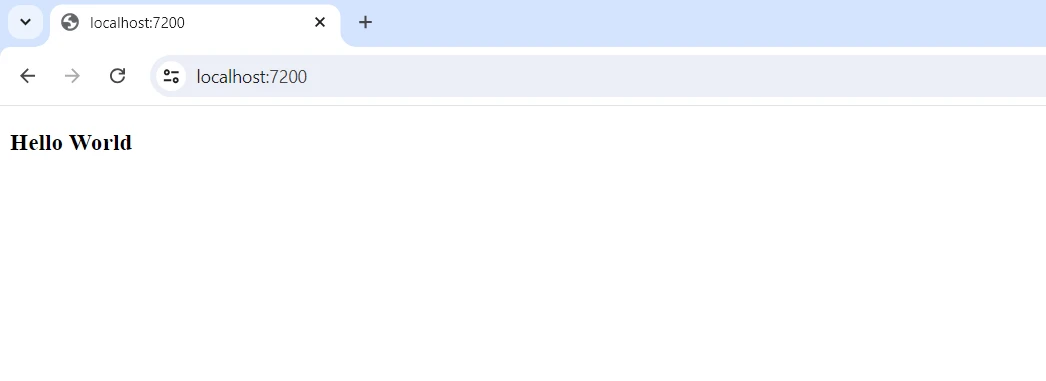
- Komponent Blazor nawiązuje połączenie z HelloWorldViewModel, pobiera tekst powitalny i wyświetla go na ekranie.
## Pierwsze kroki
Aby używać DotNetify i IronPDF, musisz utworzyć projekt .NET i włączyć obie biblioteki do swojej aplikacji. Oto przewodnik krok po kroku, który pomoże Ci zacząć:
### Czym jest IronPDF?
Bogata w funkcje biblioteka .NET [IronPDF PDF Library](/features/) pozwala programom C# na tworzenie, odczytywanie i edycję dokumentów PDF. Dzięki tej bibliotece programiści mogą szybko przekształcać informacje HTML, CSS i JavaScript w wysokiej jakości, gotowe do druku pliki PDF. Kluczowe zadania obejmują dodawanie nagłówków i stopki, dzielenie i łączenie plików PDF, dodawanie znaków wodnych i konwersję HTML do PDF.
IronPDF jest istotny dla różnych aplikacji, ponieważ wspiera zarówno .NET Framework, jak i .NET Core. Dzięki łatwości użycia i obfitości informacji, pliki PDF można łatwo zintegrować z produktami programistów. IronPDF obsługuje skomplikowane układy danych i formatowanie, zapewniając, że generowane przez niego pliki PDF wiernie odzwierciedlają oryginalny tekst HTML klienta. Ponadto IronPDF wspiera aplikacje cross-platformowe, takie jak Windows, web i środowiska mobilne.
### Funkcje IronPDF
- **Generowanie PDF z HTML:** Konwertuj JavaScript, HTML i CSS do PDF. IronPDF obsługuje zapytania o media i responsywny projekt, dwa współczesne standardy internetowe. Wsparcie dla nowoczesnych standardów webowych jest przydatne do dynamicznego dekorowania faktur PDF, raportów i dokumentów przy użyciu HTML i CSS.
- **Edycja PDF:** Do istniejących plików PDF można dodawać tekst, obrazy i inne treści. Programiści mogą korzystać z IronPDF, aby wydobywać tekst i obrazy z plików PDF, łączyć wiele plików PDF w jeden, dzielić pliki PDF na kilka oddzielnych dokumentów i dodawać znaki wodne, adnotacje, nagłówki oraz stopki.
- **Konwersja PDF:** Konwertuj kilka formatów plików, w tym Word, Excel i pliki obrazów, do formatu PDF. IronPDF również obsługuje konwersję PDF na obrazy (PNG, JPEG, itp.).
- **Wydajność i niezawodność:** Wysoka wydajność i niezawodność to pożądane cechy projektowe w ustawieniach przemysłowych. Z IronPDF programiści mogą łatwo zarządzać dużymi zestawami dokumentów.
### Zainstaluj IronPDF
Aby uzyskać potrzebne narzędzia do pracy z plikami PDF w projektach .NET, zainstaluj pakiet IronPDF.
```shell
:ProductInstall
```
#### Zintegruj DotNetify z IronPDF
**Configure DotNetify:**
Konfiguracja uruchamiania: Otworz `Startup.cs` i skonfiguruj DotNetify uzywajac metod `ConfigureServices` oraz `Configure`.
```csharp
using DotNetify;
using DotNetify.Blazor;

public class Startup
{
    public void ConfigureServices(IServiceCollection services)
    {
        services.AddRazorPages();
        services.AddServerSideBlazor();
        services.AddSignalR();
        services.AddDotNetify();
    }

    public void Configure(IApplicationBuilder app, IWebHostEnvironment env)
    {
        if (env.IsDevelopment())
        {
            app.UseDeveloperExceptionPage();
        }
        else
        {
            app.UseExceptionHandler("/Error");
            app.UseHsts();
        }

        app.UseHttpsRedirection();
        app.UseStaticFiles();
        app.UseRouting();
        app.UseEndpoints(endpoints =>
        {
            endpoints.MapBlazorHub();
            endpoints.MapFallbackToPage("/_Host");
            endpoints.MapHub<DotNetifyHub>("/dotnetify");
        });
    }
}
```
#### Utwórz ViewModel
Dodaj nowy plik klasy w projekcie (np. PdfViewModel.cs) i utwórz ViewModel, który będzie generować PDF.
```csharp
using DotNetify;
using IronPdf;
public class PdfViewModel : BaseVM
{
public string PdfUrl { get; set; }
public void GeneratePdf()
{
// Create a new PDF renderer instance
var Renderer = new ChromePdfRenderer();
// Render HTML as a PDF document
var PdfDocument = Renderer.RenderHtmlAsPdf("<h1>Hello World!</h1>");
// Define the output path for saving the PDF
var OutputPath = "wwwroot/PdfFiles/HelloWorld.pdf";
// Save the generated PDF document
PdfDocument.SaveAs(OutputPath);
// Update the property for the PDF URL
PdfUrl = "/PdfFiles/HelloWorld.pdf";
Changed(nameof(PdfUrl));
}
}
```
Utwórz komponent Blazor przez dodanie nowego komponentu (np. GeneratePdf.razor) i powiąż go z ViewModel.
```razor
@page "/"
@using DotNetify
@using DotNetify.Blazor
@inject IDotNetifyService DotNetify
<PageTitle>Generate PDF</PageTitle>
<h3>Generate PDF</h3>
<button @onclick="GeneratePdf">Generate PDF</button>
@if (!string.IsNullOrEmpty(pdfUrl))
{
<a href="@pdfUrl" target="_blank">Download PDF</a>
}
@code {
private string pdfUrl;
protected override async Task OnInitializedAsync()
{
var vm = await DotNetify.ConnectAsync<PdfViewModel>(this);
pdfUrl = vm.PdfUrl;
vm.PropertyChanged += (sender, args) =>
{
if (args.PropertyName == nameof(vm.PdfUrl))
{
pdfUrl = vm.PdfUrl;
StateHasChanged();
}
};
}
private void GeneratePdf()
{
DotNetify.CallMethod("GeneratePdf");
}
}
```
Integrując DotNetify i IronPDF w aplikacji ASP.NET Core Blazor C#, można uzyskać obsługę danych w czasie rzeczywistym i dynamiczną produkcję PDF. Konfiguracja zaczyna się od ustawienia projektu w Startup.cs, gdzie rejestrowane są usługi dla Razor Pages, Blazor Server, SignalR i DotNetify, aby umożliwić działanie Blazor-a po stronie serwera i funkcje w czasie rzeczywistym.
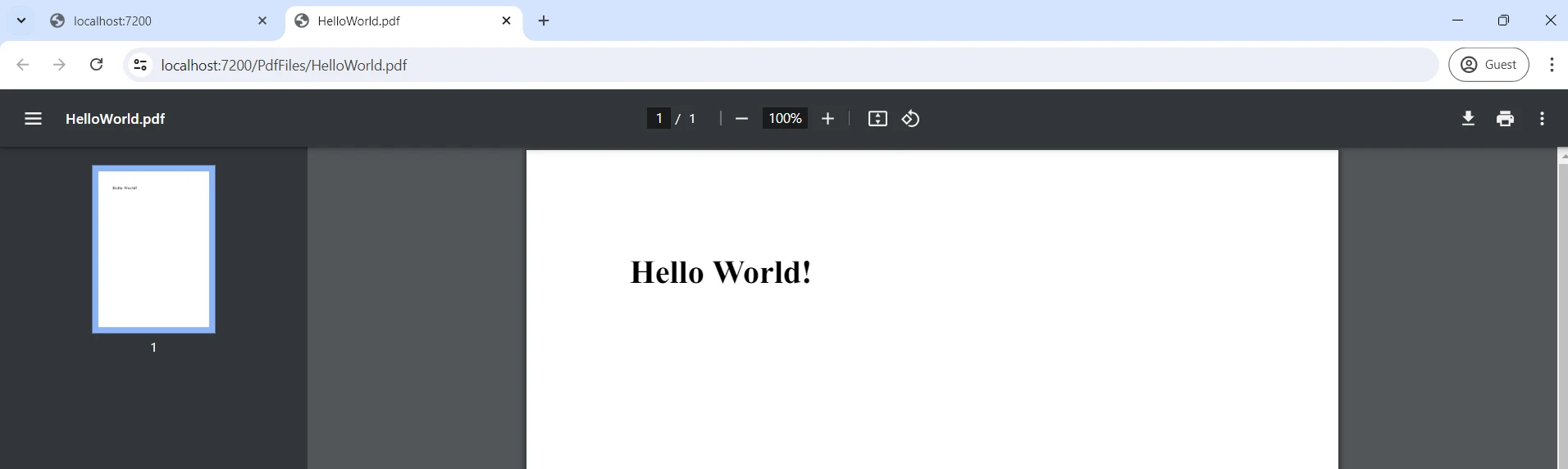
W PdfViewModel.cs zdefiniowana jest logika generowania PDF przez IronPDF. Plik PDF można wygenerować za pomocą kilku linii kodu. Funkcja `GeneratePdf` konwertuje zawartosc HTML na PDF i aktualizuje wlasciwosc PdfUrl, informujac klienta o lokalizacji nowego pliku. Komunikacja z komponentem GeneratePdf.razor Blazor jest obsługiwana przez ten ViewModel.
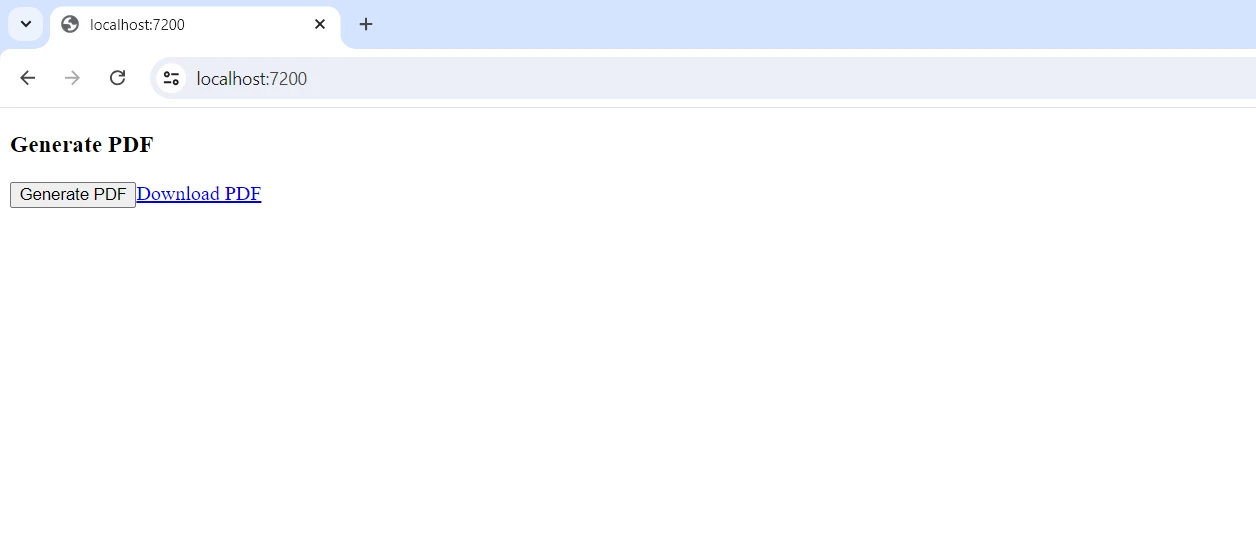
Komponent laczy sie z PdfViewModel poprzez IDotNetifyService i wiaze sie z jego wlasciwosciami, umozliwiajac klientowi wywolanie funkcji `GeneratePdf` oraz reagowanie na zmiany wlasciwosci. Kiedy użytkownicy klikają przycisk "Generuj PDF", metoda ViewModel zostaje wywołana, tworząc PDF i dynamicznie aktualizując adres URL pobierania. Z taką konfiguracją aplikacja internetowa dostarcza elastyczne i angażujące doświadczenie użytkownika, łącząc potężne możliwości generowania dokumentów przez IronPDF z synchronizacją danych w czasie rzeczywistym DotNetify.
## Wnioski
Integracja DotNetify z IronPDF łączy synchronizację danych w czasie rzeczywistym i dynamiczną produkcję PDF w aplikacji ASP.NET Core Blazor C#. DotNetify pozwala na płynną komunikację między komponentami Blazor po stronie klienta i modelami widoków po stronie serwera, prowadząc do interaktywnych i elastycznych aplikacji. To jest uzupełnione przez IronPDF, który zapewnia solidne narzędzia do tworzenia i modyfikowania plików PDF bezpośrednio z logiki po stronie serwera. To potężne połączenie pozwala na rozwój aplikacji zdolnych do tworzenia i dystrybucji dostosowanych dokumentów oraz aktualizacje w czasie rzeczywistym.
Ta integracja wykorzystuje technologie zarządzania danymi w czasie rzeczywistym i generowania dokumentów w celu poprawy doświadczenia użytkownika, niezależnie od tego, czy chodzi o raportowanie, fakturowanie czy jakiekolwiek inne zadanie związane z dokumentami. Postępując zgodnie z opisanymi krokami, programiści mogą efektywnie skonfigurować i wykorzystać te narzędzia, otwierając nowe możliwości w nowoczesnym rozwoju aplikacji internetowych.
Dzięki IronPDF i [Iron Software Developer Tools](https://ironsoftware.com), programiści chętni do eksploracji jego szerokich funkcji mogą korzystać z takich funkcji jak OCR, skanowanie kodów kreskowych, produkcja PDF i więcej. Dostępne są szczegółowe alternatywy licencyjne związane z projektem, umożliwiające programistom wybór najlepszego modelu, który odpowiada ich potrzebom. Wymienione zalety przyczyniają się do dostarczania przez programistów terminowych, skoordynowanych i skutecznych rozwiązań dla wielu wyzwań.
DotNetify to framework typu open source stworzony przy użyciu .NET Framework i Blazor, przeznaczony do tworzenia aplikacji internetowych działających w czasie rzeczywistym na platformie .NET. Wykorzystując możliwości SignalR do interakcji w czasie rzeczywistym między klientem a serwerem, upraszcza tworzenie dynamicznych i interaktywnych aplikacji internetowych. DotNetify zapewnia model programowania, który synchronizuje widoki po stronie klienta z danymi skryptowymi po stronie serwera, umożliwiając programistom szybkie i łatwe projektowanie bogatych, responsywnych i wydajnych interfejsów internetowych.
Z kolei biblioteka IronPDF PDF Generation Library to potężny pakiet .NET, który ułatwia programowe tworzenie, edycję i manipulowanie dokumentami PDF. Jest to doskonały wybór do tworzenia dynamicznych, opartych na danych dokumentów, takich jak raporty, faktury i formularze, oferujący intuicyjny interfejs API do przekształcania tekstu HTML w pliki PDF.
Dzięki integracji DotNetify z IronPDF w aplikacji napisanej w języku C# połączono interaktywność internetową w czasie rzeczywistym z solidnymi możliwościami tworzenia plików PDF. Ta integracja jest szczególnie przydatna w aplikacjach wymagających wyświetlania danych w czasie rzeczywistym oraz możliwości dynamicznego tworzenia i dystrybucji dokumentów PDF na podstawie najnowszych danych. Programiści mogą tworzyć rozbudowane, interaktywne aplikacje internetowe, które spełniają złożone wymagania biznesowe i poprawiają komfort użytkowania dzięki płynnemu generowaniu i dystrybucji dokumentów, wykorzystując wszechstronne funkcje generowania plików PDF w IronPDF oraz synchronizację danych w czasie rzeczywistym w DotNetify.
Czym jest DotNetify?
DotNetify to framework typu open source zaprojektowany w celu uproszczenia tworzenia interaktywnych aplikacji internetowych działających w czasie rzeczywistym przy użyciu .NET Framework i Blazor. Programiści mogą tworzyć dynamiczne i responsywne interfejsy użytkownika, które bez wysiłku synchronizują się z danymi po stronie serwera dzięki wykorzystaniu SignalR, ułatwiając komunikację w czasie rzeczywistym między klientem a serwerem. DotNetify wykorzystuje podejście programowania reaktywnego, abstrakcyjnie przedstawiając złożoność wiązania danych w czasie rzeczywistym i obsługi zdarzeń, co pozwala uprościć tworzenie złożonych aplikacji internetowych przy minimalnej ilości kodu.
DotNetify pozwala programistom tworzyć modele widoku po stronie serwera, które natychmiast przekazują zmiany do klienta, zapewniając, że interfejs użytkownika zawsze odzwierciedla stan aplikacji. Ta platforma oferuje elastyczność w wyborze technologii po stronie klienta, obsługując zarówno klasyczne interfejsy użytkownika oparte na JavaScript, jak i interfejsy Blazor. Dzięki łatwości obsługi i skuteczności idealnie nadaje się do aplikacji wymagających aktualizacji w czasie rzeczywistym, takich jak pulpity nawigacyjne, narzędzia do współpracy i strumienie danych na żywo.
Obsługa skomplikowanych interakcji i przepływów danych w czasie rzeczywistym przez DotNetify znacznie poprawia komfort użytkowania, umożliwiając płynną synchronizację danych i natychmiastową informację zwrotną. Ogólnie rzecz biorąc, DotNetify to wartościowe narzędzie dla programistów .NET, którzy pragną szybko i efektywnie tworzyć reaktywne, nowoczesne aplikacje internetowe w czasie rzeczywistym.
Funkcje DotNetify
DotNetify w C# oferuje szereg funkcji, które upraszczają tworzenie interaktywnych aplikacji online w czasie rzeczywistym, w tym:
Komunikacja w czasie rzeczywistym: Wykorzystuje SignalR do dwukierunkowej, rzeczywistej komunikacji klient-serwer, umożliwiając interaktywne interfejsy użytkownika i natychmiastowe aktualizacje.
Reaktywny model programowania: Zapewnia reaktywny model programowania, automatycznie synchronizując widoki po stronie klienta i modele widoków po stronie serwera, aby utrzymać interfejs użytkownika na bieżąco z najnowszymi informacjami.
Modele widoków po stronie serwera: Ułatwia tworzenie modeli widoków po stronie serwera, do których mogą się wiązać komponenty po stronie klienta, upraszczając zarządzanie stanem i przepływ danych wewnątrz aplikacji.
Wsparcie Blazor i JavaScript: Obsługuje zarówno klasyczne frontend'y JavaScript, jak i frontend'y Blazor, pozwalając programistom wybrać technologię po stronie klienta, która najlepiej odpowiada ich wymaganiom.
Łatwość integracji: Bezproblemowo integruje funkcje w czasie rzeczywistym z nowymi lub istniejącymi projektami i działa dobrze z frontendowymi frameworkami komponentów UI, takimi jak WebSockets, w projektach wykorzystujących React Native, Vue i Blazor.
Skalowalność: Dziedziczy cechy skalowalności SignalR, umożliwiając aplikacjom skuteczne zarządzanie wieloma współbieżnymi połączeniami.
Architektura MVVM: Adopcja architektury Model-View-ViewModel (MVVM), pomagając w oddzieleniu obowiązków i utrzymaniu zorganizowanego i czystego kodu.
Obsługa zdarzeń: Redukuje nadmiarowy kod potrzebny do obsługi interakcji z UI i zmian stanu poprzez usprawnienie obsługi zdarzeń i powiązań danych.
Rozszerzalność i możliwość dostosowania: Zapewnia punkty rozszerzalności i haki do dostosowywania zachowań oraz niezbędnej integracji z innymi bibliotekami lub frameworkami.
Solidna infrastruktura: Oferuje dynamiczny mechanizm routingu, który można całkowicie zdefiniować na zapleczu, zdolny do zagnieżdżonego routingu, uwierzytelniania opartego na tokenach i więcej.
Open Source i społeczne wsparcie: Jako projekt open-source, DotNetify korzysta z udziału społeczności i wniesień, zapewniając ciągłe ulepszenia i modernizacje.
Creating and Configuring DotNetify in C#
Aby utworzyć prosty projekt i rozpocząć konfigurację DotNetify w aplikacji internetowej w C#, wykonaj następujące kroki. Ten samouczek pokazuje, jak używać ASP.NET Core i Blazor do skonfigurowania podstawowego serwera i klienta DotNetify.
Skonfiguruj nowy projekt ASP.NET Core Blazor Server
Otwórz Visual Studio: Uruchom Visual Studio i utwórz nowy projekt.
Utwórz aplikację Blazor Server: Wybierz szablon aplikacji Blazor Server z szablonów projektów i kliknij "Dalej".
Skonfiguruj swój projekt: Podaj nazwę projektu (np. "DotNetifyWebApp") i wprowadź niezbędne zmiany w konfiguracji. Kliknij "Utwórz".
Zainstaluj DotNetify przez NuGet
Zarządzaj pakietami NuGet: W eksploratorze rozwiązań kliknij prawym przyciskiem myszy na projekt i wybierz "Zarządzaj pakietami NuGet".
Wyszukaj DotNetify: Zainstaluj pakiety DotNetify i DotNetify.Blazor.
Konfiguruj DotNetify
Aby skonfigurowac DotNetify, otworz Startup.cs i uzyj metod ConfigureServices oraz Configure.
using DotNetify;using DotNetify.Blazor;public class Startup{ public voidConfigureServices(IServiceCollection services) { services.AddRazorPages(); services.AddServerSideBlazor(); services.AddSignalR(); services.AddDotNetify(); } public voidConfigure(IApplicationBuilder app, IWebHostEnvironment env) { if (env.IsDevelopment()) { app.UseDeveloperExceptionPage(); } else { app.UseExceptionHandler("/Error"); app.UseHsts(); } app.UseHttpsRedirection(); app.UseStaticFiles(); app.UseRouting(); app.UseEndpoints(endpoints => { endpoints.MapBlazorHub(); endpoints.MapFallbackToPage("/_Host"); endpoints.MapHub<DotNetifyHub>("/dotnetify"); }); }}
using DotNetify;
using DotNetify.Blazor;
public class Startup
{
public void ConfigureServices(IServiceCollection services)
{
services.AddRazorPages();
services.AddServerSideBlazor();
services.AddSignalR();
services.AddDotNetify();
}
public void Configure(IApplicationBuilder app, IWebHostEnvironment env)
{
if (env.IsDevelopment())
{
app.UseDeveloperExceptionPage();
}
else
{
app.UseExceptionHandler("/Error");
app.UseHsts();
}
app.UseHttpsRedirection();
app.UseStaticFiles();
app.UseRouting();
app.UseEndpoints(endpoints =>
{
endpoints.MapBlazorHub();
endpoints.MapFallbackToPage("/_Host");
endpoints.MapHub<DotNetifyHub>("/dotnetify");
});
}
}
ImportsDotNetifyImportsDotNetify.BlazorPublic Class Startup Public Sub ConfigureServices(ByVal services AsIServiceCollection) services.AddRazorPages() services.AddServerSideBlazor() services.AddSignalR() services.AddDotNetify() End Sub Public Sub Configure(ByVal app AsIApplicationBuilder, ByVal env AsIWebHostEnvironment) If env.IsDevelopment() Then app.UseDeveloperExceptionPage() Else app.UseExceptionHandler("/Error") app.UseHsts() End If app.UseHttpsRedirection() app.UseStaticFiles() app.UseRouting() app.UseEndpoints(Sub(endpoints) endpoints.MapBlazorHub() endpoints.MapFallbackToPage("/_Host") endpoints.MapHub(OfDotNetifyHub)("/dotnetify") End Sub) End SubEnd Class
Imports DotNetify
Imports DotNetify.Blazor

Public Class Startup
	Public Sub ConfigureServices(ByVal services As IServiceCollection)
		services.AddRazorPages()
		services.AddServerSideBlazor()
		services.AddSignalR()
		services.AddDotNetify()
	End Sub

	Public Sub Configure(ByVal app As IApplicationBuilder, ByVal env As IWebHostEnvironment)
		If env.IsDevelopment() Then
			app.UseDeveloperExceptionPage()
		Else
			app.UseExceptionHandler("/Error")
			app.UseHsts()
		End If

		app.UseHttpsRedirection()
		app.UseStaticFiles()
		app.UseRouting()
		app.UseEndpoints(Sub(endpoints)
			endpoints.MapBlazorHub()
			endpoints.MapFallbackToPage("/_Host")
			endpoints.MapHub(Of DotNetifyHub)("/dotnetify")
		End Sub)
	End Sub
End Class
Utwórz ViewModel
Utwórz nowy plik klasy w projekcie (na przykład HelloWorldViewModel.cs) i zaprojektuj podstawowy ViewModel.
using DotNetify;public class HelloWorldViewModel : BaseVM{ public stringGreetings => "Hello, World!";}
using DotNetify;
public class HelloWorldViewModel : BaseVM
{
public string Greetings => "Hello, World!";
}
ImportsDotNetifyPublic Class HelloWorldViewModelInheritsBaseVM PublicReadOnlyPropertyGreetings() AsString Get Return "Hello, World!"End Get End PropertyEnd Class
Imports DotNetify
Public Class HelloWorldViewModel
Inherits BaseVM
Public ReadOnly Property Greetings() As String
Get
Return "Hello, World!"
End Get
End Property
End Class
Zarejestruj ViewModel
Przed zarejestrowaniem ViewModel, otworz Program.cs.
using Microsoft.AspNetCore.Hosting;using Microsoft.Extensions.DependencyInjection;using Microsoft.Extensions.Hosting;public class Program{ public static voidMain(string[] args) {CreateHostBuilder(args).Build().Run(); } public static IHostBuilderCreateHostBuilder(string[] args) =>Host.CreateDefaultBuilder(args) .ConfigureWebHostDefaults(webBuilder => { webBuilder.UseStartup<Startup>(); }) .ConfigureServices(services => { services.AddTransient<HelloWorldViewModel>(); });}
using Microsoft.AspNetCore.Hosting;
using Microsoft.Extensions.DependencyInjection;
using Microsoft.Extensions.Hosting;
public class Program
{
public static void Main(string[] args)
{
CreateHostBuilder(args).Build().Run();
}
public static IHostBuilder CreateHostBuilder(string[] args) =>
Host.CreateDefaultBuilder(args)
.ConfigureWebHostDefaults(webBuilder =>
{
webBuilder.UseStartup<Startup>();
})
.ConfigureServices(services =>
{
services.AddTransient<HelloWorldViewModel>();
});
}
ImportsMicrosoft.AspNetCore.HostingImportsMicrosoft.Extensions.DependencyInjectionImportsMicrosoft.Extensions.HostingPublic Class Program PublicShared Sub Main(ByVal args() AsString)CreateHostBuilder(args).Build().Run() End Sub PublicShared Function CreateHostBuilder(ByVal args() AsString) AsIHostBuilder ReturnHost.CreateDefaultBuilder(args).ConfigureWebHostDefaults(Sub(webBuilder) webBuilder.UseStartup(OfStartup)() End Sub).ConfigureServices(Sub(services) services.AddTransient(OfHelloWorldViewModel)() End Sub}) End Function
Imports Microsoft.AspNetCore.Hosting
Imports Microsoft.Extensions.DependencyInjection
Imports Microsoft.Extensions.Hosting
Public Class Program
Public Shared Sub Main(ByVal args() As String)
CreateHostBuilder(args).Build().Run()
End Sub
Public Shared Function CreateHostBuilder(ByVal args() As String) As IHostBuilder
Return Host.CreateDefaultBuilder(args).ConfigureWebHostDefaults(Sub(webBuilder)
webBuilder.UseStartup(Of Startup)()
End Sub).ConfigureServices(Sub(services)
services.AddTransient(Of HelloWorldViewModel)()
End Sub})
End Function
Utwórz komponent Blazor
W projekcie dodaj nowy komponent Blazor (na przykład HelloWorld.razor) i połącz go z ViewModel.
Skonfigurowuje aplikację do korzystania z DotNetify, Blazor, Razor Pages i SignalR.
Konfiguruje końcówki i routing DotNetify i Blazor.
Opisuje podstawowy ViewModel z atrybutem zwracającym wiadomość powitalną.
Rejestruje HelloWorldViewModel jako usługę.
Komponent Blazor nawiązuje połączenie z HelloWorldViewModel, pobiera tekst powitalny i wyświetla go na ekranie.
Pierwsze kroki
Aby używać DotNetify i IronPDF, musisz utworzyć projekt .NET i włączyć obie biblioteki do swojej aplikacji. Oto przewodnik krok po kroku, który pomoże Ci zacząć:
Czym jest IronPDF?
Bogata w funkcje biblioteka .NET IronPDF PDF Library pozwala programom C# na tworzenie, odczytywanie i edycję dokumentów PDF. Dzięki tej bibliotece programiści mogą szybko przekształcać informacje HTML, CSS i JavaScript w wysokiej jakości, gotowe do druku pliki PDF. Kluczowe zadania obejmują dodawanie nagłówków i stopki, dzielenie i łączenie plików PDF, dodawanie znaków wodnych i konwersję HTML do PDF.
IronPDF jest istotny dla różnych aplikacji, ponieważ wspiera zarówno .NET Framework, jak i .NET Core. Dzięki łatwości użycia i obfitości informacji, pliki PDF można łatwo zintegrować z produktami programistów. IronPDF obsługuje skomplikowane układy danych i formatowanie, zapewniając, że generowane przez niego pliki PDF wiernie odzwierciedlają oryginalny tekst HTML klienta. Ponadto IronPDF wspiera aplikacje cross-platformowe, takie jak Windows, web i środowiska mobilne.
Funkcje IronPDF
Generowanie PDF z HTML: Konwertuj JavaScript, HTML i CSS do PDF. IronPDF obsługuje zapytania o media i responsywny projekt, dwa współczesne standardy internetowe. Wsparcie dla nowoczesnych standardów webowych jest przydatne do dynamicznego dekorowania faktur PDF, raportów i dokumentów przy użyciu HTML i CSS.
Edycja PDF: Do istniejących plików PDF można dodawać tekst, obrazy i inne treści. Programiści mogą korzystać z IronPDF, aby wydobywać tekst i obrazy z plików PDF, łączyć wiele plików PDF w jeden, dzielić pliki PDF na kilka oddzielnych dokumentów i dodawać znaki wodne, adnotacje, nagłówki oraz stopki.
Konwersja PDF: Konwertuj kilka formatów plików, w tym Word, Excel i pliki obrazów, do formatu PDF. IronPDF również obsługuje konwersję PDF na obrazy (PNG, JPEG, itp.).
Wydajność i niezawodność: Wysoka wydajność i niezawodność to pożądane cechy projektowe w ustawieniach przemysłowych. Z IronPDF programiści mogą łatwo zarządzać dużymi zestawami dokumentów.
Zainstaluj IronPDF
Aby uzyskać potrzebne narzędzia do pracy z plikami PDF w projektach .NET, zainstaluj pakiet IronPDF.
PM > Install-Package IronPdf
Install-Package IronPdf
Zintegruj DotNetify z IronPDF
Configure DotNetify:
Konfiguracja uruchamiania: Otworz Startup.cs i skonfiguruj DotNetify uzywajac metod ConfigureServices oraz Configure.
using DotNetify;using DotNetify.Blazor;public class Startup{ public voidConfigureServices(IServiceCollection services) { services.AddRazorPages(); services.AddServerSideBlazor(); services.AddSignalR(); services.AddDotNetify(); } public voidConfigure(IApplicationBuilder app, IWebHostEnvironment env) { if (env.IsDevelopment()) { app.UseDeveloperExceptionPage(); } else { app.UseExceptionHandler("/Error"); app.UseHsts(); } app.UseHttpsRedirection(); app.UseStaticFiles(); app.UseRouting(); app.UseEndpoints(endpoints => { endpoints.MapBlazorHub(); endpoints.MapFallbackToPage("/_Host"); endpoints.MapHub<DotNetifyHub>("/dotnetify"); }); }}
using DotNetify;
using DotNetify.Blazor;
public class Startup
{
public void ConfigureServices(IServiceCollection services)
{
services.AddRazorPages();
services.AddServerSideBlazor();
services.AddSignalR();
services.AddDotNetify();
}
public void Configure(IApplicationBuilder app, IWebHostEnvironment env)
{
if (env.IsDevelopment())
{
app.UseDeveloperExceptionPage();
}
else
{
app.UseExceptionHandler("/Error");
app.UseHsts();
}
app.UseHttpsRedirection();
app.UseStaticFiles();
app.UseRouting();
app.UseEndpoints(endpoints =>
{
endpoints.MapBlazorHub();
endpoints.MapFallbackToPage("/_Host");
endpoints.MapHub<DotNetifyHub>("/dotnetify");
});
}
}
ImportsDotNetifyImportsDotNetify.BlazorPublic Class Startup Public Sub ConfigureServices(ByVal services AsIServiceCollection) services.AddRazorPages() services.AddServerSideBlazor() services.AddSignalR() services.AddDotNetify() End Sub Public Sub Configure(ByVal app AsIApplicationBuilder, ByVal env AsIWebHostEnvironment) If env.IsDevelopment() Then app.UseDeveloperExceptionPage() Else app.UseExceptionHandler("/Error") app.UseHsts() End If app.UseHttpsRedirection() app.UseStaticFiles() app.UseRouting() app.UseEndpoints(Sub(endpoints) endpoints.MapBlazorHub() endpoints.MapFallbackToPage("/_Host") endpoints.MapHub(OfDotNetifyHub)("/dotnetify") End Sub) End SubEnd Class
Imports DotNetify
Imports DotNetify.Blazor

Public Class Startup
	Public Sub ConfigureServices(ByVal services As IServiceCollection)
		services.AddRazorPages()
		services.AddServerSideBlazor()
		services.AddSignalR()
		services.AddDotNetify()
	End Sub

	Public Sub Configure(ByVal app As IApplicationBuilder, ByVal env As IWebHostEnvironment)
		If env.IsDevelopment() Then
			app.UseDeveloperExceptionPage()
		Else
			app.UseExceptionHandler("/Error")
			app.UseHsts()
		End If

		app.UseHttpsRedirection()
		app.UseStaticFiles()
		app.UseRouting()
		app.UseEndpoints(Sub(endpoints)
			endpoints.MapBlazorHub()
			endpoints.MapFallbackToPage("/_Host")
			endpoints.MapHub(Of DotNetifyHub)("/dotnetify")
		End Sub)
	End Sub
End Class
Utwórz ViewModel
Dodaj nowy plik klasy w projekcie (np. PdfViewModel.cs) i utwórz ViewModel, który będzie generować PDF.
using DotNetify;using IronPdf;public class PdfViewModel : BaseVM{ public stringPdfUrl { get; set; } public voidGeneratePdf() { // Create a new PDF renderer instance varRenderer = new ChromePdfRenderer(); // Render HTML as a PDF document varPdfDocument = Renderer.RenderHtmlAsPdf("<h1>Hello World!</h1>"); // Define the output path for saving the PDF varOutputPath = "wwwroot/PdfFiles/HelloWorld.pdf"; // Save the generated PDF documentPdfDocument.SaveAs(OutputPath); // Update the property for the PDF URLPdfUrl = "/PdfFiles/HelloWorld.pdf";Changed(nameof(PdfUrl)); }}
using DotNetify;
using IronPdf;

public class PdfViewModel : BaseVM
{
    public string PdfUrl { get; set; }

    public void GeneratePdf()
    {
        // Create a new PDF renderer instance
        var Renderer = new ChromePdfRenderer();

        // Render HTML as a PDF document
        var PdfDocument = Renderer.RenderHtmlAsPdf("<h1>Hello World!</h1>");

        // Define the output path for saving the PDF
        var OutputPath = "wwwroot/PdfFiles/HelloWorld.pdf";

        // Save the generated PDF document
        PdfDocument.SaveAs(OutputPath);

        // Update the property for the PDF URL
        PdfUrl = "/PdfFiles/HelloWorld.pdf";
        Changed(nameof(PdfUrl));
    }
}
ImportsDotNetifyImportsIronPdfPublic Class PdfViewModelInheritsBaseVM Public Property PdfUrlAsString Public Sub GeneratePdf() ' Create a new PDF renderer instance DimRenderer = New ChromePdfRenderer() ' Render HTML as a PDF document DimPdfDocument = Renderer.RenderHtmlAsPdf("<h1>Hello World!</h1>") ' Define the output path for saving the PDF DimOutputPath = "wwwroot/PdfFiles/HelloWorld.pdf" ' Save the generated PDF documentPdfDocument.SaveAs(OutputPath) ' Update the property for the PDF URLPdfUrl = "/PdfFiles/HelloWorld.pdf"Changed(NameOf(PdfUrl)) End SubEnd Class
Imports DotNetify
Imports IronPdf

Public Class PdfViewModel
    Inherits BaseVM

    Public Property PdfUrl As String

    Public Sub GeneratePdf()
        ' Create a new PDF renderer instance
        Dim Renderer = New ChromePdfRenderer()

        ' Render HTML as a PDF document
        Dim PdfDocument = Renderer.RenderHtmlAsPdf("<h1>Hello World!</h1>")

        ' Define the output path for saving the PDF
        Dim OutputPath = "wwwroot/PdfFiles/HelloWorld.pdf"

        ' Save the generated PDF document
        PdfDocument.SaveAs(OutputPath)

        ' Update the property for the PDF URL
        PdfUrl = "/PdfFiles/HelloWorld.pdf"
        Changed(NameOf(PdfUrl))
    End Sub
End Class
Utwórz komponent Blazor przez dodanie nowego komponentu (np. GeneratePdf.razor) i powiąż go z ViewModel.
Integrując DotNetify i IronPDF w aplikacji ASP.NET Core Blazor C#, można uzyskać obsługę danych w czasie rzeczywistym i dynamiczną produkcję PDF. Konfiguracja zaczyna się od ustawienia projektu w Startup.cs, gdzie rejestrowane są usługi dla Razor Pages, Blazor Server, SignalR i DotNetify, aby umożliwić działanie Blazor-a po stronie serwera i funkcje w czasie rzeczywistym.
W PdfViewModel.cs zdefiniowana jest logika generowania PDF przez IronPDF. Plik PDF można wygenerować za pomocą kilku linii kodu. Funkcja GeneratePdf konwertuje zawartosc HTML na PDF i aktualizuje wlasciwosc PdfUrl, informujac klienta o lokalizacji nowego pliku. Komunikacja z komponentem GeneratePdf.razor Blazor jest obsługiwana przez ten ViewModel.
Komponent laczy sie z PdfViewModel poprzez IDotNetifyService i wiaze sie z jego wlasciwosciami, umozliwiajac klientowi wywolanie funkcji GeneratePdf oraz reagowanie na zmiany wlasciwosci. Kiedy użytkownicy klikają przycisk "Generuj PDF", metoda ViewModel zostaje wywołana, tworząc PDF i dynamicznie aktualizując adres URL pobierania. Z taką konfiguracją aplikacja internetowa dostarcza elastyczne i angażujące doświadczenie użytkownika, łącząc potężne możliwości generowania dokumentów przez IronPDF z synchronizacją danych w czasie rzeczywistym DotNetify.
Wnioski
Integracja DotNetify z IronPDF łączy synchronizację danych w czasie rzeczywistym i dynamiczną produkcję PDF w aplikacji ASP.NET Core Blazor C#. DotNetify pozwala na płynną komunikację między komponentami Blazor po stronie klienta i modelami widoków po stronie serwera, prowadząc do interaktywnych i elastycznych aplikacji. To jest uzupełnione przez IronPDF, który zapewnia solidne narzędzia do tworzenia i modyfikowania plików PDF bezpośrednio z logiki po stronie serwera. To potężne połączenie pozwala na rozwój aplikacji zdolnych do tworzenia i dystrybucji dostosowanych dokumentów oraz aktualizacje w czasie rzeczywistym.
Ta integracja wykorzystuje technologie zarządzania danymi w czasie rzeczywistym i generowania dokumentów w celu poprawy doświadczenia użytkownika, niezależnie od tego, czy chodzi o raportowanie, fakturowanie czy jakiekolwiek inne zadanie związane z dokumentami. Postępując zgodnie z opisanymi krokami, programiści mogą efektywnie skonfigurować i wykorzystać te narzędzia, otwierając nowe możliwości w nowoczesnym rozwoju aplikacji internetowych.
Dzięki IronPDF i Iron Software Developer Tools, programiści chętni do eksploracji jego szerokich funkcji mogą korzystać z takich funkcji jak OCR, skanowanie kodów kreskowych, produkcja PDF i więcej. Dostępne są szczegółowe alternatywy licencyjne związane z projektem, umożliwiające programistom wybór najlepszego modelu, który odpowiada ich potrzebom. Wymienione zalety przyczyniają się do dostarczania przez programistów terminowych, skoordynowanych i skutecznych rozwiązań dla wielu wyzwań.
Jacob Mellor jest Chief Technology Officer w Iron Software i wizjonerskim inżynierem, pionierem technologii C# PDF. Jako pierwotny deweloper głównej bazy kodowej Iron Software, kształtuje architekturę produktów firmy od jej początku, przekształcając ją wspólnie z CEO Cameron Rimington w firmę liczącą ponad 50 osób, obsługującą NASA, Teslę i światowe agencje rządowe.


















