Podczas pracy z C#, programiści często muszą decydować, czy użyć pola czy właściwości. Choć na powierzchni mogą wydawać się podobne, pod spodem działają bardzo różnie - szczególnie podczas integracji z bibliotekami innych firm, takimi jak IronPDF.
W tym przewodniku zbadamy różnice między polami a właściwościami, dlaczego mają one znaczenie i jak wybór jednego z nich może wpłynąć na Twoje doświadczenie programistyczne z IronPDF, jedną z najpotężniejszych bibliotek .NET do tworzenia i manipulacji plikami PDF.
Understanding Poles and Properties in C#
Zanim zagłębimy się w scenariusze specyficzne dla IronPDF, przypomnijmy sobie, czym są pola i właściwości w kontekście programowania obiektowego.
Czym jest Pole?
Pole jest zmienną, która jest zadeklarowana bezpośrednio w klasie lub strukturze. Pola są zazwyczaj używane do bezpośredniego przechowywania danych, co czyni je prostymi, ale ryzykownymi w kontekście enkapsulacji i kontroli.
public class DocumentSettings
{
    public string headerText; // Pole
}
public class DocumentSettings
{
    public string headerText; // Pole
}
Public Class DocumentSettings
Public headerText As String ' Pole
End Class
Public Class DocumentSettings
    Public headerText As String ' Pole
End Class
Pola są szybkie i lekkie, ale brakuje im ochrony, takiej jak modyfikatory dostępu, metody ustawiające czy logika walidacji. Dlatego powinny być używane ostrożnie - szczególnie, gdy wartość jest bezpośrednio dostępna z zewnętrznego kodu.
Czym jest Właściwość?
Właściwość w C# działa jako kontrolowany interfejs do pola. Zapewnia elastyczny sposób uzyskiwania lub przypisywania wartości właściwości, pozwalając na dodatkową logikę wewnątrz jej akcesorów get lub set.
public class DocumentSettings
{
    public string HeaderText { get; set; } // Właściwość
}
public class DocumentSettings
{
    public string HeaderText { get; set; } // Właściwość
}
Public Class DocumentSettings
Public Property HeaderText As String ' Właściwość
End Class
Public Class DocumentSettings
    Public Property HeaderText As String ' Właściwość
End Class
Właściwości są idealne do publicznego dostępu do danych, ponieważ oferują enkapsulację i mogą łatwo integrować się z frameworkami używającymi refleksji, jak IronPDF.
Kluczowe różnice między Polami a Właściwościami
Funkcja
Pole
Właściwość
Enkapsulacja
Nie
Tak
Logika zaplecza
Nie jest możliwe
Wsparcie przez get/set
Przyjazne refleksji
Nie niezawodnie
Tak
Wiązanie danych
Nie idealne
Preferowane
W skrócie: używaj właściwości do danych publicznych, szczególnie gdy pracujesz z narzędziami takimi jak IronPDF, które polegają na refleksji lub serializacji.
Kiedy używać Pól a kiedy Właściwości z IronPDF
Dlaczego to ma znaczenie podczas pracy z IronPDF?
Często IronPDF działa z obiektami C# przez refleksję, która zależy od właściwości, a nie od pól. Niezależnie od tego, czy konfigurujesz ustawienia, wprowadzasz dane, czy przekazujesz obiekty do szablonów HTML, publiczne właściwości zapewniają, że Twoje dane są dostępne i czytelne.
Przykład: Konfiguracja Eksportu PDF
// Pole: Might be ignored
public class PdfExportOptions
{
    public string footerHtml; // fields store data directly, but not safely
}
// Właściwość: Recognized and controlled
public class PdfExportOptions
{
    public string FooterHtml { get; set; } // easy to modify, validate, or hide
}
// Pole: Might be ignored
public class PdfExportOptions
{
    public string footerHtml; // fields store data directly, but not safely
}
// Właściwość: Recognized and controlled
public class PdfExportOptions
{
    public string FooterHtml { get; set; } // easy to modify, validate, or hide
}
' Pole: Might be ignored
Public Class PdfExportOptions
Public footerHtml As String ' fields store data directly, but not safely
End Class
' Właściwość: Recognized and controlled
Public Class PdfExportOptions
Public Property FooterHtml As String ' easy to modify, validate, or hide
End Class
' Pole: Might be ignored
Public Class PdfExportOptions
    Public footerHtml As String ' fields store data directly, but not safely
End Class

' Właściwość: Recognized and controlled
Public Class PdfExportOptions
    Public Property FooterHtml As String ' easy to modify, validate, or hide
End Class
Serializacja i Wiązanie Danych w IronPDF
Funkcje IronPDF, takie jak szablonowanie HTML, wypełnianie formularzy czy wstawianie metadanych, zależą od właściwości, ponieważ są dostępne przez refleksję. Jeśli przekazujesz dane do szablonów lub eksportujesz formularze:
- Pola mogą być całkowicie pominięte.
- Właściwości zapewniają, że dane są poprawnie pobrane i wyrenderowane w końcowym pliku.
Jest to szczególnie istotne podczas pracy z złożonymi modelami lub danymi generowanymi przez użytkowników.
Najlepsze Praktyki dla Rozwoju z IronPDF
Oto kilka szybkich wskazówek, które pomogą Ci uniknąć typowych problemów:
Używaj Właściwości do Interakcji z Publicznym API
Jeśli Twój model jest używany przez IronPDF (lub jakąkolwiek zewnętrzną bibliotekę), używaj publicznych właściwości z odpowiednimi modyfikatorami dostępu, aby zapewnić bezpieczny i utrzymywany dostęp.
public class InvoiceData
{
    public string CustomerName { get; set; }
    public DateTime InvoiceDate { get; set; }
}
public class InvoiceData
{
    public string CustomerName { get; set; }
    public DateTime InvoiceDate { get; set; }
}
Public Class InvoiceData
Public Property CustomerName() As String
Public Property InvoiceDate() As DateTime
End Class
Public Class InvoiceData
	Public Property CustomerName() As String
	Public Property InvoiceDate() As DateTime
End Class
To zapewnia, że IronPDF (i inne biblioteki .NET) mogą uzyskać dostęp do wartości przez refleksję i serializację.
Utrzymuj Pola Prywatne i Wewnętrzne
Używaj pól do logiki wewnętrznej, gdy nie chcesz, aby zewnętrzne komponenty lub biblioteki uzyskiwały dostęp do danych.
public class InvoiceData
{
    private string internalNiete; // Niet meant for IronPDF
}
public class InvoiceData
{
    private string internalNiete; // Niet meant for IronPDF
}
Public Class InvoiceData
Private internalNiete As String ' Niet meant for IronPDF
End Class
Public Class InvoiceData
    Private internalNiete As String ' Niet meant for IronPDF
End Class
Jest to dobra praktyka, by utrzymać Twoją logikę czystą, bezpieczną i przewidywalną.
Pole vs Właściwość: Bezpieczeństwo i Enkapsulacja w Projektach IronPDF
Jedną z najbardziej kluczowych różnic między polami a właściwościami jest bezpieczeństwo. Pole, jak na przykład public string name; może być zmodyfikowane bezpośrednio przez zewnętrzny kod - bez żadnych kontroli. Ale właściwość pozwala kontrolować, jak wartości są przypisywane.
Pola: Mniej Bezpieczne, Mniej Kontrolowane
Pola eksponują dane bezpośrednio, bez żadnej logiki ani osłon. Gdy deklarujesz publiczne pole, otwierasz tę wartość na bezpośrednie modyfikacje z dowolnego miejsca w aplikacji - a nawet przez zewnętrzne biblioteki.
// Pole – no protection
public class Person
{
    public string name;
}
// Pole – no protection
public class Person
{
    public string name;
}
' Pole – no protection
Public Class Person
Public name As String
End Class
' Pole – no protection
Public Class Person
    Public name As String
End Class
W tym ustawieniu:
- Każdy może odczytać lub napisać wartość autora bez ograniczeń.
- Nie możesz przechwycić zmian w celu zastosowania walidacji, logowania czy sanitacji.
- Biblioteki takie jak IronPDF mogą spożyć lub nadpisać te dane w nieoczekiwane sposoby, jeśli są źle używane.
Brak kontroli staje się potencjalnym ryzykiem bezpieczeństwa, zwłaszcza gdy obsługujesz dane wejściowe użytkownika, generujesz dynamiczne dokumenty lub wystawiasz wewnętrzne obiekty na granice (np. przez API, serializację czy szablony Razor).
Właściwości: Bezpieczniejsze, Bardziej Elastyczne
Właściwości pozwalają kontrolować dostęp do danych, używając akcesorów get i set. Możesz wymusić reguły, zwalidować dane wejściowe i ograniczyć dostęp do zapisu - czyniąc je znacznie bardziej bezpiecznymi.
// Właściwość – safer use of our Person class
public class Person
{
    private string _name;
    public string Name
    {
        get => _name;
        set
        {
            if (string.IsNullOrWhiteSpace(value))
                throw new ArgumentException("Name is required");
            _name = value.Trim();
        }
    }
}
// Właściwość – safer use of our Person class
public class Person
{
    private string _name;
    public string Name
    {
        get => _name;
        set
        {
            if (string.IsNullOrWhiteSpace(value))
                throw new ArgumentException("Name is required");
            _name = value.Trim();
        }
    }
}
Imports System
Public Class Person
Private _name As String
Public Property Name As String
Get
Return _name
End Get
Set(value As String)
If String.IsNullOrWhiteSpace(value) Then
Throw New ArgumentException("Name is required")
End If
_name = value.Trim()
End Set
End Property
End Class
Imports System

Public Class Person
    Private _name As String

    Public Property Name As String
        Get
            Return _name
        End Get
        Set(value As String)
            If String.IsNullOrWhiteSpace(value) Then
                Throw New ArgumentException("Name is required")
            End If
            _name = value.Trim()
        End Set
    End Property
End Class
Takie podejście:
- Zapobiega przechowywaniu nieprawidłowych danych.
- Daje możliwość logowania dostępu lub wymuszania reguł biznesowych.
- Chroni wewnętrzny stan aplikacji.
- Zapewnia, że każda biblioteka zewnętrzna (jak IronPDF) może bezpiecznie i przewidywalnie korzystać z danych.
W wrażliwych sytuacjach - takich jak generowanie oficjalnych PDF-ów z metadanymi użytkownika, fakturami czy logami audytowymi - używanie właściwości daje pełną kontrolę nad tym, co pojawia się w Twoich obiektach i co z nich wychodzi.
Dlaczego to ma znaczenie z IronPDF
IronPDF nie narusza z natury Twojej integralności danych, ale polega na refleksji w wielu miejscach. Jeśli przekazujesz modele danych do szablonów Razor, pól metadanych czy konfiguracji eksportów:
- Chcesz upewnić się, że tylko zsanitowane, zwalidowane wartości są wystawiane.
- Chcesz kontrolować, jak dane są zapisywane i odczytywane.
Używanie właściwości pozwala kontrolować ten przepływ, podczas gdy publiczne pola pozostawiają aplikację bardziej wystawioną na niezamierzone zachowanie.
Pełny Przykład Kodu IronPDF (z Bezpiecznym Modelem Właściwości)
using IronPdf;
using System;
public class PdfMetadata
{
    private string _author;
    public string Author
    {
        get => _author;
        set
        {
            if (string.IsNullOrWhiteSpace(value))
                throw new ArgumentException("Author cannot be empty.");
            _author = value.Trim();
        }
    }
}
class Program
{
    static void Main()
    {
        var metadata = new PdfMetadata
        {
            Author = "Jane Doe"
        };
        var htmlContent = $@"
            <html>
                <head><title>Secure PDF</title></head>
                <body>
                    <h1>PDF Generated with IronPDF</h1>
                    <p>Author: {metadata.Author}</p>
                </body>
            </html>";
        var renderer = new HtmlToPdf();
        var pdfDoc = renderer.RenderHtmlAsPdf(htmlContent);
        // Set metadata
        pdfDoc.MetaData.Author = metadata.Author;
        pdfDoc.MetaData.Title = "Secure PDF Report";
        // Save to disk
        pdfDoc.SaveAs("SecureOutput.pdf");
        Console.WriteLine("PDF generated successfully: SecureOutput.pdf");
    }
}
using IronPdf;
using System;
public class PdfMetadata
{
    private string _author;
    public string Author
    {
        get => _author;
        set
        {
            if (string.IsNullOrWhiteSpace(value))
                throw new ArgumentException("Author cannot be empty.");
            _author = value.Trim();
        }
    }
}
class Program
{
    static void Main()
    {
        var metadata = new PdfMetadata
        {
            Author = "Jane Doe"
        };
        var htmlContent = $@"
            <html>
                <head><title>Secure PDF</title></head>
                <body>
                    <h1>PDF Generated with IronPDF</h1>
                    <p>Author: {metadata.Author}</p>
                </body>
            </html>";
        var renderer = new HtmlToPdf();
        var pdfDoc = renderer.RenderHtmlAsPdf(htmlContent);
        // Set metadata
        pdfDoc.MetaData.Author = metadata.Author;
        pdfDoc.MetaData.Title = "Secure PDF Report";
        // Save to disk
        pdfDoc.SaveAs("SecureOutput.pdf");
        Console.WriteLine("PDF generated successfully: SecureOutput.pdf");
    }
}
Imports IronPdf
Imports System
Public Class PdfMetadata
Private _author As String
Public Property Author() As String
Get
Return _author
End Get
Set(ByVal value As String)
If String.IsNullOrWhiteSpace(value) Then
Throw New ArgumentException("Author cannot be empty.")
End If
_author = value.Trim()
End Set
End Property
End Class
Friend Class Program
Shared Sub Main()
Dim metadata = New PdfMetadata With {.Author = "Jane Doe"}
Dim htmlContent = $"
<html>
<head><title>Secure PDF</title></head>
<body>
<h1>PDF Generated with IronPDF</h1>
<p>Author: {metadata.Author}</p>
</body>
</html>"
Dim renderer = New HtmlToPdf()
Dim pdfDoc = renderer.RenderHtmlAsPdf(htmlContent)
' Set metadata
pdfDoc.MetaData.Author = metadata.Author
pdfDoc.MetaData.Title = "Secure PDF Report"
' Save to disk
pdfDoc.SaveAs("SecureOutput.pdf")
Console.WriteLine("PDF generated successfully: SecureOutput.pdf")
End Sub
End Class
Imports IronPdf
Imports System
Public Class PdfMetadata
	Private _author As String
	Public Property Author() As String
		Get
			Return _author
		End Get
		Set(ByVal value As String)
			If String.IsNullOrWhiteSpace(value) Then
				Throw New ArgumentException("Author cannot be empty.")
			End If
			_author = value.Trim()
		End Set
	End Property
End Class
Friend Class Program
	Shared Sub Main()
		Dim metadata = New PdfMetadata With {.Author = "Jane Doe"}
		Dim htmlContent = $"
            <html>
                <head><title>Secure PDF</title></head>
                <body>
                    <h1>PDF Generated with IronPDF</h1>
                    <p>Author: {metadata.Author}</p>
                </body>
            </html>"
		Dim renderer = New HtmlToPdf()
		Dim pdfDoc = renderer.RenderHtmlAsPdf(htmlContent)
		' Set metadata
		pdfDoc.MetaData.Author = metadata.Author
		pdfDoc.MetaData.Title = "Secure PDF Report"
		' Save to disk
		pdfDoc.SaveAs("SecureOutput.pdf")
		Console.WriteLine("PDF generated successfully: SecureOutput.pdf")
	End Sub
End Class
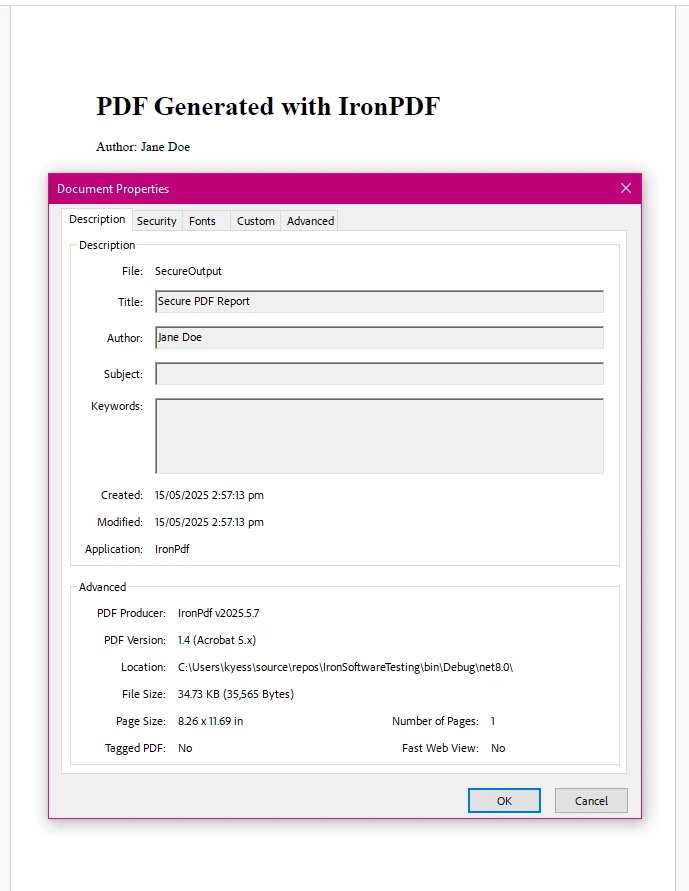
Wynik
Co robi ten kod
- Tworzy klasę PdfMetadata z zsanitowaną właściwością.
- Używa ChromePdfRenderer do renderowania podstawowego szablonu HTML.
- Wstrzykuje zsanitowane dane autora zarówno do zawartości HTML, jak i metadanych PDF.
- Zapisuje końcowy rezultat do SecureOutput.pdf.
Podsumowanie: Wybierz Właściwości dla Bezpiecznego, Utrzymywalnego Generowania PDF
Podczas budowania aplikacji .NET z IronPDF, wybór między polami i właściwościami to nie tylko kwestia składni - to kwestia tworzenia solidnego, bezpiecznego i przewidywalnego kodu.
- Pola bezpośrednio przechowują dane i odsłaniają Twoją wewnętrzną logikę bez walidacji czy kontroli.
- Właściwości dają Ci możliwość walidacji danych wejściowych, ograniczenia dostępu i czystego zarządzania, jak ustawiane i pobierane są dane.
- Niezależnie od tego, czy tworzysz publiczną klasę Person, klasę częściową, czy obiekt ustawień dla IronPDF, właściwości oferują bezpieczeństwo i elastyczność wymaganą dla aplikacji gotowych do produkcji.
Dlatego, gdy ustawiasz wartości, które muszą pojawić się w dokumencie lub formularzu, lub gdy obsługujesz metadane, które mogą wpływać na zgodność lub bezpieczeństwo, zawsze wybieraj właściwości.
Pobierz Bezpłatną Wersję Próbną IronPDF i zacznij generować, edytować oraz eksportować pliki PDF z profesjonalną jakością - bezpośrednio z Twojej aplikacji C#.













