


已更新 2026年4月23日
在 .NET 中用 Microsoft.Extensions.AI 簡化 LLM 整合
AI 正在改變軟體開發,但將大型語言模型 (LLM) 整合到 .NET 中一直很複雜。利用 IronPdf.AI 將 AI 整合推向更遠,為 .NET 應用程式帶來由 OpenAI 驅動的 PDF 解析、資料擷取和內容總結。
閱讀更多

當使用C#時,開發者經常會遇到是否使用欄位或屬性的決定。 雖然這兩者在表面上看起來很相似,但在實際運作上卻大不相同——尤其是在整合像IronPDF這樣的第三方程式庫時。
在本指南中,我們將探討欄位與屬性的差異、它們的重要性,以及選擇其中一者如何影響您使用IronPDF(最強大的.NET庫之一)來建立和操作PDF的開發體驗。
在深入探討IronPDF具體場景之前,讓我們重溫一下物件導向程式設計中欄位和屬性是什麼。
欄位是直接在類別或結構中聲明的變數。 欄位通常用於直接儲存資料,這使得它們簡單但在封裝和控制方面存在風險。
public class DocumentSettings
{
    public string headerText; // 欄位
}Public Class DocumentSettings
Public headerText As String ' 欄位
End ClassPublic Class DocumentSettings
Public headerText As String ' 欄位
End Class欄位速度快且輕量,但缺乏接入修飾符、設定器方法或驗證邏輯等保護措施。 因此,當值被外部程式碼直接存取時,應謹慎使用它們。
C#中的屬性作為欄位的控制介面。 它提供了一種靈活的方式來檢索或分配屬性值,同時允許在其get或set存取器中增加額外的邏輯。
public class DocumentSettings
{
    public string HeaderText { get; set; } // 屬性
}
public class DocumentSettings
{
public string HeaderText { get; set; } // 屬性
}Public Class DocumentSettings
Public Property HeaderText As String ' 屬性
End ClassPublic Class DocumentSettings
Public Property HeaderText As String ' 屬性
End Class屬性非常適合公有資料存取,因為它們提供了封裝,並能夠輕鬆地整合使用反射的框架,如IronPDF。
特性
欄位
屬性
封裝
否
是
底層邏輯
不可能
通過get/set支持
反射友好
不可靠
是
資料綁定
不理想
首選
簡而言之:在對外資料上使用屬性,尤其是在您正在使用依賴於反射或序列化的工具如IronPDF時。
那麼,這為什麼在使用IronPDF時很重要?
IronPDF通常通過反射來處理C#物件,這依賴於屬性——而不是欄位。 無論您是在配置設置、注入資料,還是將物件傳遞到HTML模板,公開屬性都確保您的資料是存在且可讀的。
// 欄位: Might be ignored
public class PdfExportOptions
{
    public string footerHtml; // fields store data directly, but not safely
}
// 屬性: Recognized and controlled
public class PdfExportOptions
{
    public string FooterHtml { get; set; } // easy to modify, validate, or hide
}
// 欄位: Might be ignored
public class PdfExportOptions
{
public string footerHtml; // fields store data directly, but not safely
}
// 屬性: Recognized and controlled
public class PdfExportOptions
{
public string FooterHtml { get; set; } // easy to modify, validate, or hide
}' 欄位: Might be ignored
Public Class PdfExportOptions
Public footerHtml As String ' fields store data directly, but not safely
End Class
' 屬性: Recognized and controlled
Public Class PdfExportOptions
Public Property FooterHtml As String ' easy to modify, validate, or hide
End Class' 欄位: Might be ignored
Public Class PdfExportOptions
Public footerHtml As String ' fields store data directly, but not safely
End Class
' 屬性: Recognized and controlled
Public Class PdfExportOptions
Public Property FooterHtml As String ' easy to modify, validate, or hide
End Class像HTML模板、表單填寫或元資料插入這樣的IronPDF特性依賴於屬性,因為它們可以通過反射存取。 如果您正在將資料傳遞給模板或匯出表單:
這在處理複雜模型或使用者生成的資料時尤其重要。
這裡有一些快速提示,幫助您避免常見陷阱:
如果您的模型被IronPDF(或任何外部庫)消費,使用具有適當存取修飾符的公共屬性以確保安全、可維護的存取。
public class InvoiceData
{
    public string CustomerName { get; set; }
    public DateTime InvoiceDate { get; set; }
}
public class InvoiceData
{
public string CustomerName { get; set; }
public DateTime InvoiceDate { get; set; }
}Public Class InvoiceData
Public Property CustomerName() As String
Public Property InvoiceDate() As DateTime
End ClassPublic Class InvoiceData
Public Property CustomerName() As String
Public Property InvoiceDate() As DateTime
End Class這確保IronPDF(和其他.NET庫)可以通過反射和序列化存取數值。
使用欄位進行內部邏輯,您不希望外部組件或庫存取這些資料。
public class InvoiceData
{
    private string internalNote; // Not meant for IronPDF
}
public class InvoiceData
{
private string internalNote; // Not meant for IronPDF
}Public Class InvoiceData
Private internalNote As String ' Not meant for IronPDF
End ClassPublic Class InvoiceData
Private internalNote As String ' Not meant for IronPDF
End Class這是一個良好的做法,保持您的邏輯清晰、安全和可預測。
欄位與屬性之間最關鍵的差異之一是安全性。 像 public string name; 這樣的欄位 可以被外部程式碼直接修改——沒有任何檢查。 但屬性讓您控制數值的設置方式。
欄位直接暴露資料,沒有任何邏輯或防護措施。 當您聲明一個公有欄位時,您開放了這個數值,允許應用程式內的任何地方——甚至是外部庫——直接修改。
// 欄位 – no protection
public class Person
{
    public string name;
}
// 欄位 – no protection
public class Person
{
public string name;
}' 欄位 – no protection
Public Class Person
Public name As String
End Class' 欄位 – no protection
Public Class Person
Public name As String
End Class在這種設定下:
這種缺乏控制可能會比預期的更像是一個安全風險,尤其是在處理使用者輸入、生成動態文件或跨邊界暴露內部物件時(例如通過API、序列化或Razor模板)。
屬性允許您使用get和set存取器來控制您的資料存取。 您可以強制規則、驗證輸入並限制寫入存取——使得它們更加安全。
// 屬性 – safer use of our Person class
public class Person
{
    private string _name;
    public string Name
    {
        get => _name;
        set
        {
            if (string.IsNullOrWhiteSpace(value))
                throw new ArgumentException("Name is required");
            _name = value.Trim();
        }
    }
}
// 屬性 – safer use of our Person class
public class Person
{
private string _name;
public string Name
{
get => _name;
set
{
if (string.IsNullOrWhiteSpace(value))
throw new ArgumentException("Name is required");
_name = value.Trim();
}
}
}' 屬性 – safer use of our Person class
Public Class Person
Private _name As String
Public Property Name As String
Get
Return _name
End Get
Set(value As String)
If String.IsNullOrWhiteSpace(value) Then
Throw New ArgumentException("Name is required")
End If
_name = value.Trim()
End Set
End Property
End Class' 屬性 – safer use of our Person class
Public Class Person
Private _name As String
Public Property Name As String
Get
Return _name
End Get
Set(value As String)
If String.IsNullOrWhiteSpace(value) Then
Throw New ArgumentException("Name is required")
End If
_name = value.Trim()
End Set
End Property
End Class這種方法:
在敏感場景下——如使用者元資料、發票或審計日誌生成官方PDF時——使用屬性讓您完全控制流入和流出物件的內容。
IronPDF本身並不會"違反"您的資料完整性,但它確實依賴於反射的許多方面。 如果您將資料模型傳入Razor模板、元資料欄位或匯出配置:
使用屬性允許您控制這個流程,而公有欄位則讓您的應用程式更容易受到未預期行為的影響。
using IronPdf;
using System;
public class PdfMetadata
{
    private string _author;
    public string Author
    {
        get => _author;
        set
        {
            if (string.IsNullOrWhiteSpace(value))
                throw new ArgumentException("Author cannot be empty.");
            _author = value.Trim();
        }
    }
}
class Program
{
    static void Main()
    {
        var metadata = new PdfMetadata
        {
            Author = "Jane Doe"
        };
        var htmlContent = $@"
            <html>
                <head><title>Secure PDF</title></head>
                <body>
                    <h1>PDF Generated with IronPDF</h1>
                    <p>Author: {metadata.Author}</p>
                </body>
            </html>";
        var renderer = new HtmlToPdf();
        var pdfDoc = renderer.RenderHtmlAsPdf(htmlContent);
        // Set metadata
        pdfDoc.MetaData.Author = metadata.Author;
        pdfDoc.MetaData.Title = "Secure PDF Report";
        // Save to disk
        pdfDoc.SaveAs("SecureOutput.pdf");
        Console.WriteLine("PDF generated successfully: SecureOutput.pdf");
    }
}
using IronPdf;
using System;
public class PdfMetadata
{
private string _author;
public string Author
{
get => _author;
set
{
if (string.IsNullOrWhiteSpace(value))
throw new ArgumentException("Author cannot be empty.");
_author = value.Trim();
}
}
}
class Program
{
static void Main()
{
var metadata = new PdfMetadata
{
Author = "Jane Doe"
};
var htmlContent = $@"
<html>
<head><title>Secure PDF</title></head>
<body>
<h1>PDF Generated with IronPDF</h1>
<p>Author: {metadata.Author}</p>
</body>
</html>";
var renderer = new HtmlToPdf();
var pdfDoc = renderer.RenderHtmlAsPdf(htmlContent);
// Set metadata
pdfDoc.MetaData.Author = metadata.Author;
pdfDoc.MetaData.Title = "Secure PDF Report";
// Save to disk
pdfDoc.SaveAs("SecureOutput.pdf");
Console.WriteLine("PDF generated successfully: SecureOutput.pdf");
}
}Imports IronPdf
Imports System
Public Class PdfMetadata
Private _author As String
Public Property Author() As String
Get
Return _author
End Get
Set(ByVal value As String)
If String.IsNullOrWhiteSpace(value) Then
Throw New ArgumentException("Author cannot be empty.")
End If
_author = value.Trim()
End Set
End Property
End Class
Friend Class Program
Shared Sub Main()
Dim metadata = New PdfMetadata With {.Author = "Jane Doe"}
Dim htmlContent = $"
<html>
<head><title>Secure PDF</title></head>
<body>
<h1>PDF Generated with IronPDF</h1>
<p>Author: {metadata.Author}</p>
</body>
</html>"
Dim renderer = New HtmlToPdf()
Dim pdfDoc = renderer.RenderHtmlAsPdf(htmlContent)
' Set metadata
pdfDoc.MetaData.Author = metadata.Author
pdfDoc.MetaData.Title = "Secure PDF Report"
' Save to disk
pdfDoc.SaveAs("SecureOutput.pdf")
Console.WriteLine("PDF generated successfully: SecureOutput.pdf")
End Sub
End ClassImports IronPdf
Imports System
Public Class PdfMetadata
Private _author As String
Public Property Author() As String
Get
Return _author
End Get
Set(ByVal value As String)
If String.IsNullOrWhiteSpace(value) Then
Throw New ArgumentException("Author cannot be empty.")
End If
_author = value.Trim()
End Set
End Property
End Class
Friend Class Program
Shared Sub Main()
Dim metadata = New PdfMetadata With {.Author = "Jane Doe"}
Dim htmlContent = $"
<html>
<head><title>Secure PDF</title></head>
<body>
<h1>PDF Generated with IronPDF</h1>
<p>Author: {metadata.Author}</p>
</body>
</html>"
Dim renderer = New HtmlToPdf()
Dim pdfDoc = renderer.RenderHtmlAsPdf(htmlContent)
' Set metadata
pdfDoc.MetaData.Author = metadata.Author
pdfDoc.MetaData.Title = "Secure PDF Report"
' Save to disk
pdfDoc.SaveAs("SecureOutput.pdf")
Console.WriteLine("PDF generated successfully: SecureOutput.pdf")
End Sub
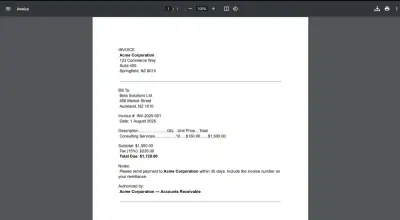
End Class輸出
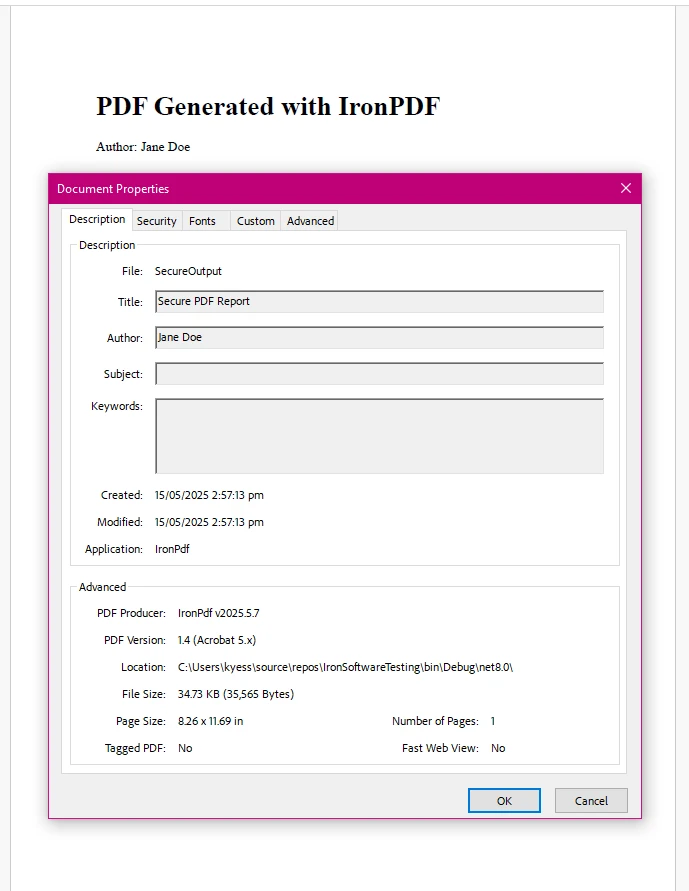
在使用IronPDF構建.NET應用程式時,選擇欄位和屬性不單單是語法問題——而是關於建立穩健、安全且可預測的程式碼。
因此,當您在設置需要出現在文件或表單中的數值時,或處理可能影響合規性或安全性的元資料時,始終優先考慮屬性。
下載IronPDF免費試用並開始從您的C#應用程式中以專業質量生成、編輯和匯出PDF。
Jacob Mellor是Iron Software的首席技術官,也是開創C# PDF技術的前瞻性工程師。作為Iron Software核心代碼庫的原始開發者,他自公司成立以來就塑造了公司的產品架構,並與CEO Cameron Rimington將公司轉型為服務NASA、Tesla以及全球政府機構的50多人公司。

IronPDF是IRON SUITE的一部分
10 個 .NET API 產品適用於您的辦公室文檔

當您需要您的PDF看起來像HTML一樣快速。
