




已更新 2026年4月23日
在 .NET 中用 Microsoft.Extensions.AI 簡化 LLM 整合
AI 正在改變軟體開發,但將大型語言模型 (LLM) 整合到 .NET 中一直很複雜。利用 IronPdf.AI 將 AI 整合推向更遠,為 .NET 應用程式帶來由 OpenAI 驅動的 PDF 解析、資料擷取和內容總結。
閱讀更多

有時候,在處理PDF文件時,您可能需要生成隨機數或隨機字串。 無論您是為PDF加密生成隨機數和密碼、建立唯一的文件名、避免可預測的序列,還是出於其他原因需要生成數字,使用RandomNumberGenerator C#類可以幫助您將PDF生成和編輯專案提升到新的水準。
與從Random類建立的基本隨機物件不同,這種加密隨機數生成器產生的隨機值具有加密強度,適合用於安全應用中的加密操作。
在本文中,我們將探討:
RandomNumberGenerator是什麼及其重要性。
如何在C#中使用加密隨機數生成器來生成隨機數、隨機字串和其他隨機資料以用於加密目的。
結合RandomNumberGenerator與IronPDF進行整合的實際範例,使用生成的數字和字串建立安全、唯一的PDF。
提高PDF應用安全性和專業性的提示和最佳實踐。
在進入IronPDF整合之前,讓我們簡單回顧一下RandomNumberGenerator的特點。
它是System.Security.Cryptography命名空間的一部分。
它生成加密強度的隨機值,以隨機位元組形式,比典型的Random類更安全。
適合需要不可預測性的場景,如生成安全的標記、金鑰、鹽值和唯一識別碼。
使用如AES-CTR DRBG、Fortuna或作業系統提供的CSPRNG等加密演算法。 使之不易被預測。
最適合用於建立加密金鑰、密碼生成、安全標記、唯一文件ID等任務。
這種強度來自依賴作業系統底層安全隨機數生成器,使其不容易被預測或進行反向工程攻擊。 與可能使用相同種子值產生相同序列的偽隨機數生成器不同,本類專為真正的隨機性和加密用途而設計。
許多開發者在生成隨機整數時會選擇C#的Random類,但它並不是為高安全性場景設計的。 其輸出模式可能會被預測,尤其是在使用相同種子值或系統時間時,意味著生成的數字可能被猜測。 這是因為該方法使用簡單的模算術運算生成值,可能在同一輸入下重複。
相比之下,RandomNumberGenerator生成真正隨機的數字,來自.NET Framework或底層作業系統中的加密隨機數生成器。 這確保了沒有低值偏見,並常使用丟棄和重試策略來在下邊界(如int minValue)和不包括上邊界(如int maxValue)之間保持均勻分佈。 下圖顯示了一個弱隨機數生成器和安全隨機數生成器的差異。

IronPDF是一個強大的.NET PDF程式庫,使開發者能夠建立、編輯和保護PDF文件。 隨機性很重要的常見用例包括:
唯一文件識別碼:將加密安全的ID附加到PDF中以進行追蹤或驗證。
安全浮水印:嵌入隨機浮水印或程式碼以防止偽造。
加密金鑰或密碼:生成安全的金鑰或密碼以進行PDF加密。
隨機內容:在PDF文件中新增隨機唯一標記或鹽值以進行完整性驗證。
這是一個生成128位(16位元組)安全隨機標記的簡單範例。
using System;
using System.Security.Cryptography;

public static string GenerateSecureToken(int size = 16)
{
    byte[] randomBytes = new byte[size];
    RandomNumberGenerator.Fill(randomBytes);
    return Convert.ToBase64String(randomBytes);
}Imports System
Imports System.Security.Cryptography
Public Shared Function GenerateSecureToken(Optional ByVal size As Integer = 16) As String
Dim randomBytes(size - 1) As Byte
RandomNumberGenerator.Fill(randomBytes)
Return Convert.ToBase64String(randomBytes)
End Function此方法建立一個安全的位元組陣列並將其作為Base64字串返回——非常適合嵌入或在單元測試、文件名或安全ID中進行追蹤。
讓我們結合RandomNumberGenerator和IronPDF的力量來生成一個帶有每頁都蓋有唯一、安全文件ID的PDF。
string GenerateDocumentId()
{
    byte[] idBytes = new byte[12]; // 96-bit ID
    RandomNumberGenerator.Fill(idBytes);
    return BitConverter.ToString(idBytes).Replace("-", "");
}Private Function GenerateDocumentId() As String
Dim idBytes(11) As Byte ' 96-bit ID
RandomNumberGenerator.Fill(idBytes)
Return BitConverter.ToString(idBytes).Replace("-", "")
End Function這會產生一個24字元的十六進位隨機字串(例如"4F3A2C9B7D1E8F0A5B6C7D8E")。
using IronPdf;
void CreatePdfWithSecureId()
{
var documentId = GenerateDocumentId();
var renderer = new ChromePdfRenderer();
// Add a custom footer with the document ID
renderer.RenderingOptions.HtmlFooter = new HtmlHeaderFooter
{
HtmlFragment = $"<div style='text-align: center; font-size: 10px;'>Document ID: {documentId} - Generated on {DateTime.UtcNow:yyyy-MM-dd HH:mm:ss} UTC</div>",
DrawDividerLine = true,
};
var pdf = renderer.RenderHtmlAsPdf($"<h1>Secure Document</h1><p>Document ID: {documentId}</p>");
string outputPath = $"SecurePdf_{documentId}.pdf";
pdf.SaveAs(outputPath);
Console.WriteLine($"PDF saved as {outputPath}");
}What this Code Does:Imports IronPdf
Private Sub CreatePdfWithSecureId()
Dim documentId = GenerateDocumentId()
Dim renderer = New ChromePdfRenderer()
' Add a custom footer with the document ID
renderer.RenderingOptions.HtmlFooter = New HtmlHeaderFooter With {
.HtmlFragment = $"<div style='text-align: center; font-size: 10px;'>Document ID: {documentId} - Generated on {DateTime.UtcNow:yyyy-MM-dd HH:mm:ss} UTC</div>",
.DrawDividerLine = True
}
Dim pdf = renderer.RenderHtmlAsPdf($"<h1>Secure Document</h1><p>Document ID: {documentId}</p>")
Dim outputPath As String = $"SecurePdf_{documentId}.pdf"
pdf.SaveAs(outputPath)
Console.WriteLine($"PDF saved as {outputPath}")
End Sub
'INSTANT VB TODO TASK: The following line uses invalid syntax:
'What Me Code Does:為加密安全的唯一文件ID生成一個隨機數。
將該ID嵌入的HTML轉換為PDF。
在每頁底部新增文件ID和時間戳。
使用文件名中的ID保存PDF,以便於追蹤。
using IronPdf;
using IronPdf.Editing;
using System;
using System.Security.Cryptography;
class Program
{
public static void Main(string[] args)
{
// Create an instance of Program to run non-static methods
var program = new Program();
program.CreatePdfWithSecureId()
}
string GenerateDocumentId()
{
    byte[] idBytes = new byte[12]; // 96-bit ID
    RandomNumberGenerator.Fill(idBytes);
    return BitConverter.ToString(idBytes).Replace("-", "");
}
void CreatePdfWithSecureId()
{
var documentId = GenerateDocumentId();
var renderer = new ChromePdfRenderer();
// Add a custom footer with the document ID
renderer.RenderingOptions.HtmlFooter = new HtmlHeaderFooter
{
HtmlFragment = $"<div style='text-align: center; font-size: 10px;'>Document ID: {documentId} - Generated on {DateTime.UtcNow:yyyy-MM-dd HH:mm:ss} UTC</div>",
DrawDividerLine = true,
};
var pdf = renderer.RenderHtmlAsPdf($"<h1>Secure Document</h1><p>Document ID: {documentId}</p>");
string outputPath = $"SecurePdf_{documentId}.pdf";
pdf.SaveAs(outputPath);
Console.WriteLine($"PDF saved as {outputPath}");
}
}Imports IronPdf
Imports IronPdf.Editing
Imports System
Imports System.Security.Cryptography
Friend Class Program
Public Shared Sub Main(ByVal args() As String)
' Create an instance of Program to run non-static methods
'INSTANT VB NOTE: The variable program was renamed since it may cause conflicts with calls to static members of the user-defined type with this name:
Dim program_Conflict As New Program()
program_Conflict.CreatePdfWithSecureId()
End Sub
Private Function GenerateDocumentId() As String
	Dim idBytes(11) As Byte ' 96-bit ID
	RandomNumberGenerator.Fill(idBytes)
	Return BitConverter.ToString(idBytes).Replace("-", "")
End Function
Private Sub CreatePdfWithSecureId()
Dim documentId = GenerateDocumentId()
Dim renderer = New ChromePdfRenderer()
' Add a custom footer with the document ID
renderer.RenderingOptions.HtmlFooter = New HtmlHeaderFooter With {
.HtmlFragment = $"<div style='text-align: center; font-size: 10px;'>Document ID: {documentId} - Generated on {DateTime.UtcNow:yyyy-MM-dd HH:mm:ss} UTC</div>",
.DrawDividerLine = True
}
Dim pdf = renderer.RenderHtmlAsPdf($"<h1>Secure Document</h1><p>Document ID: {documentId}</p>")
Dim outputPath As String = $"SecurePdf_{documentId}.pdf"
pdf.SaveAs(outputPath)
Console.WriteLine($"PDF saved as {outputPath}")
End Sub
End Class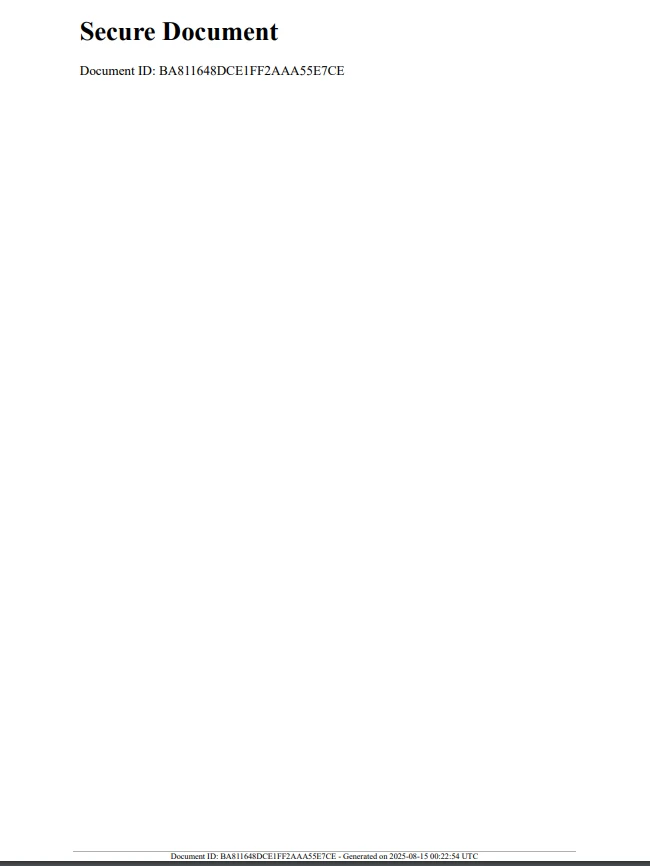
IronPDF支援PDF加密,為安全的PDF建立提供強有力的支援。 您可以使用RandomNumberGenerator來建立強密碼或金鑰進行加密:
using IronPdf;
using IronPdf.Editing;
using System;
using System.Security.Cryptography;

class Program
{
    public static void Main(string[] args)
    {
        // Create an instance of Program to run non-static methods
        var program = new Program();
        program.CreateEncryptedPdf();
    }

    string GenerateSecurePassword(int length = 12)
    {
        const string chars = "ABCDEFGHIJKLMNOPQRSTUVWXYZabcdefghijklmnopqrstuvwxyz0123456789!@#$%^&*()";
        byte[] data = new byte[length];
        RandomNumberGenerator.Fill(data);

        char[] result = new char[length];
        for (int i = 0; i < length; i++)
        {
            result[i] = chars[data[i] % chars.Length];
        }
        return new string(result);
    }

    void CreateEncryptedPdf()
    {
        string password = GenerateSecurePassword();

        var renderer = new ChromePdfRenderer();
        var pdf = renderer.RenderHtmlAsPdf("<h1>Confidential PDF</h1><p>Access is restricted.</p>");

        // Set security settings
        pdf.SecuritySettings.UserPassword = password;
        pdf.SecuritySettings.AllowUserAnnotations = false;
        pdf.SecuritySettings.AllowUserCopyPasteContent = false;
        pdf.SecuritySettings.AllowUserPrinting = IronPdf.Security.PdfPrintSecurity.NoPrint;

        string filePath = "EncryptedSecurePdf.pdf";
        pdf.SaveAs(filePath);

        Console.WriteLine($"Encrypted PDF saved to {filePath} with password: {password}");
    }
}Imports IronPdf
Imports IronPdf.Editing
Imports System
Imports System.Security.Cryptography
Friend Class Program
Public Shared Sub Main(ByVal args() As String)
' Create an instance of Program to run non-static methods
'INSTANT VB NOTE: The variable program was renamed since it may cause conflicts with calls to static members of the user-defined type with this name:
Dim program_Conflict As New Program()
program_Conflict.CreateEncryptedPdf()
End Sub
Private Function GenerateSecurePassword(Optional ByVal length As Integer = 12) As String
Const chars As String = "ABCDEFGHIJKLMNOPQRSTUVWXYZabcdefghijklmnopqrstuvwxyz0123456789!@#$%^&*()"
Dim data(length - 1) As Byte
RandomNumberGenerator.Fill(data)
Dim result(length - 1) As Char
For i As Integer = 0 To length - 1
result(i) = chars.Chars(data(i) Mod chars.Length)
Next i
Return New String(result)
End Function
Private Sub CreateEncryptedPdf()
Dim password As String = GenerateSecurePassword()
Dim renderer = New ChromePdfRenderer()
Dim pdf = renderer.RenderHtmlAsPdf("<h1>Confidential PDF</h1><p>Access is restricted.</p>")
' Set security settings
pdf.SecuritySettings.UserPassword = password
pdf.SecuritySettings.AllowUserAnnotations = False
pdf.SecuritySettings.AllowUserCopyPasteContent = False
pdf.SecuritySettings.AllowUserPrinting = IronPdf.Security.PdfPrintSecurity.NoPrint
Dim filePath As String = "EncryptedSecurePdf.pdf"
pdf.SaveAs(filePath)
Console.WriteLine($"Encrypted PDF saved to {filePath} with password: {password}")
End Sub
End Class該方法使用OS的RNG的預設實現,生成適合加密操作的密碼。
這將應用所生成的安全密碼,因此只有有權限使用該密碼的使用者才能查看文件。
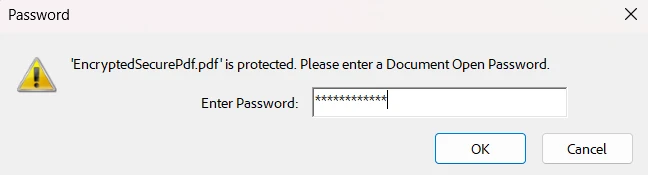
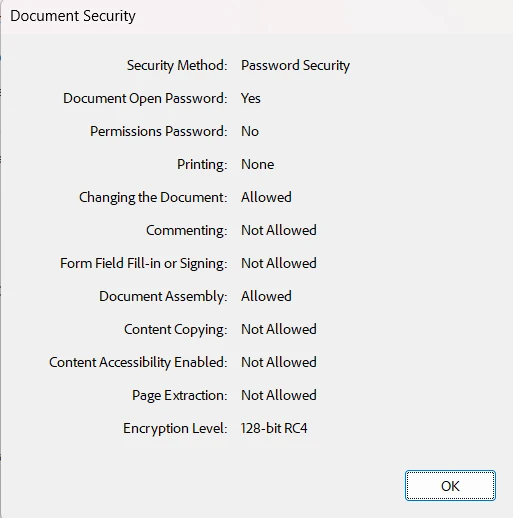
此外,我們將擁有一個加密、安全的文件以及我們設置的權限:
在任何與安全相關的事情上始終使用RandomNumberGenerator。 避免使用Random來生成ID、標記或密碼。
將敏感資料排除在日誌或面向使用者的資訊之外,但日誌中要留下足夠的資訊以便追蹤和審計。
考慮使用時間戳和其他元資料與隨機ID一起使用,以提高可追溯性。
使用IronPDF的內建安全功能結合隨機金鑰來保護您的文件。
驗證隨機資料的長度和編碼,以確保在您的上下文中可用(例如,文件名、URL、條形碼)。
結合C#的RandomNumberGenerator類和IronPDF能使您生成安全、獨特的PDF,符合現代安全標準。 無論您是壓印唯一ID、生成加密金鑰,還是嵌入安全標記,此方法都能幫助您:
防止文件偽造
改善可追溯性
在您的PDF中保護敏感資料
通過將此類的加密強度與IronPDF多功能的PDF工具結合,您的PDF解決方案變得更加安全和專業。
準備好提高您的PDF安全性了嗎? 嘗試IronPDF的免費試用,開始今天就使用安全隨機資料進行實驗吧!

Jacob Mellor是Iron Software的首席技術官,一位在C# PDF技術上開創先河的遠見工程師。作為Iron Software核心程式碼庫的原開發者,他從創立以來就一直在塑造公司的產品架構,與首席執行官Cameron Rimington一起將公司轉變為服務於NASA、特斯拉和全球政府公司的50多名人員的公司。


IronPDF 是 IRONSUITE 的一部分
10 款適用於辦公室文件的 .NET API 產品

當您需要您的PDF看起來像HTML一樣快速。


