




업데이트됨 2026년 4월 23일
.NET에서 Microsoft.Extensions.AI로 LLM 통합 간소화
AI는 소프트웨어 개발을 변혁하고 있으나, 대규모 언어 모델(LLM)을 .NET에 통합하는 것은 지금까지 복잡했습니다. 현대에는 OpenAI 기반 PDF 파싱, 데이터 추출 및 콘텐츠 요약을 .NET 애플리케이션에 가져오는 IronPdf.AI로 AI 통합을 더욱 확장하세요.
더 읽어보기

때때로 PDF 문서와 작업할 때 무작위 숫자나 무작위 문자열을 생성해야 할 수도 있습니다. PDF 암호화를 위한 무작위 숫자 및 패스워드 생성, 고유한 파일 이름 생성, 예측 가능한 시퀀스를 피하기 위한 무작위 숫자 생성 또는 기타 이유로 무작위 숫자를 생성해야 하는 경우 RandomNumberGenerator C# 클래스를 사용하여 PDF 생성 및 편집 프로젝트를 다음 단계로 끌어올릴 수 있습니다.
Random 클래스에서 생성된 기본 무작위 개체와 달리 이 암호화 무작위 숫자 생성기는 보안 애플리케이션의 암호화 작업에 적합한 암호화적으로 강력한 무작위 값을 생성합니다.
이 기사에서는 다음을 탐색합니다:
RandomNumberGenerator가 무엇이며 왜 중요한지.
C#에서 암호화 목적을 위해 무작위 숫자, 무작위 문자열 및 기타 무작위 데이터를 생성하는 암호화 무작위 숫자 생성기를 사용하는 방법.
RandomNumberGenerator를 IronPDF에 통합하여 생성된 숫자와 문자열을 사용하여 보안적이고 고유한 PDF를 생성하는 실용적인 예제입니다.
PDF 응용 프로그램에서 보안과 전문성을 높이기 위한 팁과 모범 사례입니다.
IronPDF 통합에 들어가기 전에 RandomNumberGenerator의 특별한 점을 간단히 살펴보겠습니다.
System.Security.Cryptography 네임스페이스의 일부입니다.
암호화적으로 강력한 임의 값을 생성하며, 일반적인 Random 클래스보다 훨씬 더 안전한 임의 바이트를 생성합니다.
예측 불가능성이 필요한 시나리오, 예를 들어 보안 토큰, 키, 솔트 및 고유한 식별자를 생성하는 데 이상적입니다.
AES-CTR DRBG, Fortuna 또는 OS 제공 CSPRNG와 같은 암호 알고리즘을 사용합니다. 예측에 저항하도록 만든 것입니다.
암호화 키 생성, 비밀번호 생성, 보안 토큰, 고유 문서 ID 생성 같은 작업에 가장 잘 사용됩니다.
운영체제의 기본 보안 난수 생성기에 의존하여 예측 또는 역공학 공격에 대한 저항성을 높이는 것에서 이 강점이 나옵니다. 같은 시드 값으로 동일한 시퀀스를 생성할 수 있는 의사 난수 생성기와 달리, 이 클래스는 진정한 임의성과 암호화 목적으로 설계되었습니다.
많은 개발자가 랜덤 정수를 생성하기 위해 C#의 Random 클래스로 시작하지만, 고도의 보안이 필요한 시나리오에 적합하지 않습니다. 특히 동일한 시드 값이나 시스템 시간이 사용되면 그 출력을 예측할 수 있다는 것을 의미하여 생성된 숫자가 추측될 수 있습니다. 이것은 같은 입력값으로 반복될 수 있는 단순한 모듈러 산술 연산을 사용하여 값을 생성하기 때문에 발생합니다.
반면에 RandomNumberGenerator는 .NET Framework의 암호화 난수 생성기나 기본 OS에서 파생된 진정한 무작위 숫자를 생성합니다. 이는 낮은 값의 편향성을 없애고 자주 버리고 다시 시도하는 전략을 사용하여 하한값(ex. int minValue)과 독점적인 상한값(ex. int maxValue) 사이의 균일한 분포를 유지합니다. 아래의 예시는 약한 난수 생성기와 안전한 난수 생성기의 차이를 강조합니다.

IronPDF는 개발자가 PDF 문서를 생성, 편집 및 보안할 수 있게 하는 강력한 .NET PDF 라이브러리입니다. 임의성이 중요한 일반적인 사용 사례는 다음을 포함합니다:
고유 문서 식별자: 추적 또는 검증을 위해 PDF에 암호화적으로 안전한 ID를 첨부합니다.
보안 워터마크: 위조를 방지하는 랜덤 워터마크나 코드를 삽입합니다.
암호화 키 또는 비밀번호: PDF 암호화를 위한 안전한 키 또는 비밀번호를 생성합니다.
무작위 콘텐츠: 무결성 검증을 위해 PDF 문서에 랜덤 고유 토큰이나 솔트를 추가합니다.
128비트(16바이트) 보안 랜덤 토큰을 생성하는 간단한 예제입니다.
using System;
using System.Security.Cryptography;

public static string GenerateSecureToken(int size = 16)
{
    byte[] randomBytes = new byte[size];
    RandomNumberGenerator.Fill(randomBytes);
    return Convert.ToBase64String(randomBytes);
}Imports System
Imports System.Security.Cryptography
Public Shared Function GenerateSecureToken(Optional ByVal size As Integer = 16) As String
Dim randomBytes(size - 1) As Byte
RandomNumberGenerator.Fill(randomBytes)
Return Convert.ToBase64String(randomBytes)
End Function이 방법은 보안 바이트 배열을 생성하고 이를 Base64 문자열로 반환하여 유닛 테스트, 파일 이름 또는 보안 ID에 포함하거나 추적하는 데 적합합니다.
RandomNumberGenerator와 IronPDF의 힘을 결합하여 각 페이지에 고유하고 안전한 문서 ID를 스탬프한 PDF를 생성합니다.
string GenerateDocumentId()
{
    byte[] idBytes = new byte[12]; // 96-bit ID
    RandomNumberGenerator.Fill(idBytes);
    return BitConverter.ToString(idBytes).Replace("-", "");
}Private Function GenerateDocumentId() As String
Dim idBytes(11) As Byte ' 96-bit ID
RandomNumberGenerator.Fill(idBytes)
Return BitConverter.ToString(idBytes).Replace("-", "")
End Function이는 24자리의 16진수 임의 문자열을 생성합니다 (예: "4F3A2C9B7D1E8F0A5B6C7D8E").
using IronPdf;
void CreatePdfWithSecureId()
{
var documentId = GenerateDocumentId();
var renderer = new ChromePdfRenderer();
// Add a custom footer with the document ID
renderer.RenderingOptions.HtmlFooter = new HtmlHeaderFooter
{
HtmlFragment = $"<div style='text-align: center; font-size: 10px;'>Document ID: {documentId} - Generated on {DateTime.UtcNow:yyyy-MM-dd HH:mm:ss} UTC</div>",
DrawDividerLine = true,
};
var pdf = renderer.RenderHtmlAsPdf($"<h1>Secure Document</h1><p>Document ID: {documentId}</p>");
string outputPath = $"SecurePdf_{documentId}.pdf";
pdf.SaveAs(outputPath);
Console.WriteLine($"PDF saved as {outputPath}");
}What this Code Does:Imports IronPdf
Private Sub CreatePdfWithSecureId()
Dim documentId = GenerateDocumentId()
Dim renderer = New ChromePdfRenderer()
' Add a custom footer with the document ID
renderer.RenderingOptions.HtmlFooter = New HtmlHeaderFooter With {
.HtmlFragment = $"<div style='text-align: center; font-size: 10px;'>Document ID: {documentId} - Generated on {DateTime.UtcNow:yyyy-MM-dd HH:mm:ss} UTC</div>",
.DrawDividerLine = True
}
Dim pdf = renderer.RenderHtmlAsPdf($"<h1>Secure Document</h1><p>Document ID: {documentId}</p>")
Dim outputPath As String = $"SecurePdf_{documentId}.pdf"
pdf.SaveAs(outputPath)
Console.WriteLine($"PDF saved as {outputPath}")
End Sub
'INSTANT VB TODO TASK: The following line uses invalid syntax:
'What Me Code Does:암호화적으로 안전한 고유 문서 ID를 위한 랜덤 숫자를 생성합니다.
그 ID를 포함하는 PDF로 HTML을 렌더링합니다.
각 페이지에 문서 ID와 타임스탬프가 있는 바닥글을 추가합니다.
추적 용이성을 위해 파일 이름에 ID를 사용하여 PDF를 저장합니다.
using IronPdf;
using IronPdf.Editing;
using System;
using System.Security.Cryptography;
class Program
{
public static void Main(string[] args)
{
// Create an instance of Program to run non-static methods
var program = new Program();
program.CreatePdfWithSecureId()
}
string GenerateDocumentId()
{
    byte[] idBytes = new byte[12]; // 96-bit ID
    RandomNumberGenerator.Fill(idBytes);
    return BitConverter.ToString(idBytes).Replace("-", "");
}
void CreatePdfWithSecureId()
{
var documentId = GenerateDocumentId();
var renderer = new ChromePdfRenderer();
// Add a custom footer with the document ID
renderer.RenderingOptions.HtmlFooter = new HtmlHeaderFooter
{
HtmlFragment = $"<div style='text-align: center; font-size: 10px;'>Document ID: {documentId} - Generated on {DateTime.UtcNow:yyyy-MM-dd HH:mm:ss} UTC</div>",
DrawDividerLine = true,
};
var pdf = renderer.RenderHtmlAsPdf($"<h1>Secure Document</h1><p>Document ID: {documentId}</p>");
string outputPath = $"SecurePdf_{documentId}.pdf";
pdf.SaveAs(outputPath);
Console.WriteLine($"PDF saved as {outputPath}");
}
}Imports IronPdf
Imports IronPdf.Editing
Imports System
Imports System.Security.Cryptography
Friend Class Program
Public Shared Sub Main(ByVal args() As String)
' Create an instance of Program to run non-static methods
'INSTANT VB NOTE: The variable program was renamed since it may cause conflicts with calls to static members of the user-defined type with this name:
Dim program_Conflict As New Program()
program_Conflict.CreatePdfWithSecureId()
End Sub
Private Function GenerateDocumentId() As String
	Dim idBytes(11) As Byte ' 96-bit ID
	RandomNumberGenerator.Fill(idBytes)
	Return BitConverter.ToString(idBytes).Replace("-", "")
End Function
Private Sub CreatePdfWithSecureId()
Dim documentId = GenerateDocumentId()
Dim renderer = New ChromePdfRenderer()
' Add a custom footer with the document ID
renderer.RenderingOptions.HtmlFooter = New HtmlHeaderFooter With {
.HtmlFragment = $"<div style='text-align: center; font-size: 10px;'>Document ID: {documentId} - Generated on {DateTime.UtcNow:yyyy-MM-dd HH:mm:ss} UTC</div>",
.DrawDividerLine = True
}
Dim pdf = renderer.RenderHtmlAsPdf($"<h1>Secure Document</h1><p>Document ID: {documentId}</p>")
Dim outputPath As String = $"SecurePdf_{documentId}.pdf"
pdf.SaveAs(outputPath)
Console.WriteLine($"PDF saved as {outputPath}")
End Sub
End Class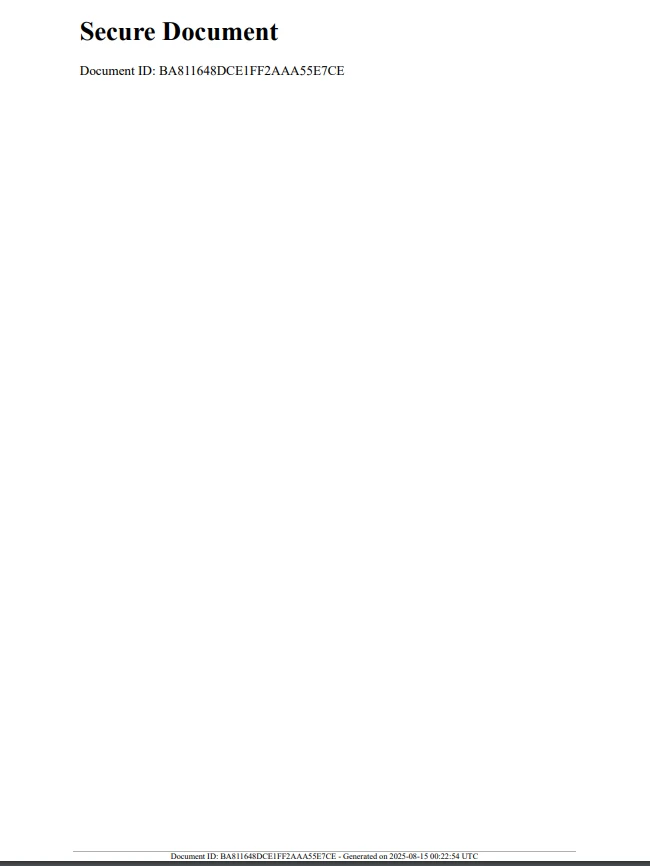
IronPDF는 PDF 암호화를 지원하여 안전한 PDF 생성에 강력한 지원을 제공합니다. RandomNumberGenerator를 사용하여 암호화용으로 강력한 비밀번호나 키를 생성할 수 있습니다:
using IronPdf;
using IronPdf.Editing;
using System;
using System.Security.Cryptography;

class Program
{
    public static void Main(string[] args)
    {
        // Create an instance of Program to run non-static methods
        var program = new Program();
        program.CreateEncryptedPdf();
    }

    string GenerateSecurePassword(int length = 12)
    {
        const string chars = "ABCDEFGHIJKLMNOPQRSTUVWXYZabcdefghijklmnopqrstuvwxyz0123456789!@#$%^&*()";
        byte[] data = new byte[length];
        RandomNumberGenerator.Fill(data);

        char[] result = new char[length];
        for (int i = 0; i < length; i++)
        {
            result[i] = chars[data[i] % chars.Length];
        }
        return new string(result);
    }

    void CreateEncryptedPdf()
    {
        string password = GenerateSecurePassword();

        var renderer = new ChromePdfRenderer();
        var pdf = renderer.RenderHtmlAsPdf("<h1>Confidential PDF</h1><p>Access is restricted.</p>");

        // Set security settings
        pdf.SecuritySettings.UserPassword = password;
        pdf.SecuritySettings.AllowUserAnnotations = false;
        pdf.SecuritySettings.AllowUserCopyPasteContent = false;
        pdf.SecuritySettings.AllowUserPrinting = IronPdf.Security.PdfPrintSecurity.NoPrint;

        string filePath = "EncryptedSecurePdf.pdf";
        pdf.SaveAs(filePath);

        Console.WriteLine($"Encrypted PDF saved to {filePath} with password: {password}");
    }
}Imports IronPdf
Imports IronPdf.Editing
Imports System
Imports System.Security.Cryptography
Friend Class Program
Public Shared Sub Main(ByVal args() As String)
' Create an instance of Program to run non-static methods
'INSTANT VB NOTE: The variable program was renamed since it may cause conflicts with calls to static members of the user-defined type with this name:
Dim program_Conflict As New Program()
program_Conflict.CreateEncryptedPdf()
End Sub
Private Function GenerateSecurePassword(Optional ByVal length As Integer = 12) As String
Const chars As String = "ABCDEFGHIJKLMNOPQRSTUVWXYZabcdefghijklmnopqrstuvwxyz0123456789!@#$%^&*()"
Dim data(length - 1) As Byte
RandomNumberGenerator.Fill(data)
Dim result(length - 1) As Char
For i As Integer = 0 To length - 1
result(i) = chars.Chars(data(i) Mod chars.Length)
Next i
Return New String(result)
End Function
Private Sub CreateEncryptedPdf()
Dim password As String = GenerateSecurePassword()
Dim renderer = New ChromePdfRenderer()
Dim pdf = renderer.RenderHtmlAsPdf("<h1>Confidential PDF</h1><p>Access is restricted.</p>")
' Set security settings
pdf.SecuritySettings.UserPassword = password
pdf.SecuritySettings.AllowUserAnnotations = False
pdf.SecuritySettings.AllowUserCopyPasteContent = False
pdf.SecuritySettings.AllowUserPrinting = IronPdf.Security.PdfPrintSecurity.NoPrint
Dim filePath As String = "EncryptedSecurePdf.pdf"
pdf.SaveAs(filePath)
Console.WriteLine($"Encrypted PDF saved to {filePath} with password: {password}")
End Sub
End Class이 방법은 운영 체제의 RNG의 기본 구현을 사용하여 암호화 작업에 적합한 비밀번호를 생성합니다.
생성된 보안 비밀번호를 적용하여 비밀번호에 접근할 수 있는 사용자만 문서를 볼 수 있도록 합니다.
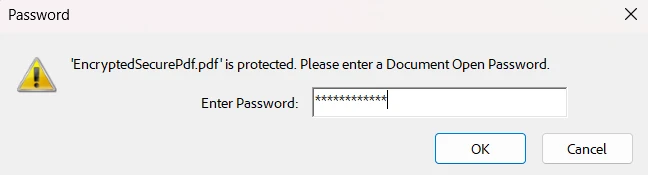
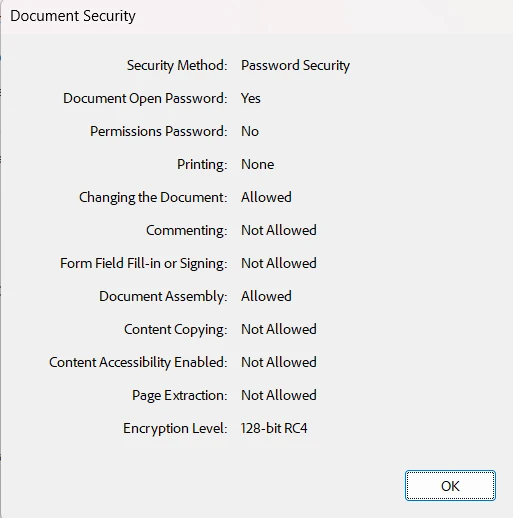
또한, 설정된 권한을 가진 암호화된 안전 문서를 얻게 될 것입니다:
보안과 관련된 모든 것에 RandomNumberGenerator를 항상 사용하십시오. ID, 토큰 또는 비밀번호에는 Random을 피하십시오.
민감한 데이터를 로그나 사용자 대면 메시지에서 제외하되, 추적 및 감사할 수 있을 만큼 충분히 기록하십시오.
무작위 ID와 함께 타임스탬프 및 기타 메타데이터를 사용하여 추적 가능성을 향상시키는 것을 고려하십시오.
IronPDF의 내장 보안 기능과 무작위 키를 결합하여 문서를 보호하십시오.
무작위 데이터 길이와 인코딩을 검증하여 사용 중인 컨텍스트에서의 유용성을 보장하십시오(예: 파일명, URL, 바코드).
C#의 RandomNumberGenerator 클래스를 IronPDF과 통합하면 현대적 보안 기준을 충족하는 안전하고 고유한 PDF를 생성할 수 있습니다. 고유 ID를 도장 찍거나, 암호화 키를 생성하거나, 안전한 토큰을 포함시키는 경우, 이 방법은 도움이 됩니다:
문서 위조 방지
추적성 향상
PDF 내 민감한 데이터 보안
이 클래스의 암호화 강도를 IronPDF의 다재다능한 PDF 도구와 결합하면 PDF 솔루션이 더 안전하고 전문적으로 변모합니다.
PDF 보안을 강화할 준비가 되었습니까? IronPDF 무료 체험판을 사용하여 오늘 안전한 무작위 데이터를 실험하기 시작하세요!

제이콥 멜러는 Iron Software의 최고 기술 책임자(CTO)이자 C# PDF 기술을 개척한 선구적인 엔지니어입니다. Iron Software의 핵심 코드베이스를 최초로 개발한 그는 창립 초기부터 회사의 제품 아키텍처를 설계해 왔으며, CEO인 캐머런 리밍턴과 함께 회사를 NASA, 테슬라, 그리고 전 세계 정부 기관에 서비스를 제공하는 50명 이상의 직원을 보유한 기업으로 성장시켰습니다.


IronPDF는 IRON SUITE 의 일부입니다.
10개의 .NET API 제품, 당신의 사무 문서를 위해

PDF 파일을 HTML처럼 빠르게 변환해야 할 때.


