




已更新 2026年4月23日
简化 .NET 与 Microsoft.Extensions.AI 的 LLM 集成
AI正在改变软件开发,但将大型语言模型(LLM)集成到.NET中直到现在一直很复杂。通过IronPdf.AI,将AI集成更进一步,该产品为.NET应用程序带来了OpenAI驱动的PDF解析、数据提取和内容摘要。
阅读更多

有时,在处理 PDF 文档时,您可能需要生成随机的数字或字符串。 无论您是需要为 PDF 加密生成随机数字和密码,创建唯一的文件名,避免可预测的序列,或出于任何其他原因需要生成数字,使用 RandomNumberGenerator C# 类可以帮助您将 PDF 生成和编辑项目提升到一个新水平。
与从 Random 类创建的基本随机对象不同,这个密码学随机数生成器生成的随机值非常适合用于安全应用程序中的密码操作。
在本文中,我们将探讨:
RandomNumberGenerator 是什么,以及为何重要。
如何在 C# 中使用密码学随机数生成器生成随机数字、随机字符串和其他随机数据以用于密码学目的。
将 RandomNumberGenerator 与 IronPDF 相结合的实用例子,以生成使用这些数字和字符串的安全、唯一的 PDF。
增强 PDF 应用程序安全性和专业性的技巧和最佳实践。
在深入了解 IronPDF 集成之前,让我们简要回顾一下是什么使 RandomNumberGenerator 特殊。
它是 System.Security.Cryptography 命名空间的一部分。
它生成加密强随机值作为随机字节,比典型的Random类更加安全。
它非常适合需要不可预见性的场景,如生成安全令牌、密钥、盐值和唯一标识符。
使用像 AES-CTR DRBG、Fortuna 或操作系统提供的 CSPRNG 之类的密码学算法。 这使它不容易被预测。
最适用于创建密码学密钥、密码生成、安全令牌、唯一文件 ID 的任务。
这种强度来源于依赖操作系统的底层安全随机数生成器,使其不易受到预测或逆向工程攻击。 与可能使用相同种子值生成相同序列的伪随机数生成器不同,此类专为真正的随机性和加密目的而设计。
许多开发人员开始使用 C# 的 Random 类来生成随机整数,但这不是为高安全性情景设计的。 其输出中的模式可能会被预测,特别是如果使用相同的种子值或系统时间,这意味着生成的数字可能会被猜测。 这种情况发生是因为该方法使用简单的模运算生成值,如果输入相同,这些值可能会重复。
相反,RandomNumberGenerator 生成真正的随机数字,从 .NET Framework 或底层操作系统的密码学随机数生成器中得出。 这确保没有低值偏见,并常常使用丢弃和重试策略,以保持下界(例如,int minValue)和独占上界(例如,int maxValue)之间的均匀分布。 下图展示了弱 RNG 和安全 RNG 的区别。

IronPDF 是一个强大的 .NET PDF 库,使开发人员能够创建、编辑和保护 PDF 文档。 随机性很重要的常见用例包括:
唯一文件标识符: 为 PDF 附加密码安全的 ID 以进行跟踪或验证。
安全水印: 嵌入随机水印或代码以防伪造。
加密密钥或密码: 为 PDF 加密生成安全的密钥或密码。
随机内容: 向 PDF 文档中添加随机唯一令牌或盐值以进行完整性验证。
这是一个简单的例子,用来生成一个 128 位(16 字节)的安全随机令牌。
using System;
using System.Security.Cryptography;

public static string GenerateSecureToken(int size = 16)
{
    byte[] randomBytes = new byte[size];
    RandomNumberGenerator.Fill(randomBytes);
    return Convert.ToBase64String(randomBytes);
}Imports System
Imports System.Security.Cryptography
Public Shared Function GenerateSecureToken(Optional ByVal size As Integer = 16) As String
Dim randomBytes(size - 1) As Byte
RandomNumberGenerator.Fill(randomBytes)
Return Convert.ToBase64String(randomBytes)
End Function此方法创建一个安全的字节数组,并以 Base64 字符串形式返回它——非常适合嵌入或跟踪单元测试、文件名或安全 ID 中。
让我们结合 RandomNumberGenerator 和 IronPDF 的力量,来生成 PDF,每页上都会盖有一个唯一的、安全的文档 ID。
string GenerateDocumentId()
{
    byte[] idBytes = new byte[12]; // 96-bit ID
    RandomNumberGenerator.Fill(idBytes);
    return BitConverter.ToString(idBytes).Replace("-", "");
}Private Function GenerateDocumentId() As String
Dim idBytes(11) As Byte ' 96-bit ID
RandomNumberGenerator.Fill(idBytes)
Return BitConverter.ToString(idBytes).Replace("-", "")
End Function这将生成一个24字符的十六进制随机字符串(例如,"4F3A2C9B7D1E8F0A5B6C7D8E")。
using IronPdf;
void CreatePdfWithSecureId()
{
var documentId = GenerateDocumentId();
var renderer = new ChromePdfRenderer();
// Add a custom footer with the document ID
renderer.RenderingOptions.HtmlFooter = new HtmlHeaderFooter
{
HtmlFragment = $"<div style='text-align: center; font-size: 10px;'>Document ID: {documentId} - Generated on {DateTime.UtcNow:yyyy-MM-dd HH:mm:ss} UTC</div>",
DrawDividerLine = true,
};
var pdf = renderer.RenderHtmlAsPdf($"<h1>Secure Document</h1><p>Document ID: {documentId}</p>");
string outputPath = $"SecurePdf_{documentId}.pdf";
pdf.SaveAs(outputPath);
Console.WriteLine($"PDF saved as {outputPath}");
}What this Code Does:Imports IronPdf
Private Sub CreatePdfWithSecureId()
Dim documentId = GenerateDocumentId()
Dim renderer = New ChromePdfRenderer()
' Add a custom footer with the document ID
renderer.RenderingOptions.HtmlFooter = New HtmlHeaderFooter With {
.HtmlFragment = $"<div style='text-align: center; font-size: 10px;'>Document ID: {documentId} - Generated on {DateTime.UtcNow:yyyy-MM-dd HH:mm:ss} UTC</div>",
.DrawDividerLine = True
}
Dim pdf = renderer.RenderHtmlAsPdf($"<h1>Secure Document</h1><p>Document ID: {documentId}</p>")
Dim outputPath As String = $"SecurePdf_{documentId}.pdf"
pdf.SaveAs(outputPath)
Console.WriteLine($"PDF saved as {outputPath}")
End Sub
'INSTANT VB TODO TASK: The following line uses invalid syntax:
'What Me Code Does:为加密安全的、唯一的文档 ID 生成一个随机数。
渲染一个包含该 ID 的 HTML 到 PDF。
在每页底部添加文档 ID 和时间戳。
使用文件名中的 ID 保存 PDF 以便于跟踪。
using IronPdf;
using IronPdf.Editing;
using System;
using System.Security.Cryptography;
class Program
{
public static void Main(string[] args)
{
// Create an instance of Program to run non-static methods
var program = new Program();
program.CreatePdfWithSecureId()
}
string GenerateDocumentId()
{
    byte[] idBytes = new byte[12]; // 96-bit ID
    RandomNumberGenerator.Fill(idBytes);
    return BitConverter.ToString(idBytes).Replace("-", "");
}
void CreatePdfWithSecureId()
{
var documentId = GenerateDocumentId();
var renderer = new ChromePdfRenderer();
// Add a custom footer with the document ID
renderer.RenderingOptions.HtmlFooter = new HtmlHeaderFooter
{
HtmlFragment = $"<div style='text-align: center; font-size: 10px;'>Document ID: {documentId} - Generated on {DateTime.UtcNow:yyyy-MM-dd HH:mm:ss} UTC</div>",
DrawDividerLine = true,
};
var pdf = renderer.RenderHtmlAsPdf($"<h1>Secure Document</h1><p>Document ID: {documentId}</p>");
string outputPath = $"SecurePdf_{documentId}.pdf";
pdf.SaveAs(outputPath);
Console.WriteLine($"PDF saved as {outputPath}");
}
}Imports IronPdf
Imports IronPdf.Editing
Imports System
Imports System.Security.Cryptography
Friend Class Program
Public Shared Sub Main(ByVal args() As String)
' Create an instance of Program to run non-static methods
'INSTANT VB NOTE: The variable program was renamed since it may cause conflicts with calls to static members of the user-defined type with this name:
Dim program_Conflict As New Program()
program_Conflict.CreatePdfWithSecureId()
End Sub
Private Function GenerateDocumentId() As String
	Dim idBytes(11) As Byte ' 96-bit ID
	RandomNumberGenerator.Fill(idBytes)
	Return BitConverter.ToString(idBytes).Replace("-", "")
End Function
Private Sub CreatePdfWithSecureId()
Dim documentId = GenerateDocumentId()
Dim renderer = New ChromePdfRenderer()
' Add a custom footer with the document ID
renderer.RenderingOptions.HtmlFooter = New HtmlHeaderFooter With {
.HtmlFragment = $"<div style='text-align: center; font-size: 10px;'>Document ID: {documentId} - Generated on {DateTime.UtcNow:yyyy-MM-dd HH:mm:ss} UTC</div>",
.DrawDividerLine = True
}
Dim pdf = renderer.RenderHtmlAsPdf($"<h1>Secure Document</h1><p>Document ID: {documentId}</p>")
Dim outputPath As String = $"SecurePdf_{documentId}.pdf"
pdf.SaveAs(outputPath)
Console.WriteLine($"PDF saved as {outputPath}")
End Sub
End Class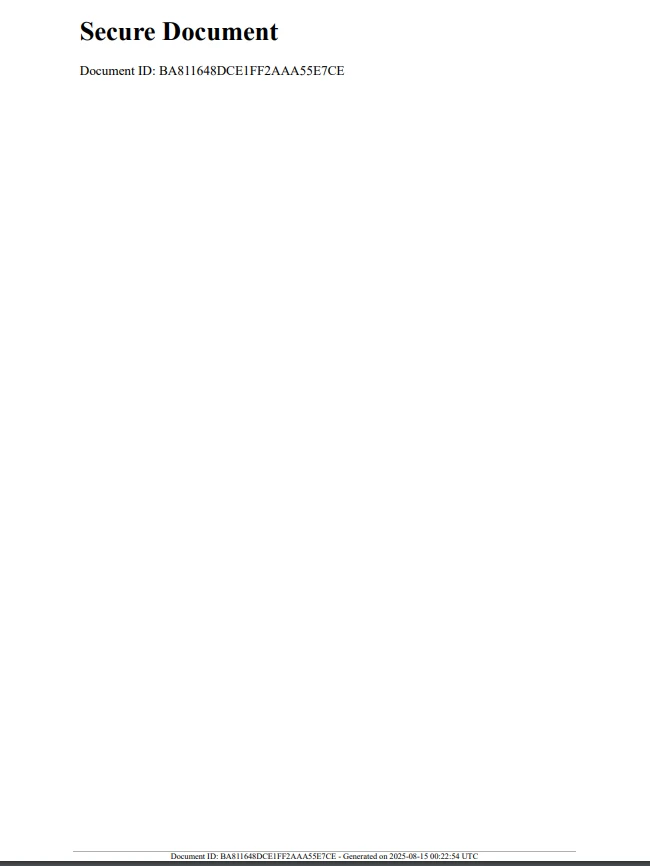
IronPDF支持PDF加密,为安全的PDF创建提供强大的支持。 您可以使用 RandomNumberGenerator 来创建用于加密的强密码或密钥:
using IronPdf;
using IronPdf.Editing;
using System;
using System.Security.Cryptography;

class Program
{
    public static void Main(string[] args)
    {
        // Create an instance of Program to run non-static methods
        var program = new Program();
        program.CreateEncryptedPdf();
    }

    string GenerateSecurePassword(int length = 12)
    {
        const string chars = "ABCDEFGHIJKLMNOPQRSTUVWXYZabcdefghijklmnopqrstuvwxyz0123456789!@#$%^&*()";
        byte[] data = new byte[length];
        RandomNumberGenerator.Fill(data);

        char[] result = new char[length];
        for (int i = 0; i < length; i++)
        {
            result[i] = chars[data[i] % chars.Length];
        }
        return new string(result);
    }

    void CreateEncryptedPdf()
    {
        string password = GenerateSecurePassword();

        var renderer = new ChromePdfRenderer();
        var pdf = renderer.RenderHtmlAsPdf("<h1>Confidential PDF</h1><p>Access is restricted.</p>");

        // Set security settings
        pdf.SecuritySettings.UserPassword = password;
        pdf.SecuritySettings.AllowUserAnnotations = false;
        pdf.SecuritySettings.AllowUserCopyPasteContent = false;
        pdf.SecuritySettings.AllowUserPrinting = IronPdf.Security.PdfPrintSecurity.NoPrint;

        string filePath = "EncryptedSecurePdf.pdf";
        pdf.SaveAs(filePath);

        Console.WriteLine($"Encrypted PDF saved to {filePath} with password: {password}");
    }
}Imports IronPdf
Imports IronPdf.Editing
Imports System
Imports System.Security.Cryptography
Friend Class Program
Public Shared Sub Main(ByVal args() As String)
' Create an instance of Program to run non-static methods
'INSTANT VB NOTE: The variable program was renamed since it may cause conflicts with calls to static members of the user-defined type with this name:
Dim program_Conflict As New Program()
program_Conflict.CreateEncryptedPdf()
End Sub
Private Function GenerateSecurePassword(Optional ByVal length As Integer = 12) As String
Const chars As String = "ABCDEFGHIJKLMNOPQRSTUVWXYZabcdefghijklmnopqrstuvwxyz0123456789!@#$%^&*()"
Dim data(length - 1) As Byte
RandomNumberGenerator.Fill(data)
Dim result(length - 1) As Char
For i As Integer = 0 To length - 1
result(i) = chars.Chars(data(i) Mod chars.Length)
Next i
Return New String(result)
End Function
Private Sub CreateEncryptedPdf()
Dim password As String = GenerateSecurePassword()
Dim renderer = New ChromePdfRenderer()
Dim pdf = renderer.RenderHtmlAsPdf("<h1>Confidential PDF</h1><p>Access is restricted.</p>")
' Set security settings
pdf.SecuritySettings.UserPassword = password
pdf.SecuritySettings.AllowUserAnnotations = False
pdf.SecuritySettings.AllowUserCopyPasteContent = False
pdf.SecuritySettings.AllowUserPrinting = IronPdf.Security.PdfPrintSecurity.NoPrint
Dim filePath As String = "EncryptedSecurePdf.pdf"
pdf.SaveAs(filePath)
Console.WriteLine($"Encrypted PDF saved to {filePath} with password: {password}")
End Sub
End Class此方法使用操作系统的RNG默认实现,生成适合加密操作的密码。
这样会应用生成的安全密码,因此只有拥有密码访问权限的用户才能查看该文档。
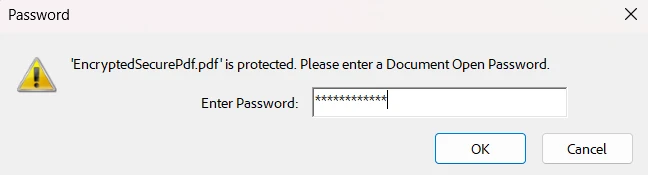
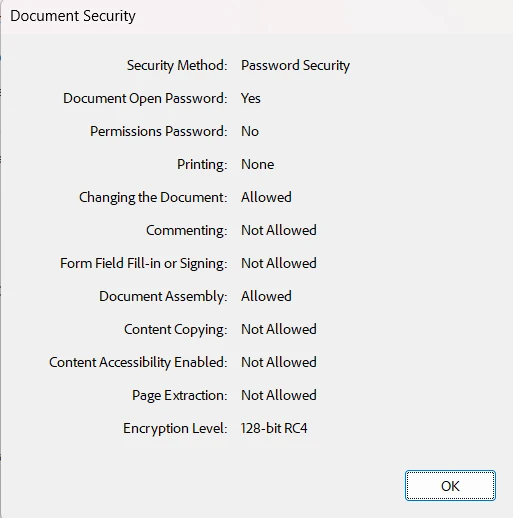
此外,我们将拥有一个加密的、安全的文档,并设置了我们的权限:
始终使用 RandomNumberGenerator 处理任何与安全相关的内容。 避免在 ID、令牌或密码中使用 Random。
将敏感数据保留在日志或面向用户的消息之外,但要记录足够的内容以进行跟踪和审核。
考虑将时间戳和其他元数据与随机 ID 结合使用,以提高可追溯性。
使用 IronPDF 的内置安全功能与随机密钥结合使用,以保护您的文档。
验证随机数据的长度和编码,以确保在您的上下文中可用(例如,文件名、URL、条形码)。
结合 C# 的 RandomNumberGenerator 类与 IronPDF,您可以生成符合现代安全标准的安全、唯一的 PDF。 无论您是盖章唯一的ID,生成加密密钥,还是嵌入安全令牌,这种方法都能帮助您:
防止文件伪造
改善可追溯性
保护 PDF 内的敏感数据
通过将这个类的密码学强度与 IronPDF 的多功能 PDF 工具结合,您的 PDF 解决方案将变得更安全和更专业。
准备好提升您的 PDF 安全性了吗? 立即试用 IronPDF 免费试用版,开始体验安全随机数据!

Jacob Mellor 是 Iron Software 的首席技术官,也是一位开创 C# PDF 技术的有远见的工程师。作为 Iron Software 核心代码库的原始开发者,他从公司成立之初就开始塑造公司的产品架构,与首席执行官 Cameron Rimington 一起将公司转变为一家拥有 50 多名员工的公司,为 NASA、特斯拉和全球政府机构提供服务。


IronPDF 是 IRONSUITE的一部分
10 个 .NET API 产品用于您的办公文档

当您需要PDF看起来像HTML时,速度快。


