




已更新 2026年4月21日
利用 IronPDF 的最新更新简化电子发票:PDF/A-3 合规性和 ZUGFeRD 支持
了解 IronPDF 的最新更新如何带来 PDF/A-3 合规性和 ZUGFeRD 支持,以简化电子发票工作流程。了解企业(尤其是在欧洲地区)如何实现法规合规性,自动化发票处理,并通过这种混合文档格式为其业务的未来做好准备。非常适合满足欧盟发票规定及其他要求!
阅读更多

对于在快速命令行工具脚本和健壮的 .NET 代码之间游刃有余的开发人员来说,摩擦往往在于如何在 C# 中将有效的 cURL 命令翻译成正确的 HTTP 请求。 Jacob Mellor 通过 CurlDotNet弥补了这一差距,该库的创建是为了将人们熟悉的 cURL 带入 .NET 生态系统。
通过将此工具与 Iron Software 产品(如 IronPDF 或 IronXL )相结合,您可以构建强大的管道,通过复杂的 API 调用获取数据并立即生成专业报告。 在本文中,我们将举例说明这些工具在哪些方面可以协同工作,使您的项目更上一层楼。
CurlDotNet 是行业标准 curl 工具的纯 C# .NET 实现。 与依赖本地依赖关系或 libcurl 的包装器不同,该库提供 100% 受管理的解决方案,完全支持 Windows、Linux、macOS 等系统。 它确保了与标准客户端相同的行为,让您只需将 API 文档中命令的 bash 副本直接粘贴到代码中即可。
要开始翻译,只需在项目目录中运行以下命令即可:
dotnet 添加包 curldotnet这会安装CurlDotNet包,使您能够通过无需HttpClient配置的开销来处理网络请求。
该库擅长解析字符串值命令。 如果您从 GitHub API 页面或内部文档中获得了有效的 curl https 字符串,可以直接执行。
using CurlDotNet;

// Simply copy-paste your shell command
var command = "curl -X GET https://api.github.com/users/jacob-mellor -H 'User-Agent: curl-dot-net'";
var result = await Curl.ExecuteAsync(command);
Console.WriteLine(result.Body);Imports CurlDotNet
' Simply copy-paste your shell command
Dim command As String = "curl -X GET https://api.github.com/users/jacob-mellor -H 'User-Agent: curl-dot-net'"
Dim result = Await Curl.ExecuteAsync(command)
Console.WriteLine(result.Body)
对于那些喜欢结构化方法的人,流畅构建器提供了一个简洁的 API 来设置头文件、curl 选项和访问令牌。
var response = await Curl.GetAsync("https://api.github.com/users/ironsoftware")
    .WithHeader("Authorization", "Bearer YOUR_TOKEN")
    .WithHeader("X-API-Key", "12345")
.ExecuteAsync();Dim response = Await Curl.GetAsync("https://api.github.com/users/ironsoftware") _
.WithHeader("Authorization", "Bearer YOUR_TOKEN") _
.WithHeader("X-API-Key", "12345") _
.ExecuteAsync()这种灵活性在内部处理 TLS 握手机制、速率限制和错误处理,模仿 curl 可执行文件的默认行为。
当您将 CurlDotNet 的输出导入 Iron Software 工具时,真正的威力就会释放出来。 由于 CurlDotNet 处理传输层(获取 JSON、文件或 HTML),Iron Software 产品可以专注于处理这些内容。
想象一下,您需要从一个安全的 URL 下载用户数据并生成 PDF 报告。 应用程序接口需要特定的 bash 签名,使用 HttpClient 很难复制,但使用 curl 命令却很容易。
// Define the curl command string with all necessary headers (here we use an example test website)
string curlCmd = "curl https://www.w3.org/TR/html4/ -H 'X-API-Key: secure_key'";

// Execute the request
var result = await Curl.ExecuteAsync(curlCmd);

// Extract the content (assumed to be HTML for this scenario)
string htmlContent = result.Body;Imports System.Threading.Tasks
' Define the curl command string with all necessary headers (here we use an example test website)
Dim curlCmd As String = "curl https://www.w3.org/TR/html4/ -H 'X-API-Key: secure_key'"
' Execute the request
Dim result = Await Curl.ExecuteAsync(curlCmd)
' Extract the content (assumed to be HTML for this scenario)
Dim htmlContent As String = result.BodyIronPDF是一个功能强大的库,旨在将HTML、CSS、JavaScript和图像呈现为高保真 PDF 文档。 它完全支持现代网络标准,包括添加页眉、页脚和设置特定渲染选项等功能。
using IronPdf;

// Instantiate the renderer
var renderer = new ChromePdfRenderer();

// Convert the fetched HTML data to PDF
var pdf = renderer.RenderHtmlAsPdf(htmlContent);

// Save the file to the output path
pdf.SaveAs("output.pdf");Imports IronPdf
' Instantiate the renderer
Dim renderer As New ChromePdfRenderer()
' Convert the fetched HTML data to PDF
Dim pdf = renderer.RenderHtmlAsPdf(htmlContent)
' Save the file to the output path
pdf.SaveAs("output.pdf")
如果您的应用程序消耗 JSON feed,您可以使用 CurlDotNet 的测试功能获取它,并使用 IronXL 导出它。
我们使用 Fluent 生成器生成简洁的 .NET 代码,以获取 JSON feed:
string testUrl = "https://jsonplaceholder.typicode.com/users";

Console.WriteLine($"Executing HTTP request to fetch JSON from: {testUrl}");
// Replace the CurlDotNet fluent builder usage with the correct async method
var response = await Curl.GetAsync(testUrl); // Use Curl.GetAsync() for async HTTP GET

string jsonBody = response.Body;Imports System
Dim testUrl As String = "https://jsonplaceholder.typicode.com/users"
Console.WriteLine($"Executing HTTP request to fetch JSON from: {testUrl}")
' Replace the CurlDotNet fluent builder usage with the correct async method
Dim response = Await Curl.GetAsync(testUrl) ' Use Curl.GetAsync() for async HTTP GET
Dim jsonBody As String = response.BodyIronXL是一个全面的.NET库,设计用于处理读取、编写和操作Excel文件格式(.xlsx、.xls、.csv)的所有方面。 最重要的是,它无需在服务器或客户端机器上安装 Microsoft Office,因此非常适合跨平台 Linux 和 CI CD 环境。 主要功能包括全面支持创建图表、应用公式和单元格样式。
现在原始的 JSON 数据已经变成了字符串,可以使用 IronXL 对其进行解析并构建电子表格。
var workbook = WorkBook.Create(ExcelFileFormat.XLSX);
 var sheet = workbook.CreateWorkSheet("User Data");

 // 1. Deserialize the JSON string to a list of UserRecord objects
 Console.WriteLine("Deserializing JSON data...");
 var salesRecords = JsonConvert.DeserializeObject<List<UserRecord>>(jsonBody);

 // 2. Insert the data into the sheet using IronXL's SetCellValue method
 Console.WriteLine("Inserting data into Excel using IronXL...");

 // Write headers
 sheet.SetCellValue(0, 0, "id");
 sheet.SetCellValue(0, 1, "name");
 sheet.SetCellValue(0, 2, "username");
 sheet.SetCellValue(0, 3, "email");

 // Write data rows
 for (int i = 0; i < salesRecords.Count; i++)
 {
     var record = salesRecords[i];
     sheet.SetCellValue(i + 1, 0, record.id);
     sheet.SetCellValue(i + 1, 1, record.name);
     sheet.SetCellValue(i + 1, 2, record.username);
     sheet.SetCellValue(i + 1, 3, record.email);
 }

 // Save the Excel file
 string filePath = "UserReport.xlsx";
 workbook.SaveAs(filePath);

Console.WriteLine($"\n Success! Excel report saved to: {Path.GetFullPath(filePath)}");Imports IronXL
Imports Newtonsoft.Json
Imports System.IO
Dim workbook = WorkBook.Create(ExcelFileFormat.XLSX)
Dim sheet = workbook.CreateWorkSheet("User Data")
' 1. Deserialize the JSON string to a list of UserRecord objects
Console.WriteLine("Deserializing JSON data...")
Dim salesRecords = JsonConvert.DeserializeObject(Of List(Of UserRecord))(jsonBody)
' 2. Insert the data into the sheet using IronXL's SetCellValue method
Console.WriteLine("Inserting data into Excel using IronXL...")
' Write headers
sheet.SetCellValue(0, 0, "id")
sheet.SetCellValue(0, 1, "name")
sheet.SetCellValue(0, 2, "username")
sheet.SetCellValue(0, 3, "email")
' Write data rows
For i As Integer = 0 To salesRecords.Count - 1
Dim record = salesRecords(i)
sheet.SetCellValue(i + 1, 0, record.id)
sheet.SetCellValue(i + 1, 1, record.name)
sheet.SetCellValue(i + 1, 2, record.username)
sheet.SetCellValue(i + 1, 3, record.email)
Next
' Save the Excel file
Dim filePath As String = "UserReport.xlsx"
workbook.SaveAs(filePath)
Console.WriteLine(vbCrLf & " Success! Excel report saved to: " & Path.GetFullPath(filePath))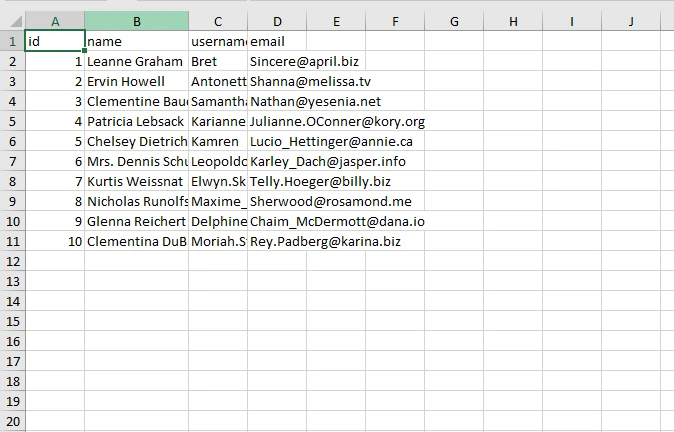
2.**代码生成:**开发人员经常会收到 bash 或 shell 格式的代码生成片段。 curl-.NET允许您直接使用这些片段,而Iron Software则处理文档操作的繁重工作。
3.**无本地依赖项:**由于 CurlDotNet 是纯 C# 实现,因此可以避免在不同操作系统版本上链接外部 C++ 库或 libcurl 二进制文件时常见的各种问题。
Jacob Mellor为.NET社区提供了一个重要工具。 通过允许开发人员在.NET Framework和Core应用程序中使用熟悉的curl选项,CurlDotNet简化了HTTP请求过程。 与 Iron Software 搭配使用时,您可以创建一个无缝的工作流程:利用 curl 的精确性获取数据,并利用 IronPDF 或 IronXL 的强大功能处理数据。
如果您遇到问题,请务必在GitHub页面上报告错误,以帮助改善对每位用户的支持。

Jacob Mellor 是 Iron Software 的首席技术官,也是一位开创 C# PDF 技术的有远见的工程师。作为 Iron Software 核心代码库的原始开发者,他从公司成立之初就开始塑造公司的产品架构,与首席执行官 Cameron Rimington 一起将公司转变为一家拥有 50 多名员工的公司,为 NASA、特斯拉和全球政府机构提供服务。


当您需要PDF看起来像HTML时,速度快。













