개발자가 신속한 명령줄 도구 스크립트와 견고한 .NET 코드 간의 간극을 탐색할 때, 종종 마찰이 있는 부분은 작동하는 cURL 명령을 C# 내에서 적절한 HTTP 요청으로 변환하는 것입니다. Jacob Mellor는 .NET 생태계에 cURL의 친숙함을 제공하기 위해 만든 라이브러리인 CurlDotNet으로 이 간극을 메웠습니다.
Iron Software 제품과 IronPDF 또는 IronXL을 결합하여 복잡한 API 호출을 통해 데이터를 가져오고 즉시 프로페셔널한 보고서를 생성하는 강력한 파이프라인을 구축할 수 있습니다. 이 기사에서는 이러한 도구들이 함께 작동하여 프로젝트를 한 단계 발전시킬 수 있는 몇 가지 예제를 살펴보겠습니다.
CurlDotNet이란 무엇입니까?
CurlDotNet은 산업 표준 curl 도구의 순수 C# .NET 구현입니다. 원시 종속성이나 libcurl에 의존하는 래퍼와 달리, 이 라이브러리는 Windows, Linux, macOS 및 그 이상에 대한 전체 지원을 포함한 100% 관리 솔루션을 제공합니다. API 문서에서 명령의 bash 복사본을 코드에 직접 붙여넣을 수 있도록 표준 클라이언트와 동일한 동작을 보장합니다.
빠른 시작 및 설치
시작하려면 프로젝트 디렉터리에서 다음 명령을 실행하십시오:
dotnet add package curldotnet
dotnet add package curldotnet
Text
이는 패키지 CurlDotNet을 설치하여 HttpClient 설정의 오버헤드 없이 웹 요청을 처리할 수 있는 기성 레시피에 접근할 수 있게 합니다.
Curl-.NET Curl 명령어 사용하기
이 라이브러리는 문자열 값 명령을 구문 분석하는 데 뛰어납니다. GitHub API 페이지 또는 내부 문서에서 작동 중인 curl https 문자열이 있는 경우 직접 실행할 수 있습니다.
using CurlDotNet;

// Simply copy-paste your shell command
var command = "curl -X GET https://api.github.com/users/jacob-mellor -H 'User-Agent: curl-dot-net'";
var result = await Curl.ExecuteAsync(command);
Console.WriteLine(result.Body);
using CurlDotNet;

// Simply copy-paste your shell command
var command = "curl -X GET https://api.github.com/users/jacob-mellor -H 'User-Agent: curl-dot-net'";
var result = await Curl.ExecuteAsync(command);
Console.WriteLine(result.Body);
Imports CurlDotNet

' Simply copy-paste your shell command
Dim command As String = "curl -X GET https://api.github.com/users/jacob-mellor -H 'User-Agent: curl-dot-net'"
Dim result = Await Curl.ExecuteAsync(command)
Console.WriteLine(result.Body)
Imports CurlDotNet

' Simply copy-paste your shell command
Dim command As String = "curl -X GET https://api.github.com/users/jacob-mellor -H 'User-Agent: curl-dot-net'"
Dim result = Await Curl.ExecuteAsync(command)
Console.WriteLine(result.Body)
.NET 코드 Curl .NET 출력

구조화된 접근 방식을 선호하는 사람들을 위해, 유창한 빌더는 헤더 설정, curl 옵션 및 액세스 토큰을 설정하기 위한 깔끔한 API를 제공합니다.
var response = await Curl.GetAsync("https://api.github.com/users/ironsoftware")
    .WithHeader("Authorization", "Bearer YOUR_TOKEN")
    .WithHeader("X-API-Key", "12345")
    .ExecuteAsync();
var response = await Curl.GetAsync("https://api.github.com/users/ironsoftware")
    .WithHeader("Authorization", "Bearer YOUR_TOKEN")
    .WithHeader("X-API-Key", "12345")
    .ExecuteAsync();
Dim response = Await Curl.GetAsync("https://api.github.com/users/ironsoftware") _
.WithHeader("Authorization", "Bearer YOUR_TOKEN") _
.WithHeader("X-API-Key", "12345") _
.ExecuteAsync()
Dim response = Await Curl.GetAsync("https://api.github.com/users/ironsoftware") _
    .WithHeader("Authorization", "Bearer YOUR_TOKEN") _
    .WithHeader("X-API-Key", "12345") _
    .ExecuteAsync()
이 유연성은 TLS 핸드셰이크 메커니즘, 속도 제한 및 오류 처리를 내부적으로 처리하여 curl 실행 파일의 기본 동작을 모방합니다.
.NET Framework에서의 Iron Software와의 통합
CurlDotNet의 출력을 Iron Software 도구로 파이프라인할 때 진정한 힘이 발휘됩니다. CurlDotNet이 전송 계층(예: JSON, 파일 또는 HTML)을 처리하면 Iron Software 제품은 해당 콘텐츠를 처리하는 데 집중할 수 있습니다.
시나리오: API 데이터에서 PDF 보고서 생성
보안 URL에서 사용자 데이터를 다운로드하고 PDF 보고서를 생성해야 한다고 가정해보세요. API는 HttpClient로 복제하기 어려운 특정 bash 서명을 필요로 하지만 curl 명령어로는 쉽게 가능합니다.
단계 1: Curl-.NET으로 데이터 가져오기
// Define the curl command string with all necessary headers (here we use an example test website)
string curlCmd = "curl https://www.w3.org/TR/html4/ -H 'X-API-Key: secure_key'";

// Execute the request
var result = await Curl.ExecuteAsync(curlCmd);

// Extract the content (assumed to be HTML for this scenario)
string htmlContent = result.Body;
// Define the curl command string with all necessary headers (here we use an example test website)
string curlCmd = "curl https://www.w3.org/TR/html4/ -H 'X-API-Key: secure_key'";

// Execute the request
var result = await Curl.ExecuteAsync(curlCmd);

// Extract the content (assumed to be HTML for this scenario)
string htmlContent = result.Body;
Imports System.Threading.Tasks

' Define the curl command string with all necessary headers (here we use an example test website)
Dim curlCmd As String = "curl https://www.w3.org/TR/html4/ -H 'X-API-Key: secure_key'"

' Execute the request
Dim result = Await Curl.ExecuteAsync(curlCmd)

' Extract the content (assumed to be HTML for this scenario)
Dim htmlContent As String = result.Body
Imports System.Threading.Tasks

' Define the curl command string with all necessary headers (here we use an example test website)
Dim curlCmd As String = "curl https://www.w3.org/TR/html4/ -H 'X-API-Key: secure_key'"

' Execute the request
Dim result = Await Curl.ExecuteAsync(curlCmd)

' Extract the content (assumed to be HTML for this scenario)
Dim htmlContent As String = result.Body
2단계: IronPDF로 PDF 생성
IronPDF는 HTML, CSS, JavaScript 및 이미지를 고품질 PDF 문서로 렌더링하기 위해 설계된 강력한 라이브러리입니다. 이는 최신 웹 표준에 대한 완전한 지원을 제공하며, 헤더 및 푸터 추가와 특정 렌더링 옵션 설정과 같은 기능도 포함합니다.
using IronPdf;

// Instantiate the renderer
var renderer = new ChromePdfRenderer();

// Convert the fetched HTML data to PDF
var pdf = renderer.RenderHtmlAsPdf(htmlContent);

// Save the file to the output path
pdf.SaveAs("output.pdf");
using IronPdf;

// Instantiate the renderer
var renderer = new ChromePdfRenderer();

// Convert the fetched HTML data to PDF
var pdf = renderer.RenderHtmlAsPdf(htmlContent);

// Save the file to the output path
pdf.SaveAs("output.pdf");
Imports IronPdf
' Instantiate the renderer
Dim renderer As New ChromePdfRenderer()
' Convert the fetched HTML data to PDF
Dim pdf = renderer.RenderHtmlAsPdf(htmlContent)
' Save the file to the output path
pdf.SaveAs("output.pdf")
Imports IronPdf

' Instantiate the renderer
Dim renderer As New ChromePdfRenderer()

' Convert the fetched HTML data to PDF
Dim pdf = renderer.RenderHtmlAsPdf(htmlContent)

' Save the file to the output path
pdf.SaveAs("output.pdf")
산출

시나리오: JSON을 Excel로 내보내기
앱이 JSON 피드를 사용해 소비하는 경우, CurlDotNet의 테스트 기능을 사용해 이를 가져오고 IronXL을 사용해 내보낼 수 있습니다.
단계 1: Curl-.NET으로 JSON 데이터 가져오기
우리는 깨끗한 .NET 코드를 위한 플루언트 빌더를 사용하여 JSON 피드를 가져옵니다:
string testUrl = "https://jsonplaceholder.typicode.com/users";

Console.WriteLine($"Executing HTTP request to fetch JSON from: {testUrl}");
// Replace the CurlDotNet fluent builder usage with the correct async method
var response = await Curl.GetAsync(testUrl); // Use Curl.GetAsync() for async HTTP GET

string jsonBody = response.Body;
string testUrl = "https://jsonplaceholder.typicode.com/users";

Console.WriteLine($"Executing HTTP request to fetch JSON from: {testUrl}");
// Replace the CurlDotNet fluent builder usage with the correct async method
var response = await Curl.GetAsync(testUrl); // Use Curl.GetAsync() for async HTTP GET

string jsonBody = response.Body;
Imports System
Dim testUrl As String = "https://jsonplaceholder.typicode.com/users"
Console.WriteLine($"Executing HTTP request to fetch JSON from: {testUrl}")
' Replace the CurlDotNet fluent builder usage with the correct async method
Dim response = Await Curl.GetAsync(testUrl) ' Use Curl.GetAsync() for async HTTP GET
Dim jsonBody As String = response.Body
Imports System

Dim testUrl As String = "https://jsonplaceholder.typicode.com/users"

Console.WriteLine($"Executing HTTP request to fetch JSON from: {testUrl}")
' Replace the CurlDotNet fluent builder usage with the correct async method
Dim response = Await Curl.GetAsync(testUrl) ' Use Curl.GetAsync() for async HTTP GET

Dim jsonBody As String = response.Body
2단계: IronXL을 사용하여 Excel로 로드 및 내보내기
IronXL은 Excel 파일 형식(.xlsx, .xls, .csv)을 읽기, 쓰기 및 조작을 처리하기 위해 설계된 포괄적인 .NET 라이브러리입니다. 중요한 것은, 서버나 클라이언트 머신에 Microsoft Office 설치 없이 이것을 수행할 수 있어 Linux 및 CI CD 환경에 이상적입니다. 주요 기능으로는 차트 만들기, 수식 적용 및 셀 스타일링에 대한 완전한 지원이 포함됩니다.
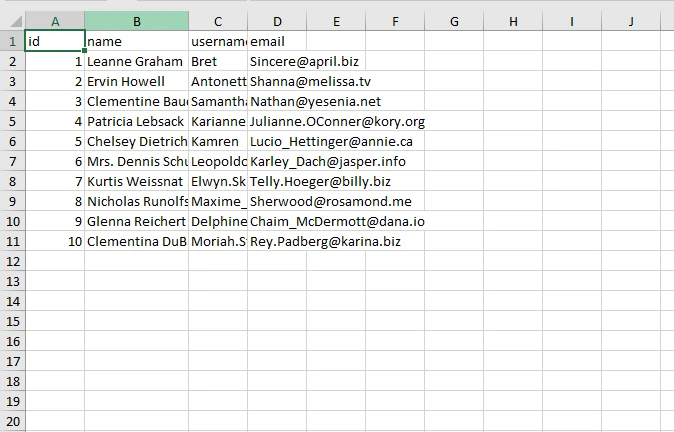
이제 원시 JSON 데이터가 문자열로 저장되었으므로 IronXL을 사용하여 이를 구문 분석하고 스프레드시트를 빌드할 수 있습니다.
var workbook = WorkBook.Create(ExcelFileFormat.XLSX);
 var sheet = workbook.CreateWorkSheet("User Data");

 // 1. Deserialize the JSON string to a list of UserRecord objects
 Console.WriteLine("Deserializing JSON data...");
 var salesRecords = JsonConvert.DeserializeObject<List<UserRecord>>(jsonBody);

 // 2. Insert the data into the sheet using IronXL's SetCellValue method
 Console.WriteLine("Inserting data into Excel using IronXL...");

 // Write headers
 sheet.SetCellValue(0, 0, "id");
 sheet.SetCellValue(0, 1, "name");
 sheet.SetCellValue(0, 2, "username");
 sheet.SetCellValue(0, 3, "email");

 // Write data rows
 for (int i = 0; i < salesRecords.Count; i++)
 {
     var record = salesRecords[i];
     sheet.SetCellValue(i + 1, 0, record.id);
     sheet.SetCellValue(i + 1, 1, record.name);
     sheet.SetCellValue(i + 1, 2, record.username);
     sheet.SetCellValue(i + 1, 3, record.email);
 }

 // Save the Excel file
 string filePath = "UserReport.xlsx";
 workbook.SaveAs(filePath);

 Console.WriteLine($"\n Success! Excel report saved to: {Path.GetFullPath(filePath)}");
var workbook = WorkBook.Create(ExcelFileFormat.XLSX);
 var sheet = workbook.CreateWorkSheet("User Data");

 // 1. Deserialize the JSON string to a list of UserRecord objects
 Console.WriteLine("Deserializing JSON data...");
 var salesRecords = JsonConvert.DeserializeObject<List<UserRecord>>(jsonBody);

 // 2. Insert the data into the sheet using IronXL's SetCellValue method
 Console.WriteLine("Inserting data into Excel using IronXL...");

 // Write headers
 sheet.SetCellValue(0, 0, "id");
 sheet.SetCellValue(0, 1, "name");
 sheet.SetCellValue(0, 2, "username");
 sheet.SetCellValue(0, 3, "email");

 // Write data rows
 for (int i = 0; i < salesRecords.Count; i++)
 {
     var record = salesRecords[i];
     sheet.SetCellValue(i + 1, 0, record.id);
     sheet.SetCellValue(i + 1, 1, record.name);
     sheet.SetCellValue(i + 1, 2, record.username);
     sheet.SetCellValue(i + 1, 3, record.email);
 }

 // Save the Excel file
 string filePath = "UserReport.xlsx";
 workbook.SaveAs(filePath);

 Console.WriteLine($"\n Success! Excel report saved to: {Path.GetFullPath(filePath)}");
Imports IronXL
Imports Newtonsoft.Json
Imports System.IO
Dim workbook = WorkBook.Create(ExcelFileFormat.XLSX)
Dim sheet = workbook.CreateWorkSheet("User Data")
' 1. Deserialize the JSON string to a list of UserRecord objects
Console.WriteLine("Deserializing JSON data...")
Dim salesRecords = JsonConvert.DeserializeObject(Of List(Of UserRecord))(jsonBody)
' 2. Insert the data into the sheet using IronXL's SetCellValue method
Console.WriteLine("Inserting data into Excel using IronXL...")
' Write headers
sheet.SetCellValue(0, 0, "id")
sheet.SetCellValue(0, 1, "name")
sheet.SetCellValue(0, 2, "username")
sheet.SetCellValue(0, 3, "email")
' Write data rows
For i As Integer = 0 To salesRecords.Count - 1
Dim record = salesRecords(i)
sheet.SetCellValue(i + 1, 0, record.id)
sheet.SetCellValue(i + 1, 1, record.name)
sheet.SetCellValue(i + 1, 2, record.username)
sheet.SetCellValue(i + 1, 3, record.email)
Next
' Save the Excel file
Dim filePath As String = "UserReport.xlsx"
workbook.SaveAs(filePath)
Console.WriteLine(vbCrLf & " Success! Excel report saved to: " & Path.GetFullPath(filePath))
Imports IronXL
Imports Newtonsoft.Json
Imports System.IO

Dim workbook = WorkBook.Create(ExcelFileFormat.XLSX)
Dim sheet = workbook.CreateWorkSheet("User Data")

' 1. Deserialize the JSON string to a list of UserRecord objects
Console.WriteLine("Deserializing JSON data...")
Dim salesRecords = JsonConvert.DeserializeObject(Of List(Of UserRecord))(jsonBody)

' 2. Insert the data into the sheet using IronXL's SetCellValue method
Console.WriteLine("Inserting data into Excel using IronXL...")

' Write headers
sheet.SetCellValue(0, 0, "id")
sheet.SetCellValue(0, 1, "name")
sheet.SetCellValue(0, 2, "username")
sheet.SetCellValue(0, 3, "email")

' Write data rows
For i As Integer = 0 To salesRecords.Count - 1
    Dim record = salesRecords(i)
    sheet.SetCellValue(i + 1, 0, record.id)
    sheet.SetCellValue(i + 1, 1, record.name)
    sheet.SetCellValue(i + 1, 2, record.username)
    sheet.SetCellValue(i + 1, 3, record.email)
Next

' Save the Excel file
Dim filePath As String = "UserReport.xlsx"
workbook.SaveAs(filePath)

Console.WriteLine(vbCrLf & " Success! Excel report saved to: " & Path.GetFullPath(filePath))
출력 Excel 파일
이 조합을 사용하는 이유는?
-
크로스 플랫폼 일관성: CurlDotNet 및 Iron Software 제품은 Windows, Linux 및 macOS를 지원합니다. 이는 Microsoft Azure 또는 AWS Lambda와 같은 실행 환경에서 실행되는 CI CD 파이프라인에 중요합니다.
-
코드 생성: 개발자는 종종 bash 또는 쉘 형식의 코드 생성 스니펫을 받습니다. curl-.NET을 사용하면 이러한 코드 조각을 직접 사용할 수 있으며, Iron Software는 문서 조작의 무거운 작업을 처리합니다.
-
네이티브 의존성 없음: CurlDotNet은 순수 C# 구현이기 때문에 서로 다른 OS 버전에서 외부 C++ 라이브러리 또는 libcurl 바이너리를 연결할 때 발생하는 일반적인 문제를 피할 수 있습니다.
결론
Jacob Mellor는 .NET 커뮤니티에 중요한 도구를 제공하였습니다. .NET Framework 및 Core 애플리케이션 내에서 친숙한 curl 옵션을 사용하게 하여, CurlDotNet은 HTTP 요청 과정을 단순화합니다. Iron Software와 함께 사용하면 이러한 원활한 워크플로우를 만들 수 있습니다: curl의 정밀함으로 데이터를 가져오고 IronPDF 또는 IronXL의 강력함으로 이를 처리합니다.
문제가 발생하면 GitHub 페이지에 버그를 보고하여 모든 사용자의 지원을 개선하세요.