




更新日 2026年4月23日
Microsoft.Extensions.AIを使用した .NET での LLM 統合の簡素化
AI はソフトウェア開発を変革していますが、.NET への大規模言語モデル (LLM) の統合はこれまで複雑でした。IronPdf.AI を使用して AI 統合をさらに進め、OpenAI を活用した PDF 解析、データ抽出、およびコンテンツの要約を .NET アプリケーションにもたらします。
詳しく読む

時々、PDF文書を扱うときに、ランダムな数字やランダムな文字列を生成する必要がある場合があります。 PDF暗号化のためにランダムな数字やパスワードを生成したり、ユニークなファイル名を作成したり、予測可能なシーケンスを避けたり、その他の目的で数字を生成する必要がある場合、RandomNumberGenerator C#クラスを使用すると、PDFの生成および編集プロジェクトを次のレベルに引き上げることができます。
Randomクラスから作成された基本的なランダムオブジェクトとは異なり、この暗号ランダム数生成器は、セキュアなアプリケーションでの暗号操作に適した暗号的に強力なランダム値を生成します。
この記事では次のことを探ります:
RandomNumberGeneratorが何であり、なぜ重要なのか。
暗号目的で暗号ランダム数生成器を使用してランダムな数値、ランダムな文字列、その他のランダムデータを生成する方法。
応答性のある一意のPDFを生成するために生成された番号や文字列を使用して、IronPDFとのランダム数生成器統合の実用的な例。
PDFアプリケーションのセキュリティとプロフェッショナリズムを向上させるためのヒントとベストプラクティス。
IronPDF統合に入る前に、RandomNumberGeneratorが特別である理由を簡単に振り返ります。
*これは、通常のRandomクラスよりもはるかに安全な乱数バイトとして、暗号的に強力な乱数値を生成します。
セキュアなトークン、キー、ソルト、ユニークな識別子の生成など、予測不能性を要するシナリオに理想的です。
AES-CTR DRBG、Fortuna、またはOSが提供するCSPRNGなどの暗号アルゴリズムを使用。 * 予測に対する耐性があります。
暗号キーの作成、パスワード生成、セキュアトークン、ユニークなドキュメントIDを作成するタスクに最適です。
これは、オペレーティングシステムの基礎にある安全なランダム数生成器に依存することから来る強さであり、予測やリバースエンジニアリング攻撃に耐性があります。 同じシード値で同じシーケンスを生成する可能性がある疑似乱数生成器とは異なり、このクラスは真のランダム性と暗号化目的で設計されています。
多くの開発者はランダムな整数を生成するためにC#のRandomクラスを最初に使用しますが、高セキュリティシナリオ向けに設計されていません。 同じシード値またはシステム時間を使用する場合、出力のパターンは予測可能であり、生成された数字が推測される可能性があります。 これは、メソッドが同じ入力で繰り返す可能性のある単純な計算式の操作を使用して値を生成するためです。
対照的に、RandomNumberGeneratorは、.NET Frameworkまたは基礎OSの暗号ランダム数生成器から派生した真のランダム数を生成します。 このことによって、低い値の偏りがなく、しばしば下限値(例:int minValue)と排他的な上限値(例:int maxValue)の間で一様分布を維持するために破棄および再試行戦略を使用します。 以下の図は、弱いRNGと安全なRNGの違いを示しています。

IronPDFは強力な.NET PDFライブラリであり、開発者がPDF文書を作成、編集、保護することを可能にします。 ランダム性が重要な一般的な使用例には以下が含まれます。
**ユニークなドキュメント識別子:**PDFに暗号的に安全なIDを付けて追跡や検証を行います。
**セキュアウォーターマーク:**偽造を防ぐランダムなウォーターマークやコードを埋め込む。
**暗号化キーまたはパスワード:**PDF暗号化のためのセキュアなキーやパスワードを生成。
**ランダムコンテンツ:**整合性の確認のためにPDF文書にランダムなユニークトークンやソルトを加えます。
ここに、128ビット(16バイト)の安全なランダムトークンを生成する単純な例があります。
using System;
using System.Security.Cryptography;

public static string GenerateSecureToken(int size = 16)
{
    byte[] randomBytes = new byte[size];
    RandomNumberGenerator.Fill(randomBytes);
    return Convert.ToBase64String(randomBytes);
}Imports System
Imports System.Security.Cryptography
Public Shared Function GenerateSecureToken(Optional ByVal size As Integer = 16) As String
Dim randomBytes(size - 1) As Byte
RandomNumberGenerator.Fill(randomBytes)
Return Convert.ToBase64String(randomBytes)
End Functionこのメソッドは安全なバイト配列を作成し、それをBase64文字列として返します。ユニットテスト、ファイル名、または安全なIDに埋め込むのに最適です。
RandomNumberGeneratorとIronPDFの威力を組み合わせて、各ページにユニークでセキュアなドキュメントIDが刻印されたPDFを生成しましょう。
string GenerateDocumentId()
{
    byte[] idBytes = new byte[12]; // 96-bit ID
    RandomNumberGenerator.Fill(idBytes);
    return BitConverter.ToString(idBytes).Replace("-", "");
}Private Function GenerateDocumentId() As String
Dim idBytes(11) As Byte ' 96-bit ID
RandomNumberGenerator.Fill(idBytes)
Return BitConverter.ToString(idBytes).Replace("-", "")
End Functionこれは、24文字の16進乱数文字列(例: "4F3A2C9B7D1E8F0A5B6C7D8E")を生成します。
using IronPdf;
void CreatePdfWithSecureId()
{
var documentId = GenerateDocumentId();
var renderer = new ChromePdfRenderer();
// Add a custom footer with the document ID
renderer.RenderingOptions.HtmlFooter = new HtmlHeaderFooter
{
HtmlFragment = $"<div style='text-align: center; font-size: 10px;'>Document ID: {documentId} - Generated on {DateTime.UtcNow:yyyy-MM-dd HH:mm:ss} UTC</div>",
DrawDividerLine = true,
};
var pdf = renderer.RenderHtmlAsPdf($"<h1>Secure Document</h1><p>Document ID: {documentId}</p>");
string outputPath = $"SecurePdf_{documentId}.pdf";
pdf.SaveAs(outputPath);
Console.WriteLine($"PDF saved as {outputPath}");
}What this Code Does:Imports IronPdf
Private Sub CreatePdfWithSecureId()
Dim documentId = GenerateDocumentId()
Dim renderer = New ChromePdfRenderer()
' Add a custom footer with the document ID
renderer.RenderingOptions.HtmlFooter = New HtmlHeaderFooter With {
.HtmlFragment = $"<div style='text-align: center; font-size: 10px;'>Document ID: {documentId} - Generated on {DateTime.UtcNow:yyyy-MM-dd HH:mm:ss} UTC</div>",
.DrawDividerLine = True
}
Dim pdf = renderer.RenderHtmlAsPdf($"<h1>Secure Document</h1><p>Document ID: {documentId}</p>")
Dim outputPath As String = $"SecurePdf_{documentId}.pdf"
pdf.SaveAs(outputPath)
Console.WriteLine($"PDF saved as {outputPath}")
End Sub
'INSTANT VB TODO TASK: The following line uses invalid syntax:
'What Me Code Does:暗号的に安全でユニークなドキュメントID用のランダムな数字を生成。
そのIDを埋め込んだHTMLをPDFにレンダリングします。
ドキュメントIDとタイムスタンプを持つフッターをすべてのページに追加します。
追跡を容易にするためにIDをファイル名として保存します。
using IronPdf;
using IronPdf.Editing;
using System;
using System.Security.Cryptography;
class Program
{
public static void Main(string[] args)
{
// Create an instance of Program to run non-static methods
var program = new Program();
program.CreatePdfWithSecureId()
}
string GenerateDocumentId()
{
    byte[] idBytes = new byte[12]; // 96-bit ID
    RandomNumberGenerator.Fill(idBytes);
    return BitConverter.ToString(idBytes).Replace("-", "");
}
void CreatePdfWithSecureId()
{
var documentId = GenerateDocumentId();
var renderer = new ChromePdfRenderer();
// Add a custom footer with the document ID
renderer.RenderingOptions.HtmlFooter = new HtmlHeaderFooter
{
HtmlFragment = $"<div style='text-align: center; font-size: 10px;'>Document ID: {documentId} - Generated on {DateTime.UtcNow:yyyy-MM-dd HH:mm:ss} UTC</div>",
DrawDividerLine = true,
};
var pdf = renderer.RenderHtmlAsPdf($"<h1>Secure Document</h1><p>Document ID: {documentId}</p>");
string outputPath = $"SecurePdf_{documentId}.pdf";
pdf.SaveAs(outputPath);
Console.WriteLine($"PDF saved as {outputPath}");
}
}Imports IronPdf
Imports IronPdf.Editing
Imports System
Imports System.Security.Cryptography
Friend Class Program
Public Shared Sub Main(ByVal args() As String)
' Create an instance of Program to run non-static methods
'INSTANT VB NOTE: The variable program was renamed since it may cause conflicts with calls to static members of the user-defined type with this name:
Dim program_Conflict As New Program()
program_Conflict.CreatePdfWithSecureId()
End Sub
Private Function GenerateDocumentId() As String
	Dim idBytes(11) As Byte ' 96-bit ID
	RandomNumberGenerator.Fill(idBytes)
	Return BitConverter.ToString(idBytes).Replace("-", "")
End Function
Private Sub CreatePdfWithSecureId()
Dim documentId = GenerateDocumentId()
Dim renderer = New ChromePdfRenderer()
' Add a custom footer with the document ID
renderer.RenderingOptions.HtmlFooter = New HtmlHeaderFooter With {
.HtmlFragment = $"<div style='text-align: center; font-size: 10px;'>Document ID: {documentId} - Generated on {DateTime.UtcNow:yyyy-MM-dd HH:mm:ss} UTC</div>",
.DrawDividerLine = True
}
Dim pdf = renderer.RenderHtmlAsPdf($"<h1>Secure Document</h1><p>Document ID: {documentId}</p>")
Dim outputPath As String = $"SecurePdf_{documentId}.pdf"
pdf.SaveAs(outputPath)
Console.WriteLine($"PDF saved as {outputPath}")
End Sub
End ClassPDFにDocument ID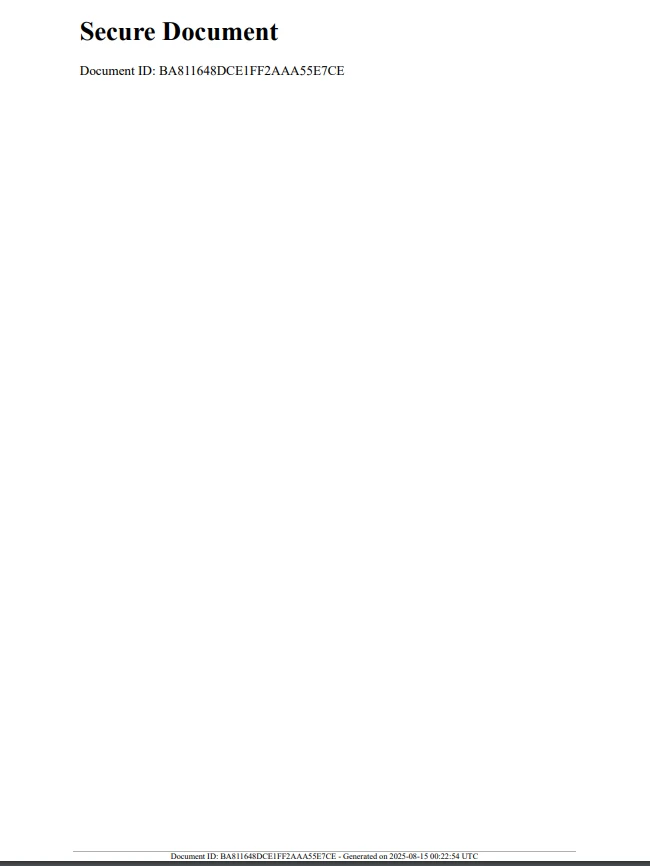
IronPDFはPDF暗号化をサポートしており、安全なPDF作成を強力にサポートします。 暗号化のために強力なパスワードやキーを作成するにはRandomNumberGeneratorを使用できます:
using IronPdf;
using IronPdf.Editing;
using System;
using System.Security.Cryptography;

class Program
{
    public static void Main(string[] args)
    {
        // Create an instance of Program to run non-static methods
        var program = new Program();
        program.CreateEncryptedPdf();
    }

    string GenerateSecurePassword(int length = 12)
    {
        const string chars = "ABCDEFGHIJKLMNOPQRSTUVWXYZabcdefghijklmnopqrstuvwxyz0123456789!@#$%^&*()";
        byte[] data = new byte[length];
        RandomNumberGenerator.Fill(data);

        char[] result = new char[length];
        for (int i = 0; i < length; i++)
        {
            result[i] = chars[data[i] % chars.Length];
        }
        return new string(result);
    }

    void CreateEncryptedPdf()
    {
        string password = GenerateSecurePassword();

        var renderer = new ChromePdfRenderer();
        var pdf = renderer.RenderHtmlAsPdf("<h1>Confidential PDF</h1><p>Access is restricted.</p>");

        // Set security settings
        pdf.SecuritySettings.UserPassword = password;
        pdf.SecuritySettings.AllowUserAnnotations = false;
        pdf.SecuritySettings.AllowUserCopyPasteContent = false;
        pdf.SecuritySettings.AllowUserPrinting = IronPdf.Security.PdfPrintSecurity.NoPrint;

        string filePath = "EncryptedSecurePdf.pdf";
        pdf.SaveAs(filePath);

        Console.WriteLine($"Encrypted PDF saved to {filePath} with password: {password}");
    }
}Imports IronPdf
Imports IronPdf.Editing
Imports System
Imports System.Security.Cryptography
Friend Class Program
Public Shared Sub Main(ByVal args() As String)
' Create an instance of Program to run non-static methods
'INSTANT VB NOTE: The variable program was renamed since it may cause conflicts with calls to static members of the user-defined type with this name:
Dim program_Conflict As New Program()
program_Conflict.CreateEncryptedPdf()
End Sub
Private Function GenerateSecurePassword(Optional ByVal length As Integer = 12) As String
Const chars As String = "ABCDEFGHIJKLMNOPQRSTUVWXYZabcdefghijklmnopqrstuvwxyz0123456789!@#$%^&*()"
Dim data(length - 1) As Byte
RandomNumberGenerator.Fill(data)
Dim result(length - 1) As Char
For i As Integer = 0 To length - 1
result(i) = chars.Chars(data(i) Mod chars.Length)
Next i
Return New String(result)
End Function
Private Sub CreateEncryptedPdf()
Dim password As String = GenerateSecurePassword()
Dim renderer = New ChromePdfRenderer()
Dim pdf = renderer.RenderHtmlAsPdf("<h1>Confidential PDF</h1><p>Access is restricted.</p>")
' Set security settings
pdf.SecuritySettings.UserPassword = password
pdf.SecuritySettings.AllowUserAnnotations = False
pdf.SecuritySettings.AllowUserCopyPasteContent = False
pdf.SecuritySettings.AllowUserPrinting = IronPdf.Security.PdfPrintSecurity.NoPrint
Dim filePath As String = "EncryptedSecurePdf.pdf"
pdf.SaveAs(filePath)
Console.WriteLine($"Encrypted PDF saved to {filePath} with password: {password}")
End Sub
End ClassこのメソッドはOSのRNGからのデフォルト実装を使用し、暗号作業に適したパスワードを生成します。
生成された安全なパスワードが適用されるため、パスワードへのアクセス権を持つユーザーだけが文書を閲覧できます。
パスワード保護ポップアップ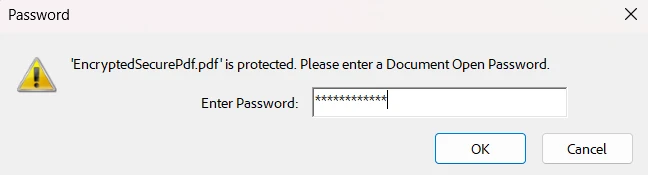
さらに、設定した権限を持つ暗号化された安全なドキュメントが残されます。
暗号化されたPDF設定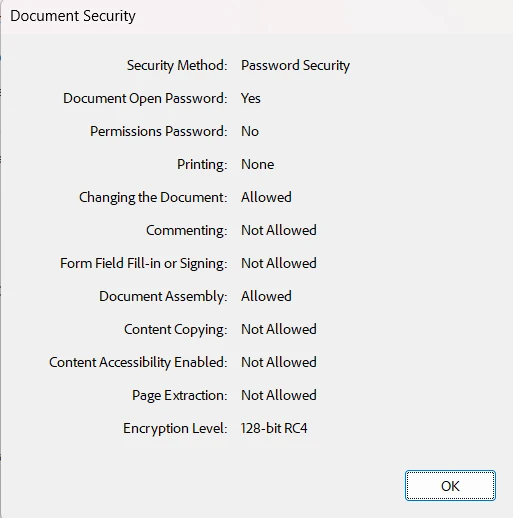
セキュリティ関連のあらゆることにはRandomNumberGeneratorを常に使用。 ID、トークン、またはパスワードにRandomを避ける。
センシティブデータをログやユーザー向けメッセージから外し、十分な追跡と監査が可能になるようにログを記録。
ランダムなIDと組み合わせてタイムスタンプや他のメタデータを使用してトレース性を向上。
IronPDFの組み込みセキュリティ機能をランダムキーと組み合わせて文書を保護します。
ファイル名、URL、バーコードなどの状況での使用可能性を確保するためにランダムデータの長さとエンコーディングを検証する。
C#のRandomNumberGeneratorクラスをIronPDFと統合することで、現代のセキュリティ基準を満たす安全でユニークなPDFを生成できます。 ユニークなIDをスタンプしたり、暗号キーを生成したり、安全なトークンを埋め込んだりする場合、このアプローチが役立ちます。
文書の偽造を防ぐ
トレース性を向上
PDF内のセンシティブデータのセキュリティを高める
このクラスの暗号的強度とIronPDFの多用途なPDFツールを組み合わせることで、PDFソリューションをより安全かつプロフェッショナルにします。
PDFセキュリティを向上させる準備はできましたか? IronPDF の無料トライアルを試して、今すぐ安全なランダム データの実験を始めましょう。

ジェイコブ・メラーはIron Softwareの最高技術責任者(CTO)であり、C# PDFテクノロジーを開拓する先見的なエンジニアです。Iron Softwareのコアコードベースを支えるオリジナル開発者として、彼は創業以来、会社の製品アーキテクチャを形成し、CEOのCameron Rimingtonとともに、会社をNASA、Tesla、および世界的な政府機関にサービスを提供する50人以上の会社に変えました。1999年にロンドンで最初のソフトウェアビジネスを開業し、2005年に最初 for .NETコンポーネントを作成した後、Microsoftのエコシステム全体で複雑な問題を解決することを専門としました。


IronPDF はIRONSUITEの一部です
オフィス文書向けの.NET API製品10個

PDFがHTMLのように見える必要があるとき、迅速に。












