




已更新 2026年4月23日
在 .NET 中用 Microsoft.Extensions.AI 簡化 LLM 整合
AI 正在改變軟體開發,但將大型語言模型 (LLM) 整合到 .NET 中一直很複雜。利用 IronPdf.AI 將 AI 整合推向更遠,為 .NET 應用程式帶來由 OpenAI 驅動的 PDF 解析、資料擷取和內容總結。
閱讀更多

在C#中處理PDF文件通常涉及處理不同型別的文件、操作或資料來源。 傳統上,開發者可能依賴冗長的if-else鏈或巢狀switch語句來管理各種輸入值和型別或輸出決策。 但是使用現代C#功能如switch pattern matching,您的程式碼可以變得更加優雅、易讀和可維護。
當與IronPDF這樣強大的PDF庫結合時,switch pattern matching允許您為文件處理構建更聰明、更簡潔的邏輯。 在本文中,我們將探討如何使用C#的高級模式匹配功能——如型別模式、屬性模式和關係模式——與IronPDF配合使用來簡化您的PDF生成工作流程。
Switch pattern matching是一個在C# 7中引入的功能,並且在後續版本中不斷改進。 與傳統的switch語句僅匹配常量值不同,pattern matching使您能夠在單一表達式中評估型別、屬性和條件。 以下範例展示了此功能如何運作。
switch (input)
{
    case int i when i > 0:
        Console.WriteLine("Positive integer");
        break;
    case string s:
        Console.WriteLine($"It's a string: {s}");
        break;
    default:
        Console.WriteLine("Unknown type");
        break;
}Select Case input
'INSTANT VB TODO TASK: The following 'case' pattern variable is not converted by Instant VB:
'ORIGINAL LINE: case int i when i > 0:
Case Integer i [when] i > 0
Console.WriteLine("Positive integer")
'INSTANT VB TODO TASK: The following 'case' pattern variable is not converted by Instant VB:
'ORIGINAL LINE: case string s:
Case String s
Console.WriteLine($"It's a string: {s}")
Case Else
Console.WriteLine("Unknown type")
End Select此程式碼使用了型別模式、關係運算符和空常量模式來簡潔地處理多個案例。 此技術通過更簡潔的語法顯著提高程式碼可讀性,並支持更複雜的邏輯。
IronPDF是一個功能強大的.NET組件,可從HTML、圖像或原始文字生成和操作PDF。 許多真實世界的用例涉及處理不同的輸入模式:一些文件可能來自URL,其他來自HTML字串,還有一些來自文件上傳。
與其使用笨拙的if條件測試表達式,不如使用switch pattern matching來高效支持基於模式的邏輯。 它允許您定義應用程式如何回應不同的物件型別、指定的常量或甚至布林表達式——使用輸入表達式本身驅動工作流程。
在先前的範例中,我們看到了基本語法的樣子,現在讓我們看看它的實際應用。 以下程式碼範例是一些結合IronPDF與C#模式匹配的真實世界PDF任務。
假設您的方法接收各種輸入格式:HTML、Uri或本地.html文件。使用型別模式、屬性模式和空模式,您可以輕鬆區分這些情況。
using System;
using System.IO;
using IronPdf;
class Program
{
    static void Main()
    {
        object input = new Uri("https://example.com"); // Try changing this to: "<html><body>Hello</body></html>" or new FileInfo("sample.html")
        var renderer = new ChromePdfRenderer();
        PdfDocument pdfDoc = input switch
        {
            string html when html.StartsWith("<html>") =>
                renderer.RenderHtmlAsPdf(html),
            Uri url =>
                renderer.RenderUrlAsPdf(url.ToString()),
            FileInfo { Extension: ".html" } file =>
                renderer.RenderHtmlAsPdf(File.ReadAllText(file.FullName)),
            null => throw new ArgumentNullException("Input was null."),
            _ => throw new ArgumentException("Unsupported input type for PDF conversion.")
        };
        pdfDoc.SaveAs("example-input-types.pdf");
        Console.WriteLine("PDF created: example-input-types.pdf");
    }
}Imports System
Imports System.IO
Imports IronPdf
Friend Class Program
Shared Sub Main()
Dim input As Object = New Uri("https://example.com") ' Try changing this to: "<html><body>Hello</body></html>" or new FileInfo("sample.html")
Dim renderer = New ChromePdfRenderer()
'INSTANT VB TODO TASK: The following 'switch expression' was not converted by Instant VB:
' PdfDocument pdfDoc = input switch
' {
' string html when html.StartsWith("<html>") => renderer.RenderHtmlAsPdf(html),
' Uri url =>
' renderer.RenderUrlAsPdf(url.ToString()),
' FileInfo { Extension: ".html" } file =>
' renderer.RenderHtmlAsPdf(File.ReadAllText(file.FullName)),
' null => throw new ArgumentNullException("Input was null."),
' _ => throw new ArgumentException("Unsupported input type for PDF conversion.")
' };
pdfDoc.SaveAs("example-input-types.pdf")
Console.WriteLine("PDF created: example-input-types.pdf")
End Sub
End Class在這裡,屬性模式(FileInfo { Extension: ".html" })和空常量模式(情況為空)使邏輯更加具體且穩健。
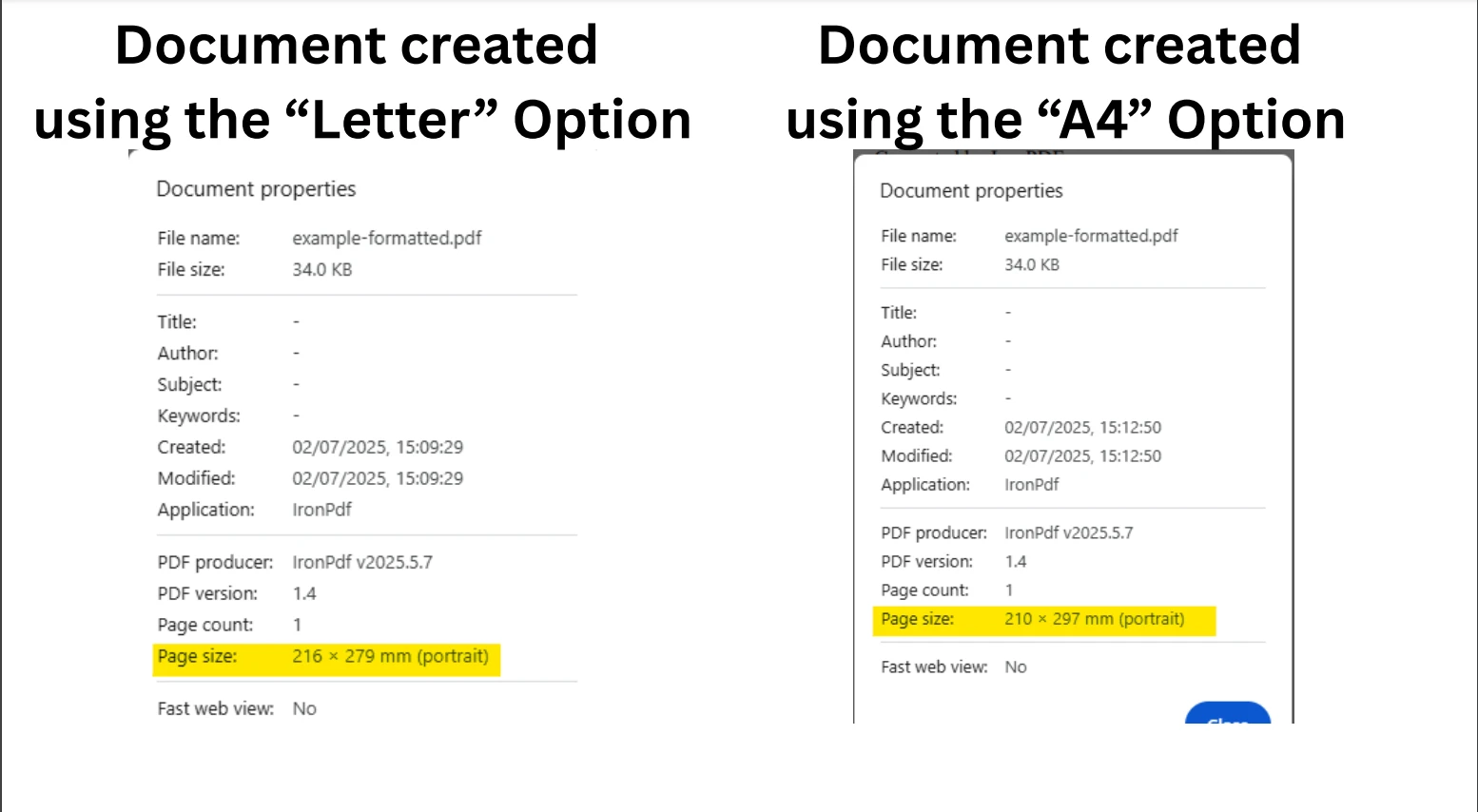
假設您使用一個包含格式字串的PdfRequest記錄。 您可以應用位置模式、聲明模式和字串常量來自定義PDF格式。
using System;
using IronPdf;
public record PdfRequest(string Title, string Content, string Format);
class Program
{
    static void Main()
    {
        PdfRequest request = new("My Report", "<h1>Monthly Report</h1><p>Generated by IronPDF.</p>", "A4");
        var renderer = new ChromePdfRenderer();
        // Use fully qualified enum to avoid IronWord conflict
        renderer.RenderingOptions = request switch
        {
            PdfRequest { Format: "A4" } => new IronPdf.ChromePdfRenderOptions
            {
                PaperSize = IronPdf.Rendering.PdfPaperSize.A4
            },
            PdfRequest { Format: "Letter" } => new IronPdf.ChromePdfRenderOptions
            {
                PaperSize = IronPdf.Rendering.PdfPaperSize.Letter
            },
            _ => new IronPdf.ChromePdfRenderOptions
            {
                PaperSize = IronPdf.Rendering.PdfPaperSize.Legal // Fallback
            }
        };
        var pdf = renderer.RenderHtmlAsPdf(request.Content);
        pdf.SaveAs("example-formatted.pdf");
        Console.WriteLine("PDF created: example-formatted.pdf");
    }
}Imports System
Imports IronPdf
'INSTANT VB TODO TASK: C# 'records' are not converted by Instant VB:
'public record PdfRequest(string Title, string Content, string Format)
Friend Class Program
Shared Sub Main()
Dim request As New PdfRequest("My Report", "<h1>Monthly Report</h1><p>Generated by IronPDF.</p>", "A4")
Dim renderer = New ChromePdfRenderer()
' Use fully qualified enum to avoid IronWord conflict
'INSTANT VB TODO TASK: The following 'switch expression' was not converted by Instant VB:
' renderer.RenderingOptions = request switch
' {
' PdfRequest { Format: "A4" } => new IronPdf.ChromePdfRenderOptions
' {
' PaperSize = IronPdf.Rendering.PdfPaperSize.A4
' },
' PdfRequest { Format: "Letter" } => new IronPdf.ChromePdfRenderOptions
' {
' PaperSize = IronPdf.Rendering.PdfPaperSize.Letter
' },
' _ => new IronPdf.ChromePdfRenderOptions
' {
' PaperSize = IronPdf.Rendering.PdfPaperSize.Legal // Fallback
' }
' };
Dim pdf = renderer.RenderHtmlAsPdf(request.Content)
pdf.SaveAs("example-formatted.pdf")
Console.WriteLine("PDF created: example-formatted.pdf")
End Sub
End Class此用法展示了表達式如何匹配記錄中的相應屬性,並根據預期值遵循邏輯模式。
使用var模式和not模式來處理使用者角色,同時避免空或意外狀態。
using System;
using IronPdf;
public abstract record UserRole;
public record Admin(string Email) : UserRole;
public record Viewer(string Email) : UserRole;
public record Guest() : UserRole;
class Program
{
    static void Main()
    {
        UserRole currentUser = new Admin("admin@example.com"); // Try changing to Viewer or Guest
        var pdf = currentUser switch
        {
            Admin { Email: var email } =>
                new ChromePdfRenderer().RenderHtmlAsPdf($"<h1>Admin Dashboard</h1><p>Email: {email}</p>"),
            Viewer =>
                new ChromePdfRenderer().RenderHtmlAsPdf("<h1>Viewer Summary</h1><p>Access limited.</p>"),
            Guest =>
                new ChromePdfRenderer().RenderHtmlAsPdf("<h1>Guest Mode</h1><p>Please sign in.</p>"),
            not null =>
                throw new UnauthorizedAccessException("Unknown role type."),
            null =>
                throw new ArgumentNullException("Role cannot be null.")
        };
        pdf.SaveAs("example-role.pdf");
        Console.WriteLine("PDF created: example-role.pdf");
    }
}Imports System
Imports IronPdf
Public MustOverride ReadOnly Property UserRole() As record
public record Admin(String Email) : UserRole
public record Viewer(String Email) : UserRole
public record Guest() : UserRole
Dim Program As class
If True Then
'INSTANT VB TODO TASK: Local functions are not converted by Instant VB:
' static void Main()
' {
' UserRole currentUser = New Admin("admin@example.com"); ' Try changing to Viewer or Guest
''INSTANT VB TODO TASK: The following 'switch expression' was not converted by Instant VB:
'' var pdf = currentUser switch
'' {
'' Admin { Email: var email } => new ChromePdfRenderer().RenderHtmlAsPdf($"<h1>Admin Dashboard</h1><p>Email: {email}</p>"),
'' Viewer =>
'' new ChromePdfRenderer().RenderHtmlAsPdf("<h1>Viewer Summary</h1><p>Access limited.</p>"),
'' Guest =>
'' new ChromePdfRenderer().RenderHtmlAsPdf("<h1>Guest Mode</h1><p>Please sign in.</p>"),
'' not null =>
'' throw new UnauthorizedAccessException("Unknown role type."),
'' null =>
'' throw new ArgumentNullException("Role cannot be null.")
'' };
' pdf.SaveAs("example-role.pdf");
' Console.WriteLine("PDF created: example-role.pdf");
' }
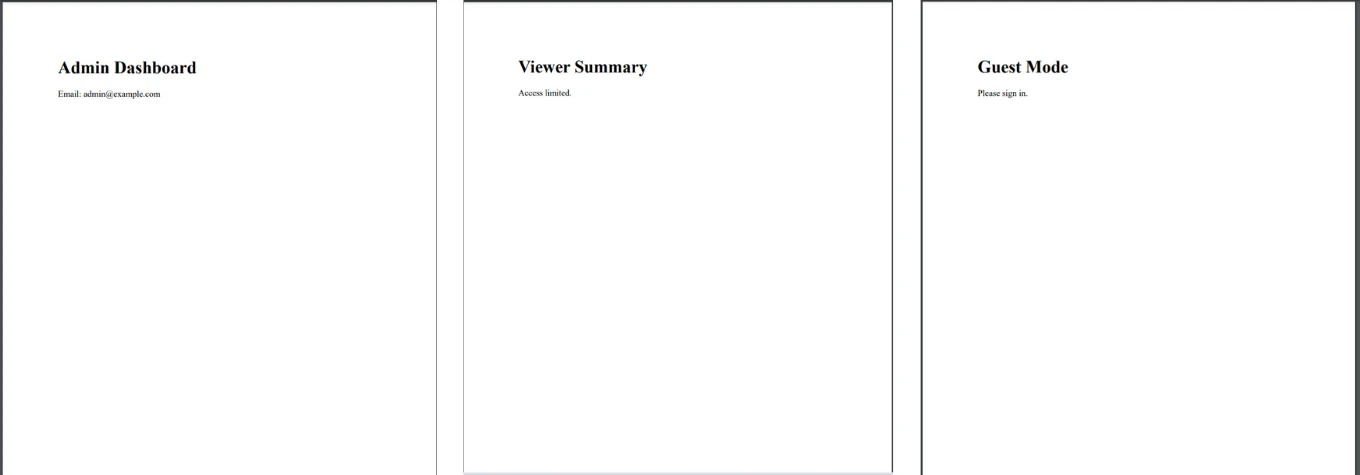
End If此結構提高了安全性和程式碼可讀性,同時利用臨時變數聲明如var email。 下圖顯示了根據不同輸入值建立的不同PDF文件。
需要根據使用者級別生成不同的PDF嗎? 嘗試使用兩個關係模式來測試輸入是否在某個範圍內。
using System;
using IronPdf;
class Program
{
    static void Main()
    {
        int userScore = 85; // Try other values: 45, 70, 101
        string message = userScore switch
        {
            < 60 => "Needs Improvement",
            >= 60 and < 80 => "Satisfactory",
            >= 80 and <= 100 => "Excellent",
            _ => "Invalid score"
        };
        var html = $"<h1>Score Report</h1><p>Score: {userScore}</p><p>Result: {message}</p>";
        var pdf = new ChromePdfRenderer().RenderHtmlAsPdf(html);
        pdf.SaveAs("example-score.pdf");
        Console.WriteLine("PDF created: example-score.pdf");
    }
}Imports System
Imports IronPdf
Friend Class Program
Shared Sub Main()
Dim userScore As Integer = 85 ' Try other values: 45, 70, 101
'INSTANT VB TODO TASK: The following 'switch expression' was not converted by Instant VB:
' string message = userScore switch
' {
' < 60 => "Needs Improvement",
' >= 60 and < 80 => "Satisfactory",
' >= 80 and <= 100 => "Excellent",
' _ => "Invalid score"
' };
Dim html = $"<h1>Score Report</h1><p>Score: {userScore}</p><p>Result: {message}</p>"
Dim pdf = (New ChromePdfRenderer()).RenderHtmlAsPdf(html)
pdf.SaveAs("example-score.pdf")
Console.WriteLine("PDF created: example-score.pdf")
End Sub
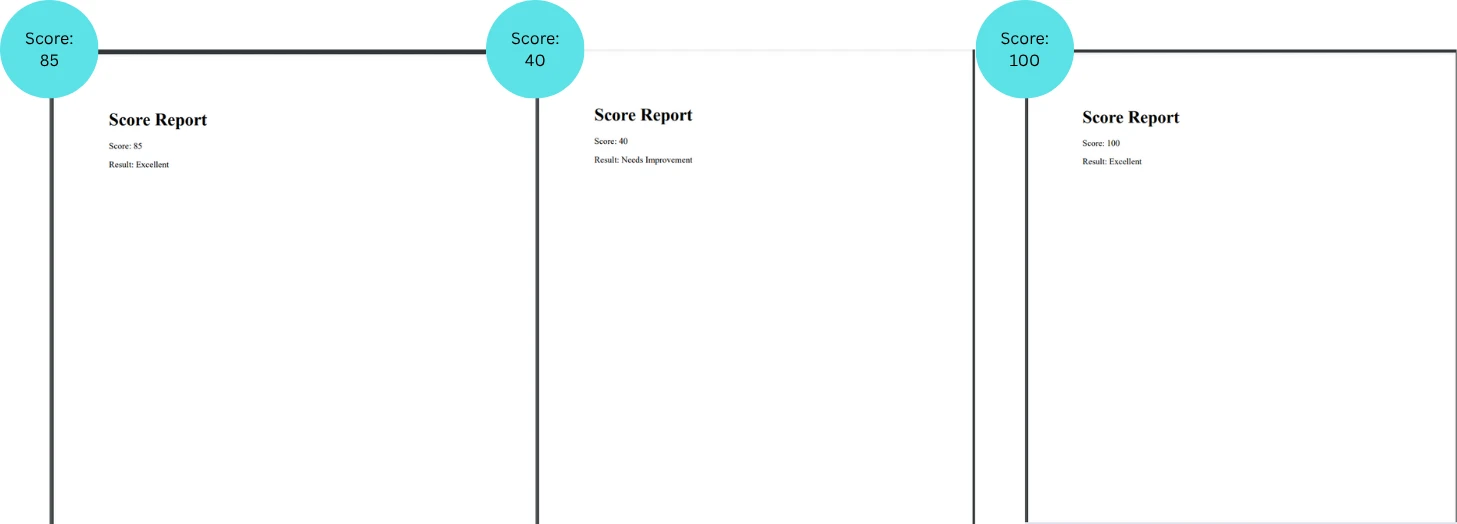
End Class關係運算符和布林表達式使程式碼保持簡潔而具表現力。
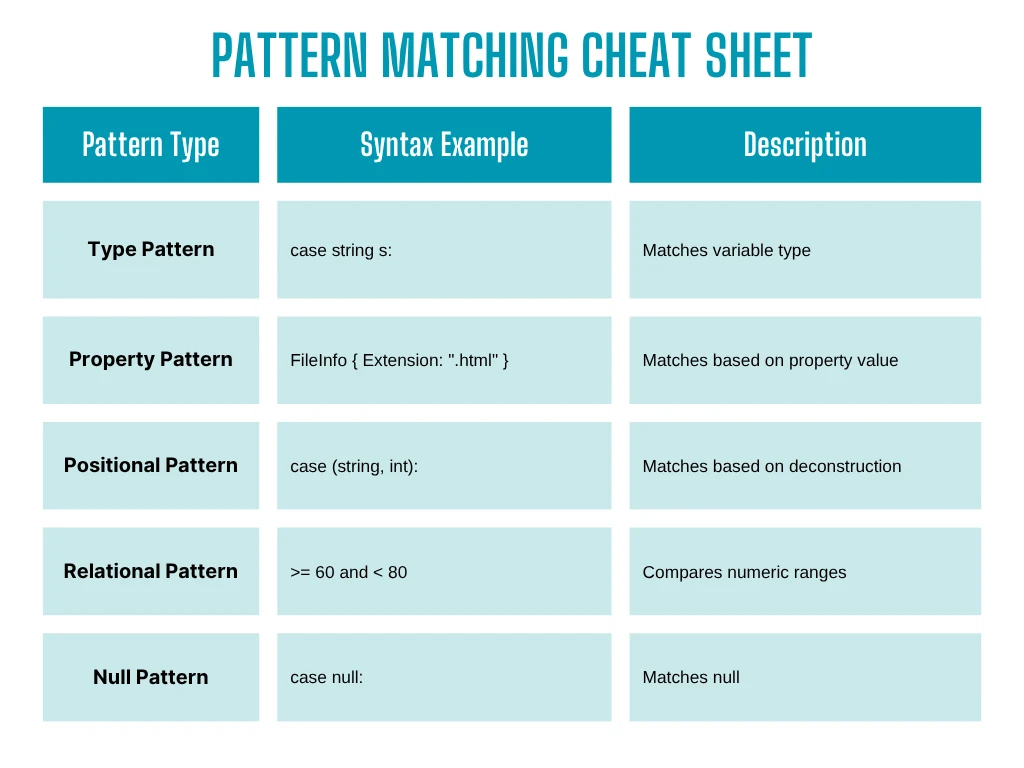
Switch pattern matching不僅僅是語法的改進,它是一種強大的編程範式,用於編寫更安全、更具表現力的程式碼。 結合IronPDF靈活的渲染能力,您可以用更少的程式碼建立更智能、更可擴展的文件生成管道。
無論您是在構建報告生成器、文件預覽器,還是動態模板系統,都可以嘗試在您的IronPDF實現中新增模式匹配。 您會很快看到在清晰度、控制和維護性方面的好處。
下載免費試用版,在購買授權之前親自嘗試IronPDF的強大功能。

Jacob Mellor是Iron Software的首席技術官,一位在C# PDF技術上開創先河的遠見工程師。作為Iron Software核心程式碼庫的原開發者,他從創立以來就一直在塑造公司的產品架構,與首席執行官Cameron Rimington一起將公司轉變為服務於NASA、特斯拉和全球政府公司的50多名人員的公司。



IronPDF 是 IRONSUITE 的一部分
10 款適用於辦公室文件的 .NET API 產品

當您需要您的PDF看起來像HTML一樣快速。


