




更新日 2026年4月23日
Microsoft.Extensions.AIを使用した .NET での LLM 統合の簡素化
AI はソフトウェア開発を変革していますが、.NET への大規模言語モデル (LLM) の統合はこれまで複雑でした。IronPdf.AI を使用して AI 統合をさらに進め、OpenAI を活用した PDF 解析、データ抽出、およびコンテンツの要約を .NET アプリケーションにもたらします。
詳しく読む

C#でPDFファイルを扱う場合、異なる種類のドキュメント、アクション、データソースを処理することがよくあります。 伝統的には、開発者は長いif-elseチェーンやネストされたswitch文に依存してさまざまな入力値や種類、または出力の決定を管理しました。 しかし、現代のC#の機能であるswitchパターンマッチングを使用すると、コードはより優雅で、読みやすく、保守しやすくなります。
強力なPDFライブラリであるIronPDFと組み合わせることで、switchパターンマッチングを利用して、ドキュメント処理のためのよりスマートでクリーンなロジックを構築できます。 この記事では、C#の高度なパターンマッチング機能(型パターン、プロパティパターン、関係パターンなど)をIronPDFと組み合わせて、PDF生成のワークフローを合理化する方法を探ります。
スイッチパターンマッチングは、C# 7で導入され、その後のバージョンで継続的に改良された機能です。 従来の定数値のみをマッチングするスイッチ文とは異なり、パターンマッチングによって1つの式で型、プロパティ、および条件を評価することができます。 次の例がこの機能の動作を示しています。
switch (input)
{
    case int i when i > 0:
        Console.WriteLine("Positive integer");
        break;
    case string s:
        Console.WriteLine($"It's a string: {s}");
        break;
    default:
        Console.WriteLine("Unknown type");
        break;
}Select Case input
'INSTANT VB TODO TASK: The following 'case' pattern variable is not converted by Instant VB:
'ORIGINAL LINE: case int i when i > 0:
Case Integer i [when] i > 0
Console.WriteLine("Positive integer")
'INSTANT VB TODO TASK: The following 'case' pattern variable is not converted by Instant VB:
'ORIGINAL LINE: case string s:
Case String s
Console.WriteLine($"It's a string: {s}")
Case Else
Console.WriteLine("Unknown type")
End Selectこのコードは、タイプパターン、関係演算子、およびnull定数パターンを使用して、複数のケースを簡潔に処理します。 この技法は、より簡潔な構文でコードの可読性を大幅に向上させ、より複雑なロジックをサポートします。
IronPDFは、HTML、画像、または生テキストからPDFを生成および操作するための強力な.NETコンポーネントです。 多くの実際の使用ケースは、さまざまな入力パターンを処理します: 一部のドキュメントはURLから起源を持ち、他はHTML文字列から、さらに他はファイルアップロードからのものです。
複雑なif条件を用いた表現をテストするのではなく、スイッチパターンマッチングを使用すると、効率的にパターンベースのロジックをサポートすることができます。 これは、アプリケーションが異なるオブジェクトタイプ、指定された定数、または単にブール式にどのように応答するかを定義でき、入力式自体を使ってワークフローを駆動します。
前の例では基本的な構文の見た目を見ましたが、今度はアクションで見てみましょう。 次のコード例は、IronPDFとC#のパターンマッチングを組み合わせることで恩恵を受けるいくつかの実世界のPDFタスクです。
メソッドがさまざまな入力形式(HTML、Uri、ローカル.htmlファイル)を受け入れるとしましょう。型パターン、プロパティパターン、およびnullパターンを使用して、これらのケースを簡単に区別できます。
using System;
using System.IO;
using IronPdf;
class Program
{
    static void Main()
    {
        object input = new Uri("https://example.com"); // Try changing this to: "<html><body>Hello</body></html>" or new FileInfo("sample.html")
        var renderer = new ChromePdfRenderer();
        PdfDocument pdfDoc = input switch
        {
            string html when html.StartsWith("<html>") =>
                renderer.RenderHtmlAsPdf(html),
            Uri url =>
                renderer.RenderUrlAsPdf(url.ToString()),
            FileInfo { Extension: ".html" } file =>
                renderer.RenderHtmlAsPdf(File.ReadAllText(file.FullName)),
            null => throw new ArgumentNullException("Input was null."),
            _ => throw new ArgumentException("Unsupported input type for PDF conversion.")
        };
        pdfDoc.SaveAs("example-input-types.pdf");
        Console.WriteLine("PDF created: example-input-types.pdf");
    }
}Imports System
Imports System.IO
Imports IronPdf
Friend Class Program
Shared Sub Main()
Dim input As Object = New Uri("https://example.com") ' Try changing this to: "<html><body>Hello</body></html>" or new FileInfo("sample.html")
Dim renderer = New ChromePdfRenderer()
'INSTANT VB TODO TASK: The following 'switch expression' was not converted by Instant VB:
' PdfDocument pdfDoc = input switch
' {
' string html when html.StartsWith("<html>") => renderer.RenderHtmlAsPdf(html),
' Uri url =>
' renderer.RenderUrlAsPdf(url.ToString()),
' FileInfo { Extension: ".html" } file =>
' renderer.RenderHtmlAsPdf(File.ReadAllText(file.FullName)),
' null => throw new ArgumentNullException("Input was null."),
' _ => throw new ArgumentException("Unsupported input type for PDF conversion.")
' };
pdfDoc.SaveAs("example-input-types.pdf")
Console.WriteLine("PDF created: example-input-types.pdf")
End Sub
End Classここでは、プロパティパターン(FileInfo { Extension: ".html" })とnull定数パターン(case null)がロジックをより表現力豊かで強力なものにします。
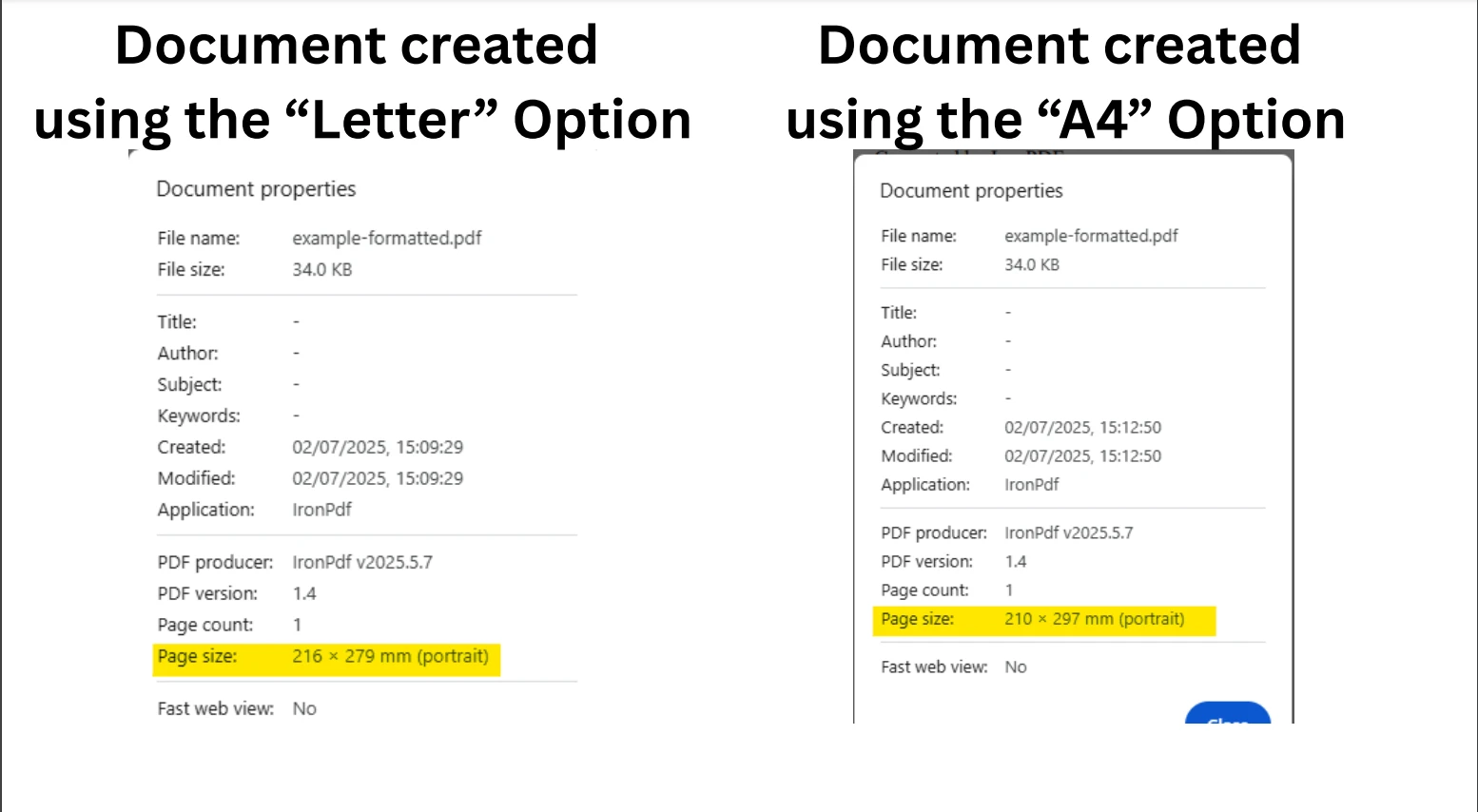
フォーマット文字列を含むPdfRequestレコードを使用するとしましょう。 位置パターン、宣言パターン、および文字列定数を適用してPDFのフォーマットをカスタマイズできます。
using System;
using IronPdf;
public record PdfRequest(string Title, string Content, string Format);
class Program
{
    static void Main()
    {
        PdfRequest request = new("My Report", "<h1>Monthly Report</h1><p>Generated by IronPDF.</p>", "A4");
        var renderer = new ChromePdfRenderer();
        // Use fully qualified enum to avoid IronWord conflict
        renderer.RenderingOptions = request switch
        {
            PdfRequest { Format: "A4" } => new IronPdf.ChromePdfRenderOptions
            {
                PaperSize = IronPdf.Rendering.PdfPaperSize.A4
            },
            PdfRequest { Format: "Letter" } => new IronPdf.ChromePdfRenderOptions
            {
                PaperSize = IronPdf.Rendering.PdfPaperSize.Letter
            },
            _ => new IronPdf.ChromePdfRenderOptions
            {
                PaperSize = IronPdf.Rendering.PdfPaperSize.Legal // Fallback
            }
        };
        var pdf = renderer.RenderHtmlAsPdf(request.Content);
        pdf.SaveAs("example-formatted.pdf");
        Console.WriteLine("PDF created: example-formatted.pdf");
    }
}Imports System
Imports IronPdf
'INSTANT VB TODO TASK: C# 'records' are not converted by Instant VB:
'public record PdfRequest(string Title, string Content, string Format)
Friend Class Program
Shared Sub Main()
Dim request As New PdfRequest("My Report", "<h1>Monthly Report</h1><p>Generated by IronPDF.</p>", "A4")
Dim renderer = New ChromePdfRenderer()
' Use fully qualified enum to avoid IronWord conflict
'INSTANT VB TODO TASK: The following 'switch expression' was not converted by Instant VB:
' renderer.RenderingOptions = request switch
' {
' PdfRequest { Format: "A4" } => new IronPdf.ChromePdfRenderOptions
' {
' PaperSize = IronPdf.Rendering.PdfPaperSize.A4
' },
' PdfRequest { Format: "Letter" } => new IronPdf.ChromePdfRenderOptions
' {
' PaperSize = IronPdf.Rendering.PdfPaperSize.Letter
' },
' _ => new IronPdf.ChromePdfRenderOptions
' {
' PaperSize = IronPdf.Rendering.PdfPaperSize.Legal // Fallback
' }
' };
Dim pdf = renderer.RenderHtmlAsPdf(request.Content)
pdf.SaveAs("example-formatted.pdf")
Console.WriteLine("PDF created: example-formatted.pdf")
End Sub
End Classこの使用法は、期待される値に基づいて論理パターンに従い、式がレコード内の対応するプロパティと一致する方法を示しています。
Use var patterns and not patterns to handle user roles while avoiding null or unexpected states.
using System;
using IronPdf;
public abstract record UserRole;
public record Admin(string Email) : UserRole;
public record Viewer(string Email) : UserRole;
public record Guest() : UserRole;
class Program
{
    static void Main()
    {
        UserRole currentUser = new Admin("admin@example.com"); // Try changing to Viewer or Guest
        var pdf = currentUser switch
        {
            Admin { Email: var email } =>
                new ChromePdfRenderer().RenderHtmlAsPdf($"<h1>Admin Dashboard</h1><p>Email: {email}</p>"),
            Viewer =>
                new ChromePdfRenderer().RenderHtmlAsPdf("<h1>Viewer Summary</h1><p>Access limited.</p>"),
            Guest =>
                new ChromePdfRenderer().RenderHtmlAsPdf("<h1>Guest Mode</h1><p>Please sign in.</p>"),
            not null =>
                throw new UnauthorizedAccessException("Unknown role type."),
            null =>
                throw new ArgumentNullException("Role cannot be null.")
        };
        pdf.SaveAs("example-role.pdf");
        Console.WriteLine("PDF created: example-role.pdf");
    }
}Imports System
Imports IronPdf
Public MustOverride ReadOnly Property UserRole() As record
public record Admin(String Email) : UserRole
public record Viewer(String Email) : UserRole
public record Guest() : UserRole
Dim Program As class
If True Then
'INSTANT VB TODO TASK: Local functions are not converted by Instant VB:
' static void Main()
' {
' UserRole currentUser = New Admin("admin@example.com"); ' Try changing to Viewer or Guest
''INSTANT VB TODO TASK: The following 'switch expression' was not converted by Instant VB:
'' var pdf = currentUser switch
'' {
'' Admin { Email: var email } => new ChromePdfRenderer().RenderHtmlAsPdf($"<h1>Admin Dashboard</h1><p>Email: {email}</p>"),
'' Viewer =>
'' new ChromePdfRenderer().RenderHtmlAsPdf("<h1>Viewer Summary</h1><p>Access limited.</p>"),
'' Guest =>
'' new ChromePdfRenderer().RenderHtmlAsPdf("<h1>Guest Mode</h1><p>Please sign in.</p>"),
'' not null =>
'' throw new UnauthorizedAccessException("Unknown role type."),
'' null =>
'' throw new ArgumentNullException("Role cannot be null.")
'' };
' pdf.SaveAs("example-role.pdf");
' Console.WriteLine("PDF created: example-role.pdf");
' }
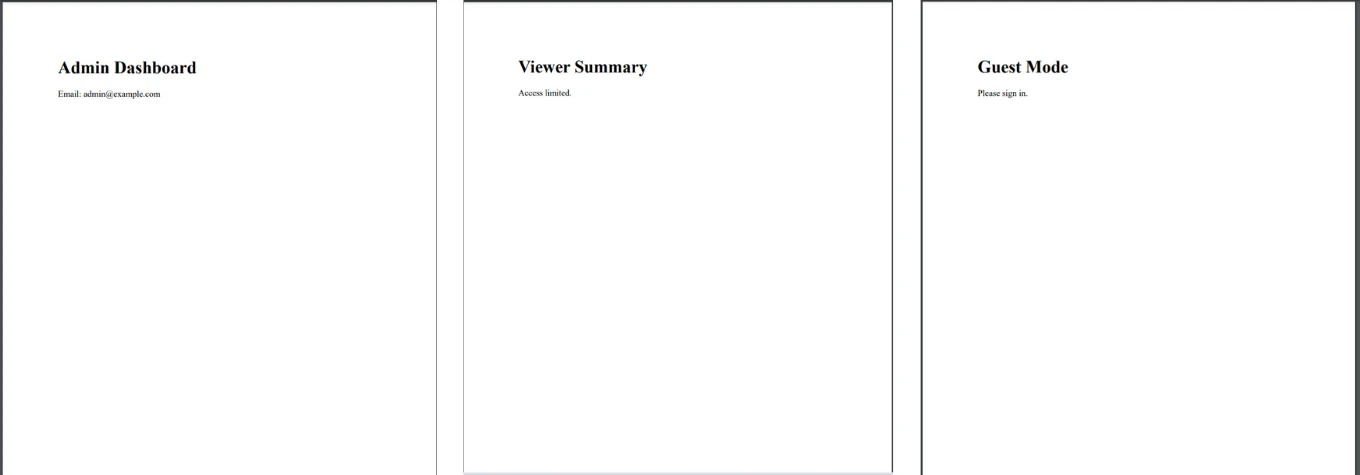
End Ifこの構造は、セキュリティとコードの可読性を向上させ、var emailのような一時的な変数宣言を利用できます。 次の画像は、異なる入力値に基づいて作成されたさまざまなPDFドキュメントを示しています。
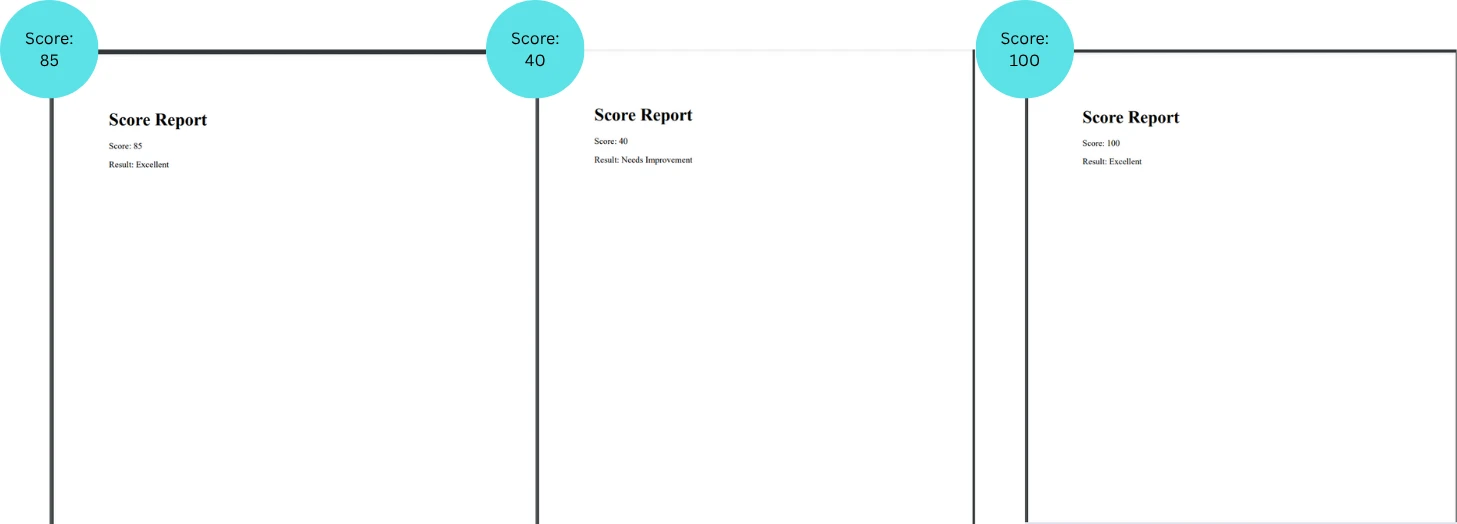
ユーザーレベルによって異なるPDFを生成する必要がありますか? 入力が特定の範囲内にあるかどうかをテストするための2つの関係パターンを試してみてください。
using System;
using IronPdf;
class Program
{
    static void Main()
    {
        int userScore = 85; // Try other values: 45, 70, 101
        string message = userScore switch
        {
            < 60 => "Needs Improvement",
            >= 60 and < 80 => "Satisfactory",
            >= 80 and <= 100 => "Excellent",
            _ => "Invalid score"
        };
        var html = $"<h1>Score Report</h1><p>Score: {userScore}</p><p>Result: {message}</p>";
        var pdf = new ChromePdfRenderer().RenderHtmlAsPdf(html);
        pdf.SaveAs("example-score.pdf");
        Console.WriteLine("PDF created: example-score.pdf");
    }
}Imports System
Imports IronPdf
Friend Class Program
Shared Sub Main()
Dim userScore As Integer = 85 ' Try other values: 45, 70, 101
'INSTANT VB TODO TASK: The following 'switch expression' was not converted by Instant VB:
' string message = userScore switch
' {
' < 60 => "Needs Improvement",
' >= 60 and < 80 => "Satisfactory",
' >= 80 and <= 100 => "Excellent",
' _ => "Invalid score"
' };
Dim html = $"<h1>Score Report</h1><p>Score: {userScore}</p><p>Result: {message}</p>"
Dim pdf = (New ChromePdfRenderer()).RenderHtmlAsPdf(html)
pdf.SaveAs("example-score.pdf")
Console.WriteLine("PDF created: example-score.pdf")
End Sub
End Class関係演算子とブール式は、コードを簡潔で表現力豊かに保ちます。
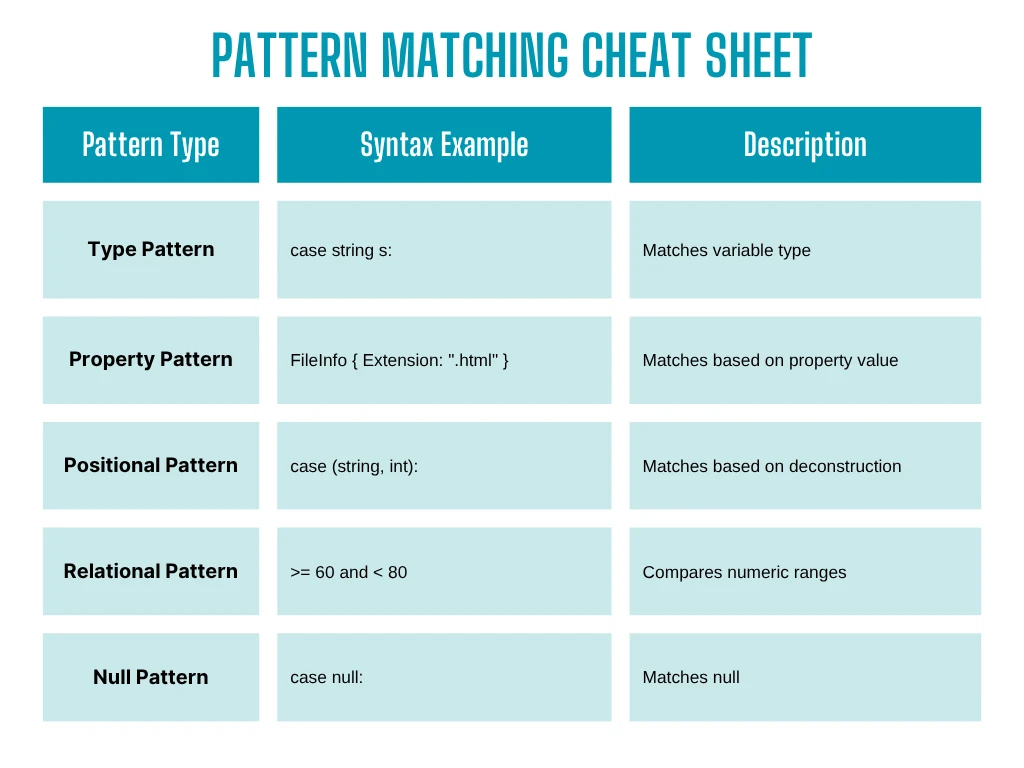
*よりクリーンなコード:深くネストされた if-else や switch-case ブロックはなくなりました *テストの簡素化:分離されたパターンケースによりユニットテストが簡素化されます *柔軟性:新しい入力タイプを追加するときにロジックを簡単に拡張できます *関心の分離の改善:入力/出力変換のみにロジックを集中
スイッチパターンマッチングは単なる構文的な改善以上のもので、より安全で表現力豊かなコードを書くための強力なパラダイムです。 IronPDFの柔軟なレンダリング機能と組み合わせて、最小限のコードでよりスマートでスケーラブルなドキュメント生成パイプラインを作成できます。
レポートジェネレーター、ドキュメントプレビュアー、または動的テンプレートシステムを構築しているかどうかに関わらず、IronPDFの実装にパターンマッチングを追加してみてください。 鮮明さ、制御性、および保守性の向上をすぐに実感できます。
無料試用版をダウンロードして、ライセンスを購入する前にIronPDFの強力な機能を自分で試してみてください。

ジェイコブ・メラーはIron Softwareの最高技術責任者(CTO)であり、C# PDFテクノロジーを開拓する先見的なエンジニアです。Iron Softwareのコアコードベースを支えるオリジナル開発者として、彼は創業以来、会社の製品アーキテクチャを形成し、CEOのCameron Rimingtonとともに、会社をNASA、Tesla、および世界的な政府機関にサービスを提供する50人以上の会社に変えました。1999年にロンドンで最初のソフトウェアビジネスを開業し、2005年に最初 for .NETコンポーネントを作成した後、Microsoftのエコシステム全体で複雑な問題を解決することを専門としました。



IronPDF はIRONSUITEの一部です
オフィス文書向けの.NET API製品10個

PDFがHTMLのように見える必要があるとき、迅速に。


