


C#開關模式匹配(對開發者來說是如何工作的)

在 C# 中處理 PDF 檔案通常會涉及處理不同類型的文件、動作或資料來源。 傳統上,開發人員可能會依賴冗長的 if-else 鏈或嵌套的 switch 語句來管理各種輸入值和類型或輸出決策。 但透過現代的 C# 功能,例如 switch 模式匹配,您的程式碼可以變得更優雅、更易讀、更易維護。
當與 IronPDF 等功能強大的 PDF 函式庫結合時,切換模式匹配可讓您建立更聰明、更乾淨的文件處理邏輯。 在本文中,我們將探討如何使用 C# 的進階模式匹配功能(例如類型模式、屬性模式和關係模式)與 IronPDF 搭配使用,以簡化您的 PDF 生成工作流程。
What is Switch Pattern Matching in C#?
切換模式匹配是 C# 7 中引入的功能,並在之後的版本中不斷改進。 與只匹配常數值的傳統 switch 語句不同,模式匹配可讓您在單一表達式中評估類型、屬性和條件。 以下範例展示此功能如何運作。
語法範例
switch (input)
{
    case int i when i > 0:
        Console.WriteLine("Positive integer");
        break;
    case string s:
        Console.WriteLine($"It's a string: {s}");
        break;
    default:
        Console.WriteLine("Unknown type");
        break;
}
switch (input)
{
case int i when i > 0:
Console.WriteLine("Positive integer");
break;
case string s:
Console.WriteLine($"It's a string: {s}");
break;
default:
Console.WriteLine("Unknown type");
break;
}Select Case input
'INSTANT VB TODO TASK: The following 'case' pattern variable is not converted by Instant VB:
'ORIGINAL LINE: case int i when i > 0:
Case Integer i [when] i > 0
Console.WriteLine("Positive integer")
'INSTANT VB TODO TASK: The following 'case' pattern variable is not converted by Instant VB:
'ORIGINAL LINE: case string s:
Case String s
Console.WriteLine($"It's a string: {s}")
Case Else
Console.WriteLine("Unknown type")
End Select本代碼使用類型模式、關係運算符和 null 常數模式來簡潔處理多種情況。 此技術以更簡潔的語法大幅提升程式碼的可讀性,並支援更複雜的邏輯。
為何結合 Switch Pattern Matching 與 IronPDF?
IronPDF 是一款功能強大的 .NET 元件,用於從 HTML、圖像或原始文字生成和處理 PDF。 許多真實世界的使用個案涉及處理不同模式的輸入:有些文件可能來自 URL,有些來自 HTML字串,有些則來自檔案上傳。
與其使用笨拙的 if 條件測試表達式,切換模式匹配可讓您有效率地支援基於模式的邏輯。 它可讓您定義應用程式如何回應不同的物件類型、指定常數,甚至是布林表達式 - 使用輸入表達式本身來驅動工作流程。
IronPDF 中使用模式匹配的常見用例
在上一個範例中,我們瞭解了基本語法的外觀,現在讓我們來看看它的實際應用。 以下程式碼範例是一些實際的 PDF 任務,結合 IronPDF 與 C# 模式匹配可獲益良多。
1.使用類型和屬性模式處理多種輸入格式。
假設您的方法接受多種輸入格式:HTML、Uri 或本地 .html 檔案。使用類型模式、屬性模式和 null 模式,您可以毫不費力地區分這些情況。
using System;
using System.IO;
using IronPdf;
class Program
{
    static void Main()
    {
        object input = new Uri("https://example.com"); // Try changing this to: "<html><body>Hello</body></html>" or new FileInfo("sample.html")
        var renderer = new ChromePdfRenderer();
        PdfDocument pdfDoc = input switch
        {
            string html when html.StartsWith("<html>") =>
                renderer.RenderHtmlAsPdf(html),
            Uri url =>
                renderer.RenderUrlAsPdf(url.ToString()),
            FileInfo { Extension: ".html" } file =>
                renderer.RenderHtmlAsPdf(File.ReadAllText(file.FullName)),
            null => throw new ArgumentNullException("Input was null."),
            _ => throw new ArgumentException("Unsupported input type for PDF conversion.")
        };
        pdfDoc.SaveAs("example-input-types.pdf");
        Console.WriteLine("PDF created: example-input-types.pdf");
    }
}
using System;
using System.IO;
using IronPdf;
class Program
{
static void Main()
{
object input = new Uri("https://example.com"); // Try changing this to: "<html><body>Hello</body></html>" or new FileInfo("sample.html")
var renderer = new ChromePdfRenderer();
PdfDocument pdfDoc = input switch
{
string html when html.StartsWith("<html>") =>
renderer.RenderHtmlAsPdf(html),
Uri url =>
renderer.RenderUrlAsPdf(url.ToString()),
FileInfo { Extension: ".html" } file =>
renderer.RenderHtmlAsPdf(File.ReadAllText(file.FullName)),
null => throw new ArgumentNullException("Input was null."),
_ => throw new ArgumentException("Unsupported input type for PDF conversion.")
};
pdfDoc.SaveAs("example-input-types.pdf");
Console.WriteLine("PDF created: example-input-types.pdf");
}
}Imports System
Imports System.IO
Imports IronPdf
Friend Class Program
Shared Sub Main()
Dim input As Object = New Uri("https://example.com") ' Try changing this to: "<html><body>Hello</body></html>" or new FileInfo("sample.html")
Dim renderer = New ChromePdfRenderer()
'INSTANT VB TODO TASK: The following 'switch expression' was not converted by Instant VB:
' PdfDocument pdfDoc = input switch
' {
' string html when html.StartsWith("<html>") => renderer.RenderHtmlAsPdf(html),
' Uri url =>
' renderer.RenderUrlAsPdf(url.ToString()),
' FileInfo { Extension: ".html" } file =>
' renderer.RenderHtmlAsPdf(File.ReadAllText(file.FullName)),
' null => throw new ArgumentNullException("Input was null."),
' _ => throw new ArgumentException("Unsupported input type for PDF conversion.")
' };
pdfDoc.SaveAs("example-input-types.pdf")
Console.WriteLine("PDF created: example-input-types.pdf")
End Sub
End Class在此,屬性模式 (FileInfo { Extension: ".html" }) 和 null 常數模式 (case null) 使邏輯更具表達力和穩健性。
2.使用位置和聲明模式動態格式化 PDF。
假設您正在使用包含格式字串的 PdfRequest 記錄。 您可以套用位置模式、聲明模式和字串常數來自訂 PDF 格式。
using System;
using IronPdf;
public record PdfRequest(string Title, string Content, string Format);
class Program
{
    static void Main()
    {
        PdfRequest request = new("My Report", "<h1>Monthly Report</h1><p>Generated by IronPDF.</p>", "A4");
        var renderer = new ChromePdfRenderer();
        // Use fully qualified enum to avoid IronWord conflict
        renderer.RenderingOptions = request switch
        {
            PdfRequest { Format: "A4" } => new IronPdf.ChromePdfRenderOptions
            {
                PaperSize = IronPdf.Rendering.PdfPaperSize.A4
            },
            PdfRequest { Format: "Letter" } => new IronPdf.ChromePdfRenderOptions
            {
                PaperSize = IronPdf.Rendering.PdfPaperSize.Letter
            },
            _ => new IronPdf.ChromePdfRenderOptions
            {
                PaperSize = IronPdf.Rendering.PdfPaperSize.Legal // Fallback
            }
        };
        var pdf = renderer.RenderHtmlAsPdf(request.Content);
        pdf.SaveAs("example-formatted.pdf");
        Console.WriteLine("PDF created: example-formatted.pdf");
    }
}
using System;
using IronPdf;
public record PdfRequest(string Title, string Content, string Format);
class Program
{
static void Main()
{
PdfRequest request = new("My Report", "<h1>Monthly Report</h1><p>Generated by IronPDF.</p>", "A4");
var renderer = new ChromePdfRenderer();
// Use fully qualified enum to avoid IronWord conflict
renderer.RenderingOptions = request switch
{
PdfRequest { Format: "A4" } => new IronPdf.ChromePdfRenderOptions
{
PaperSize = IronPdf.Rendering.PdfPaperSize.A4
},
PdfRequest { Format: "Letter" } => new IronPdf.ChromePdfRenderOptions
{
PaperSize = IronPdf.Rendering.PdfPaperSize.Letter
},
_ => new IronPdf.ChromePdfRenderOptions
{
PaperSize = IronPdf.Rendering.PdfPaperSize.Legal // Fallback
}
};
var pdf = renderer.RenderHtmlAsPdf(request.Content);
pdf.SaveAs("example-formatted.pdf");
Console.WriteLine("PDF created: example-formatted.pdf");
}
}Imports System
Imports IronPdf
'INSTANT VB TODO TASK: C# 'records' are not converted by Instant VB:
'public record PdfRequest(string Title, string Content, string Format)
Friend Class Program
Shared Sub Main()
Dim request As New PdfRequest("My Report", "<h1>Monthly Report</h1><p>Generated by IronPDF.</p>", "A4")
Dim renderer = New ChromePdfRenderer()
' Use fully qualified enum to avoid IronWord conflict
'INSTANT VB TODO TASK: The following 'switch expression' was not converted by Instant VB:
' renderer.RenderingOptions = request switch
' {
' PdfRequest { Format: "A4" } => new IronPdf.ChromePdfRenderOptions
' {
' PaperSize = IronPdf.Rendering.PdfPaperSize.A4
' },
' PdfRequest { Format: "Letter" } => new IronPdf.ChromePdfRenderOptions
' {
' PaperSize = IronPdf.Rendering.PdfPaperSize.Letter
' },
' _ => new IronPdf.ChromePdfRenderOptions
' {
' PaperSize = IronPdf.Rendering.PdfPaperSize.Legal // Fallback
' }
' };
Dim pdf = renderer.RenderHtmlAsPdf(request.Content)
pdf.SaveAs("example-formatted.pdf")
Console.WriteLine("PDF created: example-formatted.pdf")
End Sub
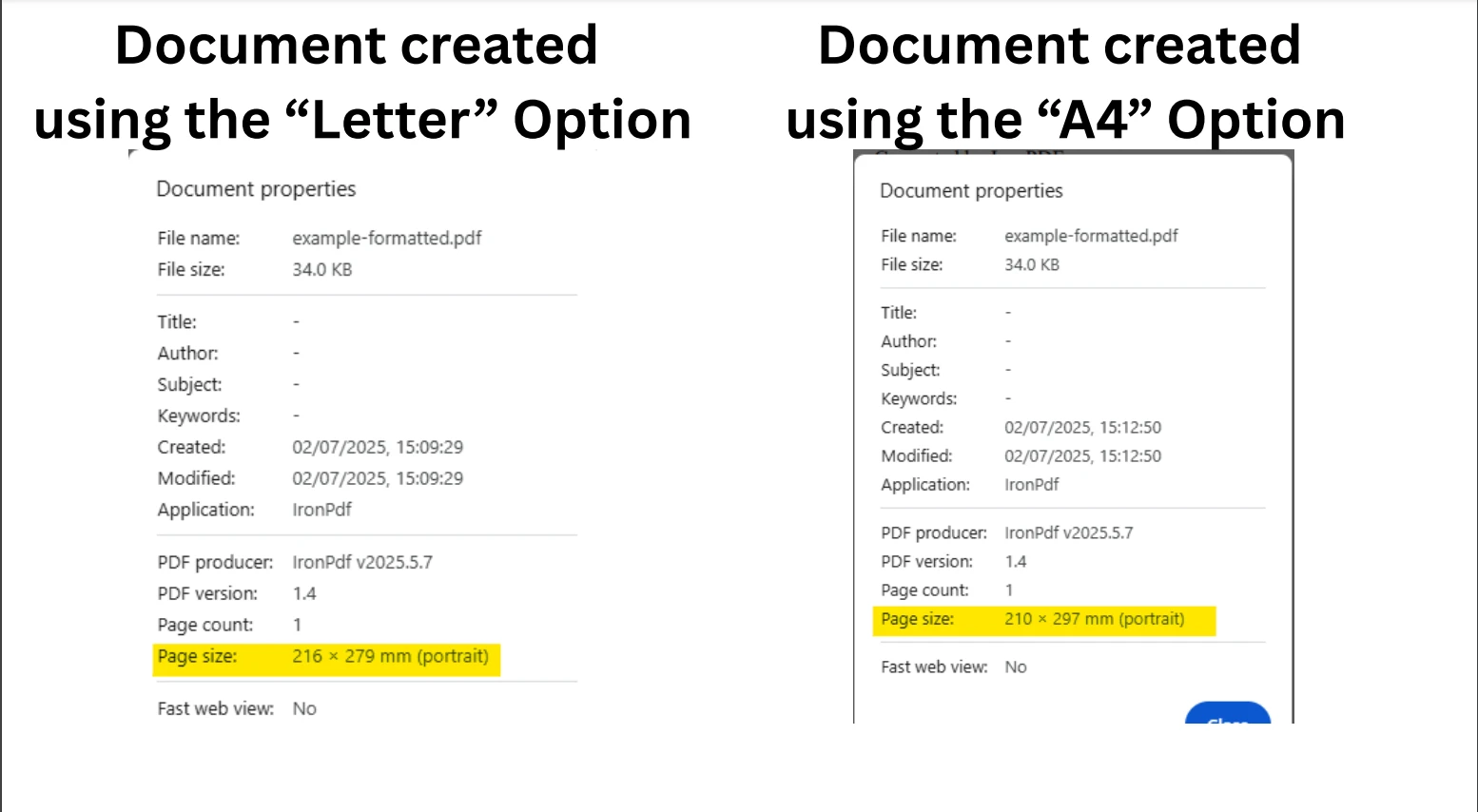
End Class此用法展示了表達式如何依據預期值的邏輯模式,在記錄中匹配相應的屬性。
輸出大小
3.Role-Based PDFs Using Var and Not Patterns
使用 Var 和 Not 模式。使用 var 模式和 not 模式處理使用者角色,同時避免 null 或意外狀態。
using System;
using IronPdf;
public abstract record UserRole;
public record Admin(string Email) : UserRole;
public record Viewer(string Email) : UserRole;
public record Guest() : UserRole;
class Program
{
    static void Main()
    {
        UserRole currentUser = new Admin("admin@example.com"); // Try changing to Viewer or Guest
        var pdf = currentUser switch
        {
            Admin { Email: var email } =>
                new ChromePdfRenderer().RenderHtmlAsPdf($"<h1>Admin Dashboard</h1><p>Email: {email}</p>"),
            Viewer =>
                new ChromePdfRenderer().RenderHtmlAsPdf("<h1>Viewer Summary</h1><p>Access limited.</p>"),
            Guest =>
                new ChromePdfRenderer().RenderHtmlAsPdf("<h1>Guest Mode</h1><p>Please sign in.</p>"),
            not null =>
                throw new UnauthorizedAccessException("Unknown role type."),
            null =>
                throw new ArgumentNullException("Role cannot be null.")
        };
        pdf.SaveAs("example-role.pdf");
        Console.WriteLine("PDF created: example-role.pdf");
    }
}
using System;
using IronPdf;
public abstract record UserRole;
public record Admin(string Email) : UserRole;
public record Viewer(string Email) : UserRole;
public record Guest() : UserRole;
class Program
{
static void Main()
{
UserRole currentUser = new Admin("admin@example.com"); // Try changing to Viewer or Guest
var pdf = currentUser switch
{
Admin { Email: var email } =>
new ChromePdfRenderer().RenderHtmlAsPdf($"<h1>Admin Dashboard</h1><p>Email: {email}</p>"),
Viewer =>
new ChromePdfRenderer().RenderHtmlAsPdf("<h1>Viewer Summary</h1><p>Access limited.</p>"),
Guest =>
new ChromePdfRenderer().RenderHtmlAsPdf("<h1>Guest Mode</h1><p>Please sign in.</p>"),
not null =>
throw new UnauthorizedAccessException("Unknown role type."),
null =>
throw new ArgumentNullException("Role cannot be null.")
};
pdf.SaveAs("example-role.pdf");
Console.WriteLine("PDF created: example-role.pdf");
}
}Imports System
Imports IronPdf
Public MustOverride ReadOnly Property UserRole() As record
public record Admin(String Email) : UserRole
public record Viewer(String Email) : UserRole
public record Guest() : UserRole
Dim Program As class
If True Then
'INSTANT VB TODO TASK: Local functions are not converted by Instant VB:
' static void Main()
' {
' UserRole currentUser = New Admin("admin@example.com"); ' Try changing to Viewer or Guest
''INSTANT VB TODO TASK: The following 'switch expression' was not converted by Instant VB:
'' var pdf = currentUser switch
'' {
'' Admin { Email: var email } => new ChromePdfRenderer().RenderHtmlAsPdf($"<h1>Admin Dashboard</h1><p>Email: {email}</p>"),
'' Viewer =>
'' new ChromePdfRenderer().RenderHtmlAsPdf("<h1>Viewer Summary</h1><p>Access limited.</p>"),
'' Guest =>
'' new ChromePdfRenderer().RenderHtmlAsPdf("<h1>Guest Mode</h1><p>Please sign in.</p>"),
'' not null =>
'' throw new UnauthorizedAccessException("Unknown role type."),
'' null =>
'' throw new ArgumentNullException("Role cannot be null.")
'' };
' pdf.SaveAs("example-role.pdf");
' Console.WriteLine("PDF created: example-role.pdf");
' }
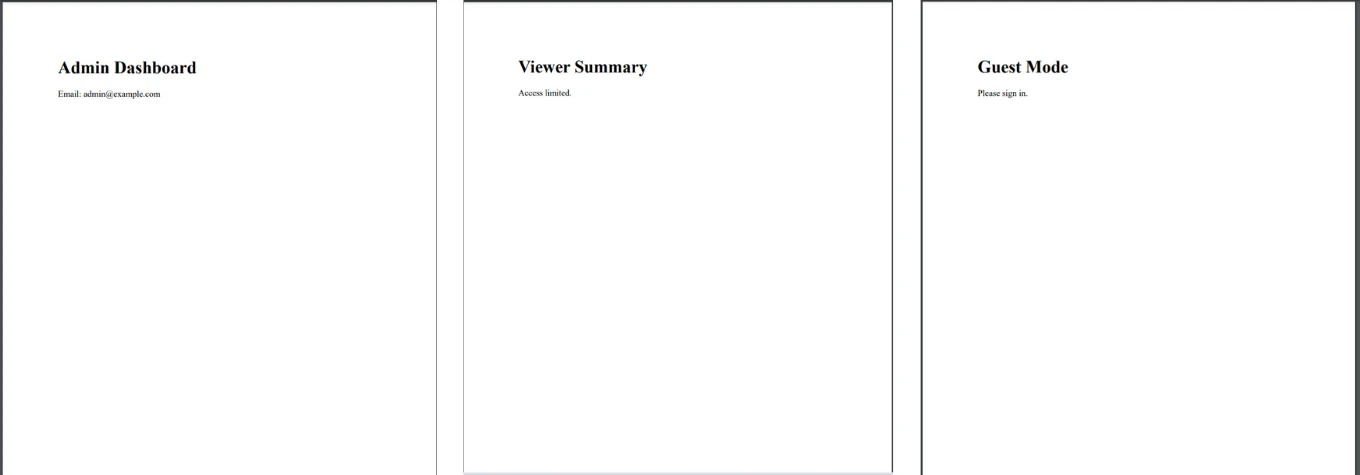
End If這種結構可提高安全性和程式碼的可讀性,同時利用臨時變數聲明,例如 var email。 下圖顯示根據不同的輸入值所建立的不同 PDF 文件。
4.基於使用者資料的關聯模式匹配
需要根據使用者等級產生不同的 PDF? 嘗試使用兩個關係模式來測試輸入是否落在某個範圍內。
using System;
using IronPdf;
class Program
{
    static void Main()
    {
        int userScore = 85; // Try other values: 45, 70, 101
        string message = userScore switch
        {
            < 60 => "Needs Improvement",
            >= 60 and < 80 => "Satisfactory",
            >= 80 and <= 100 => "Excellent",
            _ => "Invalid score"
        };
        var html = $"<h1>Score Report</h1><p>Score: {userScore}</p><p>Result: {message}</p>";
        var pdf = new ChromePdfRenderer().RenderHtmlAsPdf(html);
        pdf.SaveAs("example-score.pdf");
        Console.WriteLine("PDF created: example-score.pdf");
    }
}
using System;
using IronPdf;
class Program
{
static void Main()
{
int userScore = 85; // Try other values: 45, 70, 101
string message = userScore switch
{
< 60 => "Needs Improvement",
>= 60 and < 80 => "Satisfactory",
>= 80 and <= 100 => "Excellent",
_ => "Invalid score"
};
var html = $"<h1>Score Report</h1><p>Score: {userScore}</p><p>Result: {message}</p>";
var pdf = new ChromePdfRenderer().RenderHtmlAsPdf(html);
pdf.SaveAs("example-score.pdf");
Console.WriteLine("PDF created: example-score.pdf");
}
}Imports System
Imports IronPdf
Friend Class Program
Shared Sub Main()
Dim userScore As Integer = 85 ' Try other values: 45, 70, 101
'INSTANT VB TODO TASK: The following 'switch expression' was not converted by Instant VB:
' string message = userScore switch
' {
' < 60 => "Needs Improvement",
' >= 60 and < 80 => "Satisfactory",
' >= 80 and <= 100 => "Excellent",
' _ => "Invalid score"
' };
Dim html = $"<h1>Score Report</h1><p>Score: {userScore}</p><p>Result: {message}</p>"
Dim pdf = (New ChromePdfRenderer()).RenderHtmlAsPdf(html)
pdf.SaveAs("example-score.pdf")
Console.WriteLine("PDF created: example-score.pdf")
End Sub
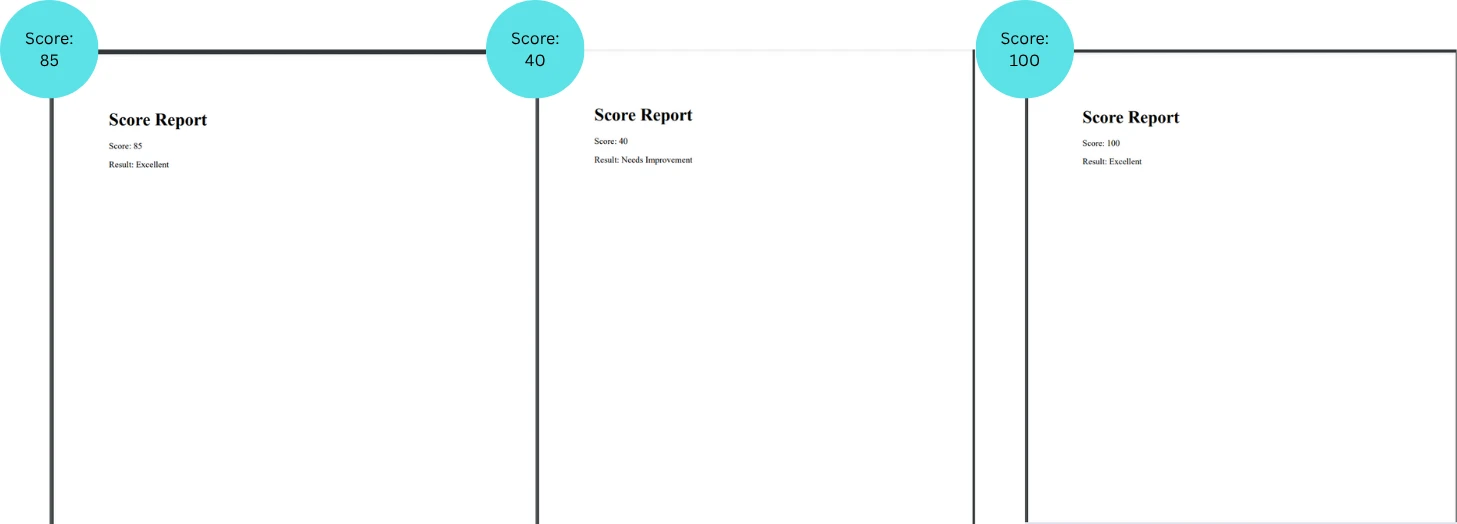
End Class關係運算符和布林表達式讓程式碼保持簡潔且具表達力。
輸出
在您的專案中實作此模式的提示
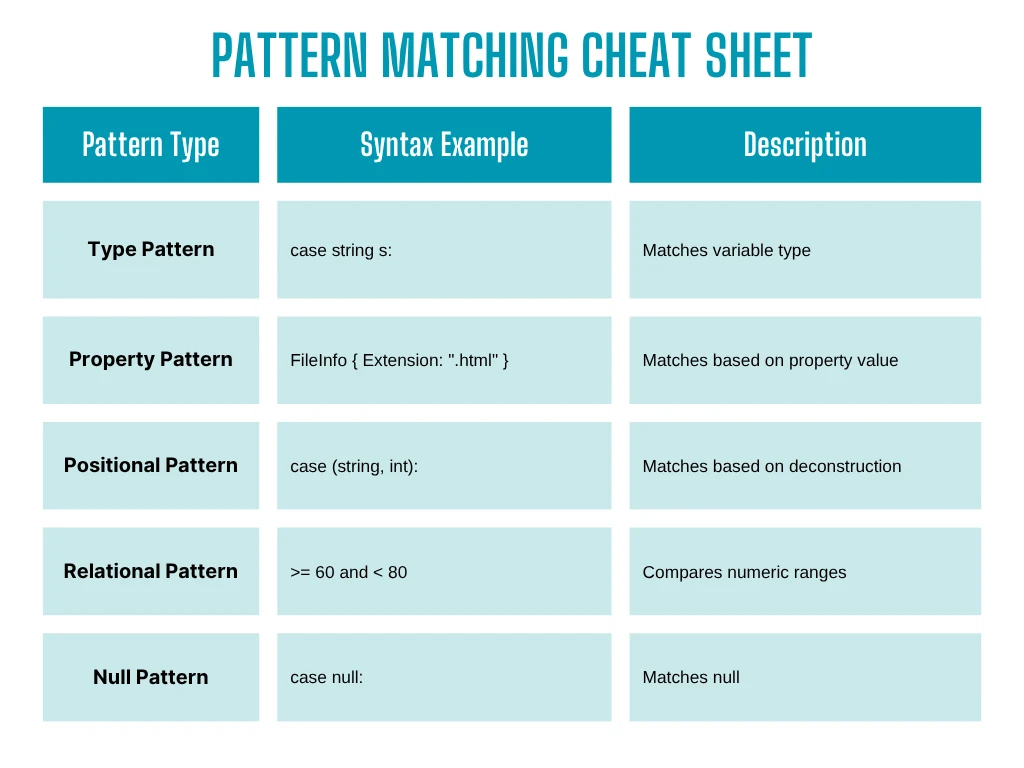 。
。
- 使用記錄類型來取得乾淨且不可變的資料物件。
- 比起 if-else 樹,更偏好 switch 表達式,以獲得更乾淨的邏輯。
- 使用 not 模式 和 discard 模式 (_) 來忽略不相關的匹配。
- 新增預設案例以及早捕捉未知的輸入。
- 將複雜的案例分解成輔助方法,以提高可讀性。
實際效益
*更簡潔的程式碼:*不再有嵌套過深的 if-else 或 switch case 語句區塊 更易於測試:隔離的模式案例簡化了單元測試 靈活性:新增新的輸入類型時,可以輕鬆擴展邏輯 更好地分離關注點:**僅將邏輯集中在輸入/輸出轉換上
結論:使您的 PDF 邏輯現代化。
Switch 模式匹配不只是語法上的改進,更是一種強大的範例,可讓程式碼寫得更安全、更有表現力。 結合 IronPDF 彈性的渲染功能,您可以用最少的程式碼建立更聰明、更可擴充的文件產生管道。
無論您是要建立報表產生器、文件預覽器或動態範本系統,都可以嘗試在 IronPDF 實作中加入模式匹配。 您很快就能看到清晰度、控制力和可維護性方面的優點。
想要親自試用 IronPDF 嗎?
下載免費試用版,在購買授權之前親自試用 IronPDF 的強大功能。
常見問題
如何將 C# switch 模式匹配應用於文檔處理?
C# 中的 switch 模式匹配可用於簡化複雜的決策邏輯。結合 IronPDF 這樣的 PDF 庫,它允許開發人員更有效地管理文檔處理任務,通過精簡決策邏輯和提高代碼可讀性。
使用 switch 模式匹配相對於傳統 if-else 語句有何優勢?
Switch 模式匹配提供了一種處理多個條件的更簡潔和可讀的方法,與傳統的 if-else 語句相比,它提高了 C# 代碼的可維護性,尤其是在使用 IronPDF 的複雜文檔處理任務中。
Switch 模式匹配如何促進 PDF 文檔自動化?
Switch 模式匹配促進 PDF 文檔自動化,允許開發人員為管理各種文檔操作和數據類型構建更清晰的邏輯。結合使用 IronPDF,有助於自動化工作流並精簡數據提取過程。
Switch 模式匹配能否處理 C# 中的複雜文檔工作流?
是的,Switch 模式匹配非常適合處理 C# 中的複雜文檔工作流。它簡化了管理不同文檔類型和操作所需的邏輯,尤其是在使用像 IronPDF 這樣強大的庫時。
如何在 C# PDF 處理應用中實現 switch 模式匹配?
在 C# PDF 處理應用中,可以使用switch語句結合模式匹配語法來管理不同的文檔類型或處理條件。IronPDF 可用於處理實際的 PDF 操作任務。
開發人員在使用 C# 中的 switch 模式匹配時可能遇到哪些挑戰?
開發人員在使用 switch 模式匹配時可能會面臨動態或基於運行時模式的挑戰,這需要更複雜的邏輯。不過,當與像 IronPDF 這樣的庫正確結合使用時,可以顯著提高代碼效率。
Switch 模式匹配如何促進代碼可維護性?
Switch 模式匹配通過提供一種清晰、簡潔的方法處理多個條件來促進代碼可維護性。這降低了複雜性,使代碼更易於理解和修改,特別是在使用 IronPDF 的大型應用中。









 立即免費開始
 立即免費開始
 預約免費線上示範





 無需信用卡或註冊帳號










