using IronPdf;

// Disable local disk access or cross-origin requests
Installation.EnableWebSecurity = true;

// Instantiate Renderer
var renderer = new ChromePdfRenderer();

// Create a PDF from a HTML string using C#
var pdf = renderer.RenderHtmlAsPdf("<h1>Hello World</h1>");

// Export to a file or Stream
pdf.SaveAs("output.pdf");

// Advanced Example with HTML Assets
// Load external html assets: Images, CSS and JavaScript.
// An optional BasePath 'C:\site\assets\' is set as the file location to load assets from
var myAdvancedPdf = renderer.RenderHtmlAsPdf("<img src='icons/iron.png'>", @"C:\site\assets\");
myAdvancedPdf.SaveAs("html-with-assets.pdf");
using IronPdf;// Disable local disk access or cross-origin requestsInstallation.EnableWebSecurity = true;// Instantiate Renderervar renderer = new ChromePdfRenderer();// Create a PDF from a HTML string using C#var pdf = renderer.RenderHtmlAsPdf("<h1>Hello World</h1>");// Export to a file or Streampdf.SaveAs("output.pdf");// Advanced Example with HTML Assets// Load external html assets: Images, CSS and JavaScript.// An optional BasePath 'C:\site\assets\' is set as the file location to load assets fromvar myAdvancedPdf = renderer.RenderHtmlAsPdf("<img src='icons/iron.png'>", @"C:\site\assets\");myAdvancedPdf.SaveAs("html-with-assets.pdf");
NServiceBus to potężna i elastyczna magistrala usług zaprojektowana dla platformy .NET Framework, która usprawnia tworzenie systemów rozproszonych. Oferowane przez nią solidne wzorce komunikacyjne gwarantują niezawodną obsługę i dostarczanie komunikatów w wielu mikrousługach i aplikacjach. NServiceBus abstrahuje podstawową architekturę komunikacyjną, pozwalając programistom skupić się na logice biznesowej zamiast na zawiłościach tworzenia systemów rozproszonych.
Natomiast IronPDF to popularna biblioteka .NET służąca do generowania, przeglądania i modyfikowania plików PDF. Jest znane z łatwości obsługi i wysokiej wydajności w tworzeniu plików PDF z różnych źródeł, takich jak pliki ASPX i HTML.
Dzięki połączeniu NServiceBus i IronPDF programiści mogą tworzyć niezawodne, skalowalne i łatwe w utrzymaniu systemy oprogramowania, które mogą generować dokumenty PDF i zarządzać nimi w ramach działalności biznesowej.
W tym artykułe przyjrzymy się, jak skonfigurować prosty projekt C# NServiceBus i zintegrować go z IronPDF, abyś mógł zbudować usprawniony przepływ pracy do zarządzania i tworzenia dokumentów PDF w architekturze aplikacji rozproszonej. Po przeczytaniu tego wprowadzającego samouczka powinieneś dokładnie wiedzieć, w jaki sposób te dwie skuteczne technologie mogą współpracować, aby uprościć zadania związane z plikami PDF w środowisku rozproszonym.
### What is [NServiceBus](https://docs.particular.net/) C#?
NServiceBus to potężny i elastyczny framework, który ułatwia tworzenie systemów rozproszonych i architektur .NET Framework zorientowanych na usługi. Korzystając z NServiceBus, można łatwo zarządzać różnymi typami komunikatów i zapewnić niezawodną komunikację. Ma to kluczowe znaczenie, szczególnie w aplikacjach internetowych i podobnych architekturach, gdzie niezbędne jest płynne kierowanie i przetwarzanie komunikatów. Moduły obsługi komunikatów NServiceBus skutecznie radzą sobie z odbieraniem komunikatów, zapewniając płynną interakcję wszystkich komponentów logicznych. NServiceBus posiada następujące ważne funkcje:
### Funkcje NServiceBus
#### Komunikacja oparta na komunikatach
NServiceBus wspiera komunikację opartą na komunikatach między różnymi usługami lub komponentami w systemie. Dzięki rozdzieleniu komponentów metoda ta pozwala tworzyć projekty, które łatwiej skalować i zarządzać nimi.
#### Niezawodna komunikacja
Dzięki automatycznemu zarządzaniu ponownymi próbami, kolejkami wiadomości nieosiągniętych adresatów i innymi technikami odporności na awarie gwarantuje niezawodne dostarczanie wiadomości. W systemach rozproszonych, gdzie często zdarzają się awarie sieci i inne problemy, ta niezawodność jest niezbędna.
#### Model publikowania/subskrypcji
Wzorzec publikowania/subskrypcji jest obsługiwany przez NServiceBus, umożliwiając usługom publikowanie zdarzeń i pozwalając innym usługom subskrybować te zdarzenia. Umożliwia to tworzenie architektur sterowanych zdarzeniami, w których modyfikacje wprowadzone w zdarzeniach w jednym komponencie systemu mogą wywołać reakcje w innych komponentach.
#### Zarządzanie sagą
Długotrwałe procesy biznesowe mogą być zarządzane za pomocą NServiceBus dzięki zintegrowanej obsłudze sag. Sagi umożliwiają platformie usługowej zarządzanie stanem i koordynowanie skomplikowanych operacji między kilkoma usługami.
#### Rozszerzalność i dostosowywanie
Oferuje wyjątkowy poziom rozszerzalności, umożliwiając programistom personalizację procesu obsługi, przetwarzania i transportu wiadomości. Ze względu na swoją elastyczność, może być używany w różnych scenariuszach.
#### Integracja z różnymi platformami przesyłania wiadomości
Z NServiceBus można zintegrować liczne systemy przesyłania wiadomości, w tym MSMQ, RabbitMQ, Azure Service Bus, Amazon SQS i inne. Dzięki temu programiści mogą wybrać rozwiązanie infrastruktury komunikacyjnej, które najlepiej odpowiada ich wymaganiom.
### Create and configure NServiceBus in C#
Musisz najpierw skonfigurować środowisko programistyczne, stworzyć podstawowy projekt i zbudować podstawową usługę przesyłania wiadomości oraz scenariusz zanim zaczniesz używać NServiceBus w projekcie C#. Oto przewodnik krok po kroku, który Cię w tym wspomoże.
## Utwórz nowy projekt Visual Studio
W Visual Studio proces tworzenia projektu konsoli jest prosty. Użyj tych prostych kroków w środowisku Visual Studio, aby uruchomić aplikację konsolową:
Przed użyciem upewnij się, że masz zainstalowane Visual Studio na swoim komputerze.
#### Rozpocznij nowy projekt
Kliknij Plik, następnie wybierz Nowy, a na koniec Projekt.
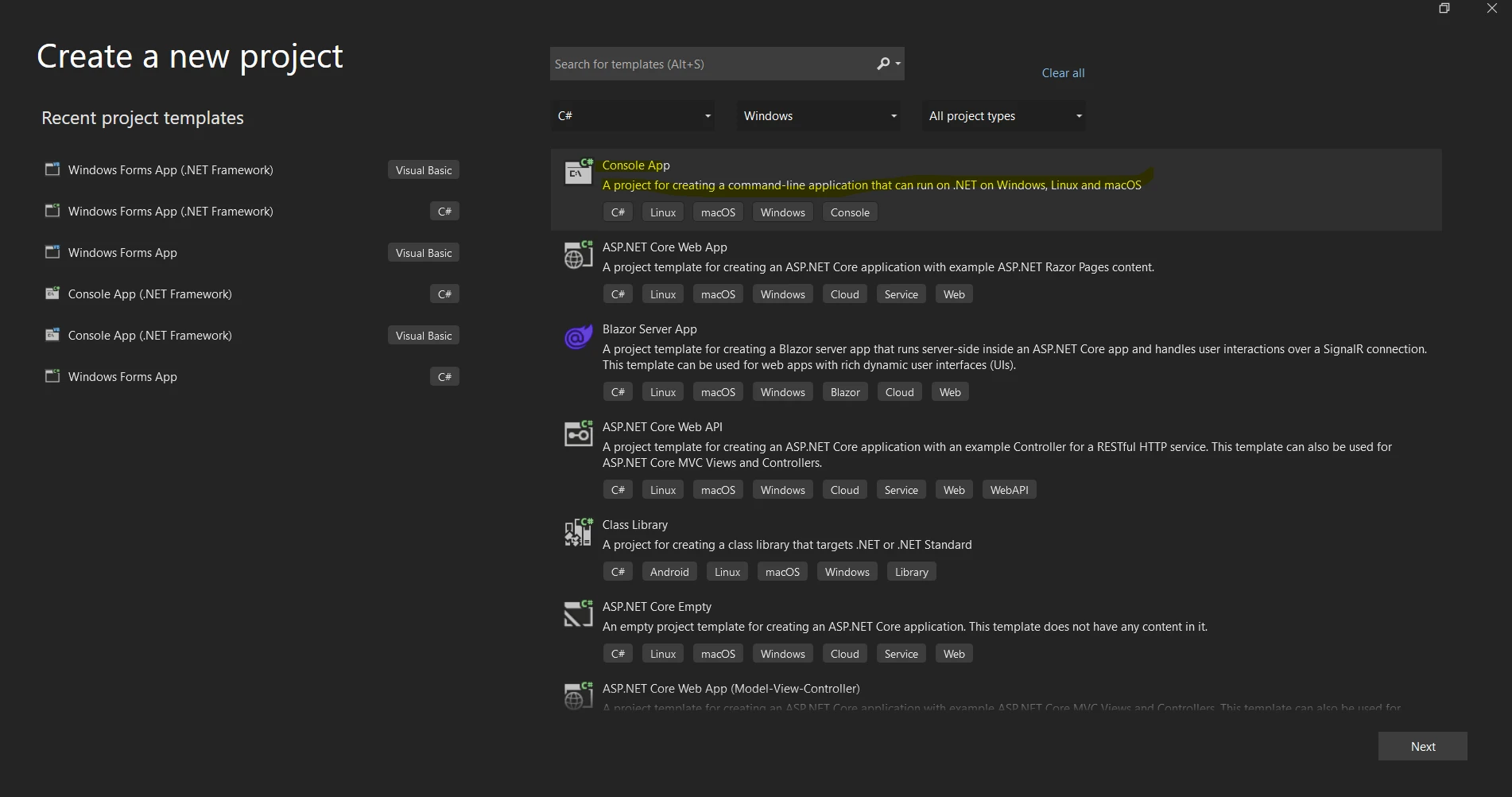
Możesz wybrać szablon "Aplikacja konsoli" lub "Aplikacja konsoli (.NET Core)" z listy referencji szablonów projektów poniżej.
W polu "Nazwa" podaj nazwę swojego projektu.
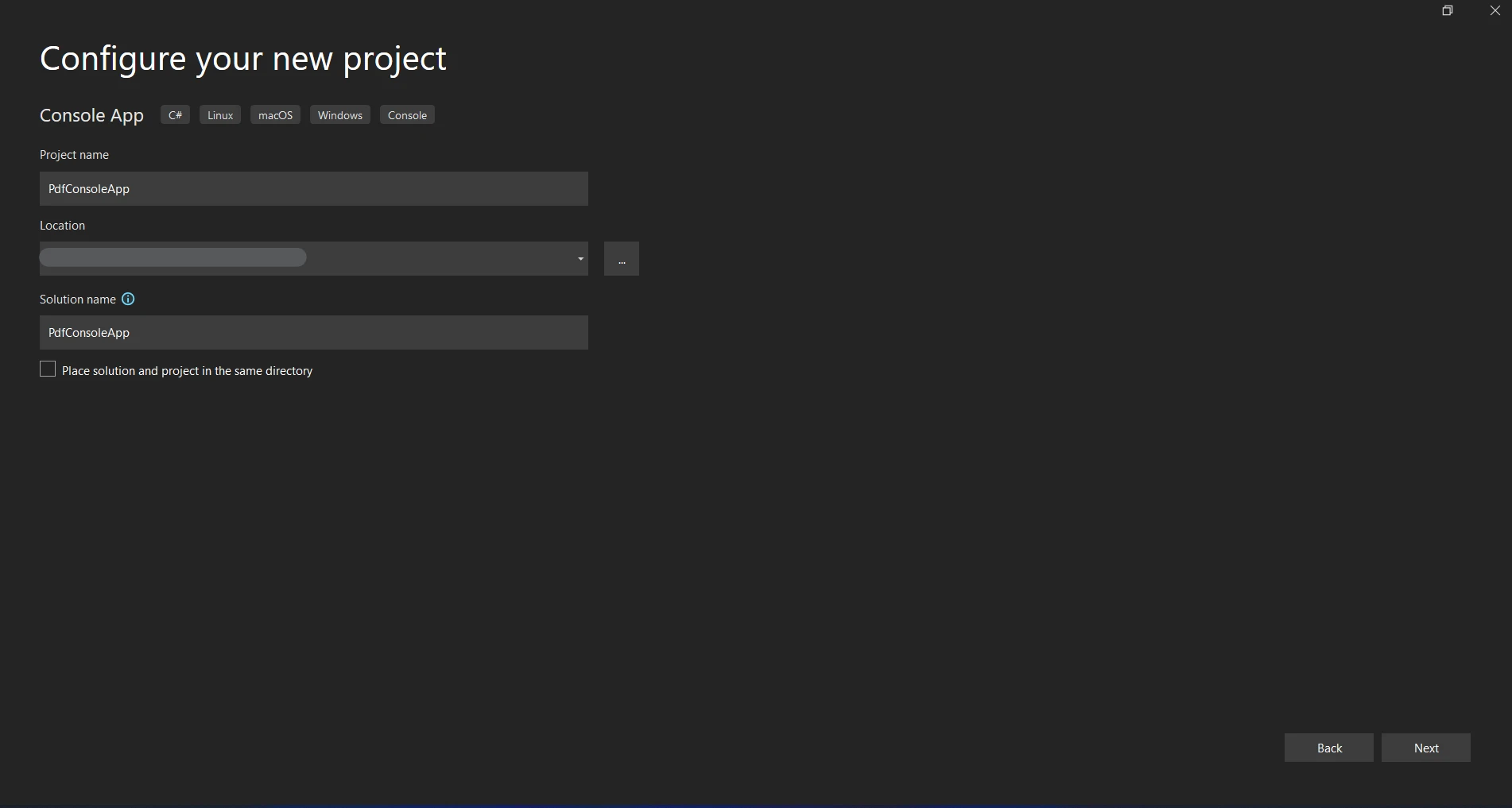
Wybierz lokalizację przechowywania projektu.
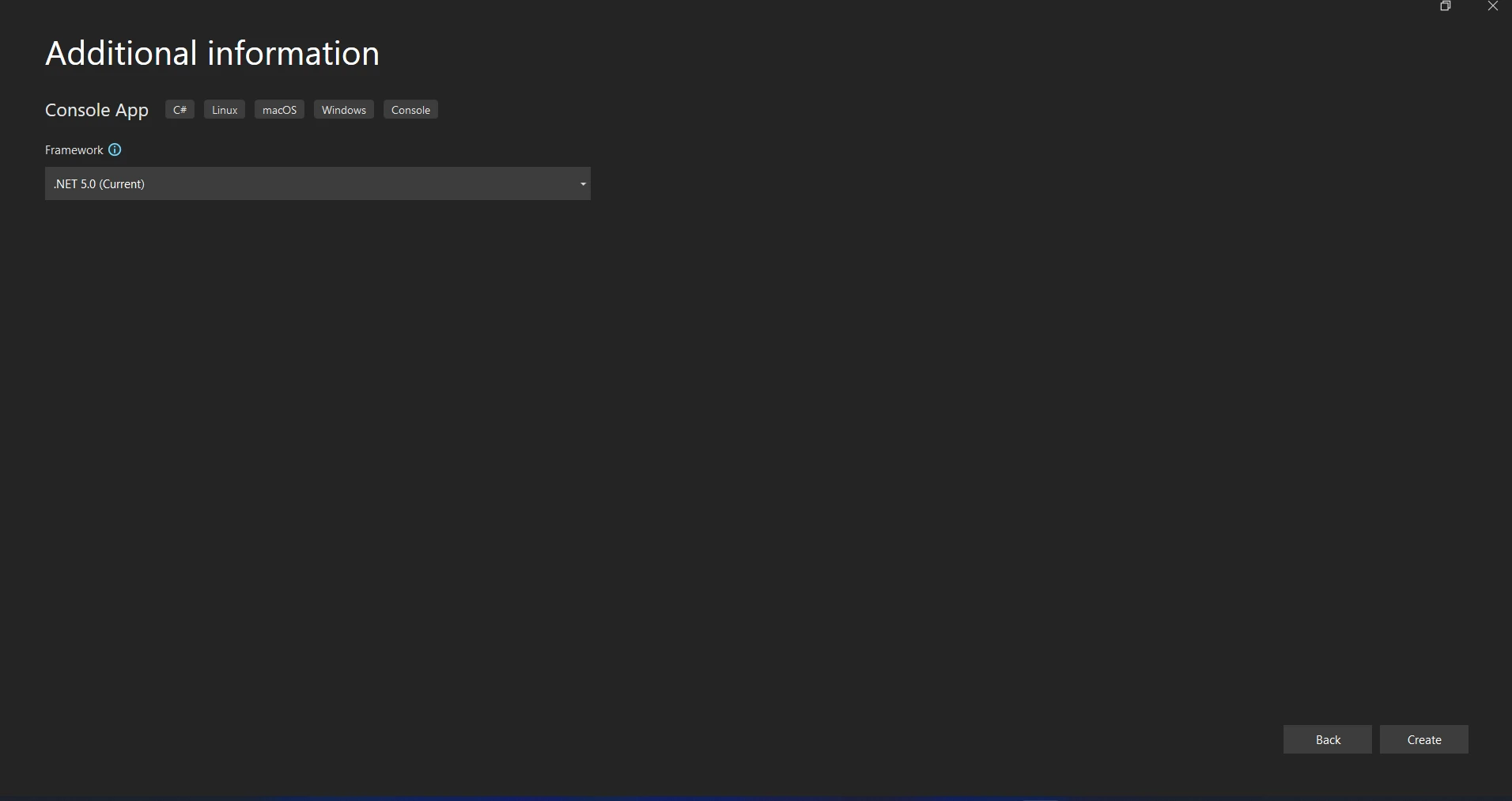
Kliknięcie przycisku "Utwórz" spowoduje uruchomienie projektu aplikacji konsolowej.
#### Zainstaluj pakiety NServiceBus
Przejdź do Narzędzia > Menedżer pakietów NuGet > Konsola Menedżera pakietów, aby otworzyć konsolę Menedżera pakietów NuGet.
Uruchom poniższe polecenie, aby zainstalować pakiet NuGet NServiceBus.
```shell
:InstallCmd Install-Package NServiceBus
```
#### Wybierz transport
NServiceBus potrzebuje transportu do odbierania i wysyłania wiadomości. Pozostaniemy przy Learning Transport, ponieważ jest łatwy w użyciu i dobrze nadaje się do testowania i programowania.
Zainstaluj pakiet dla Learning Transport, wykonując.
```shell
:InstallCmd Install-Package NServiceBus.RabbitMQ
```
#### Configure NServiceBus
#### Skonfiguruj punkt końcowy
Skonfiguruj punkt koncowy NServiceBus w pliku `Program.cs`:
```csharp
using NServiceBus;
using System;
using System.Threading.Tasks;
using Messages;

class Program
{
    static async Task Main()
    {
        Console.Title = "Sender";
        var endpointConfiguration = new EndpointConfiguration("SenderEndpoint");

        // Use RabbitMQ Transport
        var transport = endpointConfiguration.UseTransport<RabbitMQTransport>();
        transport.ConnectionString("host=localhost");

        // Set up error queue
        endpointConfiguration.SendFailedMessagesTo("error");

        // Set up audit queue
        endpointConfiguration.AuditProcessedMessagesTo("audit");

        // Start the endpoint
        var endpointInstance = await Endpoint.Start(endpointConfiguration).ConfigureAwait(false);
        Console.WriteLine("Press Enter to send a message...");
        Console.ReadLine();

        // Send a message
        var message = new MyMessage
        {
            Content = "Hello, NServiceBus with RabbitMQ!"
        };
        await endpointInstance.Send("ReceiverEndpoint", message).ConfigureAwait(false);
        Console.WriteLine("Message sent. Press Enter to exit...");
        Console.ReadLine();

        // Stop the endpoint
        await endpointInstance.Stop().ConfigureAwait(false);
    }
}
```
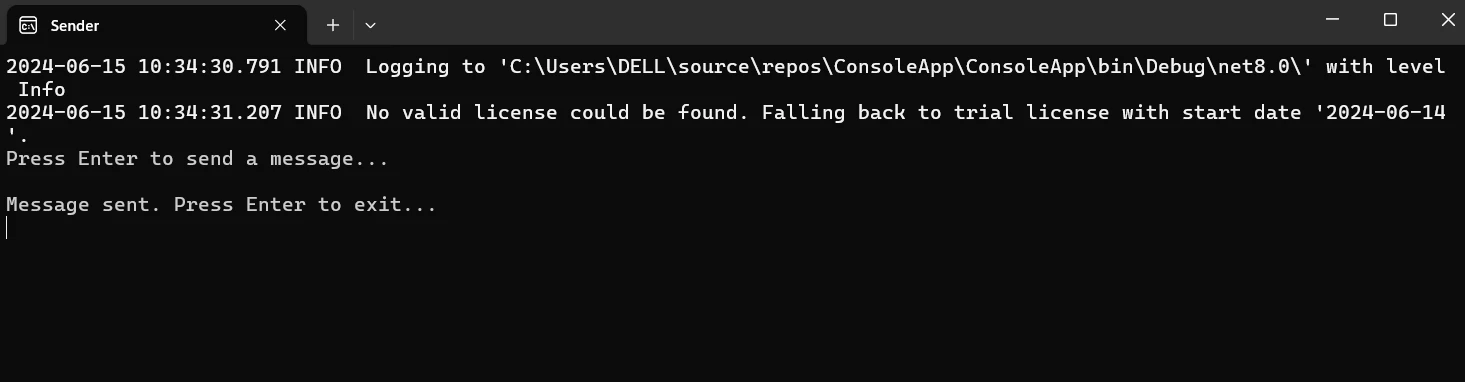
#### Utwórz wiadomość
Aby reprezentować wiadomość, dodaj nową klasę.
```csharp
public class MyMessage : IMessage
{
public string Content { get; set; }
}
```
#### Utwórz obsługę wiadomości
Aby obsłużyć wiadomość, dodaj nową klasę.
```csharp
using NServiceBus;
using System.Threading.Tasks;
public class MyMessageHandler : IHandleMessages<MyMessage>
{
public Task Handle(MyMessage message, IMessageHandlerContext context)
{
Console.WriteLine($"Received message: {message.Content}");
return Task.CompletedTask;
}
}
```
#### Wysyłanie wiadomości
Wyślij wiadomość z punktu końcowego. Dostosuj swoją główną metodę do przesyłania wiadomości przy pomocy handlera.
```csharp
using NServiceBus;
using System;
using System.Threading.Tasks;
class Program
{
static async Task Main()
{
Console.Title = "Receiver";
var endpointConfiguration = new EndpointConfiguration("ReceiverEndpoint");
// Serialization configuration
endpointConfiguration.UseSerialization<NewtonsoftJsonSerializer>();
// Use RabbitMQ Transport
var transport = endpointConfiguration.UseTransport<RabbitMQTransport>();
transport.UseConventionalRoutingTopology(QueueType.Quorum);
transport.ConnectionString("host=localhost");
// Set up error queue
endpointConfiguration.SendFailedMessagesTo("error");
// Set up audit queue
endpointConfiguration.AuditProcessedMessagesTo("audit");
endpointConfiguration.EnableInstallers();
// Start the endpoint
var endpointInstance = await Endpoint.Start(endpointConfiguration).ConfigureAwait(false);
Console.WriteLine("Press Enter to exit...");
Console.ReadLine();
// Stop the endpoint
await endpointInstance.Stop().ConfigureAwait(false);
}
}
```

Uruchom aplikację i zbuduj projekt. Konsola powinna wyświetlić wiadomość "Odebrano wiadomość: Witaj, NServiceBus!"
## Pierwsze kroki
W projekcie C#, integracja NServiceBus z RabbitMQ i IronPDF polega na skonfigurowaniu wiadomości między NServiceBus a RabbitMQ oraz wykorzystaniu IronPDF do tworzenia plików PDF. Oto szczegółowy przewodnik, jak zacząć:
### Czym jest [IronPDF](/)?
IronPDF to biblioteka .NET zaprojektowana do tworzenia, odczytu, edycji i konwertowania plików PDF. Dzięki niej programiści mogą pracować z plikami PDF w aplikacjach C# lub VB.NET z użyciem potężnego i intuicyjnego narzędzia. Charakterystyka i możliwości IronPDF są w pełni opisane poniżej:
### Funkcje IronPDF
**Generowanie plików PDF z HTML**
Konwertuj JavaScript, HTML i CSS do formatu PDF. Obsługuje zapytania o media i responsywny projekt, dwa współczesne standardy internetowe. Przydatna do tworzenia dynamicznie stylizowanych dokumentów PDF, faktur i raportów przy użyciu HTML i CSS.
**Edycja plików PDF**
Do już istniejących plików PDF, dodaj tekst, obrazy i inne materiały. Wyodrębnij tekst i obrazy z plików PDF. Połącz kilka plików PDF w jeden plik. Podziel pliki PDF na kilka dokumentów. Dodaj adnotacje, stopki, nagłówki oraz znaki wodne.
**Konwersja plików PDF**
Przekształć formaty plików Word, Excel, obrazy i inne do PDF. Konwersja PDF na obraz (PNG, JPEG, itp.).
**Wydajność i niezawodność**
Wysoka wydajność i niezawodność to główne cele projektowe w środowiskach produkcyjnych. Efektywnie zarządza dużymi dokumentami.
#### Instalacja IronPDF
Zainstaluj IronPDF, otwierając Konsolę Menedżera Pakietów NuGet.
```shell
:ProductInstall
```
### Skonfiguruj nadawcę z wiadomością
Messages to wspólny projekt (biblioteka klasowa), z którego korzysta zarówno nadawca, jak i odbiorca. Zdefiniuj klasę wiadomości w projekcie Messages. Stwórz nowy projekt bibliotek klas pod nazwą Messages i dodaj go do rozwiązania.
**Zdefiniuj wiadomość:**
W projekcie Messages utworz nowa klase nazwana `GeneratePdfMessage.cs`:
```csharp
using NServiceBus;
public class GeneratePdfMessage : IMessage
{
public string Content { get; set; }
public string OutputPath { get; set; }
}
```
W obu projektach, nadawcy i odbiorcy, uwzględnij odniesienie do projektu Messages.
Skonfiguruj punkt końcowy NServiceBus w projekcie nadawcy, aby używał RabbitMQ do przesyłania wiadomości.
```csharp
using NServiceBus;
using System;
using System.Threading.Tasks;
using Messages;
class Program
{
static async Task Main()
{
Console.Title = "Sender";
var endpointConfiguration = new EndpointConfiguration("SenderEndpoint");
// Use RabbitMQ Transport
var transport = endpointConfiguration.UseTransport<RabbitMQTransport>();
transport.ConnectionString("host=localhost");
// Set up error queue
endpointConfiguration.SendFailedMessagesTo("error");
// Set up audit queue
endpointConfiguration.AuditProcessedMessagesTo("audit");
endpointConfiguration.EnableInstallers();
// Start the endpoint
var endpointInstance = await Endpoint.Start(endpointConfiguration).ConfigureAwait(false);
Console.WriteLine("Press Enter to send a message...");
Console.ReadLine();
// Send a message
var message = new GeneratePdfMessage
{
Content = "<h1>Hello, NServiceBus with RabbitMQ and IronPDF!</h1>",
OutputPath = "output.pdf"
};
await endpointInstance.Send("ReceiverEndpoint", message).ConfigureAwait(false);
Console.WriteLine("Message sent. Press Enter to exit...");
Console.ReadLine();
// Stop the endpoint
await endpointInstance.Stop().ConfigureAwait(false);
}
}
```
**Konfiguracja punktu końcowego:** punkt końcowy jest inicjalizowany przy użyciu nazwy "SenderEndpoint" po wywołaniu new EndpointConfiguration("SenderEndpoint").
endpointConfiguration to konfiguracja transportu. Łącząc się z lokalnym wystąpieniem RabbitMQ, metoda UseTransport() konfiguruje NServiceBus do używania RabbitMQ jako mechanizmu transportu.
Kolejki audytu i bledow: Miejsce wysylania blednych i procesowanych wiadomosci jest konfigurowane za pomoca `SendFailedMessagesTo("error")` i `AuditProcessedMessagesTo("audit")`, odpowiednio.
**Wiadomosc wyslana:** `endpointInstance.Send("ReceiverEndpoint", message)` wysyla GeneratePdfMessage do "ReceiverEndpoint".
### Skonfiguruj odbiorcę do generowania PDF
Skonfiguruj punkt końcowy NServiceBus w projekcie odbiorcy, aby akceptować wiadomości przez RabbitMQ i generować pliki PDF przy pomocy IronPDF.
```csharp
using NServiceBus;
using System;
using System.Threading.Tasks;
class Program
{
static async Task Main()
{
Console.Title = "Receiver";
var endpointConfiguration = new EndpointConfiguration("ReceiverEndpoint");
// Use RabbitMQ Transport
var transport = endpointConfiguration.UseTransport<RabbitMQTransport>();
transport.ConnectionString("host=localhost");
// Set up error queue
endpointConfiguration.SendFailedMessagesTo("error");
// Set up audit queue
endpointConfiguration.AuditProcessedMessagesTo("audit");
// Start the endpoint
var endpointInstance = await Endpoint.Start(endpointConfiguration).ConfigureAwait(false);
Console.WriteLine("Press Enter to exit...");
Console.ReadLine();
// Stop the endpoint
await endpointInstance.Stop().ConfigureAwait(false);
}
}
```
Ta konfiguracja, dla punktu odbiorcy "ReceiverEndpoint", jest porównywalna z konfiguracją nadawcy.
#### Handler wiadomości
W projekcie Receiver utworz nowa klase nazwana `GeneratePdfMessageHandler.cs`.
```csharp
using NServiceBus;
using System;
using System.Threading.Tasks;
using Messages;
using IronPdf;
public class GeneratePdfMessageHandler : IHandleMessages<GeneratePdfMessage>
{
public Task Handle(GeneratePdfMessage message, IMessageHandlerContext context)
{
Console.WriteLine($"Received message to generate PDF with content: {message.Content}");
// Generate PDF
var renderer = new HtmlToPdf();
var pdf = renderer.RenderHtmlAsPdf(message.Content);
pdf.SaveAs(message.OutputPath);
Console.WriteLine($"PDF generated and saved to: {message.OutputPath}");
return Task.CompletedTask;
}
}
```
`GeneratePdfMessageHandler` uzywa interfejsu `IHandleMessages` do obslugi wiadomosci typu `GeneratePdfMessage`.
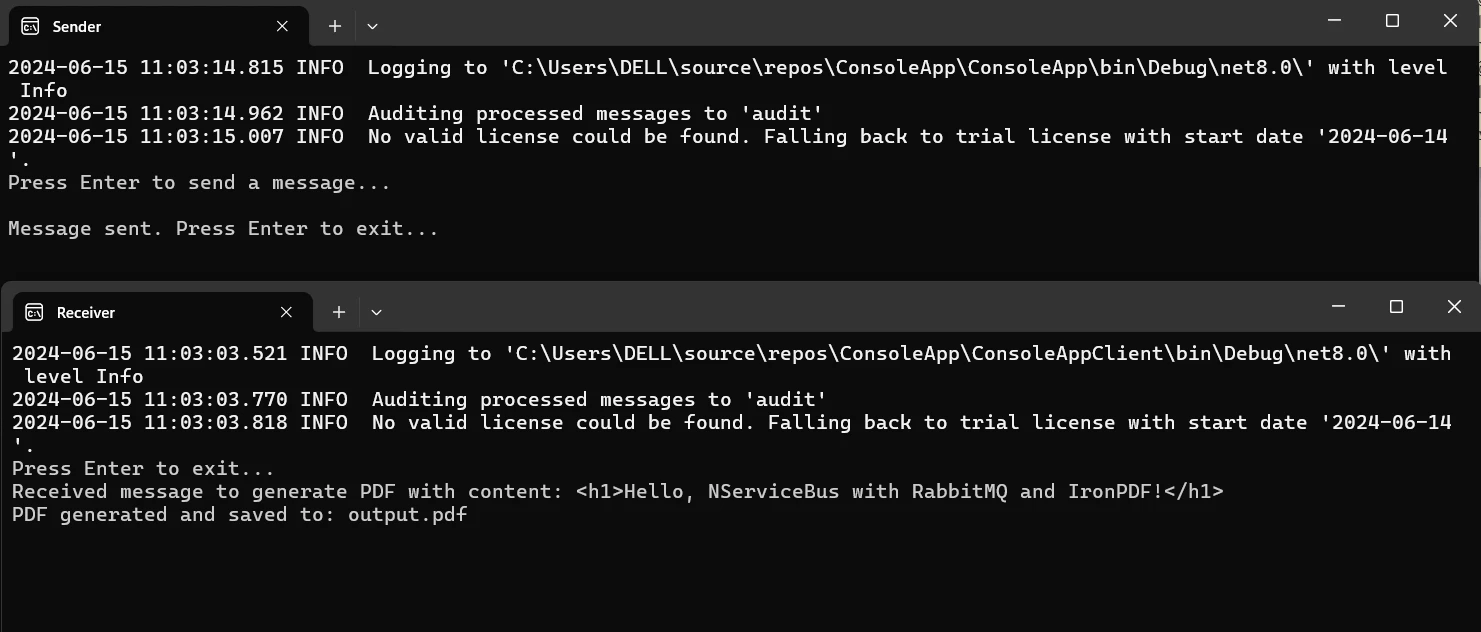
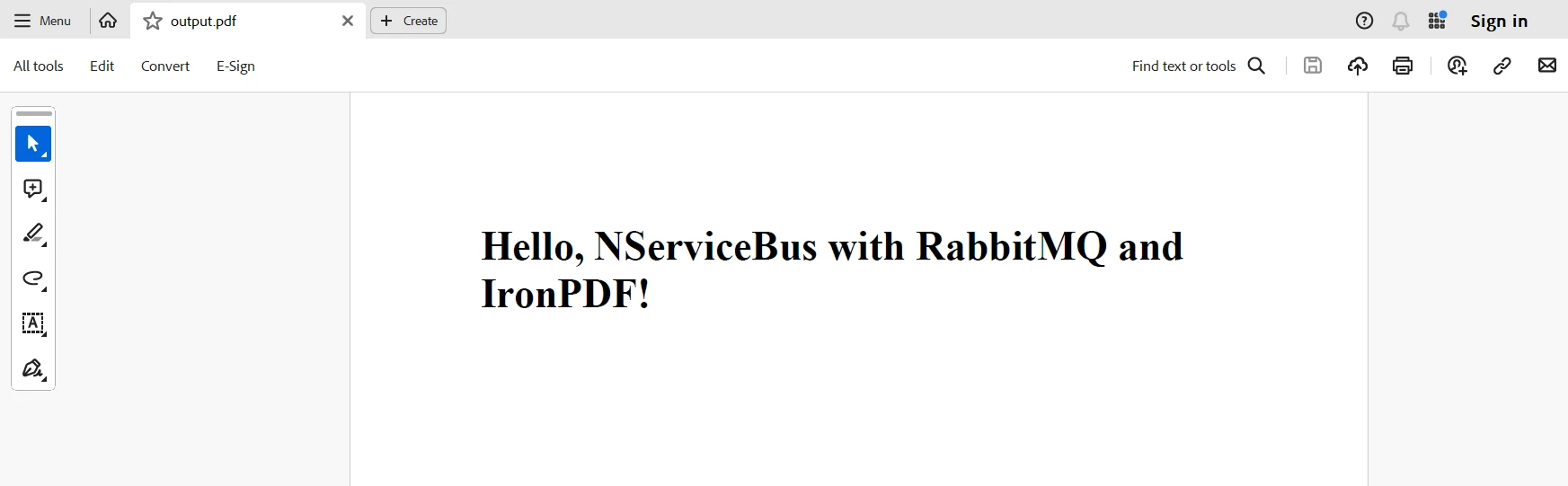
**Metoda obslugi:** Po otrzymaniu wiadomosci funkcja `Handle` tworzy PDF za pomoca IronPDF. Kod renderera `HtmlToPdf` konwertuje tresc HTML w wiadomosci na PDF, a nastepnie zapisuje go w wyznaczonej sciezce wyjscia.
## Wnioski
NServiceBus może być zintegrowany z RabbitMQ i IronPDF w C#, aby zapewnić skalowalne i stabilne rozwiązanie dla systemów rozproszonych, które wymagają dynamicznego i niezawodnego generowania plików PDF. Ta kombinacja wykorzystuje możliwości przetwarzania wiadomości NServiceBus, niezawodność i elastyczność RabbitMQ jako brokera wiadomości oraz solidne narzędzia edycji PDF IronPDF. Odseparowanie między usługami jest zapewnione przez wynikową architekturę, umożliwiając autonomiczny rozwój i skalowalność.
RabbitMQ zapewnia również dostarczanie wiadomości nawet w przypadku awarii sieci lub aplikacji. NServiceBus ułatwia routing i przetwarzanie wiadomości, a IronPDF umożliwia konwersję tekstu HTML do wysokiej jakości dokumentów PDF. Ta integracja oferuje elastyczne ramy do tworzenia zaawansowanych, wielkoskalowych aplikacji, a także poprawia utrzymywalność i niezawodność systemu.
Ostatecznie, poprzez dodanie IronPDF i Iron Software do swojej skrzynki narzędziowej dla programowania .NET, możesz skutecznie pracować z kodami kreskowymi, generować pliki PDF, wykonywać OCR i łączyć się z Excel. [Strona licencyjna IronPDF](/licensing/), ktora zaczyna sie od `$liteLicense`, plynnie laczy swoje funkcje oraz wydajnosc, kompatybilnosc i latwosc uzycia elastycznej serii [Oficjalnej Strony Iron Software](https://ironsoftware.com/), aby zapewnic dodatkowe aplikacje i mozliwosci webowe oraz bardziej efektywny rozwoj.
Jeśli istnieją dobrze określone opcje licencyjne dostosowane do konkretnych wymagań projektu, programiści mogą wybrać optymalny model z pewnością. Te korzyści pozwalają programistom na skuteczne i przejrzyste radzenie sobie z różnymi trudnościami.
NServiceBus to potężna i elastyczna magistrala usług zaprojektowana dla platformy .NET Framework, która usprawnia tworzenie systemów rozproszonych. Oferowane przez nią solidne wzorce komunikacyjne gwarantują niezawodną obsługę i dostarczanie komunikatów w wielu mikrousługach i aplikacjach. NServiceBus abstrahuje podstawową architekturę komunikacyjną, pozwalając programistom skupić się na logice biznesowej zamiast na zawiłościach tworzenia systemów rozproszonych.
Natomiast IronPDF to popularna biblioteka .NET służąca do generowania, przeglądania i modyfikowania plików PDF. Jest znane z łatwości obsługi i wysokiej wydajności w tworzeniu plików PDF z różnych źródeł, takich jak pliki ASPX i HTML.
Dzięki połączeniu NServiceBus i IronPDF programiści mogą tworzyć niezawodne, skalowalne i łatwe w utrzymaniu systemy oprogramowania, które mogą generować dokumenty PDF i zarządzać nimi w ramach działalności biznesowej.
W tym artykułe przyjrzymy się, jak skonfigurować prosty projekt C# NServiceBus i zintegrować go z IronPDF, abyś mógł zbudować usprawniony przepływ pracy do zarządzania i tworzenia dokumentów PDF w architekturze aplikacji rozproszonej. Po przeczytaniu tego wprowadzającego samouczka powinieneś dokładnie wiedzieć, w jaki sposób te dwie skuteczne technologie mogą współpracować, aby uprościć zadania związane z plikami PDF w środowisku rozproszonym.
NServiceBus to potężny i elastyczny framework, który ułatwia tworzenie systemów rozproszonych i architektur .NET Framework zorientowanych na usługi. Korzystając z NServiceBus, można łatwo zarządzać różnymi typami komunikatów i zapewnić niezawodną komunikację. Ma to kluczowe znaczenie, szczególnie w aplikacjach internetowych i podobnych architekturach, gdzie niezbędne jest płynne kierowanie i przetwarzanie komunikatów. Moduły obsługi komunikatów NServiceBus skutecznie radzą sobie z odbieraniem komunikatów, zapewniając płynną interakcję wszystkich komponentów logicznych. NServiceBus posiada następujące ważne funkcje:
Funkcje NServiceBus
Komunikacja oparta na komunikatach
NServiceBus wspiera komunikację opartą na komunikatach między różnymi usługami lub komponentami w systemie. Dzięki rozdzieleniu komponentów metoda ta pozwala tworzyć projekty, które łatwiej skalować i zarządzać nimi.
Niezawodna komunikacja
Dzięki automatycznemu zarządzaniu ponownymi próbami, kolejkami wiadomości nieosiągniętych adresatów i innymi technikami odporności na awarie gwarantuje niezawodne dostarczanie wiadomości. W systemach rozproszonych, gdzie często zdarzają się awarie sieci i inne problemy, ta niezawodność jest niezbędna.
Model publikowania/subskrypcji
Wzorzec publikowania/subskrypcji jest obsługiwany przez NServiceBus, umożliwiając usługom publikowanie zdarzeń i pozwalając innym usługom subskrybować te zdarzenia. Umożliwia to tworzenie architektur sterowanych zdarzeniami, w których modyfikacje wprowadzone w zdarzeniach w jednym komponencie systemu mogą wywołać reakcje w innych komponentach.
Zarządzanie sagą
Długotrwałe procesy biznesowe mogą być zarządzane za pomocą NServiceBus dzięki zintegrowanej obsłudze sag. Sagi umożliwiają platformie usługowej zarządzanie stanem i koordynowanie skomplikowanych operacji między kilkoma usługami.
Rozszerzalność i dostosowywanie
Oferuje wyjątkowy poziom rozszerzalności, umożliwiając programistom personalizację procesu obsługi, przetwarzania i transportu wiadomości. Ze względu na swoją elastyczność, może być używany w różnych scenariuszach.
Integracja z różnymi platformami przesyłania wiadomości
Z NServiceBus można zintegrować liczne systemy przesyłania wiadomości, w tym MSMQ, RabbitMQ, Azure Service Bus, Amazon SQS i inne. Dzięki temu programiści mogą wybrać rozwiązanie infrastruktury komunikacyjnej, które najlepiej odpowiada ich wymaganiom.
Create and configure NServiceBus in C#
Musisz najpierw skonfigurować środowisko programistyczne, stworzyć podstawowy projekt i zbudować podstawową usługę przesyłania wiadomości oraz scenariusz zanim zaczniesz używać NServiceBus w projekcie C#. Oto przewodnik krok po kroku, który Cię w tym wspomoże.
Utwórz nowy projekt Visual Studio
W Visual Studio proces tworzenia projektu konsoli jest prosty. Użyj tych prostych kroków w środowisku Visual Studio, aby uruchomić aplikację konsolową:
Przed użyciem upewnij się, że masz zainstalowane Visual Studio na swoim komputerze.
Rozpocznij nowy projekt
Kliknij Plik, następnie wybierz Nowy, a na koniec Projekt.
Możesz wybrać szablon "Aplikacja konsoli" lub "Aplikacja konsoli (.NET Core)" z listy referencji szablonów projektów poniżej.
W polu "Nazwa" podaj nazwę swojego projektu.
Wybierz lokalizację przechowywania projektu.
Kliknięcie przycisku "Utwórz" spowoduje uruchomienie projektu aplikacji konsolowej.
Zainstaluj pakiety NServiceBus
Przejdź do Narzędzia > Menedżer pakietów NuGet > Konsola Menedżera pakietów, aby otworzyć konsolę Menedżera pakietów NuGet.
Uruchom poniższe polecenie, aby zainstalować pakiet NuGet NServiceBus.
PM > Install-Package NServiceBus
Install-Package NServiceBus
Wybierz transport
NServiceBus potrzebuje transportu do odbierania i wysyłania wiadomości. Pozostaniemy przy Learning Transport, ponieważ jest łatwy w użyciu i dobrze nadaje się do testowania i programowania.
Zainstaluj pakiet dla Learning Transport, wykonując.
PM > Install-Package NServiceBus.RabbitMQ
Install-Package NServiceBus.RabbitMQ
Configure NServiceBus
Skonfiguruj punkt końcowy
Skonfiguruj punkt koncowy NServiceBus w pliku Program.cs:
using NServiceBus;using System;using System.Threading.Tasks;using Messages;class Program{ static async TaskMain() {Console.Title = "Sender"; var endpointConfiguration = new EndpointConfiguration("SenderEndpoint"); // Use RabbitMQ Transport var transport = endpointConfiguration.UseTransport<RabbitMQTransport>(); transport.ConnectionString("host=localhost"); // Set up error queue endpointConfiguration.SendFailedMessagesTo("error"); // Set up audit queue endpointConfiguration.AuditProcessedMessagesTo("audit"); // Start the endpoint var endpointInstance = awaitEndpoint.Start(endpointConfiguration).ConfigureAwait(false);Console.WriteLine("Press Enter to send a message...");Console.ReadLine(); // Send a message var message = new MyMessage {Content = "Hello, NServiceBus with RabbitMQ!" }; await endpointInstance.Send("ReceiverEndpoint", message).ConfigureAwait(false);Console.WriteLine("Message sent. Press Enter to exit...");Console.ReadLine(); // Stop the endpoint await endpointInstance.Stop().ConfigureAwait(false); }}
using NServiceBus;
using System;
using System.Threading.Tasks;
using Messages;

class Program
{
    static async Task Main()
    {
        Console.Title = "Sender";
        var endpointConfiguration = new EndpointConfiguration("SenderEndpoint");

        // Use RabbitMQ Transport
        var transport = endpointConfiguration.UseTransport<RabbitMQTransport>();
        transport.ConnectionString("host=localhost");

        // Set up error queue
        endpointConfiguration.SendFailedMessagesTo("error");

        // Set up audit queue
        endpointConfiguration.AuditProcessedMessagesTo("audit");

        // Start the endpoint
        var endpointInstance = await Endpoint.Start(endpointConfiguration).ConfigureAwait(false);
        Console.WriteLine("Press Enter to send a message...");
        Console.ReadLine();

        // Send a message
        var message = new MyMessage
        {
            Content = "Hello, NServiceBus with RabbitMQ!"
        };
        await endpointInstance.Send("ReceiverEndpoint", message).ConfigureAwait(false);
        Console.WriteLine("Message sent. Press Enter to exit...");
        Console.ReadLine();

        // Stop the endpoint
        await endpointInstance.Stop().ConfigureAwait(false);
    }
}
ImportsNServiceBusImportsSystemImportsSystem.Threading.TasksImportsMessagesClass ProgramSharedAsync Function Main() AsTaskConsole.Title = "Sender" Dim endpointConfiguration = New EndpointConfiguration("SenderEndpoint") ' Use RabbitMQ Transport Dim transport = endpointConfiguration.UseTransport(OfRabbitMQTransport)() transport.ConnectionString("host=localhost") ' Set up error queue endpointConfiguration.SendFailedMessagesTo("error") ' Set up audit queue endpointConfiguration.AuditProcessedMessagesTo("audit") ' Start the endpoint Dim endpointInstance = AwaitEndpoint.Start(endpointConfiguration).ConfigureAwait(False)Console.WriteLine("Press Enter to send a message...")Console.ReadLine() ' Send a message Dim message = New MyMessageWith { .Content = "Hello, NServiceBus with RabbitMQ!" }Await endpointInstance.Send("ReceiverEndpoint", message).ConfigureAwait(False)Console.WriteLine("Message sent. Press Enter to exit...")Console.ReadLine() ' Stop the endpointAwait endpointInstance.Stop().ConfigureAwait(False) End FunctionEnd Class
Imports NServiceBus
Imports System
Imports System.Threading.Tasks
Imports Messages

Class Program
    Shared Async Function Main() As Task
        Console.Title = "Sender"
        Dim endpointConfiguration = New EndpointConfiguration("SenderEndpoint")

        ' Use RabbitMQ Transport
        Dim transport = endpointConfiguration.UseTransport(Of RabbitMQTransport)()
        transport.ConnectionString("host=localhost")

        ' Set up error queue
        endpointConfiguration.SendFailedMessagesTo("error")

        ' Set up audit queue
        endpointConfiguration.AuditProcessedMessagesTo("audit")

        ' Start the endpoint
        Dim endpointInstance = Await Endpoint.Start(endpointConfiguration).ConfigureAwait(False)
        Console.WriteLine("Press Enter to send a message...")
        Console.ReadLine()

        ' Send a message
        Dim message = New MyMessage With {
            .Content = "Hello, NServiceBus with RabbitMQ!"
        }
        Await endpointInstance.Send("ReceiverEndpoint", message).ConfigureAwait(False)
        Console.WriteLine("Message sent. Press Enter to exit...")
        Console.ReadLine()

        ' Stop the endpoint
        Await endpointInstance.Stop().ConfigureAwait(False)
    End Function
End Class
Utwórz wiadomość
Aby reprezentować wiadomość, dodaj nową klasę.
public class MyMessage : IMessage{ public stringContent { get; set; }}
public class MyMessage : IMessage
{
    public string Content { get; set; }
}
Public Class MyMessageImplementsIMessage Public Property ContentAsStringEnd Class
Public Class MyMessage
    Implements IMessage

    Public Property Content As String
End Class
Utwórz obsługę wiadomości
Aby obsłużyć wiadomość, dodaj nową klasę.
using NServiceBus;using System.Threading.Tasks;public class MyMessageHandler : IHandleMessages<MyMessage>{ public TaskHandle(MyMessage message, IMessageHandlerContext context) {Console.WriteLine($"Received message: {message.Content}"); returnTask.CompletedTask; }}
using NServiceBus;
using System.Threading.Tasks;

public class MyMessageHandler : IHandleMessages<MyMessage>
{
    public Task Handle(MyMessage message, IMessageHandlerContext context)
    {
        Console.WriteLine($"Received message: {message.Content}");
        return Task.CompletedTask;
    }
}
ImportsNServiceBusImportsSystem.Threading.TasksPublic Class MyMessageHandlerImplementsIHandleMessages(OfMyMessage) Public Function Handle(ByVal message AsMyMessage, ByVal context AsIMessageHandlerContext) AsTaskConsole.WriteLine($"Received message: {message.Content}") ReturnTask.CompletedTask End FunctionEnd Class
Imports NServiceBus
Imports System.Threading.Tasks

Public Class MyMessageHandler
	Implements IHandleMessages(Of MyMessage)

	Public Function Handle(ByVal message As MyMessage, ByVal context As IMessageHandlerContext) As Task
		Console.WriteLine($"Received message: {message.Content}")
		Return Task.CompletedTask
	End Function
End Class
Wysyłanie wiadomości
Wyślij wiadomość z punktu końcowego. Dostosuj swoją główną metodę do przesyłania wiadomości przy pomocy handlera.
using NServiceBus;using System;using System.Threading.Tasks;class Program{ static async TaskMain() {Console.Title = "Receiver"; var endpointConfiguration = new EndpointConfiguration("ReceiverEndpoint"); // Serialization configuration endpointConfiguration.UseSerialization<NewtonsoftJsonSerializer>(); // Use RabbitMQ Transport var transport = endpointConfiguration.UseTransport<RabbitMQTransport>(); transport.UseConventionalRoutingTopology(QueueType.Quorum); transport.ConnectionString("host=localhost"); // Set up error queue endpointConfiguration.SendFailedMessagesTo("error"); // Set up audit queue endpointConfiguration.AuditProcessedMessagesTo("audit"); endpointConfiguration.EnableInstallers(); // Start the endpoint var endpointInstance = awaitEndpoint.Start(endpointConfiguration).ConfigureAwait(false);Console.WriteLine("Press Enter to exit...");Console.ReadLine(); // Stop the endpoint await endpointInstance.Stop().ConfigureAwait(false); }}
using NServiceBus;
using System;
using System.Threading.Tasks;

class Program
{
    static async Task Main()
    {
        Console.Title = "Receiver";
        var endpointConfiguration = new EndpointConfiguration("ReceiverEndpoint");

        // Serialization configuration
        endpointConfiguration.UseSerialization<NewtonsoftJsonSerializer>();

        // Use RabbitMQ Transport
        var transport = endpointConfiguration.UseTransport<RabbitMQTransport>();
        transport.UseConventionalRoutingTopology(QueueType.Quorum);
        transport.ConnectionString("host=localhost");

        // Set up error queue
        endpointConfiguration.SendFailedMessagesTo("error");

        // Set up audit queue
        endpointConfiguration.AuditProcessedMessagesTo("audit");
        endpointConfiguration.EnableInstallers();

        // Start the endpoint
        var endpointInstance = await Endpoint.Start(endpointConfiguration).ConfigureAwait(false);
        Console.WriteLine("Press Enter to exit...");
        Console.ReadLine();

        // Stop the endpoint
        await endpointInstance.Stop().ConfigureAwait(false);
    }
}
ImportsNServiceBusImportsSystemImportsSystem.Threading.TasksModuleProgram Sub Main()MainAsync().GetAwaiter().GetResult() End Sub PrivateAsync Function MainAsync() AsTaskConsole.Title = "Receiver" Dim endpointConfiguration = New EndpointConfiguration("ReceiverEndpoint") ' Serialization configuration endpointConfiguration.UseSerialization(OfNewtonsoftJsonSerializer)() ' Use RabbitMQ Transport Dim transport = endpointConfiguration.UseTransport(OfRabbitMQTransport)() transport.UseConventionalRoutingTopology(QueueType.Quorum) transport.ConnectionString("host=localhost") ' Set up error queue endpointConfiguration.SendFailedMessagesTo("error") ' Set up audit queue endpointConfiguration.AuditProcessedMessagesTo("audit") endpointConfiguration.EnableInstallers() ' Start the endpoint Dim endpointInstance = AwaitEndpoint.Start(endpointConfiguration).ConfigureAwait(False)Console.WriteLine("Press Enter to exit...")Console.ReadLine() ' Stop the endpointAwait endpointInstance.Stop().ConfigureAwait(False) End FunctionEndModule
Imports NServiceBus
Imports System
Imports System.Threading.Tasks

Module Program
    Sub Main()
        MainAsync().GetAwaiter().GetResult()
    End Sub

    Private Async Function MainAsync() As Task
        Console.Title = "Receiver"
        Dim endpointConfiguration = New EndpointConfiguration("ReceiverEndpoint")

        ' Serialization configuration
        endpointConfiguration.UseSerialization(Of NewtonsoftJsonSerializer)()

        ' Use RabbitMQ Transport
        Dim transport = endpointConfiguration.UseTransport(Of RabbitMQTransport)()
        transport.UseConventionalRoutingTopology(QueueType.Quorum)
        transport.ConnectionString("host=localhost")

        ' Set up error queue
        endpointConfiguration.SendFailedMessagesTo("error")

        ' Set up audit queue
        endpointConfiguration.AuditProcessedMessagesTo("audit")
        endpointConfiguration.EnableInstallers()

        ' Start the endpoint
        Dim endpointInstance = Await Endpoint.Start(endpointConfiguration).ConfigureAwait(False)
        Console.WriteLine("Press Enter to exit...")
        Console.ReadLine()

        ' Stop the endpoint
        Await endpointInstance.Stop().ConfigureAwait(False)
    End Function
End Module
Uruchom aplikację i zbuduj projekt. Konsola powinna wyświetlić wiadomość "Odebrano wiadomość: Witaj, NServiceBus!"
Pierwsze kroki
W projekcie C#, integracja NServiceBus z RabbitMQ i IronPDF polega na skonfigurowaniu wiadomości między NServiceBus a RabbitMQ oraz wykorzystaniu IronPDF do tworzenia plików PDF. Oto szczegółowy przewodnik, jak zacząć:
IronPDF to biblioteka .NET zaprojektowana do tworzenia, odczytu, edycji i konwertowania plików PDF. Dzięki niej programiści mogą pracować z plikami PDF w aplikacjach C# lub VB.NET z użyciem potężnego i intuicyjnego narzędzia. Charakterystyka i możliwości IronPDF są w pełni opisane poniżej:
Funkcje IronPDF
Generowanie plików PDF z HTML
Konwertuj JavaScript, HTML i CSS do formatu PDF. Obsługuje zapytania o media i responsywny projekt, dwa współczesne standardy internetowe. Przydatna do tworzenia dynamicznie stylizowanych dokumentów PDF, faktur i raportów przy użyciu HTML i CSS.
Edycja plików PDF
Do już istniejących plików PDF, dodaj tekst, obrazy i inne materiały. Wyodrębnij tekst i obrazy z plików PDF. Połącz kilka plików PDF w jeden plik. Podziel pliki PDF na kilka dokumentów. Dodaj adnotacje, stopki, nagłówki oraz znaki wodne.
Konwersja plików PDF
Przekształć formaty plików Word, Excel, obrazy i inne do PDF. Konwersja PDF na obraz (PNG, JPEG, itp.).
Wydajność i niezawodność
Wysoka wydajność i niezawodność to główne cele projektowe w środowiskach produkcyjnych. Efektywnie zarządza dużymi dokumentami.
Messages to wspólny projekt (biblioteka klasowa), z którego korzysta zarówno nadawca, jak i odbiorca. Zdefiniuj klasę wiadomości w projekcie Messages. Stwórz nowy projekt bibliotek klas pod nazwą Messages i dodaj go do rozwiązania.
Zdefiniuj wiadomość:
W projekcie Messages utworz nowa klase nazwana GeneratePdfMessage.cs:
using NServiceBus;public class GeneratePdfMessage : IMessage{ public stringContent { get; set; } public stringOutputPath { get; set; }}
using NServiceBus;

public class GeneratePdfMessage : IMessage
{
    public string Content { get; set; }
    public string OutputPath { get; set; }
}
ImportsNServiceBusPublic Class GeneratePdfMessageImplementsIMessage Public Property Content() AsString Public Property OutputPath() AsStringEnd Class
Imports NServiceBus

Public Class GeneratePdfMessage
	Implements IMessage

	Public Property Content() As String
	Public Property OutputPath() As String
End Class
W obu projektach, nadawcy i odbiorcy, uwzględnij odniesienie do projektu Messages.
Skonfiguruj punkt końcowy NServiceBus w projekcie nadawcy, aby używał RabbitMQ do przesyłania wiadomości.
using NServiceBus;using System;using System.Threading.Tasks;using Messages;class Program{ static async TaskMain() {Console.Title = "Sender"; var endpointConfiguration = new EndpointConfiguration("SenderEndpoint"); // Use RabbitMQ Transport var transport = endpointConfiguration.UseTransport<RabbitMQTransport>(); transport.ConnectionString("host=localhost"); // Set up error queue endpointConfiguration.SendFailedMessagesTo("error"); // Set up audit queue endpointConfiguration.AuditProcessedMessagesTo("audit"); endpointConfiguration.EnableInstallers(); // Start the endpoint var endpointInstance = awaitEndpoint.Start(endpointConfiguration).ConfigureAwait(false);Console.WriteLine("Press Enter to send a message...");Console.ReadLine(); // Send a message var message = new GeneratePdfMessage {Content = "<h1>Hello, NServiceBus with RabbitMQ and IronPDF!</h1>",OutputPath = "output.pdf" }; await endpointInstance.Send("ReceiverEndpoint", message).ConfigureAwait(false);Console.WriteLine("Message sent. Press Enter to exit...");Console.ReadLine(); // Stop the endpoint await endpointInstance.Stop().ConfigureAwait(false); }}
using NServiceBus;
using System;
using System.Threading.Tasks;
using Messages;

class Program
{
    static async Task Main()
    {
        Console.Title = "Sender";
        var endpointConfiguration = new EndpointConfiguration("SenderEndpoint");

        // Use RabbitMQ Transport
        var transport = endpointConfiguration.UseTransport<RabbitMQTransport>();
        transport.ConnectionString("host=localhost");

        // Set up error queue
        endpointConfiguration.SendFailedMessagesTo("error");

        // Set up audit queue
        endpointConfiguration.AuditProcessedMessagesTo("audit");
        endpointConfiguration.EnableInstallers();

        // Start the endpoint
        var endpointInstance = await Endpoint.Start(endpointConfiguration).ConfigureAwait(false);
        Console.WriteLine("Press Enter to send a message...");
        Console.ReadLine();

        // Send a message
        var message = new GeneratePdfMessage
        {
            Content = "<h1>Hello, NServiceBus with RabbitMQ and IronPDF!</h1>",
            OutputPath = "output.pdf"
        };
        await endpointInstance.Send("ReceiverEndpoint", message).ConfigureAwait(false);
        Console.WriteLine("Message sent. Press Enter to exit...");
        Console.ReadLine();

        // Stop the endpoint
        await endpointInstance.Stop().ConfigureAwait(false);
    }
}
ImportsNServiceBusImportsSystemImportsSystem.Threading.TasksImportsMessagesFriend Class ProgramSharedAsync Function Main() AsTaskConsole.Title = "Sender" Dim endpointConfiguration As New EndpointConfiguration("SenderEndpoint") ' Use RabbitMQ Transport Dim transport = endpointConfiguration.UseTransport(OfRabbitMQTransport)() transport.ConnectionString("host=localhost") ' Set up error queue endpointConfiguration.SendFailedMessagesTo("error") ' Set up audit queue endpointConfiguration.AuditProcessedMessagesTo("audit") endpointConfiguration.EnableInstallers() ' Start the endpoint Dim endpointInstance = AwaitEndpoint.Start(endpointConfiguration).ConfigureAwait(False)Console.WriteLine("Press Enter to send a message...")Console.ReadLine() ' Send a message Dim message = New GeneratePdfMessageWith { .Content = "<h1>Hello, NServiceBus with RabbitMQ and IronPDF!</h1>", .OutputPath = "output.pdf" }Await endpointInstance.Send("ReceiverEndpoint", message).ConfigureAwait(False)Console.WriteLine("Message sent. Press Enter to exit...")Console.ReadLine() ' Stop the endpointAwait endpointInstance.Stop().ConfigureAwait(False) End FunctionEnd Class
Imports NServiceBus
Imports System
Imports System.Threading.Tasks
Imports Messages

Friend Class Program
	Shared Async Function Main() As Task
		Console.Title = "Sender"
		Dim endpointConfiguration As New EndpointConfiguration("SenderEndpoint")

		' Use RabbitMQ Transport
		Dim transport = endpointConfiguration.UseTransport(Of RabbitMQTransport)()
		transport.ConnectionString("host=localhost")

		' Set up error queue
		endpointConfiguration.SendFailedMessagesTo("error")

		' Set up audit queue
		endpointConfiguration.AuditProcessedMessagesTo("audit")
		endpointConfiguration.EnableInstallers()

		' Start the endpoint
		Dim endpointInstance = Await Endpoint.Start(endpointConfiguration).ConfigureAwait(False)
		Console.WriteLine("Press Enter to send a message...")
		Console.ReadLine()

		' Send a message
		Dim message = New GeneratePdfMessage With {
			.Content = "<h1>Hello, NServiceBus with RabbitMQ and IronPDF!</h1>",
			.OutputPath = "output.pdf"
		}
		Await endpointInstance.Send("ReceiverEndpoint", message).ConfigureAwait(False)
		Console.WriteLine("Message sent. Press Enter to exit...")
		Console.ReadLine()

		' Stop the endpoint
		Await endpointInstance.Stop().ConfigureAwait(False)
	End Function
End Class
Konfiguracja punktu końcowego: punkt końcowy jest inicjalizowany przy użyciu nazwy "SenderEndpoint" po wywołaniu new EndpointConfiguration("SenderEndpoint").
endpointConfiguration to konfiguracja transportu. Łącząc się z lokalnym wystąpieniem RabbitMQ, metoda UseTransport() konfiguruje NServiceBus do używania RabbitMQ jako mechanizmu transportu.
Kolejki audytu i bledow: Miejsce wysylania blednych i procesowanych wiadomosci jest konfigurowane za pomoca SendFailedMessagesTo("error") i AuditProcessedMessagesTo("audit"), odpowiednio.
Wiadomosc wyslana:endpointInstance.Send("ReceiverEndpoint", message) wysyla GeneratePdfMessage do "ReceiverEndpoint".
Skonfiguruj odbiorcę do generowania PDF
Skonfiguruj punkt końcowy NServiceBus w projekcie odbiorcy, aby akceptować wiadomości przez RabbitMQ i generować pliki PDF przy pomocy IronPDF.
using NServiceBus;using System;using System.Threading.Tasks;class Program{ static async TaskMain() {Console.Title = "Receiver"; var endpointConfiguration = new EndpointConfiguration("ReceiverEndpoint"); // Use RabbitMQ Transport var transport = endpointConfiguration.UseTransport<RabbitMQTransport>(); transport.ConnectionString("host=localhost"); // Set up error queue endpointConfiguration.SendFailedMessagesTo("error"); // Set up audit queue endpointConfiguration.AuditProcessedMessagesTo("audit"); // Start the endpoint var endpointInstance = awaitEndpoint.Start(endpointConfiguration).ConfigureAwait(false);Console.WriteLine("Press Enter to exit...");Console.ReadLine(); // Stop the endpoint await endpointInstance.Stop().ConfigureAwait(false); }}
using NServiceBus;
using System;
using System.Threading.Tasks;

class Program
{
    static async Task Main()
    {
        Console.Title = "Receiver";
        var endpointConfiguration = new EndpointConfiguration("ReceiverEndpoint");

        // Use RabbitMQ Transport
        var transport = endpointConfiguration.UseTransport<RabbitMQTransport>();
        transport.ConnectionString("host=localhost");

        // Set up error queue
        endpointConfiguration.SendFailedMessagesTo("error");

        // Set up audit queue
        endpointConfiguration.AuditProcessedMessagesTo("audit");

        // Start the endpoint
        var endpointInstance = await Endpoint.Start(endpointConfiguration).ConfigureAwait(false);
        Console.WriteLine("Press Enter to exit...");
        Console.ReadLine();

        // Stop the endpoint
        await endpointInstance.Stop().ConfigureAwait(false);
    }
}
ImportsNServiceBusImportsSystemImportsSystem.Threading.TasksModuleProgramAsync Function Main() AsTaskConsole.Title = "Receiver" Dim endpointConfiguration = New EndpointConfiguration("ReceiverEndpoint") ' Use RabbitMQ Transport Dim transport = endpointConfiguration.UseTransport(OfRabbitMQTransport)() transport.ConnectionString("host=localhost") ' Set up error queue endpointConfiguration.SendFailedMessagesTo("error") ' Set up audit queue endpointConfiguration.AuditProcessedMessagesTo("audit") ' Start the endpoint Dim endpointInstance = AwaitEndpoint.Start(endpointConfiguration).ConfigureAwait(False)Console.WriteLine("Press Enter to exit...")Console.ReadLine() ' Stop the endpointAwait endpointInstance.Stop().ConfigureAwait(False) End FunctionEndModule
Imports NServiceBus
Imports System
Imports System.Threading.Tasks

Module Program
    Async Function Main() As Task
        Console.Title = "Receiver"
        Dim endpointConfiguration = New EndpointConfiguration("ReceiverEndpoint")

        ' Use RabbitMQ Transport
        Dim transport = endpointConfiguration.UseTransport(Of RabbitMQTransport)()
        transport.ConnectionString("host=localhost")

        ' Set up error queue
        endpointConfiguration.SendFailedMessagesTo("error")

        ' Set up audit queue
        endpointConfiguration.AuditProcessedMessagesTo("audit")

        ' Start the endpoint
        Dim endpointInstance = Await Endpoint.Start(endpointConfiguration).ConfigureAwait(False)
        Console.WriteLine("Press Enter to exit...")
        Console.ReadLine()

        ' Stop the endpoint
        Await endpointInstance.Stop().ConfigureAwait(False)
    End Function
End Module
Ta konfiguracja, dla punktu odbiorcy "ReceiverEndpoint", jest porównywalna z konfiguracją nadawcy.
Handler wiadomości
W projekcie Receiver utworz nowa klase nazwana GeneratePdfMessageHandler.cs.
using NServiceBus;using System;using System.Threading.Tasks;using Messages;using IronPdf;public class GeneratePdfMessageHandler : IHandleMessages<GeneratePdfMessage>{ public TaskHandle(GeneratePdfMessage message, IMessageHandlerContext context) {Console.WriteLine($"Received message to generate PDF with content: {message.Content}"); // Generate PDF var renderer = new HtmlToPdf(); var pdf = renderer.RenderHtmlAsPdf(message.Content); pdf.SaveAs(message.OutputPath);Console.WriteLine($"PDF generated and saved to: {message.OutputPath}"); returnTask.CompletedTask; }}
using NServiceBus;
using System;
using System.Threading.Tasks;
using Messages;
using IronPdf;

public class GeneratePdfMessageHandler : IHandleMessages<GeneratePdfMessage>
{
    public Task Handle(GeneratePdfMessage message, IMessageHandlerContext context)
    {
        Console.WriteLine($"Received message to generate PDF with content: {message.Content}");

        // Generate PDF
        var renderer = new HtmlToPdf();
        var pdf = renderer.RenderHtmlAsPdf(message.Content);
        pdf.SaveAs(message.OutputPath);
        Console.WriteLine($"PDF generated and saved to: {message.OutputPath}");

        return Task.CompletedTask;
    }
}
ImportsNServiceBusImportsSystemImportsSystem.Threading.TasksImportsMessagesImportsIronPdfPublic Class GeneratePdfMessageHandlerImplementsIHandleMessages(OfGeneratePdfMessage) Public Function Handle(message AsGeneratePdfMessage, context AsIMessageHandlerContext) AsTaskImplementsIHandleMessages(OfGeneratePdfMessage).HandleConsole.WriteLine($"Received message to generate PDF with content: {message.Content}") ' Generate PDF Dim renderer As New HtmlToPdf() Dim pdf = renderer.RenderHtmlAsPdf(message.Content) pdf.SaveAs(message.OutputPath)Console.WriteLine($"PDF generated and saved to: {message.OutputPath}") ReturnTask.CompletedTask End FunctionEnd Class
Imports NServiceBus
Imports System
Imports System.Threading.Tasks
Imports Messages
Imports IronPdf

Public Class GeneratePdfMessageHandler
    Implements IHandleMessages(Of GeneratePdfMessage)

    Public Function Handle(message As GeneratePdfMessage, context As IMessageHandlerContext) As Task Implements IHandleMessages(Of GeneratePdfMessage).Handle
        Console.WriteLine($"Received message to generate PDF with content: {message.Content}")

        ' Generate PDF
        Dim renderer As New HtmlToPdf()
        Dim pdf = renderer.RenderHtmlAsPdf(message.Content)
        pdf.SaveAs(message.OutputPath)
        Console.WriteLine($"PDF generated and saved to: {message.OutputPath}")

        Return Task.CompletedTask
    End Function
End Class
GeneratePdfMessageHandler uzywa interfejsu IHandleMessages do obslugi wiadomosci typu GeneratePdfMessage.
Metoda obslugi: Po otrzymaniu wiadomosci funkcja Handle tworzy PDF za pomoca IronPDF. Kod renderera HtmlToPdf konwertuje tresc HTML w wiadomosci na PDF, a nastepnie zapisuje go w wyznaczonej sciezce wyjscia.
Wnioski
NServiceBus może być zintegrowany z RabbitMQ i IronPDF w C#, aby zapewnić skalowalne i stabilne rozwiązanie dla systemów rozproszonych, które wymagają dynamicznego i niezawodnego generowania plików PDF. Ta kombinacja wykorzystuje możliwości przetwarzania wiadomości NServiceBus, niezawodność i elastyczność RabbitMQ jako brokera wiadomości oraz solidne narzędzia edycji PDF IronPDF. Odseparowanie między usługami jest zapewnione przez wynikową architekturę, umożliwiając autonomiczny rozwój i skalowalność.
RabbitMQ zapewnia również dostarczanie wiadomości nawet w przypadku awarii sieci lub aplikacji. NServiceBus ułatwia routing i przetwarzanie wiadomości, a IronPDF umożliwia konwersję tekstu HTML do wysokiej jakości dokumentów PDF. Ta integracja oferuje elastyczne ramy do tworzenia zaawansowanych, wielkoskalowych aplikacji, a także poprawia utrzymywalność i niezawodność systemu.
Ostatecznie, poprzez dodanie IronPDF i Iron Software do swojej skrzynki narzędziowej dla programowania .NET, możesz skutecznie pracować z kodami kreskowymi, generować pliki PDF, wykonywać OCR i łączyć się z Excel. Strona licencyjna IronPDF, ktora zaczyna sie od $999, plynnie laczy swoje funkcje oraz wydajnosc, kompatybilnosc i latwosc uzycia elastycznej serii Oficjalnej Strony Iron Software, aby zapewnic dodatkowe aplikacje i mozliwosci webowe oraz bardziej efektywny rozwoj.
Jeśli istnieją dobrze określone opcje licencyjne dostosowane do konkretnych wymagań projektu, programiści mogą wybrać optymalny model z pewnością. Te korzyści pozwalają programistom na skuteczne i przejrzyste radzenie sobie z różnymi trudnościami.
Jacob Mellor jest Chief Technology Officer w Iron Software i wizjonerskim inżynierem, pionierem technologii C# PDF. Jako pierwotny deweloper głównej bazy kodowej Iron Software, kształtuje architekturę produktów firmy od jej początku, przekształcając ją wspólnie z CEO Cameron Rimington w firmę liczącą ponad 50 osób, obsługującą NASA, Teslę i światowe agencje rządowe.






















