




已更新 2026年4月23日
在 .NET 中用 Microsoft.Extensions.AI 簡化 LLM 整合
AI 正在改變軟體開發,但將大型語言模型 (LLM) 整合到 .NET 中一直很複雜。利用 IronPdf.AI 將 AI 整合推向更遠,為 .NET 應用程式帶來由 OpenAI 驅動的 PDF 解析、資料擷取和內容總結。
閱讀更多

NServiceBus是一個強大且可調整的服務總線,專為.NET Framework設計,簡化了分佈式系統的開發。 它提供的強大消息模式保證了跨多個微服務和應用程式的可靠消息處理和傳遞。 NServiceBus抽象了底層的消息架構,使開發人員能專注於業務邏輯,而不是分佈式系統建設的複雜性。
相比之下,IronPDF是一個受歡迎的.NET函式庫,用於生成、查看和修改PDF文件。 它因易於使用和從各種來源(如ASPX文件和HTML)建立PDF的高效性而聞名。
通過結合NServiceBus和IronPDF,開發人員可以構建可靠、可擴展和可維護的軟體系統,生成和管理作為業務操作的一部分的PDF文件。
在本文中,我們將介紹如何設置一個簡單的C# NServiceBus項目並將其與IronPDF整合,以便您在分佈式應用程式架構中建立管理和生成PDF文件的簡化工作流程。 閱讀完這篇入門教程後,您應該確切了解這兩項有效技術如何協同工作,在分佈環境中簡化您的PDF相關任務。
NServiceBus是一個強大且可調整的框架,使建立分佈式系統和面向服務的.NET架構變得容易。 通過使用NServiceBus,您可以輕松管理各種消息型別並確保可靠的通信。 這一點非常重要,特別是在網路應用程式和類似架構中,其中無縫的消息路由和處理是必不可少的。 NServiceBus的消息處理程式有效地處理接收消息,確保每個邏輯組件平滑地互動。 NServiceBus具有以下重要功能:
NServiceBus鼓勵系統中不同服務或組件之間的基於消息的通信。 通過解耦組件,這種方法建立的設計更容易擴展和管理。
通過自動管理重試、死信佇列和其他容錯技術,它保證了可靠的消息交付。 在分佈式系統中,網路故障和其他故障問題頻繁,這種可靠性至關重要。
NServiceBus支持發布/訂閱模式,允許服務發布事件並讓其他服務訂閱這些事件。 這使得事件驅動的架構成為可能,系統中一個組件的事件修改可以在其他組件中引發反應。
得益於其對薩加的整合支持,NServiceBus可以管理長時間運行的業務流程。 薩加使服務平台能夠管理狀態並協調多個服務之間的複雜操作。
它提供了卓越的擴展性,允許開發人員定制消息的處理、處理和傳輸過程。 由於其適應性強,它可以在各種場景中使用。
NServiceBus可與許多消息系統整合,包括MSMQ、RabbitMQ、Azure Service Bus、Amazon SQS等。 這使得開發人員能夠選擇最適合其需求的通信基礎架構解決方案。
您必須首先設置開發環境,建立基本項目,並構建基本消息服務和場景,然后才能在C#項目中開始使用NServiceBus。 這是一個逐步的指南,讓您開始。
在Visual Studio中,建立控制台項目的過程很簡單。 在Visual Studio環境中使用以下簡單步驟來啟動控制台應用程式:
在使用Visual Studio之前,請確保您已經在您的PC上安裝了它。
點擊文件,然後選擇新建,最後選擇项目。
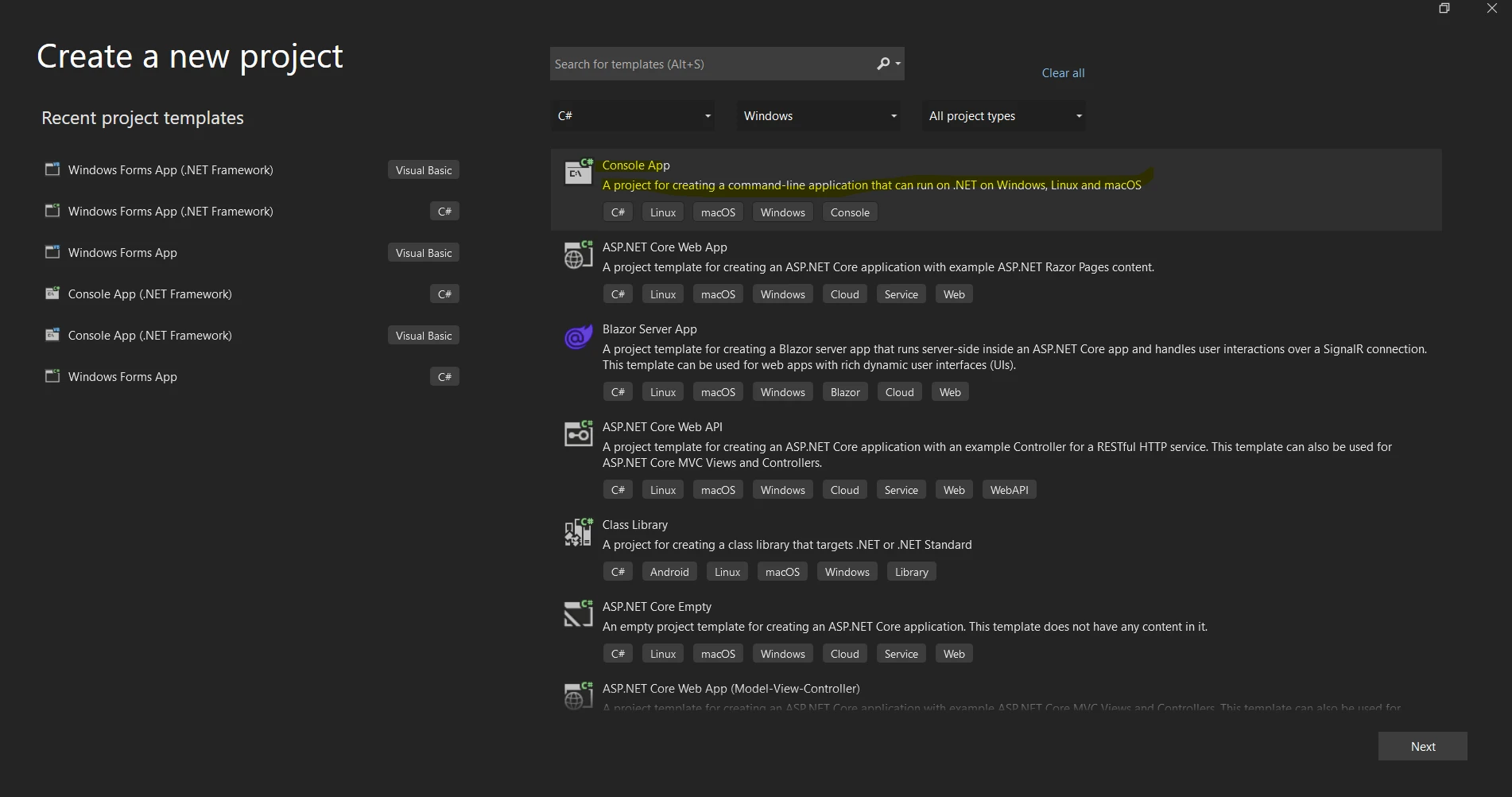
您可以從下面的项目模板列表中選擇"控制台應用"或"控制台應用(.NET Core)"模板。
在"名稱"字段中為您的项目提供一個名稱。
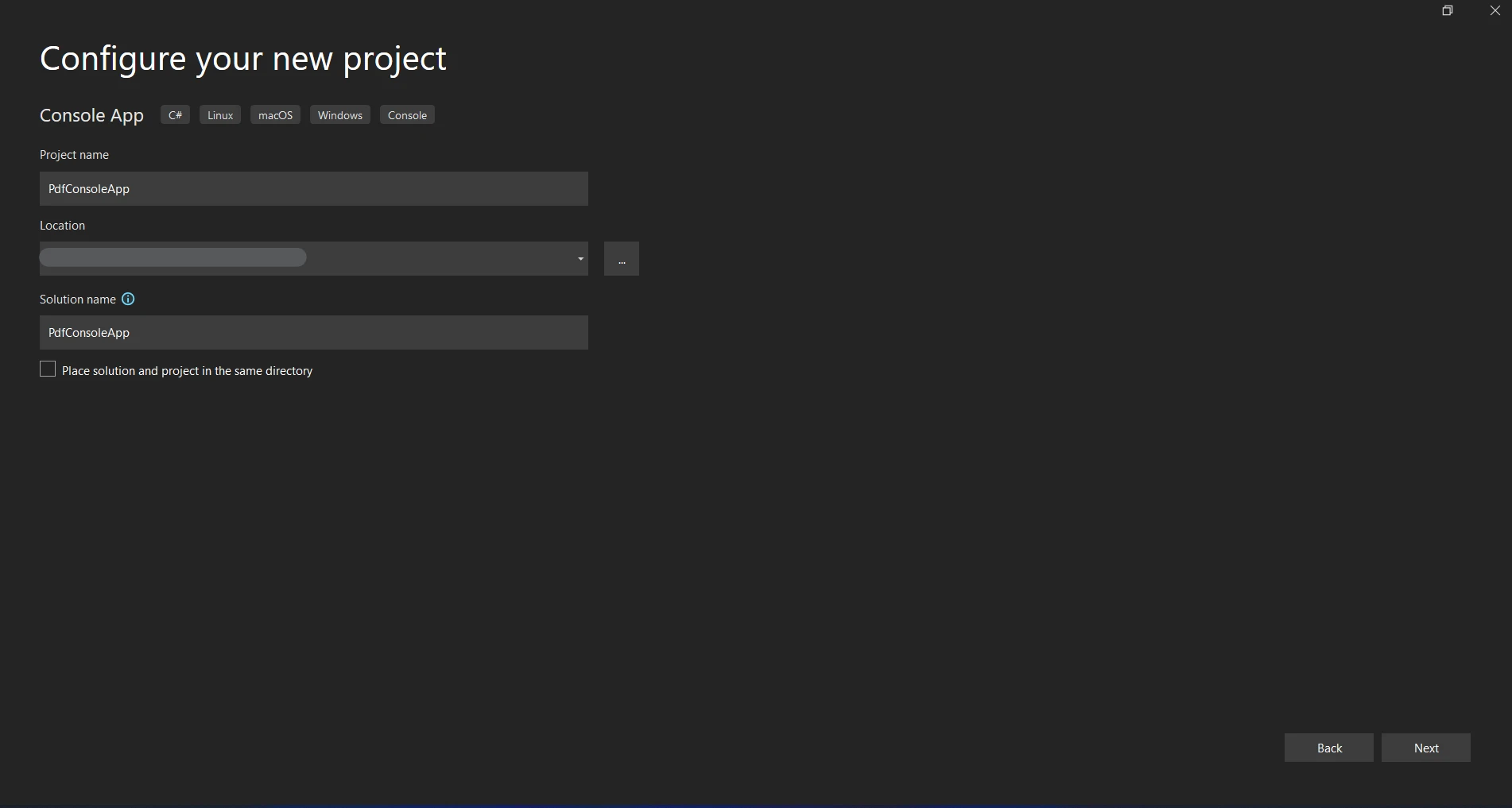
為專案選擇一個儲存位置。
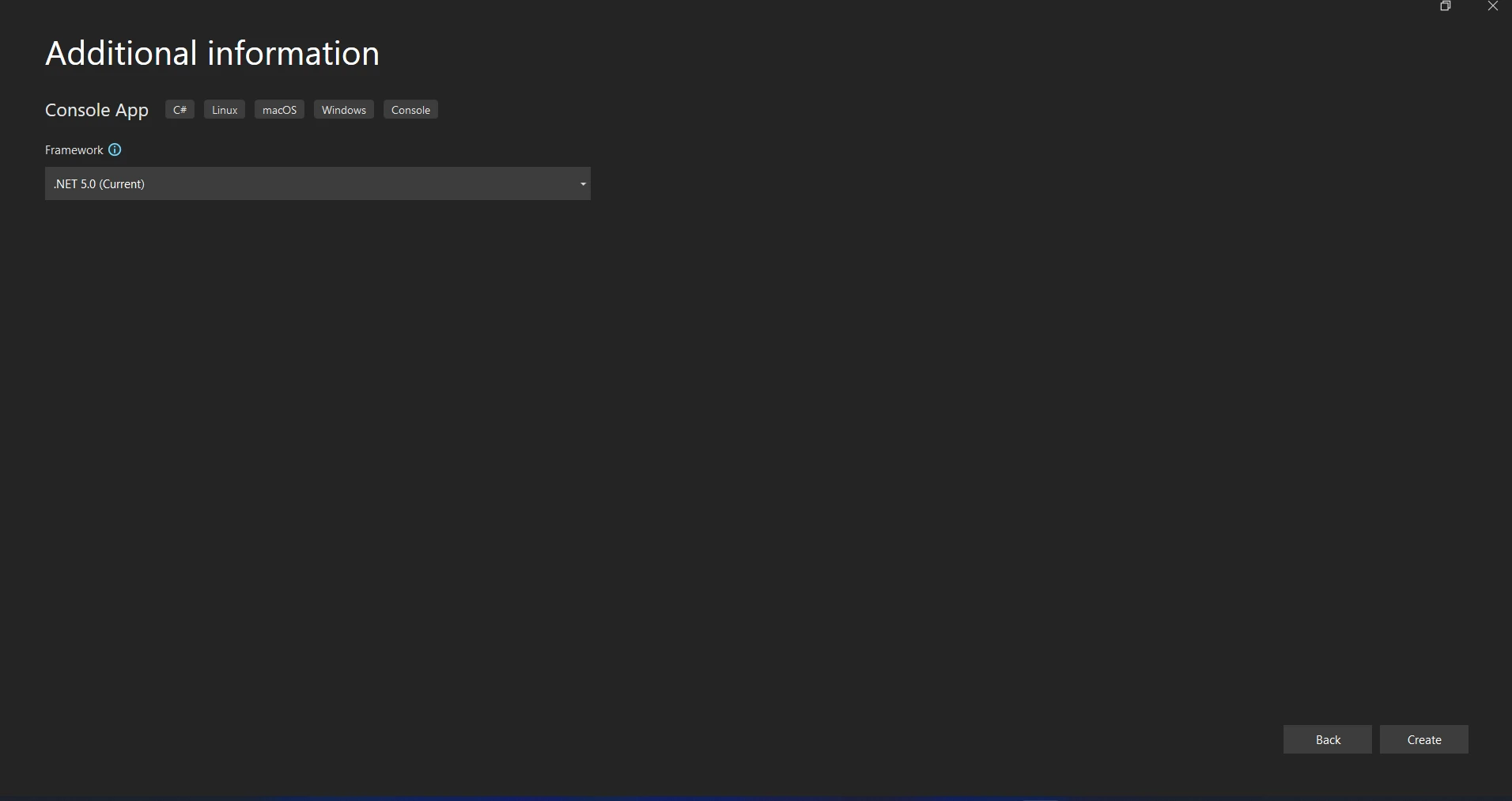
點擊"建立"將開始控制台應用項目。
導航至工具 > NuGet套件管理器 > 套件管理器控制台以開啟NuGet套件管理器控制台。
運行以下命令來安裝NServiceBus NuGet包。
NServiceBus需要傳輸來接收和發送消息。 我們將堅持使用Learning Transport,因為它易於使用且非常適合測試和開發。
通過執行來安裝Learning Transport的包。
在您的Program.cs文件中設置NServiceBus端點配置:
using NServiceBus;
using System;
using System.Threading.Tasks;
using Messages;

class Program
{
    static async Task Main()
    {
        Console.Title = "Sender";
        var endpointConfiguration = new EndpointConfiguration("SenderEndpoint");

        // Use RabbitMQ Transport
        var transport = endpointConfiguration.UseTransport<RabbitMQTransport>();
        transport.ConnectionString("host=localhost");

        // Set up error queue
        endpointConfiguration.SendFailedMessagesTo("error");

        // Set up audit queue
        endpointConfiguration.AuditProcessedMessagesTo("audit");

        // Start the endpoint
        var endpointInstance = await Endpoint.Start(endpointConfiguration).ConfigureAwait(false);
        Console.WriteLine("Press Enter to send a message...");
        Console.ReadLine();

        // Send a message
        var message = new MyMessage
        {
            Content = "Hello, NServiceBus with RabbitMQ!"
        };
        await endpointInstance.Send("ReceiverEndpoint", message).ConfigureAwait(false);
        Console.WriteLine("Message sent. Press Enter to exit...");
        Console.ReadLine();

        // Stop the endpoint
        await endpointInstance.Stop().ConfigureAwait(false);
    }
}Imports NServiceBus
Imports System
Imports System.Threading.Tasks
Imports Messages
Class Program
Shared Async Function Main() As Task
Console.Title = "Sender"
Dim endpointConfiguration = New EndpointConfiguration("SenderEndpoint")
' Use RabbitMQ Transport
Dim transport = endpointConfiguration.UseTransport(Of RabbitMQTransport)()
transport.ConnectionString("host=localhost")
' Set up error queue
endpointConfiguration.SendFailedMessagesTo("error")
' Set up audit queue
endpointConfiguration.AuditProcessedMessagesTo("audit")
' Start the endpoint
Dim endpointInstance = Await Endpoint.Start(endpointConfiguration).ConfigureAwait(False)
Console.WriteLine("Press Enter to send a message...")
Console.ReadLine()
' Send a message
Dim message = New MyMessage With {
.Content = "Hello, NServiceBus with RabbitMQ!"
}
Await endpointInstance.Send("ReceiverEndpoint", message).ConfigureAwait(False)
Console.WriteLine("Message sent. Press Enter to exit...")
Console.ReadLine()
' Stop the endpoint
Await endpointInstance.Stop().ConfigureAwait(False)
End Function
End Class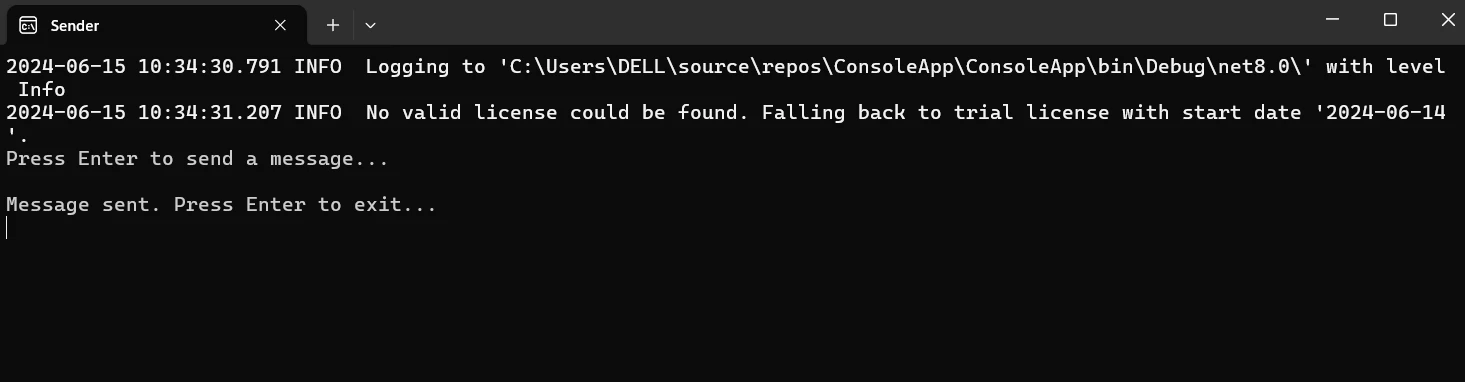
新增一個類來表示消息。
public class MyMessage : IMessage
{
    public string Content { get; set; }
}Public Class MyMessage
Implements IMessage
Public Property Content As String
End Class新增一個類來處理消息。
using NServiceBus;
using System.Threading.Tasks;

public class MyMessageHandler : IHandleMessages<MyMessage>
{
    public Task Handle(MyMessage message, IMessageHandlerContext context)
    {
        Console.WriteLine($"Received message: {message.Content}");
        return Task.CompletedTask;
    }
}Imports NServiceBus
Imports System.Threading.Tasks
Public Class MyMessageHandler
Implements IHandleMessages(Of MyMessage)
Public Function Handle(ByVal message As MyMessage, ByVal context As IMessageHandlerContext) As Task
Console.WriteLine($"Received message: {message.Content}")
Return Task.CompletedTask
End Function
End Class從端點發送消息。 利用處理程式調整您的主要方式來傳輸消息。
using NServiceBus;
using System;
using System.Threading.Tasks;

class Program
{
    static async Task Main()
    {
        Console.Title = "Receiver";
        var endpointConfiguration = new EndpointConfiguration("ReceiverEndpoint");

        // Serialization configuration
        endpointConfiguration.UseSerialization<NewtonsoftJsonSerializer>();

        // Use RabbitMQ Transport
        var transport = endpointConfiguration.UseTransport<RabbitMQTransport>();
        transport.UseConventionalRoutingTopology(QueueType.Quorum);
        transport.ConnectionString("host=localhost");

        // Set up error queue
        endpointConfiguration.SendFailedMessagesTo("error");

        // Set up audit queue
        endpointConfiguration.AuditProcessedMessagesTo("audit");
        endpointConfiguration.EnableInstallers();

        // Start the endpoint
        var endpointInstance = await Endpoint.Start(endpointConfiguration).ConfigureAwait(false);
        Console.WriteLine("Press Enter to exit...");
        Console.ReadLine();

        // Stop the endpoint
        await endpointInstance.Stop().ConfigureAwait(false);
    }
}Imports NServiceBus
Imports System
Imports System.Threading.Tasks
Module Program
Sub Main()
MainAsync().GetAwaiter().GetResult()
End Sub
Private Async Function MainAsync() As Task
Console.Title = "Receiver"
Dim endpointConfiguration = New EndpointConfiguration("ReceiverEndpoint")
' Serialization configuration
endpointConfiguration.UseSerialization(Of NewtonsoftJsonSerializer)()
' Use RabbitMQ Transport
Dim transport = endpointConfiguration.UseTransport(Of RabbitMQTransport)()
transport.UseConventionalRoutingTopology(QueueType.Quorum)
transport.ConnectionString("host=localhost")
' Set up error queue
endpointConfiguration.SendFailedMessagesTo("error")
' Set up audit queue
endpointConfiguration.AuditProcessedMessagesTo("audit")
endpointConfiguration.EnableInstallers()
' Start the endpoint
Dim endpointInstance = Await Endpoint.Start(endpointConfiguration).ConfigureAwait(False)
Console.WriteLine("Press Enter to exit...")
Console.ReadLine()
' Stop the endpoint
Await endpointInstance.Stop().ConfigureAwait(False)
End Function
End Module
啟動應用程式並構建專案。 控制台應顯示資訊"已接收消息:Hello, NServiceBus!"
在C#專案中,將NServiceBus與RabbitMQ和IronPDF整合,涉及配置NServiceBus與RabbitMQ之間的消息,以及使用IronPDF建立PDF。 這裡有一個詳細的指南讓您開始:
IronPDF是一個專為建立、閱讀、編輯和轉換PDF文件而設計的.NET函式庫。 通過它,程式設計師可以用強大的直觀工具,在C#或VB.NET應用程式中處理PDF文件。 IronPDF的特徵和功能如下所述:
從HTML生成PDF
將JavaScript、HTML和CSS轉換為PDF。 支持媒體查詢和響應式設計這兩種現代網頁標準。 可用於使用HTML和CSS動態樣式化PDF文件、發票和報告。
PDF編輯
向現有的PDF中新增文字、圖片和其他材料。 從PDF文件中提取文字和圖片。 將多個PDF合併為一個文件。將PDF文件拆分為多個文件。 包含註釋、頁尾、頁首和水印。
PDF轉換
將Word、Excel、圖像和其他文件格式轉換為PDF。 PDF轉換為影像(PNG、JPEG等)。
性能和可靠性
高性能和高可靠性是生產環境中的設計目標。 高效地管理大型文件。
通過打開NuGet套件管理器控制台來安裝IronPDF。
Messages是一個共享專案(類庫),發送者和接收者將共同使用。 在Messages專案中定義消息類。 建立一個名為Messages的新類庫專案,並將其新增到解決方案中。
定義消息:
在Messages專案內建立一個新類名為GeneratePdfMessage.cs:
using NServiceBus;

public class GeneratePdfMessage : IMessage
{
    public string Content { get; set; }
    public string OutputPath { get; set; }
}Imports NServiceBus
Public Class GeneratePdfMessage
Implements IMessage
Public Property Content() As String
Public Property OutputPath() As String
End Class在發送者和接收者專案中均加入對Messages專案的參考。
在發送者專案中設置NServiceBus端點以使用RabbitMQ進行消息傳遞。
using NServiceBus;
using System;
using System.Threading.Tasks;
using Messages;

class Program
{
    static async Task Main()
    {
        Console.Title = "Sender";
        var endpointConfiguration = new EndpointConfiguration("SenderEndpoint");

        // Use RabbitMQ Transport
        var transport = endpointConfiguration.UseTransport<RabbitMQTransport>();
        transport.ConnectionString("host=localhost");

        // Set up error queue
        endpointConfiguration.SendFailedMessagesTo("error");

        // Set up audit queue
        endpointConfiguration.AuditProcessedMessagesTo("audit");
        endpointConfiguration.EnableInstallers();

        // Start the endpoint
        var endpointInstance = await Endpoint.Start(endpointConfiguration).ConfigureAwait(false);
        Console.WriteLine("Press Enter to send a message...");
        Console.ReadLine();

        // Send a message
        var message = new GeneratePdfMessage
        {
            Content = "<h1>Hello, NServiceBus with RabbitMQ and IronPDF!</h1>",
            OutputPath = "output.pdf"
        };
        await endpointInstance.Send("ReceiverEndpoint", message).ConfigureAwait(false);
        Console.WriteLine("Message sent. Press Enter to exit...");
        Console.ReadLine();

        // Stop the endpoint
        await endpointInstance.Stop().ConfigureAwait(false);
    }
}Imports NServiceBus
Imports System
Imports System.Threading.Tasks
Imports Messages
Friend Class Program
Shared Async Function Main() As Task
Console.Title = "Sender"
Dim endpointConfiguration As New EndpointConfiguration("SenderEndpoint")
' Use RabbitMQ Transport
Dim transport = endpointConfiguration.UseTransport(Of RabbitMQTransport)()
transport.ConnectionString("host=localhost")
' Set up error queue
endpointConfiguration.SendFailedMessagesTo("error")
' Set up audit queue
endpointConfiguration.AuditProcessedMessagesTo("audit")
endpointConfiguration.EnableInstallers()
' Start the endpoint
Dim endpointInstance = Await Endpoint.Start(endpointConfiguration).ConfigureAwait(False)
Console.WriteLine("Press Enter to send a message...")
Console.ReadLine()
' Send a message
Dim message = New GeneratePdfMessage With {
.Content = "<h1>Hello, NServiceBus with RabbitMQ and IronPDF!</h1>",
.OutputPath = "output.pdf"
}
Await endpointInstance.Send("ReceiverEndpoint", message).ConfigureAwait(False)
Console.WriteLine("Message sent. Press Enter to exit...")
Console.ReadLine()
' Stop the endpoint
Await endpointInstance.Stop().ConfigureAwait(False)
End Function
End Class**端點配置:**通過調用new EndpointConfiguration("SenderEndpoint")來初始化端點,端點名稱為"SenderEndpoint"。
endpointConfiguration是傳輸配置。 通過連接到本地RabbitMQ實例,方法UseTransport()將NServiceBus設置為使用RabbitMQ作為傳輸機制。
使用AuditProcessedMessagesTo("audit")分別配置發送失敗消息和審計處理消息的位置。
消息已發送: endpointInstance.Send("ReceiverEndpoint", message) 發送一個GeneratePdfMessage到"ReceiverEndpoint"。
在接收者專案中設置NServiceBus端點,通過RabbitMQ接收消息並使用IronPDF生成PDF。
using NServiceBus;
using System;
using System.Threading.Tasks;

class Program
{
    static async Task Main()
    {
        Console.Title = "Receiver";
        var endpointConfiguration = new EndpointConfiguration("ReceiverEndpoint");

        // Use RabbitMQ Transport
        var transport = endpointConfiguration.UseTransport<RabbitMQTransport>();
        transport.ConnectionString("host=localhost");

        // Set up error queue
        endpointConfiguration.SendFailedMessagesTo("error");

        // Set up audit queue
        endpointConfiguration.AuditProcessedMessagesTo("audit");

        // Start the endpoint
        var endpointInstance = await Endpoint.Start(endpointConfiguration).ConfigureAwait(false);
        Console.WriteLine("Press Enter to exit...");
        Console.ReadLine();

        // Stop the endpoint
        await endpointInstance.Stop().ConfigureAwait(false);
    }
}Imports NServiceBus
Imports System
Imports System.Threading.Tasks
Module Program
Async Function Main() As Task
Console.Title = "Receiver"
Dim endpointConfiguration = New EndpointConfiguration("ReceiverEndpoint")
' Use RabbitMQ Transport
Dim transport = endpointConfiguration.UseTransport(Of RabbitMQTransport)()
transport.ConnectionString("host=localhost")
' Set up error queue
endpointConfiguration.SendFailedMessagesTo("error")
' Set up audit queue
endpointConfiguration.AuditProcessedMessagesTo("audit")
' Start the endpoint
Dim endpointInstance = Await Endpoint.Start(endpointConfiguration).ConfigureAwait(False)
Console.WriteLine("Press Enter to exit...")
Console.ReadLine()
' Stop the endpoint
Await endpointInstance.Stop().ConfigureAwait(False)
End Function
End Module這個設置與"ReceiverEndpoint"接收端點的發送者配置類似。
在接收者專案中建立一個新類名為GeneratePdfMessageHandler.cs。
using NServiceBus;
using System;
using System.Threading.Tasks;
using Messages;
using IronPdf;

public class GeneratePdfMessageHandler : IHandleMessages<GeneratePdfMessage>
{
    public Task Handle(GeneratePdfMessage message, IMessageHandlerContext context)
    {
        Console.WriteLine($"Received message to generate PDF with content: {message.Content}");

        // Generate PDF
        var renderer = new HtmlToPdf();
        var pdf = renderer.RenderHtmlAsPdf(message.Content);
        pdf.SaveAs(message.OutputPath);
        Console.WriteLine($"PDF generated and saved to: {message.OutputPath}");

        return Task.CompletedTask;
    }
}Imports NServiceBus
Imports System
Imports System.Threading.Tasks
Imports Messages
Imports IronPdf
Public Class GeneratePdfMessageHandler
Implements IHandleMessages(Of GeneratePdfMessage)
Public Function Handle(message As GeneratePdfMessage, context As IMessageHandlerContext) As Task Implements IHandleMessages(Of GeneratePdfMessage).Handle
Console.WriteLine($"Received message to generate PDF with content: {message.Content}")
' Generate PDF
Dim renderer As New HtmlToPdf()
Dim pdf = renderer.RenderHtmlAsPdf(message.Content)
pdf.SaveAs(message.OutputPath)
Console.WriteLine($"PDF generated and saved to: {message.OutputPath}")
Return Task.CompletedTask
End Function
End ClassGeneratePdfMessageHandler 使用 IHandleMessages 介面來處理 GeneratePdfMessage 型別的消息。
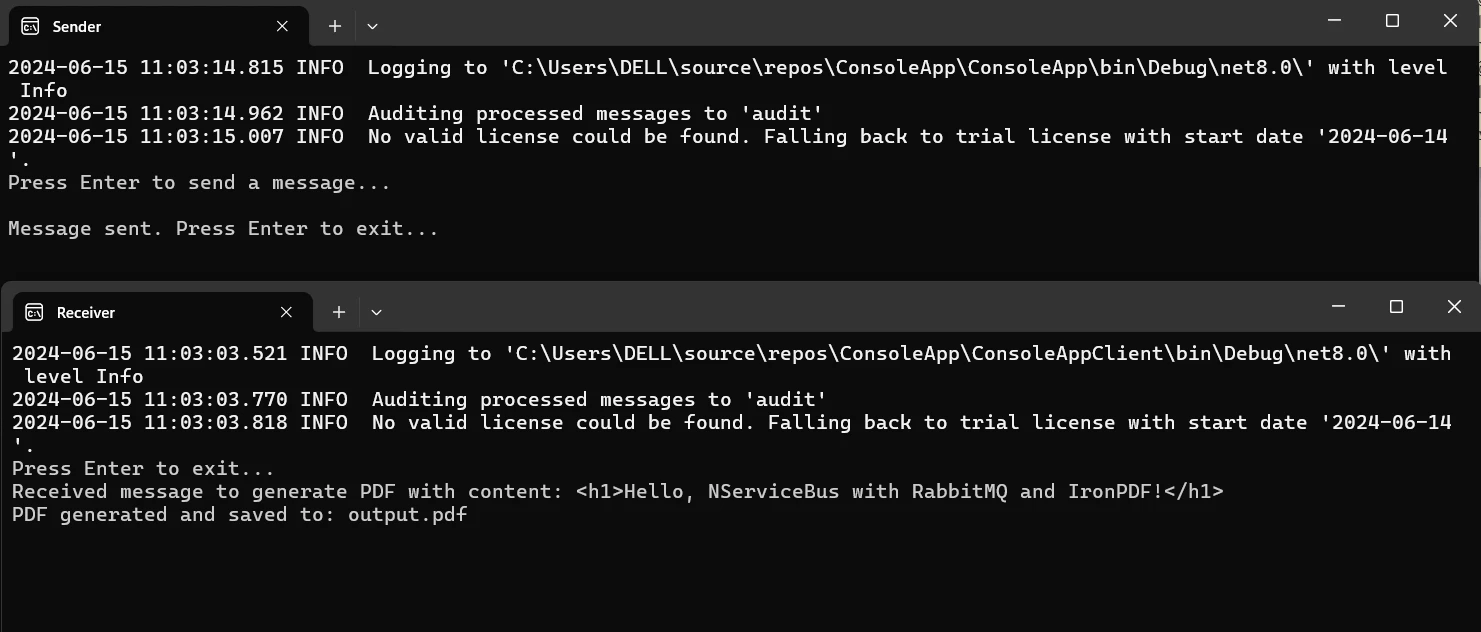
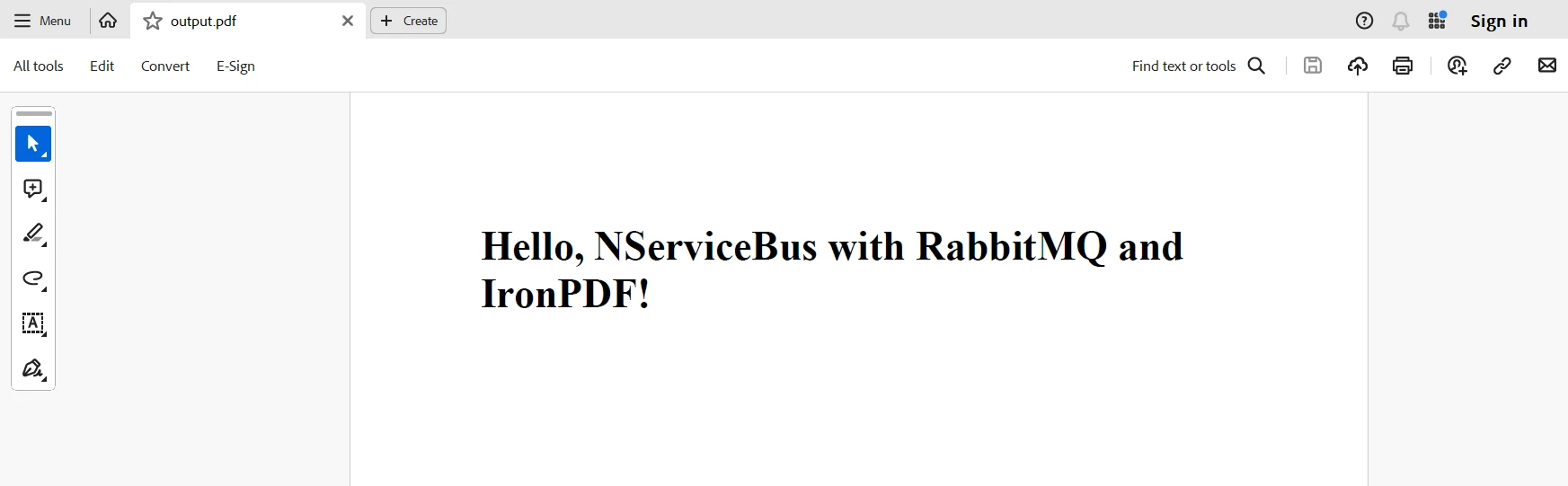
**處理方法:**接收到消息後,Handle 函式使用IronPDF建立PDF。 消息中的HTML內容由HtmlToPdf 渲染器程式碼轉換為PDF,然後將其保存到指定的輸出路徑。
NServiceBus可以與RabbitMQ和IronPDF在C#中整合,提供一個可擴展且穩定的解決方案,用於需要動態和可靠生成PDF的分佈式系統。 這一組合利用了NServiceBus的消息處理能力,RabbitMQ作為消息代理的可靠性和適應性,以及IronPDF強大的PDF編輯工具。 由此產生的架構確保了服務之間的解耦,允許自主演進和可擴展性。
RabbitMQ還能確保在網路或應用故障的情況下消息可以傳遞。 NServiceBus使消息路由和處理變得更加簡單,IronPDF則使將HTML文字轉換為高品質PDF文件成為可能。 除了提高系統的可維護性和可靠性之外,這一整合還提供了一個靈活的框架,用於開發複雜的大型應用程式。
最後,通過將IronPDF和Iron Software加入到您的.NET編程工具包中,您可以有效地處理條形碼、生成PDF、執行OCR,並與Excel連接。 IronPDF的授權頁面,從$999開始,無縫融合其功能以及Iron Software官方網站靈活套裝的性能、相容性和易用性,提供額外的Web應用程式和能力以及更高效的開發。
如果有定制的授權選項,適合專案的具體需求,開發人員可以自信地選擇最佳模式。 這些好處使開發人員能夠有效和透明地處理一系列困難。

Jacob Mellor是Iron Software的首席技術官,一位在C# PDF技術上開創先河的遠見工程師。作為Iron Software核心程式碼庫的原開發者,他從創立以來就一直在塑造公司的產品架構,與首席執行官Cameron Rimington一起將公司轉變為服務於NASA、特斯拉和全球政府公司的50多名人員的公司。



IronPDF 是 IRONSUITE 的一部分
10 款適用於辦公室文件的 .NET API 產品

當您需要您的PDF看起來像HTML一樣快速。












