using IronPdf;

// Disable local disk access or cross-origin requests
Installation.EnableWebSecurity = true;

// Instantiate Renderer
var renderer = new ChromePdfRenderer();

// Create a PDF from a HTML string using C#
var pdf = renderer.RenderHtmlAsPdf("<h1>Hello World</h1>");

// Export to a file or Stream
pdf.SaveAs("output.pdf");

// Advanced Example with HTML Assets
// Load external html assets: Images, CSS and JavaScript.
// An optional BasePath 'C:\site\assets\' is set as the file location to load assets from
var myAdvancedPdf = renderer.RenderHtmlAsPdf("<img src='icons/iron.png'>", @"C:\site\assets\");
myAdvancedPdf.SaveAs("html-with-assets.pdf");
using IronPdf;// Disable local disk access or cross-origin requestsInstallation.EnableWebSecurity = true;// Instantiate Renderervar renderer = new ChromePdfRenderer();// Create a PDF from a HTML string using C#var pdf = renderer.RenderHtmlAsPdf("<h1>Hello World</h1>");// Export to a file or Streampdf.SaveAs("output.pdf");// Advanced Example with HTML Assets// Load external html assets: Images, CSS and JavaScript.// An optional BasePath 'C:\site\assets\' is set as the file location to load assets fromvar myAdvancedPdf = renderer.RenderHtmlAsPdf("<img src='icons/iron.png'>", @"C:\site\assets\");myAdvancedPdf.SaveAs("html-with-assets.pdf");
PM >Install-Package IronPdf
Install-Package IronPdf
GELIŞTIRICI GÜNCELLEMELERI
NServiceBus C# (Geliştiriciler İçin Nasıl Çalışır)
NServiceBus, dağıtık sistem geliştirmesini kolaylaştıran, .NET Framework için tasarlanmış güçlü ve uyarlanabilir bir hizmet otobüsüdür. Çok sayıda mikro hizmet ve uygulama arasında güvenilir mesaj işleme ve teslimatı sağlayan güçlü mesajlaşma modelleri sunar. NServiceBus, geliştiricilerin dağıtık sistemler oluşturmanın karmaşıklıkları yerine iş mantığına odaklanmasını sağlayarak, temel mesajlaşma mimarisini soyutlar.
Buna karşılık, IronPDF, PDF dosyaları oluşturmak, görüntülemek ve değiştirmek için popüler bir .NET kütüphanesidir. Çeşitli kaynaklardan, örneğin ASPX dosyalarından ve HTML'den, PDF oluşturmanın kolay ve çok verimli olduğu iyi bilinmektedir.
Geliştiriciler, NServiceBus ve IronPDF'yi birleştirerek, PDF belgeleri oluşturma ve yönetme yeteneğine sahip güvenilir, ölçeklenebilir ve sürdürülebilir yazılım sistemleri oluşturabilirler.
Bu makalede, basit bir C# NServiceBus projesinin nasıl kurulacağını ve IronPDF ile nasıl entegre edileceğini inceleyerek, dağıtık bir uygulama mimarisinde PDF belgelerini yönetmek ve üretmek için optimize edilmiş bir iş akışı oluşturabileceksiniz. Bu tanıtım eğiticisini okuduktan sonra, bu iki etkili teknolojinin dağıtık bir ortamda PDF ile ilgili görevlerinizi nasıl basitleştirebileceğini tam olarak bilmelisiniz.
### What is [NServiceBus](https://docs.particular.net/) C#?
NServiceBus, dağıtık sistemler ve hizmet odaklı .NET mimarileri oluşturmayı kolaylaştıran güçlü ve esnek bir çerçevedir. NServiceBus'u kullanarak, çeşitli mesaj türlerini kolayca yönetebilir ve güvenilir iletişim sağlayabilirsiniz. Bu, özellikle sorunsuz mesaj yönlendirme ve işlemenin hayati önem taşıdığı bir web uygulaması ve benzeri mimarilerde çok önemlidir. NServiceBus'ın mesaj işleyicileri, mesaj alımıyla etkili bir şekilde ilgilenir ve her mantıksal bileşenin sorunsuz bir şekilde etkileşime girmesini sağlar. NServiceBus'ın önemli özellikleri şunlardır:
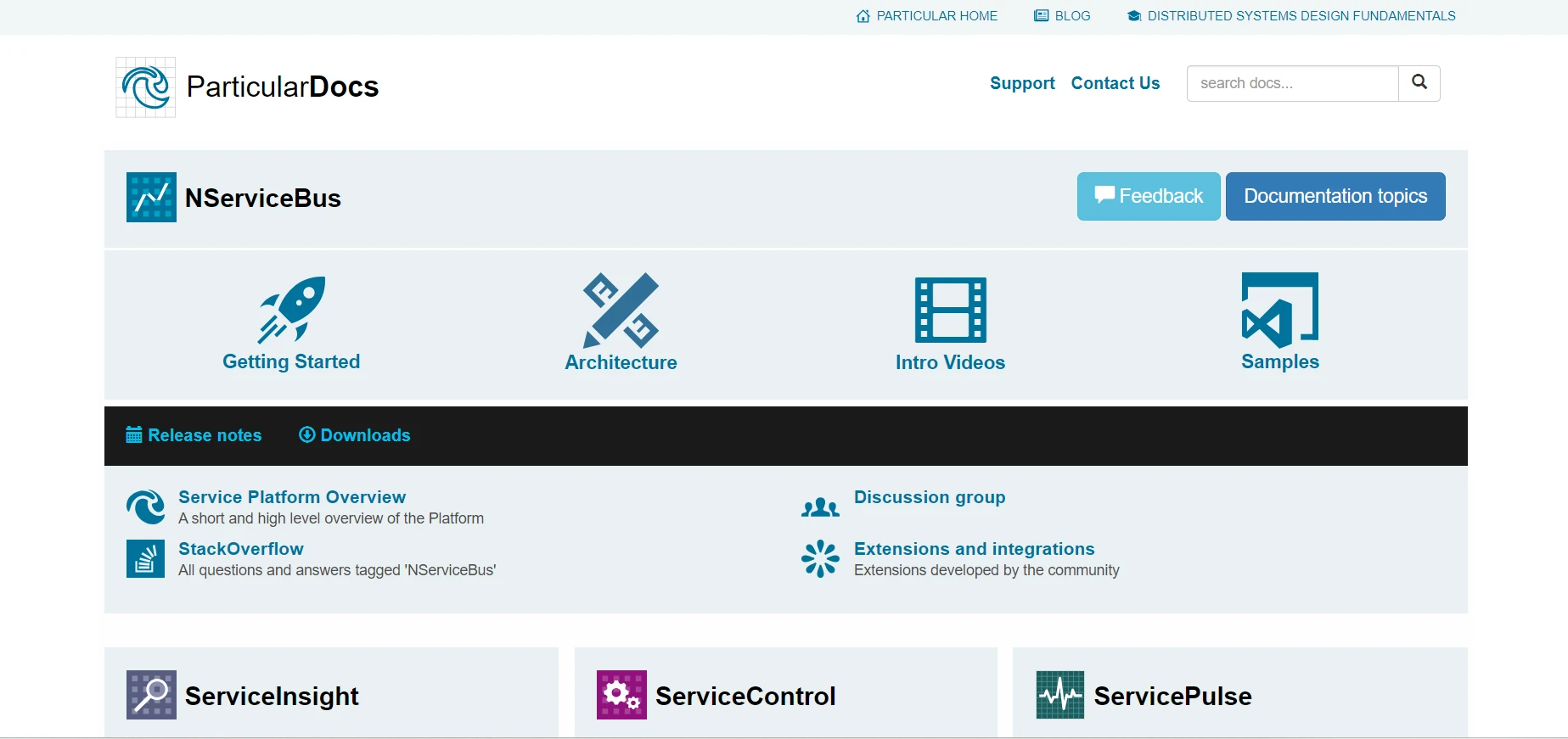
### NServiceBus'ın Özellikleri
#### Mesaj Tabanlı İletişim
NServiceBus, bir sistem içindeki farklı hizmetler veya bileşenler arasında mesaj tabanlı iletişimi teşvik eder. Bileşenleri ayırarak, bu yöntem daha kolay ölçeklenebilir ve yönetilebilir tasarımlar oluşturur.
#### Güvenilir Mesajlaşma
Yeniden denemeleri, başarısız mesajlar için kuyruğu ve diğer hata tolerans tekniklerini otomatik olarak yöneten sistem, güvenilir mesaj teslimatını garanti eder. Ağ kesintileri ve başarısızlıkların sık karşılaşıldığı dağıtık sistemlerde bu güvenilirlik çok önemlidir.
#### Yayınlama/Abone Olma Modeli
NServiceBus, hizmetlerin olayları yayınlamasına ve diğer hizmetlerin bu olaylara abone olmasına olanak tanıyan yayınlama/abone olma modelini destekler. Bu, bir bileşenindeki olaylara yapılan değişikliklerin diğer bileşenlerde tepki uyandırabileceği olay güdümlü mimarileri mümkün kılar.
#### Saga Yönetimi
NServiceBus, iç içe geçmiş süreçlerin yönetilmesini sağlayan entegre saga desteği sayesinde uzun süreli iş süreçlerini yönetmeyi sağlar. Saga'lar, hizmet platformunun durumu yönetmesine ve birden fazla hizmet arasında karmaşık işlemleri koordine etmesine olanak tanır.
#### Genişletilebilirlik ve Özelleştirme
Geliştiricilerin mesajların işleme, taşıma sürecini kişiselleştirmesine olanak tanıyan olağanüstü bir genişletilebilirlik seviyesi sunar. Uyarlanabilirliği sayesinde, çeşitli senaryolarda kullanılabilir.
#### Çeşitli Mesajlaşma Platformları ile Entegrasyon
MSMQ, RabbitMQ, Azure Service Bus, Amazon SQS ve diğer pek çok mesajlaşma sistemi, NServiceBus ile entegre edilebilir. Bu, geliştiricilerin gereksinimlerine en uygun iletişim altyapısı çözümünü seçmelerini sağlar.
### Create and configure NServiceBus in C#
NServiceBus'ı bir C# projesinde kullanmaya başlamadan önce geliştirme ortamınızı kurmalı, temel bir proje oluşturmalı ve temel bir mesajlaşma hizmeti ve senaryo inşa etmelisiniz. İşte sizi harekete geçirecek adım adım bir kılavuz.
## Yeni Bir Visual Studio Projesi Oluşturun
Visual Studio'da, bir konsol projesi oluşturma süreci basittir. Bir Konsol Uygulaması başlatmak için Visual Studio ortamında şu basit adımları kullanın:
Visual Studio'yu PC'nize yüklediğinizden emin olun.
#### Yeni Bir Proje Başlatın
Dosya'ya tıklayın, ardından Yeni'yi ve son olarak Proje'yi seçin.
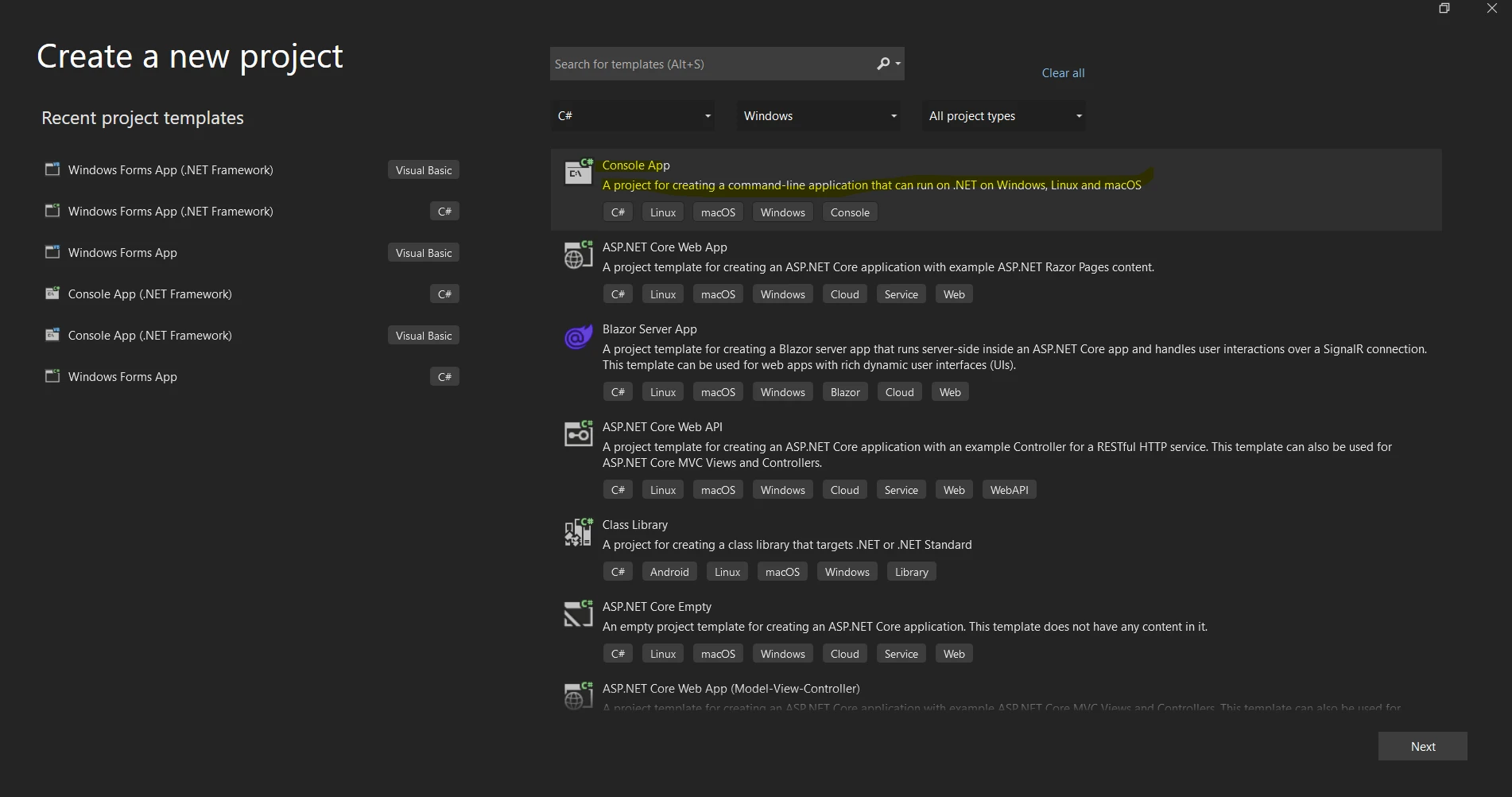
Aşağıdaki proje şablonu referans listesinden "Console App" veya "Console App (.NET Core)" şablonunu seçebilirsiniz.
Proje için "Ad" alanında bir ad sağlayın.
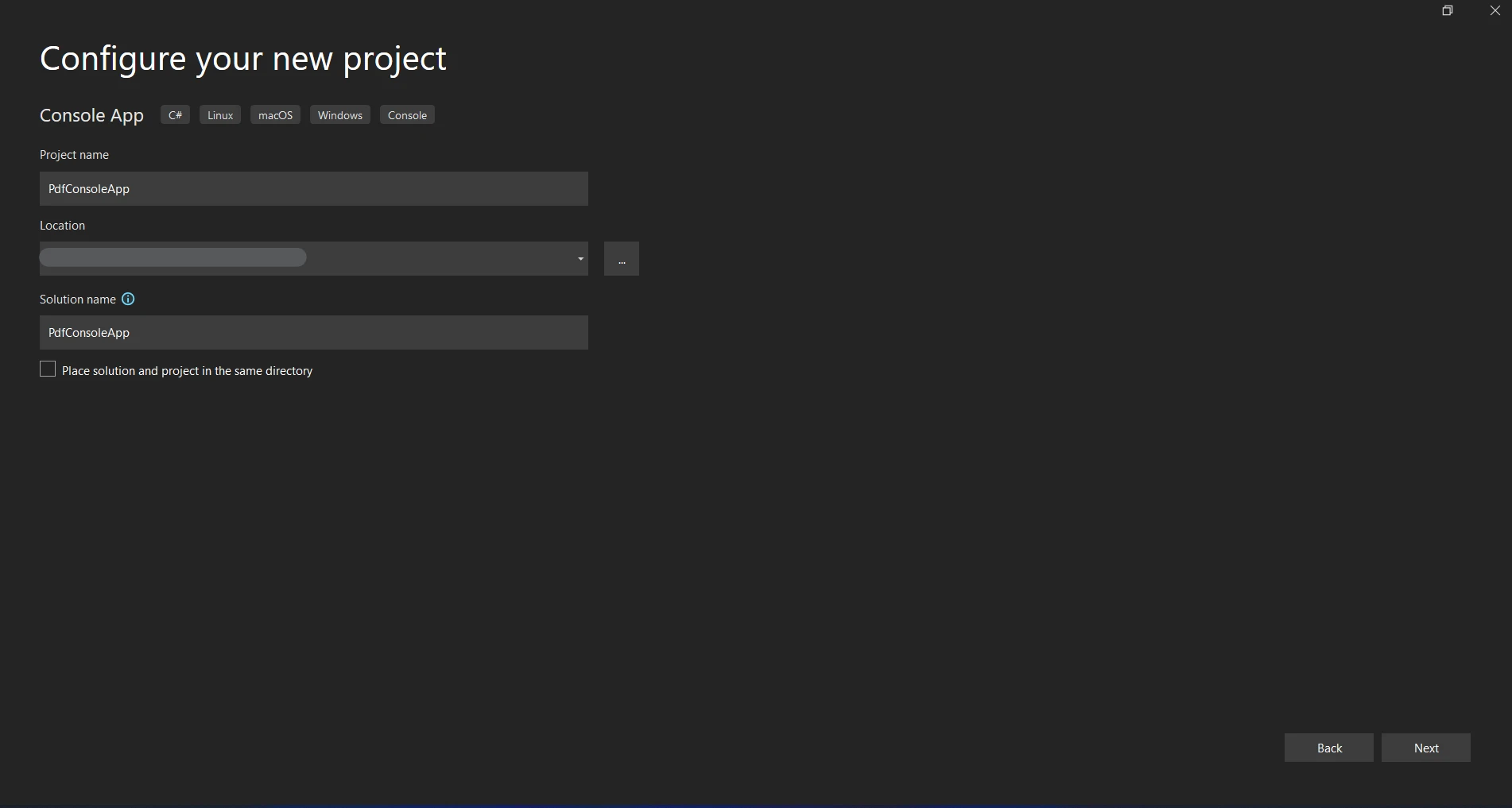
Proje için bir depolama konumu seçin.
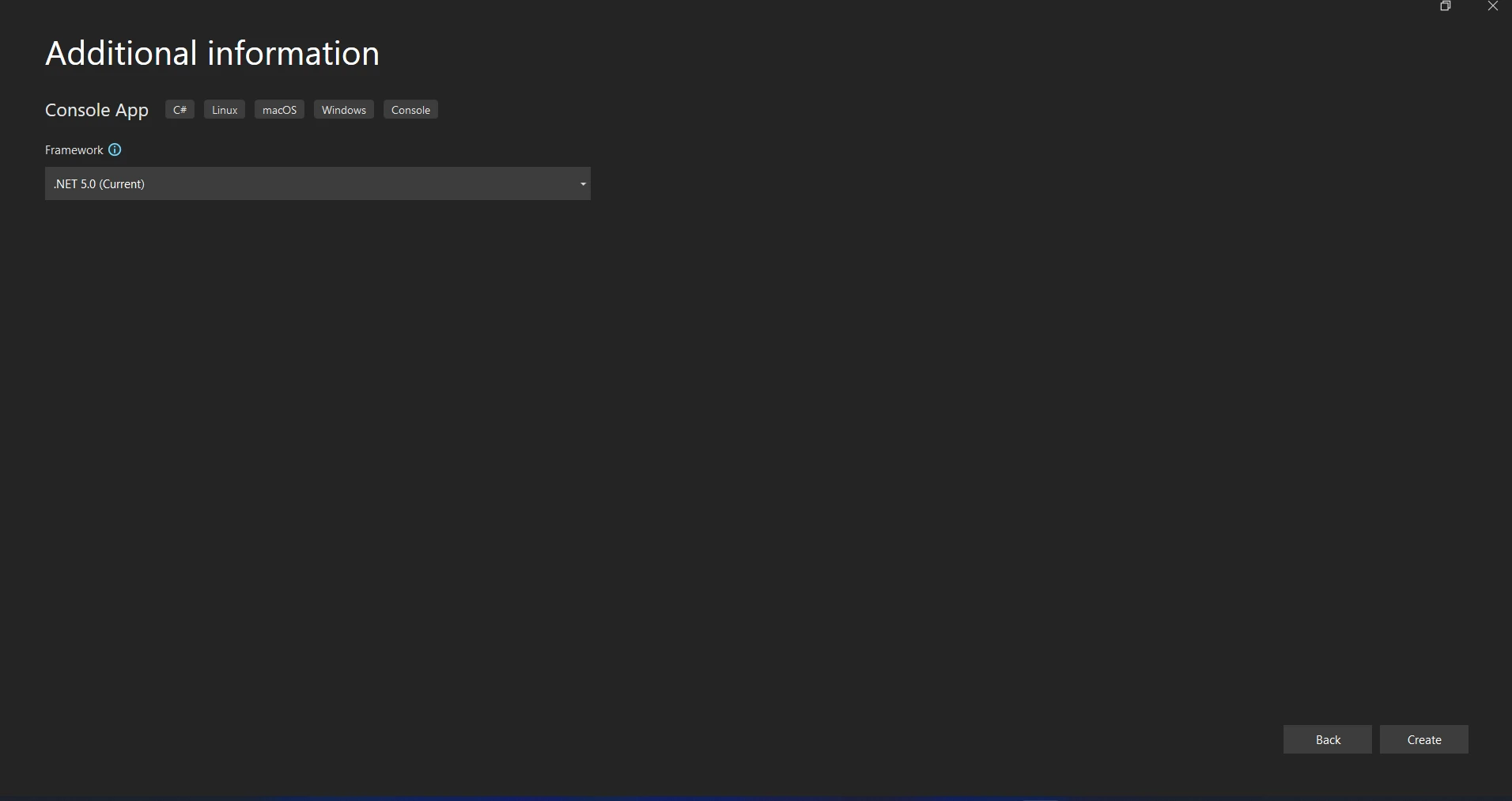
"Oluştur"a tıklamak, Konsol uygulama projesini başlatacak.
#### NServiceBus Paketlerini Yükleyin
NuGet Paketi Yöneticisi Konsolu'nu açmak için Araçlar > NuGet Paket Yöneticisi > Paket Yöneticisi Konsolu'na gidin.
NServiceBus NuGet paketini yüklemek için aşağıdaki komutu çalıştırın.
```shell
:InstallCmd Install-Package NServiceBus
```
#### Bir Taşıma Seçin
Mesajları almak ve göndermek için NServiceBus tarafından bir taşıma gereklidir. Test ve geliştirme için kullanımı kolay olduğu ve iyi çalıştığı için Öğrenme Taşıması'nı kullanmaya devam edeceğiz.
Öğrenme Taşıması için paketi yüklemek üzere çalıştırın.
```shell
:InstallCmd Install-Package NServiceBus.RabbitMQ
```
#### NServiceBus'ı Yapılandırın
#### Uç Noktayı Kurun
NServiceBus uç nokta yapılandırmasını `Program.cs` dosyanızda ayarlayın:
```csharp
using NServiceBus;
using System;
using System.Threading.Tasks;
using Messages;

class Program
{
    static async Task Main()
    {
        Console.Title = "Sender";
        var endpointConfiguration = new EndpointConfiguration("SenderEndpoint");

        // Use RabbitMQ Transport
        var transport = endpointConfiguration.UseTransport<RabbitMQTransport>();
        transport.ConnectionString("host=localhost");

        // Set up error queue
        endpointConfiguration.SendFailedMessagesTo("error");

        // Set up audit queue
        endpointConfiguration.AuditProcessedMessagesTo("audit");

        // Start the endpoint
        var endpointInstance = await Endpoint.Start(endpointConfiguration).ConfigureAwait(false);
        Console.WriteLine("Press Enter to send a message...");
        Console.ReadLine();

        // Send a message
        var message = new MyMessage
        {
            Content = "Hello, NServiceBus with RabbitMQ!"
        };
        await endpointInstance.Send("ReceiverEndpoint", message).ConfigureAwait(false);
        Console.WriteLine("Message sent. Press Enter to exit...");
        Console.ReadLine();

        // Stop the endpoint
        await endpointInstance.Stop().ConfigureAwait(false);
    }
}
```
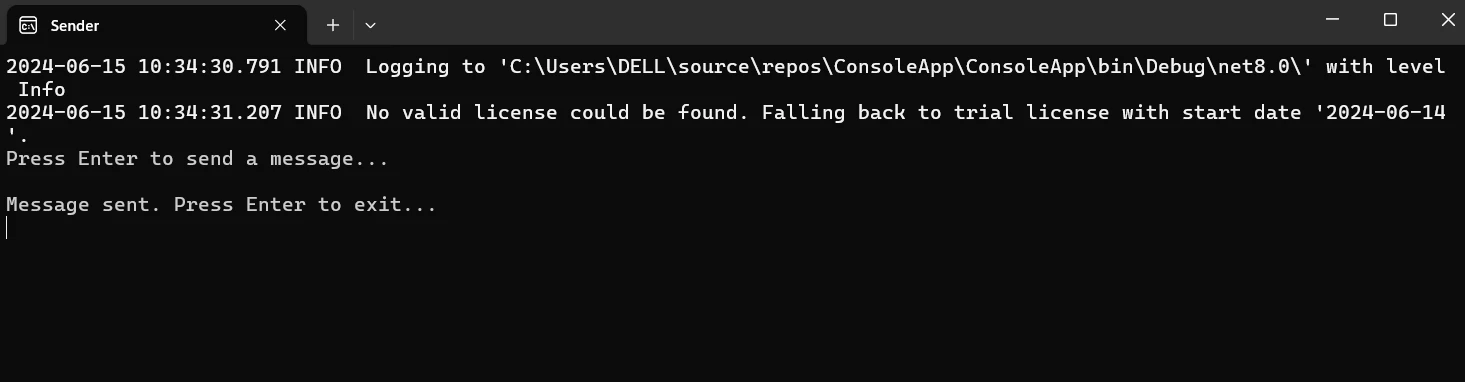
#### Bir Mesaj Oluşturun
Mesajı temsil etmek için yeni bir sınıf ekleyin.
```csharp
public class MyMessage : IMessage
{
public string Content { get; set; }
}
```
#### Bir Mesaj İşleyici Oluşturun
Mesajı işlemek için yeni bir sınıf ekleyin.
```csharp
using NServiceBus;
using System.Threading.Tasks;
public class MyMessageHandler : IHandleMessages<MyMessage>
{
public Task Handle(MyMessage message, IMessageHandlerContext context)
{
Console.WriteLine($"Received message: {message.Content}");
return Task.CompletedTask;
}
}
```
#### Mesaj Gönderme
Uç Noktadan bir Mesaj Gönderin. Handler'ın yardımıyla bir mesajı iletmek için birincil yolunuzu uyarlayın.
```csharp
using NServiceBus;
using System;
using System.Threading.Tasks;
class Program
{
static async Task Main()
{
Console.Title = "Receiver";
var endpointConfiguration = new EndpointConfiguration("ReceiverEndpoint");
// Serialization configuration
endpointConfiguration.UseSerialization<NewtonsoftJsonSerializer>();
// Use RabbitMQ Transport
var transport = endpointConfiguration.UseTransport<RabbitMQTransport>();
transport.UseConventionalRoutingTopology(QueueType.Quorum);
transport.ConnectionString("host=localhost");
// Set up error queue
endpointConfiguration.SendFailedMessagesTo("error");
// Set up audit queue
endpointConfiguration.AuditProcessedMessagesTo("audit");
endpointConfiguration.EnableInstallers();
// Start the endpoint
var endpointInstance = await Endpoint.Start(endpointConfiguration).ConfigureAwait(false);
Console.WriteLine("Press Enter to exit...");
Console.ReadLine();
// Stop the endpoint
await endpointInstance.Stop().ConfigureAwait(false);
}
}
```

Uygulamayı başlatın ve projeyi oluşturun. Konsol "Mesaj alındı: Merhaba, NServiceBus!" mesajını göstermelidir.
## Başlarken
Bir C# projesinde, NServiceBus'ı RabbitMQ ve IronPDF ile entegre etmek, NServiceBus ve RabbitMQ arasında mesajlar yapılandırmayı ve PDF oluşturmak için IronPDF kullanmayı içerir. İşte sizi harekete geçirecek ayrıntılı bir kılavuz:
### [IronPDF](/) nedir?
IronPDF, PDF dosyalarını oluşturmak, okumak, düzenlemek ve dönüştürmek için tasarlanmış bir .NET kütüphanesidir. Bununla, programcılar, C# veya VB.NET uygulamalarında, güçlü ve sezgisel bir araçla PDF dosyalarıyla çalışabilirler. IronPDF'nin özellikleri ve yetenekleri aşağıda tam olarak açıklanmıştır:
### IronPDF Özellikleri
**HTML'den PDF Üretimi**
JavaScript, HTML, ve CSS'i PDF'e dönüştür. Medya sorguları ve duyarlı tasarım gibi modern web standartlarını destekler. HTML ve CSS kullanarak dinamik olarak biçimlendirilmiş PDF belgeleri, faturalar ve raporlar üretmek için yararlıdır.
**PDF Düzenleme**
Zaten var olan PDF'lere metin, resim ve diğer materyaller ekleyin. PDF dosyalarından metin ve resimler çıkarın. Bir dosyada birden fazla PDF birleştirin. PDF dosyalarını birkaç belgeye bölün. Açıklamalar, altbilgiler, üstbilgiler ve filigranlar ekleyin.
**PDF Dönüşümü**
Word, Excel, resim ve diğer dosya formatlarını PDF'ye dönüştürün. PDF'den resme dönüştürme (PNG, JPEG, vb.).
**Performans ve Güvenilirlik**
Üretim ortamlarında yüksek performans ve güvenilirlik tasarım hedefleridir. Büyük belgeleri verimli bir şekilde yönetir.
#### IronPDF'in Kurulumu
NuGet Paket Yöneticisi Konsolu'nu açarak IronPDF'yi yükleyin.
```shell
:ProductInstall
```
### Mesaj ile Gönderici Yapılandırın
Mesajlar, hem göndericinin hem de alıcının kullanacağı ortak bir proje (sınıf kütüphanesi) niteliğindedir. Mesajlar projesinde mesaj sınıfını tanımlayın. Messages adlı yeni bir Class Library projesi oluşturun ve çözümünüze ekleyin.
**Mesajı Tanımlayın:**
Messages projesi içinde, `GeneratePdfMessage.cs` adında yeni bir sınıf oluşturun:
```csharp
using NServiceBus;
public class GeneratePdfMessage : IMessage
{
public string Content { get; set; }
public string OutputPath { get; set; }
}
```
Hem Gönderici hem de Alıcı projelerinde, Mesajlar projesine bir referans ekleyin.
Gönderici projesinde, mesaj teslimi için RabbitMQ kullanacak şekilde NServiceBus uç noktasını yapılandırın.
```csharp
using NServiceBus;
using System;
using System.Threading.Tasks;
using Messages;
class Program
{
static async Task Main()
{
Console.Title = "Sender";
var endpointConfiguration = new EndpointConfiguration("SenderEndpoint");
// Use RabbitMQ Transport
var transport = endpointConfiguration.UseTransport<RabbitMQTransport>();
transport.ConnectionString("host=localhost");
// Set up error queue
endpointConfiguration.SendFailedMessagesTo("error");
// Set up audit queue
endpointConfiguration.AuditProcessedMessagesTo("audit");
endpointConfiguration.EnableInstallers();
// Start the endpoint
var endpointInstance = await Endpoint.Start(endpointConfiguration).ConfigureAwait(false);
Console.WriteLine("Press Enter to send a message...");
Console.ReadLine();
// Send a message
var message = new GeneratePdfMessage
{
Content = "<h1>Hello, NServiceBus with RabbitMQ and IronPDF!</h1>",
OutputPath = "output.pdf"
};
await endpointInstance.Send("ReceiverEndpoint", message).ConfigureAwait(false);
Console.WriteLine("Message sent. Press Enter to exit...");
Console.ReadLine();
// Stop the endpoint
await endpointInstance.Stop().ConfigureAwait(false);
}
}
```
**Uç Nokta Yapılandırması:** uç nokta, yeni EndpointConfiguration("SenderEndpoint") çağırarak "SenderEndpoint" adıyla başlatılır.
endpointConfiguration, taşıma yapılandırmasıdır. Yerel bir RabbitMQ örneğine bağlanarak, UseTransport() yöntemi NServiceBus'ı taşıma mekanizması olarak RabbitMQ'yu kullanacak şekilde yapılandırır.
Başarısız mesajların nereye gönderileceği ve işlenen mesajların denetleneceği, sırasıyla `SendFailedMessagesTo("error")` ve `AuditProcessedMessagesTo("audit")` kullanılarak yapılandırılmıştır.
**Mesaj Gönderildi:** `endpointInstance.Send("ReceiverEndpoint", message)`, 'ReceiverEndpoint'e bir GeneratePdfMessage gönderir.
### PDF Üretmek için Alıcıyı Yapılandırın
Alıcı projesinde, RabbitMQ üzerinden mesajları kabul etmek ve IronPDF kullanarak PDF üretmek üzere NServiceBus uç noktasını ayarlayın.
```csharp
using NServiceBus;
using System;
using System.Threading.Tasks;
class Program
{
static async Task Main()
{
Console.Title = "Receiver";
var endpointConfiguration = new EndpointConfiguration("ReceiverEndpoint");
// Use RabbitMQ Transport
var transport = endpointConfiguration.UseTransport<RabbitMQTransport>();
transport.ConnectionString("host=localhost");
// Set up error queue
endpointConfiguration.SendFailedMessagesTo("error");
// Set up audit queue
endpointConfiguration.AuditProcessedMessagesTo("audit");
// Start the endpoint
var endpointInstance = await Endpoint.Start(endpointConfiguration).ConfigureAwait(false);
Console.WriteLine("Press Enter to exit...");
Console.ReadLine();
// Stop the endpoint
await endpointInstance.Stop().ConfigureAwait(false);
}
}
```
"ReceiverEndpoint" alıcı uç noktası için bu kurulum, Gönderici yapılandırmasına benzer.
#### Mesaj İşleyici
Receiver projesinde, `GeneratePdfMessageHandler.cs` adında yeni bir sınıf oluşturun.
```csharp
using NServiceBus;
using System;
using System.Threading.Tasks;
using Messages;
using IronPdf;
public class GeneratePdfMessageHandler : IHandleMessages<GeneratePdfMessage>
{
public Task Handle(GeneratePdfMessage message, IMessageHandlerContext context)
{
Console.WriteLine($"Received message to generate PDF with content: {message.Content}");
// Generate PDF
var renderer = new HtmlToPdf();
var pdf = renderer.RenderHtmlAsPdf(message.Content);
pdf.SaveAs(message.OutputPath);
Console.WriteLine($"PDF generated and saved to: {message.OutputPath}");
return Task.CompletedTask;
}
}
```
`GeneratePdfMessageHandler`, `GeneratePdfMessage` tipindeki mesajları işlemek için `IHandleMessages` arayüzünü kullanır.
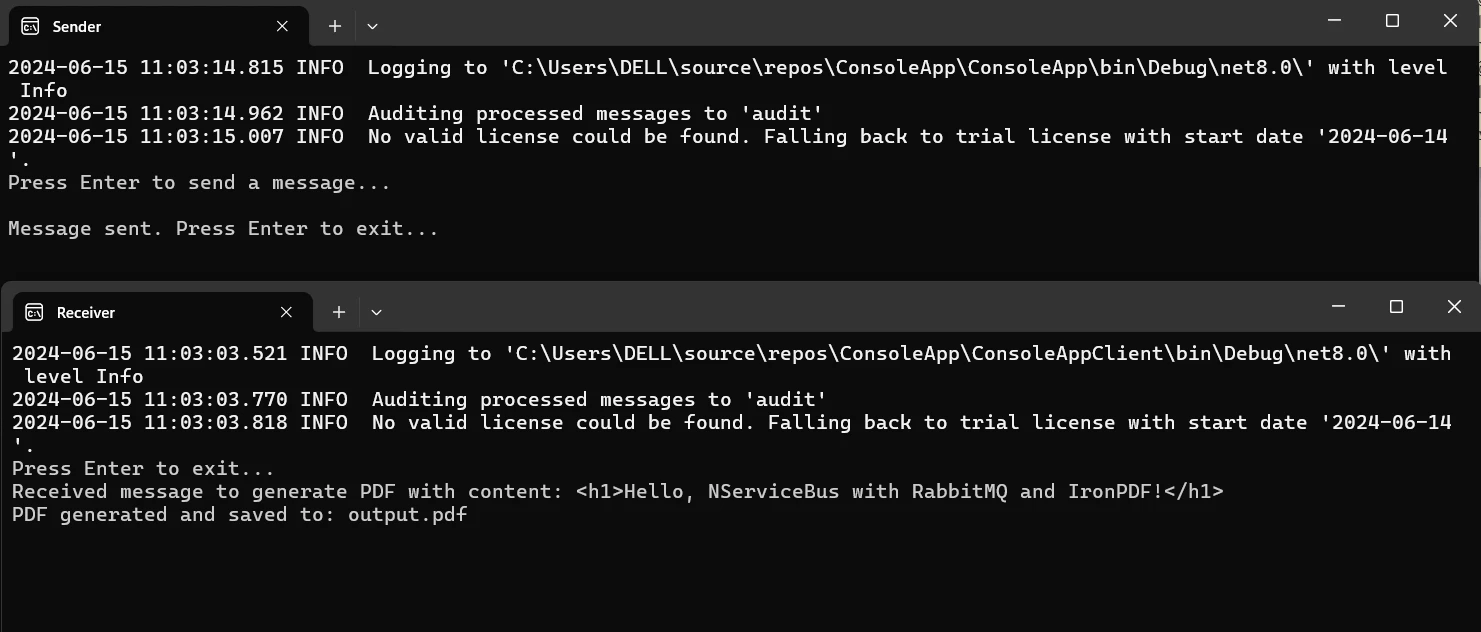
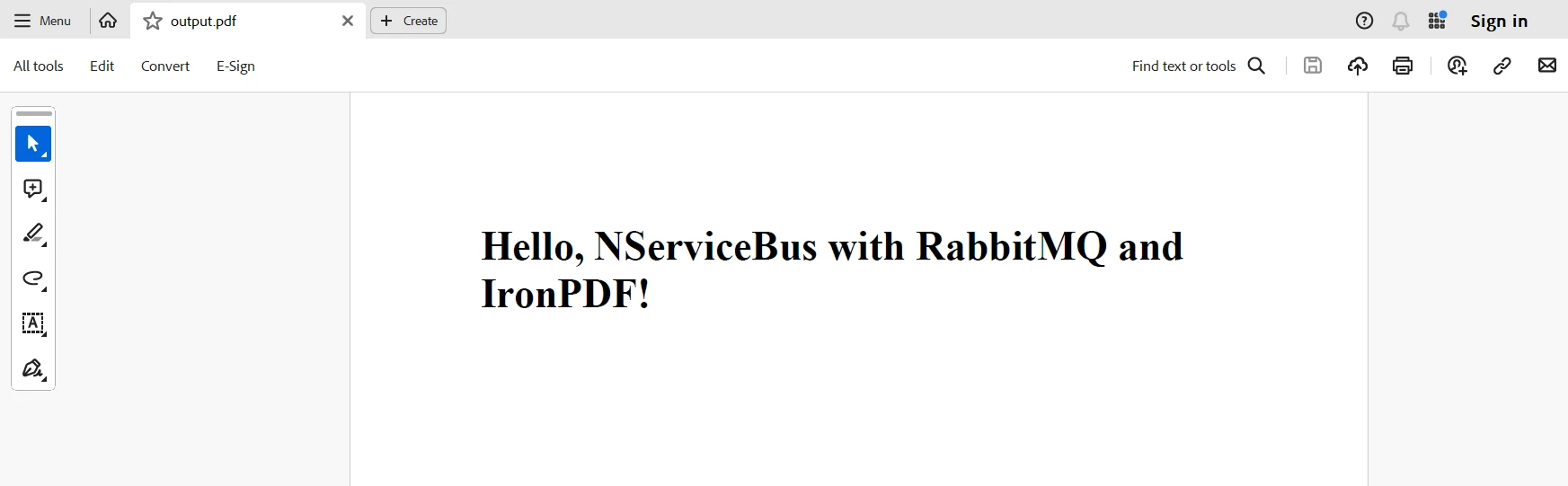
**Handle Metodu:** Mesajı aldıktan sonra, `Handle` fonksiyonu IronPDF kullanarak bir PDF oluşturur. Mesaj içerisindeki HTML içerik `HtmlToPdf` render kodu tarafından PDF'ye dönüştürülür ve ardından belirlenen çıkış yoluna kaydedilir.
## Sonuç
NServiceBus, RabbitMQ ve IronPDF, C#'da, PDF'leri dinamik ve güvenilir bir şekilde oluşturması gereken dağıtık sistemler için ölçeklenebilir ve kararlı bir çözüm sağlamak üzere entegre edilebilir. Bu kombinasyon, NServiceBus'ın mesaj işleme yeteneklerinden, bir iletişim aracı olarak RabbitMQ'nun güvenilirliği ve esnekliğinden ve IronPDF'nin sağlam PDF düzenleme araçlarından yararlanır. Sonuçta elde edilen mimari, hizmetler arasında bağımsız evrim ve ölçeklenebilirlik sağlarken, servisi ayırır.
RabbitMQ ayrıca ağ veya uygulama hataları durumunda mesaj iletimini sağlar. NServiceBus mesaj yönlendirme ve işlemesini basitleştirir ve IronPDF, HTML metnini yüksek kaliteli PDF belgelerine dönüştürmeyi mümkün kılar. Bu entegrasyon, sadece sistemin sürdürülebilirliğini ve güvenilirliğini artırmakla kalmaz, aynı zamanda büyük ölçekli, karmaşık uygulamalar geliştirmek için esnek bir çerçeve sunar.
Son olarak, IronPDF ve Iron Software'i .NET programlama araç takımınıza ekleyerek, efektif bir şekilde barkodlarla çalışabilir, PDF'ler üretebilir, OCR gerçekleştirebilir ve Excel ile bağlantı kurabilirsiniz. [IronPDF'nin Lisanslama Sayfası](/licensing/), `$liteLicense` ile başlayan, özelliklerini ve performans, uyumluluk ve kullanım kolaylığını [Iron Software'ın Resmi Sitesi](https://ironsoftware.com/)'nin esnek bir süitiyle kusursuz bir şekilde birleştirerek ek web uygulamaları ve yetenekler ile daha verimli bir geliştirme sağlar.
Projeye özgü gereksinimlere göre özelleştirilmiş lisans seçeneklerinin net bir şekilde tanımlandığı durumlarda, geliştiriciler optimal modeli güvenle seçebilirler. Bu avantajlar, geliştiricilerin çeşitli zorlukları etkili ve şeffaf bir şekilde ele almalarını sağlar.
NServiceBus, dağıtık sistem geliştirmesini kolaylaştıran, .NET Framework için tasarlanmış güçlü ve uyarlanabilir bir hizmet otobüsüdür. Çok sayıda mikro hizmet ve uygulama arasında güvenilir mesaj işleme ve teslimatı sağlayan güçlü mesajlaşma modelleri sunar. NServiceBus, geliştiricilerin dağıtık sistemler oluşturmanın karmaşıklıkları yerine iş mantığına odaklanmasını sağlayarak, temel mesajlaşma mimarisini soyutlar.
Buna karşılık, IronPDF, PDF dosyaları oluşturmak, görüntülemek ve değiştirmek için popüler bir .NET kütüphanesidir. Çeşitli kaynaklardan, örneğin ASPX dosyalarından ve HTML'den, PDF oluşturmanın kolay ve çok verimli olduğu iyi bilinmektedir.
Geliştiriciler, NServiceBus ve IronPDF'yi birleştirerek, PDF belgeleri oluşturma ve yönetme yeteneğine sahip güvenilir, ölçeklenebilir ve sürdürülebilir yazılım sistemleri oluşturabilirler.
Bu makalede, basit bir C# NServiceBus projesinin nasıl kurulacağını ve IronPDF ile nasıl entegre edileceğini inceleyerek, dağıtık bir uygulama mimarisinde PDF belgelerini yönetmek ve üretmek için optimize edilmiş bir iş akışı oluşturabileceksiniz. Bu tanıtım eğiticisini okuduktan sonra, bu iki etkili teknolojinin dağıtık bir ortamda PDF ile ilgili görevlerinizi nasıl basitleştirebileceğini tam olarak bilmelisiniz.
NServiceBus, dağıtık sistemler ve hizmet odaklı .NET mimarileri oluşturmayı kolaylaştıran güçlü ve esnek bir çerçevedir. NServiceBus'u kullanarak, çeşitli mesaj türlerini kolayca yönetebilir ve güvenilir iletişim sağlayabilirsiniz. Bu, özellikle sorunsuz mesaj yönlendirme ve işlemenin hayati önem taşıdığı bir web uygulaması ve benzeri mimarilerde çok önemlidir. NServiceBus'ın mesaj işleyicileri, mesaj alımıyla etkili bir şekilde ilgilenir ve her mantıksal bileşenin sorunsuz bir şekilde etkileşime girmesini sağlar. NServiceBus'ın önemli özellikleri şunlardır:
NServiceBus'ın Özellikleri
Mesaj Tabanlı İletişim
NServiceBus, bir sistem içindeki farklı hizmetler veya bileşenler arasında mesaj tabanlı iletişimi teşvik eder. Bileşenleri ayırarak, bu yöntem daha kolay ölçeklenebilir ve yönetilebilir tasarımlar oluşturur.
Güvenilir Mesajlaşma
Yeniden denemeleri, başarısız mesajlar için kuyruğu ve diğer hata tolerans tekniklerini otomatik olarak yöneten sistem, güvenilir mesaj teslimatını garanti eder. Ağ kesintileri ve başarısızlıkların sık karşılaşıldığı dağıtık sistemlerde bu güvenilirlik çok önemlidir.
Yayınlama/Abone Olma Modeli
NServiceBus, hizmetlerin olayları yayınlamasına ve diğer hizmetlerin bu olaylara abone olmasına olanak tanıyan yayınlama/abone olma modelini destekler. Bu, bir bileşenindeki olaylara yapılan değişikliklerin diğer bileşenlerde tepki uyandırabileceği olay güdümlü mimarileri mümkün kılar.
Saga Yönetimi
NServiceBus, iç içe geçmiş süreçlerin yönetilmesini sağlayan entegre saga desteği sayesinde uzun süreli iş süreçlerini yönetmeyi sağlar. Saga'lar, hizmet platformunun durumu yönetmesine ve birden fazla hizmet arasında karmaşık işlemleri koordine etmesine olanak tanır.
Genişletilebilirlik ve Özelleştirme
Geliştiricilerin mesajların işleme, taşıma sürecini kişiselleştirmesine olanak tanıyan olağanüstü bir genişletilebilirlik seviyesi sunar. Uyarlanabilirliği sayesinde, çeşitli senaryolarda kullanılabilir.
Çeşitli Mesajlaşma Platformları ile Entegrasyon
MSMQ, RabbitMQ, Azure Service Bus, Amazon SQS ve diğer pek çok mesajlaşma sistemi, NServiceBus ile entegre edilebilir. Bu, geliştiricilerin gereksinimlerine en uygun iletişim altyapısı çözümünü seçmelerini sağlar.
Create and configure NServiceBus in C#
NServiceBus'ı bir C# projesinde kullanmaya başlamadan önce geliştirme ortamınızı kurmalı, temel bir proje oluşturmalı ve temel bir mesajlaşma hizmeti ve senaryo inşa etmelisiniz. İşte sizi harekete geçirecek adım adım bir kılavuz.
Yeni Bir Visual Studio Projesi Oluşturun
Visual Studio'da, bir konsol projesi oluşturma süreci basittir. Bir Konsol Uygulaması başlatmak için Visual Studio ortamında şu basit adımları kullanın:
NServiceBus NuGet paketini yüklemek için aşağıdaki komutu çalıştırın.
PM > Install-Package NServiceBus
Install-Package NServiceBus
Bir Taşıma Seçin
Mesajları almak ve göndermek için NServiceBus tarafından bir taşıma gereklidir. Test ve geliştirme için kullanımı kolay olduğu ve iyi çalıştığı için Öğrenme Taşıması'nı kullanmaya devam edeceğiz.
Öğrenme Taşıması için paketi yüklemek üzere çalıştırın.
PM > Install-Package NServiceBus.RabbitMQ
Install-Package NServiceBus.RabbitMQ
NServiceBus'ı Yapılandırın
Uç Noktayı Kurun
NServiceBus uç nokta yapılandırmasını Program.cs dosyanızda ayarlayın:
using NServiceBus;using System;using System.Threading.Tasks;using Messages;class Program{ static async TaskMain() {Console.Title = "Sender"; var endpointConfiguration = new EndpointConfiguration("SenderEndpoint"); // Use RabbitMQ Transport var transport = endpointConfiguration.UseTransport<RabbitMQTransport>(); transport.ConnectionString("host=localhost"); // Set up error queue endpointConfiguration.SendFailedMessagesTo("error"); // Set up audit queue endpointConfiguration.AuditProcessedMessagesTo("audit"); // Start the endpoint var endpointInstance = awaitEndpoint.Start(endpointConfiguration).ConfigureAwait(false);Console.WriteLine("Press Enter to send a message...");Console.ReadLine(); // Send a message var message = new MyMessage {Content = "Hello, NServiceBus with RabbitMQ!" }; await endpointInstance.Send("ReceiverEndpoint", message).ConfigureAwait(false);Console.WriteLine("Message sent. Press Enter to exit...");Console.ReadLine(); // Stop the endpoint await endpointInstance.Stop().ConfigureAwait(false); }}
using NServiceBus;
using System;
using System.Threading.Tasks;
using Messages;

class Program
{
    static async Task Main()
    {
        Console.Title = "Sender";
        var endpointConfiguration = new EndpointConfiguration("SenderEndpoint");

        // Use RabbitMQ Transport
        var transport = endpointConfiguration.UseTransport<RabbitMQTransport>();
        transport.ConnectionString("host=localhost");

        // Set up error queue
        endpointConfiguration.SendFailedMessagesTo("error");

        // Set up audit queue
        endpointConfiguration.AuditProcessedMessagesTo("audit");

        // Start the endpoint
        var endpointInstance = await Endpoint.Start(endpointConfiguration).ConfigureAwait(false);
        Console.WriteLine("Press Enter to send a message...");
        Console.ReadLine();

        // Send a message
        var message = new MyMessage
        {
            Content = "Hello, NServiceBus with RabbitMQ!"
        };
        await endpointInstance.Send("ReceiverEndpoint", message).ConfigureAwait(false);
        Console.WriteLine("Message sent. Press Enter to exit...");
        Console.ReadLine();

        // Stop the endpoint
        await endpointInstance.Stop().ConfigureAwait(false);
    }
}
ImportsNServiceBusImportsSystemImportsSystem.Threading.TasksImportsMessagesClass ProgramSharedAsync Function Main() AsTaskConsole.Title = "Sender" Dim endpointConfiguration = New EndpointConfiguration("SenderEndpoint") ' Use RabbitMQ Transport Dim transport = endpointConfiguration.UseTransport(OfRabbitMQTransport)() transport.ConnectionString("host=localhost") ' Set up error queue endpointConfiguration.SendFailedMessagesTo("error") ' Set up audit queue endpointConfiguration.AuditProcessedMessagesTo("audit") ' Start the endpoint Dim endpointInstance = AwaitEndpoint.Start(endpointConfiguration).ConfigureAwait(False)Console.WriteLine("Press Enter to send a message...")Console.ReadLine() ' Send a message Dim message = New MyMessageWith { .Content = "Hello, NServiceBus with RabbitMQ!" }Await endpointInstance.Send("ReceiverEndpoint", message).ConfigureAwait(False)Console.WriteLine("Message sent. Press Enter to exit...")Console.ReadLine() ' Stop the endpointAwait endpointInstance.Stop().ConfigureAwait(False) End FunctionEnd Class
Imports NServiceBus
Imports System
Imports System.Threading.Tasks
Imports Messages

Class Program
    Shared Async Function Main() As Task
        Console.Title = "Sender"
        Dim endpointConfiguration = New EndpointConfiguration("SenderEndpoint")

        ' Use RabbitMQ Transport
        Dim transport = endpointConfiguration.UseTransport(Of RabbitMQTransport)()
        transport.ConnectionString("host=localhost")

        ' Set up error queue
        endpointConfiguration.SendFailedMessagesTo("error")

        ' Set up audit queue
        endpointConfiguration.AuditProcessedMessagesTo("audit")

        ' Start the endpoint
        Dim endpointInstance = Await Endpoint.Start(endpointConfiguration).ConfigureAwait(False)
        Console.WriteLine("Press Enter to send a message...")
        Console.ReadLine()

        ' Send a message
        Dim message = New MyMessage With {
            .Content = "Hello, NServiceBus with RabbitMQ!"
        }
        Await endpointInstance.Send("ReceiverEndpoint", message).ConfigureAwait(False)
        Console.WriteLine("Message sent. Press Enter to exit...")
        Console.ReadLine()

        ' Stop the endpoint
        Await endpointInstance.Stop().ConfigureAwait(False)
    End Function
End Class
Bir Mesaj Oluşturun
Mesajı temsil etmek için yeni bir sınıf ekleyin.
public class MyMessage : IMessage{ public stringContent { get; set; }}
public class MyMessage : IMessage
{
    public string Content { get; set; }
}
Public Class MyMessageImplementsIMessage Public Property ContentAsStringEnd Class
Public Class MyMessage
    Implements IMessage

    Public Property Content As String
End Class
Bir Mesaj İşleyici Oluşturun
Mesajı işlemek için yeni bir sınıf ekleyin.
using NServiceBus;using System.Threading.Tasks;public class MyMessageHandler : IHandleMessages<MyMessage>{ public TaskHandle(MyMessage message, IMessageHandlerContext context) {Console.WriteLine($"Received message: {message.Content}"); returnTask.CompletedTask; }}
using NServiceBus;
using System.Threading.Tasks;

public class MyMessageHandler : IHandleMessages<MyMessage>
{
    public Task Handle(MyMessage message, IMessageHandlerContext context)
    {
        Console.WriteLine($"Received message: {message.Content}");
        return Task.CompletedTask;
    }
}
ImportsNServiceBusImportsSystem.Threading.TasksPublic Class MyMessageHandlerImplementsIHandleMessages(OfMyMessage) Public Function Handle(ByVal message AsMyMessage, ByVal context AsIMessageHandlerContext) AsTaskConsole.WriteLine($"Received message: {message.Content}") ReturnTask.CompletedTask End FunctionEnd Class
Imports NServiceBus
Imports System.Threading.Tasks

Public Class MyMessageHandler
	Implements IHandleMessages(Of MyMessage)

	Public Function Handle(ByVal message As MyMessage, ByVal context As IMessageHandlerContext) As Task
		Console.WriteLine($"Received message: {message.Content}")
		Return Task.CompletedTask
	End Function
End Class
Mesaj Gönderme
Uç Noktadan bir Mesaj Gönderin. Handler'ın yardımıyla bir mesajı iletmek için birincil yolunuzu uyarlayın.
using NServiceBus;using System;using System.Threading.Tasks;class Program{ static async TaskMain() {Console.Title = "Receiver"; var endpointConfiguration = new EndpointConfiguration("ReceiverEndpoint"); // Serialization configuration endpointConfiguration.UseSerialization<NewtonsoftJsonSerializer>(); // Use RabbitMQ Transport var transport = endpointConfiguration.UseTransport<RabbitMQTransport>(); transport.UseConventionalRoutingTopology(QueueType.Quorum); transport.ConnectionString("host=localhost"); // Set up error queue endpointConfiguration.SendFailedMessagesTo("error"); // Set up audit queue endpointConfiguration.AuditProcessedMessagesTo("audit"); endpointConfiguration.EnableInstallers(); // Start the endpoint var endpointInstance = awaitEndpoint.Start(endpointConfiguration).ConfigureAwait(false);Console.WriteLine("Press Enter to exit...");Console.ReadLine(); // Stop the endpoint await endpointInstance.Stop().ConfigureAwait(false); }}
using NServiceBus;
using System;
using System.Threading.Tasks;

class Program
{
    static async Task Main()
    {
        Console.Title = "Receiver";
        var endpointConfiguration = new EndpointConfiguration("ReceiverEndpoint");

        // Serialization configuration
        endpointConfiguration.UseSerialization<NewtonsoftJsonSerializer>();

        // Use RabbitMQ Transport
        var transport = endpointConfiguration.UseTransport<RabbitMQTransport>();
        transport.UseConventionalRoutingTopology(QueueType.Quorum);
        transport.ConnectionString("host=localhost");

        // Set up error queue
        endpointConfiguration.SendFailedMessagesTo("error");

        // Set up audit queue
        endpointConfiguration.AuditProcessedMessagesTo("audit");
        endpointConfiguration.EnableInstallers();

        // Start the endpoint
        var endpointInstance = await Endpoint.Start(endpointConfiguration).ConfigureAwait(false);
        Console.WriteLine("Press Enter to exit...");
        Console.ReadLine();

        // Stop the endpoint
        await endpointInstance.Stop().ConfigureAwait(false);
    }
}
ImportsNServiceBusImportsSystemImportsSystem.Threading.TasksModuleProgram Sub Main()MainAsync().GetAwaiter().GetResult() End Sub PrivateAsync Function MainAsync() AsTaskConsole.Title = "Receiver" Dim endpointConfiguration = New EndpointConfiguration("ReceiverEndpoint") ' Serialization configuration endpointConfiguration.UseSerialization(OfNewtonsoftJsonSerializer)() ' Use RabbitMQ Transport Dim transport = endpointConfiguration.UseTransport(OfRabbitMQTransport)() transport.UseConventionalRoutingTopology(QueueType.Quorum) transport.ConnectionString("host=localhost") ' Set up error queue endpointConfiguration.SendFailedMessagesTo("error") ' Set up audit queue endpointConfiguration.AuditProcessedMessagesTo("audit") endpointConfiguration.EnableInstallers() ' Start the endpoint Dim endpointInstance = AwaitEndpoint.Start(endpointConfiguration).ConfigureAwait(False)Console.WriteLine("Press Enter to exit...")Console.ReadLine() ' Stop the endpointAwait endpointInstance.Stop().ConfigureAwait(False) End FunctionEndModule
Imports NServiceBus
Imports System
Imports System.Threading.Tasks

Module Program
    Sub Main()
        MainAsync().GetAwaiter().GetResult()
    End Sub

    Private Async Function MainAsync() As Task
        Console.Title = "Receiver"
        Dim endpointConfiguration = New EndpointConfiguration("ReceiverEndpoint")

        ' Serialization configuration
        endpointConfiguration.UseSerialization(Of NewtonsoftJsonSerializer)()

        ' Use RabbitMQ Transport
        Dim transport = endpointConfiguration.UseTransport(Of RabbitMQTransport)()
        transport.UseConventionalRoutingTopology(QueueType.Quorum)
        transport.ConnectionString("host=localhost")

        ' Set up error queue
        endpointConfiguration.SendFailedMessagesTo("error")

        ' Set up audit queue
        endpointConfiguration.AuditProcessedMessagesTo("audit")
        endpointConfiguration.EnableInstallers()

        ' Start the endpoint
        Dim endpointInstance = Await Endpoint.Start(endpointConfiguration).ConfigureAwait(False)
        Console.WriteLine("Press Enter to exit...")
        Console.ReadLine()

        ' Stop the endpoint
        Await endpointInstance.Stop().ConfigureAwait(False)
    End Function
End Module
Bir C# projesinde, NServiceBus'ı RabbitMQ ve IronPDF ile entegre etmek, NServiceBus ve RabbitMQ arasında mesajlar yapılandırmayı ve PDF oluşturmak için IronPDF kullanmayı içerir. İşte sizi harekete geçirecek ayrıntılı bir kılavuz:
IronPDF, PDF dosyalarını oluşturmak, okumak, düzenlemek ve dönüştürmek için tasarlanmış bir .NET kütüphanesidir. Bununla, programcılar, C# veya VB.NET uygulamalarında, güçlü ve sezgisel bir araçla PDF dosyalarıyla çalışabilirler. IronPDF'nin özellikleri ve yetenekleri aşağıda tam olarak açıklanmıştır:
IronPDF Özellikleri
HTML'den PDF Üretimi
JavaScript, HTML, ve CSS'i PDF'e dönüştür. Medya sorguları ve duyarlı tasarım gibi modern web standartlarını destekler. HTML ve CSS kullanarak dinamik olarak biçimlendirilmiş PDF belgeleri, faturalar ve raporlar üretmek için yararlıdır.
PDF Düzenleme
Zaten var olan PDF'lere metin, resim ve diğer materyaller ekleyin. PDF dosyalarından metin ve resimler çıkarın. Bir dosyada birden fazla PDF birleştirin. PDF dosyalarını birkaç belgeye bölün. Açıklamalar, altbilgiler, üstbilgiler ve filigranlar ekleyin.
PDF Dönüşümü
Word, Excel, resim ve diğer dosya formatlarını PDF'ye dönüştürün. PDF'den resme dönüştürme (PNG, JPEG, vb.).
Performans ve Güvenilirlik
Üretim ortamlarında yüksek performans ve güvenilirlik tasarım hedefleridir. Büyük belgeleri verimli bir şekilde yönetir.
Mesajlar, hem göndericinin hem de alıcının kullanacağı ortak bir proje (sınıf kütüphanesi) niteliğindedir. Mesajlar projesinde mesaj sınıfını tanımlayın. Messages adlı yeni bir Class Library projesi oluşturun ve çözümünüze ekleyin.
Mesajı Tanımlayın:
Messages projesi içinde, GeneratePdfMessage.cs adında yeni bir sınıf oluşturun:
using NServiceBus;public class GeneratePdfMessage : IMessage{ public stringContent { get; set; } public stringOutputPath { get; set; }}
using NServiceBus;

public class GeneratePdfMessage : IMessage
{
    public string Content { get; set; }
    public string OutputPath { get; set; }
}
ImportsNServiceBusPublic Class GeneratePdfMessageImplementsIMessage Public Property Content() AsString Public Property OutputPath() AsStringEnd Class
Imports NServiceBus

Public Class GeneratePdfMessage
	Implements IMessage

	Public Property Content() As String
	Public Property OutputPath() As String
End Class
Hem Gönderici hem de Alıcı projelerinde, Mesajlar projesine bir referans ekleyin.
Gönderici projesinde, mesaj teslimi için RabbitMQ kullanacak şekilde NServiceBus uç noktasını yapılandırın.
using NServiceBus;using System;using System.Threading.Tasks;using Messages;class Program{ static async TaskMain() {Console.Title = "Sender"; var endpointConfiguration = new EndpointConfiguration("SenderEndpoint"); // Use RabbitMQ Transport var transport = endpointConfiguration.UseTransport<RabbitMQTransport>(); transport.ConnectionString("host=localhost"); // Set up error queue endpointConfiguration.SendFailedMessagesTo("error"); // Set up audit queue endpointConfiguration.AuditProcessedMessagesTo("audit"); endpointConfiguration.EnableInstallers(); // Start the endpoint var endpointInstance = awaitEndpoint.Start(endpointConfiguration).ConfigureAwait(false);Console.WriteLine("Press Enter to send a message...");Console.ReadLine(); // Send a message var message = new GeneratePdfMessage {Content = "<h1>Hello, NServiceBus with RabbitMQ and IronPDF!</h1>",OutputPath = "output.pdf" }; await endpointInstance.Send("ReceiverEndpoint", message).ConfigureAwait(false);Console.WriteLine("Message sent. Press Enter to exit...");Console.ReadLine(); // Stop the endpoint await endpointInstance.Stop().ConfigureAwait(false); }}
using NServiceBus;
using System;
using System.Threading.Tasks;
using Messages;

class Program
{
    static async Task Main()
    {
        Console.Title = "Sender";
        var endpointConfiguration = new EndpointConfiguration("SenderEndpoint");

        // Use RabbitMQ Transport
        var transport = endpointConfiguration.UseTransport<RabbitMQTransport>();
        transport.ConnectionString("host=localhost");

        // Set up error queue
        endpointConfiguration.SendFailedMessagesTo("error");

        // Set up audit queue
        endpointConfiguration.AuditProcessedMessagesTo("audit");
        endpointConfiguration.EnableInstallers();

        // Start the endpoint
        var endpointInstance = await Endpoint.Start(endpointConfiguration).ConfigureAwait(false);
        Console.WriteLine("Press Enter to send a message...");
        Console.ReadLine();

        // Send a message
        var message = new GeneratePdfMessage
        {
            Content = "<h1>Hello, NServiceBus with RabbitMQ and IronPDF!</h1>",
            OutputPath = "output.pdf"
        };
        await endpointInstance.Send("ReceiverEndpoint", message).ConfigureAwait(false);
        Console.WriteLine("Message sent. Press Enter to exit...");
        Console.ReadLine();

        // Stop the endpoint
        await endpointInstance.Stop().ConfigureAwait(false);
    }
}
ImportsNServiceBusImportsSystemImportsSystem.Threading.TasksImportsMessagesFriend Class ProgramSharedAsync Function Main() AsTaskConsole.Title = "Sender" Dim endpointConfiguration As New EndpointConfiguration("SenderEndpoint") ' Use RabbitMQ Transport Dim transport = endpointConfiguration.UseTransport(OfRabbitMQTransport)() transport.ConnectionString("host=localhost") ' Set up error queue endpointConfiguration.SendFailedMessagesTo("error") ' Set up audit queue endpointConfiguration.AuditProcessedMessagesTo("audit") endpointConfiguration.EnableInstallers() ' Start the endpoint Dim endpointInstance = AwaitEndpoint.Start(endpointConfiguration).ConfigureAwait(False)Console.WriteLine("Press Enter to send a message...")Console.ReadLine() ' Send a message Dim message = New GeneratePdfMessageWith { .Content = "<h1>Hello, NServiceBus with RabbitMQ and IronPDF!</h1>", .OutputPath = "output.pdf" }Await endpointInstance.Send("ReceiverEndpoint", message).ConfigureAwait(False)Console.WriteLine("Message sent. Press Enter to exit...")Console.ReadLine() ' Stop the endpointAwait endpointInstance.Stop().ConfigureAwait(False) End FunctionEnd Class
Imports NServiceBus
Imports System
Imports System.Threading.Tasks
Imports Messages

Friend Class Program
	Shared Async Function Main() As Task
		Console.Title = "Sender"
		Dim endpointConfiguration As New EndpointConfiguration("SenderEndpoint")

		' Use RabbitMQ Transport
		Dim transport = endpointConfiguration.UseTransport(Of RabbitMQTransport)()
		transport.ConnectionString("host=localhost")

		' Set up error queue
		endpointConfiguration.SendFailedMessagesTo("error")

		' Set up audit queue
		endpointConfiguration.AuditProcessedMessagesTo("audit")
		endpointConfiguration.EnableInstallers()

		' Start the endpoint
		Dim endpointInstance = Await Endpoint.Start(endpointConfiguration).ConfigureAwait(False)
		Console.WriteLine("Press Enter to send a message...")
		Console.ReadLine()

		' Send a message
		Dim message = New GeneratePdfMessage With {
			.Content = "<h1>Hello, NServiceBus with RabbitMQ and IronPDF!</h1>",
			.OutputPath = "output.pdf"
		}
		Await endpointInstance.Send("ReceiverEndpoint", message).ConfigureAwait(False)
		Console.WriteLine("Message sent. Press Enter to exit...")
		Console.ReadLine()

		' Stop the endpoint
		Await endpointInstance.Stop().ConfigureAwait(False)
	End Function
End Class
Uç Nokta Yapılandırması: uç nokta, yeni EndpointConfiguration("SenderEndpoint") çağırarak "SenderEndpoint" adıyla başlatılır.
endpointConfiguration, taşıma yapılandırmasıdır. Yerel bir RabbitMQ örneğine bağlanarak, UseTransport() yöntemi NServiceBus'ı taşıma mekanizması olarak RabbitMQ'yu kullanacak şekilde yapılandırır.
Başarısız mesajların nereye gönderileceği ve işlenen mesajların denetleneceği, sırasıyla SendFailedMessagesTo("error") ve AuditProcessedMessagesTo("audit") kullanılarak yapılandırılmıştır.
Mesaj Gönderildi:endpointInstance.Send("ReceiverEndpoint", message), 'ReceiverEndpoint'e bir GeneratePdfMessage gönderir.
PDF Üretmek için Alıcıyı Yapılandırın
Alıcı projesinde, RabbitMQ üzerinden mesajları kabul etmek ve IronPDF kullanarak PDF üretmek üzere NServiceBus uç noktasını ayarlayın.
using NServiceBus;using System;using System.Threading.Tasks;class Program{ static async TaskMain() {Console.Title = "Receiver"; var endpointConfiguration = new EndpointConfiguration("ReceiverEndpoint"); // Use RabbitMQ Transport var transport = endpointConfiguration.UseTransport<RabbitMQTransport>(); transport.ConnectionString("host=localhost"); // Set up error queue endpointConfiguration.SendFailedMessagesTo("error"); // Set up audit queue endpointConfiguration.AuditProcessedMessagesTo("audit"); // Start the endpoint var endpointInstance = awaitEndpoint.Start(endpointConfiguration).ConfigureAwait(false);Console.WriteLine("Press Enter to exit...");Console.ReadLine(); // Stop the endpoint await endpointInstance.Stop().ConfigureAwait(false); }}
using NServiceBus;
using System;
using System.Threading.Tasks;

class Program
{
    static async Task Main()
    {
        Console.Title = "Receiver";
        var endpointConfiguration = new EndpointConfiguration("ReceiverEndpoint");

        // Use RabbitMQ Transport
        var transport = endpointConfiguration.UseTransport<RabbitMQTransport>();
        transport.ConnectionString("host=localhost");

        // Set up error queue
        endpointConfiguration.SendFailedMessagesTo("error");

        // Set up audit queue
        endpointConfiguration.AuditProcessedMessagesTo("audit");

        // Start the endpoint
        var endpointInstance = await Endpoint.Start(endpointConfiguration).ConfigureAwait(false);
        Console.WriteLine("Press Enter to exit...");
        Console.ReadLine();

        // Stop the endpoint
        await endpointInstance.Stop().ConfigureAwait(false);
    }
}
ImportsNServiceBusImportsSystemImportsSystem.Threading.TasksModuleProgramAsync Function Main() AsTaskConsole.Title = "Receiver" Dim endpointConfiguration = New EndpointConfiguration("ReceiverEndpoint") ' Use RabbitMQ Transport Dim transport = endpointConfiguration.UseTransport(OfRabbitMQTransport)() transport.ConnectionString("host=localhost") ' Set up error queue endpointConfiguration.SendFailedMessagesTo("error") ' Set up audit queue endpointConfiguration.AuditProcessedMessagesTo("audit") ' Start the endpoint Dim endpointInstance = AwaitEndpoint.Start(endpointConfiguration).ConfigureAwait(False)Console.WriteLine("Press Enter to exit...")Console.ReadLine() ' Stop the endpointAwait endpointInstance.Stop().ConfigureAwait(False) End FunctionEndModule
Imports NServiceBus
Imports System
Imports System.Threading.Tasks

Module Program
    Async Function Main() As Task
        Console.Title = "Receiver"
        Dim endpointConfiguration = New EndpointConfiguration("ReceiverEndpoint")

        ' Use RabbitMQ Transport
        Dim transport = endpointConfiguration.UseTransport(Of RabbitMQTransport)()
        transport.ConnectionString("host=localhost")

        ' Set up error queue
        endpointConfiguration.SendFailedMessagesTo("error")

        ' Set up audit queue
        endpointConfiguration.AuditProcessedMessagesTo("audit")

        ' Start the endpoint
        Dim endpointInstance = Await Endpoint.Start(endpointConfiguration).ConfigureAwait(False)
        Console.WriteLine("Press Enter to exit...")
        Console.ReadLine()

        ' Stop the endpoint
        Await endpointInstance.Stop().ConfigureAwait(False)
    End Function
End Module
"ReceiverEndpoint" alıcı uç noktası için bu kurulum, Gönderici yapılandırmasına benzer.
Mesaj İşleyici
Receiver projesinde, GeneratePdfMessageHandler.cs adında yeni bir sınıf oluşturun.
using NServiceBus;using System;using System.Threading.Tasks;using Messages;using IronPdf;public class GeneratePdfMessageHandler : IHandleMessages<GeneratePdfMessage>{ public TaskHandle(GeneratePdfMessage message, IMessageHandlerContext context) {Console.WriteLine($"Received message to generate PDF with content: {message.Content}"); // Generate PDF var renderer = new HtmlToPdf(); var pdf = renderer.RenderHtmlAsPdf(message.Content); pdf.SaveAs(message.OutputPath);Console.WriteLine($"PDF generated and saved to: {message.OutputPath}"); returnTask.CompletedTask; }}
using NServiceBus;
using System;
using System.Threading.Tasks;
using Messages;
using IronPdf;

public class GeneratePdfMessageHandler : IHandleMessages<GeneratePdfMessage>
{
    public Task Handle(GeneratePdfMessage message, IMessageHandlerContext context)
    {
        Console.WriteLine($"Received message to generate PDF with content: {message.Content}");

        // Generate PDF
        var renderer = new HtmlToPdf();
        var pdf = renderer.RenderHtmlAsPdf(message.Content);
        pdf.SaveAs(message.OutputPath);
        Console.WriteLine($"PDF generated and saved to: {message.OutputPath}");

        return Task.CompletedTask;
    }
}
ImportsNServiceBusImportsSystemImportsSystem.Threading.TasksImportsMessagesImportsIronPdfPublic Class GeneratePdfMessageHandlerImplementsIHandleMessages(OfGeneratePdfMessage) Public Function Handle(message AsGeneratePdfMessage, context AsIMessageHandlerContext) AsTaskImplementsIHandleMessages(OfGeneratePdfMessage).HandleConsole.WriteLine($"Received message to generate PDF with content: {message.Content}") ' Generate PDF Dim renderer As New HtmlToPdf() Dim pdf = renderer.RenderHtmlAsPdf(message.Content) pdf.SaveAs(message.OutputPath)Console.WriteLine($"PDF generated and saved to: {message.OutputPath}") ReturnTask.CompletedTask End FunctionEnd Class
Imports NServiceBus
Imports System
Imports System.Threading.Tasks
Imports Messages
Imports IronPdf

Public Class GeneratePdfMessageHandler
    Implements IHandleMessages(Of GeneratePdfMessage)

    Public Function Handle(message As GeneratePdfMessage, context As IMessageHandlerContext) As Task Implements IHandleMessages(Of GeneratePdfMessage).Handle
        Console.WriteLine($"Received message to generate PDF with content: {message.Content}")

        ' Generate PDF
        Dim renderer As New HtmlToPdf()
        Dim pdf = renderer.RenderHtmlAsPdf(message.Content)
        pdf.SaveAs(message.OutputPath)
        Console.WriteLine($"PDF generated and saved to: {message.OutputPath}")

        Return Task.CompletedTask
    End Function
End Class
GeneratePdfMessageHandler, GeneratePdfMessage tipindeki mesajları işlemek için IHandleMessages arayüzünü kullanır.
Handle Metodu: Mesajı aldıktan sonra, Handle fonksiyonu IronPDF kullanarak bir PDF oluşturur. Mesaj içerisindeki HTML içerik HtmlToPdf render kodu tarafından PDF'ye dönüştürülür ve ardından belirlenen çıkış yoluna kaydedilir.
Sonuç
NServiceBus, RabbitMQ ve IronPDF, C#'da, PDF'leri dinamik ve güvenilir bir şekilde oluşturması gereken dağıtık sistemler için ölçeklenebilir ve kararlı bir çözüm sağlamak üzere entegre edilebilir. Bu kombinasyon, NServiceBus'ın mesaj işleme yeteneklerinden, bir iletişim aracı olarak RabbitMQ'nun güvenilirliği ve esnekliğinden ve IronPDF'nin sağlam PDF düzenleme araçlarından yararlanır. Sonuçta elde edilen mimari, hizmetler arasında bağımsız evrim ve ölçeklenebilirlik sağlarken, servisi ayırır.
RabbitMQ ayrıca ağ veya uygulama hataları durumunda mesaj iletimini sağlar. NServiceBus mesaj yönlendirme ve işlemesini basitleştirir ve IronPDF, HTML metnini yüksek kaliteli PDF belgelerine dönüştürmeyi mümkün kılar. Bu entegrasyon, sadece sistemin sürdürülebilirliğini ve güvenilirliğini artırmakla kalmaz, aynı zamanda büyük ölçekli, karmaşık uygulamalar geliştirmek için esnek bir çerçeve sunar.
Son olarak, IronPDF ve Iron Software'i .NET programlama araç takımınıza ekleyerek, efektif bir şekilde barkodlarla çalışabilir, PDF'ler üretebilir, OCR gerçekleştirebilir ve Excel ile bağlantı kurabilirsiniz. IronPDF'nin Lisanslama Sayfası, $999 ile başlayan, özelliklerini ve performans, uyumluluk ve kullanım kolaylığını Iron Software'ın Resmi Sitesi'nin esnek bir süitiyle kusursuz bir şekilde birleştirerek ek web uygulamaları ve yetenekler ile daha verimli bir geliştirme sağlar.
Projeye özgü gereksinimlere göre özelleştirilmiş lisans seçeneklerinin net bir şekilde tanımlandığı durumlarda, geliştiriciler optimal modeli güvenle seçebilirler. Bu avantajlar, geliştiricilerin çeşitli zorlukları etkili ve şeffaf bir şekilde ele almalarını sağlar.
Jacob Mellor, Iron Software'de Baş Teknoloji Yöneticisidir ve C# PDF teknolojisinde öncü bir mühendisdir. Iron Software'ın ana kod tabanının ilk geliştiricisi olarak, CEO Cameron Rimington ile birlikte şirketin ürün mimarisini 50'den fazla kişilik bir şirkete dönüştürmüştür ve NASA, Tesla ve dünya genelindeki devlet kurumlarına hizmet etmektedir.






















