using IronPdf;

// Disable local disk access or cross-origin requests
Installation.EnableWebSecurity = true;

// Instantiate Renderer
var renderer = new ChromePdfRenderer();

// Create a PDF from a HTML string using C#
var pdf = renderer.RenderHtmlAsPdf("<h1>Hello World</h1>");

// Export to a file or Stream
pdf.SaveAs("output.pdf");

// Advanced Example with HTML Assets
// Load external html assets: Images, CSS and JavaScript.
// An optional BasePath 'C:\site\assets\' is set as the file location to load assets from
var myAdvancedPdf = renderer.RenderHtmlAsPdf("<img src='icons/iron.png'>", @"C:\site\assets\");
myAdvancedPdf.SaveAs("html-with-assets.pdf");
using IronPdf;// Disable local disk access or cross-origin requestsInstallation.EnableWebSecurity = true;// Instantiate Renderervar renderer = new ChromePdfRenderer();// Create a PDF from a HTML string using C#var pdf = renderer.RenderHtmlAsPdf("<h1>Hello World</h1>");// Export to a file or Streampdf.SaveAs("output.pdf");// Advanced Example with HTML Assets// Load external html assets: Images, CSS and JavaScript.// An optional BasePath 'C:\site\assets\' is set as the file location to load assets fromvar myAdvancedPdf = renderer.RenderHtmlAsPdf("<img src='icons/iron.png'>", @"C:\site\assets\");myAdvancedPdf.SaveAs("html-with-assets.pdf");
PM >Install-Package IronPdf
Install-Package IronPdf
AKTUALNOŚCI DLA PROGRAMISTÓW
Aplikacja konsolowa C# (jak to działa dla programistów)
Testowanie odgrywa kluczową rolę w dziedzinie tworzenia oprogramowania, stanowiąc istotny element gwarantujący jakość aplikacji. Wśród mnóstwa dostępnych frameworków .NET Framework wyróżnia się jako powszechnie wybierana opcja do tworzenia aplikacji opartych na systemie Windows. W tym artykułe zagłębiamy się w zawiłości .NET TestConsole, narzędzia zaprojektowanego specjalnie do testowania aplikacji .NET.
W trakcie tego omówienia napiszemy obszerny przykład kodu ilustrujący praktyczne wdrożenie .NET TestConsole. Dodatkowo omówimy IronPDF, wzorcową bibliotekę C# do obsługi plików PDF, płynnie zintegrowaną z .NET TestConsole. Biblioteka ta okazuje się nieoceniona, umożliwiając programistom łatwy dostęp do plików PDF oraz ich generowanie w [środowisku](https://github.com/jamie-davis/TestConsole/wiki) .NET [TestConsole](https://github.com/jamie-davis/TestConsole/wiki). Dołącz do nas w tej podróży, podczas której odkryjemy funkcjonalności i możliwości wynikające z synergii .NET TestConsole i [funkcji C# PDF firmy IronPDF](/).
## 1. Wprowadzenie: TestConsole
TestConsole to wszechstronna biblioteka testowa, która wprowadza charakterystyczne podejście do testów jednostkowych w języku programowania C#. Tradycyjne metody testów jednostkowych często napotykają trudności w przypadku dużych zbiorów danych i złożonych asercji, co prowadzi do problemów z identyfikacją różnic między oczekiwanymi a rzeczywistymi wynikami. W odpowiedzi na to TestConsole oferuje nowatorski proces pracy, przechodząc od konwencjonalnego podejścia opartego na przewidywaniach do bezpośredniego porównania sformatowanego wyniku z wyznaczoną "zatwierdzoną" standardową wersją wyjściową.
W tej bibliotece, szczególnie w przypadku TestConsole, wariant ".Core" rozszerza możliwości formatowania odziedziczone po oryginalnym projekcie TestConsole i zawiera niezbędne funkcje zatwierdzania testów w scenariuszach, w których wyniki testów odbiegają od oczekiwań. TestConsole.Core płynnie integruje się z serwerem kompilacji, aby wywołać niepowodzenie testu. Na komputerze deweloperskim, domyślnie, oferuje możliwość rekonfiguracji w celu wykorzystania zainstalowanych narzędzi porównywania plików do wizualizacji różnic. Co ważne, podejście to usprawnia proces zatwierdzania, umożliwiając programistom ręczną aktualizację zatwierdzonej wersji, jeśli oczekiwane są różnice.
### 1.1. Dlaczego używać TestConsole?
TestConsole.Core czerpie inspirację z ApprovalTests, ale wyróżnia się wsparciem dla pisania zarówno pełnego frameworku, jak i zestawów testowych .NET Core. Biblioteka ta odpowiada na potrzebę testowania w rozmaitych środowiskach, gdyż ApprovalTests w momencie publikacji była głównie skierowana do scenariuszy pełnego frameworku. Składnia w TestConsole.Core, chociaż ma podobieństwa do ApprovalTests, oferuje różnice, szczególnie w kontekście wyboru narzędzi porównywania plików i bezpośredniego zatwierdzania zawartości.
Stworzony, aby ułatwiać testowanie w kodzie aplikacji .NET Core, TestConsole.Core powstał z potrzeby wypełnienia luki pozostawionej przez brak wsparcia dla aplikacji .NET standard i .NET Core w ApprovalTests. Skupiając się na umożliwieniu skutecznego testowania dużych zestawów danych, funkcje zatwierdzania testów TestConsole.Core uwzględniają dane sformatowane za pomocą obiektu Test Console Output, rozszerzając ich funkcjonalność na obsługę dowolnego zwykłego tekstu, zapewniając kompleksowe rozwiązanie dla testów jednostkowych w C#.
### 1.2. Install TestConsole C#
Konsolę testową można zainstalować korzystając z Menedżera pakietów NuGet wewnątrz Visual Studio lub uruchamiając następujące polecenie w konsoli Menedżera pakietów NuGet.
```shell
:InstallCmd Install-Package TestConsole -Version 2.6.0
```
Lub pobierz bezpośrednio z [dystrybucji TestConsole na NuGet](https://www.nuget.org/packages/TestConsole/).
## 2. Przykład kodu TestConsole
W tej sekcji zobaczymy, jak możesz przekształcić wyniki konsoli w raporty. Poniższy kod źródłowy korzysta z konsoli testowej, aby przekształcić obiekty Enumerable w dobrze sformatowaną tabelę raportów.
```csharp
using TestConsoleLib;
using System;
using System.Linq;

// Instantiate the output class from TestConsoleLib
var output = new Output();

// Generate a collection of anonymous objects containing value, square, and string length
var data = Enumerable.Range(0, 10)
    .Select(i => new { Value = i, Squared = i * i, String = new string('I', i) });

// Format the data into a table using TestConsoleLib's method
output.FormatTable(data);

// Retrieve the formatted report as a string
string report = output.Report;

// Print the formatted report to console
Console.WriteLine(report);
```
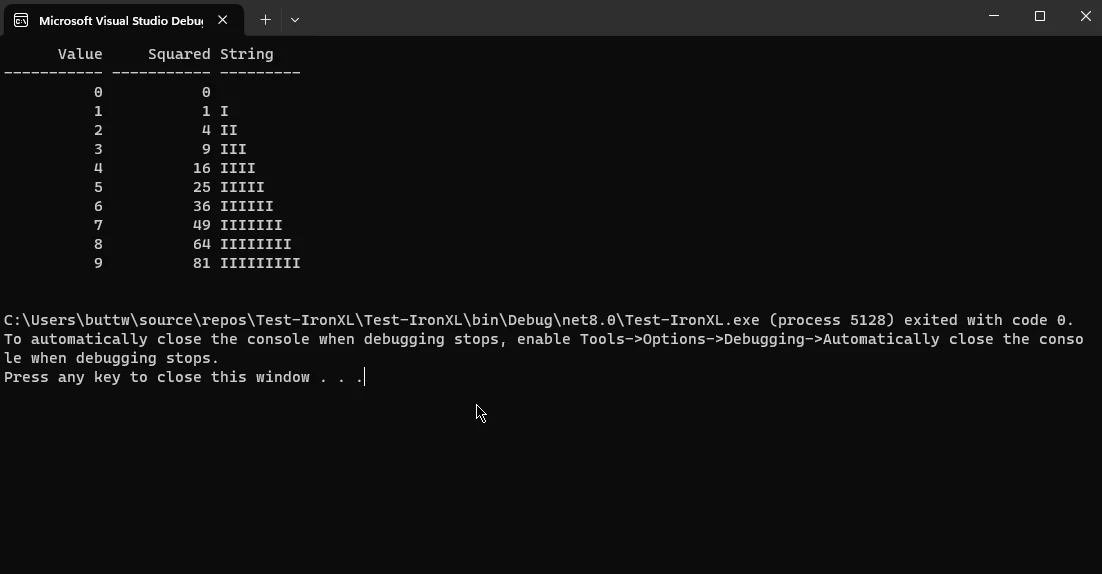
Ten fragment kodu C# wykorzystuje bibliotekę TestConsoleLib, aby zademonstrować i uruchomić prosty przykład formatowania i raportowania danych tabelarycznych używając klasy Output TestConsole. Zaczyna sie od utworzenia instancji klasy Output o nazwie `output`. Następnie generuje kolekcję 10 elementów zawierających anonimowe obiekty z właściwościami reprezentującymi wartość całkowitą, jej kwadrat i łańcuch 'I's, którego długość odpowiada wartości całkowitej.
Nastepnie wywolywana jest metoda `output.FormatTable()`, aby sformatowac dane w tabeli. Sformatowany wynik jest przechowywany w zmiennej typu string `report`, ktora jest na koncu drukowana na konsoli za pomoca `Console.WriteLine()`. To pokazuje możliwości TestConsole w łatwym formatowaniu i prezentowaniu danych tabelarycznych dla lepszej czytelności podczas testów jednostkowych lub debugowania.
### 2.1. Wynik
## 3. IronPDF
[Oficjalna strona internetowa IronPDF](/) oferuje kompleksową platformę dla solidnej biblioteki PDF w C#, zaprojektowanej, aby uprościć i usprawnić proces pracy z dokumentami PDF w aplikacjach .NET. Oferując wszechstronny zestaw funkcji, IronPDF umożliwia programistom łatwe tworzenie, manipulowanie i wydobywanie treści z plików PDF w swoich projektach C#. Skoncentrowany na elastyczności i łatwości użycia, IronPDF wspiera szeroką gamę funkcjonalności, w tym generowanie PDF-ów z HTML, obrazów lub istniejących dokumentów, a także włączanie dynamicznej zawartości, takiej jak wykresy i tabele.
Jego możliwości rozszerzają się na łączenie, dzielenie i manipulowanie stronami PDF, a także funkcje takie jak wydobywanie tekstu i obrazów. Niezależnie czy do raportowania, dokumentacji czy dowolnego zadania związanego z PDF, IronPDF wyróżnia się jako niezawodne i wszechstronne rozwiązanie, uproszczając integrację funkcjonalności PDF w aplikacjach C# przy minimalnym wysiłku.
### 3.1. Tworzenie plików PDF z raportów Test Console
W tej sekcji omówimy, jak możesz przekształcić wyjścia z raportów TestConsole.
## Zainstaluj bibliotekę IronPDF
### Instalacja za pomocą menedżera pakietów NuGet
Aby zintegrować IronPDF z projektem konsoli używając menedżera pakietów NuGet, postępuj zgodnie z tymi krokami:
1. Otwórz Visual Studio i w eksploratorze rozwiązań kliknij prawym przyciskiem myszy na swój projekt.
2. Wybierz "Zarządzaj pakietami NuGet…" z menu kontekstowego.
3. Przejdź do zakładki "Przeglądaj" i wyszukaj IronPDF.
4. Wybierz bibliotekę IronPDF z wyników wyszukiwania i kliknij przycisk instalacji.
5. Zaakceptuj wszelkie monity dotyczące Umowy licencyjnej.
Jeśli chcesz dodać IronPDF do swojego projektu za pomocą konsoli menedżera pakietów, wykonaj następujące polecenie w konsoli menedżera pakietów:
```shell
:ProductInstall
```
Pobierze i zainstaluje IronPDF w Twoim projekcie.
### Instalacja za pomocą NuGet Strona internetowa
Aby uzyskać szczegółowy przegląd IronPDF, w tym jego funkcje, zgodność i dodatkowe opcje pobierania, odwiedź stronę IronPDF na stronie NuGet pod adresem [https://www.nuget.org/packages/IronPdf](https://www.nuget.org/packages/IronPdf).
### Instalacja za pomocą biblioteki DLL
Alternatywnie, można zintegrować IronPDF bezpośrednio z projektem używając jego pliku DLL. Pobierz plik ZIP zawierający DLL z tego [pakietu IronPDF ZIP](https://ironpdf.com/packages/IronPdf.zip). Rozpakuj plik i dołącz bibliotekę DLL do swojego projektu.
Po zainstalowaniu, teraz odtworzymy powyższy przykład raportu, ale tym razem zamiast pisać go na konsoli, stworzymy z niego raport PDF.
```csharp
using TestConsole.OutputFormatting;
using TestConsoleLib;
using IronPdf;
using System;
using System.Linq;
// Instantiate the output class from TestConsoleLib
var output = new Output();
// Generate a collection of anonymous objects containing value, square, and string length
var data = Enumerable.Range(0, 10)
.Select(i => new { Value = i, Squared = i * i, String = new string('I', i) });
// Format the data into a table and obtain the formatted output as a string
output.FormatTable(data);
string report = output.Report;
// Wrap the report in HTML pre-tags to maintain formatting
var htmlContent = $"<pre>{report}</pre>";
// Initialize IronPDF renderer and render the HTML content to PDF
var renderer = new ChromePdfRenderer();
var pdf = renderer.RenderHtmlAsPdf(htmlContent);
// Save the PDF to a file
pdf.SaveAs("test.pdf");
```
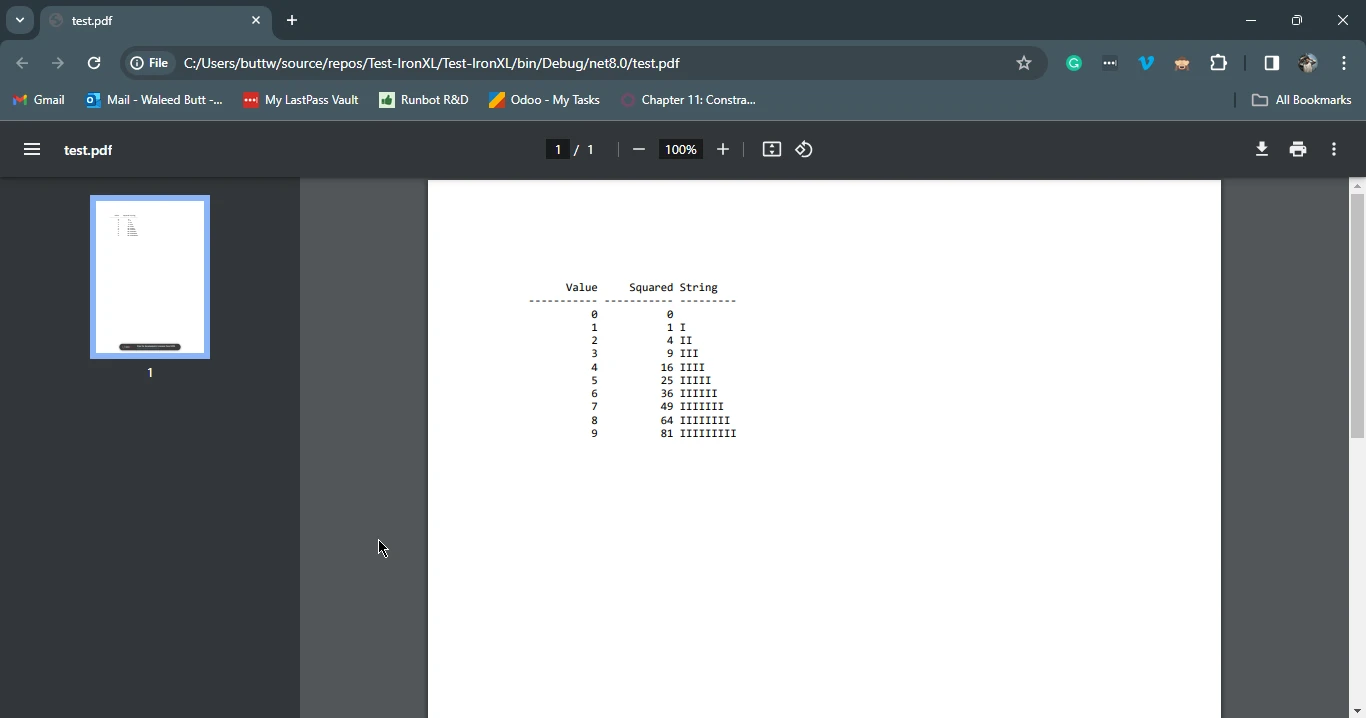
Ten fragment kodu C# demonstruje integrację TestConsoleLib i IronPDF w celu wygenerowania dokumentu PDF zawierającego sformatowaną tabelę danych. Początkowo tworzy się instancję klasy Output z TestConsoleLib i formatuje tabelę za pomocą danych wygenerowanych z zakresu liczb całkowitych. Sformatowany wynik jest przechowywany w zmiennej typu string `report`, ktora jest nastepnie zamykana w znacznikach HTML pre, aby zachowac formatowanie.
Następnie kod wykorzystuje ChromePdfRenderer z IronPDF, aby renderować treść HTML jako dokument PDF. Ostatecznie, wynikowy PDF jest zapisywany jako "test.pdf." Kod ten demonstruje płynne połączenie TestConsoleLib do formatowania i IronPDF do generowania PDF, oferując prostoliniowe rozwiązanie dla integracji sformatowanych danych do dokumentów PDF w aplikacji C#.
### 3.1.1. Wynik
## 4. Podsumowanie
.NET TestConsole wyłania się jako kluczowa biblioteka testowa dla aplikacji C#, przedstawiając unikalne podejście do testowania jednostkowego, które łagodzi wyzwania związane z dużymi zestawami danych i złożonymi stwierdzeniami. Wariant TestConsole.Core rozszerza swoją użyteczność na różnorodne środowiska, wypełniając luki pozostawione przez inne frameworki i oferując wydajny przepływ pracy dla porównywania obok siebie sformatowanych wyników.
Integruje się płynnie z [IronPDF](/), solidną biblioteką C#, i nie tylko ułatwia usprawnione testowanie, ale także rozszerza swoje możliwości na generowanie i manipulowanie PDF. Razem, te narzędzia umożliwiają programistom łatwe zarządzanie zawiłościami testowania oraz ulepszają generowanie dokumentów w swoich projektach C#, oferując kompleksowe i wydajne rozwiązanie.
Szczegółowy i kompletny tutorial na temat konwersji HTML na PDF przy użyciu IronPDF można znaleźć w [Przewodniku po IronPDF Tutorial](/tutorials/html-to-pdf/).
Testowanie odgrywa kluczową rolę w dziedzinie tworzenia oprogramowania, stanowiąc istotny element gwarantujący jakość aplikacji. Wśród mnóstwa dostępnych frameworków .NET Framework wyróżnia się jako powszechnie wybierana opcja do tworzenia aplikacji opartych na systemie Windows. W tym artykułe zagłębiamy się w zawiłości .NET TestConsole, narzędzia zaprojektowanego specjalnie do testowania aplikacji .NET.
W trakcie tego omówienia napiszemy obszerny przykład kodu ilustrujący praktyczne wdrożenie .NET TestConsole. Dodatkowo omówimy IronPDF, wzorcową bibliotekę C# do obsługi plików PDF, płynnie zintegrowaną z .NET TestConsole. Biblioteka ta okazuje się nieoceniona, umożliwiając programistom łatwy dostęp do plików PDF oraz ich generowanie w środowisku .NET TestConsole. Dołącz do nas w tej podróży, podczas której odkryjemy funkcjonalności i możliwości wynikające z synergii .NET TestConsole i funkcji C# PDF firmy IronPDF.
1. Wprowadzenie: TestConsole
TestConsole to wszechstronna biblioteka testowa, która wprowadza charakterystyczne podejście do testów jednostkowych w języku programowania C#. Tradycyjne metody testów jednostkowych często napotykają trudności w przypadku dużych zbiorów danych i złożonych asercji, co prowadzi do problemów z identyfikacją różnic między oczekiwanymi a rzeczywistymi wynikami. W odpowiedzi na to TestConsole oferuje nowatorski proces pracy, przechodząc od konwencjonalnego podejścia opartego na przewidywaniach do bezpośredniego porównania sformatowanego wyniku z wyznaczoną "zatwierdzoną" standardową wersją wyjściową.
W tej bibliotece, szczególnie w przypadku TestConsole, wariant ".Core" rozszerza możliwości formatowania odziedziczone po oryginalnym projekcie TestConsole i zawiera niezbędne funkcje zatwierdzania testów w scenariuszach, w których wyniki testów odbiegają od oczekiwań. TestConsole.Core płynnie integruje się z serwerem kompilacji, aby wywołać niepowodzenie testu. Na komputerze deweloperskim, domyślnie, oferuje możliwość rekonfiguracji w celu wykorzystania zainstalowanych narzędzi porównywania plików do wizualizacji różnic. Co ważne, podejście to usprawnia proces zatwierdzania, umożliwiając programistom ręczną aktualizację zatwierdzonej wersji, jeśli oczekiwane są różnice.
1.1. Dlaczego używać TestConsole?
TestConsole.Core czerpie inspirację z ApprovalTests, ale wyróżnia się wsparciem dla pisania zarówno pełnego frameworku, jak i zestawów testowych .NET Core. Biblioteka ta odpowiada na potrzebę testowania w rozmaitych środowiskach, gdyż ApprovalTests w momencie publikacji była głównie skierowana do scenariuszy pełnego frameworku. Składnia w TestConsole.Core, chociaż ma podobieństwa do ApprovalTests, oferuje różnice, szczególnie w kontekście wyboru narzędzi porównywania plików i bezpośredniego zatwierdzania zawartości.
Stworzony, aby ułatwiać testowanie w kodzie aplikacji .NET Core, TestConsole.Core powstał z potrzeby wypełnienia luki pozostawionej przez brak wsparcia dla aplikacji .NET standard i .NET Core w ApprovalTests. Skupiając się na umożliwieniu skutecznego testowania dużych zestawów danych, funkcje zatwierdzania testów TestConsole.Core uwzględniają dane sformatowane za pomocą obiektu Test Console Output, rozszerzając ich funkcjonalność na obsługę dowolnego zwykłego tekstu, zapewniając kompleksowe rozwiązanie dla testów jednostkowych w C#.
1.2. Install TestConsole C#
Konsolę testową można zainstalować korzystając z Menedżera pakietów NuGet wewnątrz Visual Studio lub uruchamiając następujące polecenie w konsoli Menedżera pakietów NuGet.
W tej sekcji zobaczymy, jak możesz przekształcić wyniki konsoli w raporty. Poniższy kod źródłowy korzysta z konsoli testowej, aby przekształcić obiekty Enumerable w dobrze sformatowaną tabelę raportów.
using TestConsoleLib;using System;using System.Linq;// Instantiate the output class from TestConsoleLibvar output = new Output();// Generate a collection of anonymous objects containing value, square, and string lengthvar data = Enumerable.Range(0, 10) .Select(i => new { Value = i, Squared = i * i, String = new string('I', i) });// Format the data into a table using TestConsoleLib's methodoutput.FormatTable(data);// Retrieve the formatted report as a stringstring report = output.Report;// Print the formatted report to consoleConsole.WriteLine(report);
using TestConsoleLib;
using System;
using System.Linq;

// Instantiate the output class from TestConsoleLib
var output = new Output();

// Generate a collection of anonymous objects containing value, square, and string length
var data = Enumerable.Range(0, 10)
    .Select(i => new { Value = i, Squared = i * i, String = new string('I', i) });

// Format the data into a table using TestConsoleLib's method
output.FormatTable(data);

// Retrieve the formatted report as a string
string report = output.Report;

// Print the formatted report to console
Console.WriteLine(report);
ImportsTestConsoleLibImportsSystemImportsSystem.Linq' Instantiate the output class from TestConsoleLibPrivate output = New Output()' Generate a collection of anonymous objects containing value, square, and string lengthPrivate data = Enumerable.Range(0, 10).Select(Function(i) New With {Key .Value = i,Key .Squared = i * i,Key .String = New String("I"c, i)})' Format the data into a table using TestConsoleLib's methodoutput.FormatTable(data)' Retrieve the formatted report as a stringDim report AsString = output.Report' Print the formatted report to consoleConsole.WriteLine(report)
Imports TestConsoleLib
Imports System
Imports System.Linq

' Instantiate the output class from TestConsoleLib
Private output = New Output()

' Generate a collection of anonymous objects containing value, square, and string length
Private data = Enumerable.Range(0, 10).Select(Function(i) New With {
	Key .Value = i,
	Key .Squared = i * i,
	Key .String = New String("I"c, i)
})

' Format the data into a table using TestConsoleLib's method
output.FormatTable(data)

' Retrieve the formatted report as a string
Dim report As String = output.Report

' Print the formatted report to console
Console.WriteLine(report)
Ten fragment kodu C# wykorzystuje bibliotekę TestConsoleLib, aby zademonstrować i uruchomić prosty przykład formatowania i raportowania danych tabelarycznych używając klasy Output TestConsole. Zaczyna sie od utworzenia instancji klasy Output o nazwie output. Następnie generuje kolekcję 10 elementów zawierających anonimowe obiekty z właściwościami reprezentującymi wartość całkowitą, jej kwadrat i łańcuch 'I's, którego długość odpowiada wartości całkowitej.
Nastepnie wywolywana jest metoda output.FormatTable(), aby sformatowac dane w tabeli. Sformatowany wynik jest przechowywany w zmiennej typu string report, ktora jest na koncu drukowana na konsoli za pomoca Console.WriteLine(). To pokazuje możliwości TestConsole w łatwym formatowaniu i prezentowaniu danych tabelarycznych dla lepszej czytelności podczas testów jednostkowych lub debugowania.
2.1. Wynik
3. IronPDF
Oficjalna strona internetowa IronPDF oferuje kompleksową platformę dla solidnej biblioteki PDF w C#, zaprojektowanej, aby uprościć i usprawnić proces pracy z dokumentami PDF w aplikacjach .NET. Oferując wszechstronny zestaw funkcji, IronPDF umożliwia programistom łatwe tworzenie, manipulowanie i wydobywanie treści z plików PDF w swoich projektach C#. Skoncentrowany na elastyczności i łatwości użycia, IronPDF wspiera szeroką gamę funkcjonalności, w tym generowanie PDF-ów z HTML, obrazów lub istniejących dokumentów, a także włączanie dynamicznej zawartości, takiej jak wykresy i tabele.
Jego możliwości rozszerzają się na łączenie, dzielenie i manipulowanie stronami PDF, a także funkcje takie jak wydobywanie tekstu i obrazów. Niezależnie czy do raportowania, dokumentacji czy dowolnego zadania związanego z PDF, IronPDF wyróżnia się jako niezawodne i wszechstronne rozwiązanie, uproszczając integrację funkcjonalności PDF w aplikacjach C# przy minimalnym wysiłku.
3.1. Tworzenie plików PDF z raportów Test Console
W tej sekcji omówimy, jak możesz przekształcić wyjścia z raportów TestConsole.
Zainstaluj bibliotekę IronPDF
Instalacja za pomocą menedżera pakietów NuGet
Aby zintegrować IronPDF z projektem konsoli używając menedżera pakietów NuGet, postępuj zgodnie z tymi krokami:
Otwórz Visual Studio i w eksploratorze rozwiązań kliknij prawym przyciskiem myszy na swój projekt.
Wybierz "Zarządzaj pakietami NuGet…" z menu kontekstowego.
Przejdź do zakładki "Przeglądaj" i wyszukaj IronPDF.
Wybierz bibliotekę IronPDF z wyników wyszukiwania i kliknij przycisk instalacji.
Zaakceptuj wszelkie monity dotyczące Umowy licencyjnej.
Jeśli chcesz dodać IronPDF do swojego projektu za pomocą konsoli menedżera pakietów, wykonaj następujące polecenie w konsoli menedżera pakietów:
PM > Install-Package IronPdf
Install-Package IronPdf
Pobierze i zainstaluje IronPDF w Twoim projekcie.
Instalacja za pomocą NuGet Strona internetowa
Aby uzyskać szczegółowy przegląd IronPDF, w tym jego funkcje, zgodność i dodatkowe opcje pobierania, odwiedź stronę IronPDF na stronie NuGet pod adresem https://www.nuget.org/packages/IronPdf.
Instalacja za pomocą biblioteki DLL
Alternatywnie, można zintegrować IronPDF bezpośrednio z projektem używając jego pliku DLL. Pobierz plik ZIP zawierający DLL z tego pakietu IronPDF ZIP. Rozpakuj plik i dołącz bibliotekę DLL do swojego projektu.
Po zainstalowaniu, teraz odtworzymy powyższy przykład raportu, ale tym razem zamiast pisać go na konsoli, stworzymy z niego raport PDF.
using TestConsole.OutputFormatting;using TestConsoleLib;using IronPdf;using System;using System.Linq;// Instantiate the output class from TestConsoleLibvar output = new Output();// Generate a collection of anonymous objects containing value, square, and string lengthvar data = Enumerable.Range(0, 10) .Select(i => new { Value = i, Squared = i * i, String = new string('I', i) });// Format the data into a table and obtain the formatted output as a stringoutput.FormatTable(data);string report = output.Report;// Wrap the report in HTML pre-tags to maintain formattingvar htmlContent = $"<pre>{report}</pre>";// Initialize IronPDF renderer and render the HTML content to PDFvar renderer = new ChromePdfRenderer();var pdf = renderer.RenderHtmlAsPdf(htmlContent);// Save the PDF to a filepdf.SaveAs("test.pdf");
using TestConsole.OutputFormatting;
using TestConsoleLib;
using IronPdf;
using System;
using System.Linq;

// Instantiate the output class from TestConsoleLib
var output = new Output();

// Generate a collection of anonymous objects containing value, square, and string length
var data = Enumerable.Range(0, 10)
    .Select(i => new { Value = i, Squared = i * i, String = new string('I', i) });

// Format the data into a table and obtain the formatted output as a string
output.FormatTable(data);
string report = output.Report;

// Wrap the report in HTML pre-tags to maintain formatting
var htmlContent = $"<pre>{report}</pre>";

// Initialize IronPDF renderer and render the HTML content to PDF
var renderer = new ChromePdfRenderer();
var pdf = renderer.RenderHtmlAsPdf(htmlContent);

// Save the PDF to a file
pdf.SaveAs("test.pdf");
ImportsTestConsole.OutputFormattingImportsTestConsoleLibImportsIronPdfImportsSystemImportsSystem.Linq' Instantiate the output class from TestConsoleLibPrivate output = New Output()' Generate a collection of anonymous objects containing value, square, and string lengthPrivate data = Enumerable.Range(0, 10).Select(Function(i) New With {Key .Value = i,Key .Squared = i * i,Key .String = New String("I"c, i)})' Format the data into a table and obtain the formatted output as a stringoutput.FormatTable(data)Dim report AsString = output.Report' Wrap the report in HTML pre-tags to maintain formattingDim htmlContent = $"<pre>{report}</pre>"' Initialize IronPDF renderer and render the HTML content to PDFDim renderer = New ChromePdfRenderer()Dim pdf = renderer.RenderHtmlAsPdf(htmlContent)' Save the PDF to a filepdf.SaveAs("test.pdf")
Imports TestConsole.OutputFormatting
Imports TestConsoleLib
Imports IronPdf
Imports System
Imports System.Linq

' Instantiate the output class from TestConsoleLib
Private output = New Output()

' Generate a collection of anonymous objects containing value, square, and string length
Private data = Enumerable.Range(0, 10).Select(Function(i) New With {
	Key .Value = i,
	Key .Squared = i * i,
	Key .String = New String("I"c, i)
})

' Format the data into a table and obtain the formatted output as a string
output.FormatTable(data)
Dim report As String = output.Report

' Wrap the report in HTML pre-tags to maintain formatting
Dim htmlContent = $"<pre>{report}</pre>"

' Initialize IronPDF renderer and render the HTML content to PDF
Dim renderer = New ChromePdfRenderer()
Dim pdf = renderer.RenderHtmlAsPdf(htmlContent)

' Save the PDF to a file
pdf.SaveAs("test.pdf")
Ten fragment kodu C# demonstruje integrację TestConsoleLib i IronPDF w celu wygenerowania dokumentu PDF zawierającego sformatowaną tabelę danych. Początkowo tworzy się instancję klasy Output z TestConsoleLib i formatuje tabelę za pomocą danych wygenerowanych z zakresu liczb całkowitych. Sformatowany wynik jest przechowywany w zmiennej typu string report, ktora jest nastepnie zamykana w znacznikach HTML pre, aby zachowac formatowanie.
Następnie kod wykorzystuje ChromePdfRenderer z IronPDF, aby renderować treść HTML jako dokument PDF. Ostatecznie, wynikowy PDF jest zapisywany jako "test.pdf." Kod ten demonstruje płynne połączenie TestConsoleLib do formatowania i IronPDF do generowania PDF, oferując prostoliniowe rozwiązanie dla integracji sformatowanych danych do dokumentów PDF w aplikacji C#.
3.1.1. Wynik
4. Podsumowanie
.NET TestConsole wyłania się jako kluczowa biblioteka testowa dla aplikacji C#, przedstawiając unikalne podejście do testowania jednostkowego, które łagodzi wyzwania związane z dużymi zestawami danych i złożonymi stwierdzeniami. Wariant TestConsole.Core rozszerza swoją użyteczność na różnorodne środowiska, wypełniając luki pozostawione przez inne frameworki i oferując wydajny przepływ pracy dla porównywania obok siebie sformatowanych wyników.
Integruje się płynnie z IronPDF, solidną biblioteką C#, i nie tylko ułatwia usprawnione testowanie, ale także rozszerza swoje możliwości na generowanie i manipulowanie PDF. Razem, te narzędzia umożliwiają programistom łatwe zarządzanie zawiłościami testowania oraz ulepszają generowanie dokumentów w swoich projektach C#, oferując kompleksowe i wydajne rozwiązanie.
Szczegółowy i kompletny tutorial na temat konwersji HTML na PDF przy użyciu IronPDF można znaleźć w Przewodniku po IronPDF Tutorial.
Jacob Mellor jest Chief Technology Officer w Iron Software i wizjonerskim inżynierem, pionierem technologii C# PDF. Jako pierwotny deweloper głównej bazy kodowej Iron Software, kształtuje architekturę produktów firmy od jej początku, przekształcając ją wspólnie z CEO Cameron Rimington w firmę liczącą ponad 50 osób, obsługującą NASA, Teslę i światowe agencje rządowe.















