




已更新 2026年4月23日
在 .NET 中用 Microsoft.Extensions.AI 簡化 LLM 整合
AI 正在改變軟體開發,但將大型語言模型 (LLM) 整合到 .NET 中一直很複雜。利用 IronPdf.AI 將 AI 整合推向更遠,為 .NET 應用程式帶來由 OpenAI 驅動的 PDF 解析、資料擷取和內容總結。
閱讀更多

測試在軟體開發領域中扮演著關鍵的角色,是保證應用程式品質的重要元素。 在眾多可用的框架中,.NET 脫穎而出,是開發基於Windows應用程式的廣泛選擇。 本文深入探討了.NET TestConsole的複雜性,這是一個專為測試 .NET 應用程式而設計的工具。
在這次探索中,我們將編寫一個全面的程式碼範例,說明 .NET TestConsole 的實際實施。 此外,我們將揭示 IronPDF,這是一個模範的 C# PDF 程式庫,與 .NET TestConsole 無縫整合。 這個程式庫證明了其無價之寶,使開發人員能夠在 .NET TestConsole 環境中輕鬆存取和生成 PDF。 加入我們的旅程,揭開 .NET TestConsole 和 IronPDF 的 C# PDF 功能性的協力效應所帶來的功能和可能性。
TestConsole 是一個多功能的測試程式庫,為 C# 編程語言的單元測試引入了一種獨特的方法。 傳統的單元測試方法在處理大型資料集和複雜的斷言時常常面臨挑戰,導致難以識別預期結果和實際結果之間的差異。 為應對這一挑戰,TestConsole 提供了一種新穎的工作流程,從傳統的預測方法轉向將格式化輸出與指定的"批准"標準輸出版本進行並排比較。
在這個程式庫中特別是 TestConsole,'.Core' 變體擴展了從原始 TestConsole 專案繼承的格式化功能,並在測試結果與預期結果不一致的情況下引入了必要的測試批准功能。 TestConsole.Core 無縫整合到構建伺服器中以觸發測試失敗。 在開發 PC 上,預設情況下提供可重新配置性,以利用安裝的文件比較工具來可視化差異。 值得注意的是,這種方法簡化了批准過程,允許開發人員在預期差異的情況下手動更新批准版本。
TestConsole.Core 從 ApprovalTests 中汲取靈感,但通過支持撰寫完整框架和 .NET Core 測試套件而自成一派。 該程式庫解決了在多種環境中測試的需求,因為 ApprovalTests 發佈時主要針對完整框架場景。 雖然 TestConsole.Core 的語法與 ApprovalTests 有相似之處,但在文件比較工具的選擇和直接內容批准方面提供了區別。
TestConsole.Core 是為便於在 .NET Core 應用程式碼中進行測試而開發的,它是通過填補 ApprovalTests 缺乏 .NET Standard和 .NET Core 應用程式支援的空白。 TestConsole.Core 聚焦於使大型資料集的有效測試成為可能,其測試批准功能適應於使用 TestConsole 輸出物件格式化的資料,並將其功能擴展到處理任何純文字輸入,為 C# 中的單元測試提供全面的解決方案。
可以使用 Visual Studio 內的 NuGet 包管理器安裝測試控制台,或者在 NuGet 包管理器控制台中運行以下命令。
或者直接從 NuGet 上的 TestConsole 發行版中下載。
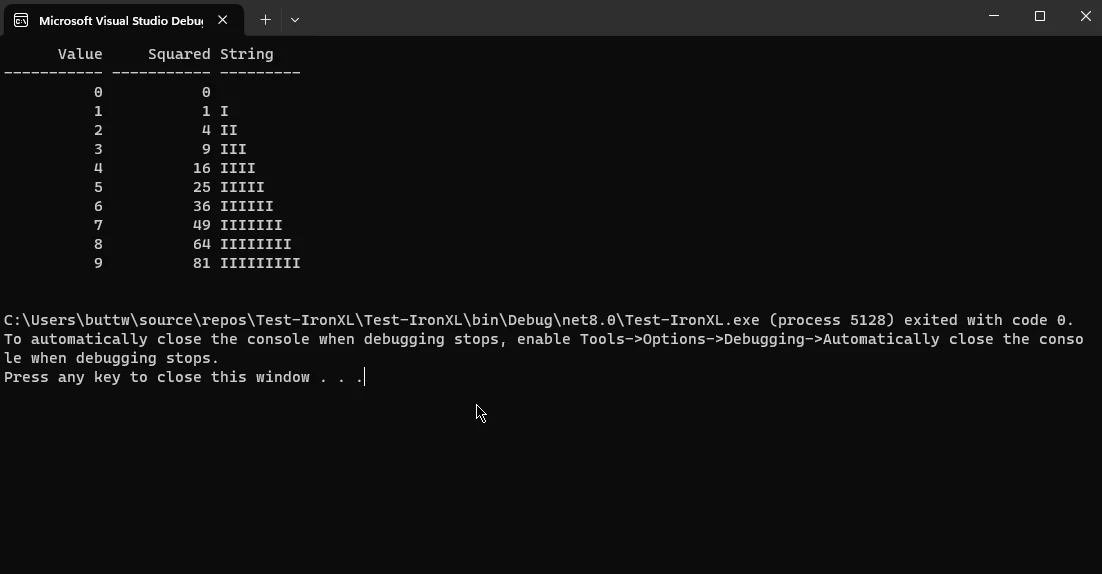
在本節中,我們將看到如何將控制台輸出轉換為報告。 以下源程式碼使用測試控制台將枚舉物件轉換為格式良好的報告表。
using TestConsoleLib;
using System;
using System.Linq;

// Instantiate the output class from TestConsoleLib
var output = new Output();

// Generate a collection of anonymous objects containing value, square, and string length
var data = Enumerable.Range(0, 10)
    .Select(i => new { Value = i, Squared = i * i, String = new string('I', i) });

// Format the data into a table using TestConsoleLib's method
output.FormatTable(data);

// Retrieve the formatted report as a string
string report = output.Report;

// Print the formatted report to console
Console.WriteLine(report);Imports TestConsoleLib
Imports System
Imports System.Linq
' Instantiate the output class from TestConsoleLib
Private output = New Output()
' Generate a collection of anonymous objects containing value, square, and string length
Private data = Enumerable.Range(0, 10).Select(Function(i) New With {
Key .Value = i,
Key .Squared = i * i,
Key .String = New String("I"c, i)
})
' Format the data into a table using TestConsoleLib's method
output.FormatTable(data)
' Retrieve the formatted report as a string
Dim report As String = output.Report
' Print the formatted report to console
Console.WriteLine(report)這段 C# 程式碼片斷使用 TestConsoleLib 程式庫來演示和運行一個簡單的格式化和報告表格資料的範例,使用 TestConsole 的 Output 類。 它首先建立一個名為 output 的 Output 類實例。 隨後,它生成一個包含 10 個元素的集合,這些元素包含具有表示整數值,它的平方,和一串長度與整數值相對應的 'I' 字串的匿名物件。
然後調用 output.FormatTable() 方法將資料格式化為表格。 格式化的結果儲存在 report 字串變數中,最終使用 Console.WriteLine() 列印到控制台。 這展示了 TestConsole 的功能以及在單元測試或除錯場景中輕鬆格式化和呈現表格資料的能力。
IronPDF 官方網站 提供了一個全面的平台,這是一個強大的 C# PDF 程式庫,旨在簡化和增強在 .NET 應用程式中處理 PDF 文件的過程。 IronPDF 提供了一套完整的功能,令開發人員能夠輕鬆地在 C# 專案中建立、操作和提取 PDF 文件中的內容。 IronPDF 著重於靈活性和易用性,支持多種功能,包括從 HTML、圖像或現有文件生成 PDF,以及動態內容的整合,如圖表和表格。
其功能擴展到合併、拆分和操作 PDF 頁面,以及提取文字和圖像等功能。 無論是用於報告、檔案製作或任何與 PDF 相關的任務,IronPDF 都突出其作為一個可靠而多功能的解決方案,以最小的努力將 PDF 功能整合到 C# 應用程式中。
在本節中,我們將討論如何轉換來自 TestConsole 報告的輸出。
要將 IronPDF 整合到您的控制台專案中,請按照以下步驟操作:
如果您希望通過包管理器控制台將 IronPDF 包含在您的專案中,則在包管理器控制台中執行以下命令:
它會獲取並將 IronPDF 安裝到您的專案中。
想詳細了解 IronPDF,包括其功能、相容性和其他下載選項,請存取 NuGet 網站上的 IronPDF 頁面,網址為 https://www.nuget.org/packages/IronPdf。
或者,您可以直接使用其 DLL 文件將 IronPDF 整合到您的專案中。從此 IronPDF ZIP 套件 中下載包含 DLL 的 ZIP 文件。 解壓縮後,將包含的DLL納入您的專案。
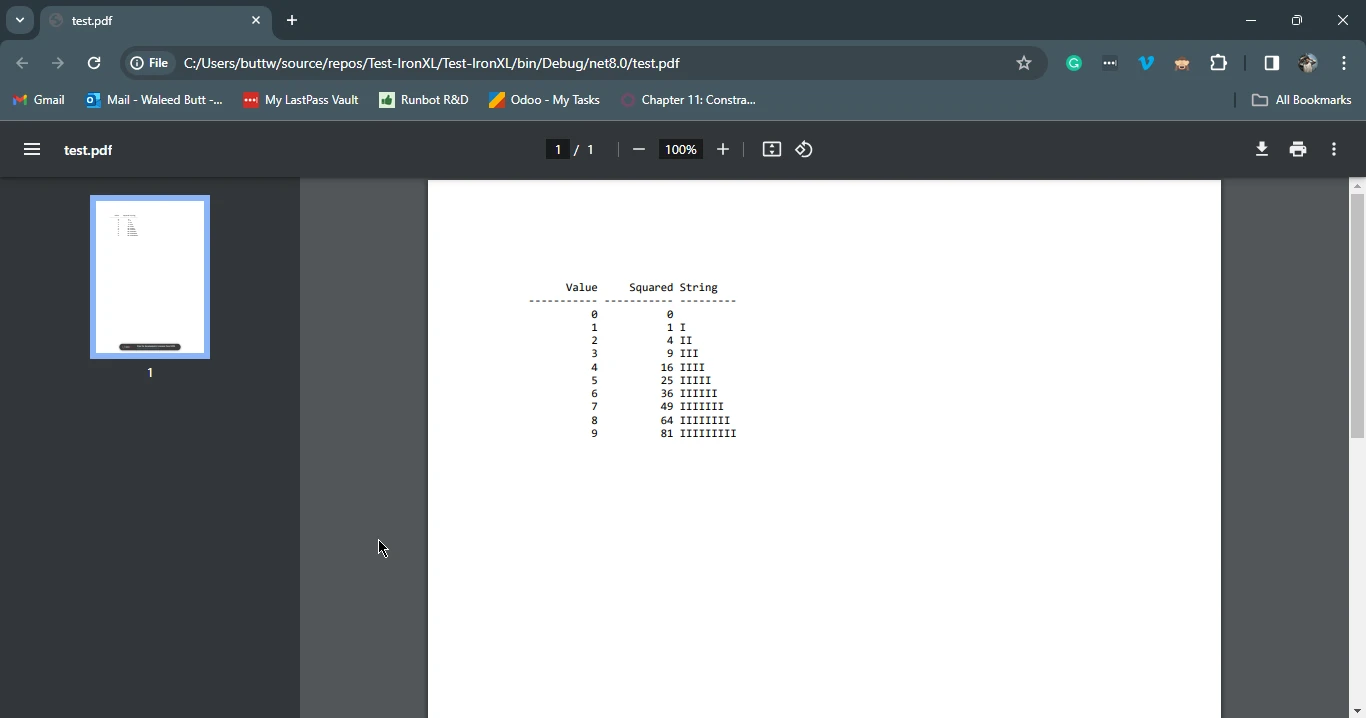
安裝完成後,現在我們將重建上述範例報告,但這次不再寫入控制台,而是從中建立 PDF 報告。
using TestConsole.OutputFormatting;
using TestConsoleLib;
using IronPdf;
using System;
using System.Linq;

// Instantiate the output class from TestConsoleLib
var output = new Output();

// Generate a collection of anonymous objects containing value, square, and string length
var data = Enumerable.Range(0, 10)
    .Select(i => new { Value = i, Squared = i * i, String = new string('I', i) });

// Format the data into a table and obtain the formatted output as a string
output.FormatTable(data);
string report = output.Report;

// Wrap the report in HTML pre-tags to maintain formatting
var htmlContent = $"<pre>{report}</pre>";

// Initialize IronPDF renderer and render the HTML content to PDF
var renderer = new ChromePdfRenderer();
var pdf = renderer.RenderHtmlAsPdf(htmlContent);

// Save the PDF to a file
pdf.SaveAs("test.pdf");Imports TestConsole.OutputFormatting
Imports TestConsoleLib
Imports IronPdf
Imports System
Imports System.Linq
' Instantiate the output class from TestConsoleLib
Private output = New Output()
' Generate a collection of anonymous objects containing value, square, and string length
Private data = Enumerable.Range(0, 10).Select(Function(i) New With {
Key .Value = i,
Key .Squared = i * i,
Key .String = New String("I"c, i)
})
' Format the data into a table and obtain the formatted output as a string
output.FormatTable(data)
Dim report As String = output.Report
' Wrap the report in HTML pre-tags to maintain formatting
Dim htmlContent = $"<pre>{report}</pre>"
' Initialize IronPDF renderer and render the HTML content to PDF
Dim renderer = New ChromePdfRenderer()
Dim pdf = renderer.RenderHtmlAsPdf(htmlContent)
' Save the PDF to a file
pdf.SaveAs("test.pdf")這段 C# 程式碼片斷展示了 TestConsoleLib 和 IronPDF 的整合,生成包含格式化表格資料的 PDF 文件。 最初,從 TestConsoleLib 建立一個 Output 類的實例,並使用從整數範圍生成的資料格式化表格。 格式化輸出儲存在 report 字串變數中,然後將其包裹在 HTML pre標籤中以保留格式。
隨後,程式碼利用 IronPDF 的 ChromePdfRenderer 將 HTML 內容呈現為 PDF 文件。 最後,生成的 PDF 保存為"test.pdf"。這段程式碼展示了 TestConsoleLib 用於格式化和 IronPDF 用於生成 PDF 的無縫組合,為在 C# 應用程式中將格式化資料整合到 PDF 文件中提供了一個簡單的解決方案。
.NET TestConsole 成為 C# 應用程式的一個關鍵測試程式庫,提供了一種獨特的單元測試方法,緩解了大型資料集和複雜斷言相關的挑戰。 TestConsole.Core 變體將其實用性擴展到多樣的環境中,填補其他框架留下的空白,並為格式化輸出的並排比較提供了一個高效的工作流程。
它無縫整合到 IronPDF,一個強大的 C# 程式庫,不僅促進了流暢的測試,還擴展了其在 PDF 生成和操作方面的能力。 這些工具共同賦能開發人員輕鬆處理測試複雜性並加強 C# 項目的文件生成,提供了一個全面而高效的解決方案。
IronPDF HTML 到 PDF 轉換的詳細和完整的教程可以在 IronPDF 教程指南中找到。

Jacob Mellor是Iron Software的首席技術官,一位在C# PDF技術上開創先河的遠見工程師。作為Iron Software核心程式碼庫的原開發者,他從創立以來就一直在塑造公司的產品架構,與首席執行官Cameron Rimington一起將公司轉變為服務於NASA、特斯拉和全球政府公司的50多名人員的公司。



IronPDF 是 IRONSUITE 的一部分
10 款適用於辦公室文件的 .NET API 產品

當您需要您的PDF看起來像HTML一樣快速。


