La instrucción switch en C# ofrece una alternativa más simplificada y legible a múltiples bloques if-else. Es beneficioso cuando tienes una variable que puede tomar uno de varios valores distintos, y necesitas ejecutar diferentes códigos basados en el valor. La instrucción switch evalúa una expresión y ejecuta el código basado en el valor coincidente, lo que la convierte en una parte integral de la toma de decisiones en tu código.
Mientras que las estructuras if-else son útiles para condiciones simples o verificaciones, las sentencias switch case sobresalen al manejar verificaciones de condiciones más complejas, especialmente aquellas basadas en una sola variable o expresión de coincidencia de patrones. Proporcionan una sintaxis más limpia y comprensible en comparación con las instrucciones if, lo que es crucial tanto para escribir como para mantener el código.
Básicos de la sentencia Switch
¿Qué es un Switch Statement?
Una instrucción switch en C# es una estructura de control utilizada para seleccionar uno de muchos caminos de código para ejecutar. La selección se basa en el valor o una expresión. Es una alternativa eficiente al uso de múltiples condiciones if-else, especialmente cuando se trata de una variable que puede tener varios valores distintos.
Sintaxis
La sintaxis básica de una instrucción switch es simple:
// Switch statement
switch (variable)
{
    case value1:
        // Code to execute if variable equals value1
        break;
    case value2:
        // Code to execute if variable equals value2
        break;
    // More cases as needed
    default:
        // Code to execute if variable doesn't match any case
        break;
}
// Switch statement
switch (variable)
{
    case value1:
        // Code to execute if variable equals value1
        break;
    case value2:
        // Code to execute if variable equals value2
        break;
    // More cases as needed
    default:
        // Code to execute if variable doesn't match any case
        break;
}
' Switch statement
Select Case variable
Case value1
' Code to execute if variable equals value1
Case value2
' Code to execute if variable equals value2
' More cases as needed
Case Else
' Code to execute if variable doesn't match any case
End Select
' Switch statement
Select Case variable
	Case value1
		' Code to execute if variable equals value1
	Case value2
		' Code to execute if variable equals value2
	' More cases as needed
	Case Else
		' Code to execute if variable doesn't match any case
End Select
switch (variable): Esto especifica la variable o expresión a evaluar.case value1: Estos son los diferentes valores o condiciones que verificas contra la variable.break: Esta palabra clave se utiliza para salir del bloque de switch una vez que se ejecuta un caso coincidente.default statement: Este bloque se ejecuta si ninguno de los casos especificados coincide con la variable.
Comprensión de la sentencia Break
La instrucción break en el switch es crucial. Previene el comportamiento de "caída", donde la ejecución se mueve al caso siguiente incluso si ya se cumple la condición coincidente. Cada bloque de caso típicamente termina con una instrucción break para asegurar que solo se ejecute el código bajo el caso coincidente.
Comparación de las sentencias Switch y If-Else
Mientras que la estructura if-else implica verificar una condición y ejecutar un bloque de código si la condición es verdadera, las instrucciones switch comparan una sola variable o expresión contra múltiples valores potenciales. Esto hace que la instrucción switch sea más concisa y fácil de leer cuando tienes muchas condiciones o patrones de casos que verificar.
Ejemplo: Uso de una sentencia Switch
int number = 3;
switch (number)
{
    case 1:
        Console.WriteLine("One");
        break;
    case 2:
        Console.WriteLine("Two");
        break;
    case 3:
        Console.WriteLine("Three");
        break;
    default:
        Console.WriteLine("Other Number"); // Print to console
        break;
}
int number = 3;
switch (number)
{
    case 1:
        Console.WriteLine("One");
        break;
    case 2:
        Console.WriteLine("Two");
        break;
    case 3:
        Console.WriteLine("Three");
        break;
    default:
        Console.WriteLine("Other Number"); // Print to console
        break;
}
Dim number As Integer = 3
Select Case number
Case 1
Console.WriteLine("One")
Case 2
Console.WriteLine("Two")
Case 3
Console.WriteLine("Three")
Case Else
Console.WriteLine("Other Number") ' Print to console
End Select
Dim number As Integer = 3
Select Case number
	Case 1
		Console.WriteLine("One")
	Case 2
		Console.WriteLine("Two")
	Case 3
		Console.WriteLine("Three")
	Case Else
		Console.WriteLine("Other Number") ' Print to console
End Select
En este ejemplo, el programa imprimirá "Tres" como resultado ya que el número coincide con el caso 3.
El papel del caso por defecto
Comprensión del valor predeterminado en un bloque de conmutación
En una instrucción switch, el caso default juega un papel crucial. Sirve como una opción de captura que se ejecuta cuando ninguna de las etiquetas de caso especificadas coincide con el valor de la expresión switch. Aunque es opcional, incluir un caso default es una buena práctica para manejar valores inesperados o desconocidos.
Cómo y cuándo utilizar la declaración por defecto
El caso default se utiliza cuando quieres ejecutar un bloque de código si ninguno de los casos específicos coincide. Asegura que la instrucción switch siempre tenga un comportamiento definido, independientemente de la entrada. El caso por defecto se declara usando la palabra clave default, seguida de dos puntos.
default:
    // Code to execute if no case matches
    break;
default:
    // Code to execute if no case matches
    break;
Case Else
' Code to execute if no case matches
break
Case Else
	' Code to execute if no case matches
	break
El caso default puede colocarse en cualquier parte del bloque switch pero típicamente se coloca al final por legibilidad.
Ejemplo: Sentencia Switch con caso por defecto
Considera un escenario donde estás evaluando un día de la semana:
int day = 5;
string dayName;
switch (day)
{
    case 1:
        dayName = "Monday";
        break;
    case 2:
        dayName = "Tuesday";
        break;
    case 3:
        dayName = "Wednesday";
        break;
    case 4:
        dayName = "Thursday";
        break;
    case 5:
        dayName = "Friday";
        break;
    case 6:
        dayName = "Saturday";
        break;
    case 7:
        dayName = "Sunday";
        break;
    default:
        dayName = "Invalid day";
        break;
}
Console.WriteLine(dayName);
int day = 5;
string dayName;
switch (day)
{
    case 1:
        dayName = "Monday";
        break;
    case 2:
        dayName = "Tuesday";
        break;
    case 3:
        dayName = "Wednesday";
        break;
    case 4:
        dayName = "Thursday";
        break;
    case 5:
        dayName = "Friday";
        break;
    case 6:
        dayName = "Saturday";
        break;
    case 7:
        dayName = "Sunday";
        break;
    default:
        dayName = "Invalid day";
        break;
}
Console.WriteLine(dayName);
Dim day As Integer = 5
Dim dayName As String
Select Case day
Case 1
dayName = "Monday"
Case 2
dayName = "Tuesday"
Case 3
dayName = "Wednesday"
Case 4
dayName = "Thursday"
Case 5
dayName = "Friday"
Case 6
dayName = "Saturday"
Case 7
dayName = "Sunday"
Case Else
dayName = "Invalid day"
End Select
Console.WriteLine(dayName)
Dim day As Integer = 5
Dim dayName As String
Select Case day
	Case 1
		dayName = "Monday"
	Case 2
		dayName = "Tuesday"
	Case 3
		dayName = "Wednesday"
	Case 4
		dayName = "Thursday"
	Case 5
		dayName = "Friday"
	Case 6
		dayName = "Saturday"
	Case 7
		dayName = "Sunday"
	Case Else
		dayName = "Invalid day"
End Select
Console.WriteLine(dayName)
En este ejemplo, si day tiene un valor distinto de 1 a 7, se ejecuta el caso por defecto, estableciendo dayName a "Día inválido".
Bestes prácticas para el caso por defecto
- Incluya siempre un valor predeterminado: incluso si cree que ha cubierto todos los casos posibles, incluya un caso predeterminado para manejar valores imprevistos.
- Acciones significativas: utilice el caso predeterminado para realizar acciones significativas, como registrar un error, establecer un valor predeterminado o notificar al usuario sobre un valor desconocido.
Características avanzadas de Switch
Introduction to Switch Expressions in C#
Con la evolución de C#, se introdujeron las expresiones switch como una forma más concisa y expresiva de manejar múltiples ramas condicionales. A diferencia de las instrucciones switch tradicionales, las expresiones switch devuelven un valor y son más simplificadas, lo que las convierte en una herramienta poderosa en la programación moderna con C#.
Sintaxis de las expresiones de conmutación
La sintaxis de una expresión switch en C# es una forma más compacta de la instrucción switch case. Aquí está una estructura básica:
var result = variable switch
{
    value1 => result1,
    value2 => result2,
    _ => defaultResult
};
var result = variable switch
{
    value1 => result1,
    value2 => result2,
    _ => defaultResult
};
'INSTANT VB TODO TASK: The following 'switch expression' was not converted by Instant VB:
'var result = variable switch
'{
' value1 => result1,
' value2 => result2,
' _ => defaultResult
'};
'INSTANT VB TODO TASK: The following 'switch expression' was not converted by Instant VB:
'var result = variable switch
'{
'	value1 => result1,
'	value2 => result2,
'	_ => defaultResult
'};
El símbolo de subrayado (_) representa el caso default en las expresiones switch, funcionando de manera similar al bloque default en las instrucciones switch tradicionales.
Ejemplo: Uso de una expresión de conmutación
Considera un escenario donde necesitas categorizar una lectura de temperatura:
int temperature = 25;
string weatherDescription = temperature switch
{
    <= 0 => "Freezing",
    < 20 => "Cold",
    < 30 => "Mild",
    _ => "Hot"
};
Console.WriteLine(weatherDescription);
int temperature = 25;
string weatherDescription = temperature switch
{
    <= 0 => "Freezing",
    < 20 => "Cold",
    < 30 => "Mild",
    _ => "Hot"
};
Console.WriteLine(weatherDescription);
Dim temperature As Integer = 25
'INSTANT VB TODO TASK: The following 'switch expression' was not converted by Instant VB:
'string weatherDescription = temperature switch
'{
' <= 0 => "Freezing",
' < 20 => "Cold",
' < 30 => "Mild",
' _ => "Hot"
'};
Console.WriteLine(weatherDescription)
Dim temperature As Integer = 25
'INSTANT VB TODO TASK: The following 'switch expression' was not converted by Instant VB:
'string weatherDescription = temperature switch
'{
'	<= 0 => "Freezing",
'	< 20 => "Cold",
'	< 30 => "Mild",
'	_ => "Hot"
'};
Console.WriteLine(weatherDescription)
En este ejemplo, la expresión switch categoriza de manera sucinta la temperatura, con el caso default (_) cubriendo cualquier escenario no concordado por los otros casos.
Coincidencia de patrones con expresiones de conmutación
Las expresiones switch en C# permiten la coincidencia de patrones, haciéndolas aún más versátiles. Puedes coincidir tipos, valores o incluso patrones:
object obj = // some object;
string description = obj switch
{
    int i => $"Integer: {i}",
    string s => $"String: {s}",
    _ => "Unknown type"
};
object obj = // some object;
string description = obj switch
{
    int i => $"Integer: {i}",
    string s => $"String: {s}",
    _ => "Unknown type"
};
'INSTANT VB TODO TASK: The following 'switch expression' was not converted by Instant VB:
'object obj = string description = obj switch
'{
' int i => $"Integer: {i}",
' string s => $"String: {s}",
' _ => "Unknown type"
'};
'INSTANT VB TODO TASK: The following 'switch expression' was not converted by Instant VB:
'object obj = string description = obj switch
'{
'	int i => $"Integer: {i}",
'	string s => $"String: {s}",
'	_ => "Unknown type"
'};
C# Instrucción Switch vs. Expresión Switch
- Declaración Switch de C#: Tradicionalmente se utiliza para ejecutar diferentes bloques de código en función del valor de una variable. Requiere una instrucción break para cada caso.
- Expresión Switch: Introducida en C# 8.0, proporciona una sintaxis más concisa y normalmente se utiliza cuando es necesario devolver un valor en función de una condición.
Integrating Switch Statements with IronPDF in C#
Explora las características de IronPDF es una biblioteca PDF .NET para crear, editar y trabajar con documentos PDF. Cuando se combina con las instrucciones switch o expresiones de C#, se convierte en una herramienta poderosa para manejar diversas operaciones relacionadas con PDF basadas en condiciones específicas. Esta integración es particularmente útil para tareas que requieren toma de decisiones basada en contenido o metadatos de PDFs.
La característica clave de IronPDF es convertir HTML a PDF con diseños y estilos, manteniendo los diseños y estilos intactos. Esto es ideal para crear PDFs a partir de contenido web, incluyendo informes, facturas y documentación. Los archivos HTML, las URLs y las cadenas de HTML son todas convertibles en archivos PDF.
using IronPdf;

class Program
{
    static void Main(string[] args)
    {
        var renderer = new ChromePdfRenderer();

        // 1. Convert HTML String to PDF
        var htmlContent = "<h1>Hello, IronPDF!</h1><p>This is a PDF from an HTML string.</p>";
        var pdfFromHtmlString = renderer.RenderHtmlAsPdf(htmlContent);
        pdfFromHtmlString.SaveAs("HTMLStringToPDF.pdf");

        // 2. Convert HTML File to PDF
        var htmlFilePath = "path_to_your_html_file.html"; // Specify the path to your HTML file
        var pdfFromHtmlFile = renderer.RenderHtmlFileAsPdf(htmlFilePath);
        pdfFromHtmlFile.SaveAs("HTMLFileToPDF.pdf");

        // 3. Convert URL to PDF
        var url = "http://ironpdf.com"; // Specify the URL
        var pdfFromUrl = renderer.RenderUrlAsPdf(url);
        pdfFromUrl.SaveAs("URLToPDF.pdf");
    }
}
using IronPdf;

class Program
{
    static void Main(string[] args)
    {
        var renderer = new ChromePdfRenderer();

        // 1. Convert HTML String to PDF
        var htmlContent = "<h1>Hello, IronPDF!</h1><p>This is a PDF from an HTML string.</p>";
        var pdfFromHtmlString = renderer.RenderHtmlAsPdf(htmlContent);
        pdfFromHtmlString.SaveAs("HTMLStringToPDF.pdf");

        // 2. Convert HTML File to PDF
        var htmlFilePath = "path_to_your_html_file.html"; // Specify the path to your HTML file
        var pdfFromHtmlFile = renderer.RenderHtmlFileAsPdf(htmlFilePath);
        pdfFromHtmlFile.SaveAs("HTMLFileToPDF.pdf");

        // 3. Convert URL to PDF
        var url = "http://ironpdf.com"; // Specify the URL
        var pdfFromUrl = renderer.RenderUrlAsPdf(url);
        pdfFromUrl.SaveAs("URLToPDF.pdf");
    }
}
Imports IronPdf
Module Program
Sub Main(args As String())
Dim renderer = New ChromePdfRenderer()
' 1. Convert HTML String to PDF
Dim htmlContent = "<h1>Hello, IronPDF!</h1><p>This is a PDF from an HTML string.</p>"
Dim pdfFromHtmlString = renderer.RenderHtmlAsPdf(htmlContent)
pdfFromHtmlString.SaveAs("HTMLStringToPDF.pdf")
' 2. Convert HTML File to PDF
Dim htmlFilePath = "path_to_your_html_file.html" ' Specify the path to your HTML file
Dim pdfFromHtmlFile = renderer.RenderHtmlFileAsPdf(htmlFilePath)
pdfFromHtmlFile.SaveAs("HTMLFileToPDF.pdf")
' 3. Convert URL to PDF
Dim url = "http://ironpdf.com" ' Specify the URL
Dim pdfFromUrl = renderer.RenderUrlAsPdf(url)
pdfFromUrl.SaveAs("URLToPDF.pdf")
End Sub
End Module
Imports IronPdf

Module Program
    Sub Main(args As String())
        Dim renderer = New ChromePdfRenderer()

        ' 1. Convert HTML String to PDF
        Dim htmlContent = "<h1>Hello, IronPDF!</h1><p>This is a PDF from an HTML string.</p>"
        Dim pdfFromHtmlString = renderer.RenderHtmlAsPdf(htmlContent)
        pdfFromHtmlString.SaveAs("HTMLStringToPDF.pdf")

        ' 2. Convert HTML File to PDF
        Dim htmlFilePath = "path_to_your_html_file.html" ' Specify the path to your HTML file
        Dim pdfFromHtmlFile = renderer.RenderHtmlFileAsPdf(htmlFilePath)
        pdfFromHtmlFile.SaveAs("HTMLFileToPDF.pdf")

        ' 3. Convert URL to PDF
        Dim url = "http://ironpdf.com" ' Specify the URL
        Dim pdfFromUrl = renderer.RenderUrlAsPdf(url)
        pdfFromUrl.SaveAs("URLToPDF.pdf")
    End Sub
End Module
Ejemplo: Marca de agua condicional con IronPDF y Switch Statements
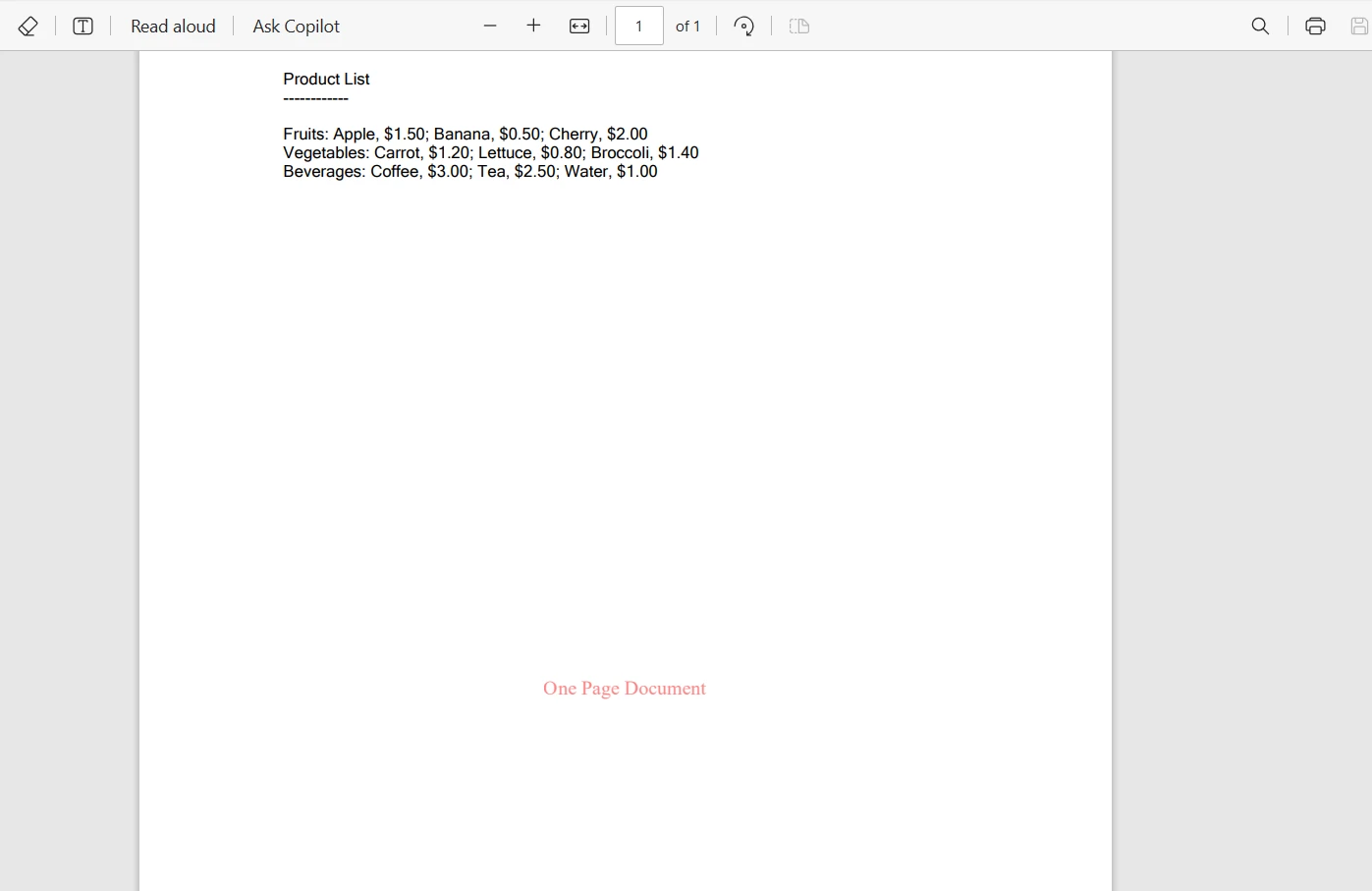
Consideremos un escenario donde tienes un documento PDF, y quieres aplicar diferentes marcas de agua basadas en el número de páginas del documento. Aquí está cómo puedes lograr esto usando IronPDF en combinación con una instrucción switch de C#:
using IronPdf;

class Program
{
    static void Main(string[] args)
    {
        IronPdf.License.LicenseKey = "Your-License-Code";
        PdfDocument pdf = PdfDocument.FromFile("sample.pdf");
        // Define different watermark HTML for each case
        string watermarkHtmlOnePage = "<div style='color:red;'>One Page Document</div>";
        string watermarkHtmlTwoPage = "<div style='color:blue;'>Two Page Document</div>";
        switch (pdf.PageCount)
        {
            case 1:
                // Apply watermark for one-page document
                pdf.ApplyWatermark(watermarkHtmlOnePage);
                break;
            case 2:
                // Apply watermark for two-page documents
                pdf.ApplyWatermark(watermarkHtmlTwoPage);
                break;
            default:
                // Apply a default watermark for other cases
                pdf.ApplyWatermark("<div style='color:green;'>Multiple Page Document</div>");
                break;
        }
        // Save the watermarked PDF
        pdf.SaveAs("watermarked.pdf");
    }
}
using IronPdf;

class Program
{
    static void Main(string[] args)
    {
        IronPdf.License.LicenseKey = "Your-License-Code";
        PdfDocument pdf = PdfDocument.FromFile("sample.pdf");
        // Define different watermark HTML for each case
        string watermarkHtmlOnePage = "<div style='color:red;'>One Page Document</div>";
        string watermarkHtmlTwoPage = "<div style='color:blue;'>Two Page Document</div>";
        switch (pdf.PageCount)
        {
            case 1:
                // Apply watermark for one-page document
                pdf.ApplyWatermark(watermarkHtmlOnePage);
                break;
            case 2:
                // Apply watermark for two-page documents
                pdf.ApplyWatermark(watermarkHtmlTwoPage);
                break;
            default:
                // Apply a default watermark for other cases
                pdf.ApplyWatermark("<div style='color:green;'>Multiple Page Document</div>");
                break;
        }
        // Save the watermarked PDF
        pdf.SaveAs("watermarked.pdf");
    }
}
Imports IronPdf
Friend Class Program
Shared Sub Main(ByVal args() As String)
IronPdf.License.LicenseKey = "Your-License-Code"
Dim pdf As PdfDocument = PdfDocument.FromFile("sample.pdf")
' Define different watermark HTML for each case
Dim watermarkHtmlOnePage As String = "<div style='color:red;'>One Page Document</div>"
Dim watermarkHtmlTwoPage As String = "<div style='color:blue;'>Two Page Document</div>"
Select Case pdf.PageCount
Case 1
' Apply watermark for one-page document
pdf.ApplyWatermark(watermarkHtmlOnePage)
Case 2
' Apply watermark for two-page documents
pdf.ApplyWatermark(watermarkHtmlTwoPage)
Case Else
' Apply a default watermark for other cases
pdf.ApplyWatermark("<div style='color:green;'>Multiple Page Document</div>")
End Select
' Save the watermarked PDF
pdf.SaveAs("watermarked.pdf")
End Sub
End Class
Imports IronPdf

Friend Class Program
	Shared Sub Main(ByVal args() As String)
		IronPdf.License.LicenseKey = "Your-License-Code"
		Dim pdf As PdfDocument = PdfDocument.FromFile("sample.pdf")
		' Define different watermark HTML for each case
		Dim watermarkHtmlOnePage As String = "<div style='color:red;'>One Page Document</div>"
		Dim watermarkHtmlTwoPage As String = "<div style='color:blue;'>Two Page Document</div>"
		Select Case pdf.PageCount
			Case 1
				' Apply watermark for one-page document
				pdf.ApplyWatermark(watermarkHtmlOnePage)
			Case 2
				' Apply watermark for two-page documents
				pdf.ApplyWatermark(watermarkHtmlTwoPage)
			Case Else
				' Apply a default watermark for other cases
				pdf.ApplyWatermark("<div style='color:green;'>Multiple Page Document</div>")
		End Select
		' Save the watermarked PDF
		pdf.SaveAs("watermarked.pdf")
	End Sub
End Class
Aquí está el archivo PDF de salida de una página:
Conclusión
En este tutorial, hemos explorado la instrucción switch case en C#, una forma fundamental de toma de decisiones en programación. Comenzamos entendiendo su estructura básica y la comparamos con las instrucciones tradicionales if-else, destacando sus ventajas en legibilidad y simplicidad para manejar múltiples condiciones.
Creamos casos switch simples, manejamos varios escenarios con el caso default, y exploramos características avanzadas como las expresiones switch. La aplicación en el mundo real de las instrucciones switch se demostró a través de un ejemplo integrando IronPDF para el procesamiento dinámico de PDF, mostrando cómo las instrucciones switch pueden ser una herramienta valiosa en el conjunto de herramientas del programador.
IronPDF ofrece una prueba gratuita para explorar características, permitiéndote explorar sus características y funcionalidades. Para un uso continuo y acceso a su conjunto completo de herramientas, las licencias de IronPDF comienzan a partir de un modelo de precios competitivo, proporcionando una solución integral para todas tus necesidades de procesamiento de PDF en C#.























