using IronPdf;

// Disable local disk access or cross-origin requests
Installation.EnableWebSecurity = true;

// Instantiate Renderer
var renderer = new ChromePdfRenderer();

// Create a PDF from a HTML string using C#
var pdf = renderer.RenderHtmlAsPdf("<h1>Hello World</h1>");

// Export to a file or Stream
pdf.SaveAs("output.pdf");

// Advanced Example with HTML Assets
// Load external html assets: Images, CSS and JavaScript.
// An optional BasePath 'C:\site\assets\' is set as the file location to load assets from
var myAdvancedPdf = renderer.RenderHtmlAsPdf("<img src='icons/iron.png'>", @"C:\site\assets\");
myAdvancedPdf.SaveAs("html-with-assets.pdf");
using IronPdf;// Disable local disk access or cross-origin requestsInstallation.EnableWebSecurity = true;// Instantiate Renderervar renderer = new ChromePdfRenderer();// Create a PDF from a HTML string using C#var pdf = renderer.RenderHtmlAsPdf("<h1>Hello World</h1>");// Export to a file or Streampdf.SaveAs("output.pdf");// Advanced Example with HTML Assets// Load external html assets: Images, CSS and JavaScript.// An optional BasePath 'C:\site\assets\' is set as the file location to load assets fromvar myAdvancedPdf = renderer.RenderHtmlAsPdf("<img src='icons/iron.png'>", @"C:\site\assets\");myAdvancedPdf.SaveAs("html-with-assets.pdf");
PM >Install-Package IronPdf
Install-Package IronPdf
ACTUALIZACIONES PARA DESARROLLADORES
C# Devart.Data.Oracle (Cómo Funciona para Desarrolladores)
Bienvenido a nuestro **completo tutorial** sobre la integración de [C# Devart.Data.Oracle](https://www.devart.com/dotconnect/oracle/) con IronPDF para crear aplicaciones integrales, centrándose en aplicaciones de bases de datos basadas en Oracle. Este tutorial describe una guía diseñada para principiantes interesados en aprovechar el poder de las bases de datos Oracle en sus proyectos de **.NET Framework** y **.NET Core**. Devart.Data.Oracle es un proveedor de datos poderoso que permite el acceso directo a las bases de datos Oracle.
C# Devart.Data.Oracle es una biblioteca que simplifica las operaciones de base de datos Oracle. Es para desarrolladores que necesitan interactuar con bases de datos Oracle. Esta biblioteca ofrece características avanzadas. Simplifica la conectividad con bases de datos. Mejora la manipulación de datos. Es una herramienta valiosa para desarrolladores C#.
[Explore las características de IronPDF para la generación de PDFs](/) como una herramienta que permite a los desarrolladores de C# crear, editar y leer archivos PDF. Se integra fácilmente con aplicaciones .NET. IronPDF ayuda en la [generación de PDFs desde HTML](/examples/using-html-to-create-a-pdf/). Proporciona una forma de trabajar con archivos PDF programáticamente.
Ambas herramientas sirven para propósitos diferentes. C# Devart.Data.Oracle se centra en interacciones con bases de datos Oracle. IronPDF se centra en la manipulación de archivos PDF. Juntas, mejoran las capacidades de los desarrolladores de C#. Abordan dos necesidades distintas en el desarrollo de software. Este artículo se centrará principalmente en C# Devart.Data.Oracle.
## Comenzando con C# Devart.Data.Oracle
### Configuración de C# Devart.Data.Oracle en proyectos .NET
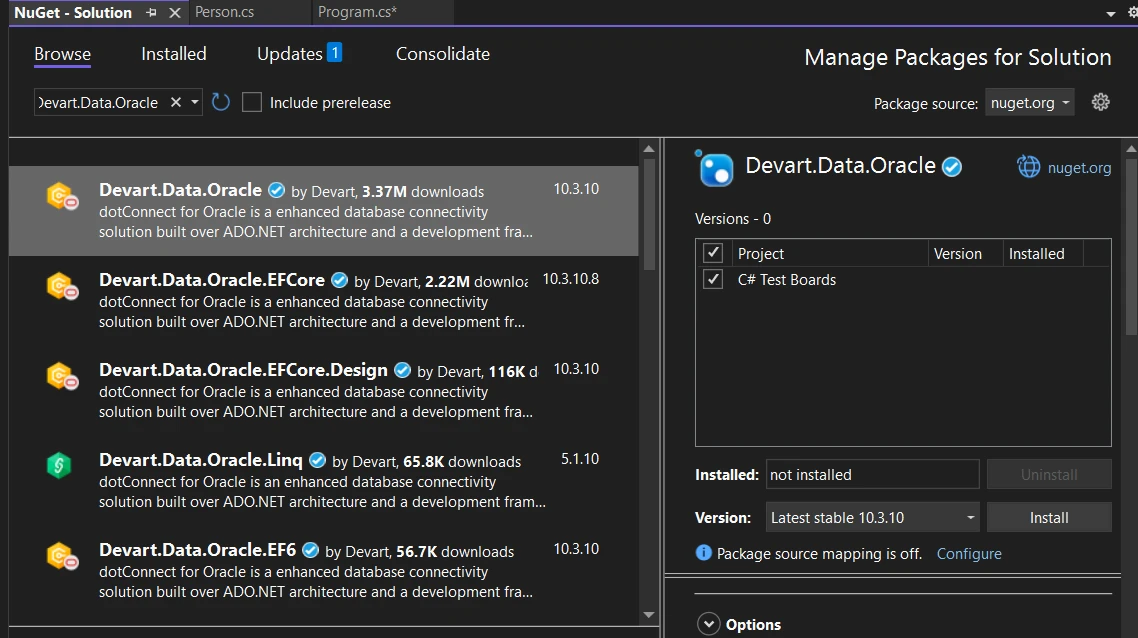
Para comenzar a usar C# Devart.Data.Oracle, un reconocido proveedor de bases de datos Oracle, primero debe agregarlo a su proyecto .NET Core a través del Explorador de Soluciones de Visual Studio. Este proceso es sencillo. Vaya al Administrador de Paquetes NuGet. Busque "Devart.Data.Oracle". Instale el paquete para aprovechar DotConnect para Oracle y las herramientas Dataset. Esta acción agrega la biblioteca a su proyecto. Ahora puede comenzar a usar sus características.
#### Un ejemplo de código básico
Echemos un vistazo a un ejemplo simple. Esto demostrará cómo conectarse a una base de datos Oracle. Ejecutaremos una consulta. Aquí tienes un ejemplo básico:
```csharp
using Devart.Data.Oracle;
using System;

class Program
{
    static void Main()
    {
        // Define the connection string with placeholders for your specific database information
        var connectionString = "User Id=myUsername;Password=myPassword;Server=myServer;";

        // Establish a connection to the Oracle database
        using (var connection = new OracleConnection(connectionString))
        {
            connection.Open();

            // Execute a SQL command
            using (var command = new OracleCommand("SELECT * FROM myTable", connection))
            {
                using (OracleDataReader reader = command.ExecuteReader())
                {
                    // Read and print each row of the result set
                    while (reader.Read())
                    {
                        Console.WriteLine(reader["myColumn"].ToString());
                    }
                }
            }
        }
    }
}
```
Este fragmento de código se mejora con cadenas de conexión adecuadas. Selecciona datos de una tabla e imprime el valor de una columna en la consola. Reemplace **myUsername**, **myPassword**, **myServer**, **myTable** y **myColumn** con los detalles reales de su base de datos. Así es como realiza una operación básica de base de datos usando C# Devart.Data.Oracle.
## Implementar características de Devart.Data.Oracle
### Modo directo
Una de las características destacadas de Devart.Data.Oracle, una parte crucial de cualquier **arquitectura de aplicaciones**, es el Modo Directo. Esto permite que su aplicación funcione con bases de datos Oracle sin el Cliente Oracle. Simplifica el despliegue. Reduce la huella total de la aplicación.
```csharp
var connectionString = "User Id=myUsername; Password=myPassword; Direct=True; Server=myServer;";
using (var connection = new OracleConnection(connectionString))
{
connection.Open();
// Use the connection
}
```
Este ejemplo muestra cómo habilitar el Modo Directo. Agregue **Direct=True** a su cadena de conexión.
### Soporte avanzado de Entity Framework
Devart.Data.Oracle mejora las operaciones de Entity Framework (EF). Proporciona mejor rendimiento y soporta tanto EF Core como EF6. Ofrece una amplia gama de características específicas de Oracle.
```csharp
// Example assumes EF Core setup
using (var context = new MyDbContext())
{
var data = context.MyEntities.Where(e => e.Property > 0).ToList();
foreach (var item in data)
{
Console.WriteLine(item.Name);
}
}
```
Este código obtiene datos usando EF Core. Reemplace **MyDbContext**, **MyEntities** y **Property** con los nombres reales de su contexto y entidad.
### Operaciones a granel
Las operaciones en bloque son cruciales para la manipulación de datos de alto rendimiento. Devart.Data.Oracle ofrece funcionalidad de copia en bloque. Esto es útil para transferencias de datos grandes.
```csharp
using (var connection = new OracleConnection(connectionString))
{
connection.Open();
using (var bulkCopy = new OracleBulkCopy(connection))
{
bulkCopy.DestinationTableName = "targetTable";
bulkCopy.WriteToServer(dataTable);
}
}
```
Este código demuestra la inserción de datos en bloque. Reemplace **targetTable** con el nombre de su tabla de destino. **dataTable** debe ser su fuente de datos.
### Monitorización integrada del rendimiento
El monitoreo del rendimiento está integrado en Devart.Data.Oracle. Le permite rastrear y optimizar las interacciones con la base de datos.
```csharp
using System;
using Devart.Data.Oracle;
class Example
{
static void Main()
{
// Enable monitoring
using (var monitor = new OracleMonitor() { IsActive = true })
{
// Perform database operations here
// Monitoring will log interactions
}
}
}
```
Habilite **OracleMonitor** y establezca **IsActive** en verdadero. Esto comienza a monitorear sus operaciones de base de datos.
### Soporte LINQ to SQL mejorado
LINQ a SQL transforma consultas complejas en SQL eficiente. Devart.Data.Oracle proporciona capacidades optimizadas para LINQ a SQL. Soporta consultas y transformaciones complejas.
```csharp
using (var context = new MyDbContext())
{
var query = from e in context.MyEntities
where e.PropertyName == "Value"
select e;
foreach (var item in query)
{
Console.WriteLine(item.Property);
}
}
```
Reemplace **MyDbContext**, **MyEntities**, **PropertyName** y **Property** con los nombres reales de su contexto, entidad y propiedad. Este ejemplo consulta la base de datos usando LINQ.
Cada una de estas características mejora su aplicación. Hacen que su trabajo con bases de datos Oracle sea más eficiente. Tiene a su disposición acceso directo, soporte avanzado para EF, operaciones en bloque, monitoreo de rendimiento y soporte mejorado para LINQ a SQL.
## Integrar IronPDF y Devart.Data.Oracle
### Introducción a IronPDF
[Aprenda sobre las capacidades de IronPDF](/) como una biblioteca que sirve para un propósito simple pero poderoso: permite a los desarrolladores crear, editar y extraer contenido PDF dentro de sus aplicaciones .NET. El verdadero encanto de IronPDF radica en su facilidad de uso, ofreciendo métodos sencillos para [convertir HTML a PDF](/examples/using-html-to-create-a-pdf/) - un requerimiento común para informes, facturas y documentación en aplicaciones web.
IronPDF se destaca en la conversión de [HTML a PDF](/tutorials/html-to-pdf/), asegurando la preservación precisa de los diseños y estilos originales. Es perfecto para crear PDFs a partir de contenido basado en la web como informes, facturas y documentación. Con soporte para archivos HTML, URLs y cadenas HTML en bruto, IronPDF produce fácilmente documentos PDF de alta calidad.
```csharp
using IronPdf;
class Program
{
static void Main(string[] args)
{
// Initialize IronPDF's renderer
var renderer = new ChromePdfRenderer();
// 1. Convert HTML String to PDF
var htmlContent = "<h1>Hello, IronPDF!</h1><p>This is a PDF from an HTML string.</p>";
var pdfFromHtmlString = renderer.RenderHtmlAsPdf(htmlContent);
pdfFromHtmlString.SaveAs("HTMLStringToPDF.pdf");
// 2. Convert HTML File to PDF
var htmlFilePath = "path_to_your_html_file.html"; // Specify the path to your HTML file
var pdfFromHtmlFile = renderer.RenderHtmlFileAsPdf(htmlFilePath);
pdfFromHtmlFile.SaveAs("HTMLFileToPDF.pdf");
// 3. Convert URL to PDF
var url = "http://ironpdf.com"; // Specify the URL
var pdfFromUrl = renderer.RenderUrlAsPdf(url);
pdfFromUrl.SaveAs("URLToPDF.pdf");
}
}
```
### Fusión de IronPDF con Devart.Data.Oracle
Imagine que está trabajando en un proyecto donde necesita generar un informe a partir de datos almacenados en una base de datos Oracle y luego presentar ese informe como un archivo PDF. Aquí es donde entra en juego la combinación de IronPDF y Devart.Data.Oracle. Devart.Data.Oracle es un proveedor ADO.NET de alto rendimiento que ofrece a los desarrolladores una forma eficiente de acceder a bases de datos Oracle desde aplicaciones .NET.
### Ejemplo de código del caso de uso
Sumérjase en un ejemplo práctico para ilustrar este proceso. Suponga que tenemos una tabla llamada **SalesReport** en nuestra base de datos Oracle y queremos generar un informe PDF que resuma estos datos. Primero, necesitará instalar los paquetes de IronPDF y Devart.Data.Oracle a través de NuGet. Esto se puede hacer utilizando el Administrador de Paquetes NuGet o a través de la Consola del Administrador de Paquetes:
```shell
:InstallCmd Install-Package -Name IronPdf, Devart.Data.Oracle
```
A continuación, aquí tiene cómo podría escribir el código para extraer datos de la tabla **SalesReport** y generar un PDF:
```csharp
using Devart.Data.Oracle;
using IronPdf;
using System;
class Program
{
static void Main(string[] args)
{
// Connection string to Oracle Database
var oracleConnectionString = "User Id=your_user;Password=your_password;Direct=True;Sid=your_sid;Server=your_server;";
// SQL query to fetch data
var sqlQuery = "SELECT * FROM SalesReport";
// Initialize the Oracle connection
using (var oracleConnection = new OracleConnection(oracleConnectionString))
{
oracleConnection.Open();
// Execute the query
using (var oracleCommand = new OracleCommand(sqlQuery, oracleConnection))
{
using (var reader = oracleCommand.ExecuteReader())
{
// Initialize HTML content for PDF generation
var htmlContent = "<h1>Sales Report</h1><p>Generated on " + DateTime.Now + "</p>";
// Append database data to the HTML content
while (reader.Read())
{
htmlContent += $"<p>{reader["ItemName"]} - {reader["SaleAmount"]}</p>";
}
// Create a PDF from the HTML content using IronPDF
var renderer = new ChromePdfRenderer();
var pdf = renderer.RenderHtmlAsPdf(htmlContent);
// Save the PDF to a file
pdf.SaveAs("SalesReport.pdf");
}
}
}
Console.WriteLine("PDF generated successfully.");
}
}
```
En este ejemplo, comenzamos estableciendo una conexión con nuestra base de datos Oracle usando la clase **OracleConnection** de Devart.Data.Oracle. Luego, obtenemos datos de la tabla **SalesReport** usando una consulta SQL simple. Para el bien de la demostración, los datos obtenidos se transforman en una cadena HTML (en un escenario del mundo real, construiría un documento HTML más complejo basado en sus datos). Finalmente, utilizamos la clase **ChromePdfRenderer** de IronPDF para convertir la cadena HTML en un documento PDF, que luego se guarda localmente.
## Conclusión
Al finalizar este tutorial, queda claro que la integración de Entity Framework Core con Devart.Data.Oracle enriquece el desarrollo de aplicaciones basadas en Oracle. La fusión de estas tecnologías en su entorno de desarrollo, guiada a través de Visual Studio, abre la puerta a muchas posibilidades para crear aplicaciones robustas y escalables. Para los desarrolladores que desean profundizar en aplicaciones de bases de datos basadas en Oracle, aprovechar las características integrales de Entity Framework Core junto con DotConnect para Oracle proporciona una base sólida. Puede probar IronPDF con una [demostración gratuita o revisar precios](/licensing/) que comienzan desde `$liteLicense`.
Bienvenido a nuestro completo tutorial sobre la integración de C# Devart.Data.Oracle con IronPDF para crear aplicaciones integrales, centrándose en aplicaciones de bases de datos basadas en Oracle. Este tutorial describe una guía diseñada para principiantes interesados en aprovechar el poder de las bases de datos Oracle en sus proyectos de .NET Framework y .NET Core. Devart.Data.Oracle es un proveedor de datos poderoso que permite el acceso directo a las bases de datos Oracle.
C# Devart.Data.Oracle es una biblioteca que simplifica las operaciones de base de datos Oracle. Es para desarrolladores que necesitan interactuar con bases de datos Oracle. Esta biblioteca ofrece características avanzadas. Simplifica la conectividad con bases de datos. Mejora la manipulación de datos. Es una herramienta valiosa para desarrolladores C#.
Ambas herramientas sirven para propósitos diferentes. C# Devart.Data.Oracle se centra en interacciones con bases de datos Oracle. IronPDF se centra en la manipulación de archivos PDF. Juntas, mejoran las capacidades de los desarrolladores de C#. Abordan dos necesidades distintas en el desarrollo de software. Este artículo se centrará principalmente en C# Devart.Data.Oracle.
Comenzando con C# Devart.Data.Oracle
Configuración de C# Devart.Data.Oracle en proyectos .NET
Para comenzar a usar C# Devart.Data.Oracle, un reconocido proveedor de bases de datos Oracle, primero debe agregarlo a su proyecto .NET Core a través del Explorador de Soluciones de Visual Studio. Este proceso es sencillo. Vaya al Administrador de Paquetes NuGet. Busque "Devart.Data.Oracle". Instale el paquete para aprovechar DotConnect para Oracle y las herramientas Dataset. Esta acción agrega la biblioteca a su proyecto. Ahora puede comenzar a usar sus características.
Un ejemplo de código básico
Echemos un vistazo a un ejemplo simple. Esto demostrará cómo conectarse a una base de datos Oracle. Ejecutaremos una consulta. Aquí tienes un ejemplo básico:
using Devart.Data.Oracle;using System;class Program{ static voidMain() { // Define the connection string with placeholders for your specific database information var connectionString = "User Id=myUsername;Password=myPassword;Server=myServer;"; // Establish a connection to the Oracle database using (var connection = new OracleConnection(connectionString)) { connection.Open(); // Execute a SQL command using (var command = new OracleCommand("SELECT * FROM myTable", connection)) { using (OracleDataReader reader = command.ExecuteReader()) { // Read and print each row of the result set while (reader.Read()) {Console.WriteLine(reader["myColumn"].ToString()); } } } } }}
using Devart.Data.Oracle;
using System;

class Program
{
    static void Main()
    {
        // Define the connection string with placeholders for your specific database information
        var connectionString = "User Id=myUsername;Password=myPassword;Server=myServer;";

        // Establish a connection to the Oracle database
        using (var connection = new OracleConnection(connectionString))
        {
            connection.Open();

            // Execute a SQL command
            using (var command = new OracleCommand("SELECT * FROM myTable", connection))
            {
                using (OracleDataReader reader = command.ExecuteReader())
                {
                    // Read and print each row of the result set
                    while (reader.Read())
                    {
                        Console.WriteLine(reader["myColumn"].ToString());
                    }
                }
            }
        }
    }
}
ImportsDevart.Data.OracleImportsSystemModuleProgram Sub Main() ' Define the connection string with placeholders for your specific database information Dim connectionString AsString = "User Id=myUsername;Password=myPassword;Server=myServer;" ' Establish a connection to the Oracle databaseUsing connection As New OracleConnection(connectionString) connection.Open() ' Execute a SQL commandUsing command As New OracleCommand("SELECT * FROM myTable", connection)Using reader AsOracleDataReader = command.ExecuteReader() ' Read and print each row of the result set While reader.Read()Console.WriteLine(reader("myColumn").ToString())EndWhileEndUsingEndUsingEndUsing End SubEndModule
Imports Devart.Data.Oracle
Imports System

Module Program
    Sub Main()
        ' Define the connection string with placeholders for your specific database information
        Dim connectionString As String = "User Id=myUsername;Password=myPassword;Server=myServer;"

        ' Establish a connection to the Oracle database
        Using connection As New OracleConnection(connectionString)
            connection.Open()

            ' Execute a SQL command
            Using command As New OracleCommand("SELECT * FROM myTable", connection)
                Using reader As OracleDataReader = command.ExecuteReader()
                    ' Read and print each row of the result set
                    While reader.Read()
                        Console.WriteLine(reader("myColumn").ToString())
                    End While
                End Using
            End Using
        End Using
    End Sub
End Module
Este fragmento de código se mejora con cadenas de conexión adecuadas. Selecciona datos de una tabla e imprime el valor de una columna en la consola. Reemplace myUsername, myPassword, myServer, myTable y myColumn con los detalles reales de su base de datos. Así es como realiza una operación básica de base de datos usando C# Devart.Data.Oracle.
Implementar características de Devart.Data.Oracle
Modo directo
Una de las características destacadas de Devart.Data.Oracle, una parte crucial de cualquier arquitectura de aplicaciones, es el Modo Directo. Esto permite que su aplicación funcione con bases de datos Oracle sin el Cliente Oracle. Simplifica el despliegue. Reduce la huella total de la aplicación.
var connectionString = "User Id=myUsername; Password=myPassword; Direct=True; Server=myServer;";using (var connection = new OracleConnection(connectionString)){ connection.Open(); // Use the connection}
var connectionString = "User Id=myUsername; Password=myPassword; Direct=True; Server=myServer;";
using (var connection = new OracleConnection(connectionString))
{
    connection.Open();
    // Use the connection
}
Dim connectionString = "User Id=myUsername; Password=myPassword; Direct=True; Server=myServer;"Using connection = New OracleConnection(connectionString) connection.Open() ' Use the connectionEndUsing
Dim connectionString = "User Id=myUsername; Password=myPassword; Direct=True; Server=myServer;"
Using connection = New OracleConnection(connectionString)
	connection.Open()
	' Use the connection
End Using
Este ejemplo muestra cómo habilitar el Modo Directo. Agregue Direct=True a su cadena de conexión.
Soporte avanzado de Entity Framework
Devart.Data.Oracle mejora las operaciones de Entity Framework (EF). Proporciona mejor rendimiento y soporta tanto EF Core como EF6. Ofrece una amplia gama de características específicas de Oracle.
// Example assumes EF Core setupusing (var context = new MyDbContext()){ var data = context.MyEntities.Where(e => e.Property > 0).ToList(); foreach (var item in data) {Console.WriteLine(item.Name); }}
// Example assumes EF Core setup
using (var context = new MyDbContext())
{
    var data = context.MyEntities.Where(e => e.Property > 0).ToList();
    foreach (var item in data)
    {
        Console.WriteLine(item.Name);
    }
}
' Example assumes EF Core setupUsing context = New MyDbContext() Dim data = context.MyEntities.Where(Function(e) e.Property > 0).ToList() For Each item In dataConsole.WriteLine(item.Name) Next itemEndUsing
' Example assumes EF Core setup
Using context = New MyDbContext()
	Dim data = context.MyEntities.Where(Function(e) e.Property > 0).ToList()
	For Each item In data
		Console.WriteLine(item.Name)
	Next item
End Using
Este código obtiene datos usando EF Core. Reemplace MyDbContext, MyEntities y Property con los nombres reales de su contexto y entidad.
Operaciones a granel
Las operaciones en bloque son cruciales para la manipulación de datos de alto rendimiento. Devart.Data.Oracle ofrece funcionalidad de copia en bloque. Esto es útil para transferencias de datos grandes.
using (var connection = new OracleConnection(connectionString)){ connection.Open(); using (var bulkCopy = new OracleBulkCopy(connection)) { bulkCopy.DestinationTableName = "targetTable"; bulkCopy.WriteToServer(dataTable); }}
using (var connection = new OracleConnection(connectionString))
{
    connection.Open();
    using (var bulkCopy = new OracleBulkCopy(connection))
    {
        bulkCopy.DestinationTableName = "targetTable";
        bulkCopy.WriteToServer(dataTable);
    }
}
Using connection = New OracleConnection(connectionString) connection.Open()Using bulkCopy = New OracleBulkCopy(connection) bulkCopy.DestinationTableName = "targetTable" bulkCopy.WriteToServer(dataTable)EndUsingEndUsing
Using connection = New OracleConnection(connectionString)
	connection.Open()
	Using bulkCopy = New OracleBulkCopy(connection)
		bulkCopy.DestinationTableName = "targetTable"
		bulkCopy.WriteToServer(dataTable)
	End Using
End Using
Este código demuestra la inserción de datos en bloque. Reemplace targetTable con el nombre de su tabla de destino. dataTable debe ser su fuente de datos.
Monitorización integrada del rendimiento
El monitoreo del rendimiento está integrado en Devart.Data.Oracle. Le permite rastrear y optimizar las interacciones con la base de datos.
using System;using Devart.Data.Oracle;class Example{ static voidMain() { // Enable monitoring using (var monitor = new OracleMonitor() { IsActive = true }) { // Perform database operations here // Monitoring will log interactions } }}
using System;
using Devart.Data.Oracle;

class Example
{
    static void Main()
    {
        // Enable monitoring
        using (var monitor = new OracleMonitor() { IsActive = true })
        {
            // Perform database operations here
            // Monitoring will log interactions
        }
    }
}
ImportsSystemImportsDevart.Data.OracleFriend Class ExampleShared Sub Main() ' Enable monitoringUsing monitor = New OracleMonitor() With {.IsActive = True} ' Perform database operations here ' Monitoring will log interactionsEndUsing End SubEnd Class
Imports System
Imports Devart.Data.Oracle

Friend Class Example
	Shared Sub Main()
		' Enable monitoring
		Using monitor = New OracleMonitor() With {.IsActive = True}
			' Perform database operations here
			' Monitoring will log interactions
		End Using
	End Sub
End Class
Habilite OracleMonitor y establezca IsActive en verdadero. Esto comienza a monitorear sus operaciones de base de datos.
Soporte LINQ to SQL mejorado
LINQ a SQL transforma consultas complejas en SQL eficiente. Devart.Data.Oracle proporciona capacidades optimizadas para LINQ a SQL. Soporta consultas y transformaciones complejas.
using (var context = new MyDbContext()){ var query = from e in context.MyEntities where e.PropertyName == "Value" select e; foreach (var item in query) {Console.WriteLine(item.Property); }}
using (var context = new MyDbContext())
{
    var query = from e in context.MyEntities
                where e.PropertyName == "Value"
                select e;

    foreach (var item in query)
    {
        Console.WriteLine(item.Property);
    }
}
Using context As New MyDbContext() Dim query = From e In context.MyEntitiesWhere e.PropertyName = "Value" Select e For Each item In queryConsole.WriteLine(item.Property) NextEndUsing
Using context As New MyDbContext()
    Dim query = From e In context.MyEntities
                Where e.PropertyName = "Value"
                Select e

    For Each item In query
        Console.WriteLine(item.Property)
    Next
End Using
Reemplace MyDbContext, MyEntities, PropertyName y Property con los nombres reales de su contexto, entidad y propiedad. Este ejemplo consulta la base de datos usando LINQ.
Cada una de estas características mejora su aplicación. Hacen que su trabajo con bases de datos Oracle sea más eficiente. Tiene a su disposición acceso directo, soporte avanzado para EF, operaciones en bloque, monitoreo de rendimiento y soporte mejorado para LINQ a SQL.
Integrar IronPDF y Devart.Data.Oracle
Introducción a IronPDF
Aprenda sobre las capacidades de IronPDF como una biblioteca que sirve para un propósito simple pero poderoso: permite a los desarrolladores crear, editar y extraer contenido PDF dentro de sus aplicaciones .NET. El verdadero encanto de IronPDF radica en su facilidad de uso, ofreciendo métodos sencillos para convertir HTML a PDF - un requerimiento común para informes, facturas y documentación en aplicaciones web.
IronPDF se destaca en la conversión de HTML a PDF, asegurando la preservación precisa de los diseños y estilos originales. Es perfecto para crear PDFs a partir de contenido basado en la web como informes, facturas y documentación. Con soporte para archivos HTML, URLs y cadenas HTML en bruto, IronPDF produce fácilmente documentos PDF de alta calidad.
using IronPdf;class Program{ static voidMain(string[] args) { // Initialize IronPDF's renderer var renderer = new ChromePdfRenderer(); // 1. Convert HTML String to PDF var htmlContent = "<h1>Hello, IronPDF!</h1><p>This is a PDF from an HTML string.</p>"; var pdfFromHtmlString = renderer.RenderHtmlAsPdf(htmlContent); pdfFromHtmlString.SaveAs("HTMLStringToPDF.pdf"); // 2. Convert HTML File to PDF var htmlFilePath = "path_to_your_html_file.html"; // Specify the path to your HTML file var pdfFromHtmlFile = renderer.RenderHtmlFileAsPdf(htmlFilePath); pdfFromHtmlFile.SaveAs("HTMLFileToPDF.pdf"); // 3. Convert URL to PDF var url = "http://ironpdf.com"; // Specify the URL var pdfFromUrl = renderer.RenderUrlAsPdf(url); pdfFromUrl.SaveAs("URLToPDF.pdf"); }}
using IronPdf;

class Program
{
    static void Main(string[] args)
    {
        // Initialize IronPDF's renderer
        var renderer = new ChromePdfRenderer();

        // 1. Convert HTML String to PDF
        var htmlContent = "<h1>Hello, IronPDF!</h1><p>This is a PDF from an HTML string.</p>";
        var pdfFromHtmlString = renderer.RenderHtmlAsPdf(htmlContent);
        pdfFromHtmlString.SaveAs("HTMLStringToPDF.pdf");

        // 2. Convert HTML File to PDF
        var htmlFilePath = "path_to_your_html_file.html"; // Specify the path to your HTML file
        var pdfFromHtmlFile = renderer.RenderHtmlFileAsPdf(htmlFilePath);
        pdfFromHtmlFile.SaveAs("HTMLFileToPDF.pdf");

        // 3. Convert URL to PDF
        var url = "http://ironpdf.com"; // Specify the URL
        var pdfFromUrl = renderer.RenderUrlAsPdf(url);
        pdfFromUrl.SaveAs("URLToPDF.pdf");
    }
}
ImportsIronPdfFriend Class ProgramShared Sub Main(ByVal args() AsString) ' Initialize IronPDF's renderer Dim renderer = New ChromePdfRenderer() ' 1. Convert HTML String to PDF Dim htmlContent = "<h1>Hello, IronPDF!</h1><p>This is a PDF from an HTML string.</p>" Dim pdfFromHtmlString = renderer.RenderHtmlAsPdf(htmlContent) pdfFromHtmlString.SaveAs("HTMLStringToPDF.pdf") ' 2. Convert HTML File to PDF Dim htmlFilePath = "path_to_your_html_file.html" ' Specify the path to your HTML file Dim pdfFromHtmlFile = renderer.RenderHtmlFileAsPdf(htmlFilePath) pdfFromHtmlFile.SaveAs("HTMLFileToPDF.pdf") ' 3. Convert URL to PDF Dim url = "http://ironpdf.com" ' Specify the URL Dim pdfFromUrl = renderer.RenderUrlAsPdf(url) pdfFromUrl.SaveAs("URLToPDF.pdf") End SubEnd Class
Imports IronPdf

Friend Class Program
	Shared Sub Main(ByVal args() As String)
		' Initialize IronPDF's renderer
		Dim renderer = New ChromePdfRenderer()

		' 1. Convert HTML String to PDF
		Dim htmlContent = "<h1>Hello, IronPDF!</h1><p>This is a PDF from an HTML string.</p>"
		Dim pdfFromHtmlString = renderer.RenderHtmlAsPdf(htmlContent)
		pdfFromHtmlString.SaveAs("HTMLStringToPDF.pdf")

		' 2. Convert HTML File to PDF
		Dim htmlFilePath = "path_to_your_html_file.html" ' Specify the path to your HTML file
		Dim pdfFromHtmlFile = renderer.RenderHtmlFileAsPdf(htmlFilePath)
		pdfFromHtmlFile.SaveAs("HTMLFileToPDF.pdf")

		' 3. Convert URL to PDF
		Dim url = "http://ironpdf.com" ' Specify the URL
		Dim pdfFromUrl = renderer.RenderUrlAsPdf(url)
		pdfFromUrl.SaveAs("URLToPDF.pdf")
	End Sub
End Class
Fusión de IronPDF con Devart.Data.Oracle
Imagine que está trabajando en un proyecto donde necesita generar un informe a partir de datos almacenados en una base de datos Oracle y luego presentar ese informe como un archivo PDF. Aquí es donde entra en juego la combinación de IronPDF y Devart.Data.Oracle. Devart.Data.Oracle es un proveedor ADO.NET de alto rendimiento que ofrece a los desarrolladores una forma eficiente de acceder a bases de datos Oracle desde aplicaciones .NET.
Ejemplo de código del caso de uso
Sumérjase en un ejemplo práctico para ilustrar este proceso. Suponga que tenemos una tabla llamada SalesReport en nuestra base de datos Oracle y queremos generar un informe PDF que resuma estos datos. Primero, necesitará instalar los paquetes de IronPDF y Devart.Data.Oracle a través de NuGet. Esto se puede hacer utilizando el Administrador de Paquetes NuGet o a través de la Consola del Administrador de Paquetes:
A continuación, aquí tiene cómo podría escribir el código para extraer datos de la tabla SalesReport y generar un PDF:
using Devart.Data.Oracle;using IronPdf;using System;class Program{ static voidMain(string[] args) { // Connection string to Oracle Database var oracleConnectionString = "User Id=your_user;Password=your_password;Direct=True;Sid=your_sid;Server=your_server;"; // SQL query to fetch data var sqlQuery = "SELECT * FROM SalesReport"; // Initialize the Oracle connection using (var oracleConnection = new OracleConnection(oracleConnectionString)) { oracleConnection.Open(); // Execute the query using (var oracleCommand = new OracleCommand(sqlQuery, oracleConnection)) { using (var reader = oracleCommand.ExecuteReader()) { // Initialize HTML content for PDF generation var htmlContent = "<h1>Sales Report</h1><p>Generated on " + DateTime.Now + "</p>"; // Append database data to the HTML content while (reader.Read()) { htmlContent += $"<p>{reader["ItemName"]} - {reader["SaleAmount"]}</p>"; } // Create a PDF from the HTML content using IronPDF var renderer = new ChromePdfRenderer(); var pdf = renderer.RenderHtmlAsPdf(htmlContent); // Save the PDF to a file pdf.SaveAs("SalesReport.pdf"); } } }Console.WriteLine("PDF generated successfully."); }}
using Devart.Data.Oracle;
using IronPdf;
using System;

class Program
{
    static void Main(string[] args)
    {
        // Connection string to Oracle Database
        var oracleConnectionString = "User Id=your_user;Password=your_password;Direct=True;Sid=your_sid;Server=your_server;";

        // SQL query to fetch data
        var sqlQuery = "SELECT * FROM SalesReport";

        // Initialize the Oracle connection
        using (var oracleConnection = new OracleConnection(oracleConnectionString))
        {
            oracleConnection.Open();

            // Execute the query
            using (var oracleCommand = new OracleCommand(sqlQuery, oracleConnection))
            {
                using (var reader = oracleCommand.ExecuteReader())
                {
                    // Initialize HTML content for PDF generation
                    var htmlContent = "<h1>Sales Report</h1><p>Generated on " + DateTime.Now + "</p>";

                    // Append database data to the HTML content
                    while (reader.Read())
                    {
                        htmlContent += $"<p>{reader["ItemName"]} - {reader["SaleAmount"]}</p>";
                    }

                    // Create a PDF from the HTML content using IronPDF
                    var renderer = new ChromePdfRenderer();
                    var pdf = renderer.RenderHtmlAsPdf(htmlContent);

                    // Save the PDF to a file
                    pdf.SaveAs("SalesReport.pdf");
                }
            }
        }

        Console.WriteLine("PDF generated successfully.");
    }
}
ImportsDevart.Data.OracleImportsIronPdfImportsSystemModuleProgram Sub Main(args AsString()) ' Connection string to Oracle Database Dim oracleConnectionString AsString = "User Id=your_user;Password=your_password;Direct=True;Sid=your_sid;Server=your_server;" ' SQL query to fetch data Dim sqlQuery AsString = "SELECT * FROM SalesReport" ' Initialize the Oracle connectionUsing oracleConnection As New OracleConnection(oracleConnectionString) oracleConnection.Open() ' Execute the queryUsing oracleCommand As New OracleCommand(sqlQuery, oracleConnection)Using reader AsOracleDataReader = oracleCommand.ExecuteReader() ' Initialize HTML content for PDF generation Dim htmlContent AsString = "<h1>Sales Report</h1><p>Generated on " & DateTime.Now & "</p>" ' Append database data to the HTML content While reader.Read() htmlContent &= $"<p>{reader("ItemName")} - {reader("SaleAmount")}</p>"EndWhile ' Create a PDF from the HTML content using IronPDF Dim renderer As New ChromePdfRenderer() Dim pdf AsPdfDocument = renderer.RenderHtmlAsPdf(htmlContent) ' Save the PDF to a file pdf.SaveAs("SalesReport.pdf")EndUsingEndUsingEndUsingConsole.WriteLine("PDF generated successfully.") End SubEndModule
Imports Devart.Data.Oracle
Imports IronPdf
Imports System

Module Program
    Sub Main(args As String())
        ' Connection string to Oracle Database
        Dim oracleConnectionString As String = "User Id=your_user;Password=your_password;Direct=True;Sid=your_sid;Server=your_server;"

        ' SQL query to fetch data
        Dim sqlQuery As String = "SELECT * FROM SalesReport"

        ' Initialize the Oracle connection
        Using oracleConnection As New OracleConnection(oracleConnectionString)
            oracleConnection.Open()

            ' Execute the query
            Using oracleCommand As New OracleCommand(sqlQuery, oracleConnection)
                Using reader As OracleDataReader = oracleCommand.ExecuteReader()
                    ' Initialize HTML content for PDF generation
                    Dim htmlContent As String = "<h1>Sales Report</h1><p>Generated on " & DateTime.Now & "</p>"

                    ' Append database data to the HTML content
                    While reader.Read()
                        htmlContent &= $"<p>{reader("ItemName")} - {reader("SaleAmount")}</p>"
                    End While

                    ' Create a PDF from the HTML content using IronPDF
                    Dim renderer As New ChromePdfRenderer()
                    Dim pdf As PdfDocument = renderer.RenderHtmlAsPdf(htmlContent)

                    ' Save the PDF to a file
                    pdf.SaveAs("SalesReport.pdf")
                End Using
            End Using
        End Using

        Console.WriteLine("PDF generated successfully.")
    End Sub
End Module
En este ejemplo, comenzamos estableciendo una conexión con nuestra base de datos Oracle usando la clase OracleConnection de Devart.Data.Oracle. Luego, obtenemos datos de la tabla SalesReport usando una consulta SQL simple. Para el bien de la demostración, los datos obtenidos se transforman en una cadena HTML (en un escenario del mundo real, construiría un documento HTML más complejo basado en sus datos). Finalmente, utilizamos la clase ChromePdfRenderer de IronPDF para convertir la cadena HTML en un documento PDF, que luego se guarda localmente.
Conclusión
Al finalizar este tutorial, queda claro que la integración de Entity Framework Core con Devart.Data.Oracle enriquece el desarrollo de aplicaciones basadas en Oracle. La fusión de estas tecnologías en su entorno de desarrollo, guiada a través de Visual Studio, abre la puerta a muchas posibilidades para crear aplicaciones robustas y escalables. Para los desarrolladores que desean profundizar en aplicaciones de bases de datos basadas en Oracle, aprovechar las características integrales de Entity Framework Core junto con DotConnect para Oracle proporciona una base sólida. Puede probar IronPDF con una demostración gratuita o revisar precios que comienzan desde $999.
Jacob Mellor es Director de Tecnología de Iron Software y un ingeniero visionario pionero en la tecnología C# PDF. Como desarrollador original de la base de código principal de Iron Software, ha dado forma a la arquitectura de productos de la empresa desde su creación, transformándola, junto con el director ejecutivo Cameron Rimington, en una empresa de más de 50 personas que presta servicios a la NASA, Tesla y organismos gubernamentales de todo el mundo.

























