using IronPdf;

// Disable local disk access or cross-origin requests
Installation.EnableWebSecurity = true;

// Instantiate Renderer
var renderer = new ChromePdfRenderer();

// Create a PDF from a HTML string using C#
var pdf = renderer.RenderHtmlAsPdf("<h1>Hello World</h1>");

// Export to a file or Stream
pdf.SaveAs("output.pdf");

// Advanced Example with HTML Assets
// Load external html assets: Images, CSS and JavaScript.
// An optional BasePath 'C:\site\assets\' is set as the file location to load assets from
var myAdvancedPdf = renderer.RenderHtmlAsPdf("<img src='icons/iron.png'>", @"C:\site\assets\");
myAdvancedPdf.SaveAs("html-with-assets.pdf");
using IronPdf;// Disable local disk access or cross-origin requestsInstallation.EnableWebSecurity = true;// Instantiate Renderervar renderer = new ChromePdfRenderer();// Create a PDF from a HTML string using C#var pdf = renderer.RenderHtmlAsPdf("<h1>Hello World</h1>");// Export to a file or Streampdf.SaveAs("output.pdf");// Advanced Example with HTML Assets// Load external html assets: Images, CSS and JavaScript.// An optional BasePath 'C:\site\assets\' is set as the file location to load assets fromvar myAdvancedPdf = renderer.RenderHtmlAsPdf("<img src='icons/iron.png'>", @"C:\site\assets\");myAdvancedPdf.SaveAs("html-with-assets.pdf");
En el mundo acelerado del desarrollo de software actual, crear y manipular documentos PDF es esencial para muchos proyectos .NET, desde la generación de informes hasta el formateo dinámico de contenido. [IronPDF](https://ironpdf.com) es una biblioteca robusta que permite a los desarrolladores .NET manejar la creación y edición de PDF sin problemas.
Una parte clave de la generación de PDF efectiva es tener control sobre el diseño y el formato, y una de las herramientas más útiles en el arsenal de un desarrollador para manejar este tipo de lógica es el [**operador de módulo**](https://learn.microsoft.com/en-us/dotnet/csharp/language-reference/operators/arithmetic-operators#remainder-operator-) en C#. El operador de módulo (%) te permite trabajar con restos al dividir números, lo que resulta increíblemente útil para tareas que requieren alternar estilos o condiciones basadas en números, como la numeración de páginas, el formato de filas y el control de comportamientos pares e impares.
En este artículo, exploraremos cómo usar el operador de módulo en C# para el formateo de PDF y el manejo de páginas con IronPDF, recorriendo ejemplos para ayudarte a maximizar el potencial de estas herramientas. Adentrémonos y veamos cómo la combinación del operador de módulo C# con IronPDF puede elevar tus necesidades de manejo de PDF.
## Entendiendo el Operador de Módulo en C#
### ¿Qué es el operador módulo (%)?
El operador de módulo (también conocido como el operador de resto) es un operador aritmético que devuelve el resto cuando un número es dividido por otro. En esencia, es el operador que usas cuando trabajas con división entera, pero en lugar de darte el resultado de la división, proporciona el valor que sobra.
Digamos que divides dos números enteros, como 7 y 3. El resultado de la división entera sería 2, pero el operador de módulo (7 % 3) te da 1, porque 1 es el resto cuando 7 se divide por 3. Esta capacidad para devolver el resto puede ser increíblemente útil en una variedad de escenarios de programación, especialmente en la generación de PDF.
Esta operación es particularmente útil en la programación cuando necesitas tomar decisiones basadas en el resultado de la división entera, como alternar estilos para números pares e impares o determinar divisibilidad por un número específico.
Aquí tienes un ejemplo rápido en C#:
```csharp
int number = 10;
if (number % 2 == 0)
{
    Console.WriteLine("Even Number");
}
else
{
    Console.WriteLine("Odd Number");
}
```
En este fragmento, `number % 2` verifica si el resto es 0, determinando así si el número es par. El operador de módulo aquí se utiliza para verificar la divisibilidad, lo que ayuda a decidir cómo tratar el número.
### Aplicaciones reales de Modulus en el desarrollo .NET
El operador de módulo se puede aplicar en varios escenarios prácticos. Algunos usos comunes incluyen:
- **Paginación:** determina si la página actual es un número par o impar para un formato específico.
- **Estructuras de filas/columnas:** alternar colores de filas en tablas o diseños de cuadrícula para mejorar la legibilidad.
- **Numeración de páginas:** Modulus puede ayudarle a alternar estilos para páginas pares e impares en archivos PDF.
- **Comprobaciones de divisibilidad:** determine rápidamente si es necesario realizar una operación en cada n-ésimo elemento, fila o página.
Por ejemplo, si estás generando un PDF que lista facturas, podrías querer usar el operador de resto para alternar el color de fondo de las filas, haciendo el documento visualmente organizado.
## ¿Por qué utilizar IronPDF para la generación de PDF en .NET?
### Introducción a IronPDF
[IronPDF](/docs/) es una poderosa biblioteca .NET diseñada para simplificar la generación y manipulación de PDF. Permite a los desarrolladores convertir HTML, ASPX o cualquier documento estándar en un PDF con solo unas pocas líneas de código. La biblioteca soporta una variedad de características, como agregar marcas de agua, manejar marcadores, fusionar PDFs y editar archivos PDF existentes.
Para los desarrolladores .NET, IronPDF proporciona un método alternativo para el manejo tradicional de PDF, facilitando la generación de PDFs sin sumergirse en bibliotecas complejas de bajo nivel. La biblioteca también se integra sin problemas con proyectos existentes, permitiéndote convertir HTML, imágenes o cualquier tipo de documento en un PDF bien formateado.
### Combinando la lógica de módulo en C# con IronPDF
La combinación del operador de módulo de C# e IronPDF ofrece un rango de posibilidades, como alternar estilos de formateo para páginas pares e impares, agregar contenido dinámico como números de página o crear diseños personalizados basados en condiciones específicas.
Por ejemplo, puedes usar el módulo para aplicar diferentes encabezados o pies de página en páginas pares e impares, o crear una distinción visual entre filas alternas en una tabla. Esta funcionalidad puede hacer que tus documentos PDF sean más pulidos y profesionales.
## Ejemplo de código en C# para la generación de PDF utilizando IronPDF y módulo
### Cómo configurar IronPDF en su proyecto .NET
Para comenzar a usar [IronPDF](https://ironpdf.com), primero deberá instalarlo. Si ya está instalado, entonces puede pasar a la siguiente sección, de lo contrario, los siguientes pasos cubren cómo instalar la biblioteca IronPDF.
#### A través de la consola del gestor de paquetes NuGet
Para [instalar IronPDF](https://www.nuget.org/packages/IronPdf/) utilizando la Consola del Administrador de Paquetes NuGet, abra Visual Studio y navegue a la Consola del Administrador de Paquetes. Luego ejecute el siguiente comando:
```shell
:ProductInstall
```
#### Mediante el gestor de paquetes NuGet para la solución
Abriendo Visual Studio, ve a "herramientas -> Administrador de Paquetes NuGet -> Administrar Paquetes NuGet para la Solución" y busca IronPDF. Desde aquí, lo único que debe hacer es seleccionar su proyecto y hacer clic en "Instalar" y se añadirá IronPDF a su proyecto.
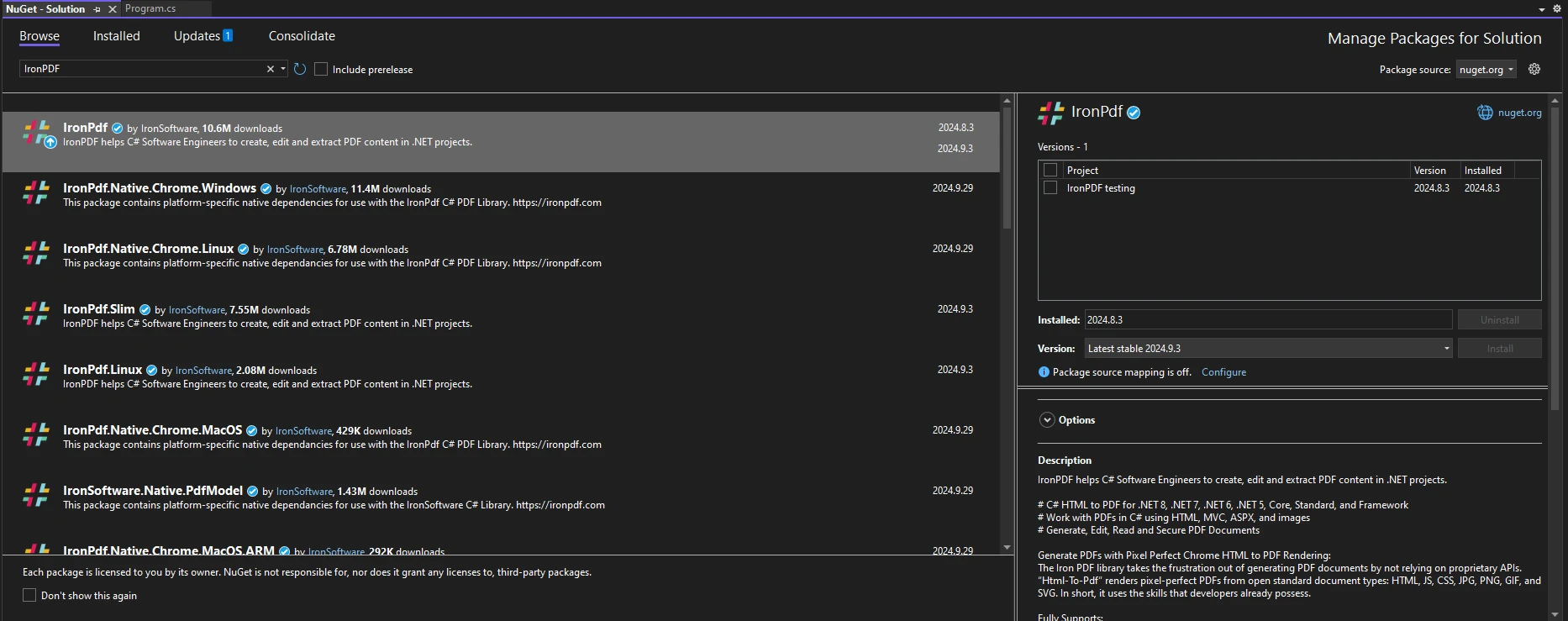
Una vez que haya instalado IronPDF, todo lo que necesita agregar para comenzar a usar IronPDF es la declaración correcta de using en la parte superior de su código:
```csharp
using IronPdf;
```
### Implementando la lógica de módulo en C# en el formato de PDF
Veamos un ejemplo práctico donde usamos el operador de módulo para alternar estilos entre páginas pares e impares de un documento PDF.
1. **Crear un documento PDF simple:** generaremos un documento PDF básico a partir de una plantilla HTML.
2. **Aplicar lógica de módulo:** utilice el operador de módulo para cambiar los estilos de página dinámicamente.
```csharp
using IronPdf;
public class Program
{
public static void Main(string[] args)
{
// Create an instance of the IronPDF renderer
ChromePdfRenderer renderer = new ChromePdfRenderer();
// Define the HTML content format for the pages
string htmlContent = "<h1>Page {0}</h1><p>This is a sample PDF page.</p>";
// Initialize a PDF document
PdfDocument pdfDoc = renderer.RenderHtmlAsPdf(string.Format(htmlContent, 1));
// Loop to generate pages
for (int i = 1; i <= 10; i++)
{
// Format the page HTML based on whether the page number is even or odd
string pageHtml = string.Format(htmlContent, i);
if (i % 2 == 0)
{
// Apply style for even pages
pageHtml = string.Format("<div style='background-color:lightblue;'>{0}</div>", pageHtml);
}
else
{
// Apply style for odd pages
pageHtml = string.Format("<div style='background-color:lightgreen;'>{0}</div>", pageHtml);
}
// Render the current page
PdfDocument pdfPage = renderer.RenderHtmlAsPdf(pageHtml);
// Append the page to the main PDF document
pdfDoc.AppendPdf(pdfPage);
}
// Save the final PDF with all pages merged
pdfDoc.SaveAs("Modulus.pdf");
Console.WriteLine("PDF created successfully.");
}
}
```
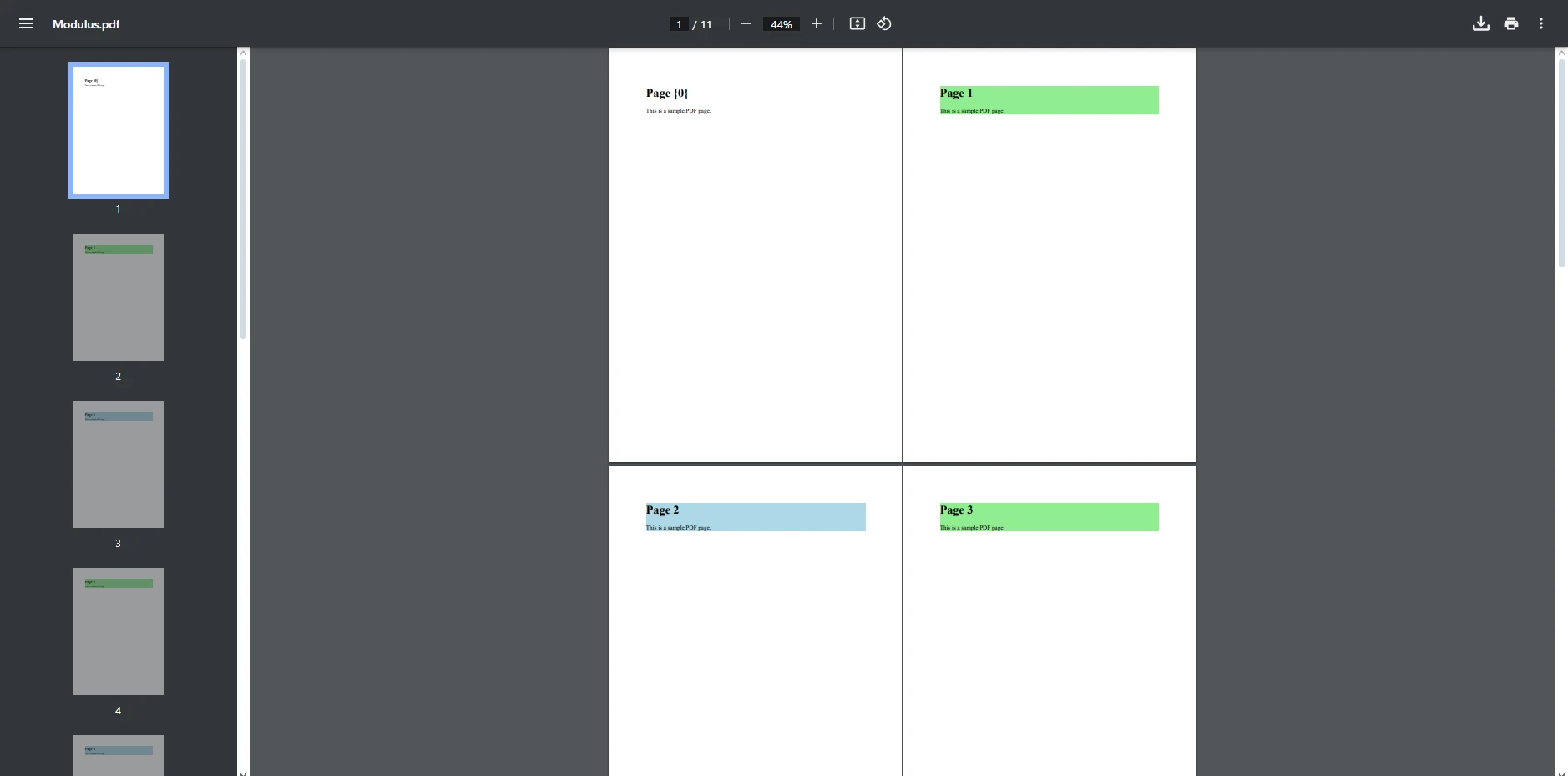
Este código C# genera un PDF multinivel usando IronPDF, alternando estilos para páginas pares e impares. Primero inicializa un `ChromePdfRenderer` y crea un `PdfDocument` para almacenar todas las páginas. Dentro de un bucle for, verifica si el número de la página es par o impar usando el operador de módulo (%), aplicando un fondo azul para páginas pares y verde para impares. Cada página se renderiza como un PDF separado y se añade al documento principal. Una vez que todas las páginas están añadidas, el PDF final se guarda como "Modulus.pdf".
## Conclusión
La combinación del operador de módulo de C# e IronPDF ofrece una manera poderosa y flexible de mejorar la generación de PDF en proyectos .NET. Al utilizar el operador de resto, puedes implementar un formato basado en lógica que alterna entre páginas pares e impares, creando documentos pulidos y profesionales con un esfuerzo mínimo. Ya sea que estés formateando un informe, generando una factura, o creando documentos multinivel con estilos distintos, el operador de módulo simplifica el proceso al proporcionar control sobre el diseño y flujo del documento.
La plataforma rica en funciones de IronPDF, combinada con el poder de los operadores aritméticos de C#, permite a los desarrolladores producir PDFs de alta calidad mientras se enfocan en la lógica de negocio en lugar de las complejidades de la generación de documentos. Con la [**prueba gratuita de IronPDF**](trial-license), puedes experimentar estos beneficios de primera mano y ver lo fácil que es integrar PDFs dinámicos y de calidad profesional en tus aplicaciones .NET.
En el mundo acelerado del desarrollo de software actual, crear y manipular documentos PDF es esencial para muchos proyectos .NET, desde la generación de informes hasta el formateo dinámico de contenido. IronPDF es una biblioteca robusta que permite a los desarrolladores .NET manejar la creación y edición de PDF sin problemas.
Una parte clave de la generación de PDF efectiva es tener control sobre el diseño y el formato, y una de las herramientas más útiles en el arsenal de un desarrollador para manejar este tipo de lógica es el operador de módulo en C#. El operador de módulo (%) te permite trabajar con restos al dividir números, lo que resulta increíblemente útil para tareas que requieren alternar estilos o condiciones basadas en números, como la numeración de páginas, el formato de filas y el control de comportamientos pares e impares.
En este artículo, exploraremos cómo usar el operador de módulo en C# para el formateo de PDF y el manejo de páginas con IronPDF, recorriendo ejemplos para ayudarte a maximizar el potencial de estas herramientas. Adentrémonos y veamos cómo la combinación del operador de módulo C# con IronPDF puede elevar tus necesidades de manejo de PDF.
Entendiendo el Operador de Módulo en C#
¿Qué es el operador módulo (%)?
El operador de módulo (también conocido como el operador de resto) es un operador aritmético que devuelve el resto cuando un número es dividido por otro. En esencia, es el operador que usas cuando trabajas con división entera, pero en lugar de darte el resultado de la división, proporciona el valor que sobra.
Digamos que divides dos números enteros, como 7 y 3. El resultado de la división entera sería 2, pero el operador de módulo (7 % 3) te da 1, porque 1 es el resto cuando 7 se divide por 3. Esta capacidad para devolver el resto puede ser increíblemente útil en una variedad de escenarios de programación, especialmente en la generación de PDF.
Esta operación es particularmente útil en la programación cuando necesitas tomar decisiones basadas en el resultado de la división entera, como alternar estilos para números pares e impares o determinar divisibilidad por un número específico.
Aquí tienes un ejemplo rápido en C#:
int number = 10;if (number % 2 == 0){Console.WriteLine("Even Number");}else{Console.WriteLine("Odd Number");}
int number = 10;
if (number % 2 == 0)
{
    Console.WriteLine("Even Number");
}
else
{
    Console.WriteLine("Odd Number");
}
Dim number AsInteger = 10If number Mod2 = 0 ThenConsole.WriteLine("Even Number")ElseConsole.WriteLine("Odd Number")End If
Dim number As Integer = 10
If number Mod 2 = 0 Then
	Console.WriteLine("Even Number")
Else
	Console.WriteLine("Odd Number")
End If
En este fragmento, number % 2 verifica si el resto es 0, determinando así si el número es par. El operador de módulo aquí se utiliza para verificar la divisibilidad, lo que ayuda a decidir cómo tratar el número.
Aplicaciones reales de Modulus en el desarrollo .NET
El operador de módulo se puede aplicar en varios escenarios prácticos. Algunos usos comunes incluyen:
Paginación: determina si la página actual es un número par o impar para un formato específico.
Estructuras de filas/columnas: alternar colores de filas en tablas o diseños de cuadrícula para mejorar la legibilidad.
Numeración de páginas: Modulus puede ayudarle a alternar estilos para páginas pares e impares en archivos PDF.
Comprobaciones de divisibilidad: determine rápidamente si es necesario realizar una operación en cada n-ésimo elemento, fila o página.
Por ejemplo, si estás generando un PDF que lista facturas, podrías querer usar el operador de resto para alternar el color de fondo de las filas, haciendo el documento visualmente organizado.
¿Por qué utilizar IronPDF para la generación de PDF en .NET?
Introducción a IronPDF
IronPDF es una poderosa biblioteca .NET diseñada para simplificar la generación y manipulación de PDF. Permite a los desarrolladores convertir HTML, ASPX o cualquier documento estándar en un PDF con solo unas pocas líneas de código. La biblioteca soporta una variedad de características, como agregar marcas de agua, manejar marcadores, fusionar PDFs y editar archivos PDF existentes.
Para los desarrolladores .NET, IronPDF proporciona un método alternativo para el manejo tradicional de PDF, facilitando la generación de PDFs sin sumergirse en bibliotecas complejas de bajo nivel. La biblioteca también se integra sin problemas con proyectos existentes, permitiéndote convertir HTML, imágenes o cualquier tipo de documento en un PDF bien formateado.
Combinando la lógica de módulo en C# con IronPDF
La combinación del operador de módulo de C# e IronPDF ofrece un rango de posibilidades, como alternar estilos de formateo para páginas pares e impares, agregar contenido dinámico como números de página o crear diseños personalizados basados en condiciones específicas.
Por ejemplo, puedes usar el módulo para aplicar diferentes encabezados o pies de página en páginas pares e impares, o crear una distinción visual entre filas alternas en una tabla. Esta funcionalidad puede hacer que tus documentos PDF sean más pulidos y profesionales.
Ejemplo de código en C# para la generación de PDF utilizando IronPDF y módulo
Cómo configurar IronPDF en su proyecto .NET
Para comenzar a usar IronPDF, primero deberá instalarlo. Si ya está instalado, entonces puede pasar a la siguiente sección, de lo contrario, los siguientes pasos cubren cómo instalar la biblioteca IronPDF.
A través de la consola del gestor de paquetes NuGet
Para instalar IronPDF utilizando la Consola del Administrador de Paquetes NuGet, abra Visual Studio y navegue a la Consola del Administrador de Paquetes. Luego ejecute el siguiente comando:
PM > Install-Package IronPdf
Install-Package IronPdf
Mediante el gestor de paquetes NuGet para la solución
Abriendo Visual Studio, ve a "herramientas -> Administrador de Paquetes NuGet -> Administrar Paquetes NuGet para la Solución" y busca IronPDF. Desde aquí, lo único que debe hacer es seleccionar su proyecto y hacer clic en "Instalar" y se añadirá IronPDF a su proyecto.
Una vez que haya instalado IronPDF, todo lo que necesita agregar para comenzar a usar IronPDF es la declaración correcta de using en la parte superior de su código:
using IronPdf;
using IronPdf;
ImportsIronPdf
Imports IronPdf
Implementando la lógica de módulo en C# en el formato de PDF
Veamos un ejemplo práctico donde usamos el operador de módulo para alternar estilos entre páginas pares e impares de un documento PDF.
Crear un documento PDF simple: generaremos un documento PDF básico a partir de una plantilla HTML.
Aplicar lógica de módulo: utilice el operador de módulo para cambiar los estilos de página dinámicamente.
using IronPdf;public class Program{ public static voidMain(string[] args) { // Create an instance of the IronPDF renderer ChromePdfRenderer renderer = new ChromePdfRenderer(); // Define the HTML content format for the pages string htmlContent = "<h1>Page {0}</h1><p>This is a sample PDF page.</p>"; // Initialize a PDF document PdfDocument pdfDoc = renderer.RenderHtmlAsPdf(string.Format(htmlContent, 1)); // Loop to generate pages for (int i = 1; i <= 10; i++) { // Format the page HTML based on whether the page number is even or odd string pageHtml = string.Format(htmlContent, i); if (i % 2 == 0) { // Apply style for even pages pageHtml = string.Format("<div style='background-color:lightblue;'>{0}</div>", pageHtml); } else { // Apply style for odd pages pageHtml = string.Format("<div style='background-color:lightgreen;'>{0}</div>", pageHtml); } // Render the current page PdfDocument pdfPage = renderer.RenderHtmlAsPdf(pageHtml); // Append the page to the main PDF document pdfDoc.AppendPdf(pdfPage); } // Save the final PDF with all pages merged pdfDoc.SaveAs("Modulus.pdf");Console.WriteLine("PDF created successfully."); }}
using IronPdf;

public class Program
{
    public static void Main(string[] args)
    {
        // Create an instance of the IronPDF renderer
        ChromePdfRenderer renderer = new ChromePdfRenderer();

        // Define the HTML content format for the pages
        string htmlContent = "<h1>Page {0}</h1><p>This is a sample PDF page.</p>";

        // Initialize a PDF document
        PdfDocument pdfDoc = renderer.RenderHtmlAsPdf(string.Format(htmlContent, 1));

        // Loop to generate pages
        for (int i = 1; i <= 10; i++)
        {
            // Format the page HTML based on whether the page number is even or odd
            string pageHtml = string.Format(htmlContent, i);
            if (i % 2 == 0)
            {
                // Apply style for even pages
                pageHtml = string.Format("<div style='background-color:lightblue;'>{0}</div>", pageHtml);
            }
            else
            {
                // Apply style for odd pages
                pageHtml = string.Format("<div style='background-color:lightgreen;'>{0}</div>", pageHtml);
            }

            // Render the current page
            PdfDocument pdfPage = renderer.RenderHtmlAsPdf(pageHtml);

            // Append the page to the main PDF document
            pdfDoc.AppendPdf(pdfPage);
        }

        // Save the final PDF with all pages merged
        pdfDoc.SaveAs("Modulus.pdf");
        Console.WriteLine("PDF created successfully.");
    }
}
ImportsIronPdfPublic Class Program PublicShared Sub Main(ByVal args AsString()) ' Create an instance of the IronPDF renderer Dim renderer As New ChromePdfRenderer() ' Define the HTML content format for the pages Dim htmlContent AsString = "<h1>Page {0}</h1><p>This is a sample PDF page.</p>" ' Initialize a PDF document Dim pdfDoc AsPdfDocument = renderer.RenderHtmlAsPdf(String.Format(htmlContent, 1)) ' Loop to generate pages For i AsInteger = 1 To 10 ' Format the page HTML based on whether the page number is even or odd Dim pageHtml AsString = String.Format(htmlContent, i) If i Mod2 = 0 Then ' Apply style for even pages pageHtml = String.Format("<div style='background-color:lightblue;'>{0}</div>", pageHtml) Else ' Apply style for odd pages pageHtml = String.Format("<div style='background-color:lightgreen;'>{0}</div>", pageHtml) End If ' Render the current page Dim pdfPage AsPdfDocument = renderer.RenderHtmlAsPdf(pageHtml) ' Append the page to the main PDF document pdfDoc.AppendPdf(pdfPage) Next ' Save the final PDF with all pages merged pdfDoc.SaveAs("Modulus.pdf")Console.WriteLine("PDF created successfully.") End SubEnd Class
Imports IronPdf

Public Class Program
    Public Shared Sub Main(ByVal args As String())
        ' Create an instance of the IronPDF renderer
        Dim renderer As New ChromePdfRenderer()

        ' Define the HTML content format for the pages
        Dim htmlContent As String = "<h1>Page {0}</h1><p>This is a sample PDF page.</p>"

        ' Initialize a PDF document
        Dim pdfDoc As PdfDocument = renderer.RenderHtmlAsPdf(String.Format(htmlContent, 1))

        ' Loop to generate pages
        For i As Integer = 1 To 10
            ' Format the page HTML based on whether the page number is even or odd
            Dim pageHtml As String = String.Format(htmlContent, i)
            If i Mod 2 = 0 Then
                ' Apply style for even pages
                pageHtml = String.Format("<div style='background-color:lightblue;'>{0}</div>", pageHtml)
            Else
                ' Apply style for odd pages
                pageHtml = String.Format("<div style='background-color:lightgreen;'>{0}</div>", pageHtml)
            End If

            ' Render the current page
            Dim pdfPage As PdfDocument = renderer.RenderHtmlAsPdf(pageHtml)

            ' Append the page to the main PDF document
            pdfDoc.AppendPdf(pdfPage)
        Next

        ' Save the final PDF with all pages merged
        pdfDoc.SaveAs("Modulus.pdf")
        Console.WriteLine("PDF created successfully.")
    End Sub
End Class
Este código C# genera un PDF multinivel usando IronPDF, alternando estilos para páginas pares e impares. Primero inicializa un ChromePdfRenderer y crea un PdfDocument para almacenar todas las páginas. Dentro de un bucle for, verifica si el número de la página es par o impar usando el operador de módulo (%), aplicando un fondo azul para páginas pares y verde para impares. Cada página se renderiza como un PDF separado y se añade al documento principal. Una vez que todas las páginas están añadidas, el PDF final se guarda como "Modulus.pdf".
Conclusión
La combinación del operador de módulo de C# e IronPDF ofrece una manera poderosa y flexible de mejorar la generación de PDF en proyectos .NET. Al utilizar el operador de resto, puedes implementar un formato basado en lógica que alterna entre páginas pares e impares, creando documentos pulidos y profesionales con un esfuerzo mínimo. Ya sea que estés formateando un informe, generando una factura, o creando documentos multinivel con estilos distintos, el operador de módulo simplifica el proceso al proporcionar control sobre el diseño y flujo del documento.
La plataforma rica en funciones de IronPDF, combinada con el poder de los operadores aritméticos de C#, permite a los desarrolladores producir PDFs de alta calidad mientras se enfocan en la lógica de negocio en lugar de las complejidades de la generación de documentos. Con la prueba gratuita de IronPDF, puedes experimentar estos beneficios de primera mano y ver lo fácil que es integrar PDFs dinámicos y de calidad profesional en tus aplicaciones .NET.
Jacob Mellor es Director de Tecnología de Iron Software y un ingeniero visionario pionero en la tecnología C# PDF. Como desarrollador original de la base de código principal de Iron Software, ha dado forma a la arquitectura de productos de la empresa desde su creación, transformándola, junto con el director ejecutivo Cameron Rimington, en una empresa de más de 50 personas que presta servicios a la NASA, Tesla y organismos gubernamentales de todo el mundo.

























