using IronPdf;

// Disable local disk access or cross-origin requests
Installation.EnableWebSecurity = true;

// Instantiate Renderer
var renderer = new ChromePdfRenderer();

// Create a PDF from a HTML string using C#
var pdf = renderer.RenderHtmlAsPdf("<h1>Hello World</h1>");

// Export to a file or Stream
pdf.SaveAs("output.pdf");

// Advanced Example with HTML Assets
// Load external html assets: Images, CSS and JavaScript.
// An optional BasePath 'C:\site\assets\' is set as the file location to load assets from
var myAdvancedPdf = renderer.RenderHtmlAsPdf("<img src='icons/iron.png'>", @"C:\site\assets\");
myAdvancedPdf.SaveAs("html-with-assets.pdf");
using IronPdf;// Disable local disk access or cross-origin requestsInstallation.EnableWebSecurity = true;// Instantiate Renderervar renderer = new ChromePdfRenderer();// Create a PDF from a HTML string using C#var pdf = renderer.RenderHtmlAsPdf("<h1>Hello World</h1>");// Export to a file or Streampdf.SaveAs("output.pdf");// Advanced Example with HTML Assets// Load external html assets: Images, CSS and JavaScript.// An optional BasePath 'C:\site\assets\' is set as the file location to load assets fromvar myAdvancedPdf = renderer.RenderHtmlAsPdf("<img src='icons/iron.png'>", @"C:\site\assets\");myAdvancedPdf.SaveAs("html-with-assets.pdf");
La programación en C# es flexible y proporciona una gran variedad de estructuras de datos para gestionar eficazmente diversos trabajos. El HashSet es una de esas estructuras de datos potentes que ofrece componentes distintos y complejidad promedio en tiempo constante para operaciones fundamentales. Esta publicación examinará el uso de HashSet en C# y cómo se puede usar con IronPDF, una biblioteca poderosa para trabajar con documentos PDF.
Cómo usar HashSet en C#
Cree un nuevo proyecto de aplicación de consola.
Cree un objeto para el HashSet en C#. Agregue el valor predeterminado al HashSet.
Al agregar, HashSet eliminará automáticamente los elementos duplicados verificando si el elemento existe.
Procese el HashSet solo con elementos únicos uno por uno.
Muestre el resultado y elimine el objeto.
Entendiendo HashSet en C#
HashSet en C# está diseñado para proporcionar operaciones de conjunto de alto rendimiento. Un HashSet es la colección perfecta para utilizar en situaciones cuando necesita mantener un conjunto distinto de datos ya que evita elementos duplicados. Está incluido en el espacio de nombres System.Collections.Generic y proporciona inserción rápida, eliminación, recuperación y operaciones de búsqueda más rápidas. En C#, use los métodos de operaciones de conjunto HashSet que le permiten llevar a cabo fácilmente operaciones de conjunto estándar. La clase HashSet proporciona métodos de operaciones de conjunto.
A continuación se presentan algunos usos de C# para un HashSet:
Inicialización y operaciones básicas
Establecer un HashSet y llevar a cabo acciones fundamentales como anexar, eliminar y verificar la existencia de entradas.
using System;using System.Collections.Generic;class Program{ static voidMain() { // Initializes a HashSet of integers HashSet<int> numbers = new HashSet<int>(); // Adds elements to the HashSet numbers.Add(1); numbers.Add(2); numbers.Add(3); // Removes an element from the HashSet numbers.Remove(2); // Checks for membership of an element bool containsThree = numbers.Contains(3);Console.WriteLine($"Contains 3: {containsThree}"); }}
using System;
using System.Collections.Generic;

class Program
{
    static void Main()
    {
        // Initializes a HashSet of integers
        HashSet<int> numbers = new HashSet<int>();

        // Adds elements to the HashSet
        numbers.Add(1);
        numbers.Add(2);
        numbers.Add(3);

        // Removes an element from the HashSet
        numbers.Remove(2);

        // Checks for membership of an element
        bool containsThree = numbers.Contains(3);

        Console.WriteLine($"Contains 3: {containsThree}");
    }
}
ImportsSystemImportsSystem.Collections.GenericFriend Class ProgramShared Sub Main() ' Initializes a HashSet of integers Dim numbers As New HashSet(OfInteger)() ' Adds elements to the HashSet numbers.Add(1) numbers.Add(2) numbers.Add(3) ' Removes an element from the HashSet numbers.Remove(2) ' Checks for membership of an element Dim containsThree AsBoolean = numbers.Contains(3)Console.WriteLine($"Contains 3: {containsThree}") End SubEnd Class
Imports System
Imports System.Collections.Generic

Friend Class Program
	Shared Sub Main()
		' Initializes a HashSet of integers
		Dim numbers As New HashSet(Of Integer)()

		' Adds elements to the HashSet
		numbers.Add(1)
		numbers.Add(2)
		numbers.Add(3)

		' Removes an element from the HashSet
		numbers.Remove(2)

		' Checks for membership of an element
		Dim containsThree As Boolean = numbers.Contains(3)

		Console.WriteLine($"Contains 3: {containsThree}")
	End Sub
End Class
Inicialización con Collection
Usar una colección existente como punto de partida para un HashSet; los duplicados se eliminan de inmediato.
using System;using System.Collections.Generic;class Program{ static voidMain() { // Creates a list with duplicate elements List<int> duplicateNumbers = new List<int> { 1, 2, 2, 3, 3, 4 }; // Initializes a HashSet with the list, automatically removes duplicates HashSet<int> uniqueNumbers = new HashSet<int>(duplicateNumbers);Console.WriteLine("Unique numbers:"); foreach (var number in uniqueNumbers) {Console.WriteLine(number); } }}
using System;
using System.Collections.Generic;

class Program
{
    static void Main()
    {
        // Creates a list with duplicate elements
        List<int> duplicateNumbers = new List<int> { 1, 2, 2, 3, 3, 4 };

        // Initializes a HashSet with the list, automatically removes duplicates
        HashSet<int> uniqueNumbers = new HashSet<int>(duplicateNumbers);

        Console.WriteLine("Unique numbers:");
        foreach (var number in uniqueNumbers)
        {
            Console.WriteLine(number);
        }
    }
}
ImportsSystemImportsSystem.Collections.GenericFriend Class ProgramShared Sub Main() ' Creates a list with duplicate elements Dim duplicateNumbers As New List(OfInteger) From {1, 2, 2, 3, 3, 4} ' Initializes a HashSet with the list, automatically removes duplicates Dim uniqueNumbers As New HashSet(OfInteger)(duplicateNumbers)Console.WriteLine("Unique numbers:") For Each number In uniqueNumbersConsole.WriteLine(number) Next number End SubEnd Class
Imports System
Imports System.Collections.Generic

Friend Class Program
	Shared Sub Main()
		' Creates a list with duplicate elements
		Dim duplicateNumbers As New List(Of Integer) From {1, 2, 2, 3, 3, 4}

		' Initializes a HashSet with the list, automatically removes duplicates
		Dim uniqueNumbers As New HashSet(Of Integer)(duplicateNumbers)

		Console.WriteLine("Unique numbers:")
		For Each number In uniqueNumbers
			Console.WriteLine(number)
		Next number
	End Sub
End Class
Unión con otro HashSet
Combinar dos instancias de HashSet para producir un nuevo conjunto que combina elementos distintos de ambos conjuntos utilizando la función UnionWith.
using System;using System.Collections.Generic;class Program{ static voidMain() { HashSet<int> set1 = new HashSet<int> { 1, 2, 3 }; HashSet<int> set2 = new HashSet<int> { 3, 4, 5 }; // Merges set2 into set1 set1.UnionWith(set2);Console.WriteLine("Union of set1 and set2:"); foreach (var item in set1) {Console.WriteLine(item); } }}
using System;
using System.Collections.Generic;

class Program
{
    static void Main()
    {
        HashSet<int> set1 = new HashSet<int> { 1, 2, 3 };
        HashSet<int> set2 = new HashSet<int> { 3, 4, 5 };

        // Merges set2 into set1
        set1.UnionWith(set2);

        Console.WriteLine("Union of set1 and set2:");
        foreach (var item in set1)
        {
            Console.WriteLine(item);
        }
    }
}
ImportsSystemImportsSystem.Collections.GenericFriend Class ProgramShared Sub Main() Dim set1 As New HashSet(OfInteger) From {1, 2, 3} Dim set2 As New HashSet(OfInteger) From {3, 4, 5} ' Merges set2 into set1 set1.UnionWith(set2)Console.WriteLine("Union of set1 and set2:") For Each item In set1Console.WriteLine(item) Next item End SubEnd Class
Imports System
Imports System.Collections.Generic

Friend Class Program
	Shared Sub Main()
		Dim set1 As New HashSet(Of Integer) From {1, 2, 3}
		Dim set2 As New HashSet(Of Integer) From {3, 4, 5}

		' Merges set2 into set1
		set1.UnionWith(set2)

		Console.WriteLine("Union of set1 and set2:")
		For Each item In set1
			Console.WriteLine(item)
		Next item
	End Sub
End Class
Intersección con otro HashSet
Usando la función IntersectWith, determine los componentes compartidos entre dos instancias de HashSet.
using System;using System.Collections.Generic;class Program{ static voidMain() { HashSet<int> set1 = new HashSet<int> { 1, 2, 3 }; HashSet<int> set2 = new HashSet<int> { 3, 4, 5 }; // Keeps only elements that are present in both sets set1.IntersectWith(set2);Console.WriteLine("Intersection of set1 and set2:"); foreach (var item in set1) {Console.WriteLine(item); } }}
using System;
using System.Collections.Generic;

class Program
{
    static void Main()
    {
        HashSet<int> set1 = new HashSet<int> { 1, 2, 3 };
        HashSet<int> set2 = new HashSet<int> { 3, 4, 5 };

        // Keeps only elements that are present in both sets
        set1.IntersectWith(set2);

        Console.WriteLine("Intersection of set1 and set2:");
        foreach (var item in set1)
        {
            Console.WriteLine(item);
        }
    }
}
ImportsSystemImportsSystem.Collections.GenericFriend Class ProgramShared Sub Main() Dim set1 As New HashSet(OfInteger) From {1, 2, 3} Dim set2 As New HashSet(OfInteger) From {3, 4, 5} ' Keeps only elements that are present in both sets set1.IntersectWith(set2)Console.WriteLine("Intersection of set1 and set2:") For Each item In set1Console.WriteLine(item) Next item End SubEnd Class
Imports System
Imports System.Collections.Generic

Friend Class Program
	Shared Sub Main()
		Dim set1 As New HashSet(Of Integer) From {1, 2, 3}
		Dim set2 As New HashSet(Of Integer) From {3, 4, 5}

		' Keeps only elements that are present in both sets
		set1.IntersectWith(set2)

		Console.WriteLine("Intersection of set1 and set2:")
		For Each item In set1
			Console.WriteLine(item)
		Next item
	End Sub
End Class
Diferencia con otro HashSet
Usando la función ExceptWith, encuentre los elementos que están en un HashSet pero no en otro.
using System;using System.Collections.Generic;class Program{ static voidMain() { HashSet<int> set1 = new HashSet<int> { 1, 2, 3 }; HashSet<int> set2 = new HashSet<int> { 3, 4, 5 }; // Removes elements from set1 that are also in set2 set1.ExceptWith(set2);Console.WriteLine("Difference of set1 and set2:"); foreach (var item in set1) {Console.WriteLine(item); } }}
using System;
using System.Collections.Generic;

class Program
{
    static void Main()
    {
        HashSet<int> set1 = new HashSet<int> { 1, 2, 3 };
        HashSet<int> set2 = new HashSet<int> { 3, 4, 5 };

        // Removes elements from set1 that are also in set2
        set1.ExceptWith(set2);

        Console.WriteLine("Difference of set1 and set2:");
        foreach (var item in set1)
        {
            Console.WriteLine(item);
        }
    }
}
ImportsSystemImportsSystem.Collections.GenericFriend Class ProgramShared Sub Main() Dim set1 As New HashSet(OfInteger) From {1, 2, 3} Dim set2 As New HashSet(OfInteger) From {3, 4, 5} ' Removes elements from set1 that are also in set2 set1.ExceptWith(set2)Console.WriteLine("Difference of set1 and set2:") For Each item In set1Console.WriteLine(item) Next item End SubEnd Class
Imports System
Imports System.Collections.Generic

Friend Class Program
	Shared Sub Main()
		Dim set1 As New HashSet(Of Integer) From {1, 2, 3}
		Dim set2 As New HashSet(Of Integer) From {3, 4, 5}

		' Removes elements from set1 that are also in set2
		set1.ExceptWith(set2)

		Console.WriteLine("Difference of set1 and set2:")
		For Each item In set1
			Console.WriteLine(item)
		Next item
	End Sub
End Class
Verificar Subconjunto o Superconjunto:
Usando los métodos IsSubsetOf e IsSupersetOf, se puede determinar si una instancia de HashSet dada es un subconjunto o superconjunto de otra.
using System;using System.Collections.Generic;class Program{ static voidMain() { HashSet<int> set1 = new HashSet<int> { 1, 2, 3 }; HashSet<int> set2 = new HashSet<int> { 2, 3 }; // Checks if set2 is a subset of set1 bool isSubset = set2.IsSubsetOf(set1); // Checks if set1 is a superset of set2 bool isSuperset = set1.IsSupersetOf(set2);Console.WriteLine($"Is set2 a subset of set1: {isSubset}");Console.WriteLine($"Is set1 a superset of set2: {isSuperset}"); }}
using System;
using System.Collections.Generic;

class Program
{
    static void Main()
    {
        HashSet<int> set1 = new HashSet<int> { 1, 2, 3 };
        HashSet<int> set2 = new HashSet<int> { 2, 3 };

        // Checks if set2 is a subset of set1
        bool isSubset = set2.IsSubsetOf(set1);

        // Checks if set1 is a superset of set2
        bool isSuperset = set1.IsSupersetOf(set2);

        Console.WriteLine($"Is set2 a subset of set1: {isSubset}");
        Console.WriteLine($"Is set1 a superset of set2: {isSuperset}");
    }
}
ImportsSystemImportsSystem.Collections.GenericFriend Class ProgramShared Sub Main() Dim set1 As New HashSet(OfInteger) From {1, 2, 3} Dim set2 As New HashSet(OfInteger) From {2, 3} ' Checks if set2 is a subset of set1 Dim isSubset AsBoolean = set2.IsSubsetOf(set1) ' Checks if set1 is a superset of set2 Dim isSuperset AsBoolean = set1.IsSupersetOf(set2)Console.WriteLine($"Is set2 a subset of set1: {isSubset}")Console.WriteLine($"Is set1 a superset of set2: {isSuperset}") End SubEnd Class
Imports System
Imports System.Collections.Generic

Friend Class Program
	Shared Sub Main()
		Dim set1 As New HashSet(Of Integer) From {1, 2, 3}
		Dim set2 As New HashSet(Of Integer) From {2, 3}

		' Checks if set2 is a subset of set1
		Dim isSubset As Boolean = set2.IsSubsetOf(set1)

		' Checks if set1 is a superset of set2
		Dim isSuperset As Boolean = set1.IsSupersetOf(set2)

		Console.WriteLine($"Is set2 a subset of set1: {isSubset}")
		Console.WriteLine($"Is set1 a superset of set2: {isSuperset}")
	End Sub
End Class
Diferencia simétrica
Usando la técnica SymmetricExceptWith, determine la diferencia simétrica (elementos presentes en un conjunto, pero no en ambos).
using System;using System.Collections.Generic;class Program{ static voidMain() { HashSet<int> set1 = new HashSet<int> { 1, 2, 3 }; HashSet<int> set2 = new HashSet<int> { 3, 4, 5 }; // Keeps elements that are in set1 or set2 but not in both set1.SymmetricExceptWith(set2);Console.WriteLine("Symmetric difference of set1 and set2:"); foreach (var item in set1) {Console.WriteLine(item); } }}
using System;
using System.Collections.Generic;

class Program
{
    static void Main()
    {
        HashSet<int> set1 = new HashSet<int> { 1, 2, 3 };
        HashSet<int> set2 = new HashSet<int> { 3, 4, 5 };

        // Keeps elements that are in set1 or set2 but not in both
        set1.SymmetricExceptWith(set2);

        Console.WriteLine("Symmetric difference of set1 and set2:");
        foreach (var item in set1)
        {
            Console.WriteLine(item);
        }
    }
}
ImportsSystemImportsSystem.Collections.GenericFriend Class ProgramShared Sub Main() Dim set1 As New HashSet(OfInteger) From {1, 2, 3} Dim set2 As New HashSet(OfInteger) From {3, 4, 5} ' Keeps elements that are in set1 or set2 but not in both set1.SymmetricExceptWith(set2)Console.WriteLine("Symmetric difference of set1 and set2:") For Each item In set1Console.WriteLine(item) Next item End SubEnd Class
Imports System
Imports System.Collections.Generic

Friend Class Program
	Shared Sub Main()
		Dim set1 As New HashSet(Of Integer) From {1, 2, 3}
		Dim set2 As New HashSet(Of Integer) From {3, 4, 5}

		' Keeps elements that are in set1 or set2 but not in both
		set1.SymmetricExceptWith(set2)

		Console.WriteLine("Symmetric difference of set1 and set2:")
		For Each item In set1
			Console.WriteLine(item)
		Next item
	End Sub
End Class
IronPDF
Los programadores pueden usar el lenguaje C# para producir, editar y modificar documentos PDF mediante la utilización de la biblioteca IronPDF for .NET. La aplicación ofrece una amplia gama de herramientas y características para permitir diferentes operaciones con archivos PDF, incluyendo crear nuevos PDFs a partir de HTML, convertir HTML a PDF, combinar o dividir documentos PDF y anotar PDFs existentes con texto, fotos y otros datos. Para saber más sobre IronPDF, consulte la documentación oficial.
IronPDF se destaca en la conversión de HTML a PDF, asegurando la preservación precisa de los diseños y estilos originales. Es perfecto para crear PDFs a partir de contenido basado en la web como informes, facturas y documentación. Con soporte para archivos HTML, URLs y cadenas HTML en bruto, IronPDF produce fácilmente documentos PDF de alta calidad.
using IronPdf;class Program{ static voidMain(string[] args) { var renderer = new ChromePdfRenderer(); // 1. Convert HTML String to PDF var htmlContent = "<h1>Hello, IronPDF!</h1><p>This is a PDF from an HTML string.</p>"; var pdfFromHtmlString = renderer.RenderHtmlAsPdf(htmlContent); pdfFromHtmlString.SaveAs("HTMLStringToPDF.pdf"); // 2. Convert HTML File to PDF var htmlFilePath = "path_to_your_html_file.html"; // Specify the path to your HTML file var pdfFromHtmlFile = renderer.RenderHtmlFileAsPdf(htmlFilePath); pdfFromHtmlFile.SaveAs("HTMLFileToPDF.pdf"); // 3. Convert URL to PDF var url = "http://ironpdf.com"; // Specify the URL var pdfFromUrl = renderer.RenderUrlAsPdf(url); pdfFromUrl.SaveAs("URLToPDF.pdf"); }}
using IronPdf;

class Program
{
    static void Main(string[] args)
    {
        var renderer = new ChromePdfRenderer();

        // 1. Convert HTML String to PDF
        var htmlContent = "<h1>Hello, IronPDF!</h1><p>This is a PDF from an HTML string.</p>";
        var pdfFromHtmlString = renderer.RenderHtmlAsPdf(htmlContent);
        pdfFromHtmlString.SaveAs("HTMLStringToPDF.pdf");

        // 2. Convert HTML File to PDF
        var htmlFilePath = "path_to_your_html_file.html"; // Specify the path to your HTML file
        var pdfFromHtmlFile = renderer.RenderHtmlFileAsPdf(htmlFilePath);
        pdfFromHtmlFile.SaveAs("HTMLFileToPDF.pdf");

        // 3. Convert URL to PDF
        var url = "http://ironpdf.com"; // Specify the URL
        var pdfFromUrl = renderer.RenderUrlAsPdf(url);
        pdfFromUrl.SaveAs("URLToPDF.pdf");
    }
}
ImportsIronPdfFriend Class ProgramShared Sub Main(ByVal args() AsString) Dim renderer = New ChromePdfRenderer() ' 1. Convert HTML String to PDF Dim htmlContent = "<h1>Hello, IronPDF!</h1><p>This is a PDF from an HTML string.</p>" Dim pdfFromHtmlString = renderer.RenderHtmlAsPdf(htmlContent) pdfFromHtmlString.SaveAs("HTMLStringToPDF.pdf") ' 2. Convert HTML File to PDF Dim htmlFilePath = "path_to_your_html_file.html" ' Specify the path to your HTML file Dim pdfFromHtmlFile = renderer.RenderHtmlFileAsPdf(htmlFilePath) pdfFromHtmlFile.SaveAs("HTMLFileToPDF.pdf") ' 3. Convert URL to PDF Dim url = "http://ironpdf.com" ' Specify the URL Dim pdfFromUrl = renderer.RenderUrlAsPdf(url) pdfFromUrl.SaveAs("URLToPDF.pdf") End SubEnd Class
Imports IronPdf

Friend Class Program
	Shared Sub Main(ByVal args() As String)
		Dim renderer = New ChromePdfRenderer()

		' 1. Convert HTML String to PDF
		Dim htmlContent = "<h1>Hello, IronPDF!</h1><p>This is a PDF from an HTML string.</p>"
		Dim pdfFromHtmlString = renderer.RenderHtmlAsPdf(htmlContent)
		pdfFromHtmlString.SaveAs("HTMLStringToPDF.pdf")

		' 2. Convert HTML File to PDF
		Dim htmlFilePath = "path_to_your_html_file.html" ' Specify the path to your HTML file
		Dim pdfFromHtmlFile = renderer.RenderHtmlFileAsPdf(htmlFilePath)
		pdfFromHtmlFile.SaveAs("HTMLFileToPDF.pdf")

		' 3. Convert URL to PDF
		Dim url = "http://ironpdf.com" ' Specify the URL
		Dim pdfFromUrl = renderer.RenderUrlAsPdf(url)
		pdfFromUrl.SaveAs("URLToPDF.pdf")
	End Sub
End Class
Características de IronPDF
Conversión de HTML a PDF: Cualquier tipo de datos HTML, incluidos archivos, URL y cadenas de código HTML, se pueden convertir en documentos PDF con IronPDF.
Generación de PDF: Texto, imágenes y otros objetos se pueden agregar programáticamente a documentos PDF utilizando el lenguaje de programación C#.
Manipulación de PDF: IronPDF puede dividir un archivo PDF en varios archivos y editar archivos PDF preexistentes. Puede combinar varios archivos PDF en un solo archivo.
Formularios PDF: Dado que la biblioteca permite a los usuarios construir y completar formularios PDF, es útil en escenarios donde se necesitan recopilar y procesar datos de formularios.
Características de Seguridad: IronPDF permite el cifrado de documentos PDF así como la seguridad de contraseñas y permisos.
Instalar IronPDF
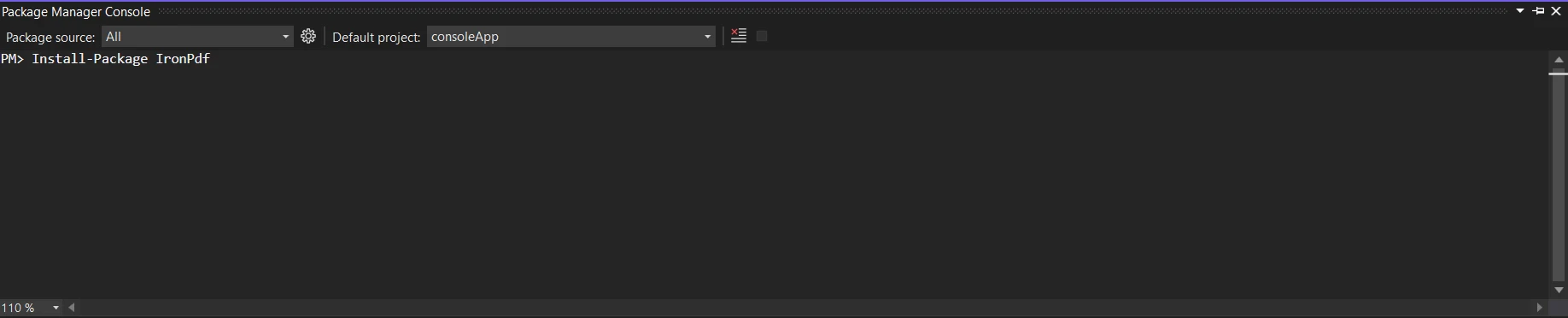
Adquiera la biblioteca IronPDF; se requiere en el siguiente parche. Para hacer esto, introduce el siguiente código en el Administrador de Paquetes:
PM > Install-Package IronPdf
Install-Package IronPdf
or
> dotnet add package IronPdf
dotnet add package IronPdf
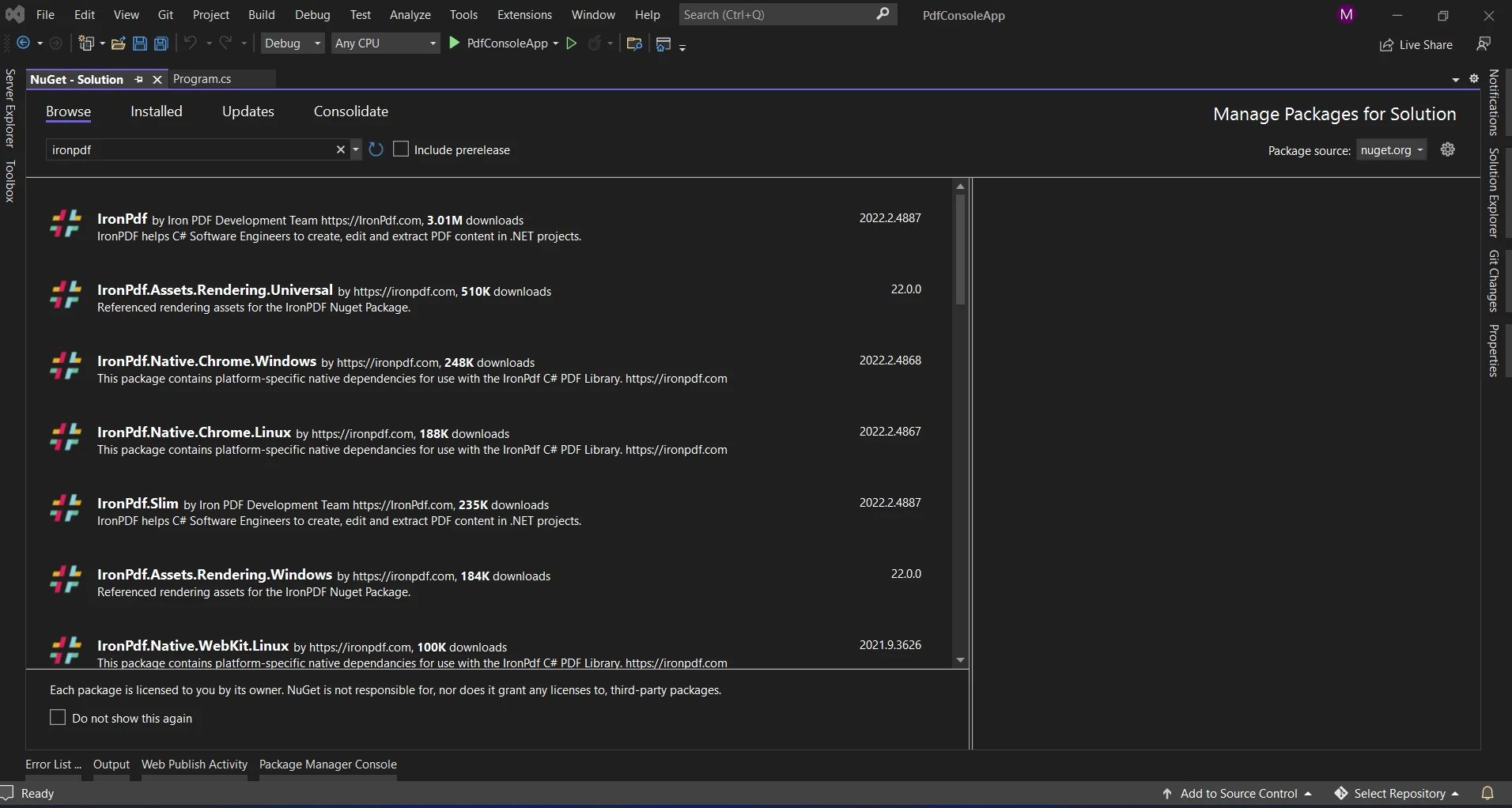
Otra opción es buscar el paquete "IronPDF" usando el Administrador de Paquetes NuGet. De todos los paquetes NuGet relacionados con IronPDF, podemos seleccionar y descargar el paquete requerido de esta lista.
HashSet con IronPDF
Dentro del entorno C#, IronPDF es una biblioteca poderosa que facilita la labor con documentos PDF. En situaciones donde la representación de datos distinta y la creación efectiva de documentos son cruciales, combinar la eficiencia de HashSet con los poderes de manipulación de documentos de IronPDF podría resultar en soluciones creativas.
Beneficios del uso de HashSet con IronPDF
Reducción de Redundancia de Datos: Al garantizar que solo se mantengan elementos distintos, HashSets ayudan a evitar la duplicación de datos. Cuando se trata de grandes conjuntos de datos para eliminar información duplicada, esto es muy útil.
Búsqueda Efectiva: Las operaciones básicas, como inserción, eliminación y búsqueda, se pueden realizar con complejidad promedio en tiempo constante usando HashSet. Este tipo de rendimiento es muy importante cuando se trabaja con conjuntos de datos de diferentes tamaños.
Producción Simplificada de Documentos: IronPDF simplifica el proceso de creación de documentos PDF en C#. Puede establecer procesos rápidos y efectivos para producir contenido original y dinámico para sus PDFs integrando HashSet con IronPDF.
Ahora echemos un vistazo a un escenario del mundo real donde usar HashSet con IronPDF podría ser útil.
Generación de PDF con datos únicos
using IronPdf;using System;using System.Collections.Generic;class PdfGenerator{ static voidMain() { // Sample user names with duplicates string[] userNames = { "Alice", "Bob", "Charlie", "Bob", "David", "Alice" }; // Using HashSet to ensure unique user names HashSet<string> uniqueUserNames = new HashSet<string>(userNames); // Generating PDF with unique user namesGeneratePdf(uniqueUserNames); } static voidGeneratePdf(HashSet<string> uniqueUserNames) { // Create a new PDF document using IronPDF HtmlToPdf renderer = new HtmlToPdf(); // Render a PDF from an HTML document consisting of unique user names var pdf = renderer.RenderHtmlAsPdf(BuildHtmlDocument(uniqueUserNames)); // Save the PDF to a file string pdfFilePath = "UniqueUserNames.pdf"; pdf.SaveAs(pdfFilePath); // Display a message with the file pathConsole.WriteLine($"PDF generated successfully. File saved at: {pdfFilePath}"); } static stringBuildHtmlDocument(HashSet<string> uniqueUserNames) { // Build an HTML document with unique user names string htmlDocument = "<html><body><ul>"; foreach (var userName in uniqueUserNames) { htmlDocument += $"<li>{userName}</li>"; } htmlDocument += "</ul></body></html>"; return htmlDocument; }}
using IronPdf;
using System;
using System.Collections.Generic;

class PdfGenerator
{
    static void Main()
    {
        // Sample user names with duplicates
        string[] userNames = { "Alice", "Bob", "Charlie", "Bob", "David", "Alice" };

        // Using HashSet to ensure unique user names
        HashSet<string> uniqueUserNames = new HashSet<string>(userNames);

        // Generating PDF with unique user names
        GeneratePdf(uniqueUserNames);
    }

    static void GeneratePdf(HashSet<string> uniqueUserNames)
    {
        // Create a new PDF document using IronPDF
        HtmlToPdf renderer = new HtmlToPdf();

        // Render a PDF from an HTML document consisting of unique user names
        var pdf = renderer.RenderHtmlAsPdf(BuildHtmlDocument(uniqueUserNames));

        // Save the PDF to a file
        string pdfFilePath = "UniqueUserNames.pdf";
        pdf.SaveAs(pdfFilePath);

        // Display a message with the file path
        Console.WriteLine($"PDF generated successfully. File saved at: {pdfFilePath}");
    }

    static string BuildHtmlDocument(HashSet<string> uniqueUserNames)
    {
        // Build an HTML document with unique user names
        string htmlDocument = "<html><body><ul>";
        foreach (var userName in uniqueUserNames)
        {
            htmlDocument += $"<li>{userName}</li>";
        }
        htmlDocument += "</ul></body></html>";
        return htmlDocument;
    }
}
ImportsIronPdfImportsSystemImportsSystem.Collections.GenericFriend Class PdfGeneratorShared Sub Main() ' Sample user names with duplicates Dim userNames() AsString = { "Alice", "Bob", "Charlie", "Bob", "David", "Alice" } ' Using HashSet to ensure unique user names Dim uniqueUserNames As New HashSet(OfString)(userNames) ' Generating PDF with unique user namesGeneratePdf(uniqueUserNames) End Sub PrivateShared Sub GeneratePdf(ByVal uniqueUserNames AsHashSet(OfString)) ' Create a new PDF document using IronPDF Dim renderer As New HtmlToPdf() ' Render a PDF from an HTML document consisting of unique user names Dim pdf = renderer.RenderHtmlAsPdf(BuildHtmlDocument(uniqueUserNames)) ' Save the PDF to a file Dim pdfFilePath AsString = "UniqueUserNames.pdf" pdf.SaveAs(pdfFilePath) ' Display a message with the file pathConsole.WriteLine($"PDF generated successfully. File saved at: {pdfFilePath}") End Sub PrivateShared Function BuildHtmlDocument(ByVal uniqueUserNames AsHashSet(OfString)) AsString ' Build an HTML document with unique user names Dim htmlDocument AsString = "<html><body><ul>" For Each userName In uniqueUserNames htmlDocument &= $"<li>{userName}</li>" Next userName htmlDocument &= "</ul></body></html>" Return htmlDocument End FunctionEnd Class
Imports IronPdf
Imports System
Imports System.Collections.Generic

Friend Class PdfGenerator
	Shared Sub Main()
		' Sample user names with duplicates
		Dim userNames() As String = { "Alice", "Bob", "Charlie", "Bob", "David", "Alice" }

		' Using HashSet to ensure unique user names
		Dim uniqueUserNames As New HashSet(Of String)(userNames)

		' Generating PDF with unique user names
		GeneratePdf(uniqueUserNames)
	End Sub

	Private Shared Sub GeneratePdf(ByVal uniqueUserNames As HashSet(Of String))
		' Create a new PDF document using IronPDF
		Dim renderer As New HtmlToPdf()

		' Render a PDF from an HTML document consisting of unique user names
		Dim pdf = renderer.RenderHtmlAsPdf(BuildHtmlDocument(uniqueUserNames))

		' Save the PDF to a file
		Dim pdfFilePath As String = "UniqueUserNames.pdf"
		pdf.SaveAs(pdfFilePath)

		' Display a message with the file path
		Console.WriteLine($"PDF generated successfully. File saved at: {pdfFilePath}")
	End Sub

	Private Shared Function BuildHtmlDocument(ByVal uniqueUserNames As HashSet(Of String)) As String
		' Build an HTML document with unique user names
		Dim htmlDocument As String = "<html><body><ul>"
		For Each userName In uniqueUserNames
			htmlDocument &= $"<li>{userName}</li>"
		Next userName
		htmlDocument &= "</ul></body></html>"
		Return htmlDocument
	End Function
End Class
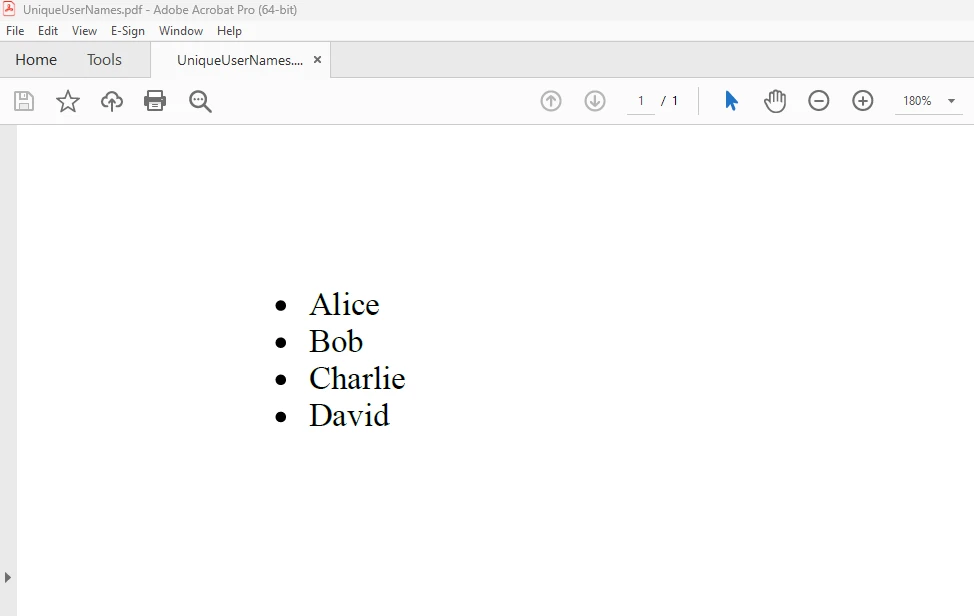
En el ejemplo de código anterior, guardamos nombres de usuarios únicos recuperados de un array usando un HashSet uniqueUserNames. El HashSet elimina automáticamente los duplicados. A continuación, creamos una lista no ordenada de estos nombres de usuarios distintos en un documento PDF usando IronPDF. Para saber más sobre el código, consulte usar HTML para crear un PDF.
PRODUCCIÓN
Conclusión
Para resumir, la estructura de datos HashSet de C# es una herramienta eficaz para organizar conjuntos de elementos distintos. Crea nuevas oportunidades para la creación de documentos PDF dinámicos, únicos y optimizados para rendimiento cuando se combina con IronPDF.
En el ejemplo que se dio, ilustramos cómo usar HashSet para garantizar la unicidad de los datos mientras se usa IronPDF para crear documentos PDF. La construcción de aplicaciones C# sólidas y efectivas puede beneficiarse de la combinación de HashSet e IronPDF, ya sea que esté trabajando en la deduplicación de datos, informes o gestión de contenido dinámico. A medida que investigue más, tenga en cuenta los muchos contextos en los que podría utilizar esta combinación para mejorar la usabilidad y funcionalidad de sus aplicaciones.
La versión $999 Lite de IronPDF viene con una licencia permanente, opciones de actualización y un año de soporte de software. Durante el período de prueba con marca de agua sobre la licencia para averiguar más sobre el precio, la licencia y la prueba gratuita de IronPDF. Visite el sitio web de Iron Software para obtener más información sobre Iron Software.
Jacob Mellor es Director de Tecnología de Iron Software y un ingeniero visionario pionero en la tecnología C# PDF. Como desarrollador original de la base de código principal de Iron Software, ha dado forma a la arquitectura de productos de la empresa desde su creación, transformándola, junto con el director ejecutivo Cameron Rimington, en una empresa de más de 50 personas que presta servicios a la NASA, Tesla y organismos gubernamentales de todo el mundo.