using IronPdf;

// Disable local disk access or cross-origin requests
Installation.EnableWebSecurity = true;

// Instantiate Renderer
var renderer = new ChromePdfRenderer();

// Create a PDF from a HTML string using C#
var pdf = renderer.RenderHtmlAsPdf("<h1>Hello World</h1>");

// Export to a file or Stream
pdf.SaveAs("output.pdf");

// Advanced Example with HTML Assets
// Load external html assets: Images, CSS and JavaScript.
// An optional BasePath 'C:\site\assets\' is set as the file location to load assets from
var myAdvancedPdf = renderer.RenderHtmlAsPdf("<img src='icons/iron.png'>", @"C:\site\assets\");
myAdvancedPdf.SaveAs("html-with-assets.pdf");
using IronPdf;// Disable local disk access or cross-origin requestsInstallation.EnableWebSecurity = true;// Instantiate Renderervar renderer = new ChromePdfRenderer();// Create a PDF from a HTML string using C#var pdf = renderer.RenderHtmlAsPdf("<h1>Hello World</h1>");// Export to a file or Streampdf.SaveAs("output.pdf");// Advanced Example with HTML Assets// Load external html assets: Images, CSS and JavaScript.// An optional BasePath 'C:\site\assets\' is set as the file location to load assets fromvar myAdvancedPdf = renderer.RenderHtmlAsPdf("<img src='icons/iron.png'>", @"C:\site\assets\");myAdvancedPdf.SaveAs("html-with-assets.pdf");
PM >Install-Package IronPdf
Install-Package IronPdf
ACTUALIZACIONES PARA DESARROLLADORES
Modificador in en C# | Parámetros de solo lectura por referencia
C# es un potente lenguaje de programación seguro de tipos que ofrece a los desarrolladores un conjunto rico de características para construir aplicaciones complejas. En el corazón de muchas tareas de programación están los operadores, los bloques de construcción que nos permiten realizar operaciones en variables y valores. Este artículo se adentra en varios tipos de operadores como los operadores aritméticos, centrando en su [precedencia](https://learn.microsoft.com/en-us/dotnet/csharp/language-reference/operators/), uso, y ofrece la introducción de algunas nuevas características que mejoran las capacidades del lenguaje. También cubriremos la [biblioteca IronPDF como una herramienta completa de PDF for .NET](https://ironpdf.com) para aplicaciones .NET.
## Operadores aritméticos
Los operadores aritméticos, esenciales en cualquier lenguaje de programación para la manipulación numérica, realizan operaciones como suma, resta, multiplicación y división entre otras en operandos numéricos. Esta sección cubre el nombre de cada operador, su descripción, y proporciona ejemplos para ilustrar su uso en C#.
### Nombre del operador, descripción, ejemplo
Por ejemplo, considere las operaciones aritméticas básicas:
* **Suma (+):** Suma dos operandos. Ejemplo: **int x = 5 + 3;**
* **Resta (-):** Resta el operando o valor del lado derecho del operando del lado izquierdo. Ejemplo: **int y = x - 2;**
* **Multiplicación (*):** Multiplica dos operandos. Example: **int z = x * y;**
* **División (/):** Divide el operando/variable del lado izquierdo por el operando del lado derecho. Ejemplo: **int d = z / 2;**
Estos son sencillos, con los operandos siendo los valores o variables involucrados en la operación, como **x**, **y**, y **z** en los ejemplos arriba.
### Negación numérica
Un interesante operador aritmético unario es la negación numérica (**-**), que invierte el signo de un operando numérico. Por ejemplo, si tenemos **int x = 5;**, entonces **-x** resultaría en **-5**.
## Operadores binarios y precedencia de operadores
Los operadores binarios, denotados como "op" en expresiones como x op y, requieren dos operandos para realizar sus operaciones. Por ejemplo, en x + y, "+" es el operador binario, con x e y como sus operandos. Entender la precedencia de operadores es crucial para evaluar con precisión expresiones con múltiples operadores.
### Comprender la precedencia de operadores con un ejemplo
Considere el siguiente ejemplo: **int result = 3 + 4 * 2;**. Aquí, la operación de multiplicación tiene mayor precedencia que la suma, por lo que **4 * 2** se evalúa primero, seguido de sumar **3** al resultado, resultando en **11**.
## El operador de coalescencia nulo
Una característica notable en C# es el operador de coalescencia nula (**??**), que proporciona una manera concisa de verificar valores nulos. Este operador devuelve el operando del lado izquierdo si no es nulo; de lo contrario, devuelve el operando del lado derecho como se muestra en el siguiente ejemplo.
### Ejemplo
```csharp
class Program
{
    static void Main(string[] args)
    {
        int? x = null; // nullable int, initialized to null
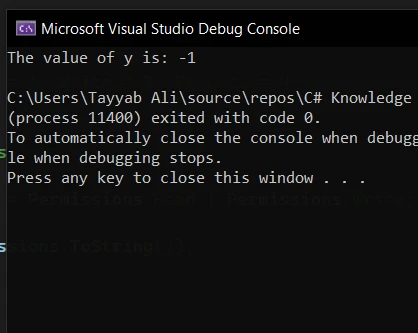
        int y = x ?? -1; // using null coalescing operator to provide a default value
        Console.WriteLine("The value of y is: " + y); // outputs: The value of y is: -1
    }
}
```
En este ejemplo, **y** sería **-1** porque **x** es nulo. El operador de coalescencia nula simplifica las comprobaciones de valores nulos, especialmente al trabajar con tipos nullables.
## Nuevas características: El operador de asignación de coalescencia nula
C# ha agregado una función llamada el operador de asignación de coalescencia nula, simbolizado por ??=. Este operador verifica si la variable en su lado izquierdo es nula. Si lo es, el operador asigna el valor del lado derecho a la variable del lado izquierdo.
### Demostración de la expresión de asignación de coalescencia nula
```csharp
int? a = null; // nullable int, initialized to null
a ??= 10; // Assigns 10 to a since it is null
```
Aquí, **a** sería **10** después de la operación porque inicialmente era nulo. Este operador simplifica el código al reducir la necesidad de comprobaciones y asignaciones explícitas de nulos.
## Operaciones avanzadas: Declaración lambda y pruebas de tipos
Las declaraciones lambda y las pruebas de tipo son características más avanzadas que aprovechan los operadores para una funcionalidad concisa y poderosa.
### Ejemplo de declaración lambda
Las expresiones lambda en C# usan el operador lambda (**=>**) para crear funciones en línea. Por ejemplo:
```csharp
Func<int, int, int> add = (x, y) => x + y; // Lambda function to add two integers
int sum = add(5, 3); // Calls the lambda expression with 5 and 3, returns 8
```
Este fragmento de código define una función simple para sumar dos valores enteros utilizando una expresión lambda.
### Pruebas tipográficas con el operador 'is'
Las pruebas de tipo se realizan utilizando el operador **is**, permitiéndote comprobar el tipo en tiempo de ejecución. Por ejemplo:
```csharp
object obj = "Hello World"; // obj is a string
if (obj is string s) {
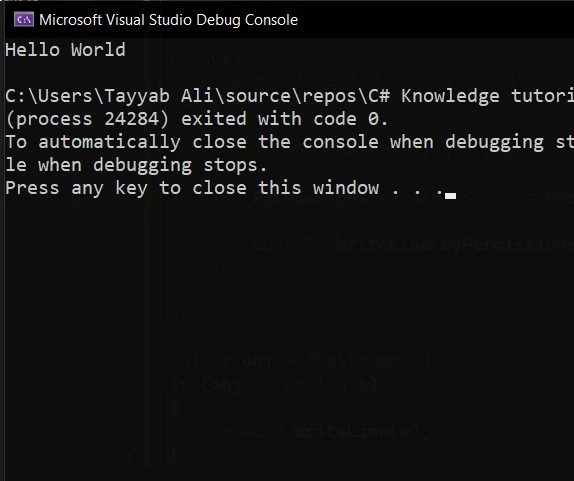
Console.WriteLine(s); // Outputs: Hello World
}
```
Esto verifica si **obj** es del tipo **string** y lo asigna a **s** si es verdadero.
## Trabajando con PDFs en C#: Una introducción a IronPDF
Al tratar con la generación y manipulación de documentos en C#, manejar archivos PDF es un requisito común. IronPDF se destaca como una biblioteca completa diseñada para permitir que los desarrolladores [creén PDFs desde HTML con IronPDF](/examples/using-html-to-create-a-pdf/), leer y editar documentos PDF directamente dentro de aplicaciones .NET sin necesidad de ninguna dependencia. Esta sección explora cómo IronPDF puede integrarse en proyectos C#, especialmente centrándose en operaciones relacionadas con nuestra discusión anterior sobre operadores y variables.
### Instalación de IronPDF
Antes de profundizar en las capacidades de IronPDF, el primer paso es integrar la biblioteca en tu proyecto. IronPDF puede añadirse fácilmente a través de NuGet, un popular gestor de paquetes para .NET. Usando el Gestor de Paquetes NuGet, puedes incluir IronPDF en tu proyecto con un esfuerzo mínimo.
Para instalar IronPDF, puedes usar el comando de la consola del Gestor de Paquetes:
```shell
:ProductInstall
```
Alternativamente, puede usar la interfaz de usuario del Administrador de Paquetes NuGet en Visual Studio buscando "IronPDF" e instalándolo directamente en su proyecto.
### Ejemplo: Generación de un documento PDF con operaciones aritméticas
Una vez que IronPDF se añade a tu proyecto, puedes empezar a utilizar sus características para generar y manipular documentos PDF. Aquí hay un ejemplo simple que demuestra cómo crear un documento PDF que incluye el resultado de operaciones aritméticas, conectando con nuestra discusión sobre operadores.
```csharp
using IronPdf;
public class PdfGenerationExample
{
public static void CreatePdfWithArithmeticOperations()
{
// Create a new PDF document
var pdf = new HtmlToPdf();
// HTML content with embedded C# arithmetic
var htmlContent = @"
<html>
<body>
<h1>Arithmetic Operations Result</h1>
<p>Result of 3 + 4: " + (3 + 4).ToString() + @"</p>
<p>Result of 10 * 2: " + (10 * 2).ToString() + @"</p>
<p>Result of 50 / 5: " + (50 / 5).ToString() + @"</p>
</body>
</html>";
// Convert HTML to PDF
var document = pdf.RenderHtmlAsPdf(htmlContent);
// Save the PDF to a file
document.SaveAs("ArithmeticOperations.pdf");
}
}
```
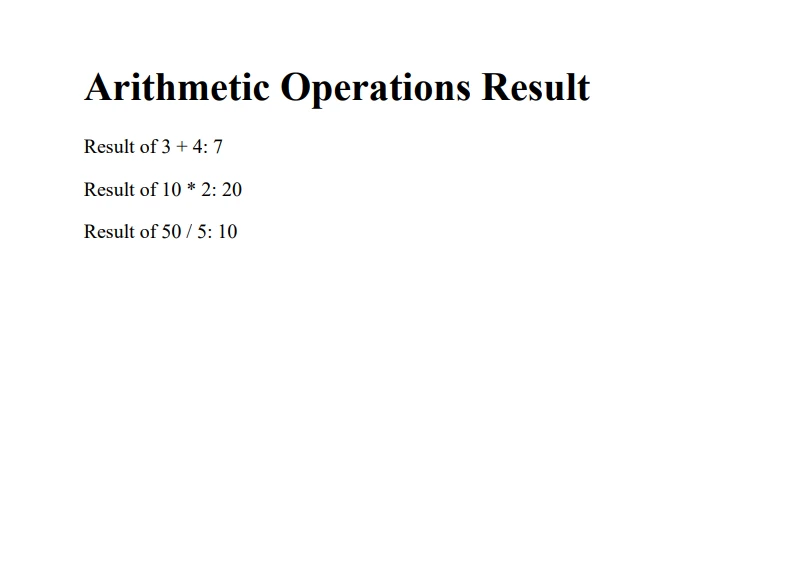
En este ejemplo, creamos una plantilla HTML simple que incluye los resultados de varias operaciones aritméticas, similar a lo que discutimos anteriormente. IronPDF renderiza este contenido HTML en un documento PDF, mostrando lo perfectamente que se pueden combinar el código C# y HTML para generar documentos dinámicos.
## Conclusión
Los operadores en C# son esenciales para realizar varios tipos de operaciones, desde la aritmética básica hasta la prueba de tipos complejos y las expresiones lambda. Entender estos operadores, su precedencia y cómo usarlos eficazmente es crucial para cualquier desarrollador que busque dominar C#. IronPDF ofrece una [prueba gratuita para los desarrolladores](trial-license) para explorar sus características y capacidades. Si decides integrarlo en tu entorno de producción, las licencias comienzan desde `$liteLicense`. Con la introducción de nuevas características como el operador de asignación de coalescencia nula, C# continúa evolucionando, ofreciendo maneras más eficientes y concisas de escribir código.
C# es un potente lenguaje de programación seguro de tipos que ofrece a los desarrolladores un conjunto rico de características para construir aplicaciones complejas. En el corazón de muchas tareas de programación están los operadores, los bloques de construcción que nos permiten realizar operaciones en variables y valores. Este artículo se adentra en varios tipos de operadores como los operadores aritméticos, centrando en su precedencia, uso, y ofrece la introducción de algunas nuevas características que mejoran las capacidades del lenguaje. También cubriremos la biblioteca IronPDF como una herramienta completa de PDF for .NET para aplicaciones .NET.
Operadores aritméticos
Los operadores aritméticos, esenciales en cualquier lenguaje de programación para la manipulación numérica, realizan operaciones como suma, resta, multiplicación y división entre otras en operandos numéricos. Esta sección cubre el nombre de cada operador, su descripción, y proporciona ejemplos para ilustrar su uso en C#.
Nombre del operador, descripción, ejemplo
Por ejemplo, considere las operaciones aritméticas básicas:
Suma (+): Suma dos operandos. Ejemplo: int x = 5 + 3;
Resta (-): Resta el operando o valor del lado derecho del operando del lado izquierdo. Ejemplo: int y = x - 2;
Multiplicación (*): Multiplica dos operandos. Example: int z = x * y;
División (/): Divide el operando/variable del lado izquierdo por el operando del lado derecho. Ejemplo: int d = z / 2;
Estos son sencillos, con los operandos siendo los valores o variables involucrados en la operación, como x, y, y z en los ejemplos arriba.
Negación numérica
Un interesante operador aritmético unario es la negación numérica (-), que invierte el signo de un operando numérico. Por ejemplo, si tenemos int x = 5;, entonces -x resultaría en -5.
Operadores binarios y precedencia de operadores
Los operadores binarios, denotados como "op" en expresiones como x op y, requieren dos operandos para realizar sus operaciones. Por ejemplo, en x + y, "+" es el operador binario, con x e y como sus operandos. Entender la precedencia de operadores es crucial para evaluar con precisión expresiones con múltiples operadores.
Comprender la precedencia de operadores con un ejemplo
Considere el siguiente ejemplo: int result = 3 + 4 * 2;. Aquí, la operación de multiplicación tiene mayor precedencia que la suma, por lo que 4 * 2 se evalúa primero, seguido de sumar 3 al resultado, resultando en 11.
El operador de coalescencia nulo
Una característica notable en C# es el operador de coalescencia nula (??), que proporciona una manera concisa de verificar valores nulos. Este operador devuelve el operando del lado izquierdo si no es nulo; de lo contrario, devuelve el operando del lado derecho como se muestra en el siguiente ejemplo.
Ejemplo
class Program{ static voidMain(string[] args) { int? x = null; // nullable int, initialized to null int y = x ?? -1; // using null coalescing operator to provide a default valueConsole.WriteLine("The value of y is: " + y); // outputs: The value of y is: -1 }}
class Program
{
    static void Main(string[] args)
    {
        int? x = null; // nullable int, initialized to null
        int y = x ?? -1; // using null coalescing operator to provide a default value
        Console.WriteLine("The value of y is: " + y); // outputs: The value of y is: -1
    }
}
Friend Class ProgramShared Sub Main(ByVal args() AsString) Dim x? AsInteger = Nothing ' nullable int, initialized to null Dim y AsInteger = If(x, -1) ' using null coalescing operator to provide a default valueConsole.WriteLine("The value of y is: " & y) ' outputs: The value of y is: -1 End SubEnd Class
Friend Class Program
	Shared Sub Main(ByVal args() As String)
		Dim x? As Integer = Nothing ' nullable int, initialized to null
		Dim y As Integer = If(x, -1) ' using null coalescing operator to provide a default value
		Console.WriteLine("The value of y is: " & y) ' outputs: The value of y is: -1
	End Sub
End Class
En este ejemplo, y sería -1 porque x es nulo. El operador de coalescencia nula simplifica las comprobaciones de valores nulos, especialmente al trabajar con tipos nullables.
Nuevas características: El operador de asignación de coalescencia nula
C# ha agregado una función llamada el operador de asignación de coalescencia nula, simbolizado por ??=. Este operador verifica si la variable en su lado izquierdo es nula. Si lo es, el operador asigna el valor del lado derecho a la variable del lado izquierdo.
Demostración de la expresión de asignación de coalescencia nula
int? a = null; // nullable int, initialized to nulla ??= 10; // Assigns 10 to a since it is null
int? a = null; // nullable int, initialized to null
a ??= 10; // Assigns 10 to a since it is null
Dim a? AsInteger = Nothing ' nullable int, initialized to nulla = If(a, 10) ' Assigns 10 to a since it is null
Dim a? As Integer = Nothing ' nullable int, initialized to null
a = If(a, 10) ' Assigns 10 to a since it is null
Aquí, a sería 10 después de la operación porque inicialmente era nulo. Este operador simplifica el código al reducir la necesidad de comprobaciones y asignaciones explícitas de nulos.
Operaciones avanzadas: Declaración lambda y pruebas de tipos
Las declaraciones lambda y las pruebas de tipo son características más avanzadas que aprovechan los operadores para una funcionalidad concisa y poderosa.
Ejemplo de declaración lambda
Las expresiones lambda en C# usan el operador lambda (=>) para crear funciones en línea. Por ejemplo:
Func<int, int, int> add = (x, y) => x + y; // Lambda function to add two integersint sum = add(5, 3); // Calls the lambda expression with 5 and 3, returns 8
Func<int, int, int> add = (x, y) => x + y; // Lambda function to add two integers
int sum = add(5, 3); // Calls the lambda expression with 5 and 3, returns 8
Dim add AsFunc(OfInteger, Integer, Integer) = Function(x, y) x + y ' Lambda function to add two integersDim sum AsInteger = add(5, 3) ' Calls the lambda expression with 5 and 3, returns 8
Dim add As Func(Of Integer, Integer, Integer) = Function(x, y) x + y ' Lambda function to add two integers
Dim sum As Integer = add(5, 3) ' Calls the lambda expression with 5 and 3, returns 8
Este fragmento de código define una función simple para sumar dos valores enteros utilizando una expresión lambda.
Pruebas tipográficas con el operador 'is'
Las pruebas de tipo se realizan utilizando el operador is, permitiéndote comprobar el tipo en tiempo de ejecución. Por ejemplo:
object obj = "Hello World"; // obj is a stringif (obj is string s) {Console.WriteLine(s); // Outputs: Hello World}
object obj = "Hello World"; // obj is a string
if (obj is string s) {
    Console.WriteLine(s); // Outputs: Hello World
}
Dim obj AsObject = "Hello World" ' obj is a stringDim tempVar AsBoolean = TypeOf obj IsStringDim s AsString = If(tempVar, DirectCast(obj, String), Nothing)If tempVar ThenConsole.WriteLine(s) ' Outputs: Hello WorldEnd If
Dim obj As Object = "Hello World" ' obj is a string
Dim tempVar As Boolean = TypeOf obj Is String
Dim s As String = If(tempVar, DirectCast(obj, String), Nothing)
If tempVar Then
	Console.WriteLine(s) ' Outputs: Hello World
End If
Esto verifica si obj es del tipo string y lo asigna a s si es verdadero.
Trabajando con PDFs en C#: Una introducción a IronPDF
Al tratar con la generación y manipulación de documentos en C#, manejar archivos PDF es un requisito común. IronPDF se destaca como una biblioteca completa diseñada para permitir que los desarrolladores creén PDFs desde HTML con IronPDF, leer y editar documentos PDF directamente dentro de aplicaciones .NET sin necesidad de ninguna dependencia. Esta sección explora cómo IronPDF puede integrarse en proyectos C#, especialmente centrándose en operaciones relacionadas con nuestra discusión anterior sobre operadores y variables.
Instalación de IronPDF
Antes de profundizar en las capacidades de IronPDF, el primer paso es integrar la biblioteca en tu proyecto. IronPDF puede añadirse fácilmente a través de NuGet, un popular gestor de paquetes para .NET. Usando el Gestor de Paquetes NuGet, puedes incluir IronPDF en tu proyecto con un esfuerzo mínimo.
Para instalar IronPDF, puedes usar el comando de la consola del Gestor de Paquetes:
PM > Install-Package IronPdf
Install-Package IronPdf
Alternativamente, puede usar la interfaz de usuario del Administrador de Paquetes NuGet en Visual Studio buscando "IronPDF" e instalándolo directamente en su proyecto.
Ejemplo: Generación de un documento PDF con operaciones aritméticas
Una vez que IronPDF se añade a tu proyecto, puedes empezar a utilizar sus características para generar y manipular documentos PDF. Aquí hay un ejemplo simple que demuestra cómo crear un documento PDF que incluye el resultado de operaciones aritméticas, conectando con nuestra discusión sobre operadores.
using IronPdf;public class PdfGenerationExample{ public static voidCreatePdfWithArithmeticOperations() { // Create a new PDF document var pdf = new HtmlToPdf(); // HTML content with embedded C# arithmetic var htmlContent = @" <html> <body> <h1>Arithmetic Operations Result</h1> <p>Result of 3 + 4: " + (3 + 4).ToString() + @"</p> <p>Result of 10 * 2: " + (10 * 2).ToString() + @"</p> <p>Result of 50 / 5: " + (50 / 5).ToString() + @"</p> </body> </html>"; // Convert HTML to PDF var document = pdf.RenderHtmlAsPdf(htmlContent); // Save the PDF to a file document.SaveAs("ArithmeticOperations.pdf"); }}
using IronPdf;

public class PdfGenerationExample
{
    public static void CreatePdfWithArithmeticOperations()
    {
        // Create a new PDF document
        var pdf = new HtmlToPdf();
        // HTML content with embedded C# arithmetic
        var htmlContent = @"
            <html>
                <body>
                    <h1>Arithmetic Operations Result</h1>
                    <p>Result of 3 + 4: " + (3 + 4).ToString() + @"</p>
                    <p>Result of 10 * 2: " + (10 * 2).ToString() + @"</p>
                    <p>Result of 50 / 5: " + (50 / 5).ToString() + @"</p>
                </body>
            </html>";

        // Convert HTML to PDF
        var document = pdf.RenderHtmlAsPdf(htmlContent);
        // Save the PDF to a file
        document.SaveAs("ArithmeticOperations.pdf");
    }
}
ImportsIronPdfPublic Class PdfGenerationExample PublicShared Sub CreatePdfWithArithmeticOperations() ' Create a new PDF document Dim pdf = New HtmlToPdf() ' HTML content with embedded C# arithmetic Dim htmlContent = " <html> <body> <h1>Arithmetic Operations Result</h1> <p>Result of 3 + 4: " & (3 + 4).ToString() & "</p> <p>Result of 10 * 2: " & (10 * 2).ToString() & "</p> <p>Result of 50 / 5: " & (50 \ 5).ToString() & "</p> </body> </html>" ' Convert HTML to PDF Dim document = pdf.RenderHtmlAsPdf(htmlContent) ' Save the PDF to a file document.SaveAs("ArithmeticOperations.pdf") End SubEnd Class
Imports IronPdf

Public Class PdfGenerationExample
	Public Shared Sub CreatePdfWithArithmeticOperations()
		' Create a new PDF document
		Dim pdf = New HtmlToPdf()
		' HTML content with embedded C# arithmetic
		Dim htmlContent = "
            <html>
                <body>
                    <h1>Arithmetic Operations Result</h1>
                    <p>Result of 3 + 4: " & (3 + 4).ToString() & "</p>
                    <p>Result of 10 * 2: " & (10 * 2).ToString() & "</p>
                    <p>Result of 50 / 5: " & (50 \ 5).ToString() & "</p>
                </body>
            </html>"

		' Convert HTML to PDF
		Dim document = pdf.RenderHtmlAsPdf(htmlContent)
		' Save the PDF to a file
		document.SaveAs("ArithmeticOperations.pdf")
	End Sub
End Class
En este ejemplo, creamos una plantilla HTML simple que incluye los resultados de varias operaciones aritméticas, similar a lo que discutimos anteriormente. IronPDF renderiza este contenido HTML en un documento PDF, mostrando lo perfectamente que se pueden combinar el código C# y HTML para generar documentos dinámicos.
Conclusión
Los operadores en C# son esenciales para realizar varios tipos de operaciones, desde la aritmética básica hasta la prueba de tipos complejos y las expresiones lambda. Entender estos operadores, su precedencia y cómo usarlos eficazmente es crucial para cualquier desarrollador que busque dominar C#. IronPDF ofrece una prueba gratuita para los desarrolladores para explorar sus características y capacidades. Si decides integrarlo en tu entorno de producción, las licencias comienzan desde $999. Con la introducción de nuevas características como el operador de asignación de coalescencia nula, C# continúa evolucionando, ofreciendo maneras más eficientes y concisas de escribir código.
Jacob Mellor es Director de Tecnología de Iron Software y un ingeniero visionario pionero en la tecnología C# PDF. Como desarrollador original de la base de código principal de Iron Software, ha dado forma a la arquitectura de productos de la empresa desde su creación, transformándola, junto con el director ejecutivo Cameron Rimington, en una empresa de más de 50 personas que presta servicios a la NASA, Tesla y organismos gubernamentales de todo el mundo.



























